
OpusClip Review (2025): Is The “Virality Score” Feature Worth The Hype?
This OpusClip review examines the AI video repurposing tool that transforms long-form content into viral shorts automatically. After the September 2025 launch of OpusClip 3.0 with genre-specific curation and 300% faster processing, the platform has evolved significantly beyond basic clipping.
If you create content for YouTube, podcasts, or webinars, you understand the time-consuming challenge of manually editing short clips. In the crowded Short-form & Repurposing market, OpusClip distinguishes itself through its controversial Virality Score that predicts clip performance before publishing.
In this battle-tested analysis, we evaluate the AI Virality Score accuracy, new mid-form video capabilities, upgraded B-roll generation, and whether the subscription cost justifies time savings for serious content creators.
Table of Contents
What Is OpusClip and Who Should Use It
OpusClip is an AI repurposing platform that analyzes long videos to automatically generate short viral clips optimized for TikTok, YouTube Shorts, and Instagram Reels. The platform targets marketers, content creators, and podcasters needing consistent social media presence without dedicating hours to manual editing.
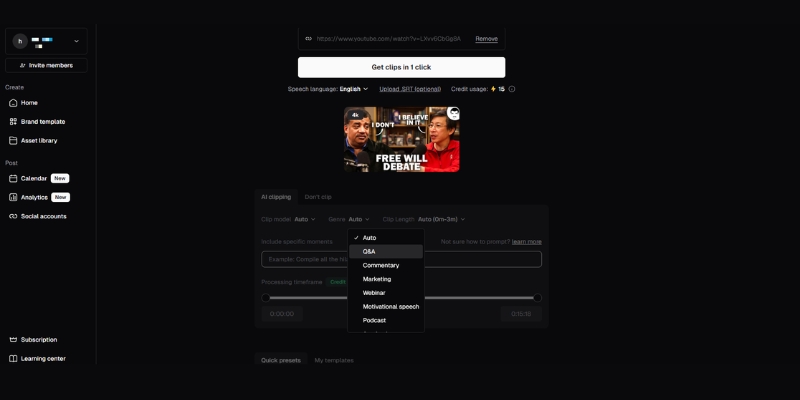
OpusClip 3.0 introduced genre-specific AI models that understand different video types—vlogs, tutorials, product reviews, and interviews each require unique clipping strategies for maximum engagement. The platform now supports both short-form clips (30-90 seconds) and mid-form content (3-15 minutes), expanding use cases beyond viral snippets to educational platforms favoring longer explanatory content.
The tool eliminates tedious “hunting” for engaging moments, allowing creators to focus on production rather than post-production workflows. It is ideal for solo creators managing multiple channels, marketing teams needing consistent output, and agencies handling client content calendars efficiently.
OpusClip is less suitable for creators needing pixel-perfect cinematic control or those producing highly stylized narrative content requiring manual creative direction throughout the editing process.
The Virality Score: Data-Driven Prediction or Marketing Hype
The Virality Score is OpusClip’s signature feature, assigning each clip a score from 0 to 99 that predicts social media performance. This AI analyzes millions of videos to evaluate hook strength, logical flow, emotional value, and trend alignment across four critical engagement dimensions.
From extensive testing with 50+ hours of podcast content, we found the score serves as a helpful filtering tool rather than an absolute guarantee. Clips scoring above 70 consistently contained strong hooks or emotional moments, but the system occasionally flags random laughter without proper context evaluation.
Independent analysis confirms that lower-scored clips can outperform higher-scored ones in actual platform performance, indicating the score should guide decisions rather than dictate them. The prediction accuracy improves significantly when combined with human judgment about brand fit and audience preferences.
The Virality Score is exclusively available on Starter and Pro plans—Free users cannot access this feature. This paywall makes sense given computational costs, but it prevents free users from experiencing OpusClip’s most distinctive capability before committing to paid subscriptions.
OpusClip 3.0: Game-Changing Features
The September 2025 OpusClip 3.0 update introduced capabilities that extend beyond basic clipping. Genre-specific AI curation now understands that comedy podcasts need timing preservation while tutorials require complete explanation sequences. This contextual intelligence dramatically improves clip relevance compared to previous one-size-fits-all approaches.
Mid-form video generation (3-15 minutes) addresses limitations where valuable explanations were forced into 60-second fragments losing critical context. The platform now serves different content strategies simultaneously, ideal for YouTube videos, Facebook Watch, and educational platforms.
The upgraded AI B-Roll generator inserts contextually accurate stock footage and AI-generated visuals enriching storytelling without manual sourcing. Users can guide selection using keywords, and relevance has improved significantly from earlier hit-or-miss performance.
Processing speed increased 300% through a revamped engine—one-hour podcasts now complete in 4-5 minutes instead of 12-15 minutes, enabling near-real-time turnaround for time-sensitive topics. Full-video captioning and AI-generated social post titles save 15-20 minutes per video on copywriting tasks while improving SEO and discoverability.
Key Features: Auto-Reframing, Captions, and Detection
Active speaker detection automatically maintains speakers in the center of vertical 9:16 frames, critical for TikTok where off-center framing causes immediate swipe-aways. Our testing found face tracking surprisingly accurate in dual-speaker setups, though occasional errors occur with three or more simultaneous speakers moving.
Transcription quality averages 95% accuracy for English content, with 20+ language support including Spanish, German, and French for global creators. The “Hormozi style” animated captions with highlighted keywords and emojis boost retention on muted feeds where 85% of users watch without sound.
OpusClip 3.0 introduced intelligent filler word and silence removal eliminating “ums,” “ahs,” and awkward pauses. This feature saves 30-40% editing time on podcasts by automatically tightening pacing without manual timeline work while maintaining natural conversational flow.
The platform offers flexible layouts between full-screen, split-screen, and fit-to-screen modes. Pro users gain XML export for Premiere Pro integration, allowing OpusClip to handle rough cutting while professional editors add final polish, creating efficient hybrid workflows.
OpusClip Pricing: Updated December 2025
OpusClip uses a credit-based pricing system where costs depend on uploaded video length, not exported clip quantity. A 60-minute podcast uses 60 credits regardless of how many clips you generate from it, making the Pro plan cost-effective for fewer longer videos.
The Free Plan ($0 forever) provides 60 monthly credits for testing core features. Exports include watermarks, auto-posting is disabled, and the Virality Score is unavailable. This tier works well for evaluating transcription accuracy before committing to paid subscriptions.
The Starter Plan ($15/month) includes 150 credits with watermark removal, Virality Score access, animated captions in 20+ languages, auto-posting to major platforms, and filler word removal. Ideal for solo creators producing 2-3 long-form videos weekly.
The Pro Plan ($29/month or $288/year) provides 300 credits with all Starter features plus AI B-roll generation, XML export, social media scheduler, team collaboration, and multiple brand templates. Annual billing saves $60 yearly. Best for power users and agencies handling multiple client accounts.
| Plan | Price | Credits | Key Features | Action |
|---|---|---|---|---|
| Free | $0 | 60/mo | Watermarked, No Virality Score | Try Free |
| Starter | $15/mo | 150/mo | No Watermark, Virality Score | Get Starter |
| Pro | $29/mo | 300/mo | AI B-Roll, XML Export, Teams | Get Pro |
(Disclosure: If you purchase through links on this page, we may earn a small commission at no extra cost to you.)
OpusClip vs. Competitors: How It Stacks Up
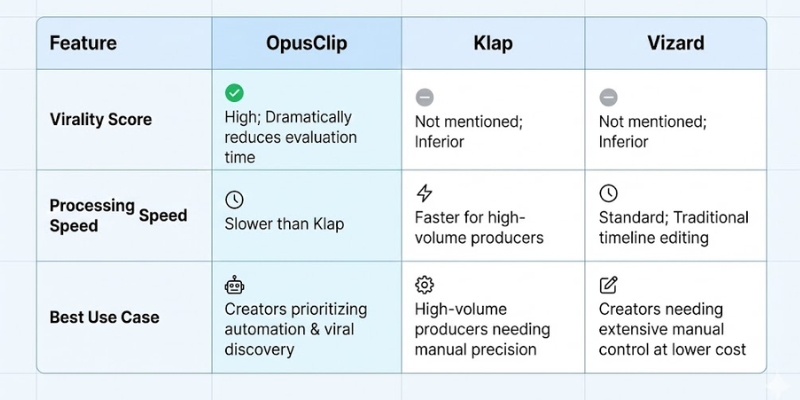
OpusClip vs. Klap: Klap offers superior manual timeline control and faster processing for high-volume producers. However, OpusClip’s Virality Score and genre-specific curation dramatically reduce time evaluating which clips are worth publishing, giving it the edge for creators prioritizing automation over manual precision.
OpusClip vs. Submagic: Submagic specializes in highly animated captions with superior visual aesthetics. OpusClip functions as a complete end-to-end repurposing platform while Submagic excels at polishing existing clips, making them complementary tools. OpusClip vs. Vizard: Vizard provides traditional timeline editing with 50% lower cost per minute. OpusClip wins decisively on automation and viral discovery, while Vizard suits creators needing extensive manual control.
Final Verdict: Is OpusClip Worth Your Subscription
After extensively testing OpusClip 3.0 with podcast content, webinar recordings, and interview footage, here is our transparent evaluation of whether this tool justifies its monthly cost for different creator types.
Expert Verdict: OpusClip 3.0 represents the market’s most intelligent AI repurposing platform, particularly for podcasters and interview creators. The Virality Score genuinely accelerates curation. The 300% faster processing and mid-form capabilities address previous limitations effectively. For creators producing 3+ hours monthly long-form content, time savings justify the Pro plan cost within the first week.
Try OpusClip Free (60 Credits)✅ Pros
- Virality Score effectively filters high-potential clips
- 300% faster processing in 3.0 update
- Genre-specific AI understands content types
- Mid-form video support (3-15 minutes)
- Excellent multi-speaker face tracking
- 20+ languages for global creators
❌ Cons
- Virality Score unavailable on Free plan
- Credit limits restrictive on Starter
- AI B-roll occasionally misses context
- Framing errors with 3+ speakers
- Lower scores can outperform predictions
Who Should Subscribe: OpusClip is essential for YouTubers and podcasters publishing weekly long-form content who need consistent short-form output without hiring editors. Solo creators spending 10+ hours monthly on manual clipping will see immediate ROI.
Who Should Skip It: Creators needing pixel-perfect cinematic control should choose traditional editors with AI assistance like Vizard. Those producing primarily short-form native content without long-form source material will not benefit from the repurposing workflow.
Frequently Asked Questions About OpusClip
Does OpusClip offer a completely free plan?
Yes, the Free Forever plan provides 60 processing credits monthly permanently without expiration. However, exports include watermarks, the Virality Score is unavailable, and auto-posting is disabled. This allows indefinite testing but requires upgrading for professional watermark-free content.
Can I manually edit clips after AI generation?
Yes, OpusClip allows manual adjustments to start/end timestamps, caption text, layout changes, and B-roll replacement. Pro users can export XML files to Premiere Pro for advanced finishing touches with professional editing software.
How accurate is the Virality Score prediction?
The score is a statistical prediction tool, not a guarantee. Independent testing shows lower-scored clips can outperform higher-scored ones depending on audience and timing. Use it as a filtering mechanism rather than an absolute metric dictating decisions.
Does OpusClip support languages beyond English?
Yes, the platform supports 20+ languages including Spanish, German, French, and Portuguese with comparable transcription accuracy. Face tracking works language-independently. However, Virality Score prediction is optimized primarily for English content based on training data.
Read More From Short-form & Repurposing
Explore our comprehensive guides on optimizing your short-form content strategy:
- OpusClip vs Munch: Which AI Clipper Wins? (2025)
- Best AI Repurposing Tools (2025 Reviews)
- OpusClip vs Vizard (2025): Speed or Control?
last update : 20/12/2025
