
X-Pilot AI Review (2025): The Knowledge-Driven Video Generator Transforming Educational Content Creation
X-Pilot AI transforms documents and ideas into professional educational videos using AI automation. With its editable animation layer and multiplatform exports (video, PowerPoint, PDF), it’s designed for educators and trainers needing fast, quality content.
Try X-Pilot Now
X-Pilot AI is revolutionizing how educators, course creators, and knowledge professionals produce video content by offering an intelligent, editable animation platform that transforms ideas into studio-quality educational videos in minutes. As demand for scalable, accurate educational content surges in 2025, X-Pilot stands out with its unique “knowledge-driven” approach that prioritizes logic, clarity, and creative control—setting it apart from traditional “black box” AI video generators that offer limited editing capabilities. For creators seeking to understand how AI video tools compare across the educational technology landscape, exploring different platforms’ approaches to automated content generation reveals significant differences in editing flexibility and output quality.
[ez-toc]
Latest Updates & New Features
X-Pilot continues to evolve with significant feature enhancements designed for professional creators and enterprise teams. Recent platform updates have introduced custom branding capabilities that allow organizations to maintain consistent visual identity across all video outputs, eliminating generic templates and watermarks for paid users. The Pro tier now includes voice cloning technology, enabling creators to replicate their own voice or develop unique branded audio personas for their educational content—a feature particularly valuable for maintaining brand consistency across educational video series. These additions address the growing demand from corporate training departments and independent educators who need scalable, personalized video production without sacrificing brand consistency.
Pricing & Plans
X-Pilot offers a tiered pricing structure designed to accommodate individual creators through large enterprise organizations:
| Plan | Price (Monthly) | Video Minutes | Resolution | Key Features |
|---|---|---|---|---|
| Free | $0 | 3 min/mo | 720p | Standard AI voices, X-Pilot watermark, basic features |
| Creator | $9 | 25 min/mo | 1080p | No watermark, premium AI voices, custom branding |
| Pro | $29 | 100 min/mo | 4K | Creator features + collaboration (3 seats), voice cloning, priority support |
| Enterprise | Custom | Unlimited | 4K | Large-scale deployment, SSO integration, dedicated account manager, custom AI training |
The pricing structure scales intelligently based on production volume and team size, making X-Pilot significantly more cost-effective than legacy video production tools or hiring external video teams. For educators producing weekly course content or marketing teams creating regular tutorial videos, understanding [how different AI video platforms structure their pricing models] helps identify the best value proposition for specific content production workflows.
Key Features Explained
One-Click Idea-to-Video Workflow
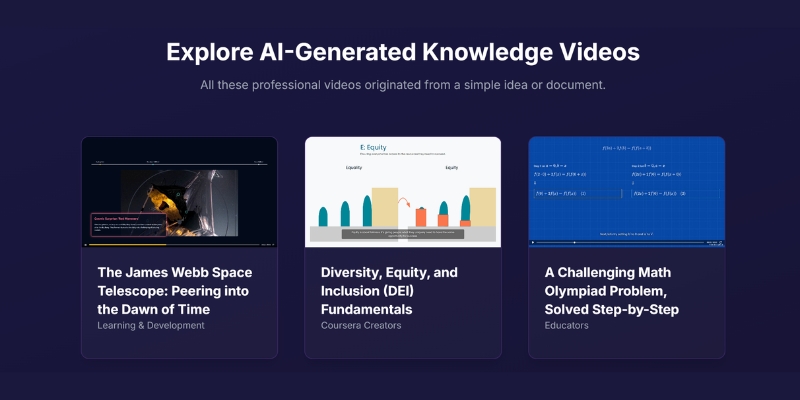
X-Pilot’s revolutionary three-step process begins with users providing a simple idea, uploading a document, or entering a few prompts. The platform’s AI agent team—consisting of a researcher, scriptwriter, and visual designer—collaborates to transform raw knowledge into structured animation slides with professional voiceover. This automated workflow dramatically reduces production time from hours to minutes while maintaining high educational value and visual quality, making it particularly effective for creating explainer videos and educational tutorials at scale.
Editable Structured Animation Layer
Unlike competing AI video tools that function as “black boxes” with minimal post-generation control, X-Pilot provides a fully editable animation layer that allows users to fine-tune every scene, animation timing, and visual element before final rendering. This granular control empowers creators to maintain their instructional vision while leveraging AI efficiency, bridging the gap between automated generation and professional video editing. Educators transitioning from traditional video editing software appreciate this balance between automation speed and creative control over final output.
Multiplatform Export Options
X-Pilot uniquely supports direct export to PowerPoint (PPT) and PDF formats in addition to standard video files. This versatility enables educators to repurpose video content as presentation slides, printable handouts, or supplementary course materials—maximizing content ROI and accommodating diverse learning preferences. For instructional designers managing comprehensive online courses, this multiformat export capability streamlines the process of creating cohesive learning materials across different delivery methods.
Professional-Grade Animation & Logic-Focused AI
The platform prioritizes accuracy, logical flow, and clarity in content presentation, ensuring educational videos maintain instructional integrity rather than simply looking visually impressive. X-Pilot’s AI agents are specifically trained on knowledge communication principles, making them particularly effective for tutorial videos, online courses, and complex explanation content where precision matters. This focus on educational quality distinguishes X-Pilot from general-purpose video generators optimized primarily for entertainment or marketing content.
Advanced Collaboration Tools
Pro and Enterprise plans include team collaboration features with multiple user seats, shared project libraries, and unified branding controls. These capabilities support instructional design teams, corporate L&D departments, and educational institutions that need centralized content production workflows with consistent quality standards. Organizations exploring AI-powered solutions for team-based video production benefit from understanding how collaboration features integrate into existing content development processes.
Hands-On Testing & Demo Review
Real-world feedback from YouTube creators and educational content producers consistently highlights X-Pilot’s ability to rapidly transform documents and scripts into polished explainer videos with minimal manual intervention. Users particularly appreciate the platform’s learning curve—while advanced motion editing may require some initial familiarization for absolute beginners, the intuitive interface and AI-guided workflow make professional video creation accessible to non-technical educators and subject matter experts.
The official demo content showcases X-Pilot’s strengths in speed, creative control, and output quality, demonstrating how the editable layer system enables refinement without requiring traditional video editing expertise. Testing reveals that X-Pilot excels at instructional content, tutorial videos, and knowledge-based presentations where logical structure and clarity take precedence over cinematic storytelling—a crucial consideration when selecting AI video tools for educational purposes.
Pros & Cons
Pros
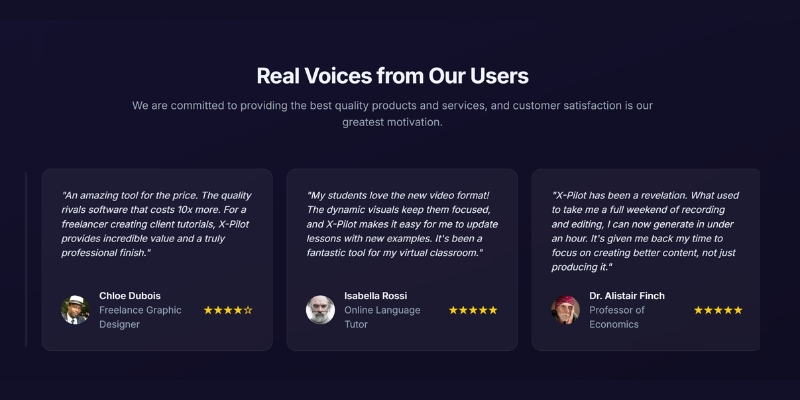
X-Pilot delivers drastic time savings for course creators, with professors, freelance educators, and corporate trainers reporting production time reductions of 70-80% compared to traditional video creation methods. The platform’s quality and flexibility rival video production tools costing significantly more, making professional educational content accessible to independent creators and small teams with limited budgets. User testimonials consistently emphasize the “outstanding production value” and high learner engagement rates achieved with X-Pilot-generated content.
The editable animation layer provides granular control that most AI video generators lack, allowing creators to maintain instructional precision while benefiting from AI automation. For content creators managing multiple video projects simultaneously, this balance between automation efficiency and editorial control proves invaluable for maintaining consistent quality across diverse educational topics.
Cons
Third-party reviews note occasional visual bugs where assets may overlap during complex animations, though these issues appear less frequent in recent platform updates. The advanced motion editing capabilities may present a learning curve for users with zero video editing experience, requiring some initial exploration to fully leverage the platform’s customization potential. The Free plan limitations—including visible watermarks and restricted monthly minutes—make it suitable primarily as a trial experience, with serious content creators needing to upgrade to Creator or Pro tiers for professional output.
Competitor Comparison
| Tool | Starting Price | Editable Animation | PPT Export | Voice Cloning | Best For |
|---|---|---|---|---|---|
| X-Pilot | $0–$29+ | ✅ Yes (Full control) | ✅ Yes | ✅ Yes (Pro) | Educators, Knowledge Professionals |
| Synthesia | $22+ | ❌ No | ❌ No | ✅ Yes | Enterprise/Marketing |
| Pictory | $19+ | ⚠️ Partial | ❌ No | ❌ No | Social Media Marketers |
| InVideo | $15+ | ⚠️ Partial | ❌ No | ❌ No | General Content Creators |
X-Pilot’s clear competitive advantages include superior editing control, unique multiplatform export capabilities, and pricing that scales efficiently for educational institutions and small creator teams. While Synthesia focuses on avatar-based corporate communications and Pictory targets social media content, X-Pilot specifically addresses the needs of knowledge professionals who require both speed and instructional precision. Content creators evaluating AI video generation platforms should consider how different tools balance automation speed against creative control based on their specific content types and production workflows.
Best Use Cases & Target Users
X-Pilot is ideally suited for educators creating YouTube tutorials, instructional designers developing online courses, corporate trainers producing internal learning modules, and freelance course creators serving multiple clients. The platform scales effectively from individual content creators to large enterprise learning and development departments requiring standardized training content across multiple teams. X-Pilot excels when integrated into workflows focused on educational content, tutorial videos, explainer content, and knowledge transfer applications where accuracy and clarity are paramount.
Organizations in academic institutions, professional training companies, and corporate L&D departments represent the core target market, as these users particularly benefit from X-Pilot’s combination of automation efficiency and editorial control. Marketing teams exploring AI solutions for educational content marketing will find X-Pilot’s emphasis on knowledge communication particularly valuable for building thought leadership and audience trust. The platform is less suitable for cinematic productions, narrative storytelling, or highly stylized marketing videos where artistic direction outweighs instructional clarity.
Quality, Reliability & Performance
X-Pilot’s track record includes over 2 million videos created, demonstrating significant market adoption and platform stability. User testimonials from professors, marketing professionals, and corporate trainers consistently praise the production value and learner engagement metrics achieved with platform-generated content. The visual quality standards meet professional broadcasting requirements, with 4K resolution available on Pro and Enterprise tiers ensuring content remains crisp on large displays and modern devices.
Performance testing reveals reliable rendering speeds and consistent output quality across different content types, from text-heavy presentations to animation-rich tutorial videos. The platform’s AI accuracy in maintaining logical flow and content integrity makes it particularly trustworthy for educational applications where misinformation or unclear explanations could undermine learning outcomes—a critical consideration for professional educators and corporate training departments.
Limitations & Drawbacks
X-Pilot is not optimal for cinematic video production, story-driven narrative content, or projects requiring advanced cinematography techniques like dynamic camera movements and complex scene transitions. Creators seeking highly artistic or entertainment-focused video content will find the platform’s knowledge-communication focus limiting compared to traditional video editing suites.
The Free tier serves best as a demonstration of platform capabilities rather than a viable long-term production solution due to watermark restrictions and limited monthly minutes. Serious content creators should budget for at least the Creator plan to produce professional, unbranded output suitable for client deliverables or professional course offerings. Some users have reported occasional visual bugs such as asset overlap in complex animations, though the editable layer system allows manual correction of these issues before final rendering.
FAQ – Trending User Questions
How does X-Pilot compare to Synthesia or Pictory for educational content?
X-Pilot provides superior editing control through its structured animation layer, allowing educators to fine-tune instructional flow and visual elements with precision that Synthesia and Pictory don’t offer. Additionally, X-Pilot’s PPT and PDF export capabilities enable content repurposing across multiple learning formats, making it more versatile for comprehensive course development. While Synthesia excels at avatar-based corporate communications and Pictory focuses on social media marketing content, X-Pilot is specifically optimized for knowledge transfer and tutorial creation where instructional accuracy matters most.
Can I integrate my own scripts or documents?
Yes, X-Pilot’s workflow accepts multiple input formats including raw ideas, complete scripts, and uploaded documents that the AI agent team transforms into structured video content. This flexibility accommodates various content creation workflows, from subject matter experts with written materials to creators who prefer to ideate directly within the platform—particularly valuable for repurposing existing educational materials into video format.
Will my videos have a watermark on the free plan?
The Free plan includes an X-Pilot watermark on all generated videos, along with 720p resolution limits and 3 minutes of monthly video generation. Upgrading to the Creator plan ($9/month) removes watermarks and provides 1080p output with 25 monthly minutes, making it the minimum recommended tier for professional content distribution and client-facing educational materials.
How secure is my content with Enterprise features?
Enterprise plans include Single Sign-On (SSO) integration for secure authentication aligned with organizational identity management systems, ensuring content access follows corporate security protocols. Additionally, Enterprise customers receive dedicated account managers and custom deployment options that support compliance requirements for regulated industries and sensitive educational content —essential considerations for healthcare training, financial education, and other regulated sectors.
Can I create handouts or presentations from videos?
X-Pilot’s unique direct export to PowerPoint and PDF formats enables seamless content repurposing from video to presentation slides and printable handouts without manual reconstruction. This feature significantly expands content utility for educators who need to provide learners with multiple engagement formats from a single production effort, streamlining the creation of comprehensive learning material packages.
Is voice cloning natural-sounding on the Pro plan?
The Pro tier’s voice cloning feature has been recently added to enable creators to replicate their own voice for consistent branding across video content. While specific naturalness metrics weren’t available in current reviews, X-Pilot’s focus on professional-grade output and the premium positioning of this Pro-tier feature suggests quality standards appropriate for [educational and corporate applications where authentic-sounding narration enhances learner trust] and engagement.
How much manual editing control is available?
X-Pilot provides extensive manual editing capabilities through its structured animation layer, allowing users to adjust every scene, modify animation timing, swap visual elements, and refine voiceover synchronization before final rendering. This granular control distinguishes X-Pilot from “black box” AI video generators while remaining more accessible than traditional video editing software that requires specialized technical skills—an important consideration for [educators without formal video production training].
Final Verdict & Recommendations
X-Pilot AI represents an ideal solution for educators, corporate trainers, instructional designers, and knowledge professionals who need to produce high-quality educational video content at scale without sacrificing instructional precision. The platform successfully bridges the gap between fully automated AI video generation and manual video editing by providing an editable animation layer that empowers creative control while maintaining production efficiency.
Small businesses and educational institutions scaling internal course libraries will find X-Pilot’s pricing structure particularly advantageous, with the Creator plan offering professional output at just $9/month and the Pro plan supporting team collaboration at $29/month—significantly more cost-effective than hiring external video production services or licensing enterprise-focused alternatives. Organizations [evaluating AI video tools for instructional design] should carefully assess how subscription costs align with projected content production volume and team collaboration requirements.
For creators prioritizing multiplatform content distribution, X-Pilot’s PPT and PDF export capabilities provide unique value unavailable in competing platforms, enabling comprehensive course material development from a single video production workflow. Organizations should consider Synthesia primarily for avatar-based corporate communications or Pictory for social media marketing content, but X-Pilot delivers superior results for instructional and educational video applications where knowledge transfer accuracy matters most.
The Pro plan represents the best value for professional educators, freelance course creators, and small instructional design teams who need voice cloning, 4K output, and collaboration features. Enterprise organizations requiring SSO integration, unlimited production capacity, and dedicated support should explore custom Enterprise pricing aligned with their specific deployment needs and compliance requirements.
Related Resources & Expert Guides
- Master the complete workflow with our step-by-step tutorial on how to use X-pilot that transform teaching materials into multimedia experiences
- Learn advanced techniques for repurposing long-form educational content into multiple short-form video formats with Wisecut optimized for different learning platforms and student preferences
