
What Is AI Video Generation: A Creator’s Guide To Text-to-Video And Automated Video Production
For Marketers, Creators, and Freelancers, the question is no longer *if* you should use video, but how you can produce it at scale without burning out. This is where what is AI video generation becomes a critical topic. It is a form of Generative AI that automates the creation of video content from simple text inputs, scripts, or even images, directly addressing the immense “performance pressure” in the content creation industry. In the world of AI Video Generation, this technology is not just a trend; it’s a battle-tested solution for automating repetitive tasks and scaling video production. This guide will provide a comprehensive look at this technology, explaining how it works, the different types of AI video generation, a battle-tested review of the best tools, and a realistic analysis of its business ROI.
Table of Contents
What is AI Video Generation & Why It’s a Game-Changer for Creators
AI Video Generation is a form of Generative AI that leverages machine learning algorithms to automate the creation of video content. Instead of requiring cameras, actors, and extensive editing software, these platforms can produce a finished video from inputs like text, scripts, images, or even audio files. This technology directly addresses the core pain points of modern content creators: the relentless pressure to produce more high-quality video content faster and with smaller budgets.
The demand for video content is exploding, but traditional video production is notoriously expensive and time-consuming. A single minute of professionally produced video can cost anywhere from $1,000 to $10,000 and take weeks to complete. For marketers and creators needing to populate social media feeds, create training materials, or develop product demos, this model is unsustainable. AI video creation flips the script by enabling video content automation on an unprecedented scale. It’s a solution that significantly reduces the time, cost, and technical barriers associated with traditional video production, allowing a single creator to achieve the output of an entire production team.
How Does AI Video Generation Actually Work? (The Core Technology Explained Simply)
To truly trust and leverage an AI Video Generator, it helps to understand the core technology without getting lost in technical jargon. Think of it as a highly skilled digital production team working behind the scenes. The process is powered by a combination of sophisticated AI models. To understand how these generators function, we can break it down into three key components:
Deep Learning & Neural Networks: This is the “brain” of the operation. Deep Learning models, which are a type of *Machine Learning*, are trained on vast datasets containing millions of videos, images, and corresponding text descriptions. These *Neural Networks* learn to recognize patterns, understand context, and predict motion, just like a human brain learns from experience. This is what allows the AI to select relevant visuals for a script or animate a character in a believable way.
Natural Language Processing (NLP): This is the “ears and mouth” of the system. NLP algorithms are responsible for interpreting your written text input—whether it’s a simple prompt or a detailed script. This technology is the engine behind both Script-to-Video generation and the creation of realistic AI Voiceovers. It understands the words, sentiment, and structure of your text to generate synchronized audio and visuals.
Generative Models (GANs & Transformer Models): This is the “artist” that creates the final product. Generative Models like Generative Adversarial Networks (GANs) and Transformer Models are the core of synthetic media creation. They synthesize entirely new video frames that have never existed before. This is the technology that creates photorealistic AI Avatars, generates animated scenes from a text prompt, and seamlessly stitches all the elements together into a coherent and polished video.
The 4 Types of AI Video Generation You Need to Know
The field of AI-powered animation and video production is diverse, with different tools designed for specific use cases. Understanding the primary types of AI video generation will help you select the right platform for your goals, whether you’re creating social media clips or corporate training modules.
Text-to-Video:
This is the most common and foundational form of generative video technology. Users input a script or a descriptive prompt, and the AI generates a complete video. The platform analyzes the text and automatically sources relevant stock footage, generates AI-created scenes, or combines both to match the narrative. This is the core of most platforms designed for marketers and content creators looking to quickly turn articles or scripts into engaging videos. Explore more about text-to-video AI technology to see how it works.
AI Avatar Video (Digital Human Technology):
This technology focuses on creating videos featuring a photorealistic or stylized AI Avatar that speaks a provided script. It eliminates the need to film a human presenter, saving significant time and cost. It’s a powerful tool for creating professional business, training, and marketing videos where a human-like presenter is needed to build connection and convey information effectively. You can learn more about what an AI avatar is and its applications.
Image-to-Video:
This method takes a static image and animates it to create a short video clip. The AI can add motion to elements within the photo, create camera panning effects, or generate subtle movements to make the image feel dynamic. This is particularly effective for creating eye-catching social media content, animated logos, or bringing product photos to life without a complex animation process.
Video-to-Video (Editing & Repurposing):
This category uses AI for automated video production and editing tasks. Instead of creating content from scratch, these tools take existing long-form video content—like a webinar, podcast, or presentation—and automatically edit it. The AI can identify key moments, add dynamic captions, reformat the video for different platforms (e.g., from a horizontal YouTube video to a vertical TikTok clip), and repurpose one long video into dozens of short, shareable clips. This directly addresses the creator’s need to “optimize time” and maximize the value of existing content.
Battle-Tested Review: The 5 Best AI Video Generators for Marketers & Creators
Our audience values “battle-tested reviews” over marketing fluff. This comparison is based on real-world use cases for Marketers, Creators, and Freelancers. We’ve evaluated these tools based on their core strengths, target user, and overall return on investment.
| Tool Name | Key Feature | Target User | Pricing Model | ROI Score (out of 5) |
|---|---|---|---|---|
| Synthesia | Best for Realistic AI Avatars | Corporate Trainers, Marketers | Subscription | 4.8 |
| Pictory | Best for Fast Text-to-Video from Articles | Content Creators, Bloggers | Subscription | 4.5 |
| Wondershare Virbo | Best Free Online Generator (Without Watermark) | Beginners, Freelancers on a budget | Freemium | 4.2 |
| Adobe Firefly | Best for Creative & AI-Powered Animation | Creative Professionals, Designers | Subscription (via Creative Cloud) | 4.6 |
| Kapwing | Best All-in-One AI Editing & Generation | Social Media Managers, Creators | Freemium/Subscription | 4.4 |
Synthesia: Best for Realistic AI Avatars
Synthesia leads the pack in Digital Human Technology. Its AI avatars are incredibly lifelike, with natural facial expressions and accurate lip-syncing in over 120 languages. This makes it the go-to tool for producing professional corporate training, sales enablement, and explainer videos where credibility and a human touch are paramount, without the cost and logistics of filming real actors.
Pictory: Best for Fast Text-to-Video from Articles
For content creators looking to repurpose blog posts and articles, Pictory is a massive time-saver. Its AI excels at taking long-form text, summarizing it, and automatically selecting relevant stock video clips to create a cohesive and engaging video. The workflow is streamlined for speed, making it ideal for scaling content marketing efforts and driving traffic from video platforms back to your website.
Wondershare Virbo: Best Free Online AI Video Generator (Without Watermark)
Many free tools impose restrictive watermarks, but Wondershare Virbo offers a generous free plan that allows users to export videos without a watermark. While it may not have the advanced features of paid competitors, it provides an excellent, cost-effective entry point for freelancers or small businesses wanting to experiment with AI video creation for social media or simple product demos.
Adobe Firefly: Best for Creative & AI-Powered Animation
Leveraging Adobe’s deep expertise in creative software, Firefly is more than just a video generator; it’s a creative partner. It excels at generating unique, stylized animations and visual effects from text prompts. This tool is perfect for creators and designers who want to produce more artistic or abstract video content that stands out from the typical stock-footage-based videos.
Kapwing: Best All-in-One AI Video Editing & Generation
Kapwing bridges the gap between a traditional video editor and a generative AI tool. It not only generates video clips from text but also offers a robust suite of AI-powered editing features like automatic silence removal, subtitle generation, and smart resizing. This makes it an ideal all-in-one solution for social media managers who need to both create and polish video content quickly within a single platform.
How to Create Your First AI Video in Under 5 Minutes (A Beginner’s Guide)
The beauty of AI video generation is its accessibility. You don’t need years of video editing experience to create a polished video. Here’s a simple, step-by-step guide for beginners to get started.
Step 1: Choose Your Goal & Write a Clear Script
Before you touch any tool, define your objective. Are you making a 30-second social media ad, a 2-minute product demo, or a 5-minute training module? Your goal dictates the length and tone. Write a concise script or a detailed prompt. For best results, use clear, descriptive language. For example, instead of “video about my product,” write “An upbeat, 2-minute explainer video showing how our CRM software helps small businesses save time.”
Step 2: Select Your AI Video Generator Platform
Based on your goal, choose the right tool from the review section above. If you need a professional presenter, try Synthesia. If you’re turning a blog post into a video, use Pictory. For a free start, Wondershare Virbo is a great choice. Sign up for an account to get started.
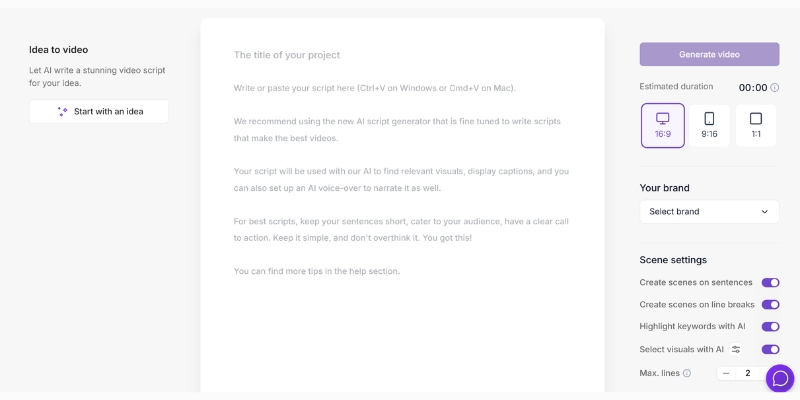
Step 3: Input Your Text and Choose a Template/Style
Once inside the platform, you’ll typically find a text box to paste your script. After inputting your text, browse the available templates or visual styles. These pre-designed templates help ensure your video has a professional look and feel that matches your brand’s aesthetic.
Step 4: Customize Your AI Avatar and Voiceover
If you’re using an avatar-based platform, this is where you bring your presenter to life. Select an AI avatar from the library, choose the language and accent for the voiceover, and select a vocal style (e.g., professional, friendly, enthusiastic). This step is crucial for matching the video’s tone to your brand identity.
Step 5: Generate, Preview, and Export Your Video
Click the “Generate” button and let the AI work its magic. This can take a few minutes, depending on the length and complexity of your video. Once finished, you’ll be able to preview the final result. If you need to make changes, you can typically go back and edit the script or visuals. When you’re satisfied, export the video in your desired format (usually MP4) and it’s ready to be shared.
Is AI Video Generation Worth It? A Realistic Look at ROI for Your Business
For Marketers and Creators facing performance pressure, the ultimate question is about return on investment (ROI). AI video generation offers clear, measurable advantages, but it’s also important to understand its limitations. This technology provides significant benefits for video content strategy.
The “PROS” – Where You Get a Clear Return:
Drastic Reduction in Production Time: This is the most significant ROI driver. A traditional 2-minute marketing video can easily take 15-20 hours of work, including scripting, filming, and editing. With an AI video generator, the same video can often be completed in under 30 minutes. This speed allows for rapid testing and iteration of video ads and content.
Significant Cost Savings: The numbers speak for themselves. Hiring a freelance videographer, actor, and editor can cost thousands of dollars for a single video. In contrast, a monthly subscription to a professional AI video tool typically ranges from $30 to $100. For the cost of a fraction of one traditional video, you can produce dozens of AI-generated videos per month.
Scalability for Content Marketing: AI empowers a single marketer or creator to achieve the output of a small team. The ability to quickly convert articles into videos, create multi-language versions of a training module with one click, or generate countless social media clips from one webinar provides unmatched scalability. This automation allows you to maintain a consistent presence on video-centric platforms without scaling your headcount.
The “CONS” – Potential Hidden Costs & Limitations:
Subscription Costs: While far cheaper than traditional production, professional-grade AI tools are not free. These recurring subscription fees are an ongoing operational expense that needs to be factored into your marketing budget.
Creative Limitations: Current AI technology, while impressive, can sometimes produce generic or formulaic results. For high-end, brand-defining campaigns that require unique emotional storytelling and complex cinematography, traditional filmmaking often remains the superior choice. AI is a tool for scale, not always for a masterpiece.
The Learning Curve: Although designed to be user-friendly, mastering these platforms requires some effort. Learning how to write effective prompts, fine-tune AI voiceovers, and utilize advanced features takes time. There is still a learning curve to get the most out of the technology and achieve high-quality output.
Frequently Asked Questions About AI Video Generation
What is the best text to video AI tool in 2025?
The “best” tool depends on your specific needs. For beginners and content marketers looking to quickly convert articles to video, Pictory is an excellent choice due to its speed and simplicity. For businesses that require highly realistic AI presenters for training or corporate communications, Synthesia is the industry leader.
Can AI generate video from a single image?
Yes. This is known as Image-to-Video generation. AI models can take a static image and add motion, such as subtle animations, camera pans, or zooms, to transform it into a short, dynamic video clip. This is most commonly used for creating engaging social media posts.
How realistic are the AI avatars and voices?
The quality varies significantly between platforms. Top-tier tools that specialize in Digital Human Technology, like Synthesia and HeyGen, offer incredibly realistic avatars with natural movements and precise lip-syncing. Free or lower-cost tools may produce avatars that are less realistic and more noticeably computer-generated. The technology is improving at an exponential rate.
Do I need any video editing skills to use an AI video generator?
No, for basic video creation, no prior skills are needed. These platforms are designed with a user-friendly interface that allows you to generate a video simply by inputting text and clicking a few buttons. However, a basic understanding of storytelling, pacing, and visual composition can help you create a more effective and engaging final product.
Can I use an AI video generator for commercial purposes?
Generally, yes. Most paid subscription plans for AI video generators grant you a commercial license to use the videos you create for marketing, advertising, and other business purposes. However, it is crucial to always read the terms of service for each specific platform, especially regarding the copyright of the generated content and the use of stock media assets.
Read More From AI Video Generation
If you found this guide helpful, continue exploring our expert, battle-tested guides and comparisons within the AI Video Generation category to find the perfect solution for your needs.
- The Ethics of AI Video: Deepfakes, Copyright, and Bias
- The History and Evolution of AI Video Generation
- 5 Limitations of AI Video Generators You Need to Know
last update : 20/11/2025
