
What Is Generative Video: A Creator’s Guide To AI Video Synthesis & The Generative Models Redefining Content (2025)
At its core, generative video is a groundbreaking subfield of Generative AI that creates entirely new video content from scratch based on user inputs like text or images. For Marketers, Creators, and Freelancers feeling the immense “performance pressure” to produce more content faster, this isn’t just a novel technology—it’s a direct solution to the production bottleneck. Within the broader world of AI Video Generation, understanding the concept of generative video is crucial for unlocking unprecedented speed and creativity. This battle-tested guide will demystify this powerful concept, exploring the core definition of generative video, the critical difference between generative and traditional AI video tools, the underlying generative models that power them, and a practical look at battle-tested tools that can accelerate your workflow today.
Table of Contents
What is Generative Video & Why It’s a Game-Changer for Creators
Generative Video is a specific type of AI video generation that synthesizes entirely new video pixels, frames, and scenes from prompts, rather than simply editing, automating, or repurposing existing video footage. It’s a fundamental shift from modification to creation. This technology directly addresses the “performance pressure” felt by modern creators by providing a way to produce high-quality video content rapidly and cost-effectively, eliminating the need for cameras, film crews, or complex editing software for many tasks.
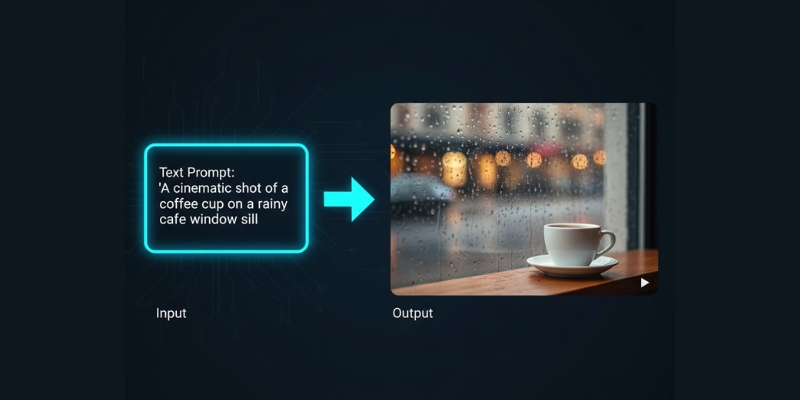
Imagine creating a cinematic B-roll of a futuristic cityscape for a product ad in minutes, just by describing it in a sentence. That is the power of generative video. This capability is built on core concepts like Text-to-Video, where a written prompt is turned into moving images, and Video-to-Video, which can transform an existing video into a completely different style. The entire process is driven by powerful Generative AI models designed specifically for video synthesis, making it a true game-changer for content velocity and creative exploration.
Generative Video vs. Traditional AI Video: What’s the Real Difference?
The term “AI Video” is broad and often causes confusion. While both generative and traditional AI video tools aim to make video production easier, their core functions are fundamentally different. Understanding this distinction is key to choosing the right tool for the job. We break down the key differences in our comparison table below. As you’ll see, one is about creating something from nothing, while the other is about making existing workflows smarter. For a deeper dive into the overall landscape, explore our guide on what is AI video generation.
| Parameter | Generative Video | Traditional AI Video |
|---|---|---|
| Core Function | Creation of new, synthetic video pixels from scratch (synthesis). It generates content that never existed before. | Automation of tasks on existing video footage (e.g., editing, subtitling, avatar animation). |
| Technology | Relies on Diffusion Models and Generative Adversarial Networks (GANs) to imagine and construct visuals. | Uses machine learning for analysis, lip-syncing algorithms, object tracking, and speech-to-text. |
| Best For | Creating original B-roll, conceptual ads, artistic visuals, animated storyboards, and prototyping ideas quickly. | Corporate training videos with AI avatars, repurposing long-form content into social clips, and automated editing tasks. |
| Example Tool | Prominent text-to-video models like Pika or Runway ML. | Prominent AI avatar and editing tools like Synthesia or Descript. |
Crucially, these two categories are not mutually exclusive. A modern, efficient workflow can leverage both. A Marketer could use a generative video tool to create a unique background scene and then use a traditional AI avatar tool to overlay a presenter on top of it, combining the strengths of both technologies to solve different problems.
How Generative Video Models Actually Work: The Core Technologies Explained
While the results can seem like magic, generative video is grounded in complex but understandable technologies. For creators and marketers, knowing the basics of how these AI video generators work helps in writing better prompts and understanding a tool’s capabilities and limitations. Here are the core generative models explained in practical terms.
Text-to-Video Synthesis: This is the most common method you’ll encounter. Think of it as a two-step process. First, the AI model is “taught” by analyzing billions of images and videos paired with text descriptions, learning the relationship between words and visuals. Then, when you provide a prompt, it uses that knowledge to “paint” a sequence of images (frames) that logically match your text description. This is the core of generative video from text.
Video Diffusion Models: This is the technology behind many of today’s most stunningly realistic results. The process starts with a screen of pure visual “noise,” like old TV static. Step-by-step, guided by your text prompt, the model refines this noise, removing randomness and adding structure until a coherent, clear video emerges. The primary benefit of generative video diffusion models is their ability to produce incredibly high-fidelity and detailed output.
Generative Adversarial Networks (GANs): A clever approach that uses a “competition” to achieve realism. Imagine an “artist” AI (the Generator) that creates a video, and a “critic” AI (the Discriminator) whose only job is to determine if the video is fake or real. The Generator constantly tries to fool the Discriminator, and this competitive loop forces it to produce increasingly sharp, believable videos. Video GANs are particularly effective at creating crisp details in the final output.
Battle-Tested Generative Video Tools to Accelerate Your Workflow
Moving from theory to practice, the market is now filled with powerful generative video tools designed to solve real-world problems for creators. Instead of a simple feature list, we’ve curated these solutions based on the primary job they accomplish, directly addressing the commercial investigational intent of users looking for the right tool. To get a complete overview of this technology, check out our guide to Text-to-Video AI.
For Rapid Prototyping & Social Media Clips:These tools are built for speed and ease of use, perfect for when you need to visualize an idea or create a short, engaging clip quickly.
- Pika (2.2): Known for its fast generation times and user-friendly interface. The latest version features advanced tools like Pikaswaps (video inpainting), Pikaffects, and Pikaframes, with support for 10-second videos in 1080p. Its strengths include excellent image-to-video animation capabilities and seamless object modification.
- InVideo AI: Great for marketers who need to produce social media videos with text overlays, voiceovers, and stock media integration alongside its generative features.
When quality, realism, and control are paramount, these platforms offer more advanced features for professional-grade output.
- Runway Gen-3 Alpha: A leader in cinematic output and a major improvement over Gen-2 in fidelity, consistency, and motion. It offers fine-grained controls for camera motion (pan, tilt, zoom), Motion Brush, Advanced Camera Controls, and Director Mode. The platform supports Text-to-Video, Image-to-Video, and Video-to-Video capabilities, making it ideal for maintaining brand consistency.
- Luma Dream Machine: Praised for its high-quality, coherent, and physically plausible video generation. Features include “Modify with Instructions” and “Reframe” tools that allow plain-language editing, making it a strong contender for creating realistic marketing assets and short films.
For creators looking to push creative boundaries, these tools are known for their distinct visual styles and flexibility.
- Kaiber: Delivers highly stylized and often psychedelic visuals, making it perfect for music videos, abstract concepts, and eye-catching artistic content.
- Haiper: A newer tool that is gaining traction for its creative flexibility and active community, which provides a great source of inspiration for unique prompts and visual styles.
Note: The generative video landscape is evolving rapidly. Major platforms like Google (Veo 3), OpenAI (Sora 2), and others are continuously releasing new models with enhanced capabilities. Always check the latest version and features when evaluating tools for your specific needs.
Measuring the ROI of Generative Video: A Practical Guide for Marketers
For any professional, purchasing decisions hinge on clear ROI comparisons. Generative video’s value isn’t just in its creative potential but in its tangible impact on your budget and timeline. Here is a simple framework to evaluate the return on investment when considering these tools.
Time Savings Calculation:The most immediate return is in hours saved. Use this simple formula: (Hours spent on traditional video production) – (Hours spent on generative video production) = Hours Saved. For example, a 30-second B-roll shoot for a product might take 8 hours (setup, travel, shooting, editing). A generative tool could produce five different high-quality options in 30 minutes. The value of the 7.5 hours saved can be directly calculated based on your or your team’s hourly rate.
Cost Reduction Analysis:Generative video can significantly reduce or completely eliminate many direct production costs. Consider the savings from no longer needing to pay for:
Crew hire: No need for a videographer, director, or production assistants. Location rental fees: Create any setting you can imagine without booking a space. Actor or talent fees: Generate human-like characters or abstract visuals on demand. Stock footage subscription costs: Create perfectly tailored, royalty-free clips instead of searching through libraries. Equipment rental: Forget about cameras, lighting, and microphones. Content Velocity & A/B Testing:Perhaps the most significant ROI comes from increased content velocity. The low cost and high speed of generation allow for robust A/B testing that was previously impossible. Instead of producing one expensive video ad, you can generate 10 variations—with different visuals, tones, and settings—for the same cost or less. This dramatically improves campaign optimization by allowing you to find the most effective creative for your audience based on real performance data.
Frequently Asked Questions About Generative Video
Is generative video the same as deepfake?
No. While both technologies use Generative AI, their goals differ. Deepfakes typically involve swapping a person’s face onto an existing video. Generative video, in contrast, aims to create the entire scene—characters, background, and action—from scratch based on a prompt.
Can I use generative video for commercial projects?
It depends on the tool’s terms of service. Most leading platforms like Runway and Pika now offer clear commercial licenses, giving you copyright ownership of the output. However, you must always check the specific terms of the service you are using to ensure compliance.
How realistic is generative video today?
The realism of generative video is improving at an exponential rate. While some artifacts (like inconsistent hands or strange physics) can still occur, the best generative video models can produce short clips that are incredibly difficult to distinguish from real camera footage, especially for atmospheric B-roll and product shots.
What is the biggest limitation of current generative video models?
The primary limitations are maintaining perfect temporal consistency (ensuring objects and characters look identical from frame to frame) and realistically depicting complex physics or detailed human interactions over longer durations (typically beyond 5-10 seconds).
How much does a generative video tool cost?
Pricing varies widely. Many tools offer free trials with limited credits. Paid plans typically follow a subscription model, ranging from $20 per month for entry-level access to over $100 per month for pro plans with higher generation volume, faster processing, and advanced features.
Read More From AI Video Generation
If you found this guide helpful, continue exploring our expert, battle-tested reviews and comparisons within the AI Video Generation category to find the perfect solution for your creative and marketing needs.
last update : 21/11/2025
