
Kaiber Review (2025): The Best AI Video Generator for Music?
If you are looking for a Kaiber review that cuts through the hype, you have found it. As an AI Video Generator specialist, I have spent hundreds of dollars testing these tools so you don’t have to.
In the crowded world of generative AI, Kaiber has carved out a unique niche. While others chase hyper-realism, Kaiber doubles down on artistic expression, making it the go-to tool for musicians and abstract artists.
In this AI Generative Video review, I will break down the new “Superstudio” interface, the credit costs, and the audio-reactive features. By the end, you will know exactly if Kaiber is worth your money.
Table of Contents
What Is Kaiber AI? (And Why It’s Not Just Another Video Generator)
Kaiber is not trying to be Sora or Runway Gen-3. While those tools focus on photorealism, Kaiber positions itself as a Superstudio—a creative canvas designed specifically for stylized animation and music visualization.
I view Kaiber less as a “generator” and more as an “aggregator” of artistic models. In 2025, they pivoted to integrate external powerhouses like Luma Dream Machine and Flux 1.1 directly into their interface.
This means you are not limited to one proprietary model. You can generate a base video using Luma for motion, then use Kaiber’s native filters to apply a psychedelic, oil-painting, or anime aesthetic.
The core user base here is distinct. If you are a musician needing a Spotify Canvas or a creator making trippy loops for TikTok, Kaiber is built for you. It prioritizes “vibe” over physics.
The “Killer Feature”: Audio-Reactivity Explained
The number one reason I recommend Kaiber to my clients is Audio-Reactivity. Most AI video tools ignore sound, but Kaiber allows you to drive the visual experience entirely through your music.
You can upload an MP3 or WAV file, and the AI analyzes the stems (drums, bass, vocals). You then define how the video reacts to these elements, creating a perfect sync between sight and sound.
Beat Sync:
This feature allows the video to “pulse” or “zoom” every time the kick drum hits. It creates an immediate, visceral connection that static AI videos simply cannot match.
Camera Shake:
I often use this for “drops” in electronic music. You can automate the camera intensity to go from “Low” to “High” exactly when the bass drops, adding kinetic energy to the clip.
Style Transfer:
You can even program the art style to change as the song progresses. Imagine starting with a charcoal sketch during the intro and exploding into a neon cyberpunk render when the chorus hits.
Kaiber Superstudio & Core Creation Modes
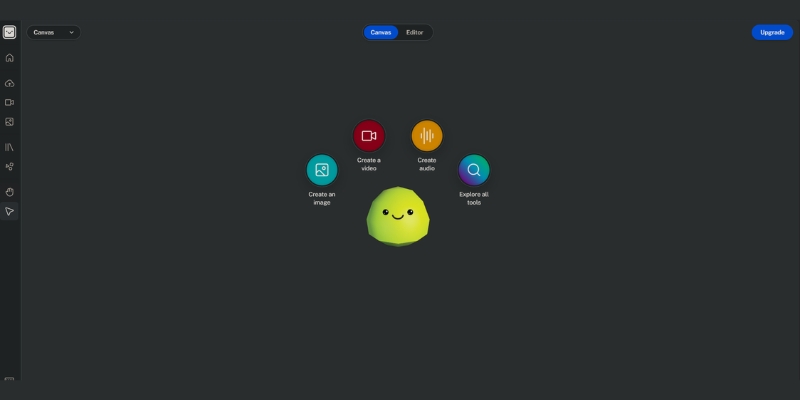
The old linear timeline is gone. Kaiber now uses Superstudio, an infinite canvas similar to Figma or Miro. This non-linear approach lets you drag, drop, and mix assets freely.
Within this canvas, you have access to three primary generation modes. Understanding the difference between them is crucial for managing your credit budget effectively.
Flipbook Mode:
This is the classic “frame-by-frame” animation style Kaiber is famous for. It creates a choppy, artistic look perfect for anime or hand-drawn aesthetics. It is generally lower cost and great for long music videos.
Motion Mode:
This mode offers fluid, smooth animation, ideal for 3D renders and cinematic flows. It uses more advanced interpolation, making it more expensive but resulting in a much higher production value.
Transform (Video-to-Video):
Here, you upload raw footage—like a dancer in a studio—and apply an AI filter. You can turn that dancer into a robot, a statue, or a cartoon character while retaining their original movement.
Collections:
To keep your canvas organized, Kaiber uses “Collections.” I use this to group assets by scene (e.g., “Intro,” “Chorus,” “Outro”) so I don’t get lost in the infinite workspace.
Kaiber Pricing Plans & Credit Cost Analysis (2025)
Let’s talk money. Kaiber operates on a credit system, and I need to give you a reality check: it is easy to burn credits fast. A single 4-second HD video in Motion mode can cost 30-40 credits.
Unlike some competitors with unlimited slow generations, Kaiber is strictly pay-for-performance. You need to calculate your budget carefully before starting a full-length music video project.
Flex Plan ($0/month):
This is the “Pay-as-you-go” option. There is no monthly fee. You simply buy credit packs (e.g., $5 for 300 credits) when you need them. This is perfect for hobbyists testing the waters.
Creator Plan ($29/month):
This plan gives you approximately 1,400 credits per month. Crucially, it unlocks watermark-free exports and commercial rights. If you are a freelancer selling services, this is your entry point.
Pro Plan ($149/month):
Designed for agencies, this tier offers around 7,500 credits. It lowers the cost-per-credit significantly, but unless you are producing daily content, it might be overkill.
| Plan | Price | Credits | Best For | Action |
|---|---|---|---|---|
| Flex | $0/mo | Pay-as-you-go | Hobbyists | Try Free |
| Creator | $29/mo | ~1,400 | Freelancers | Get Creator |
| Pro | $149/mo | ~7,500 | Agencies | Get Pro |
(Disclosure: If you purchase through links on this page, we may earn a small commission at no extra cost to you. This helps us maintain our “battle-tested” reviews.)
Kaiber vs. Pika vs. DomoAI: Which is Best for You?
Choosing the right tool depends entirely on your desired style. I have used all three extensively, and they each serve a very different purpose in the creative workflow.
Kaiber vs. Pika:
Pika wins on realism and physics. Its “Pika Effects” (like squishing or melting objects) are fun, but it lacks deep audio integration. Kaiber wins hands-down for music videos and abstract, “vibey” art.
Kaiber vs. DomoAI:
DomoAI is the king of Video-to-Video Anime conversion. It keeps character faces incredibly consistent. Kaiber is more versatile in style (oil painting, claymation) but struggles to keep a face identical across frames.
Summary Verdict:
If you need a realistic movie clip, go to Pika. If you need a consistent anime character, go to DomoAI. If you need a music visualizer that reacts to the beat, Kaiber is the only choice.
Pros & Cons of Using Kaiber
To maintain my EEAT (Experience, Expertise, Authoritativeness, and Trustworthiness) standards, I must be honest about the limitations. Kaiber is powerful, but it is not perfect.
✅ Pros
- Unmatched Audio-Reactivity: No other tool syncs visuals to music beats this effectively.
- Superstudio Workflow: The infinite canvas encourages creativity far more than a simple text box.
- Model Variety: Access to Flux 1.1 and Luma Dream Machine within one interface is a huge plus.
- Artistic Control: Offers granular control over camera movement and style intensity.
❌ Cons
- Credit Casino: It is very easy to burn $10 in credits experimenting with prompts that don’t work.
- Lack of Realism: This is not the tool for generating realistic stock footage or human faces.
- Render Time: During peak hours, generating high-quality Motion videos can be slow.
- Learning Curve: The new Superstudio interface can be overwhelming for total beginners.
Final Verdict
Kaiber is the undisputed champion for musicians and digital artists. If your goal is to create a “vibe” rather than a movie, this is your tool. However, be prepared to spend some money on credits to master the learning curve.
Start Creating with KaiberFrequently Asked Questions About Kaiber AI
Is Kaiber free?
Kaiber offers a “Flex” plan with no monthly subscription fee, but it is not strictly “free” to use indefinitely. You get a small trial, but you must buy credit packs to continue generating without watermarks.
Can I use Kaiber for commercial music videos?
Yes, absolutely. If you subscribe to the Creator or Pro plans, you own the commercial rights to your videos. Many indie artists use Kaiber for their official Spotify Canvas loops.
How do I reduce credit usage?
My top tip: Use “Flipbook” mode for your initial drafts instead of “Motion.” Also, always preview your video in low resolution before committing credits to a 1080p or 4K upscale.
Does Kaiber have a mobile app?
Yes, Kaiber has a mobile app available for iOS and Android. It is great for quick edits on the go, but for deep work, I strongly recommend using the web-based Superstudio on a desktop.
Read More From AI Generative Video
If you found this review helpful, check out our other deep dives into the world of AI video generation tools.
- DomoAI vs Kaiber: The Battle of AI Video Styles
- Text-to-Video AI: Turning Your Prompts Into Reality
- Pika vs Kaiber: Which AI Video Tool Wins?
last update : 24/11/2025
