
Pika vs DomoAI Comparison (2025): Best for Realism or Anime?
Choosing between Pika vs DomoAI is the most critical decision a modern creator faces when diving into the world of AI Video Generators.
While both tools are powerful, they serve two completely different artistic purposes.
We understand the pressure of needing high-performance content without wasting budget on the wrong subscription.
In this generative video comparison, we break down exactly how these tools differ in real-world workflows.
Whether you need cinematic realism or stylized anime aesthetics, this guide will determine which AI video tool fits your creative goals.
Table of Contents
Pika vs DomoAI: The Quick Verdict for Creators
If you are in a rush to decide, here is the battle-tested truth.
There is no single winner, only the right tool for the specific job you have in mind.
Pika (The Realism Specialist): We define Pika as the clear winner for “Text-to-Video” realism.
If you need cinematic shots, realistic physics (like hair blowing in the wind), or advanced camera controls, Pika is your choice.
DomoAI (The Stylization Powerhouse): DomoAI is the undisputed king of “Video-to-Video” transformations.
If your goal is to turn real footage into consistent Anime, cartoons, or specific artistic styles, this is the tool you need.
DomoAI also excels at anime-style lip sync with its Talking Avatar feature.
To help you visualize the differences quickly, we have compiled this comparative summary based on our extensive testing of both platforms.
| Attribute | Pika 2.2/2.5 | DomoAI |
|---|---|---|
| Best For | Realistic & Cinematic Video | Anime & Stylized Art |
| Core Strength | Text-to-Video Generation | Video-to-Video Transformation |
| Platform | Web Dashboard + Discord | Web + Discord |
| Key Feature | Scene Ingredients & Pikaframes | Talking Avatar & Anime Lip Sync |
| Video Length | Up to 10s (25s with Pikaframes) | 5s-60s (Pro: 20s/30s/60s) |
Try Pika for Realism Try DomoAI for Anime
(Disclosure: If you purchase through links on this page, we may earn a small commission at no extra cost to you. This helps us maintain our “battle-tested” reviews.)
Visual Style Comparison: Realistic Generation vs. Anime Aesthetics
The biggest difference between these two lies in the output quality.
We analyzed hundreds of generations to see how they handle visual fidelity.
Realistic Quality (Pika):
Pika excels at understanding lighting, texture, and real-world physics.
In our tests, Pika 2.2 consistently produced clips that looked like cinematic b-roll or high-quality stock footage.
The Scene Ingredients feature allows you to upload custom characters and objects for seamless integration.
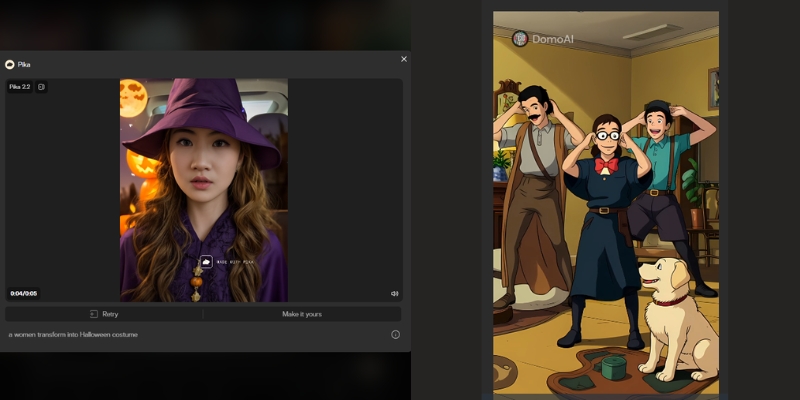
Anime & Art Styles (DomoAI):
DomoAI dominates when you need “Flat” or “2D” rendering.
It provides superior consistency when converting real footage into Anime or Illustration styles.
With **70+ style presets**, DomoAI avoids the dreaded “uncanny valley” effect that plagues other tools.
Motion Consistency:
Pika focuses on fluid, realistic motion within a scene.
DomoAI, however, focuses on maintaining style consistency across frames.
This ensures your anime character doesn’t flicker or change appearance wildly.
Feature Face-Off: Text-to-Video vs. Image-to-Video Capabilities
Beyond style, the technical capabilities define your workflow.
Here is how the features stack up in a direct head-to-head comparison.
Text-to-Video (Pika’s Strength):
Pika demonstrates superior prompt adherence.
It builds complex scenes from scratch using just text commands.
Pika understands camera movements like “zoom in” or “pan right” much better than its competitor.
Image-to-Video & Video-to-Video (DomoAI’s Strength):
This is DomoAI’s killer feature.
You can upload a video of yourself dancing, and it transforms you into an anime character.
The movement stays 100% perfect while the style changes completely.
Talking Avatar & Lip Sync (Both Tools):
Both platforms now offer lip sync capabilities, but with different strengths.
Pika excels at realistic talking heads for marketing videos and virtual presenters.
DomoAI specializes in **anime and stylized character lip sync**, supporting 5+ languages with text-to-speech.
DomoAI’s Talking Avatar is particularly strong for non-human and cartoon characters.
Control Tools:
Pika gives you specific camera controls and region modification through Scene Ingredients.
DomoAI provides “style strength” sliders and motion reference uploads.
These allow you to dictate how much the AI should deviate from your original reference.
Platform & Workflow: Web Dashboard vs. Discord Commands
Usability is often the deciding factor for new users.
We evaluated the onboarding process and daily workflow for both tools.
Pika (Web & Discord):
Pika offers a dedicated web interface (Pika Art), which is a game-changer.
It makes the tool accessible for users who dislike Discord commands.
The UI is clean and intuitive, similar to traditional software.
DomoAI (Web + Discord):
DomoAI now operates on both web (DomoAI.app) and Discord.
The web interface provides a streamlined experience with visual controls.
Discord commands (like `/generate`) remain available for power users who prefer the community ecosystem.
User Experience Verdict:
We recommend Pika for professionals wanting cinematic realism.
We recommend DomoAI for anime creators, music video producers, and those seeking unique artistic styles.
Pricing Models & Credit System: Which Offers Better Value?
Both tools use a credit-based system, but the value proposition differs depending on your output needs.
Here is our ROI analysis.
Free Plans:
Both Pika and DomoAI offer generous free trials, but outputs come with watermarks.
Pika refreshes 150 credits monthly.
DomoAI gives you 50 welcome credits to test their anime generator capabilities.
| Plan Tier | Pika Pricing | DomoAI Pricing |
|---|---|---|
| Free | 150 credits/month Watermarked |
50 welcome credits Watermarked |
| Basic/Standard | $10/mo (700 credits) No commercial use |
$7.99/mo (500 credits) ~100 videos, no watermark |
| Pro/Standard | $35/mo (2,300 credits) Commercial rights |
$15.99/mo (1,500 credits) ~300 videos, Unlimited Relax |
| Premium/Pro | $95/mo (6,000 credits, Fancy) Fastest generations |
$39.99/mo (4,000 credits) ~800 videos, 20s/30s/60s |
| Link | Check Pika Prices | Check DomoAI Prices |
Subscription Value:
For high-volume users, Pika’s higher-tier plans offer excellent value for realistic footage.
DomoAI is significantly cheaper for anime creators who need hundreds of stylized clips per month.
DomoAI’s “Relax Mode” (unlimited generations with slower processing) is a standout feature at the Standard tier.
Commercial Rights:
Both platforms grant you full ownership of your generated videos once you subscribe to any paid plan.
This is essential for Freelancers selling services on Upwork or Fiverr.
ROI Assessment:
If you sell realistic stock footage or create ads, Pika pays for itself faster.
If you run a faceless YouTube channel focused on anime trends or music videos, DomoAI offers a better cost-per-video ratio.
When to Choose Which? Recommendations for Marketers & Artists
To help you make the final call, we have categorized the ideal user scenarios for each tool.
These recommendations are based on our Pika review experience.
Choose Pika If:
You are a filmmaker needing realistic b-roll.
You require photorealistic characters for marketing campaigns.
You prefer a clean web interface over Discord commands.
Choose DomoAI If:
You are an anime artist or music video creator.
You want to participate in viral “AI dance” trends (Video-to-Video transformations).
You need anime-style lip sync for character animations and talking avatars.
You want to convert static images into highly stylized artistic renders with 70+ style presets.
The “Hybrid” Approach:
Many professional creators we know use both tools strategically.
They generate a realistic base video in Pika.
Then they run it through DomoAI to apply a unique artistic filter or anime transformation.
Frequently Asked Questions About Pika vs DomoAI
Can I use Pika and DomoAI for free?
Yes, both offer free tiers.
However, videos will have watermarks, and generation speed is slower.
You need a paid plan for commercial use and watermark removal.
Which is better for creating AI anime?
DomoAI is significantly better for anime.
It is trained specifically on stylized datasets with 70+ anime and art style presets.
Pika tends to revert to realistic 3D looks even when prompted for anime.
Does DomoAI support lip sync?
Yes! DomoAI has a powerful Talking Avatar feature with lip sync.
It supports 5+ languages, text-to-speech, and is specially optimized for anime and stylized characters.
Most videos are generated in under 5 minutes.
Does Pika support Video-to-Video?
Yes, Pika supports Video-to-Video, but it changes the structure of the video more.
DomoAI is better at keeping the original motion while only changing the visual style.
Can I remove the watermark?
You must subscribe to the “Basic” or “Standard” plan or higher on either platform.
This removes the branding watermarks from your exported videos.
Are these tools safe for commercial use?
Yes, once you are on a paid subscription, you own the commercial rights to the videos you generate.
This makes them safe for client work and YouTube monetization.
How long can DomoAI videos be?
DomoAI supports 5-10 second videos on Basic/Standard plans.
The Pro plan unlocks 20-60 second generations, including 60-second Talking Avatar videos.
Read More From AI Generative Video
Expand your knowledge with our other in-depth guides on stylized video generation and tool reviews.
- Pika Review (2025): Is Pika 2.5 the Best AI Video Generator?
- How to Use DomoAI (Image-to-Video & Anime Guide)
- DomoAI Pricing Explained (2025): Costs, Credits, & Hidden Limits
