
Luma Dream Machine vs Runway ML: Which AI Video Tool Is Best? (2025 Comparison)
If you are deciding between Luma Dream Machine vs Runway ML, you are likely torn between two distinct needs: raw video quality versus creative control. I have spent hundreds of credits testing both platforms to give you a definitive answer.
Luma Dream Machine has rapidly positioned itself as a specialist in hyper-realistic generation, challenging the status quo. Meanwhile, Runway ML remains the “Adobe of AI,” offering a comprehensive editing suite that goes far beyond simple text-to-video prompts.
In this AI Video Generators comparison, we strip away the marketing hype. We analyze specific use cases, pricing models, and feature sets to help you decide which tool deserves your marketing budget.
Table of Contents
Luma Dream Machine vs. Runway ML: The Core Differences
This comparison isn’t about which tool is “better” in a vacuum; it is about which tool fits your specific workflow. We are comparing a specialized High-Quality Generator (Luma) against a broad Full Creative Studio (Runway).
The “One-Line” Verdict:
Luma Dream Machine is the go-to for hyper-realistic raw generation and simple prompts. Runway ML is the superior choice for controlled editing and a full creative suite.
Positioning Luma Dream Machine:
We define Luma as the “New Standard for Quality.” In our tests, it excels at physics and Scene Consistency. If you need a “one-shot” cinematic clip that looks real immediately, this is your tool.
Positioning Runway ML:
Runway acts as the “Adobe of AI Video.” It is not just about the video generation models; it offers an AI Video Editing Suite. Features like Green Screen and advanced editing make it an All-in-one platform for pros.
Target Audience Fit:
Stop reading and choose Luma if you want quick, perfect clips for social media. Choose Runway if you are a video editor needing granular control over motion and composition.
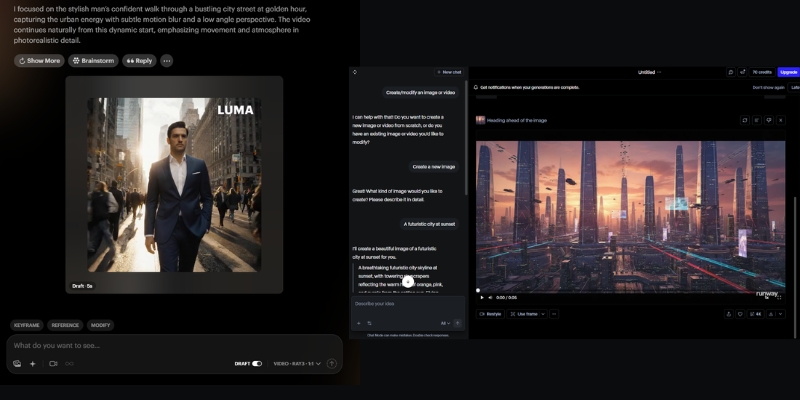
Video Generation Quality: Hyper-Realism vs. Stylized Art
For marketers, text-to-video quality is the primary metric. We ran identical prompts through both systems to test their limits. The difference in how they handle reality versus style is stark.
Realism and Texture:
Luma Dream Machine dominates in hyper-realistic textures. When we generated close-ups of human skin, Luma retained pore details and lighting physics better than Runway ML, which occasionally smoothed over details.
Motion and Consistency:
This is Luma’s “killer feature.” It maintains coherent scenes where the subject doesn’t morph into something else mid-video. Runway sometimes struggles with “temporal flickering,” where objects shift shape across different generation models.
Stylization Capabilities:
Runway hits back hard here. While Luma aims for reality, Runway excels at abstract and artistic styles. If you are making a stylized music video or anime-style ad, Runway’s aesthetic flexibility is superior.
Prompt Adherence:
Luma seems to understand complex physics better. When we prompted “a coffee cup spilling in slow motion,” Luma simulated the liquid dynamics accurately. Runway required several rerolls to get the physics right.
Creative Control & Features: Advanced Editing vs. Simple Generation
The biggest difference between these platforms lies in their philosophy. Luma is built for speed and quality, while Runway is built for control and flexibility.
Runway’s Editing Arsenal:
Runway offers a complete video editing suite. You can generate a clip, remove the background, adjust timing, and apply effects without leaving the platform. This integrated workflow is powerful for professionals who need to iterate quickly.
Camera Controls:
Runway offers a “Director Mode” where you can set specific zooms and pans. Luma supports camera prompts, but they are less granular than the dedicated UI controls found in the Runway dashboard.
Editing Ecosystem:
Runway is a full editor. You can trim clips, extend footage, and slow down segments all within the same interface. Luma is strictly a “generate and download” workflow, forcing you to use external software for post-production edits.
Image-to-Video Performance:
Both tools animate images well. Runway gives you timeline controls to adjust animation speed and intensity. Luma animates the whole scene based on its internal logic, which is high quality but offers less granular control.
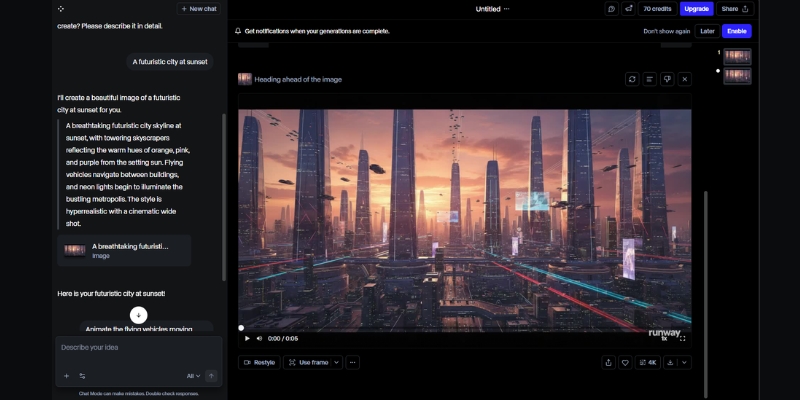
Workflow Speed & Ease of Use for Marketers
Time is money for freelancers. We measured the “Time-to-Value”—how fast you can go from a blank screen to a usable video asset for your campaign.
The Learning Curve:
Luma is “Pick up and play.” The interface is minimalist—just a text box and a generate button. Runway has a steeper learning curve because it mimics professional software like After Effects.
Generation Time:
In our current tests, Luma creates 5-second clips relatively quickly, often beating Runway’s generation times during peak hours. Runway’s queue system can sometimes slow down your workflow.
Web Interface Experience:
Luma feels like a modern SaaS app—clean and focused. Runway feels like a workstation. If you just need a clip for TikTok, Luma’s simplicity prevents “feature fatigue.”
Mobile Experience:
Luma’s simple interface works surprisingly well on mobile browsers for quick generations on the go. Runway’s complex timeline is really meant for a desktop environment.
Pricing & ROI: Which Tool Saves You Money?
Both platforms utilize a credit-based system. However, the ROI depends on your “trash rate”—how many generations you have to throw away before getting a good one.
Credit Systems Explained:
You aren’t just paying for access; you pay for seconds of video. Efficiency matters. If you have to reroll a video 5 times to get it right, the “cheaper” tool becomes expensive.
Luma Dream Machine Pricing:
Luma offers a generous Free Plan with daily limits (and watermarks). Their paid tiers are straightforward, focusing purely on generation credits. It is cost-effective if you need high-quality raw footage.
Runway ML Pricing:
Runway’s subscription covers the entire suite, including storage and editing tools. If you already pay for Premiere Pro or other tools, Runway might allow you to consolidate your software stack.
ROI Analysis:
Luma: Better ROI for “One-Shot” users. Because the quality is higher per generation, you waste fewer credits rerolling bad clips.
Runway: Better ROI for “Power Users” who utilize the editing tools, saving money on external software subscriptions.
| Feature | Luma Dream Machine | Runway ML |
|---|---|---|
| Core Strength | Hyper-Realism & Physics | Control & Editing Suite |
| Free Plan | Yes (Daily Limit + Watermark) | Yes (125 credits one-time) |
| Pricing Model | Credit Subscription | Suite Subscription |
| Best For | Quick, High-End B-Roll | Complex Creative Projects |
| Action | Try Luma Free | Try Runway Free |
(Disclosure: If you purchase through links on this page, we may earn a small commission at no extra cost to you. This helps us maintain our “battle-tested” reviews.)
Final Verdict: When to Choose Luma vs. Runway
After extensive testing, the choice comes down to whether you need a Video Generator or a Video Studio. Here is our decisive advice for your next project.
Choose Luma Dream Machine If:
You need the highest possible Hyper-realism for your output.
You want coherent, cinematic shots for B-roll without complex prompting.
You prefer a simple text-prompt workflow and don’t need to edit inside the tool.
Choose Runway ML If:
You need an all-in-one editing platform with timeline controls.
You require background removal, speed adjustments, and other post-production tools.
You are a professional editor who needs to direct and refine generated content.
The Hybrid Approach:
For the ultimate workflow, we often generate the base video in Luma Dream Machine for its superior physics, and then import that footage into Runway ML to apply advanced edits and effects.
Ready to Start Creating?
Both tools offer free tiers, so you can test the quality yourself. Don’t rely on theory—generate your first clip today.
Try Luma Dream Machine Try Runway MLFAQs About Luma Dream Machine and Runway ML
Is Luma Dream Machine free?
Yes, Luma offers a free tier that allows for a limited number of generations per day. However, these videos come with a watermark and cannot be used for commercial purposes.
Can Runway ML edit videos generated in Luma?
Absolutely. You can download your MP4 file from Luma and upload it into Runway’s editor. This is a powerful workflow to combine Luma’s quality with Runway’s editing tools.
Which tool is better for AI avatars?
Neither tool specializes in lip-syncing talking heads. For that, you should look at tools like HeyGen or Synthesia. Luma and Runway are for cinematic scene generation.
Does Runway ML have more control than Luma?
Yes. Runway offers timeline editing, background removal, and various adjustment tools. Luma focuses purely on generation quality with minimal post-processing options.
Read More From AI Video Generators
Dive deeper into our battle-tested comparisons and reviews to build the perfect AI video stack for your business.
- Runway ML (Gen-4) Review: The Original GenAI Studio
- How to Use Luma Dream Machine: A Beginner’s Guide
- Pika vs Runway ML (Gen-4): New King vs. The Original Studio
last update : 03/12/2025
