
Pictory vs InVideo Review (2025): Which AI Video Generator Wins?
The battle of Pictory vs InVideo is the defining choice for modern content creators. These tools are not just video editors; they are the engines behind scalable content marketing.
As a seasoned marketer, I understand the pressure to produce high-volume video content without sacrificing quality. In the crowded Text-to-Video category, choosing the wrong tool can cost you hours of frustration.
This battle-tested review compares ROI, speed, and quality. I will reveal which tool delivers the fastest workflow for bloggers and which offers the best aesthetics for brand marketers.
Table of Contents
Pictory vs InVideo: The Quick Verdict for Creators
After testing both tools for 50+ hours on real campaigns, the winner depends entirely on your specific “pain point.” Are you chasing volume or visual perfection?
Pictory is the undisputed winner for YouTube Automation and Blog-to-Video repurposing. Its AI logic prioritizes speed, automatically matching stock footage to your script with uncanny accuracy.
InVideo takes the crown for polished Social Media Ads and promo videos. If you need granular control over Templates, text animations, and visual hierarchy, InVideo is the superior design tool.
At a Glance: The Primary Strength
Pictory: Best for “Efficiency.” Turns long text into video in minutes. Ideal for bulk creation.
InVideo: Best for “Creativity.” Offers 5000+ templates for a custom, branded look.
(Disclosure: If you purchase through links on this page, we may earn a small commission at no extra cost to you. This helps us maintain our “battle-tested” reviews.)
Try Pictory for Speed Try InVideo for DesignCore Differences: AI Summarization vs. Creative Control
To understand the Pictory vs InVideo debate, you must look at their core philosophy. They solve the same problem—video creation—but approach it from opposite ends of the spectrum.
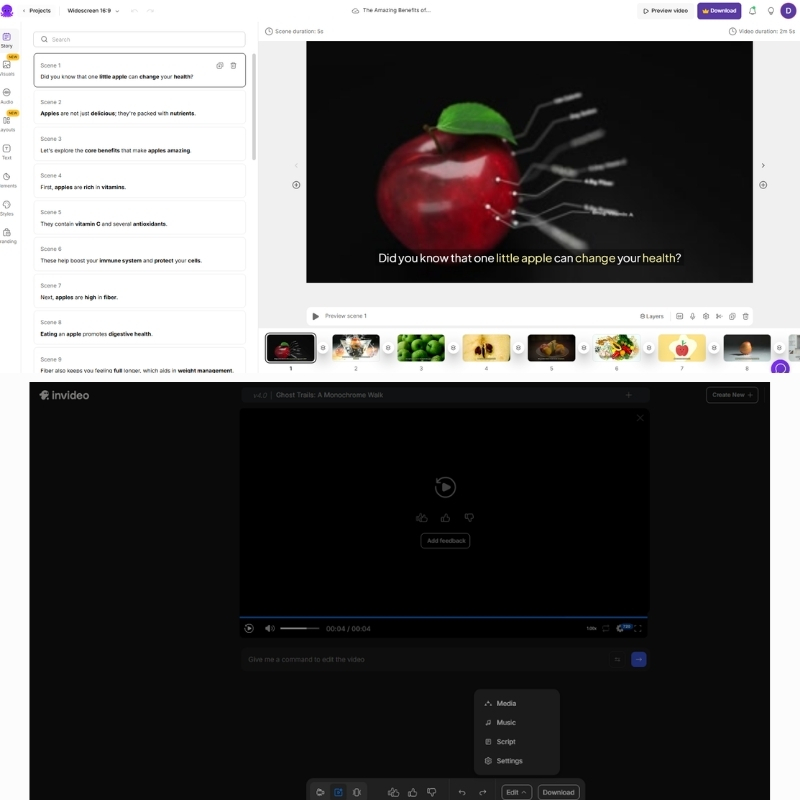
Pictory operates as an “Editor-free” platform powered by NLP (Natural Language Processing). It reads your text, understands the context, and fetches matching footage. It is function-over-form, designed to minimize human clicks.
InVideo functions as a “Canvas-based” creator. It prioritizes visual layout, layers, and 5000+ Templates. It assumes you want to design the video, not just generate it. It is form-over-function.
Pictory automates the editing process completely. InVideo enhances your visual storytelling capabilities. If you want a hands-off experience, Pictory wins. If you want a hands-on design experience, InVideo wins.
Feature Deep Dive: Stock Media, Voices, and AI Capabilities
Let’s strip away the marketing jargon and compare the raw specs. Here is how the critical features stack up for Text-to-Video production.
Stock Media Library:
Pictory integrates with Storyblocks. This provides millions of high-quality, royalty-free clips perfect for general B-roll. It is included in the standard subscription.
InVideo integrates with iStock (Getty Images). This is premium, cinema-grade footage. However, heavy usage often requires higher-tier plans or credits, making it costlier for bulk creators.
AI Text-to-Video Engine:
Pictory excels at AI Summarization. It can ingest a 2000-word blog URL and extract the key “Gold Nuggets” to create a short video. InVideo relies more on you providing a finished script.
AI Voices:
Both tools offer standard Text-to-Speech voices. However, InVideo has recently integrated ultra-realistic voice options in its higher tiers. Pictory’s voices are solid but functional.
Templates:
InVideo dominates here with over 5,000 templates covering every niche from real estate to fitness. Pictory’s templates are simpler, focusing mainly on caption styles and font placement.
User Experience: Workflow Speed & Editor Flexibility
For a beginner, the “Ease of Use” factor is often the dealbreaker. I tested how quickly I could go from “Zero to Published” on both platforms.
Pictory Workflow:
The “Script-to-Video” wizard is linear and incredibly fast. You paste text, and it builds the scene. The Edit Video Using Text feature lets you cut video clips by simply deleting words from the transcript.
InVideo Workflow:
The interface resembles Canva for video. You have a timeline, layers, and drag-and-drop assets. It has a steeper learning curve but offers significantly more control over animations and transitions.
Performance Pressure:
If your boss demands 5 videos a day, Pictory is your savior. Its bulk creation workflow is unmatched. If your client demands a specific brand font and hex code, InVideo is essential.
Best Use Cases: Who Should Choose What?
Don’t choose the “best” tool; choose the right tool for your specific role. Here is my breakdown based on user intent and daily tasks.
For Bloggers & SEOs:
Pictory is the choice. Its ability to turn URLs into videos helps increase dwell time on your articles. The AI summarization is a massive time-saver for repurposing existing content.
For Faceless YouTube Channels:
Pictory wins again. When volume is the key to growth, Pictory’s automated B-roll selection allows you to churn out 2-3 videos daily without burnout.
For Social Media Marketers (Instagram/TikTok):
InVideo is superior. Its vertical templates are trendy, high-energy, and designed to stop the scroll. Pictory’s designs can feel a bit too static for TikTok.
For Agencies:
InVideo is safer. You can adhere strictly to client branding guidelines, upload custom fonts, and fine-tune every transition to look professional.
Pricing Comparison: Which Tool Offers Better ROI?
Price is meaningless without context. We need to analyze the Return on Investment (ROI) based on your output volume.
| Feature | Pictory (Standard) | InVideo (Business) |
|---|---|---|
| Starting Price | ~$19/month (Annual) | ~$15/month (Annual) |
| Watermark | None (Paid Plans) | None (Paid Plans) |
| Stock Media | Storyblocks (Unlimited) | iStock (Limited Credits) |
| Video Duration | 10 mins (Standard) | 40 mins (Business) |
| Best ROI For | High Volume Creators | High Quality Ads |
| Action | Check Pictory | Check InVideo |
Pictory Pricing:
The “Standard” plan is great for starters, but heavy users will need “Premium” for longer video durations and more transcription hours. It is priced per user.
InVideo Pricing:
The “Free Plan” is generous but watermarked. The “Business” plan is affordable, but be careful with iStock usage—premium clips can cost extra if you exceed your quota.
Verdict on ROI:
If your goal is mass production for YouTube ad revenue, Pictory offers better ROI. If you are creating high-converting ads where one sale covers the cost, InVideo is the winner.
Top Alternatives If Neither Fits Your Needs
If you have read this far and neither tool clicks, you might have a different intent. Here are strong competitors for specific niche needs.
Fliki:
Choose Fliki if you prioritize AI Voice quality above all else. Its voice engine is often superior to the standard tiers of both Pictory and InVideo.
Canva:
If you already pay for Canva Pro, check their video features. It is not true AI creation, but it is “free” if you already have the subscription.
OpusClip:
This is the king of Long-to-Short repurposing. If your only goal is to slice podcasts into Shorts, OpusClip is more specialized than Pictory.
Frequently Asked Questions About Pictory vs InVideo
Here are the answers to the most common questions I get from creators deciding between these two giants.
Does Pictory have a free plan?
No, Pictory offers a Free Trial that lets you create 3 videos. After that, you must upgrade. InVideo offers a permanently free plan with watermarks.
Which is better for YouTube Shorts?
InVideo has better templates for vertical Shorts. However, Pictory is faster at cutting long videos into short snippets using auto-captions.
Can I use my own voice?
Yes, both platforms allow you to record a voiceover directly in the app or upload a pre-recorded audio file to sync with the video.
Is the footage copyright-free?
Yes. Pictory’s Storyblocks library and InVideo’s standard/iStock libraries come with commercial rights, provided you have an active subscription.
Read More From Text-to Video
Explore more in-depth comparisons and reviews to build your perfect AI video stack. These articles dive deeper into pricing and alternatives.
- Pictory Pricing Explained: Is It Worth It?
- InVideo Pricing Explained: Which Plan is Right?
- Videogen review: Expert AI Ad Generator Test (2025)
last update : 03/12/2025
