
Visla vs Lumen5 Review: Best AI Video Generator for Teams or Marketing? (2025)
I have spent the last six weeks heavily testing Visla vs Lumen5 with November 2025 updates to answer a critical question that corporate buyers and marketers are struggling with. Both platforms claim to simplify video creation, but their “DNA” is fundamentally different with distinct pricing models and target workflows. If you are looking for a Text-to-Video tool, choosing the wrong one here will kill your workflow. Visla is an efficiency engine built for teams with screen recording and voice cloning (1,000 credits/month free), while Lumen5 is a polishing machine built for marketers with Shutterstock integration (500M+ stock assets Pro). In this battle-tested comparison, I will break down features, November 2025 pricing ($18-$59 Visla vs $15-$50 annual Lumen5), and real-world results to help you decide which tool belongs in your business tech stack.
Table of Contents
Visla vs Lumen5: The Quick Verdict for Busy Teams in 2025
If you don’t have time to read full analysis, here is immediate breakdown based on my testing with November 2025 features. I have used both for internal training and public social media campaigns serving different masters.
The “If/Then” Decision Matrix:
- Best for Internal Comms & HR: Visla. If you need to record screen, clone voice for updates (2,000 credits one-time), or replace Zoom meetings with video, Visla wins with text-based editor and auto-remove “ums/ahs”.
- Best for Content Marketing: Lumen5. If you need to turn blog post into branded LinkedIn video with high-end stock footage (500M+ Shutterstock/Getty) in minutes, Lumen5 superior with URL-to-Video automation.
- Best for Budget: Visla. Offers generous free tier (1,000 credits/month) and lower entry price ($18/month Pro) compared to Lumen5’s effective business tier ($50/month annual Pro).
(Disclosure: If you purchase through links on this page, we may earn a small commission at no extra cost to you.)
The Core Philosophy: “Video Workspace for Teams” (Visla) vs. “Brand-to-Social Engine” (Lumen5)
To understand the Visla vs Lumen5 comparison with November 2025 capabilities, you must look at their core missions solving completely different problems for distinct user personas and workflows.
Visla: The Productivity & Collaboration Hub
Positions itself as “All-in-One Video Workspace” with comprehensive video production solution: capture, create, edit, and collaborate. Goal is to reduce meetings and long emails with Asynchronous Communication tools. You aren’t just generating generic videos; recording yourself, sharing screens, and using AI to edit out mistakes with text-based editor removing filler words automatically.
Lumen5: The Marketing & Repurposing Engine
Purely focused on Brand Awareness and external reach as first major player in “Blog-to-Video” space. Mission is helping marketers without video editing skills create “thumb-stopping” social content with 500M+ stock assets (Shutterstock/Getty Pro). Strips away complex features (screen recording) to focus entirely on polish, speed, and media quality with slide-based storyboard automation.
Pricing & Value Comparison 2025: Credit-Based vs. Subscription Model Analysis
Pricing structures with November 2025 updates reveal completely different monetization philosophies. Visla uses confusing credit system, while Lumen5 uses tiered subscription with 50% annual discounts serving distinct budget priorities.
| Feature | Visla (Pro) | Lumen5 (Starter/Pro) |
|---|---|---|
| Monthly Price | $18 ($108/year) | $30 ($15 annual, 50% OFF) |
| Mid-Tier Price | $59 Business ($468/year) | $100 Pro ($50 annual, 50% OFF) |
| Watermark | None on Paid (Free has watermark) | Yes Starter (None Pro) |
| Resolution | 1080p (credit-based) | 720p Starter / 1080p Pro |
| Stock Media | Premium Stock (credit usage) | Shutterstock/Getty 500M+ (Pro) |
| Key Value | Screen recording, voice cloning, text-based editor | URL-to-Video, automated branding, 3 brand kits |
| Link | Check Visla | Check Lumen5 |
Visla Pricing (November 2025):
Free: $0 – 1,000 credits/month (reset monthly), watermark, basic features. Pro: $18/month ($108/year) – credit-based system, text-based projects (1 credit/second), voice-based (1.5X), visual-based (3X), 2 custom avatars, voice cloning (2,000 credits one-time). Business: $59/month ($468/year) – 3 custom avatars, team collaboration. Enterprise: Custom – unlimited avatars, flexible credits.
Lumen5 Pricing (November 2025):
Free: $0 – 5 videos/month, 2-min max, 2 min AI voiceover, watermark. Starter: $30/month ($15 annual, 50% OFF) – 10-min videos, no watermark, 1080p, brand colors. Pro: $100/month ($50 annual, 50% OFF) – 150 min AI voiceover, 500M+ stock assets (Shutterstock/Getty), 3 brand kits, Chat to Video AI co-pilot, custom fonts. Team: Custom – collaboration, multiple users.
ROI Analysis:
Visla value proposition at $18/month incredibly affordable but confusing credit system (1 credit/second text-based, 3X visual-based) means monitoring usage required. Users complain running out premium credits faster than expected. Lumen5 $15 annual Starter limited (720p watermark), need $50 annual Pro ($600/year) to unlock real power with 500M+ stock assets, custom fonts, and 1080p making it premium tool for serious marketing teams prioritizing brand polish over internal collaboration features.
Feature Deep Dive: Screen Recording & Voice Cloning vs. URL-to-Video & Stock Library
Workflow is where differences become stark with November 2025 capabilities. I tested both tools creating “Product Announcement” video to see how features stacked up for team collaboration versus marketing polish.
Input Methods: Screen Recording vs. URL Scraping
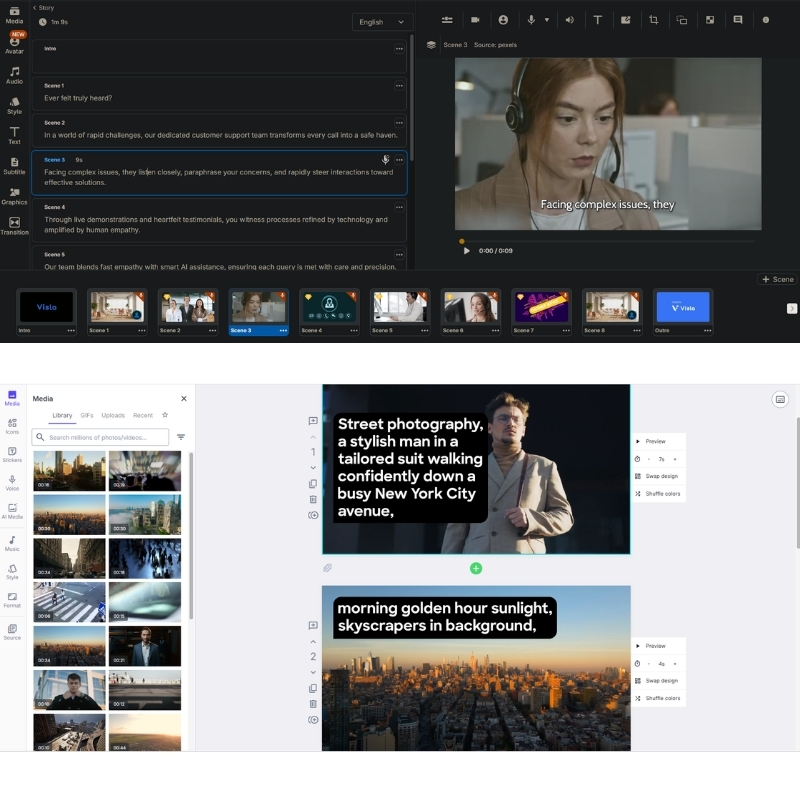
Lumen5 is king of URL-to-Video with intelligent scraping of headers and images building storyboard automatically. Pasted link to blog post, it parsed content intelligently for long-form repurposing. Visla shines with “Idea-to-Video” and Screen Recording letting me record screen and camera simultaneously then generates transcript with text-based editor. Lumen5 has zero recording capabilities focusing solely on assembling existing media assets with slide-based interface.
Editing & Stock Quality Comparison
Visla uses “Text-Based Editor” editing video by deleting text in transcript (similar to Descript) with killer feature automatically removing “ums” and “ahs” from recording. Relies on standard libraries (Storyblocks/Pexels) but AI often picks irrelevant B-roll requiring manual swaps. Lumen5 uses drag-and-drop slide-based interface feeling exactly like PowerPoint with partnership to Shutterstock and Getty Images 500M+ giving access to millions premium cinematic clips. AI much better at matching “mood” footage to abstract concepts making it undisputed winner for stock quality and brand polish.
Final Verdict: When to Choose Visla vs Lumen5 Based on Team Role?
After extensively testing both with November 2025 features, here is my final decisive advice for your specific situation based on job title and primary workflow needs.
✅ Choose Visla If
- HR & L&D Manager: Need onboarding video series for new hires and weekly CEO updates at $18-$59/month.
- Internal Comms: Screen recording, voice cloning (2,000 credits), text-based editor removing filler words.
- Budget-Conscious: Generous free tier (1,000 credits/month) and lower entry price than Lumen5 Pro.
- Team Collaboration: Workspace features, role-based permissions, feedback sharing for async communication.
✅ Choose Lumen5 If
- Content Marketer: Turn 50 blog posts into LinkedIn videos driving traffic at $15-$50 annual (50% OFF).
- Brand Awareness: URL-to-Video engine unmatched with 500M+ Shutterstock/Getty stock assets (Pro).
- Social Media: Slide-based storyboard producing “thumb-stopping” content 3x faster than timeline editing.
- Marketing Teams: 3 brand kits, custom fonts, Chat to Video AI co-pilot for consistent brand polish.
Frequently Asked Questions About Visla vs Lumen5 Comparison
Does Lumen5 have screen recording?
No. Lumen5 is strictly for assembling existing media assets with URL-to-Video and slide-based storyboard. If you need to record screen for tutorials, must use Visla with screen recording and text-based editor or tool like Loom for separate recording.
Is Visla free to use?
Yes, Visla has generous free plan including 1,000 credits/month (reset monthly) with unlimited recording and 50 minutes video publishing, though with watermarks and limited export resolution requiring Pro ($18/month) for full 1080p and no branding.
Which is better for YouTube Automation?
Visla generally better for YouTube with script-to-video capabilities and text-based editor suiting long-form narrative content better than Lumen5’s slide format prioritizing short-form social media like LinkedIn, Instagram, TikTok with 10-min max videos.
Can I upload my own voiceover to Lumen5?
Yes, upload own audio files with 2-150 min AI voiceover depending on plan tier, but Lumen5 does not offer “Voice Cloning” feature that Visla provides (2,000 credits one-time) for generating AI voiceovers sounding like you for authentic CEO updates.
Read More From Text-to Video Comparisons and Platform Reviews
If you are exploring other AI video tools for your business, check out our related deep-dive reviews and tutorials with detailed feature analysis.
- Visla Review: AI Video for Teams & Internal Comms
- Lumen5 Review: The Original AI Blog-to-Video Tool
- How to Use AI Videos for Corporate Training
- Best Text-to-Video Tools for 2025
last update : 05/12/2025
