
Fliki vs InVideo: Voice Quality or Visual Templates? (2025 Comparison)
Choosing between Fliki vs InVideo with November 2025 updates is often battle between audio perfection and visual flexibility. While both are powerful Text-to-Video Tools, they solve different problems for marketers and creators with distinct pricing models ($14-$44 Fliki vs $20-$60 InVideo). I have tested both platforms extensively from generating faceless YouTube channels with 2000+ voices to creating high-conversion social media ads with 4000+ templates.
The right choice depends entirely on your specific workflow and audience goals with voice-first automation (Fliki 2160-7200 mins/year) versus template-first customization (InVideo 60-unlimited exports/month). In this Text-to-Video comparison, we analyze their AI Voice Quality, Stock Media Libraries (InVideo 8M+ iStock vs Fliki millions premium), and Pricing Models to help you decide.
Table of Contents
Fliki vs InVideo: Quick Verdict and Core Differences with 2025 Updates
If you need quick answer with November 2025 capabilities, here is deal: Fliki is “Voice-first Creator” with 2000+ voices (1000+ ultra-realistic), while InVideo is “Template-first Creator” with 4000+ templates and 8M+ iStock access serving completely different workflows.
Fliki excels at turning scripts into videos with hyper-realistic AI voices across 75 languages and 100 dialects. Built for speed and simplicity producing 2160-7200 minutes/year depending on plan, perfect for content where narration carries value with automated scene-by-scene customization.
InVideo functions like “Canva of video” boasting massive 8M+ iStock library (Shutterstock integration) and 4000+ templates with full timeline editor for granular control. Superior for visually rich ads producing 60 exports/month (Plus) or unlimited (Max) with layer-based editing.
| Feature | Fliki | InVideo |
|---|---|---|
| Primary Strength | AI Voice Quality (2000+ Neural) | Visual Templates (4000+) & 8M+ iStock |
| Best For | YouTube Automation / Audio-First (2160-7200 mins/year) | Social Media Ads / Visual-First (60-unlimited exports) |
| Learning Curve | Very Low (Minutes) – Block-based editor | Medium (Timeline Editor) – Layer-based control |
| Pricing Model | Credit-based (Minutes/Year) $14-$44 Black Friday | Subscription (Exports/Month) $20-$60 |
My Verdict: Choose Fliki if you prioritize voiceover quality (2000+ voices, 75 languages) and speed for long-form content producing 180-600 mins/month. Choose InVideo if you prioritize visual customization (4000+ templates) and premium stock footage (8M+ iStock) for ads with 60-unlimited exports/month.
Try Fliki Free Try InVideo Free
(Disclosure: If you purchase through links on this page, we may earn a small commission at no extra cost to you.)
Audio vs. Visuals: Comparing 2000+ Voices Engine vs. 4000+ Templates Library
This is most critical section for your decision with November 2025 capabilities. We must compare “Voice Engine” of Fliki (2000+ voices, 75 languages) against “Visual Engine” of InVideo (4000+ templates, 8M+ iStock) to see which fits your needs.
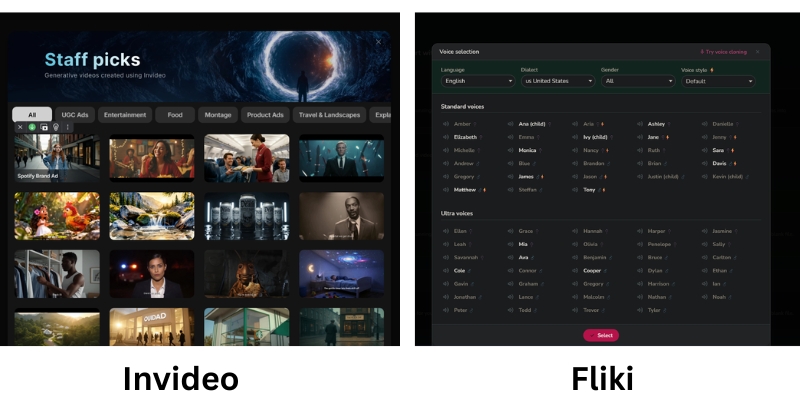
Fliki’s Neural Voices (The Audio Engine):
Fliki’s hyper-realistic AI voices arguably best in market with 2000+ voices (1000+ ultra-realistic, 350+ studio-quality Premium) across 75 languages and 100 dialects. I often use them for “faceless” channels because they sound frighteningly human with emotional tones like “Cheery,” “Sad,” or “Terrified” crucial for storytelling retention on YouTube.
Voice cloning allows creating custom voices (multiple cloning Premium), translating content to 80+ languages instantly for global scaling. For educational content or audio-first videos, bad audio kills retention faster than bad visuals—Fliki solves this with personalized avatars (photo avatars Premium) generating AI video clips.
InVideo’s Stock & Templates (The Visual Engine):
InVideo dominates when you need “eye candy” with integration to 8M+ iStock media giving access to premium footage that usually costs hundreds dollars separately. Unlike Fliki’s standard stock (millions premium assets), InVideo pulls high-resolution clips from Getty/iStock directly inside editor making game-changer for professional ads.
With 4000+ templates covering every social format (Real Estate, Fitness, Tech), you are never starting from scratch with drag-and-drop canvas and layer-based timeline editor. For Instagram Reels or Facebook Ads needing 3 seconds to grab attention, InVideo’s superior visual assets ensure stopping scroll with custom fonts, brand kits, and reseller rights.
Pricing & ROI Comparison 2025: Credit-Based Minutes vs. Export-Based Subscription
Pricing structures with November 2025 updates fundamentally different. Fliki sells “time” (minutes/year credit-based), while InVideo sells “access” (exports/month subscription) serving distinct usage patterns and budget priorities.
| Model | Fliki (Credit Based) | InVideo (User Based) |
|---|---|---|
| Standard/Plus | $28 ($14 Black Friday) – 2160 mins/year, 1000 voices, 15-min max | $20 ($25 monthly) – 60 exports, 4000+ templates, 15-min max |
| Premium/Max | $88 ($44 Black Friday) – 7200 mins/year, 2000+ voices, 40-min max | $60 – Unlimited HD, 8M+ iStock access, 40-min max |
| Hidden Cost | Edits consume credits (re-render burns minutes) | Premium stock included (saves $hundreds on separate iStock) |
| Ideal For | Fixed output (180-600 mins/month) voice-first content | Heavy daily usage / Agencies (60-unlimited exports/month) |
| Link | View Fliki | View InVideo |
Fliki (Credit-Based System November 2025):
FREE: 5 credits/month, watermark, basic features. Standard: $28/month ($14 Black Friday 50% OFF) – 2160 minutes/year, 1000 voices (150 ultra-realistic), 1080p, 15-min max, millions premium assets, voice cloning, commercial rights.
Premium: $88/month ($44 Black Friday) – 7200 minutes/year, 2000+ voices (1000+ ultra-realistic, 350+ studio-quality), 40-min max, multiple brand kits, all AI avatars, photo avatars, generate AI video clips.
Enterprise: Custom – personalized avatars, API access, professional voice cloning, dedicated account manager.
InVideo (User-Based Subscription November 2025):
Plus: $20/month ($25 monthly, $20 annual) – 60 exports, 4000+ templates, 1M+ images/videos, 15-min max, automated text-to-speech, reseller rights. Max: $60/month – Unlimited HD exports, full 8M+ iStock access, 40-min max, unlimited team members, 24/7 LIVE support.
Real value lies in included iStock media—buying clips separately costs hundreds making subscription steal for agencies or heavy users generating daily content needing premium assets.
ROI Analysis:
Fliki best for creators publishing fixed amount content per month (one video/week = 180 mins Standard). Warning: editing and re-rendering same video often burns through monthly credits quickly.
InVideo operates like traditional SaaS with higher tiers offering “Unlimited” exports huge for agencies producing 60+ videos/month with included iStock media saving $hundreds on separate stock subscriptions justifying $60 premium pricing.
Best Use Cases: YouTube Voice Automation vs. Social Media Visual Ads
To help you decide with November 2025 workflows, I have broken down specific personas that should choose each tool based on extensive testing serving different content strategies and audience engagement patterns.
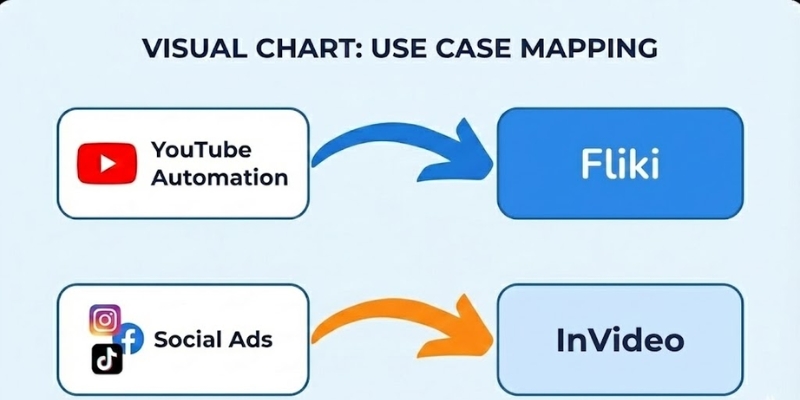
✅ Choose Fliki (Content Creator)
- Faceless YouTube: Top 10 lists, documentaries, explainers where script is king producing 180-600 mins/month.
- Podcasts/Audiobooks: Superior text-to-speech (2000+ voices, 75 languages) repurposing written content into high-quality audio.
- Educational Content: Teachers prefer Fliki because information delivery more important than flashy transitions with voice cloning.
- Multilingual Scaling: Translate content to 80+ languages instantly with 100+ dialects for global audience reach.
✅ Choose InVideo (Marketer)
- Social Media Ads: TikToks, Instagram Reels, Facebook Ads needing 3-second attention grab with dynamic movement (4000+ templates).
- Brand Promos: Videos requiring specific brand colors, logos, custom fonts easier with Brand Kit and 8M+ iStock access.
- Client Work: Freelancers making videos for local businesses where templates look more “high production” professional.
- Agency Volume: Unlimited exports (Max $60) perfect for producing 60+ videos/month with full iStock integration.
Frequently Asked Questions About Fliki vs InVideo Comparison
Which tool is better for beginners?
Fliki is faster and easier to learn with block-based editor feeling like PowerPoint (minutes to master). InVideo is more familiar if you have used tools like Canva before but has steeper learning curve with timeline editor requiring understanding layers and transitions.
Can I upload my own voiceover?
Yes, both allow this with audio file uploads. However, only Fliki allows creating Voice Clone of your own voice (multiple cloning Premium) for automation producing consistent brand voice across unlimited videos without recording every time.
Do they have copyright-free music?
Yes, both platforms provide extensive libraries of royalty-free audio tracks to use in your videos without strikes. Fliki includes millions premium music assets (Standard+), InVideo includes automated text-to-speech and background music library with 4000+ templates.
Is the content monetizable on YouTube?
Yes, provided you add value with commercial rights (Fliki Standard+, InVideo Plus+). YouTube may demonetize raw stock footage, so ensure you edit and add unique narration with Fliki’s voice cloning or InVideo’s custom text overlays making content transformative.
Read More From Text-to-Video Comparisons and Platform Reviews
If you are still exploring the best generative video tools, check out our other detailed comparisons and reviews with feature analysis.
- Fliki Review: AI Voice & Video Creation Suite
- InVideo Review: AI Video Ads with 4000+ Templates
- Pictory vs InVideo: Best AI Text-to-Video Tool?
last update : 05/12/2025
