
How to Use Pictory: The Ultimate Step-by-Step Guide for Beginners (2025)
Pictory transforms blog posts and scripts into professional videos in under 20 minutes using AI-powered automation. This cloud-based platform eliminates manual editing by automatically matching text to 18M+ Getty Images and unlimited Storyblocks footage while generating captions and voiceovers.
The tool serves marketers, bloggers, and content creators who need to produce 30-60 videos monthly without video editing expertise. With November 2025 updates including Text to Image generation, Pictory offers four distinct workflows for different content types.
Table of Contents
Understanding Pictory’s Four Video Creation Workflows
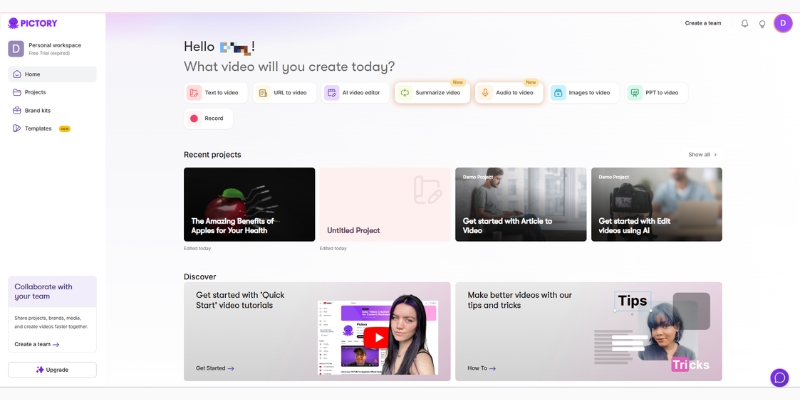
Pictory provides four specialized workflows accessed through color-coded tiles on the dashboard. Each workflow targets specific source material and use cases.
Script to Video converts pre-written scripts into videos scene-by-scene. The AI matches keywords to stock footage from 18M+ Getty Images while adding 34+ AI voices (Starter) or 120 minutes of premium 11Labs voices (Professional).
Article to Video analyzes blog post URLs using NLP to extract key sentences. The system then builds a video storyboard with unlimited Storyblocks access and auto-generated captions for social media distribution.
Edit Videos Using Text transcribes uploaded video files up to 1GB and 15 minutes long. Users edit footage by deleting transcript text, with the tool automatically removing corresponding video segments and filler words like “um” and “ah”.
Visuals to Video creates slideshows from uploaded images or short clips. The drag-and-drop interface suits users with existing visual assets who need quick assembly with music and transitions.
Blog-to-Video Method: URL Scraping Workflow
The Article to Video workflow extracts content directly from published blog posts. This method suits content marketers repurposing existing articles for YouTube or LinkedIn distribution.
Input and Analysis Steps
Click the “Article to Video” tile and paste the blog post URL into the input field. Pictory analyzes the HTML structure to extract text, with plans offering 600-3600 transcription minutes depending on subscription tier.
The AI highlights “key sentences” using semantic analysis to create a condensed narrative. Review the suggested highlights on the right panel while viewing source text on the left. Manual adjustment ensures logical flow and removes irrelevant sections.
Storyboard Generation Process
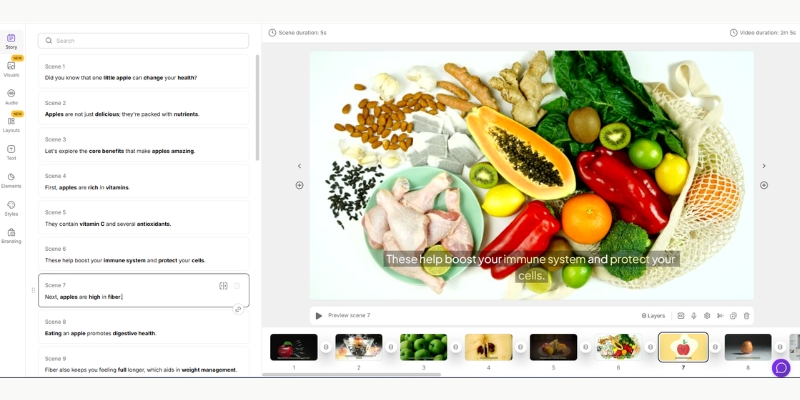
After confirmation, the NLP engine matches keywords to stock footage from unlimited Storyblocks and 18M+ Getty Images. Face and object recognition improves scene detection accuracy for character-based content.
Processing completes in 10-20 seconds using cloud servers. Review each generated scene and replace mismatched clips using the “Visuals” tab search function. The AI sometimes misinterprets context—”Apple” might show fruit instead of technology imagery.
Text to Image Enhancement
The November 23, 2025 Text to Image feature generates custom visuals from text prompts. Instead of searching stock libraries, describe needed visuals (“professional woman presenting quarterly data”) and receive unique branded images in seconds.
This GPT-powered tool eliminates dependency on generic stock photos. Custom visuals align precisely with brand aesthetics and script requirements, creating differentiated content for competitive markets.
Try Blog-to-Video Free(Disclosure: Purchases through this link may earn a commission at no extra cost to you.)
Script-to-Video Production for Original Content
The Script to Video workflow serves YouTubers and advertisers creating original scripted content. This method provides maximum control over narrative structure and pacing.
Script Formatting Requirements
Paste the finished script into the editor with strategic line breaks. The AI treats each line break as a new scene transition. Long paragraphs without breaks create static scenes with single footage clips playing too long.
Format scripts with 1-2 sentences per line for optimal scene variety. Short sentence structure improves visual pacing and maintains viewer engagement across the video timeline.
Template and Aspect Ratio Selection
Choose templates that determine font styles, transition animations, and caption positioning. Select aspect ratios based on distribution platform:
– 16:9 for YouTube, Vimeo, and website embedding – 9:16 for TikTok, Instagram Reels, and YouTube Shorts – 1:1 for Instagram feed posts and FacebookVisual Generation and Customization
The AI pulls stock footage from 18M+ Getty Images with automatic keyword highlighting in captions. Bold text emphasizes key concepts for viewers watching without sound.
Use the Text to Image feature for branded custom visuals. Prompt “modern office with diverse team collaborating” generates unique imagery matching specific brand guidelines instead of generic business stock photos.
Text-Based Video Editing for Long-Form Repurposing
The Edit Videos Using Text workflow functions like a word processor for video files. This method suits podcasters, webinar hosts, and interview creators repurposing long recordings.
Upload and Transcription
Upload MP4, MOV, or AVI files up to 1GB and 15 minutes long (Starter plan). Pictory automatically transcribes audio into editable text, creating a document view of the video timeline.
Transcription accuracy depends on audio quality. Clear recordings with minimal background noise produce cleaner transcripts requiring less manual correction.
Filler Word Removal
Click “Remove Filler Words” in the top menu to identify and eliminate “um,” “ah,” and verbal pauses. The tool automatically cuts corresponding video segments, tightening pacing without manual timeline editing.
This feature saves hours compared to traditional video editors. Manual filler word removal in Adobe Premiere or Final Cut Pro requires frame-by-frame cutting and audio smoothing.
Creating Short-Form Clips
Extract 30-60 second highlights from hour-long content for social distribution. Highlight desired sentences in the transcript, then select “Download Video” → “Video Clips” to export only selected segments.
This workflow converts podcast episodes into multiple TikTok clips or Instagram Reels. Single long-form content yields 10-15 short-form assets for daily social posting schedules.
Audio and Branding Customization Options
The editor sidebar provides tools for voiceovers, music, and brand consistency across video projects. Professional polish requires attention to audio mixing and visual identity.
AI Voice Selection
Access the “Audio” tab to choose from 34+ standard AI voices (Starter) or 120 minutes of premium 11Labs voices (Professional). 11Labs voices offer superior naturalness with human-like intonation across seven languages.
Upload pre-recorded voiceovers as MP3 or WAV files. The “Auto-sync” feature aligns spoken words with text scenes, eliminating manual timing adjustments.
Background Music Volume
Pictory applies background music by default at high volumes. Navigate to audio settings and reduce “Background Music Volume” to 10-15% to prevent overpowering voiceovers.
Proper audio mixing ensures narration clarity. Viewers abandon videos when background music drowns out spoken content, particularly in educational or instructional contexts.
Brand Kit Implementation
Professional tier subscribers access 5 brand kits for consistent visual identity. Upload logos, define color palettes, and select custom fonts that appear across all video projects.
Logos position in video corners with adjustable size and opacity. Custom intro and outro scenes maintain channel consistency for YouTube series or company communication templates.
Pricing Tiers Offers
Pictory operates on subscription-based pricing with annual payment discounts.
| Feature | Starter | Professional | Teams |
|---|---|---|---|
| Annual Price | $14/month ($168 yearly) | $24/month ($288 yearly) | $99/month ($1,188 yearly) |
| Video Exports | 30/month, 10-min max | 60/month, 20-min max | 90/month, 20-min max |
| AI Voices | 34+ standard voices | 120 min 11Labs premium | 120 min 11Labs premium |
| Brand Kits | 1 kit | 5 kits | 10 kits |
| Stock Access | Storyblocks unlimited | 18M+ Getty Images | 18M+ Getty Images |
The free trial allows 3 video projects up to 10 minutes each with watermarks. Paid plans remove branding and unlock higher resolutions.
Is Pictory Worth Learning?
Pictory ranks among the easiest Text-to video tool for beginners. The text-based editing approach requires minimal technical knowledge while delivering professional results suitable for business use.
Start Free TrialFrequently Asked Questions About Pictory
What is the Text to Image feature?
Launched November 23, 2025, Text to Image generates custom visuals from text prompts in seconds. This GPT-powered tool creates photorealistic images matching specific requirements instead of searching generic stock libraries.
Does Pictory work without video editing experience?
Yes. The platform uses text-based editing requiring no timeline manipulation or keyframe knowledge. Users who can edit Word documents can operate Pictory’s drag-and-drop interface.
Are generated videos monetizable on YouTube?
Stock footage from Storyblocks and Getty Images carries commercial licenses for monetized content. Custom Text to Image visuals also permit monetization. Verify specific licensing terms for business use cases.
How long does video rendering take?
Cloud processing renders 5-minute videos in under 5 minutes depending on server load. Users can close the browser tab and receive email notifications when exports complete.
Related Text-to-Video Guides
- Pictory vs InVideo: Best AI Text-to-Video Tool?
- Lumen5 vs Pictory: The Original Blog-to-Video Battle
- Pictory AI Review: The Ultimate Blog-to-Video Tool?
last update : 07/12/2025
