
InVideo Pricing 2025: Is the Plus Plan Worth It? (Real Cost Analysis)
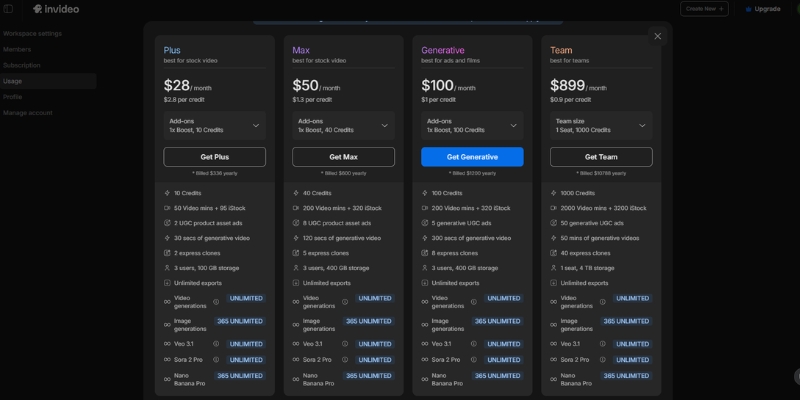
InVideo pricing structures separate into two products: InVideo AI ($20-$60 monthly) for automated text-to-video generation and InVideo Studio ($20-$60 monthly) for template-based timeline editing. The Plus plan costs $20/month annual ($25 monthly) with 50 AI minutes and 80 iStock media credits monthly.
This AI Video Generator cost analysis covers November 2025 updates. The hidden limits on iStock credits and AI generation minutes determine real ROI beyond advertised “unlimited exports.”
Table of Contents
InVideo AI vs Studio Pricing Models November 2025
InVideo operates two distinct subscription products targeting different workflows. InVideo AI automates video creation from text prompts using GPT-4.1, while InVideo Studio provides 4000+ templates with manual timeline editing capabilities.
InVideo AI Pricing costs $25/month ($20 annual) for Plus or $60/month ($48 annual) for Max. The system generates complete videos with visuals, music, and voiceovers automatically consuming 50-200 AI generation minutes monthly depending on plan tier.
InVideo Studio Pricing costs $30/month for Business or $60/month for Unlimited. Users access 4000+ templates with 8M+ iStock library producing 60-unlimited exports monthly with manual customization and timeline editing control.
This guide focuses on InVideo AI pricing for automated text-to-video generation. Users seeking timeline editing should review Pictory vs InVideo Studio comparisons targeting template-based workflows.
(Disclosure: Purchases through this link may earn a commission at no extra cost to you.)
InVideo AI Plans: Free vs Plus vs Max Tier Breakdown
Three subscription tiers offer escalating AI generation limits and iStock media access. Annual billing provides 20% savings compared to monthly payments across all paid plans.
Free Plan Limitations
The free tier includes severe restrictions unsuitable for commercial publishing:
– 10 AI generation minutes weekly (40 minutes monthly maximum) – InVideo watermark on all exports preventing professional use – 4 exports weekly limiting production volume – Standard 3M+ media library only (no premium iStock access)This plan functions as interface testing environment only. Watermarked videos damage brand credibility prohibiting YouTube monetization or client deliverables.
Plus Plan Features ($20/Month Annual)
The standard tier suits solopreneurs and content creators producing 10-15 videos monthly:
– 50 AI generation minutest monthly quota – 80 iStock media creditst accessing 8M+ premium stock library – Unlimited exportst at 1080p resolution without watermarks – 2 voice clonest for consistent brand narration – 100GB storaget for custom brand assets and footage – Chat supportt for technical troubleshootingThe 80 iStock credits typically produce 10-15 high-quality videos monthly assuming 5-8 premium clips per project. Exceeding quotas reverts to standard 3M+ library or requires credit top-ups.
Max Plan Features ($48/Month Annual)
The premium tier targets agencies and faceless channel operators producing daily content:
– 200 AI generation minutest monthly (4x Plus allocation) – 320 iStock media creditst supporting 40-50 premium videos monthly – Unlimited exportst at 1080p resolution – 5 voice clonest for multi-brand management – 400GB storaget for extensive media libraries – Priority chat support with faster response timesThe 320 iStock credits eliminate bottlenecks for high-volume production. Users generating 2+ videos daily require Max tier avoiding mid-month quota exhaustion.
| Feature | Plus ($20/mo) | Max ($48/mo) |
|---|---|---|
| AI Generation | 50 mins/month | 200 mins/month |
| iStock Media | 80 credits/month | 320 credits/month |
| Voice Clones | 2 clones | 5 clones |
| Storage | 100 GB | 400 GB |
| Watermark | None | None |
| Action | Try Plus | Try Max |
Hidden Limits: iStock Credits and AI Minutes Consumption
“Unlimited exports” marketing obscures the real production constraints. Two quota systems control actual monthly video output: iStock media credits and AI generation minutes.
iStock Media Credit System
Premium stock footage requires credits separate from export limits. Plus plan provides 80 monthly credits; Max provides 320 credits.
Each premium video clip or image consumes 1 credit. Professional videos typically require 5-8 premium assets per project yielding 10-15 videos (Plus) or 40-50 videos (Max) monthly before quota exhaustion.
Exceeding quotas forces downgrade to standard 3M+ media library lacking professional polish. Alternative options include purchasing credit top-ups at additional cost or waiting for monthly renewal.
AI Generation Minutes Depletion
AI minutes deplete whenever generating or regenerating video content. Creating 3-minute video consumes 3 minutes quota. Regenerating same project twice for revisions consumes additional 6 minutes.
Plus plan allocation (50 minutes) supports approximately 15-20 videos monthly assuming minimal regenerations. Max plan (200 minutes) accommodates 60-80 videos with revision buffer for quality control iterations.
Monitor dashboard usage meters avoiding unexpected quota exhaustion mid-project. Generative credits for custom AI images operate as separate pool from video generation minutes.
InVideo Cost vs Competitors ROI Analysis
Comparative pricing against Pictory and Canva reveals value positioning. InVideo costs $20-$48 monthly versus Pictory $19-$29 or Canva Pro $12.99 with different feature priorities.
vs Pictory Pricing:
Pictory Starter costs $19/month with 2160 minutes/year text-based editing. InVideo Plus costs $20/month with 600 minutes/year AI generation. Pictory suits blog-to-video repurposing; InVideo excels at prompt-to-video creation from scratch.
vs Canva Cost:
Canva Pro costs $12.99/month with basic Magic Media video generation. InVideo provides superior automation using GPT-4.1 versus Canva’s manual drag-and-drop workflow requiring 5+ hours editing time per video.
InVideo ROI calculation: $20 monthly subscription saves 20+ editing hours valued at $50/hour freelance rates yielding $1,000 monthly time savings. The 50:1 cost-benefit ratio justifies subscription for professional content creators producing 10+ videos monthly.
Which InVideo Plan Fits Your Production Volume?
Subscription selection depends on monthly video output and quality requirements. Three user profiles match distinct pricing tiers based on production frequency and iStock dependency.
Choose Plus Plan ($20/mo) If:
- Producing 10-15 videos monthly for YouTube or social media
- Solo content creator or small business owner
- Requiring watermark removal for professional branding
- Using 80 iStock credits sufficient for weekly video cadence
- Budget-conscious needing basic voice cloning (2 clones)
Choose Max Plan ($48/mo) If:
- Agency managing multiple client accounts requiring 40-50 videos monthly
- Faceless channel operator publishing daily content
- Needing 320 iStock credits for high-volume production
- Requiring 5 voice clones for multi-brand management
- 400GB storage essential for extensive media libraries
Free plan suitable for interface testing only due to watermark restrictions. Upgrade to Plus minimum for commercial publishing rights and professional output quality.
Cost-Effective Strategy
Upgrade to Max if producing 20+ videos monthly and exhausting 80 iStock credits by mid-month. The $28/month cost difference ($48 vs $20) justifies 4x AI minutes and 4x iStock access for high-volume workflows.
Claim Offer NowCommon Questions About InVideo Pricing
Does Plus plan remove watermarks?
Yes. All paid plans (Plus and Max) remove InVideo branding from exports. Free plan maintains watermarks on all videos preventing commercial use and YouTube monetization eligibility.
What happens after exhausting iStock credits?
Videos revert to standard 3M+ media library lacking premium polish. Options include purchasing credit top-ups at additional cost, waiting for monthly renewal, or upgrading to Max tier with 320 monthly credits.
Can subscriptions be canceled anytime?
Yes. Cancel subscriptions retaining access until current billing period ends. Annual plans provide full-year access regardless of cancellation timing without prorated refunds.
Are lifetime deals available?
No. InVideo discontinued AppSumo lifetime deals transitioning to standard SaaS subscription model.
Related Text-to-Video Pricing Guides
- How to Use InVideo: Step-by-Step Tutorial 2025
- Pictory Pricing Explained: Is It Worth It?
- Best AI Video Generators 2025 Cost Comparison
last update : 07/12/2025
