
Best AI Video Editing Software for 2025: Top 5 Tools Ranked & Reviewed
AI video editing software transforms production workflows through automated transcription, silence removal, subtitle generation, and intelligent scene detection reducing editing time 60-80% versus traditional timeline-based editors. Modern platforms address content creator burnout enabling daily video publishing without dedicated production teams or expensive editing expertise.
This AI Video Editing ranking evaluates 2025’s top five platforms across efficiency metrics, feature accuracy, and pricing structures covering Descript text-based editing ($24/month Creator), VEED.io social automation ($19 Lite), InVideo AI prompt-to-video generation ($20), Filmora desktop hybrid ($50 annual), and CapCut free viral templates with ByteDance AI integration.
Table of Contents
Top AI Video Editors 2025 Comparative Rankings
Five platforms dominate different editing workflows from podcast production to viral social content. Selection criteria emphasize automation depth, processing speed, and specialized feature sets targeting specific creator profiles.
| Platform | Primary Strength | Key AI Feature | Starting Price |
|---|---|---|---|
| 1. Descript | Podcast/interview editing | Text-based timeline editing | $24/month (Creator) |
| 2. VEED.io | Social media marketing | Auto-subtitles + eye contact | $19/month (Lite) |
| 3. InVideo AI | Faceless YouTube automation | Prompt-to-video generation | $20/month |
| 4. Filmora | Desktop creative editing | AI Copilot + Smart Cutout | $50/year (perpetual option) |
| 5. CapCut | Viral content creation | Trending templates + free tier | Free (Pro $8/month) |
(Disclosure: Purchases through this link may earn a commission at no extra cost to you.)
Descript: Text-Based Editing for Podcast Producers
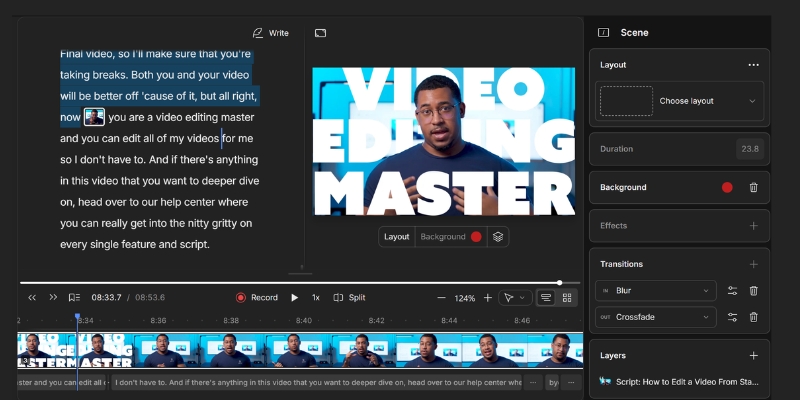
Descript revolutionizes dialogue editing through document-style workflow treating video timelines as editable transcripts. The platform targets podcasters, interview creators, and talking-head content producers requiring rapid rough-cut assembly without traditional timeline complexity.
Core Descript Features December 2025
Text-based editing capabilities redefine efficiency:
- Transcript timeline mapping: Delete transcript sentences automatically removing corresponding video segments
- Studio Sound: AI noise removal eliminating background chatter, HVAC hum, and room reverb single-click
- Filler word removal: Automated “um,” “uh,” “like” detection and deletion across entire projects
- Overdub voice cloning: Type text corrections generating synthetic speech matching original speaker tone
- Eye contact correction: Real-time pupil redirection toward camera lens for teleprompter reading
- Green screen AI: Subject isolation without physical green backgrounds
- 30 transcription hours monthly: Creator plan processes extensive podcast libraries
- 4K export: Watermark-free professional quality outputs
Workflow Time Savings Analysis
Traditional timeline editing requires manual waveform review identifying cut points consuming 45-60 minutes per 30-minute podcast episode. Text-based editing reduces rough cut assembly to 10-15 minutes through transcript manipulation achieving 60-70% time reduction.
Strengths
- Revolutionary text-based editing workflow
- Industry-leading AI noise removal (Studio Sound)
- Automated filler word detection and removal
- Voice cloning for post-production corrections
Limitations
- Limited visual effects versus Premiere Pro
- Resource-intensive requiring 16GB+ RAM
- Weak multi-layer compositing capabilities
VEED.io: Cloud-Based Social Media Video Automation
VEED.io operates as browser-based video editor eliminating software installation requirements enabling editing from Chromebooks, tablets, or shared computers. The platform specializes in social media content optimization through automated subtitle generation, aspect ratio templates, and viral visual effects.
VEED.io Social Optimization Features
Cloud-native capabilities targeting platform-specific requirements:
- Auto-subtitles: 98% accuracy transcription with pre-styled caption templates (Karaoke, MrBeast, Hormozi styles)
- 12 hours monthly transcription: Lite plan supporting consistent podcast/webinar repurposing
- Eye contact AI: Pupil redirection correcting downward script-reading gaze
- Magic Cut: Automated silence removal and best-take selection from long recordings
- Progress bars and emojis: Massive stock library for attention-retention viral editing
- 1080p export (Lite): 4K unlocked on Pro $49/month tier
- Auto-resize: Single-click reformatting between 16:9, 9:16, 1:1 aspect ratios
- Brand kit: Centralized logo, color, and font storage for consistent styling
Deployment Advantages
Browser-based architecture eliminates cross-platform compatibility issues. Teams collaborate without software version mismatches enabling remote editors accessing shared projects from any device with internet connection and modern browser (Chrome, Firefox, Safari).

Strengths
- Zero installation browser-based operation
- Excellent auto-subtitle accuracy and styling
- Massive stock asset library for viral editing
- Beginner-friendly drag-and-drop interface
Limitations
- Free tier includes watermark
- Export speed depends on internet bandwidth
- Limited offline editing capabilities
InVideo AI: Prompt-to-Video Content Generation
InVideo AI operates as generative video platform creating complete productions from text prompts eliminating manual editing entirely. The system targets faceless YouTube channels, explainer video producers, and high-volume content marketers requiring rapid asset creation without shooting original footage.
Generative Workflow Capabilities
Prompt-based automation generating finished videos:
- Script generation: AI writes hook, body, and CTA from topic keywords
- Stock footage matching: Automatic video clip selection from 10M+ iStock/Storyblocks library
- AI voiceover synthesis: 40+ neural voices with emotional inflection and pacing control
- Automated editing: Scene transitions, music synchronization, and timing optimization
- Multi-language support: Generate content in 50+ languages without translation services
- Text-to-video conversion: Blog post URLs transform into narrated video summaries
Production Volume Economics
Traditional video production costs $200-500 per video hiring freelance editors and voice actors. InVideo AI produces comparable quality at $20/month supporting 50+ monthly videos yielding $10,000+ cost savings for high-volume creators operating faceless educational or affiliate marketing channels.
Generative Limitations
InVideo AI excels at informational and listicle content but struggles with nuanced storytelling requiring specific visual sequences. The platform optimizes for speed over creative control suitable for content marketing volume strategies not cinematic productions.
Filmora: Desktop Hybrid with AI Copilot
Wondershare Filmora bridges simplified editing and professional features through desktop application leveraging GPU acceleration for real-time preview and effects rendering. The platform targets creators transitioning from mobile apps seeking timeline control with AI workflow assistance.
Filmora AI Enhancement Features
Desktop-class capabilities with intelligent automation:
- AI Copilot chatbot: Natural language interface guides feature discovery and applies effects
- Smart Cutout: Background removal and object isolation without green screens
- Silence detection: Automated pause removal integrated into traditional timeline workflow
- Auto reframe: Intelligent cropping maintaining subject focus across aspect ratio changes
- Motion tracking: Text and graphics follow moving subjects automatically
- Color correction AI: One-click LUT application and exposure balancing
- Perpetual license option: One-time $80 purchase versus subscription models
Hardware Performance Requirements
Desktop software requires dedicated GPU (NVIDIA GTX 1650+ or AMD equivalent) for real-time 4K preview and effects processing. Hardware acceleration provides smoother editing experience versus browser-based platforms dependent on cloud rendering queues and internet speeds.
Hybrid Workflow Positioning
Filmora serves creators outgrowing mobile apps but avoiding Premiere Pro complexity. The AI Copilot reduces learning curve while timeline provides granular control unavailable in fully-automated platforms enabling creative growth without overwhelming interface density.
CapCut: Free Viral Content Editor with ByteDance AI
CapCut dominates TikTok creator workflows through zero-cost tier providing professional features and trending templates. ByteDance ownership enables direct platform integration and early access to experimental AI capabilities developed for Douyin/TikTok content optimization.
CapCut Free Tier Capabilities
No-cost access to advanced features:
- Auto-captions: Multi-language transcription with zero monthly limits (normally $20+ value)
- Trending templates: Viral effect suggestions based on current TikTok algorithm preferences
- Transcript-based editing: Text timeline manipulation similar to Descript workflow
- AI voice enhance: Background noise removal and voice isolation
- Relight effects: Post-production lighting adjustments without additional equipment
- AI dubbing: Voice translation preserving original speaker tone and cadence
- Body tracking effects: Visual elements follow dancer or athlete movements automatically
- Cloud sync: Projects accessible across mobile and desktop versions
ByteDance Technology Integration
Parent company research models (OmniHuman 1.5 avatars, Seedance scene generation, Doubao language processing) deploy through CapCut enabling free access to cutting-edge generative AI unavailable on competing platforms. The integration provides consumer-facing testing ground for experimental features before broader TikTok rollout.
Strengths
- Completely free tier with professional features
- Seamless TikTok integration and export
- Massive trending template library
- Advanced keyframing and curves available
Limitations
- Privacy concerns regarding data collection
- Desktop version UI less polished than mobile
- Limited third-party plugin ecosystem
AI Feature Technology Breakdown
Understanding automation mechanisms clarifies capability distinctions between platforms. Four core technologies power modern AI video editing workflows.
Natural Language Processing Transcription
Speech-to-text algorithms convert audio into timestamped text enabling document-style editing. Platforms map transcript words to video frames allowing deletion of text automatically removing corresponding visual segments. Accuracy ranges 95-98% depending on audio quality and accent recognition model training.
Computer Vision Subject Detection
Object recognition identifies faces, bodies, and foreground subjects enabling automated background removal, eye contact correction, and motion tracking. Neural networks trained on millions of images recognize patterns distinguishing subjects from environments without manual masking.
Audio Waveform Analysis
Silence detection analyzes decibel levels identifying pauses between speech segments. Algorithms detect sustained low-amplitude sections flagging removal opportunities tightening pacing without manual timeline scrubbing. Threshold customization prevents cutting natural speech rhythm pauses.
Generative AI Synthesis
Text-to-speech and image generation models create original assets from text prompts. Language models write scripts matching topic parameters while diffusion models generate unique visuals eliminating stock footage dependency. Quality varies significantly between platforms based on underlying model sophistication.
Platform Selection Decision Framework
Optimal editor choice depends on content type, production volume, and technical expertise. Three primary factors determine best-fit platform beyond feature lists and pricing.
Content Format Specialization
Matching platform to primary content type:
- Podcasts/interviews: Descript text-based workflow eliminates timeline complexity
- Social media clips: VEED.io and CapCut optimize vertical video and trending templates
- Faceless educational: InVideo AI automates entire production from prompts
- Creative storytelling: Filmora provides timeline control with AI assistance
Budget and ROI Calculation
Free tiers (CapCut) suit beginners testing workflows before paid commitment. Subscription costs ($19-50 monthly) justify through time savings (10-20 hours monthly) worth $300-1000 at $30/hour editing rates. Annual billing provides 15-25% discount versus monthly payments.
Platform Architecture Preference
Cloud-based editors (VEED.io) enable device-agnostic editing but require consistent internet. Desktop applications (Filmora, CapCut Desktop) leverage GPU acceleration providing smoother real-time preview but limit portability to specific computers.
Common Questions About AI Video Editing Platforms
Can AI completely automate video editing?
Generative platforms like InVideo AI produce complete videos from prompts suitable for informational content. Creative storytelling requiring specific shot sequences still demands human editorial direction though AI handles technical execution (cuts, transitions, effects).
Do AI editors match Premiere Pro quality?
Speed and automation exceed traditional editors for dialogue-heavy content. Complex color grading, multi-layer compositing, and broadcast-quality audio mixing remain superior in professional software like Premiere Pro or DaVinci Resolve requiring manual expertise.
Which platform best serves complete beginners?
CapCut and VEED.io provide lowest learning curves through drag-and-drop interfaces and pre-made templates. Both platforms eliminate timeline complexity common in traditional editors enabling immediate content creation without tutorial dependency.
Does AI editing affect output quality?
Cloud platforms may compress video during processing optimizing upload speeds over maximum quality. Desktop applications maintain higher bitrates but require manual export settings verification. Always confirm 1080p or 4K output resolution before final rendering.
Related AI Video Production Guides
- Descript Tutorial: Text-Based Editing Workflow
- VEED vs Descript: Social Media vs Podcast Editing
- Best AI Video Generators: Complete Platform Comparison
last update : 08/12/2025
