
How to Use Kaiber AI: The Ultimate Guide to Creating Audio-Reactive Music Videos (2025)
If you have been wondering how to use Kaiber to create stunning, viral-worthy visuals, you are in the right place. As creatives, we know the struggle of needing high-end animation without a Hollywood budget.
Kaiber has emerged as a powerhouse in the Generative AI space, specifically for its ability to sync visuals directly to audio beats. With the launch of Superstudio in late 2024, it is no longer just a tool—it is an entire creative ecosystem integrating multiple AI models.
In this battle-tested guide, we will move beyond basic features. We will dive deep into creating full Audio-Reactive music videos, mastering the new Superstudio interface, and optimizing prompts for professional results.
Table of Contents
What is Kaiber AI and Superstudio? The Evolution of Creative AI Platforms
Kaiber is a generative AI video platform designed to transform your ideas into animated visual stories. Unlike standard editors, it generates new frames based on text prompts, images, and audio inputs using advanced diffusion models.
In October 2024, Kaiber launched Superstudio—a revolutionary infinite canvas workspace that integrates multiple best-in-class AI models including Luma, Veo, Kling, Minimax, Mochi, and Runway. This positions Kaiber as a unified creative platform rather than a single-model tool.
Its primary strength lies in its Audio-Reactive engine. While other tools focus on realism, Kaiber excels at artistic, stylized interpretations that pulse and evolve dynamically with your music—making it the go-to choice for musicians and visual artists.
We have tested dozens of AI video generators, and Kaiber stands out for audio-visual synchronization. It solves the massive pain point of creating engaging music visualizers affordably and quickly.
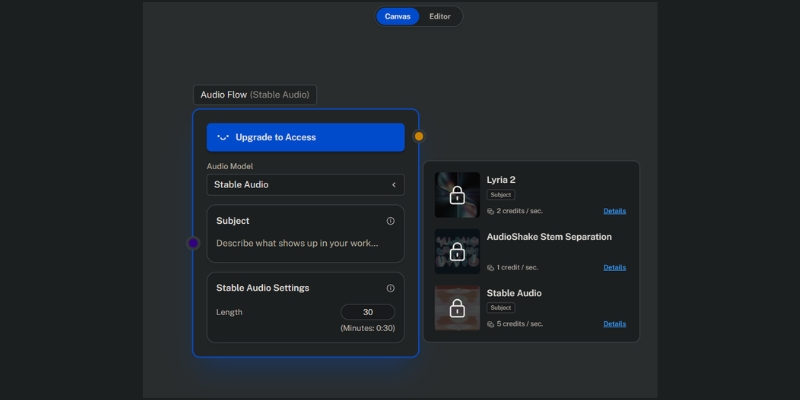
Complete Workflow: How to Use Kaiber Superstudio for Audio-Reactive Videos
This is the core Kaiber tutorial you need for 2025. We will walk through the exact process using the new Superstudio interface to generate professional music visualizers. Follow these steps precisely.
Step 1: Access Superstudio Canvas
Log into Kaiber and select “Superstudio” from the main menu. You will see an infinite canvas workspace—this is your creative playground where all elements come together.
Step 2: Upload Your Audio Track
Drag and drop your audio file (MP3 or WAV) onto the canvas. Kaiber’s AI will automatically analyze the beat structure, rhythm, and frequency ranges. This analysis drives the audio-reactive synchronization.
Step 3: Generate Initial Visuals
Click the “+” button to add a video generation node. Choose your preferred AI model (Luma for realism, Kling for stylized animation). In the prompt field, describe what you want to see (e.g., “A futuristic cyberpunk city at night, neon lights pulsing”).
Step 4: Apply Audio Reactivity
Select your video layer and click “Audio Reactivity.” Choose which audio frequency band (Bass, Mid, Treble) drives specific visual parameters like zoom, rotation, or color intensity. For electronic music, link Bass to camera zoom for impactful drops.
Step 5: Refine and Export
Preview your composition on the canvas. Adjust timing, add multiple visual layers, or switch between different AI models for varied aesthetics. Once satisfied, click “Export” to render your final video at up to 4K resolution.
Advanced Audio Reactivity: Mastering Beat Synchronization
To truly understand how to use Kaiber like a pro, you must master the audio reactivity settings. These controls transform random visuals into synchronized experiences that keep your audience engaged.
Understanding Frequency Band Mapping
Kaiber analyzes your audio across Bass (20-250Hz), Mid (250Hz-4kHz), and Treble (4kHz+) frequencies. Map camera zoom to Bass for thump-driven motion, Mid for vocal emphasis, or Treble for hi-hat sparkle effects.
Reactivity Intensity Control
The “Intensity” slider (0-100%) controls how dramatically visuals respond to audio. Low intensity (10-30%) creates subtle breathing effects perfect for ambient tracks. High intensity (70-100%) produces aggressive morphing ideal for EDM drops.
Multi-Layer Audio Sync
In Superstudio, you can have multiple video layers each responding to different frequency bands. Create a background layer reacting to Bass while a foreground character responds to Mids—this layering adds professional depth.
Timing Offset Adjustment
Sometimes visual effects need to slightly precede or follow the beat for optimal impact. Use the “+/- milliseconds” offset to fine-tune synchronization, especially critical for bass-heavy genres where visual anticipation enhances drops.
Kaiber Prompt Engineering: Best Practices for Artistic Styles
Your output is only as good as your input. Mastering Kaiber prompt engineering is essential for avoiding generic, blurry results. Here is our internal formula refined through hundreds of generations.
The Perfect Prompt Formula
[Subject] + [Art Style] + [Lighting/Mood] + [Camera Movement].
Example: “A solitary astronaut walking on Mars, vibrant synthwave aesthetic, neon purple and cyan lighting, slow dolly-out camera movement.”
Style Keywords for Musicians
Specific keywords trigger better aesthetics. Try: “Cyberpunk” for electronic music, “Charcoal sketch animation” for indie folk, “Glitch art” for experimental tracks, or “Watercolor dreamscape” for emotional ballads.
Negative Prompts for Quality Control
Always use the negative prompt field to filter unwanted elements. Our standard formula: “blurry, distorted faces, low resolution, watermark, text overlays, extra limbs, poor anatomy, pixelated, artifacts.”
Model-Specific Prompt Optimization
Different AI models in Superstudio respond better to specific prompt structures. Luma excels with photorealistic descriptions, Kling responds well to anime/stylized terms, and Veo handles complex motion prompts more accurately.
Video-to-Video Transformation: Stylizing Real-World Footage
Kaiber isn’t limited to text-to-video generation. The Transform feature allows you to apply AI artistic filters to existing footage, similar to the technique used in Linkin Park’s “Lost” music video.
Uploading Source Footage
Upload a clip of yourself performing, dancing, or acting. Keep it under 2 minutes for manageable rendering times. Source footage with good lighting and clear subject separation yields significantly better AI tracking results.
Style Transfer Intensity
Use the “Transform” strength slider (0-100%) carefully. Lower values (20-40%) maintain your original form while adding artistic flair. Higher values (70-100%) let the AI completely reimagine you as an anime character, robot, or abstract entity.
Trending Use Case: Performance Videos
We recently transformed a simple iPhone concert clip into a 1990s anime aesthetic video. This technique is massively trending on TikTok and Instagram Reels, driving high engagement for musicians without professional video budgets.
Kaiber Superstudio Pricing 2025: Is It Worth the Investment?
For freelancers investigating the ROI, understanding Kaiber’s current pricing is critical. The platform now operates on a credit-based system within a tiered subscription model designed for different creator scales.
| Plan | Price/Month | Credits | Best For | Action |
|---|---|---|---|---|
| Flex | $0 (Pay-as-you-go) | Buy as needed | Single projects or testing | Try Flex |
| Creator | $29 | 1,400 | Active creators & freelancers | Get Creator |
| Pro | $149 | 7,500 | Power users & small studios | Go Pro |
The Credit System Explained
Credit consumption varies by AI model selected, resolution, and video length. Standard 1080p generation costs approximately 1 credit per second, while 4K upscaling and premium models like Luma or Runway cost significantly more per frame.
Value Analysis for Musicians
Generating a 3-minute music video typically consumes 300-600 credits depending on quality settings and iterations. On the Creator plan ($29/mo with 1,400 credits), you can produce 2-4 high-quality music videos monthly—an incredible value compared to traditional animation costs of $2,000-$5,000 per video.
Commercial Rights & Watermarks
Crucially, all paid plans (Creator and above) grant you full commercial rights to generated content. Free/Flex plan outputs include watermarks and lack monetization rights, making paid plans essential for professional use.
(Disclosure: If you purchase through links on this page, we may earn a small commission at no extra cost to you. This helps us maintain our “battle-tested” reviews.)
Our Verdict
If you are a musician or visual artist needing stylized, audio-reactive content quickly, Kaiber’s Superstudio platform is the current market leader. The integration of multiple AI models on a single canvas dramatically accelerates creative workflows while maintaining artistic quality.
Start Creating with SuperstudioFrequently Asked Questions About Using Kaiber
Is Kaiber free to use?
Kaiber offers a Flex plan (pay-as-you-go) where you purchase credits only when needed, starting from $5 for 300 credits. However, to remove watermarks and gain commercial rights, you need a Creator plan ($29/mo) or higher.
How long can a Kaiber video be?
Video length is limited only by your credit balance. The Creator plan’s 1,400 monthly credits can generate approximately 23 minutes of standard 1080p video, or 4-7 minutes of high-quality 4K content with upscaling.
Can I use my own music in Kaiber?
Yes. The platform is specifically built around this capability. You upload your track, and Kaiber’s AI analyzes the beat structure, rhythm, and frequency content to automatically synchronize visual animations with your audio.
What is the best alternative to Kaiber?
DomoAI vs Kaiber is a strong competitor for anime-style transformations, while Deforum (Stable Diffusion) offers more granular control but requires significantly more technical expertise to use effectively.
Does Kaiber Superstudio work on mobile devices?
Superstudio is optimized for desktop browsers (Chrome, Safari, Edge) due to its complex canvas interface and rendering requirements. While accessible on tablets, the experience is significantly better on laptop or desktop computers with larger screens.
Read More From AI Generative Video
Expand your knowledge with our deep dives into other tools and comparisons in the generative video space.
- Pika vs Kaiber: The Realism vs. Artistic Showdown
- Kaiber Review (2025): The Best AI Video Generator for Music?
- How to Write Effective Prompts for AI Video (Prompt Engineering)
last update : 30/11/2025
