
InVideo vs Wave.video: Which All-in-One Platform Wins in 2025?
The battle of invideo vs wave.video is more than just comparing features; it is about choosing the right engine to power your content strategy. Marketers today face immense performance pressure to produce more videos in less time. As an expert who has tested dozens of Text-to Video tools with November 2025 updates, I know that picking the wrong platform can drain your budget and hours. This isn’t just about editing software; it’s about finding a partner for your growth with accurate pricing and feature comparisons. In this battle-tested comparison, I will break down the price, hosting capabilities, and editing power of both platforms to help you decide exactly which one deserves your subscription.
Table of Contents
InVideo vs. Wave.video: The Quick Verdict for Busy Marketers in 2025
I understand that many of you need an answer immediately. Both platforms claim to be “all-in-one” solutions, but after years of using them with 2025 feature updates, I have found they serve two very different masters with distinct philosophies.
InVideo is what I call a “Content Factory” built entirely for speed and volume. Its primary goal is helping creators generate high-quality social media videos rapidly using massive library of 4000+ pre-made templates with 8M+ stock assets from Shutterstock and Storyblocks integration.
Wave.video acts more like a “Marketing Command Center.” While it can edit video, its true strength lies in Video Hosting (400M+ assets) and Live Streaming. It replaces tools like Vimeo and StreamYard, not just Adobe Premiere, offering complete video marketing infrastructure.
Choose InVideo if: You need to churn out social media ads, TikToks, or YouTube Shorts rapidly using Text-to-Video with 4000+ templates and premium stock footage. You want a “Canva for Video” experience with 60 exports/month at $20.
Choose Wave.video if: You need a place to host your videos without ads (replacing Vimeo at $30/month), want to live stream to multiple platforms simultaneously, or need a video marketing platform that goes beyond just editing.
Try InVideo for Free or Try Wave.video for Free
(Disclosure: If you purchase through links on this page, we may earn a small commission at no extra cost to you.)
Core Editing Features: 4000+ Templates vs. Granular Timeline Control
When comparing the Video Editor capabilities with November 2025 updates, the philosophy of each tool becomes clear. This is where the rubber meets the road for your daily workflow and content production speed.
Template Library Showdown:
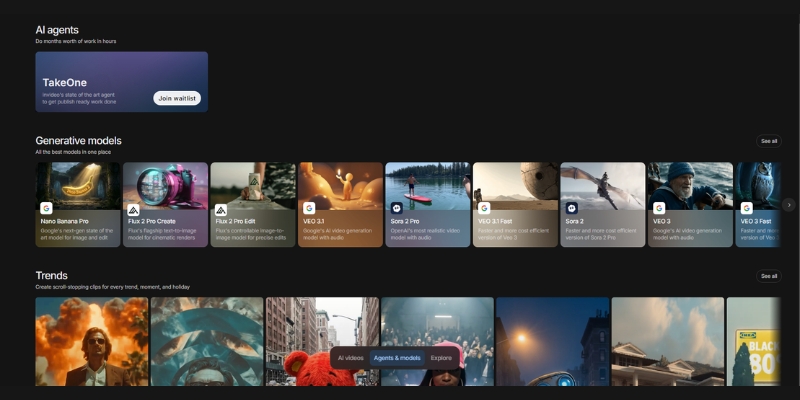
InVideo dominates with over 4000+ templates covering every niche from real estate to fitness. Wave.video has decent library but lacks the sheer volume and trend-focused variety of InVideo’s constantly updated template marketplace optimized for social media conversion.
Text-to-Video & Interface:
Both tools offer this feature, but InVideo’s AI is more aggressive at automating the process, quickly matching scenes with 8M+ stock footage from Shutterstock/Storyblocks. InVideo feels incredibly intuitive like using Canva with drag-and-drop. Wave.video uses more traditional timeline approach giving control but can feel “clunky” for beginners requiring more familiarity with video editing concepts.
Stock Media Libraries: 8M+ Assets vs. 400M+ Comprehensive Collection
One of biggest hidden costs in video production is paying for stock footage. Single clip from Shutterstock can cost $60+. This is where the InVideo vs Wave.video value comparison shifts heavily based on your volume needs.
InVideo’s Stock Power:
Direct integration with 8M+ stock videos and images through partnerships with Shutterstock and Storyblocks. Even on Plus plan ($20/month), you get access to 1M+ premium clips instantly elevating your video from “amateur” to “professional agency” quality with iStock-level footage.
Wave.video’s Massive Library:
Wave offers enormous 400M+ stock library (200M+ videos, images, audio tracks) with AI-powered search helping find exactly what you need. The platform offers more unique footage that doesn’t look like typical stock content, though it may lack some premium iStock branding polish.
Beyond Editing: Hosting and Live Streaming (Wave.video’s Exclusive Advantage)
This section highlights the rare attributes of Wave.video. If InVideo makes videos, Wave.video makes, hosts, and distributes them. InVideo has zero hosting capabilities; you must export and upload elsewhere to YouTube or social platforms.
Video Hosting Infrastructure:
Wave.video allows you to host ad-free videos with customizable player embedded on landing pages or blog posts. This feature alone replaces a $20-30/month Vimeo subscription while maintaining professional branding with password protection and domain whitelisting.
Live Streaming & Marketing Tools:
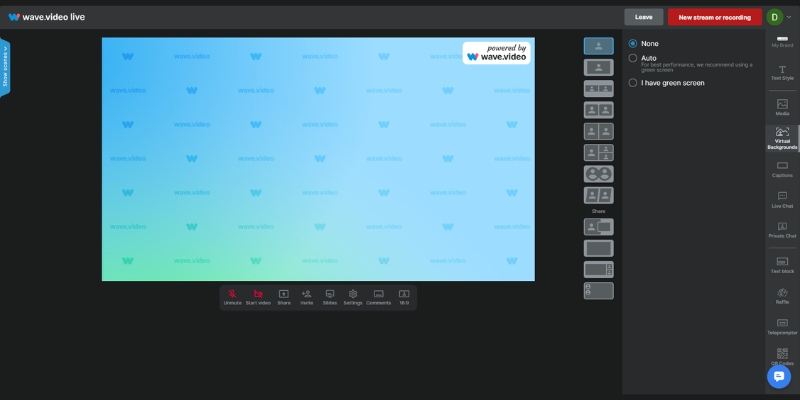
Massive differentiator: Wave.video lets you stream directly to Facebook, YouTube, and LinkedIn simultaneously (multistreaming). You can invite guests, share screen, and brand your stream similar to StreamYard. Wave goes further by generating instant video landing pages for businesses to send prospects branded video links without needing developers.
Pricing Comparison 2025: Which Tool Offers Better ROI for Your Workflow?
Price is often the deciding factor, but we need to look at the Return on Investment (ROI) with accurate November 2025 pricing. Are you paying for features you don’t use, or are you saving money on other subscriptions through consolidation?
| Feature | InVideo (Plus) | Wave.video (Creator) |
|---|---|---|
| Monthly Price | $20 ($25 monthly) | $30 ($24 annual) |
| Video Exports | 60/month (15-min max) | Unlimited (30-min max) |
| Stock Library | 8M+ (Shutterstock/Storyblocks) | 400M+ comprehensive collection |
| Video Hosting | No (Export only) | Yes (Ad-free, 150GB bandwidth) |
| Live Streaming | No | Yes (Multistreaming) |
| Best For | Social Media Content Creation | Complete Video Marketing |
| Link | Check InVideo | Check Wave |
InVideo Pricing (November 2025):
Plus: $20/month ($25 monthly, $20 annual) – 60 exports, 4000+ templates, 1M+ stock access, 15-min max, automated text-to-speech. Max: $48/month ($60 monthly) – Unlimited exports, full premium stock access, 40-min max videos.
Wave.video Pricing (November 2025):
Streamer: $20/month – 5-min edit limit, basic streaming. Creator: $30/month ($24 annual) – 30-min max, no watermark, 150GB bandwidth, background removal. Business: $60/month ($48 annual) – 2-hour max, 500GB bandwidth, team collaboration.
ROI Analysis:
InVideo value is in assets. If you were to buy stock footage separately, it would cost hundreds. Subscription pays for itself creating just two videos monthly using premium clips. Wave.video value is in bundling. By using Wave, cancel Vimeo hosting ($20/mo) and StreamYard subscription ($25/mo), consolidating marketing stack into one $30-60 bill saving $15-45 monthly.
Final Verdict: When to Choose InVideo vs Wave.video Based on Workflow?
We have analyzed the features, the assets, and the costs with 2025 updates. Now, let’s make a final decision based on who you are and your daily tasks.
✅ Choose InVideo For
- Social Media Managers: Need speed turning blog post into video in 10 minutes with 4000+ templates.
- Content Creators: 60 exports/month at $20 with 8M+ stock access beats separate subscriptions.
- Freelancers: Editing ads for clients faster with premium iStock-level footage looking expensive.
- Template Lovers: “Canva for Video” experience with drag-and-drop simplicity for beginners.
✅ Choose Wave.video For
- Business Owners: Need to host tutorials, embed videos on site, run weekly webinars without YouTube ads.
- Course Creators: Video hosting infrastructure with password protection and domain whitelisting.
- Live Streamers: Multistreaming to Facebook, YouTube, LinkedIn simultaneously replaces StreamYard.
- Agencies: Managing entire client video strategy including hosting offers more billable services.
Frequently Asked Questions About InVideo vs Wave.video Comparison
Does InVideo have video hosting?
No, InVideo is purely a video creation tool. You must download your final video and upload it to platforms like YouTube, Facebook, or your own website using separate hosting services.
Is Wave.video good for beginners?
It has steeper learning curve than InVideo’s drag-and-drop. While not overly complex, the timeline editor and hosting features require more time to master than InVideo’s intuitive Canva-like interface designed for beginners.
Can I livestream with InVideo?
No, this is a Wave.video exclusive feature. InVideo does not support live streaming functionality. Wave.video allows multistreaming to multiple platforms simultaneously from browser without OBS setup.
Which tool is better for YouTube?
Use InVideo for creating and editing the video itself due to superior 8M+ stock assets and 4000+ templates. Use Wave.video if you plan to live stream directly to YouTube or need to host private videos with ad-free player.
Read More From Text-to Video Comparisons and Reviews
If you are still exploring the world of AI video generation, check out our other battle-tested reviews and comparisons to find the perfect tool for your stack.
- Best AI Video Editing Software (Top List)
- InVideo Review: AI Video Ads with 4000+ Templates
- Wave.video Review: The Full Video Marketing Platform
last update : 03/12/2025
