
Renderforest Review 2025: Is This The Ultimate All-in-One Branding Platform?
If you are a freelancer or business owner looking for a Renderforest review that cuts through the noise, you are in the right place. In the crowded market of Text-to Video tools, Renderforest positions itself not merely as a video maker, but as a complete All-in-One Branding Platform with a revolutionary new AI Video Generator launched just days ago (November 25, 2025). In this battle-tested analysis, I will dissect whether Renderforest’s “all-in-one” promise holds up in 2025, testing its new AI capabilities, video templates, and calculating the real ROI for your business.
Table of Contents
What Is Renderforest? (The All-in-One Ecosystem)
Renderforest is a Cloud-based design suite that unifies multiple creative tools into a single dashboard. Unlike standalone video editors, it integrates a Video Maker, Logo Maker, Website Builder, and Mockup Generator with access to industry-leading AI models including OpenAI Sora, MiniMax Hailuo, Pixverse, and ByteDance Seed.
For freelancers and agencies, this ecosystem is a massive time-saver. Instead of paying for four separate subscriptions, you get a centralized Branding Suite that ensures your visual identity remains consistent across all media formats while leveraging the latest generative AI technology.
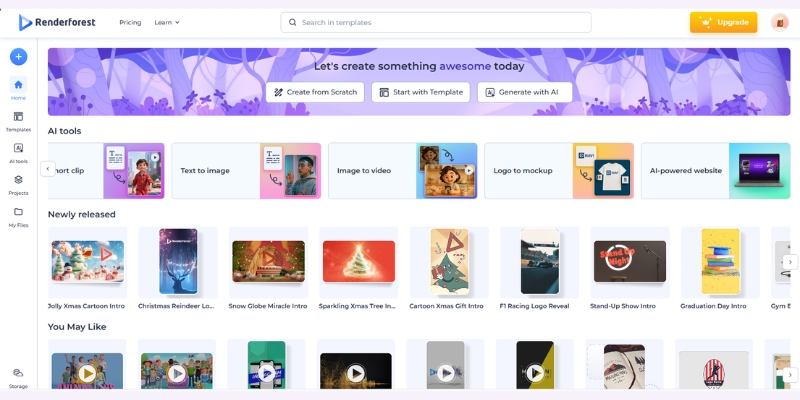
NEW AI Video Generator: Revolutionary 4-Way Creation System
On November 25, 2025, Renderforest launched a completely redesigned AI Video Generator that fundamentally changes how creators approach video production. After extensive testing, I found this update to be the most significant evolution in template-based video creation this year.
The 4 Creation Flows:
Unlike competitors that force you into a single workflow, Renderforest now offers four distinct creation paths optimized for different content types and quality requirements.
1. Cartoonish with Templates:
This flow provides professional 2D and 3D animated templates supporting up to 4K quality. It’s perfect for explainers, educational content, and fun brand stories where you need broadcast-quality motion graphics without After Effects expertise. The templates are scene-based for rapid assembly.
2. Realistic with Stock Clips:
Ideal for corporate or lifestyle videos, this flow automatically finds and matches stock footage from Renderforest’s 5 million+ asset library to your script. The AI’s keyword matching is accurate, resulting in polished, professional-looking videos suitable for business presentations and marketing campaigns.
3. AI-Generated Images:
This flow generates original image packs in any visual style you choose (60+ styles available including cinematic, anime, claymation, 3D, retro, sci-fi) and builds videos from them. Perfect when you want customized design without shooting or sourcing visuals yourself, eliminating stock footage repetition.
4. From Scratch with Generative AI:
The most advanced option creates every element from the ground up using high-end models like Pixverse (cinematic quality with rich lighting), Hailuo (highly realistic rendering with strong prompt fidelity), and Seedance (diverse artistic styles for complex multi-shot narratives). This delivers truly unique content impossible to achieve with stock libraries.
Smart Edit & Scene Regeneration:
Once generated, you can fine-tune specific scenes without regenerating the entire project. If a scene is too dark or the background doesn’t match your theme, simply describe the change you want and the AI adjusts only that element while keeping everything else consistent, saving both time and credits.
Image-to-Video Animation:
Upload any still photo, describe the movement or mood, and the AI turns it into animated clips lasting 4-12 seconds. Using the Sora 2 model, you can even make images talk with natural lip-syncing, perfect for adding motion to static product shots or creating talking characters from simple photos.
Advanced Voiceovers: 50+ Languages with Emotion Control
The voiceover system received a major upgrade. You can now choose from male or female voices in different accents with emotional tones including calm, excited, or dramatic. This level of control ensures your narration matches your content’s mood perfectly.
Crucially, Renderforest offers multilingual voice artists who can record the same voice in several languages. This is perfect for global campaigns where you want your message to sound consistent across different regions, maintaining brand identity while reaching international audiences effectively.
You can also turn voiceover off entirely if you prefer music-only videos or plan to add your own narration later. The flexibility accommodates every workflow from silent motion graphics to fully narrated explainers.
Beyond Video: Testing The Unified Branding Tools
Most reviews ignore this, but the “All-in-One” claim is Renderforest’s killer feature that separates it from pure video tools. I spent time testing the non-video tools to see if they are actually usable or just marketing gimmicks.
The Logo Maker:
This is a surprisingly robust AI-powered tool that generates hundreds of options when you enter your brand name. While some look generic, the ability to export vector files (SVG) makes it a legitimate tool for Small Businesses that need professional branding without hiring designers.
Mockup Generator:
This is a hidden gem for dropshippers and product creators. You can instantly place your new logo onto t-shirts, mugs, or iPhone screens with photorealistic rendering that rivals standalone tools like Placeit, allowing you to visualize products before manufacturing.
Website Builder:
I built a landing page in about 15 minutes. It’s basic and block-based, perfect for a portfolio or event page. It won’t replace WordPress for complex sites, but for quick Website Creation tasks when you need a simple online presence immediately, it’s incredibly efficient.
The real magic lies in the synergy. Once I created a logo, Renderforest automatically suggested a Video Intro with that exact logo animated in 3D. This seamless integration allows a freelancer to deliver a full brand kit (logo + animated intro + landing page) in under 30 minutes.
Renderforest Pricing 2025: Which Plan Offers Best ROI?
Understanding Renderforest pricing is crucial because they offer both subscription and “pay-per-product” models. Prices were recently updated in November 2025, so here’s the current breakdown for regular users.
| Plan | Price | Best For | Key Feature | Action |
|---|---|---|---|---|
| Free | $0/month | Testing | 500MB storage, 360p with watermark | Try Free |
| Lite | $18/month | New Creators | 10GB + Unlimited HD720 videos | Get Lite |
| Pro | $35/month | Freelancers | 30GB + HD1080 + 5M+ stock assets | Get Pro |
| Business | $56/month | Agencies | 50GB + 4K video + Reseller license | Get Business |
(Disclosure: If you purchase through links on this page, we may earn a small commission at no extra cost to you. This helps us maintain our “battle-tested” reviews.)
Free Plan:
Good for testing workflows, but limited to 360p with watermarks. It’s strictly for validation; you cannot use these videos for professional client work due to low quality and branding. However, it gives full access to test all four creation flows.
Lite Plan ($18/month):
This is the entry point for creators, offering 10GB storage and unlimited HD720 videos. For 2025 standards, 720p is often considered bare minimum for social media, making this suitable only for content where resolution isn’t critical or for testing paid features.
Pro Plan ($35/month – RECOMMENDED):
This is the sweet spot. You unlock Unlimited HD1080 exports and access to 5 million stock assets. If you sell just one logo intro on Fiverr for $40, this subscription pays for itself immediately, making it ideal for freelancers monetizing their services.
Business Plan ($56/month):
Designed for agencies and heavy users. It adds 4K export, a reseller license allowing you to sell videos to clients legally, and team management for collaborative workflows. The reseller license alone justifies the cost if you run an agency or white-label video services.
Renderforest vs. Competitors: InVideo, Canva, Steve AI
To help you decide, I compared Renderforest directly against its biggest rivals using real-world testing scenarios.
Renderforest vs. InVideo:
InVideo is superior for long-form content and AI avatar-based videos with realistic human presenters. However, Renderforest wins decisively on 3D motion graphics, logo animations, and the new generative AI capabilities with access to multiple AI models. Choose InVideo for YouTube documentaries; choose Renderforest for branding intros and explainers.
Renderforest vs. Canva:
Canva offers more design freedom with its drag-and-drop canvas for graphics. But Renderforest’s motion graphics are “broadcast quality” with professional 3D rendering, whereas Canva’s animations can feel flat. Renderforest is better for heavy Video production; Canva is better for static social media graphics with simple animation.
Renderforest vs. Steve AI:
Steve AI focuses heavily on 2D cartoon generation from text for faceless content. If you need specific 3D Explainer styles or access to cutting-edge generative AI models like Sora and Hailuo, Renderforest is the stronger choice due to its vast library and multi-model approach.
Pros and Cons of Using Renderforest for Business
After using this tool extensively for client projects and testing the new AI features, here is my honest assessment stripped of marketing fluff.
✅ Pros
- Revolutionary AI system: Access to Sora, Hailuo, Pixverse, Seedance in one platform.
- 4 creation flows: Flexibility to choose templates, stock, AI images, or full generative AI.
- All-in-One ecosystem: Solves logo, video, and web needs in one subscription.
- Smart Edit: Regenerate specific scenes without redoing entire project, saving time and credits.
- 60+ visual styles: From cinematic to anime, offering unmatched creative diversity.
- 50+ languages: Multilingual voiceovers with emotion control for global reach.
- High-end 3D templates: Industry-leading motion graphics quality up to 4K.
❌ Cons
- Scene-based editing: No timeline control for fine-tuning frame-by-frame timing like Premiere Pro.
- Credit system: Generative AI features require credits, which can run out quickly for heavy users.
- Learning curve: Four creation flows can be overwhelming for beginners initially.
- Pricing complexity: Mix of subscription vs. pay-per-product can confuse new users.
MY EXECUTIVE VERDICT: Renderforest is now the Best for creators needing cutting-edge AI video generation with template convenience. The new multi-model approach (Sora, Hailuo, Pixverse, Seedance) combined with Smart Edit and 4 creation flows makes it unbeatable for rapid, professional content creation.
Buy Recommendation: Ideal for freelancers, agencies, and small businesses needing a complete branding suite (logo + video + website) with access to the latest generative AI technology without paying for multiple subscriptions.
Skip Recommendation: If you need frame-by-frame timeline editing like Premiere Pro or exclusively want AI avatar-based videos with realistic human presenters, consider InVideo or Synthesia instead.
Try Renderforest’s New AI Generator FreeFrequently Asked Questions About Renderforest
Is Renderforest truly free?
Yes, but with limitations. You can create and edit indefinitely, but downloading requires a watermark and is limited to 360p quality. It’s a “freemium” model designed for testing all features including the new AI generator before committing to a paid plan.
Can I sell Renderforest videos to clients?
Absolutely, but you need at least a commercial license included with paid plans. The Business plan ($56/month) even offers a reseller license for agencies, allowing you to white-label and sell videos as your own services legally.
Which AI models does Renderforest support?
Renderforest integrates OpenAI Sora, MiniMax Hailuo, Pixverse, and ByteDance Seed. Each model has unique strengths: Sora for realism, Hailuo for prompt fidelity, Pixverse for cinematic quality, and Seedance for diverse artistic styles.
How long can AI-generated videos be?
A single generation can produce videos up to 3 minutes long. You can extend projects beyond this by generating additional scenes within the same timeline to create longer, seamless stories for comprehensive content.
Does Renderforest have a mobile app?
Yes, available for both iOS and Android. Currently, mobile supports templates and stock media creation. The desktop version offers full access to all four creation flows including generative AI features for the most comprehensive experience.
Read More From Text-to Video
Expand your knowledge with our curated list of battle-tested reviews and comparisons in the AI video space to find the perfect tool for your specific workflow.
- InVideo Review: AI Video Ads with 5000+ Templates
- Best AI Ad & UGC Video Generators (for Marketing)
- Steve AI Review: AI Animation & Cartoon Video Generator
last update : 30/11/2025
