
Vizard Review (2025): Is This Hybrid AI Clipper & Editor Better Than OpusClip?
I have spent two weeks testing this Vizard review to see if it truly solves the content repurposing puzzle for marketers and creators. In the crowded world of AI video tools, most force you to choose between speed through auto-clippers or control through traditional editors, creating frustrating workflow fragmentation.
Most tools like OpusClip excel at finding clips but offer limited editing capabilities, while editors like VEED require excessive manual work. This is where Vizard.ai enters as a hybrid solution combining AI automation with professional timeline editing in a single browser-based platform.
As part of our Short-form & Repurposing series, I will dissect whether this tool delivers on its hybrid promise. In this battle-tested analysis, we cover its AI clipping accuracy, video editor features, updated pricing, and direct comparisons to help you decide if Vizard is worth your investment.
Table of Contents
What is Vizard AI: The First True Hybrid Repurposing Tool
Vizard is an AI-powered platform designed to transform long-form content like Zoom recordings, podcasts, and YouTube videos into short viral clips optimized for TikTok, Instagram Reels, and YouTube Shorts. Unlike pure clippers that limit your control or traditional editors requiring hours of manual work, Vizard combines both approaches in a single browser-based workflow.
The platform’s hybrid architecture eliminates workflow fragmentation that plagues most content teams. Typically, marketers need one tool to generate clips automatically and another to polish them for brand consistency. Vizard eliminates this “toggle tax” by integrating AI clip discovery with professional timeline editing capabilities directly in your browser without software downloads.
Vizard targets marketers and creators who need AI automation speed but refuse to sacrifice brand consistency and editing precision. The platform is built specifically for business-focused content strategies where maintaining visual identity across all clips is non-negotiable, unlike one-click tools optimized purely for viral content volume.
We found that while Vizard is not as “one-click magic” as some alternatives, the control it offers makes it superior for professional content operations where brand guidelines, custom layouts, and precise messaging matter more than pure automation speed.
AI Clipping Feature Review: Can It Compete with OpusClip
The core promise of any AI video clipper is finding the “gold” in long footage automatically without manual review. We tested Vizard’s “Get AI Clips” feature with a 45-minute webinar to evaluate its AI highlight detection accuracy against competitors like OpusClip.
Vizard’s AI analyzes video transcripts to identify engaging moments using its vitality scoring system that predicts clip performance. In our testing, it successfully identified 6 out of 8 key topic shifts, though it occasionally missed subtle contextual humor compared to human editors. The accuracy is strong for factual content but sometimes struggles with comedy timing.
The auto-reframe feature tracks active speakers and maintains them centered in vertical 9:16 frames critical for TikTok and Reels. We found face tracking approximately 90% accurate in single-speaker scenarios, but performance degrades slightly when multiple speakers talk simultaneously or gesture expressively outside the frame.
Like competitors, Vizard assigns vitality scores to generated clips helping prioritize which to publish first. While helpful for sorting, we found these scores somewhat arbitrary in predicting actual platform performance. Use your own judgment about audience fit rather than relying blindly on AI predictions.
The Timeline Editor: Does It Replace Professional Software
This section represents Vizard’s strongest selling point where our review shifts focus to capabilities that distinguish it from pure AI clippers. The built-in editor is not an afterthought—it is a robust tool rivaling dedicated software for repurposing workflows though not full production editing.
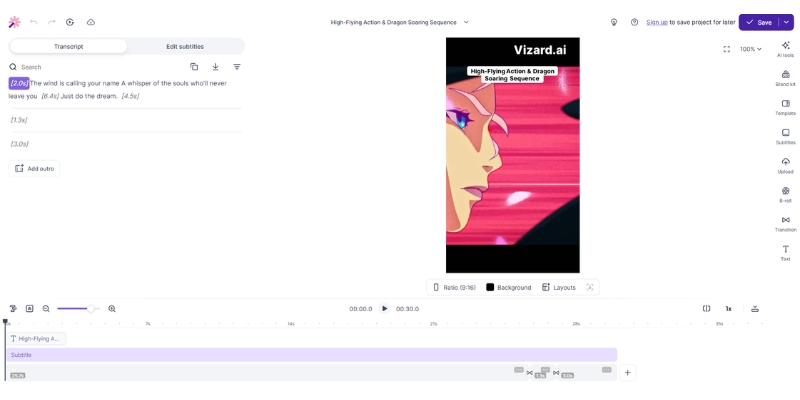
Text-based editing allows you to edit videos by simply deleting text from the transcript. If you delete a sentence from the text, it automatically cuts that scene from the video. This feature alone saved us hours of rough cutting compared to scrubbing through timelines manually in traditional editing software.
Unlike OpusClip’s limited editing, Vizard provides a visual timeline where you can detach audio tracks, add B-roll layers, and insert images. This granular control allows you to fix awkward cuts that AI clippers often leave behind, maintaining professional polish without exporting to external software.
The platform offers trending social media templates with customizable colors and backgrounds matching brand guidelines. We uploaded custom fonts and logos easily, critical for social media marketing teams maintaining consistent visual identity across all distributed clips. The stock library covers visual mistakes with relevant footage instantly.

Vizard Workflow: From Long-Form to Viral Shorts
To validate speed claims, we ran a timed test taking a raw Zoom recording and aiming to produce three polished Shorts. Here is the exact workflow we followed and time measurements at each stage for realistic expectation setting.
Upload and transcription took approximately 4 minutes for our 30-minute English video. Vizard supports 100+ languages for transcription, making it suitable for global teams. You can upload local MP4 files or paste YouTube links directly, eliminating bulky file transfer steps.
AI clipping processed for another 3 minutes and returned 12 suggested clips complete with vitality scores and auto-generated captions. The system automatically applies platform-specific formatting and smart reframing around detected speakers without manual adjustment.
Customization is where Vizard shines compared to pure clippers. We corrected caption typos, adjusted crops to center speakers better, and added a branded intro logo. The timeline editor allowed precise start/end adjustments for cleaner hooks that AI sometimes misses by a few seconds.
Export and publish took minutes in 1080p with direct integration to schedule or publish to TikTok and YouTube Shorts. The entire process consumed 18 minutes compared to over an hour manually in Premiere Pro, representing undeniable efficiency gains for recurring repurposing workflows.
Vizard vs. Competitors: The Repurposing Tool Battle
In the commercial landscape, users commonly compare Vizard vs OpusClip or VEED.io. Your optimal choice depends entirely on whether you value pure automation speed or editing control and brand customization in your content workflow.
Vizard vs. OpusClip: OpusClip’s algorithm is currently slightly smarter at identifying viral hooks without human input, offering superior “set and forget” automation. However, its editing capabilities are severely limited compared to Vizard. Choose OpusClip for maximum automation speed, choose Vizard when you need to refine output for brand consistency and precise messaging control.
Vizard vs. VEED.io: VEED.io is a full-cloud editor designed for creating videos from scratch with more powerful capabilities but steeper learning curves and slower workflows for pure repurposing tasks. Vizard wins decisively for repurposing speed and AI-assisted clip discovery, while VEED excels for original content creation requiring advanced effects and animations.
Comparison Verdict: Vizard occupies a unique “Goldilocks” zone—more flexible than simple clippers like OpusClip but faster than traditional editors like VEED. It is purpose-built for the specific use case of transforming existing long-form content into polished short-form clips efficiently.
Vizard Pricing and Plans: Updated December 2025
Understanding the cost is vital for transactional decisions. Vizard’s pricing structure has changed significantly in 2025 with notable increases from earlier reviews, so accurate current information is critical for budget planning and ROI calculations.
| Plan | Price | Key Limits | Best For |
|---|---|---|---|
| Free | $0 | 60 credits/mo, 720p, Watermarked | Testing features |
| Creator | From $29/mo | 600 credits, 4K export, No watermark | Solo creators |
| Business | From $39/mo | 600+ credits, Team workspace | Agencies & Teams |
Free Plan Analysis: The free plan offers 60 monthly credits but the watermark and 720p limit make it unusable for professional publishing. It is strictly for testing the interface and evaluating whether the workflow fits your content production needs before committing to paid subscriptions.
Creator Plan ROI: At $29/month for 600 credits with 4K export capability and watermark removal, the cost-per-minute is competitive compared to alternatives. If you produce just 4 long-form videos monthly, the tool pays for itself in time saved versus manual editing labor costs.
Business Plan Value: This tier introduces collaboration features critical for teams. If you have editors or VAs handling content, the ability to share projects, comment on timelines, and manage multiple social accounts (up to 20) justifies the upgrade for agencies and marketing teams.
Hidden Costs: We checked for hidden fees—minutes do not roll over monthly, so buy only what you need. Video storage persists as long as you maintain an active subscription, sufficient for active projects but files delete upon cancellation.
Pros and Cons of Vizard AI Based on Testing
To ensure this Vizard.ai review is unbiased, we must examine both strengths and weaknesses discovered through actual testing. No tool is perfect, and Vizard has its own set of quirks and limitations alongside its advantages.
✅ Pros
- All-in-one workflow eliminates tool switching
- Granular timeline control superior to clippers
- Text-based editing speeds rough cutting
- 4K export quality for professional use
- 100+ language transcription support
- Brand kit maintains visual consistency
❌ Cons
- AI context understanding trails OpusClip
- Export speed can slow during peak times
- Mobile experience limited for editing
- Requires manual polish for best results
- Pricing increased significantly in 2025
Final Verdict: Is Vizard AI Worth It for Creators
After extensive testing, our verdict is clear: Vizard AI is currently the best hybrid repurposing tool on the market for creators who need both automation and control.
It successfully bridges the gap between chaotic multi-app workflows and pure AI automation simplicity. While its AI detection is not quite at OpusClip’s level, its editing capabilities are far superior, making it ideal for professional content operations.
You Should Buy Vizard If: You are a marketer needing full control over branding and messaging, you find OpusClip’s editing features too restrictive, or you want to turn webinars into clips with custom B-roll and layouts matching brand guidelines.
Skip It If: You want 100% hands-off automation accepting whatever AI generates, you are editing 4K cinema-grade footage requiring professional desktop software, or you produce primarily short-form native content without long-form source material to repurpose.
Rating: 4.3/5 Stars for Hybrid Repurposing Workflow.
Try Vizard AI Free(Disclosure: If you purchase through links on this page, we may earn a small commission at no extra cost to you.)
Frequently Asked Questions About Vizard
Does Vizard have a watermark on free plans?
Yes, the Free plan includes a branded watermark on exported videos and limits export quality to 720p. You must upgrade to Creator plan ($29/month) or higher to remove watermarks completely and access 4K export quality.
Can Vizard edit 4K video quality?
Yes, Creator and Business plans support 4K uploads and exports. However, the platform is optimized for 1080p which is standard for social media platforms like TikTok and Instagram Reels where 4K provides minimal benefit.
Is Vizard safe for private content?
Vizard uses enterprise-grade encryption for data transmission and storage. However, like all cloud AI tools, your video is processed on their servers. Review their latest privacy policy for sensitive corporate data before uploading confidential content.
Does Vizard support languages beyond English?
Yes, Vizard supports transcription and captioning for 100+ languages including Spanish, French, German, Portuguese, and more. This makes it excellent for global teams and multilingual content strategies requiring localized captions.
Read More From Short-form & Repurposing
Explore more tools to optimize your video marketing workflow with our detailed comparisons and reviews:
- VEED.io Review: The Best Online AI Video Editor?
- Vmaker AI Review: AI Editor, Clipper & Recorder
- Zebracat Review (2025): Worth It? Real World Test.
last update : 20/12/2025
