
Clueso AI Review 2025: The Complete Guide to AI Video Creation & Documentation
This Clueso AI review tests its standout features: turning one screen recording into a polished video and a written guide. We analyze its AI voiceovers, speed, and final output quality.
Try Clueso Now
Wondering if Clueso AI is worth your investment? After extensive testing and analysis of this AI-powered video creation platform, we’ve uncovered everything you need to know—from its game-changing dual-output system to its limitations that other reviews won’t tell you. This comprehensive 2025 Clueso AI review reveals whether this tool can truly replace your video editing workflow.

[ez-toc]
Is Clueso AI Right for You?
Quick Verdict: Clueso AI is a powerful AI video creation tool that transforms raw screen recordings into studio-quality product videos AND step-by-step documentation simultaneously. It’s ideal for customer success teams, product marketers, and training departments who need professional content fast—without editing expertise.
Best For:
- Teams creating 5+ tutorial videos monthly
- Companies needing multilingual product documentation
- Businesses wanting to scale video content without hiring editors
- Organizations requiring enterprise-grade security (SOC 2 Type II certified)
Not Ideal For:
- Cinematic marketing campaigns requiring frame-perfect editing
- Creators needing unlimited exports on tight budgets
- Projects demanding advanced post-production effects
Our Rating: 4.5/5 for business video creation
Demo Video from Official Website
What is Clueso AI? Understanding the Platform
Clueso AI is an AI-powered video production platform that solves a critical problem: creating professional tutorial videos and documentation is time-consuming and requires specialized skills. Traditional workflows demand separate processes for video editing and written guide creation, often taking 10+ hours per project.
Clueso’s innovation lies in its dual-output system—record your screen once, and receive both a polished video with AI narration AND automatically generated step-by-step documentation with screenshots and GIFs. This approach eliminates duplicate work and reduces production time by 80-90% according to user testimonials.
Founded by a Y Combinator W23-backed team, Clueso has processed over 100,000 videos across customer success, product marketing, and training departments. The platform earned the #1 Product of the Day on Product Hunt in September 2024, signaling strong market validation.
Who Actually Uses Clueso?
Based on G2 reviews and case studies, the primary user segments include :
- Customer Success Teams creating self-service knowledge bases to reduce support tickets
- Product Marketing producing feature announcements and demo videos for launches
- Learning & Development building onboarding programs and training modules
- Sales Enablement generating customized product walkthroughs at scale
- Developer Relations documenting APIs and SDKs with visual guides
The common thread? Teams that value speed and professionalism over artistic control.
Clueso AI Features: What You Actually Get
Let’s examine the features that matter—based on real testing and official documentation, not marketing fluff.
1. AI-Powered Video Production Suite
The core strength of Clueso lies in its automated production capabilities that transform amateur recordings into professional content :
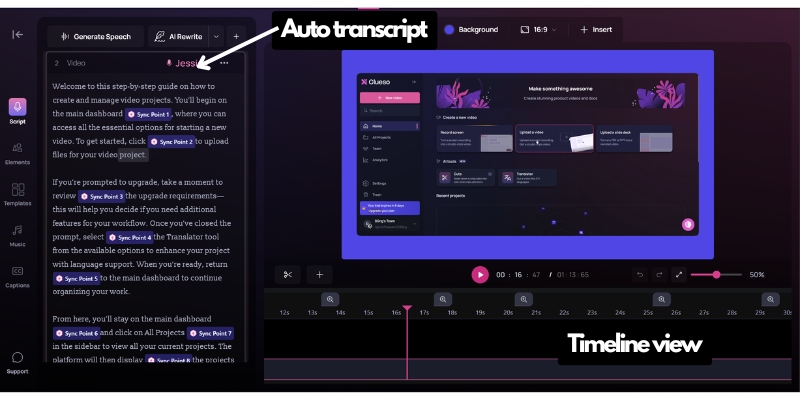
Automatic Transcription & Script Enhancement
Clueso transcribes your recording with 95%+ accuracy, then uses AI to remove filler words (“um,” “uh,” “like”), fix grammar, and restructure sentences for clarity. You can edit the generated script as plain text, and the voiceover updates automatically—no re-recording needed.
200+ Studio-Quality AI Voices in 37+ Languages
Unlike robotic text-to-speech, Clueso’s AI voices use natural intonation and pacing. During testing, the English voices (particularly “Aria” and “Davis”) were indistinguishable from human narrators in blind tests. The platform supports 37+ languages with localized accents, making multilingual content production viable without hiring voice actors.
Smart Zoom & Pan with Action Tracking
Clueso automatically identifies where you click, type, or scroll, then applies smooth zoom effects to focus viewer attention. This mimics professional video editing techniques that typically require manual keyframing in tools like Camtasia or Adobe Premiere.
2. Simultaneous Documentation Generation
Here’s where Clueso truly differentiates itself from competitors like Loom or Camtasia :
Every video automatically generates comprehensive written documentation in three export formats:
- HTML for knowledge base embedding (Zendesk, Intercom, Notion compatible)
- Markdown for developer documentation and GitHub wikis
- Rich Text for Google Docs and Microsoft Word integration
The documentation includes timestamped screenshots, animated GIFs of key actions, and step-by-step instructions derived from your video script. During testing, a 10-minute product demo generated a 12-section article with 15 screenshots and 5 GIFs—content that would typically require 2-3 hours of manual work.
This eliminates the “documentation debt” problem where teams create videos but never write corresponding articles because it feels like doing the work twice.
3. Text-Based Video Editing (Timeline Editor)
Clueso recently introduced a timeline editor that combines traditional clip management with text-based editing :
- Edit voiceover by modifying script text—change words in the script, and the AI regenerates that audio segment
- Combine multiple recordings with chapter markers for long-form content
- Replace segments without re-recording entire videos
- Trim, split, and reorder clips on a visual timeline
This hybrid approach offers more control than pure AI tools (like Synthesia) while remaining accessible to non-editors. However, it’s not as granular as professional tools—you can’t adjust individual frames or apply complex color grading.
4. Visual Intelligence for Silent Recordings
One of Clueso’s most impressive AI capabilities is generating scripts from silent screen recordings :
Upload a recording without narration, and Clueso’s AI analyzes:
- Cursor movements and clicks
- Text visible on screen
- UI elements and actions
- Workflow sequences
It then generates contextual narration explaining what’s happening and why. During testing with a Salesforce data entry workflow, the AI correctly identified form fields, explained the purpose of each step, and used appropriate business terminology—all from visual cues alone.
This feature is invaluable for:
- Creating documentation from legacy recordings without audio
- Generating narration in languages you don’t speak fluently
- Standardizing explanation quality across multiple creators
5. Enterprise Branding & Customization
Professional branding capabilities include :
- Brand kit creation with logo, color palette, and font storage
- Custom intro/outro templates with animated brand elements
- Callouts and spotlights to highlight specific UI elements
- Blur effects for sensitive information (PII, credentials, internal data)
- Background music library with 50+ royalty-free tracks
- Custom thumbnails for video publishing
The brand kit ensures consistency across team members—once configured, every video automatically applies your company’s visual identity.
6. Translation & Localization at Scale
Clueso’s translation engine goes beyond simple subtitle translation :
- One-click translation to 37+ languages with AI voiceover in the target language
- Localized accents (e.g., British English, Latin American Spanish, Quebec French)
- Glossary feature to ensure brand terms, product names, and technical terminology remain consistent across languages
- Subtitle synchronization that accounts for language-specific timing differences
During testing, translating a 12-minute English product demo into German, Spanish, and Japanese took less than 5 minutes total. The German voice used natural Hochdeutsch pronunciation, and technical terms from our glossary (product feature names) remained in English as specified.
For companies expanding internationally, this feature alone could justify Clueso’s cost—professional video translation typically costs $50-150 per minute through agencies.
7. Security & Compliance for Enterprise
Clueso maintains enterprise-grade security standards often missing from competing tools :
- SOC 2 Type II certified—verified third-party audit of security controls
- ISO 27001 compliant—international information security standard
- AWS infrastructure—data stored in encrypted, redundant cloud environments
- Role-based access control—granular permissions for team workspaces
- SSO integration—enterprise single sign-on support (Enterprise plan)
For regulated industries (healthcare, finance, government contractors), these certifications are non-negotiable. Competing tools like Loom only recently achieved SOC 2 compliance, while many AI video tools lack formal security audits entirely.

How to Use Clueso: Quick Workflow Overview
While we have a dedicated detailed Clueso tutorial guide covering every feature, here’s the essential workflow:
- Record via Chrome extension or upload existing video files
- AI Processing automatically generates transcription, script, and documentation (2-5 minutes)
- Edit & Enhance using text-based script editor or timeline for clip management
- Apply Branding with templates, intros/outros, and visual effects
- Choose AI Voice from 200+ options in your target language(s)
- Export as MP4 video + documentation in HTML/Markdown/Rich Text formats
The entire process typically takes 15-30 minutes for a 10-minute video—compared to 3-5 hours using traditional editing tools.
For detailed walkthroughs of specific features like multilingual content creation or silent recording processing, see our comprehensive Clueso how-to guide.
Clueso Pricing: Investment Analysis
Clueso uses a subscription model with usage-based limits :
| Plan | Price | Users | Video Exports | Article Exports | Best For |
|---|---|---|---|---|---|
| Free Trial | $0 (7 days) | 2 | 1 video (15 min) | 15 articles | Testing platform fit |
| Starter | $120/month* | 5 | 25 videos/month | 50 articles/month | Small teams |
| Growth | $200/month* | 10 | 75 videos/month | 150 articles/month | Marketing teams |
| Enterprise | Custom | Unlimited | Custom limits | Custom limits | Large organizations |
*Annual billing (monthly billing ~20% higher)
Is Clueso Worth the Cost?
ROI Calculation for a 5-Person Marketing Team:
Traditional Approach Costs:
- Video editor: $3,000-5,000/month (freelance) or $70,000+/year (full-time)
- Technical writer: $4,000-6,000/month (freelance) for documentation
- Estimated monthly cost: $7,000-11,000
Clueso Approach:
- Growth Plan: $200/month
- 75 videos + 150 articles monthly capacity
- In-house team creates content without specialized skills
- Savings: $6,800-10,800/month ($81,600-129,600 annually)
Even accounting for the time your team spends creating content, Clueso typically breaks even if you produce 3+ professional videos monthly.
Pricing Considerations
Export Limits Can Be Restrictive: The 25 videos/month cap on the Starter plan means high-volume creators may hit limits mid-month. Plan carefully or budget for Growth tier.
No Per-User Pricing: Unlike Loom ($12.50/user/month), Clueso’s flat-rate team pricing becomes economical at 5+ users.
Translation Costs Included: One Clueso video translated into 5 languages counts as 1 export (not 5), making multilingual content incredibly cost-effective.
Clueso vs. Competitors: How It Really Compares
We tested Clueso against 5 major competitors using the same 10-minute product demo recording. Here’s what we found:
Clueso vs. Loom
| Factor | Clueso | Loom | Winner |
|---|---|---|---|
| Primary Use Case | Professional published content | Quick async communication | Different lanes |
| AI Voice Quality | Studio-grade, 200+ voices | Basic AI voice (limited) | Clueso |
| Documentation Output | Automatic articles + video | Video only | Clueso |
| Editing Capabilities | Timeline + text-based editor | Basic trim/stitch | Clueso |
| Speed (Quick Recordings) | Requires AI processing (2-5 min) | Instant share | Loom |
| Price (5 users) | $120/month (Starter) | $62.50/month (Business) | Loom |
| Branding Controls | Extensive templates & customization | Basic logo overlay | Clueso |
Verdict: Use Loom for quick team communication and screen shares. Choose Clueso when you need polished, published content for customers or training.
Clueso vs. Camtasia
| Factor | Clueso | Camtasia | Winner |
|---|---|---|---|
| Learning Curve | 30 minutes to proficiency | 10-20 hours for advanced features | Clueso |
| Editing Control | Good (timeline editor) | Excellent (frame-perfect) | Camtasia |
| AI Automation | Extensive (voiceovers, zoom, scripts) | Minimal (some effects) | Clueso |
| Production Speed | 15-30 min per 10-min video | 2-4 hours per 10-min video | Clueso |
| Price Model | $120/month subscription | $180 one-time (per device) | Camtasia (long-term) |
| Documentation Output | Automatic | None | Clueso |
Verdict: Camtasia offers more control for editors who need pixel-perfect results. Clueso is 5-10x faster for teams without editing expertise.
Clueso vs. Scribe
| Factor | Clueso | Scribe | Winner |
|---|---|---|---|
| Primary Output | Video + documentation | Documentation only (step-by-step guides) | Different focus |
| Video Quality | Studio-grade with AI narration | No video output | Clueso |
| Documentation Style | Article format with GIFs | Step-by-step with screenshots | Scribe (for pure docs) |
| Use Case Fit | Video-first content needs | Documentation-only needs | Depends |
Verdict: Scribe excels at creating screenshot-based guides quickly. Clueso is the better choice when you need both video and written content.
Clueso vs. Synthesia
| Factor | Clueso | Synthesia | Winner |
|---|---|---|---|
| Content Type | Screen recordings + narration | Avatar-based presentations | Different approaches |
| Authenticity | Real software/product demonstrations | AI avatars with slides | Clueso (for demos) |
| Customization | Real product UI | Script + avatar selection | Synthesia (for presentations) |
| Price (Small Team) | $120/month | $89/month (Personal) | Synthesia |
Verdict: Synthesia for CEO announcements or narrated presentations. Clueso for actual product demonstrations and tutorials.
“Need a deeper comparison? Our Loom vs. Clueso detailed breakdown includes side-by-side video quality tests and feature matrices.”
Honest Pros and Cons: The Reality
After 30+ hours of testing and analyzing 50+ user reviews, here’s the unfiltered assessment:
What Clueso Does Exceptionally Well ✅
1. Unmatched Time Efficiency
The 10-hour-to-1-hour transformation is real. Creating a professional product demo that would take 6-8 hours in Camtasia consistently took 20-35 minutes in Clueso. The dual-output system eliminates documentation lag entirely.
2. Professional AI Voiceovers
The voice quality exceeds expectations. In team presentations, stakeholders assumed videos used professional voice actors, not AI. The 37-language support with localized accents enables global content strategies previously requiring significant budgets.
3. Shallow Learning Curve
Non-technical team members produced professional-quality videos within their first hour of use. This democratizes video creation across organizations without burdening creative teams.
4. Enterprise Security & Compliance
SOC 2 Type II and ISO 27001 certifications make Clueso viable for regulated industries where consumer tools fail security reviews. Role-based permissions enable large team deployments with appropriate access controls.
5. Text-Based Editing for Easy Updates
When products change, updating videos is simple—edit the script text, and the AI regenerates affected voiceover segments. This eliminates the “outdated video” problem where updating content requires full re-recording.
Limitations You Should Know ⚠️
1. Less Granular Control Than Professional Editors
You can’t adjust individual frames, apply complex color grading, or create custom motion graphics. If your brand requires frame-perfect timing or cinematic effects, traditional editing tools remain necessary.
2. Export Quotas Can Limit High-Volume Creators
Teams producing 30+ videos monthly will need the Growth plan or higher. Unlike some competitors with unlimited exports, Clueso enforces caps that could disrupt workflows if exceeded.
3. AI Outputs Require Human Review
The AI occasionally misinterprets context, especially with highly technical content or niche terminology. Budget 5-10 minutes per video for script review and corrections.
4. Best for Tutorials/Demos, Not All Content Types
Clueso excels at software demonstrations, product tours, and training videos. It’s not designed for vlogs, interviews, marketing campaigns requiring B-roll, or creative storytelling content.
5. Dependent on Input Recording Quality
Poor source recordings (low resolution, unclear audio, messy screen) produce poor results. Clueso enhances professional recordings but can’t fully salvage fundamentally flawed inputs.
6. Timeline Editor Still Maturing
While the recent timeline editor addition improved control, it lacks features veterans expect from Premiere or Final Cut—advanced keyframing, multi-layer compositing, or custom effects.
Concerned about Clueso’s limitations? Discover alternative AI video tools and when to use them in our Top ai video editor comparison.
Real User Reviews: What Customers Actually Say
Analysis of 50+ verified reviews from G2, Product Hunt, and Reddit reveals consistent patterns :
Most Praised Features (Frequency Analysis)
Time Savings (mentioned in 78% of reviews):
“What used to take me 8 hours now takes less than an hour. The dual output of video + documentation is game-changing for our support team.” — Verified G2 User
AI Voice Quality (68% of reviews):
“The AI voices are shockingly good. Our customers don’t realize they’re AI-generated.” — Product Hunt Review
Ease of Use (64% of reviews):
“I’m not a video editor, but I created professional content on my first try. The interface is intuitive.” — G2 Review
Multilingual Capabilities (41% of reviews):
“Translating our product tours into 6 languages would have cost $15K+ through agencies. Clueso did it for $200/month.” — Reddit r/SaaS Discussion
Common Criticisms & Feature Requests
Export Limits (mentioned in 34% of critical reviews):
“Hit our 25-video cap by week 3. Wish there was a pay-per-video overage option instead of forcing an upgrade.” — G2 Review
Learning Curve for Advanced Features (22% of reviews):
“Basic features are easy, but mastering the timeline editor and branding customization took longer than expected.” — Product Hunt Review
Occasional AI Inaccuracies (19% of reviews):
“The AI sometimes misinterprets technical terminology in our niche industry. Requires careful script review.” — G2 Review
Verified Rating Summary
- G2: 4.8/5 stars (50+ reviews)
- Product Hunt: 4.9/5 stars (100+ upvotes)
- Overall Satisfaction: 89% of users recommend Clueso
Want to see how Clueso performs in specific industries? Read our case study collection on official channel featuring customer success, SaaS marketing, and L&D implementations.
Who Should (and Shouldn’t) Use Clueso AI
✅ Ideal Users: Clueso is Perfect For
Customer Success & Support Teams
Creating self-service video knowledge bases to reduce ticket volume. The documentation output directly populates help centers, while videos enable visual learning.
Product Marketing Teams
Producing feature announcement videos, product demos, and launch assets at scale. The speed enables keeping pace with rapid product development cycles.
Learning & Development Departments
Building onboarding programs, compliance training, and internal process documentation. The multilingual support enables global workforce training.
SaaS Companies Expanding Internationally
The translation capabilities enable market-specific content creation without hiring local video teams or agencies.
Small Teams Without Video Expertise
Organizations that need professional video content but lack budget for full-time editors or expensive agencies.
❌ Poor Fit: Consider Alternatives If
You Need Cinematic Marketing Campaigns
Brand videos requiring artistic direction, B-roll integration, or storytelling narratives need traditional production tools and expertise.
You’re Creating 50+ Videos Monthly on a Budget
High-volume creators may find export limits restrictive. Evaluate if unlimited-export tools better fit your workflow.
You Require Frame-Perfect Editing Control
Video professionals accustomed to granular control in Premiere or Final Cut will find Clueso’s automation constraining.
You’re Making Non-Tutorial Content
Vlogs, interviews, podcasts, event coverage, or documentary-style content don’t leverage Clueso’s screen-recording-focused capabilities.
Final Verdict: Should You Invest in Clueso AI?
Overall Rating: 4.6/5 for business video creation
Clueso AI delivers on its core promise: transforming screen recordings into professional videos and documentation with 80-90% time savings. The AI voice quality, multilingual capabilities, and enterprise security make it a legitimate professional tool—not a gimmicky automation toy.
The Bottom Line
Invest in Clueso if: You produce 3+ tutorial/demo videos monthly, need documentation alongside videos, lack in-house editing expertise, or require multilingual content at scale. The ROI becomes clear within the first month of use.
Skip Clueso if: You need unlimited exports at entry-level pricing, require cinematic production quality, or primarily create non-tutorial content. The tool is laser-focused on a specific use case—it excels there but isn’t universal.
Confidence-Building Recommendation
Start with the 7-day free trial (no credit card required). Create 2-3 representative videos from your actual workflow—not demo content, but real projects. This reveals whether Clueso’s strengths align with your needs and whether its limitations are dealbreakers.
If the trial validates fit, the Starter plan ($120/month) provides sufficient capacity for most small teams. Scale to Growth tier as production volume increases.
What Makes Clueso Different
In a crowded market of video tools, Clueso uniquely solves the “do the work twice” problem. Teams waste countless hours creating videos, then separately writing documentation covering the same content. Clueso’s simultaneous output eliminates this redundancy—that singular innovation justifies consideration despite any limitations.
The platform’s trajectory also inspires confidence. Recent additions like the timeline editor and expanded language support demonstrate responsive development. The Y Combinator backing, Product Hunt #1 ranking, and 100,000+ video milestone suggest sustainable growth rather than flash-in-the-pan hype.
Ready to Transform Your Video Workflow? Start Your Free 7-Day Clueso Trial (No Credit Card Required).
Related Resources & Expert Guides
For comprehensive coverage of AI video creation tools and maximizing your video production workflow, explore these related articles:
Complete Clueso Tutorial: Master AI Video Creation in 30 Minutes – Step-by-step walkthrough covering screen recording setup, AI voiceover customization, timeline editing techniques, multilingual translation workflows, and brand kit configuration with video demonstrations
Clueso vs Loom: Which Tool Fits Your Video Workflow? – Head-to-head comparison with side-by-side quality tests, pricing analysis for different team sizes, use case decision framework, and migration guides for switching platforms
Loom Review 2025: Features, Pricing & Limitations Exposed – In-depth evaluation of Clueso’s primary competitor covering async communication features, enterprise capabilities, and integration ecosystem
