
Types of AI Video Generation: A Marketer’s Guide to Text-to-Video, Avatars, and Lip-Syncing AI Categories
Understanding the core types of AI video generation is no longer a technical curiosity—it’s a strategic necessity for marketers, creators, and freelancers facing immense “performance pressure.” The demand for consistent, high-quality video content has never been higher, yet time and resources remain finite. Within the expansive world of AI Video Generation, different technologies solve vastly different problems, from creating ads in minutes to scaling corporate training globally. Choosing the wrong category means wasted time and budget, while the right one can unlock unprecedented efficiency and ROI.
This battle-tested guide cuts through the noise. We will dissect the 5 core types of AI video generation, explore the powerful applications of Text-to-Video and AI Avatars, show you how to multiply your ROI with AI Repurposing, and provide a clear framework to choose the right category for your goals. We will also navigate the critical ethical considerations to ensure you use these powerful tools responsibly.
Table of Contents
The 5 Core Types of AI Video Generation Explained for Marketers & Creators
To effectively leverage artificial intelligence in your video strategy, it’s crucial to understand that “AI video” isn’t a single technology but a collection of distinct creation methods. Each category serves a different purpose, starts with a different input, and delivers a unique output. While these categories often overlap in advanced tools, knowing their core function is the key to selecting the right platform for your specific marketing or creative goal. Here are the five fundamental types explained from a practical, results-oriented standpoint.
Text-to-Video: This is the process of transforming a written prompt, script, or even a URL to an existing article into a complete video. These AI video creation methods analyze the text and then automatically source relevant stock footage, generate new synthetic scenes, and pair it all with a voiceover to create a cohesive narrative. Its primary value lies in rapid content creation for social media ads, blog-to-video conversions, and quick explainer videos.
AI Avatar (or Synthetic Presenter): This technology generates videos that feature a realistic, AI-powered human presenter who speaks a provided script with accurate lip-syncing. It eliminates the need for cameras, actors, or studios. For marketers and businesses, this is a game-changer for creating scalable training materials, corporate communication updates, and consistent explainer videos that can be easily edited and translated.
Video-to-Video (AI Repurposing): This category focuses on maximizing the value of your existing content. AI repurposing tools use AI to analyze long-form video content, such as webinars, podcasts, or product demos, and automatically identify the most engaging or “viral-worthy” moments. It then reformats these highlights into multiple shorter, engaging clips perfectly suited for social media platforms like TikTok, Instagram Reels, and LinkedIn. This is a direct solution to performance pressure, boosting the ROI of every long video you produce.
AI Voice Cloning & Speech Synthesis: While often a feature within other video tools, this is a distinct technology focused on creating realistic, scalable voiceovers. It involves either generating high-quality narration from text (*speech synthesis*) or cloning a specific person’s voice for brand consistency (*voice cloning*). This is essential for localization, creating consistent brand voices, and powering the audio for AI avatars. You can learn more about the intricacies in our guide to what AI voice cloning is.
Image-to-Video: This is a more niche but growing category where a static image is animated to create a short, dynamic video clip. By adding subtle motion, parallax effects, or generative elements, these tools can bring concept art, product photos, or even memes to life. It’s most commonly used for creating eye-catching social media posts or adding a layer of dynamism to otherwise static visual assets.
Text-to-Video: From a Single Prompt to a Full Marketing Video
Text-to-Video technology represents one of the most accessible entry points into generative video. It directly answers the marketer’s need for speed, turning simple text-based ideas into market-ready videos in a fraction of the time required for traditional production.
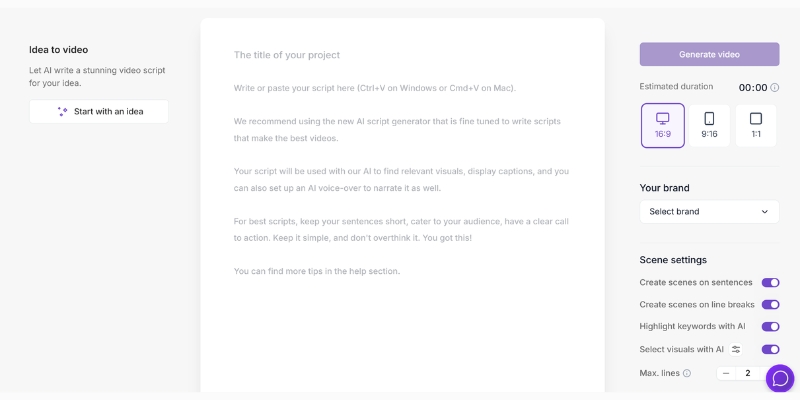
How It Works (Simplified for Marketers): At its core, these tools utilize advanced Large Language Models (LLMs) to comprehend the semantic meaning and context of your script. Once the AI understands the narrative, it taps into a massive library of licensed stock footage or uses its own generative models to create new video scenes from scratch that visually represent the text. The system then sequences these clips, applies transitions, and syncs it with an AI-generated voiceover to produce a finished video.
Battle-Tested Use Cases:
- Rapid Social Media Ad Creation: A marketer can input several variations of ad copy and generate multiple unique video ads within minutes. This allows for extensive A/B testing of visuals and messaging without the high cost and time investment of a video shoot.
- Blog Post to Video Conversion: One of the highest ROI applications is turning a high-performing blog post into an engaging summary video for YouTube or LinkedIn. Tools like Pictory excel at this, extending the lifespan and reach of your written content by tapping into video-first platforms. Learn more about how this works in our deep-dive on Text-to-Video AI.
- Script-to-Storyboard: For larger, more complex video projects, Text-to-Video tools can be used to quickly visualize a script. This creates a low-cost “video storyboard” that helps stakeholders align on the creative direction before committing to a full production budget.
Pros vs. Cons (ROI-Focused):
Pros: The primary benefits are speed (reducing production time from hours or days to mere minutes), cost-efficiency (drastically cutting the need for expensive shoots, actors, and editors), and scalability (enabling a single creator to produce a high volume of video content).
Cons: The main drawbacks are potentially limited creative control compared to manual editing software and the risk of using generic-looking stock footage that may not perfectly align with your brand. While improving rapidly, purely AI-generated scenes can sometimes contain visual artifacts or inconsistencies.
Top Tools in This Category & What They Excel At:
Tools like InVideo AI are great for creating full-length, narrated videos from a single prompt, making them suitable for YouTube content. In contrast, Pictory excels specifically at the blog-post-to-video workflow, offering powerful summarization features.
AI Avatar Generators: Your 24/7 On-Demand Digital Presenter
AI Avatar generators provide a powerful solution for producing consistent, professional, and scalable presenter-led video content without the logistical headaches of filming a real person. This category is defined by its output: a digital human presenter delivering your message.
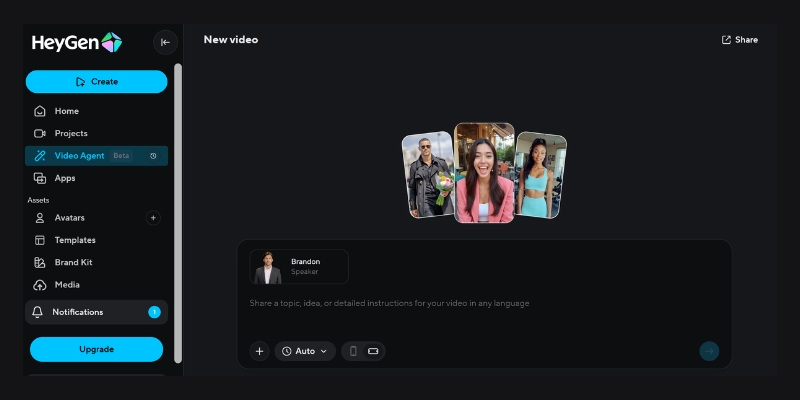
How It Works (Focus on the Outcome): The process is remarkably straightforward for the user. You begin by typing or pasting your script into a text box. Next, you select a pre-existing stock AI Avatar from a diverse library or use a custom one created to look and sound like a specific person. The platform’s Facial Animation Software and Lip-syncing AI then generate a video of the avatar speaking the script with realistic facial expressions and synchronized mouth movements. For a deeper understanding of this entity, explore our guide on what is an AI Avatar.
Battle-Tested Use Cases:
- Scalable Employee Onboarding & Training: Companies use avatars to create a consistent library of training videos. When a process or policy changes, they don’t need to re-shoot anything; they simply edit the text script, and a new, updated video is generated in minutes. This is especially powerful for global companies that need to translate content into multiple languages.
- Personalized Sales Outreach at Scale: Instead of sending generic outreach emails, a sales team can use a custom avatar to generate hundreds of personalized videos. By using variables for the prospect’s name and company, each video feels personal, dramatically increasing engagement and response rates.
- Faceless YouTube Channel Content: This technology is a boon for creators who want to run channels that require a consistent human presenter (like news summaries or educational content) without having to be on camera themselves, ensuring privacy and consistency. To find the right tool, check our comparison of the best AI avatar generators.
Pros vs. Cons (ROI-Focused):
Pros: The ROI is clear: it eliminates camera, studio, and actor costs, offers massive scalability for content production, and makes updates and edits incredibly easy. The ability to localize videos into over 140 languages with some platforms provides unparalleled global reach.
Cons: Avatars can sometimes fall into the “uncanny valley,” where they look realistic but feel slightly off, which might hinder the emotional connection with the audience. Furthermore, while the technology is impressive, it may not yet capture the full range of genuine emotion and nuance of a real human presenter. Creating a high-quality custom avatar can also be an additional upfront cost.
Top Tools in This Category & What They Excel At:
Synthesia is widely regarded as the enterprise leader, focusing on high-quality avatars and robust features for corporate training and communication. HeyGen is another strong contender, known for its wide range of avatars and innovative features like interactive, chatbot-like avatars.
AI Repurposing & Video-to-Video: Multiply Your Content ROI Instantly
For any marketer or creator sitting on a treasure trove of long-form content like podcasts or webinars, AI Repurposing tools are the key to unlocking its full potential. This category is not about creating new content from scratch but intelligently transforming existing footage to maximize its reach and engagement, directly addressing the pressure to perform across multiple platforms.
How It Works (The “Magic” Explained): These platforms typically start with a link to your long video (e.g., a YouTube video) or a direct file upload. The AI then gets to work, using a combination of Speech Synthesis Technology to transcribe the audio and computer vision to analyze the visual cues. It identifies what it determines to be the most compelling or potentially “viral” moments—key questions, insightful statements, or engaging stories. Finally, it automatically reformats these segments into vertical short clips, adds dynamic, auto-generated captions, and even provides a “virality score” to help you prioritize which clips to post.
Battle-Tested Use Cases:
- Podcast to TikTok/Reels: A one-hour podcast interview can be overwhelming for new audiences. An AI Repurposing tool can instantly turn that single recording into 10-15 engaging, bite-sized clips, each highlighting a key takeaway, ready to be shared on TikTok, Instagram Reels, and YouTube Shorts.
- Webinar to LinkedIn Nuggets: After hosting an hour-long webinar for professionals, you can use these tools to extract the most valuable insights and expert quotes. These polished, subtitled clips become perfect content for sharing on LinkedIn to demonstrate thought leadership and promote the full webinar recording.
- Product Demo to Feature Highlights: A comprehensive 20-minute software demo can be automatically dissected into a series of short videos, with each clip showcasing a single, powerful feature. This allows marketing teams to run targeted campaigns focused on specific benefits without any manual editing.
Pros vs. Cons (ROI-Focused):
Pros: The benefits are immense. It drastically reduces manual editing time from hours to minutes, maximizes the value and lifespan of content you’ve already created, and allows you to maintain a high-frequency posting schedule on social media with minimal ongoing effort.
Cons: The main limitation is that the AI’s selection of the “best” clips is based on its algorithm and might not always align perfectly with specific marketing goals or nuanced context. This often means a final manual review is necessary to ensure the chosen clips are on-message and represent the brand appropriately.
Top Tools in This Category & What They Excel At:
Tools like Opus Clip are renowned for their powerful AI curation and “virality score,” which helps creators pick the most promising clips. Munch offers similar functionality with a strong focus on data-driven content extraction. Repurpose.io stands out by excelling at the automation of not just creation but also distribution, automatically publishing clips to multiple social platforms.
How to Choose the Right AI Video Category: A Framework for Marketers, Creators, & Freelancers
Selecting the right type of AI video generator is a critical decision that directly impacts your workflow, budget, and results. Instead of getting lost in features, use this goal-oriented framework to identify the category that best aligns with your immediate needs. This is the practical approach to navigating the comparison of Text-to-Video vs. Video-to-Video AI and other modalities.
Start with Your Goal: First, clearly define your primary objective.
- If your goal is speed and creating new, simple videos from ideas (e.g., social media ads, faceless educational content, video summaries of articles)… → Text-to-Video is your best starting point.
- If your goal is to create professional, scalable, presenter-led content without being on camera (e.g., employee training, corporate announcements, consistent sales videos)… → AI Avatar generators are designed specifically for you.
- If your goal is to save time and maximize the content you already have (e.g., podcasts, webinars, interviews)… → AI Repurposing tools offer the highest and fastest ROI.
Consider Your Primary Input: What asset are you starting with?
- Do you start with just a script or an idea? → Choose Text-to-Video or AI Avatar.
- Do you start with an existing long video? → Choose AI Repurposing.
- Do you start with a static image? → Choose Image-to-Video.
Evaluate Your Budget vs. Time: Where do you need the most efficiency?
- Lowest Budget, Highest Time Savings on Existing Content: AI Repurposing.
- Moderate Budget, Need for Scalable “Human” Content: AI Avatar.
- Variable Budget, Fastest Way to Create New Concepts from Scratch: Text-to-Video.
To summarize, here is a comparative overview:
| Category | Best For | Input Required | Typical Cost | Key Benefit |
|---|---|---|---|---|
| Text-to-Video | Rapid ad creation, blog-to-video conversion | Text script or URL | Low to Moderate | Speed & Idea Visualization |
| AI Avatar | Corporate training, scalable communications | Text script | Moderate to High | Scalability & Consistency |
| AI Repurposing | Maximizing existing long-form content | Existing video/audio file or URL | Low to Moderate | Content ROI & Time Savings |
| AI Voice Cloning | Consistent branding, localization | Text script & voice sample (for cloning) | Variable (often a feature) | Brand Consistency & Realism |
| Image-to-Video | Dynamic social media posts, animating art | Static image | Low | Increased Engagement |
Ethical Concerns & Future Outlook: Navigating Deepfakes and Transparency
The power of AI video generation brings with it a critical responsibility for creators, marketers, and freelancers. As these technologies become more sophisticated, understanding and navigating the ethical landscape is paramount to building and maintaining audience trust.
The Rise of Deepfake Technology in Video Generation: The term “deepfake” refers to synthetic media where a person’s likeness is replaced or manipulated with a high degree of realism. While often associated with malicious use, the underlying Deepfake technology is the same engine that powers many legitimate AI video tools, especially in the realm of AI Avatars and AI Voice Cloning. The ability to generate a realistic human presenter or perfectly replicate a voice carries inherent risks if used irresponsibly.
Key Ethical Considerations for Users:
- Consent and Privacy: This is the most critical ethical concern. You must have explicit consent to use another person’s likeness or voice. This applies to creating custom avatars of employees or public figures and is especially crucial for AI Voice Cloning. Using these tools to impersonate someone without their permission is not only unethical but can have serious legal ramifications.
- Misinformation and Disinformation: The potential for misuse in creating fake celebrity endorsements, false testimonials, or misleading political content is significant. As professionals, the responsibility falls on us to use these generative video modalities ethically, ensuring the content we produce is truthful and not designed to deceive.
- Transparency and Disclosure: To maintain trust with your audience, it is a best practice to clearly disclose when content is AI-generated, particularly when using synthetic presenters or cloned voices. A simple disclaimer like “This video was created using an AI avatar” can prevent feelings of deception and demonstrates a commitment to transparency.
The Industry’s Response and What to Look For: Reputable AI video generation platforms are actively working to mitigate these risks. Many are implementing robust content moderation policies to prevent the creation of harmful or misleading content. Some are also developing digital watermarking technologies to help identify AI-generated media. When choosing a tool, prioritize platforms that are transparent about their ethical guidelines and have clear terms of service regarding the acceptable use of their technology.
Frequently Asked Questions About AI Video Generation Types
What is the difference between Text-to-Video and AI Avatar generation?
Text-to-Video typically creates videos by combining stock or AI-generated footage to match a script, while AI Avatar generation creates a video of a synthetic human presenter speaking that script. The former is about visualizing a story; the latter is about delivering a message via a presenter.
Can AI video generators create full-length YouTube videos?
Yes, some tools like InVideo AI are specifically designed to create full-length videos from a single prompt, complete with a script, stock media, and voiceover. However, many of the most advanced generative tools, like OpenAI’s Sora or Runway, are currently optimized for creating shorter, high-fidelity clips rather than long-form narratives.
Which type of AI video tool is best for repurposing podcast content?
AI Repurposing tools like Opus Clip or Munch are specifically built for this purpose. They automatically analyze long-form audio or video, extract the most engaging clips, and reformat them with captions for social media platforms, providing the best workflow for this task.
Is AI Voice Cloning legal?
The legality of AI voice cloning depends heavily on consent. It is generally legal if you are cloning your own voice or have explicit, documented permission from the person whose voice you are cloning. Using it to impersonate someone without their consent can lead to serious legal issues related to fraud, defamation, and right of publicity laws.
Do I need video editing skills to use these tools?
No, the primary advantage of most AI video generators is that they are designed for users without technical video editing skills. These platforms automate the most complex parts of the production process, such as clip selection, sequencing, and adding captions, making video creation accessible to everyone.
Read More From AI Video Generation
If you found this guide helpful, continue exploring our expert, battle-tested reviews and comparisons within the AI Video Generation category to find the perfect solution for your needs.
- How Do AI Video Generators Work? (A Simple Explanation)
- AI Video vs. Traditional Video Production: A Full Comparison
- The Benefits of Using AI in Video Creation
last update : 20/11/2025
