
Best AI Video Generators 2025: The Ultimate Battle-Tested Review
For Marketers, Creators, and Freelancers, the performance pressure to produce high-quality video content faster and more efficiently has never been greater. The search for the Best AI Video Generators is no longer about novelty; it’s a critical business decision driven by the need to automate repetitive tasks and maximize ROI. In the world of AI Video Generation, choosing the right tool can be the difference between scaling your content strategy and falling behind. This battle-tested review cuts through the hype, focusing on real-world performance, ROI comparisons, and practical use cases to help you find the perfect fit. We will provide a data-driven toplist, break down the core types of AI video tools, offer in-depth reviews of market leaders like Synthesia, Pika, and OpusClip, and deliver a final head-to-head AI video generator comparison.
Table of Contents
The 5 Best AI Video Generators: A Data-Driven Toplist for 2025
As a Marketer, Creator, or Freelancer, you’re under constant “performance pressure” to deliver results. Wasting time on the wrong tool isn’t an option. This toplist is your shortcut to the most effective AI video software on the market, designed for quick, high-level comparison. We’ve analyzed dozens of options to identify the top-tier platforms that deliver tangible value and a strong ROI.
| Tool Name | Core Category | Best For | Starting Price | Our Rating |
|---|---|---|---|---|
| Synthesia | AI Avatar | Corporate Training & Marketing Teams | $22/month (billed annually) | 4.8 / 5.0 |
| Pika | Generative AI Video | Solo Creators & Social Media Ads | $8/month (billed annually) | 4.7 / 5.0 |
| OpusClip | AI Video Repurposing | Content Creators & Podcasters | $9.50/month (billed annually) | 4.9 / 5.0 |
| VEED.io | AI Video Editing | All-in-One Video Workflows | $12/month (billed annually) | 4.6 / 5.0 |
| Fliki | Text-to-Video | Bloggers & Affiliate Marketers | $21/month (billed annually) | 4.5 / 5.0 |
Understanding the 3 Core Types of AI Video Generators
“AI Video Generator” is a broad term, and the “best” tool for you depends entirely on your primary goal. Choosing the wrong category is a common and costly mistake. To make an informed purchasing decision, it’s crucial to understand the main types of AI video software and how they solve different problems for Marketers and Creators.
AI Avatar Generators (e.g., Synthesia)This category focuses on creating professional, presenter-led videos without needing cameras, microphones, or actors. You simply type a script, choose a digital avatar, and the AI generates a video of them speaking. These are ideal for corporate training modules, HR onboarding, and scalable marketing presentations where consistency and clarity are paramount. For a deeper dive, explore our guide to the best AI avatar generator.
Generative AI Video (e.g., Pika)These are the most creatively focused AI video tools. They generate entirely new video clips from simple text or image prompts, transforming your imagination into motion. This category is perfect for creating unique B-roll, eye-catching social media content, conceptual ads, and storyboarding ideas. The focus here is on originality and visual impact rather than informational delivery. See our top picks in the best generative video tools category for more options.
AI Video Repurposing Tools (e.g., OpusClip)These tools are a game-changer for content creators sitting on a library of long-form content. An AI repurposing tool automatically analyzes long videos—like podcasts, webinars, or speeches—and extracts the most engaging, viral-worthy short clips. It then auto-captions and reformats them for platforms like TikTok, YouTube Shorts, and Reels. This is an essential solution for maximizing reach and engagement without hours of manual editing. Discover more powerful options in our review of the best AI repurposing tools.
Best AI Avatar Generator: Synthesia In-Depth Review
Synthesia stands as the market leader in the AI Avatar space, offering a polished, enterprise-ready platform designed for scalable video production. This isn’t just a tool; it’s a solution for businesses that need to create professional, consistent training and communication videos without the high costs and logistical headaches of traditional filming. Our battle-tested review focuses on its practical application and ROI for marketing teams.
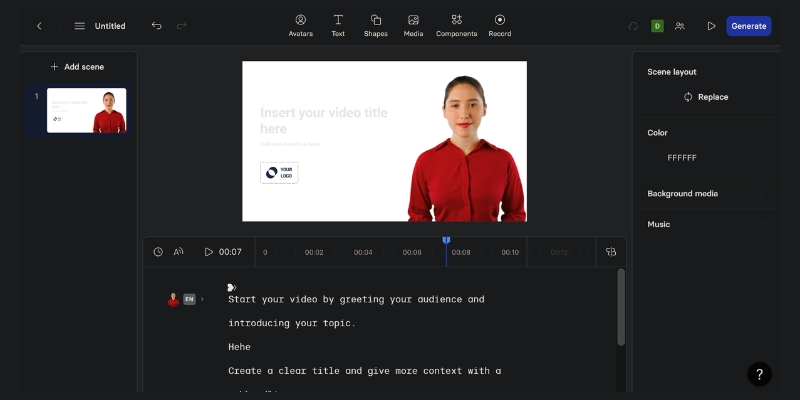
At its core, Synthesia is a text-to-video platform that uses AI to animate photorealistic digital presenters (avatars). Users type or paste a script, select one of over 150 stock avatars or create a custom one, and the software generates a high-quality video of the avatar speaking the script with realistic lip-syncing. This process replaces the need for cameras, actors, and studios.
Key Features for Marketers & Creators: Realistic AI Avatars: Synthesia offers a massive library of diverse, high-quality stock avatars. The ability to create a custom digital twin of a key stakeholder or brand ambassador is a powerful feature for maintaining brand consistency. Multi-Language Voice Cloning: With support for over 120 languages and accents, this feature is invaluable for global marketing campaigns and international corporate training. You can clone your own voice to ensure a consistent audio brand across all video assets. Customizable Video Templates: To accelerate production, Synthesia provides a wide range of professionally designed templates. These can be customized with your brand’s logos, colors, and fonts, saving countless hours for your design team. API & Integrations: For enterprise-level automation, the Synthesia API allows for the programmatic creation of personalized videos at scale, such as dynamic sales outreach or customized onboarding videos. Synthesia Pricing Analysis:Synthesia’s pricing is structured to serve users from individuals to large enterprises, with the ROI increasing significantly with scale.
- Personal Plan: Aimed at individual users, this plan provides access to the core features for creating simple videos.
- Creator Plan: Built for professionals and small teams, offering more video minutes, premium features, and better support. The ROI here comes from replacing the cost of small-scale video shoots and freelance editors.
- Enterprise Plan: Designed for large organizations, this custom plan includes features like custom avatars, API access, and robust security compliance (like SOC 2), delivering massive savings on large-scale training and communication budgets.
Imagine you need to create a weekly internal marketing update. Traditionally, this would involve recording, editing, and distributing a video, taking hours. With Synthesia, you paste your bullet points into the script box, choose your company’s branded template and custom avatar, and click “Generate.” In under 5 minutes, you have a professional, on-brand video ready to share via email or Slack.
Our Verdict:Synthesia is the undisputed best AI video generator for corporate communications, sales enablement, and professional training. If your primary need is to create polished, presenter-led videos at scale while maintaining strict brand control, Synthesia offers an unbeatable ROI. It’s less suited for highly creative or artistic projects but excels in its designated commercial use case.
Best Generative AI Video Tool: Pika Battle-Tested
Pika has rapidly emerged as a leader in the purely creative realm of generative video. Positioned as a tool to “give your imagination motion,” Pika excels at translating text, images, or even existing videos into new, dynamic, and often surreal visual content. It’s the go-to AI video software for projects where originality and high visual impact are the primary goals.
What is Pika & How Does It Work?Pika is an AI model that creates video from a variety of inputs. Its core functions are text-to-video (generating a clip from a descriptive prompt), image-to-video (animating a static image), and video-to-video (transforming the style or elements of an existing video clip). It’s designed for a fast, iterative creative process, making it a favorite among solo creators and social media marketing teams.
Key Features for Creative Projects: Prompt Interpretation Quality: Pika’s strength lies in its ability to understand and execute complex, artistic prompts. It can generate video in various styles—from cinematic and anime to 3D animation—giving creators a vast creative canvas. Lip Sync & Sound Effects: A standout feature is the ability to upload an audio track and have an AI-generated or uploaded character lip-sync to it. Users can also generate sound effects directly within the platform, adding a layer of polish and engagement to their creations. Expand Canvas & Modify Region: Similar to features in advanced image editors, Pika allows users to expand the video’s canvas (e.g., from a square to a 16:9 aspect ratio) or modify specific regions of the video with a new prompt, offering a level of control that many competitors lack. Pika Pricing Tiers:Pika’s pricing model is accessible, with a robust free offering to encourage experimentation.
- Free Plan: Includes a set number of credits with a Pika watermark on all videos. It’s perfect for learning the platform and casual use.
- Standard & Pro Plans: These paid tiers remove the watermark, provide significantly more credits, allow for faster generation times, and unlock premium features. For any serious creator or marketer, a paid plan is essential for professional output.
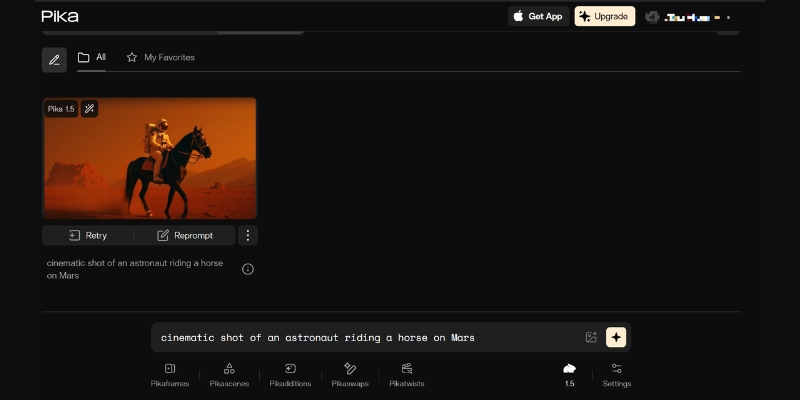
A small e-commerce brand wants to create a scroll-stopping video ad for a new line of fantasy-themed candles. Instead of using generic stock footage, the marketer uses Pika with the prompt: “A magical, glowing candle on an ancient wooden table, with wisps of sparkling smoke rising, cinematic, moody lighting.” In seconds, Pika generates several unique, eye-catching clips that are far more engaging than anything they could find or afford to shoot traditionally.
Our Verdict:Pika is the best generative AI video tool for solo creators, artists, and marketing teams focused on high-impact social media and advertising content. If your priority is creating original, attention-grabbing visuals from scratch, Pika’s creative power and ease of use are unmatched. It’s not designed for creating long-form or corporate-style videos but is a powerhouse in the short-form creative niche.
Best AI Video Repurposing Tool: OpusClip Performance Review
For content creators, the “content treadmill” is a relentless challenge. OpusClip directly addresses this pain point, positioning itself as the ultimate solution for creators struggling to keep up with the demand for short-form video. It’s an AI-powered efficiency machine designed to maximize the value and reach of your existing long-form content library.
What is OpusClip & How Does It Solve the Content Treadmill?OpusClip is a specialized AI video tool that takes a single long video and, with one click, automatically generates multiple short, viral-ready clips. It uses AI to identify the most compelling hooks and segments, intelligently reframes them for vertical viewing, adds dynamic captions, and even provides a “virality score” to help you prioritize what to post. It automates what would typically be hours of tedious work for a human editor.
Key Features for Maximizing Content ROI: AI Curation & Virality Score™: This is OpusClip’s core value proposition. Its AI analyzes the transcript and video content to find the most engaging and coherent segments, ranking them with a predictive score to indicate their potential to go viral. Auto Re-framing & Captions: The tool automatically detects and tracks the main speaker, ensuring they are always in the frame in a vertical 9:16 format. It also adds highly engaging, word-by-word animated captions, which are crucial for viewer retention on platforms like TikTok and YouTube Shorts. Brand Templates & B-Roll: Users can create and apply brand templates (custom fonts, colors, logos) to all clips instantly, ensuring brand consistency. The AI can also automatically add relevant b-roll footage to make the clips more visually interesting, a feature that sets it apart from simpler clipping tools. OpusClip Pricing Breakdown:OpusClip’s pricing is based on the number of upload minutes processed, making it a scalable solution.
- Essential Plan: A starting point for creators who are regularly producing long-form content and want to establish a consistent short-form presence.
- Pro Plan: Designed for serious content creators, agencies, and freelancers managing multiple clients. The value proposition is clear: the cost of the plan is a fraction of the cost of hiring a video editor to perform the same tasks.
A podcaster uploads a 1-hour interview to OpusClip. Within minutes, the AI returns 10-15 distinct, high-potential clips, each 30-60 seconds long. Each clip is already reframed for mobile, has engaging captions, and is scored for virality. The podcaster can now schedule a week’s worth of content for TikTok, Reels, and Shorts in less than 30 minutes, drastically increasing their show’s discovery and audience growth.
Our Verdict:OpusClip is an essential, non-negotiable AI video tool for any creator or marketer with a library of long-form video content. It is the best AI video repurposing tool on the market. The time and money it saves are immense, making its ROI almost immediate. If you create podcasts, webinars, interviews, or educational videos, OpusClip will fundamentally change your content distribution workflow for the better.
Head-to-Head Comparison: Pika vs Synthesia vs OpusClip
Now that we’ve reviewed the leaders in each core category, this direct AI video generator comparison will help you make the final purchasing decision. The right choice depends entirely on your specific use case. This table breaks down the key differences between these top AI video tools to clarify which platform aligns with your goals.
| Criteria | Synthesia | Pika | OpusClip |
|---|---|---|---|
| Core Function | AI Avatar Video Generation | Generative Video from Prompts | AI Repurposing of Long Videos |
| Best For (Use Case) | Corporate training, sales videos | Creative ads, social media content | Podcast clips, YouTube Shorts |
| Ease of Use | Very Easy (Script-based) | Easy (Prompt-based) | Extremely Easy (One-click) |
| Video Output Quality | High (Polished, Professional) | Varies (Creative, Artistic) | High (Optimized for Social) |
| Pricing Model | Subscription (Per User) | Subscription (Credit-based) | Subscription (Minutes-based) |
| ROI for Marketers | High (Saves on production costs) | High (Saves on creative/ad spend) | Very High (Saves on editing time) |
Analysis: Which Tool Should You Choose?
Choose Synthesia if: You need to create polished, consistent, presenter-led videos for corporate communications, e-learning, or training at scale. Your priority is professionalism, brand control, and replacing traditional video shoots.
Choose Pika if: Your priority is creating completely original, eye-catching creative visuals for social media campaigns, music videos, or conceptual ads. You value artistic freedom and want to generate video content that doesn’t exist anywhere else.
Choose OpusClip if: You already produce long-form video content (like podcasts or webinars) and your biggest challenge is efficiently distributing it as short-form clips. Your priority is maximizing content ROI, saving editing time, and growing your audience on social platforms.
How We Test & Rank AI Video Tools
Our recommendations are not based on surface-level feature lists. As an expert hub, we are committed to providing “battle-tested” reviews that reflect real-world application. Our ranking methodology is built on a foundation of trust and transparency, ensuring our audience of Marketers, Creators, and Freelancers receives actionable insights.
Our Testing Criteria: Real-World Performance: We test each AI video creator with projects that our target audience faces daily. For Synthesia, it’s a corporate training module. For Pika, it’s a social media ad campaign. For OpusClip, it’s repurposing a one-hour podcast. ROI & Time-Saving Analysis: We don’t just look at the price; we analyze the value. We measure the hours saved compared to traditional video production workflows and calculate the potential cost savings from reducing reliance on freelance editors or production studios. Feature Set & Usability: A powerful tool is useless if it’s impossible to use. We evaluate the learning curve of the software, the intuitiveness of its interface, and the practical utility of its core features for achieving a specific outcome. Output Quality & Customization: We assess the final video output for professionalism, visual appeal, and audio clarity. We also test the limits of customization—how much control does the user have to align the video with their brand identity?Frequently Asked Questions (FAQ)
What is the best free AI video generator?For generative video, Pika offers a generous free plan that includes a watermark, making it one of the best AI video generators free for experimentation. For general editing with AI features, CapCut is another powerful free option. However, for professional, watermark-free results, a paid plan is almost always necessary.
Which AI video generator is best for YouTube automation?For YouTube automation that relies on faceless channels or documentary-style content, a combination of tools is often best. Fliki is excellent for turning blog posts or scripts into videos with stock footage and AI voices. For creators who already have long-form content, OpusClip is the best for automating the creation of YouTube Shorts to drive traffic to the main channel.
Can AI create realistic videos?Yes, AI can create remarkably realistic videos, but the level of realism varies by category. AI Avatar tools like Synthesia produce highly realistic digital presenters. Generative AI tools like Pika are rapidly improving but can sometimes produce results that are more artistic or surreal than photorealistic.
How do AI video makers compare to traditional video editing software like Adobe Premiere?AI video makers are designed to automate and accelerate specific tasks, not to replace the comprehensive control of traditional editors like Adobe Premiere Pro. AI tools excel at speed and efficiency for tasks like avatar generation (Synthesia), creative ideation (Pika), or clip creation (OpusClip). Premiere Pro offers deep, manual control over every frame, making it better for complex, bespoke editing projects. Many professionals use both—AI tools for initial creation and Premiere for final polishing. For more on this, check our guide on the best AI video editing software.
Is Synthesia better than other AI avatar tools?In our testing, Synthesia consistently ranks as the best for enterprise and professional use cases due to its superior avatar quality, extensive feature set, security compliance, and robust platform stability. While other alternatives exist, Synthesia remains the market leader for teams that prioritize quality and scalability.
Does Pika have a watermark on free videos?Yes, videos created using Pika’s free plan will have a Pika watermark. To download videos without a watermark for professional or commercial use, you will need to subscribe to one of their paid plans.
Read More From AI Video Generation
If you found this toplist helpful, continue exploring our expert, battle-tested guides and comparisons within the AI Video Generation category to find the perfect solution for your needs.
last update : 14/11/2025
