
Synthesia Pricing 2025: Cost Breakdown, Hidden Fees & Plan Analysis
If you are struggling to understand the exact Synthesia pricing structure before committing your budget, you are not alone. As an AI Avatar Generator expert, I see marketers constantly confused by the difference between “video minutes,” “seats,” and “add-on avatars.”
We have tested every tier of this platform, from the basic personal plans to the complex enterprise contracts. In this guide, I will break down the real costs, expose the hidden fees for custom avatars, and help you decide if the investment is worth your ROI expectations.
Table of Contents
Synthesia Pricing Overview 2025: The Quick Answer & Cost Breakdown
Let’s get straight to the numbers. Synthesia operates on a tiered subscription model that primarily charges based on the number of video minutes generated per month or year. It is not a one-time purchase.
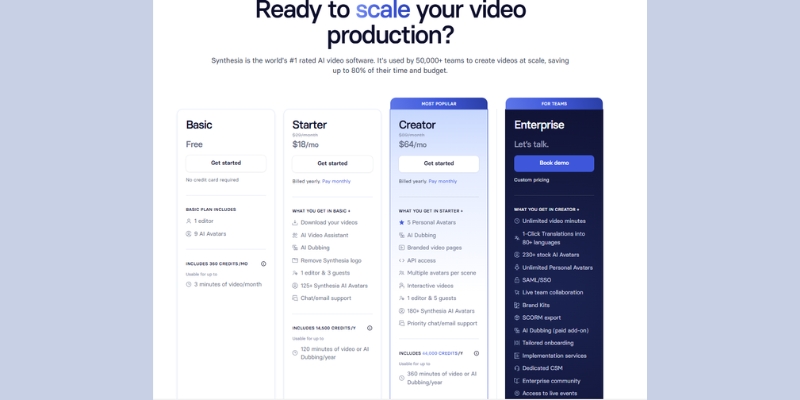
We have analyzed the current pricing structure (updated for 2025), and here is what you can expect to pay. Note that selecting an annual discount billing cycle can save you approximately 25% compared to monthly payments.
Starter Plan (Approx. $18/month):
Best for individuals just starting out. Includes 120 video minutes per year (billed annually). This is the entry-level tier for casual users.
Creator Plan (Approx. $64/month):
Designed for professional creators. Includes 360 video minutes per year and adds custom font uploads and premium built-in avatars.
Enterprise Plan (Custom Quote):
For teams needing scalability. Includes unlimited video minutes (subject to fair use), SSO, and dedicated success managers. Pricing typically starts in the thousands annually.
(Disclosure: If you purchase through links on this page, we may earn a small commission at no extra cost to you. This helps us maintain our “battle-tested” reviews.)
| Plan Tier | Cost (Annual Billing) | Key Limit | Action |
|---|---|---|---|
| Starter | ~$18 / mo | 10 Mins / Mo | See Starter Plan |
| Creator | ~$64 / mo | 30 Mins / Mo | See Creator Plan |
| Enterprise | Contact Sales | Unlimited Mins | Contact Sales |
The “Starter” & “Creator” Plans: Analyzing Costs for Individuals
When we tested the Personal Plan (now split into Starter and Creator), the most critical factor wasn’t the dollar amount, but the utility you get per dollar. Many users sign up for the cheapest option and hit a wall immediately.
Here is our deep dive into the value proposition of these individual tiers, specifically regarding the infamous “Video Minute” cap.
The Price Point:
The Starter plan is accessible at roughly $22/month if paid yearly. However, paying monthly jumps the price to around $29/month. For freelancers on a budget, this is reasonable, but only if your volume is very low.
Video Minute Limitations:
This is the biggest friction point. The Starter plan usually caps you at 10 minutes of video per month. In our experience, if you make one mistake and have to re-render a 5-minute video, you have used up your entire month’s allowance.
Avatar Availability:
You get access to over 160+ stock AI avatars. We found the quality in the Starter plan identical to the Enterprise plan visually. You are not penalized on video quality, only on volume and advanced features.
Audio & Voice Limits:
While you can use the standard voice library, voice cloning capabilities are often restricted or incur extra costs in these lower tiers. If you need a custom brand voice, the Starter plan will likely be insufficient.
Synthesia Enterprise Pricing: Is the Corporate Plan Worth the Investment?
If you are a decision-maker for a corporate L&D department, the Enterprise Plan is likely your only viable option due to compliance and volume needs. While the pricing is “Custom,” we can estimate costs based on industry standards.
Typically, enterprise contracts for AI video tools start in the mid-four figures annually depending on the number of “seats” (users). Here is why companies justify this high Synthesia cost.
Volume & Scalability:
The primary driver for upgrading is the removal of hard caps. Enterprise plans often offer “Unlimited Video Minutes” (within fair use policies). For a company churning out training modules, the cost per minute drops significantly here.
Collaboration Features:
We found the “Team Comments” and “Shared Workspaces” features essential for approval workflows. Without this, your legal team cannot review videos before they are generated, leading to wasted minutes on lower plans.
Security & Compliance:
For corporate clients, features like SSO (Single Sign-On) and SOC2 compliance are non-negotiable. The Enterprise tier is the only one that supports these security standards, along with SCORM export for Learning Management Systems (LMS).
Priority Support:
Having a dedicated Customer Success Manager (CSM) is crucial when you are rolling this out to a team. We noticed that Enterprise tickets are resolved much faster than general support inquiries.
The Real Cost of Custom Avatars: Add-Ons & Hidden Fees Explained
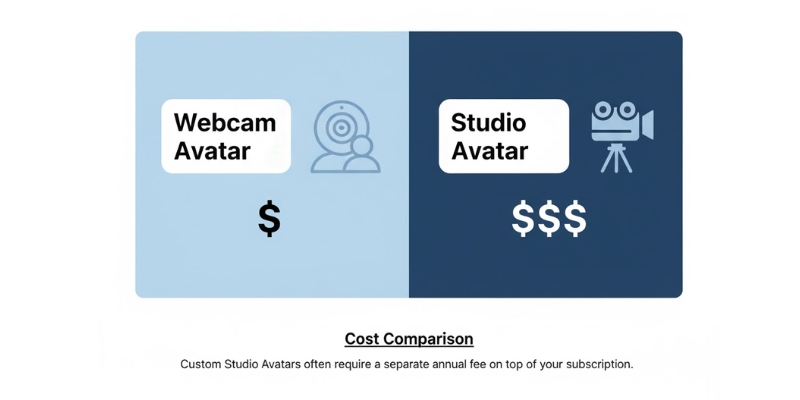
Many users mistakenly believe that a “Digital Twin” is included in the monthly subscription. It is not. Creating a Custom Avatar is usually a paid add-on service that incurs a separate fee.
This is a critical distinction for your budget. There are two main types of custom avatars, and their pricing reflects the complexity of the AI training involved.
Webcam Avatar (Lower Cost):
This allows you to record yourself via webcam. It is often included in the Creator plan or available for a small annual fee. The quality is decent for internal comms but lacks the high-fidelity polish of studio recordings.
Studio Avatar (Premium Cost):
This is the professional grade. You go to a studio (or use green screen footage), and Synthesia trains a perfect replica. We have seen this priced around $1,000 per year per avatar. It is a significant investment for high-end branding.
Synthesia Pricing vs. HeyGen: Comparing ROI & Credit Models
The most common comparison we see is Synthesia pricing vs HeyGen pricing. Both are market leaders, but they use fundamentally different billing logic that affects your bottom line.
Synthesia uses “Time” (minutes), while HeyGen often relies on a “Credit” system. Understanding this difference is key to calculating your ROI.
The Minute vs. Credit System:
In Synthesia, 1 minute of video equals 1 minute deducted. In HeyGen’s credit system, certain premium actions (like 4K resolution or specific avatars) might consume credits faster. For predictable long-form content, we prefer Synthesia’s straightforward time model.
Entry Level Comparison:
HeyGen often has a slightly lower entry barrier or a free trial that is more generous than Synthesia’s limited demo. However, Synthesia’s $22/mo price point is competitive for the visual quality provided.
Avatar Quality per Dollar:
While HeyGen is catching up fast, Synthesia generally offers more consistent lip-syncing at the Enterprise level. If you are paying for premium quality, Synthesia often delivers a slightly better “corporate polish” for the price.
For a deeper technical comparison, read our analysis on Synthesia vs HeyGen.
Understanding the “Video Minute” Economy: How Synthesia Counts Cost
New users often feel cheated when their minutes vanish. It is vital to understand exactly how Synthesia costs are calculated within the app to avoid running out of budget mid-month.
We have clarified the most confusing aspects of the “Video Minute” economy below based on our usage.
Do unused minutes roll over?
Generally, no. On the Starter monthly plan, if you don’t use your 10 minutes, they vanish at the end of the billing cycle. This forces you to “use it or lose it,” which is a downside for sporadic creators.
Does generating a preview cost minutes?
No. You can preview the video to check layout and text without spending credits. Minutes are only deducted when you hit the final “Generate” button to render the video.
Does downloading cost extra?
No. Once a video is generated, you can download it as many times as you want. However, if you fix a typo and re-generate the video, that counts as new minutes.
Final Recommendation: Which Plan Fits Your Budget?
After testing these plans extensively, we have categorized our recommendations based on user personas. Do not overspend on the Enterprise plan if you are just making TikToks, and do not rely on the Starter plan for corporate training.
The Expert Verdict
For Solo Creators & Experimenters:
Stick to the Starter Plan. It is affordable and sufficient for creating a few social media clips or a monthly update video. If you need more volume, move to Creator.
For Agencies & Heavy Content Producers:
The Creator Plan is the minimum viable option. You need the extra minutes and the ability to upload custom fonts to match client branding.
For Corporate L&D Departments:
Go straight to Enterprise. The security features (SSO), team collaboration tools, and unlimited minutes are essential for ROI in a business setting.
Frequently Asked Questions About Synthesia Pricing
We track the most common questions users ask about Synthesia plans on Google and Reddit. Here are the direct answers to save you research time.
Is there a Synthesia free lifetime deal?
No. Synthesia does not offer a lifetime deal (LTD). They operate strictly on a recurring subscription model due to the high server costs of AI video rendering.
Can I buy more minutes without upgrading?
Usually, no. If you run out of minutes on the Starter plan, you typically have to wait for the next cycle or upgrade to the next tier. There is no “top-up” feature for individual plans.
Is Synthesia cheaper if I pay annually?
Yes. You typically save around 20-25% by committing to an annual billing cycle. This is highly recommended if you plan to use the tool for at least a few months.
Does the Personal plan include API access?
No. API access for automated video generation is strictly reserved for the Enterprise tier. Developers looking to build apps on top of Synthesia must contact sales.
Read More From AI Avatar Generator
If you are looking for more tools to scale your video production, check out our related guides and comparisons below:
- 10 Synthesia Alternatives (Free & Paid)
- HeyGen Pricing Explained: Is the Free Plan Enough?
- How to Use Synthesia (Step-by-Step Tutorial for Beginners)
last update : 20/11/2025
