
Pika vs Kaiber: Which AI Video Generator Wins? (2025 Comparison)
If you are trying to decide between Pika vs Kaiber, you are standing at the crossroads of two very different creative philosophies in the AI Generative Video space.
I have spent countless credits and hours testing these platforms since their beta days.
For creators, understanding the distinction between “Realism” and “Artistic Flair” is crucial to avoiding wasted budget.
While Pika 2.2 has become the industry standard for high-fidelity, cinematic motion, Kaiber remains the undisputed champion for stylized, audio-reactive music videos.
In this battle-tested review, we will dissect the pricing, features, and specific use cases to help you decide which tool fits your creative workflow.
Table of Contents
Pika vs Kaiber: The Quick Verdict (Realism vs. Art)
Let’s cut straight to the chase.
The main difference lies in the visual output and the intended end-user.
We found that Pika focuses on generating video that looks like it was shot with a camera.
Kaiber, on the other hand, focuses on video that looks like it was painted or animated by an artist.
| Feature | Pika (2.2/2.5) | Kaiber |
|---|---|---|
| Core Strength | Realistic Cinematic Video | Stylized & Abstract Animation |
| Best For | Filmmakers, Marketing Ads | Musicians, Music Videos |
| Key Feature | Scene Ingredients & Pikaframes | Audio Reactivity (Beat Sync) |
| Video Length | Up to 10 seconds (25s with Pikaframes) | Full-length music videos (minutes) |
| Style | 3D Animation, Photorealism | Anime, Oil Painting, Claymation |
🚀 Expert Verdict
Choose Pika if: You need realistic characters or cinematic scenes with precise camera control.
The Scene Ingredients feature allows you to upload custom elements like characters, objects, and backgrounds.
Choose Kaiber if: You are a musician needing a full-length video that pulses to the beat of your song.
Kaiber excels at unique “frame-by-frame” anime aesthetics and abstract art styles.
Try Pika For Free Try Kaiber For Free
(Disclosure: If you purchase through links on this page, we may earn a small commission at no extra cost to you. This helps us maintain our “battle-tested” reviews.)
Visual Style Comparison: Cinematic AI vs. Stylized Animation
When comparing Pika vs Kaiber, the visual output is the biggest differentiator.
I have run the same prompts through both, and the results are worlds apart.
Pika’s Realism:
Pika 2.2 excels at physics and lighting.
When I prompt for “a cyberpunk city,” Pika generates reflections on wet pavement that look physically accurate.
It aims for a “shot on film” look.
The movement in Pika is smooth and consistent.
Characters maintain their identity reasonably well, making it suitable for narrative storytelling where continuity matters.
Kaiber’s Artistic Flair:
Kaiber embraces the “AI hallucination” as a feature, not a bug.
Its “Flipbook” and “Motion” styles create a flickering, dream-like aesthetic that is perfect for lo-fi beats or intense rock tracks.
In my tests, Kaiber struggled with photorealism.
If you ask for a “real person,” it often looks like a high-quality painting or a stylized rotoscope animation rather than a video clip.
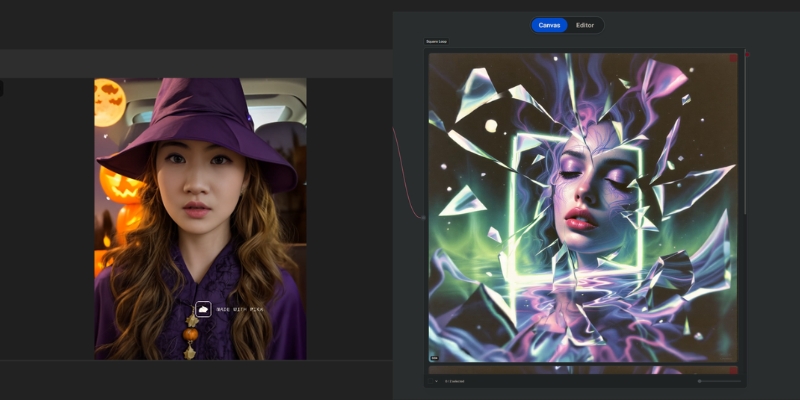
Feature Battle: Scene Ingredients vs. Audio Reactivity
Beyond the visuals, the unique features of each tool dictate their workflow.
This is where the transactional decision is usually made.
Pika’s Scene Ingredients (Pika 2.0):
This is the game-changer that sets Pika apart.
You can upload individual elements like characters, objects, clothing, or environments, and Pika’s AI combines them into a cohesive scene.
Advanced image recognition ensures these elements are seamlessly integrated.
Pika’s Pikaframes (Pika 2.2):
This feature allows you to upload the first and last frame as still images.
Pika then generates a video that transitions between them, creating motion that defies expectations.
Generations can be up to 25 seconds with Pikaframes.
Pika’s Modify Region (Pikaswaps):
This “In-painting” feature allows you to select a shirt, a pair of sunglasses, or a background element.
You can change only that part while keeping the rest of the video stable.
Kaiber’s Audio Reactivity:
Kaiber is the king of music visualization.
You can upload a song, and the AI analyzes the stems (drums, bass, melody).
You can set the video to “zoom” on the bass kick or “brighten” on the snare.
Kaiber’s Transform (Video-to-Video):
While Pika can do this, Kaiber specializes in total transformation.
You can upload a video of yourself dancing in your room and turn it into a claymation robot dancing on Mars.
Workflow & Ease of Use: From Discord to Web
Both tools started with Discord roots, but they have evolved into full-fledged web applications.
User experience (UX) is critical for daily workflows.
Pika’s Interface:
Pika successfully migrated from Discord to a sleek web interface.
I found the “text-to-video” prompt box intuitive.
The addition of camera controls (Pan, Tilt, Zoom) gives you director-level control without complex syntax.
Kaiber’s Interface:
Kaiber uses a “Storyboard” approach.
It guides you step-by-step: Upload Media → Select Style → Settings.
It feels more like a creative wizard than a technical dashboard.
Render Time:
Pika is generally faster for short clips.
With Pika 2.2, you can generate videos from 1 to 10 seconds.
Kaiber allows for much longer generations (up to minutes if you have the credits), but the rendering time can be significant for long music videos.
Pricing & ROI: Which Offers Better Value?
For freelancers and agencies, cost-per-second is a vital metric.
Both platforms operate on a credit-based model, but they burn credits differently.
| Plan Level | Pika Pricing | Kaiber Pricing |
|---|---|---|
| Free Tier | 150 credits/month (Basic) Watermarked |
50 welcome credits (Flex) Watermarked |
| Standard/Creator | $10/month (700 credits) All models, no commercial use |
$29/month (1,400 credits) Unlimited Beat Sync |
| Pro | $35/month (2,300 credits) Commercial use, no watermark |
$149/month (7,500 credits) Unlimited canvases |
| Premium | $95/month (6,000 credits, Fancy) Fastest generations |
Custom (Enterprise) Unlimited credits |
| Value Verdict | Check Pika | Check Kaiber |
Credit System:
Pika burns credits based on model and duration.
For example, Pika 2.2 costs 6-60 credits depending on length and resolution.
Kaiber is similar but can burn credits faster if you use complex “audioreactivity” settings or high frame-rate upscaling.
Recommendation:
If you are a hobbyist experimenting with AI art, Kaiber’s Creator plan offers good value.
However, for professional video production requiring high fidelity and commercial rights, Pika’s Pro plan ($35/month) offers better ROI due to the usability of the footage.
Final Recommendation: Who Wins for Your Needs?
After testing Pika vs Kaiber extensively, I can confidently say there is no single “winner”—only the right tool for the job.
Choose Pika If:
You are a filmmaker, marketer, or content creator who needs realistic stock footage.
If you need precise camera movements or want to upload custom scene elements (Scene Ingredients), Pika is your only real choice here.
The Pikaframes feature is perfect for creating transitions between two key moments.
Choose Kaiber If:
You are a musician, VJ, or artist.
If your goal is to create a full-length music video that visualizes sound, Kaiber is superior.
If you want a specific artistic style (Anime, Impressionism) without realism constraints, Kaiber excels in this domain.
The Combo Strategy:
For the ultimate workflow, we often use Pika to generate a realistic base video.
Then we run it through Kaiber to add a stylized, audio-reactive layer on top.
Ready to Create?
Start your journey with the tool that fits your vision.
Get Realistic Results with PikaGet Artistic Styles with Kaiber
Frequently Asked Questions About Pika and Kaiber
Is Pika better than Kaiber for music videos?
Generally, no.
Kaiber is designed specifically for music videos with its audio-reactivity features.
Pika is better for narrative scenes within a music video.
Can I use Pika for free?
Yes, Pika offers a free Basic plan with 150 credits per month.
The videos will have a watermark and cannot be used for commercial purposes.
Does Kaiber have lip sync?
No, Kaiber focuses on stylistic animation and video-to-video transformation.
It does not currently offer lip-synchronization for talking heads.
Which is better for AI anime generation?
Kaiber is generally stronger for consistent anime styles.
It offers specific style templates tailored for 2D animation and frame-by-frame aesthetics.
What is Pika’s Scene Ingredients feature?
Scene Ingredients (introduced in Pika 2.0) allows you to upload multiple elements like characters, objects, and environments.
Pika’s AI then combines them into a single cohesive video scene with seamless integration.
How long can Pika videos be?
Pika 2.2 supports up to 10 seconds for standard generations.
With Pikaframes, you can generate videos up to 25 seconds long.
Read More From AI Generative Video
Explore more reviews and comparisons to find the perfect tools for your creative stack.
- Kaiber Review: The Original AI Art Video Generator Tested
- Pika Review: (Pika 2.2) The New King of Text-to-Video?
- DomoAI vs Kaiber: The Battle of AI Video Styles
last update : 29/11/2025
