
VideoGen Review (2025): Is This AI Ad Generator Worth It for E-commerce?
If you’re looking for a videogen review that cuts through the noise, you’re in the right place. As a marketer testing dozens of Text-to Video tools, I know that speed and ROI are all that matter. VideoGen 3.0 with its revolutionary 3-stage workflow, AI Avatars, Google Veo 3 integration, and 12 million+ stock assets promises to eliminate the bottleneck of daily video ad production. In this article, I will dissect VideoGen’s features, test its speed, and compare it against competitors to help you decide if this is the right tool for your business.
Table of Contents
What Is VideoGen 3.0? The Revolutionary 3-Stage Workflow
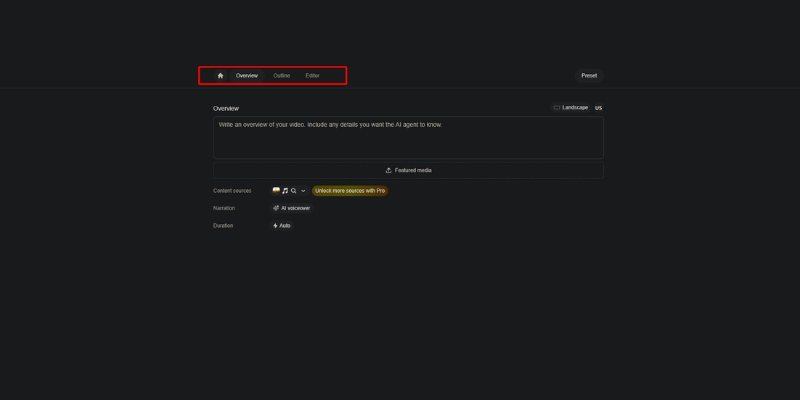
VideoGen is not a generic video editor. It is a specialized AI Ad Generator that automates finding footage, syncing audio, and adding subtitles through a redesigned 3-stage workflow: Overview (project planning), Outline (structured sections), and Editor (visual fine-tuning with interactive canvas).
Unlike tools like Sora that generate pixels from scratch, VideoGen 3.0 compiles and intelligently organizes 12 million+ copyright-free assets from Pexels, Wikimedia Commons, and iStock. It acts as an intelligent production assistant particularly powerful for E-commerce where speed and visual variety are critical for testing ad variations.
The platform allows you to upload your own media (product shots, brand assets) in Overview, then generates an AI-structured outline breaking your video into sections with specific narration modes (AI voice, avatar, or script-only), and finally provides a full-featured editor with multi-layer timeline control for precision adjustments.
Game-Changing Features: AI Avatars, Veo 3, and Web Access
I tested these Summer 2025 updates for e-commerce use cases—creating Facebook ads for fitness products. Here is how the revolutionary new features performed with measurable time savings.
AI Avatars (100+ Realistic Presenters):
The platform now offers 100+ lifelike AI avatar presenters (Business plan) that sync lip movements perfectly with any voiceover script. This eliminates the need for filming talent or expensive UGC creators, allowing you to add a human face to product demos without stepping in front of a camera.
Google Veo 3 Generative Video:
VideoGen exclusively integrates Google’s most advanced video model, Veo 3, for generating fully synthesized 8-second clips from text prompts. At just $74/month for Business plan access (versus Google’s $250/month Ultra plan), this delivers 3X value for money, enabling unique visual hooks that stock footage cannot provide.
Automatic Web Access (Real-Time Data):
The AI script writer now has live web access, meaning your videos reflect the latest news, trends, and research in real-time. Simply prompt “Create a video about today’s stock market performance” and get an up-to-date researched video instantly.
Interactive Canvas & Enhanced Timeline:
The new interactive canvas allows direct manipulation of elements with real-time visual feedback. Drag, resize, and position text overlays directly on screen while the multi-layer timeline gives precise control over assets, voice/avatar tracks, and title screens with zoom animations.
12M+ Stock Assets & Collaboration:
The expanded library includes 12 million+ assets from Pexels and Wikimedia Commons with an intelligent AI music agent that analyzes your video outline and selects the perfect background track. Teams collaboration with project sharing is now seamless across all tiers.
VideoGen 3.0 Pricing: Updated Plans & ROI Analysis
VideoGen operates on a credit-based model with significantly updated tiers as of November 2025, offering exceptional value compared to hiring editors or purchasing separate stock subscriptions.
| Plan | Price | Videos/Month | Key Features |
|---|---|---|---|
| Free | $0 | 3 videos | Watermarked, testing only |
| Pro | $19/month | 25 videos | 150+ voices, 50GB storage, no watermark |
| Business | $74/month | Higher limits | AI Avatars, Veo 3, Teams, 200GB storage |
(Disclosure: If you purchase through links on this page, we may earn a small commission at no extra cost to you.)
Pro Plan ($19/month – RECOMMENDED):
Offers 25 videos monthly, 150+ AI voices, 50GB storage, no watermarks, and API access. At $0.76 per video, this costs less than 2% of what a freelance editor charges ($50+ per video), making it ideal for creators and small businesses.
Business Plan ($74/month – BEST FOR AGENCIES):
Unlocks 100+ AI Avatars with lip-sync, Google Veo 3 generative clips, Teams collaboration, 300+ voice minutes, and 200GB storage. The Veo 3 access alone justifies the cost at 3X less than Google’s direct pricing.
ROI Calculation:
If you create just two ads monthly that each generate $500 in revenue with 3X ROAS ($1,500 return), the $19 monthly investment delivers 79X ROI ($1,500 / $19), making it one of the highest-leverage tools in your marketing stack.
VideoGen vs. Competitors: How It Stacks Up
VideoGen vs. Creatify AI:
Creatify AI excels at grabbing images from Product URLs and creating UGC-style ads. VideoGen wins on stock footage quality (12M+ assets vs 10K+ B-roll), AI avatar realism (100+ presenters), and Veo 3 generative capabilities.
VideoGen vs. InVideo:
InVideo offers 5000+ templates with more manual control. VideoGen 3.0 is more automated with AI-driven asset selection. Choose VideoGen for speed and AI automation; choose InVideo for template customization and longer content.
Pros and Cons: The Unfiltered Truth
✅ Pros
- Revolutionary Workflow: 3-stage process for structured creation.
- AI Avatars: 100+ realistic presenters with perfect lip-sync.
- Veo 3 Integration: Google’s generative video at 3X better value.
- 12M+ Stock Library: Massive expansion with diverse assets.
- Interactive Canvas: Direct manipulation with real-time feedback.
- Web Access: AI pulls current data for timely content.
❌ Cons
- Learning Curve: 3-stage workflow requires initial orientation.
- Free Plan Limited: Only 3 videos, strictly for testing.
- Veo 3 Generation Time: Up to 5 minutes per 8-second clip.
- Mobile Limitations: Full power requires desktop.
- Niche Focus: Optimized for ads, not vlogs or documentaries.
Final Verdict: Should You Buy VideoGen 3.0?
Expert Verdict: VideoGen 3.0 is a must-have for dropshippers, e-commerce brands, and agencies needing high-volume ad production. The 3-stage workflow, AI Avatars, and Veo 3 integration represent the biggest leap in AI video automation this year.
Who Should Buy: E-commerce marketers running daily Facebook/TikTok ads, YouTube automation creators, agencies managing multiple campaigns, and solopreneurs testing product-market fit with rapid creative variations.
ROI Reality: At $19/month for 25 videos ($0.76 each) versus $50-$100 from freelancers, the tool pays for itself immediately. Time savings (10 minutes vs 2-4 hours) deliver 12-24X productivity improvement.
Who Should Avoid: Filmmakers needing Hollywood VFX, creators wanting frame-by-frame control like Premiere Pro, or brands requiring exclusively custom-shot footage without stock assets.
Final Rating: 4.7/5 for E-commerce Utility.
No credit card required • 3 free videos
Frequently Asked Questions About VideoGen
Is VideoGen free to use?
Yes, it has a free plan with 3 video generations monthly, but exports are watermarked. You need Pro ($19/month) to remove watermarks for commercial use.
What is VideoGen 3.0?
VideoGen 3.0 is the major redesign introducing a 3-stage creation flow (Overview, Outline, Editor), interactive canvas, enhanced timeline, unified rendering, and expansion to 12M+ stock assets.
Can I use AI Avatars on the Pro plan?
No, AI Avatars (100+ presenters) are exclusive to Business ($74/month) and Enterprise plans. Pro users get 150+ AI voices but not avatar presenters.
Does VideoGen work for YouTube automation?
Absolutely. It is excellent for faceless YouTube channels relying on stock footage, AI voiceovers, and structured scripts. The web access feature keeps content timely with current events.
Is the content copyright-free?
Yes, Pro and Business plans include commercial rights to stock footage, AI voices, and music, making it safe for Facebook, TikTok, and YouTube ads.
Read More From Text-to Video
Explore more tools to automate your video production workflow and scale your marketing efforts.
- Creatify AI Review: AI Video Ads from a Product URL
- Best AI Ad & UGC Video Generators (for Marketing)
- InVideo Review: AI Video Ads with 5000+ Templates
last update : 30/11/2025
