
How to Use InVideo: A Step-by-Step Tutorial for Beginners (2025)
InVideo combines AI automation with timeline editing to produce professional marketing videos using 4000+ templates and 8M+ iStock media. The platform offers two workflows: InVideo AI for script-to-video generation and InVideo Studio for template customization.
This Text-to-Video guide covers both workflows with November 2025 updates including GPT-4.1 integration. Users create 60-unlimited videos monthly at $20-$60 pricing with voice cloning and automated text-to-speech.
Table of Contents
Understanding InVideo AI vs InVideo Studio Workflows
InVideo operates two distinct platforms targeting different production needs. InVideo AI automates video creation from text prompts using GPT-4.1, while InVideo Studio provides template-based editing with timeline control.
InVideo AI Workflow converts scripts into complete videos with visuals, music, and voiceovers in minutes. The system generates 50-200 minutes of AI content monthly (Plus/Max plans) with 2-5 voice clones and 80-320 iStock images per month.
InVideo Studio Workflow offers 4000+ customizable templates with full timeline editing. Users access 8M+ iStock media library (10-120 clips/month depending on plan) and produce videos up to 40 minutes long with multi-layer composition.
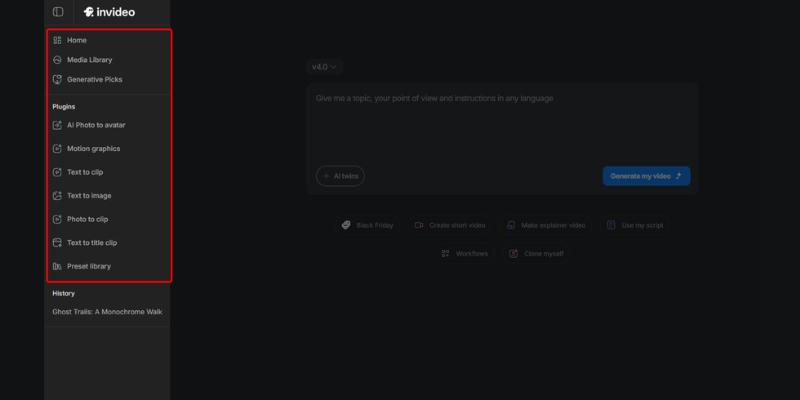
InVideo AI Method: Script-to-Video with GPT-4.1 Generation
The InVideo AI workflow generates complete videos from text prompts using OpenAI GPT-4.1, gpt-image-1 for visuals, and text-to-speech for narration. This method suits content creators producing daily social media posts without editing expertise.
AI Video Generation Steps
Access InVideo AI and select video format:
– **16:9** for YouTube, website embedding, and horizontal distribution – **9:16** for TikTok, Instagram Reels, YouTube Shorts vertical content – **1:1** for Instagram feed posts and Facebook square videosEnter text prompt describing desired video content. The AI analyzes semantic meaning using GPT-4.1 to generate scripts enriched with research and platform-specific context for TikTok versus YouTube optimization.
Select voice style from OpenAI text-to-speech models covering multiple tones and languages. The system delivers human-like narration automatically synced with generated visuals from gpt-image-1 backgrounds and cutaway scenes.
Customization and Export
Review AI-generated storyboard with matched stock footage from 3M+ standard library. Replace clips using search function or upload custom brand assets to 100-400GB storage (Plus/Max plans).
Edit narration using voice cloning (2 clones Plus, 5 clones Max) for consistent brand voice. The AI maintains tone and pacing across multiple videos without re-recording each project manually.
Export unlimited videos at 1080p resolution (Plus/Max plans remove watermarks). Processing completes in minutes using cloud rendering regardless of local hardware specifications.
Try InVideo AI Free(Disclosure: Purchases through this link may earn a commission at no extra cost to you.)
InVideo Studio Method: Template-Based Video Creation
InVideo Studio provides 4000+ professional templates with full timeline editing capabilities. This workflow serves marketers creating polished ads requiring precise brand control and custom animations.
Template Selection Process
Search templates by industry (Real Estate, Fitness, E-commerce) or format (YouTube Intro, Instagram Story, Product Demo). Filter results by aspect ratio matching distribution platform requirements.
Preview template animations and text placement before loading into editor. Templates include pre-synced music tracks, transition effects, and placeholder text for rapid customization without starting from blank canvas.
Timeline Editing Workflow
The multi-track timeline functions like desktop video editors with layer-based composition:
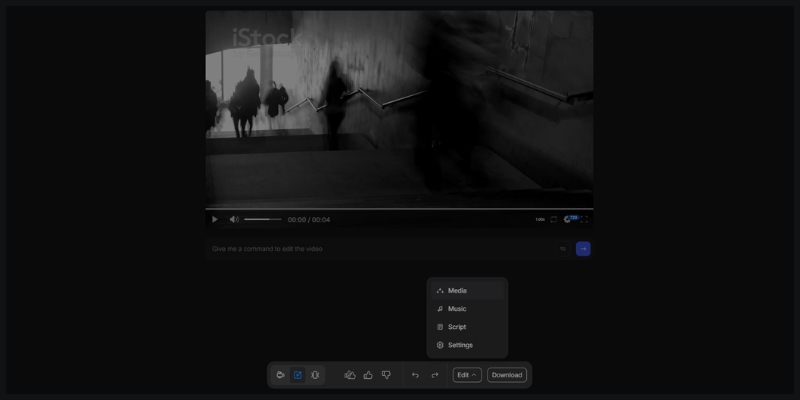
– Drag video clips, images, and text overlays onto separate timeline layers – Trim media by dragging clip edges or using split tool for precise cuts – Adjust layer order ensuring text appears above video backgrounds – Sync audio waveforms with visual transitions for professional pacingAccess 8M+ iStock media directly from left sidebar. Premium stock footage elevates production value compared to generic free libraries, with 10-120 monthly downloads depending on subscription tier.
Brand Customization Tools
Upload brand logos positioning in video corners with adjustable size and opacity. Define color palettes applying corporate colors across entire project with single-click consistency.
Configure custom fonts matching brand guidelines (available on paid plans). Set default intro/outro sequences maintaining visual identity across all video projects and campaigns.
Pricing Tiers Details
InVideo operates two separate pricing structures for AI versus Studio workflows.
| Feature | Studio Plus | AI Plus | Max (Both) |
|---|---|---|---|
| Monthly Price | $20 ($25 monthly) | $25/month | $60/month |
| Video Exports | 60/month, 15-min max | Unlimited, AI-generated | Unlimited, 40-min max |
| AI Generation | No AI features | 50 mins/month | 200 mins/month |
| iStock Media | 10 downloads/month | 80 downloads/month | 120-320 downloads/month |
| Voice Clones | N/A | 2 clones | 5 clones |
| Storage | 10GB | 100GB | 100-400GB |
The free plan allows unlimited editing with watermarked exports and limited media access (1M+ premium assets, 3M+ standard library). Paid plans remove branding and unlock commercial-use rights for client projects.
Common Questions About InVideo Tutorial
What is the difference between InVideo AI and Studio?
InVideo AI automates video creation from text prompts using GPT-4.1 with 50-200 mins generation monthly. InVideo Studio provides 4000+ templates with timeline editing requiring manual customization but offering precise control.
Does InVideo remove watermarks on free plan?
No. Free plan exports include InVideo watermarks on all videos. Paid plans (Studio Plus $20, AI Plus $25, Max $60) remove branding and enable commercial monetization rights.
Can custom brand assets be uploaded?
Yes. Upload logos, video clips, and images to 10-400GB cloud storage depending on plan tier. Custom assets integrate with both AI-generated content and Studio templates maintaining brand consistency.
How does voice cloning work?
AI Plus includes 2 voice clones, Max includes 5 clones. Record 30-second audio sample; the system generates synthetic voice matching tone and accent for automated narration across unlimited videos without re-recording.
Which InVideo Plan Fits Your Needs?
Choose InVideo AI Plus ($25/month) for automated daily social content with 50 minutes AI generation and 2 voice clones. Select Studio Plus ($20/month) for template-based ads requiring timeline editing with 60 exports monthly.
Max plan ($60/month) combines both workflows with 200 minutes AI generation, unlimited Studio exports, and 5 voice clones.
Claim Offer NowRelated Text-to-Video Tutorials and Comparisons
- Pictory vs InVideo: Best AI Text-to-Video Tool?
- InVideo vs Wave.video: All-in-One Marketing Platforms
- InVideo Review: AI Video Ads with 4000+ Templates
last update : 07/12/2025
