
VEED.io Review (2025): Is It The Best AI Video Editor For Creators?
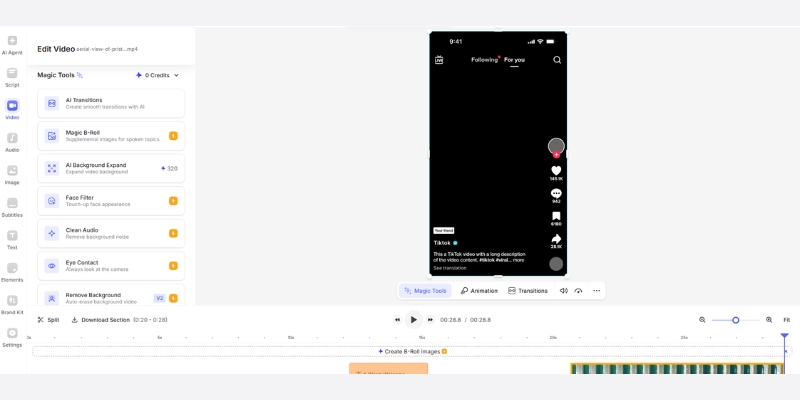
VEED.io operates as browser-based AI video editor eliminating software installation requirements while providing professional editing capabilities through automated transcription, subtitle generation, eye contact correction, and silence removal. The cloud-native platform targets social media marketers, content creators, and freelancers requiring rapid video production without Adobe Premiere complexity.
This comprehensive AI Video Editing evaluation analyzes 2025 feature accuracy, workflow efficiency, pricing structure (Lite $19-$24, Pro $49-$59 monthly), and comparative positioning against text-based editor Descript determining optimal use cases for browser-based editing versus traditional desktop software.
Table of Contents
VEED.io Platform Overview and Target Audience
VEED.io functions as Software-as-a-Service video editor accessible through web browsers (Chrome, Firefox, Safari) removing storage and processing constraints from local computers. The architecture enables editing from Chromebooks, tablets, or shared workstations without software licensing or version compatibility issues.
The platform addresses creator bottleneck between content demand and production capacity. Traditional video editing requires 3-5 hours per 10-minute video through manual trimming, subtitle creation, and audio cleanup. VEED automates repetitive tasks reducing production time 60-70% enabling sustainable daily publishing schedules.
Primary User Segments
Four creator categories benefit from browser-based workflow:
- Social media marketers: Produce vertical videos optimized for TikTok, Reels, and Shorts with trending caption styles
- Content repurposers: Transform long-form webinars and podcasts into multiple short clips maximizing content ROI
- Freelance editors: Deliver client projects without expensive software subscriptions or hardware investments
- Corporate communicators: Create training videos and internal updates without dedicated production teams
AI Feature Evaluation and Performance Testing
Five core AI capabilities define VEED.io workflow automation depth. Testing methodology employed 4K raw footage evaluating accuracy rates, processing speeds, and output quality against competitor benchmarks.
Auto-Subtitle Generation
Transcription accuracy and customization capabilities:
- 95-98% transcription accuracy: Clear audio with standard accents achieves near-perfect text generation
- 12 hours monthly processing (Lite): Sufficient for 10-15 weekly social videos or 4-5 long-form conversions
- Unlimited transcription (Pro): Enterprise-level capacity supporting high-volume repurposing strategies
- 50+ language support: Multi-language subtitle generation without external translation services
- Karaoke-style templates: Pre-designed caption animations mimicking viral creator aesthetics (MrBeast, Hormozi)
- Custom styling: Font, color, position, and animation timing fully adjustable
Eye Contact Correction AI
Computer vision technology redirecting gaze toward camera lens:
- Pupil tracking algorithm: Detects downward script-reading gaze automatically
- Natural appearance threshold: Effective for clips under 30 seconds without uncanny valley effect
- Real-time recording mode: Applies correction during webcam capture eliminating post-processing
- Teleprompter integration: Combined workflow enabling script reading while maintaining eye contact
Testing reveals limitations for extended talking-head sequences where subtle robotic quality emerges beyond 45-second continuous application. Optimal use involves short bursts rather than full video coverage.
Magic Cut Silence Removal
Automated pause detection and timeline editing:
- 90% silence detection accuracy: Identifies natural speech pauses and extended gaps
- Customizable threshold: Adjust sensitivity preventing removal of intentional dramatic pauses
- 10-minute to 4-minute reduction: Typical compression ratio transforming raw takes into tight deliverables
- Timeline preservation: Maintains multi-track sync during automated cuts
AI Avatars and Text-to-Speech
Faceless video production capabilities:
- 4 hours annual AI avatar generation (Pro): Virtual presenters for explainer and training videos
- 144 hours annual text-to-speech (Pro): Neural voice synthesis avoiding voice actor expenses
- Moderate realism level: Suitable for corporate training not brand spokesperson roles
- Multi-language voices: Consistent avatar appearance across localized content versions
Editor Workflow and User Experience Analysis
Browser-based architecture creates distinct workflow advantages and limitations versus desktop applications. Interface design prioritizes accessibility over granular control reflecting social media content focus.
Timeline and Multi-Track Editing
Core editing interface characteristics:
- Magnetic drag-and-drop: Clip snapping prevents timeline gaps common in manual editing
- Multi-track support: Layer video, audio, text, and effects independently
- Simplified versus Premiere: Reduced complexity trades advanced compositing for speed
- Learning curve: Zero training required for basic cuts, 2-3 hours for advanced features
Integrated Stock Library Access
2M+ asset library embedded in workflow:
- Royalty-free licensing: Commercial-use rights included with subscription preventing copyright issues
- 50,000+ audio tracks (Lite): Background music and sound effects for production polish
- Video clip search: Keyword-based discovery integrated into timeline insertion
- External supplement recommended: Heavy users still benefit from Artlist or Epidemic Sound for unique content
Cloud Rendering Performance
Processing speed dependency on internet bandwidth:
- 1080p 5-minute video: 3-minute export on standard broadband (100 Mbps)
- 4K processing (Pro): 8-12 minute renders for Ultra HD outputs
- Internet stability requirement: Connection interruptions cancel rendering requiring restart
- Offline limitations: Zero editing capability without active internet access
Screen Recording Integration
Built-in capture tool for tutorial creators:
- Simultaneous screen and webcam recording without external software
- Direct timeline import eliminating file transfer steps
- Ideal for software demonstrations and educational content
- Complete guide available at VEED.io workflow tutorial
VEED.io Subscription Pricing November 2025
Three primary tiers plus enterprise option serve different production volumes. Pricing analysis reveals value thresholds determining optimal subscription level. Detailed breakdown available at comprehensive pricing guide.
| Plan | Monthly Price | Key Features | Best For |
|---|---|---|---|
| Free | $0 | Watermark, 720p, 30 min subtitles/month | Interface testing only |
| Lite | $19-24 | No watermark, 1080p, 12 hrs transcription, stock access | Weekly social creators |
| Pro | $49-59 | Eye Contact, 4K, unlimited transcription, AI avatars | Professional creators |
| Enterprise | Custom | Brand kits, usage limits, personalized avatars | Teams and agencies |
Plan Selection Decision Framework
Subscription optimization by creator profile:
- Free Plan: Interface evaluation only; watermark prevents professional publishing
- Lite Plan ($19-24): Solo creators producing 5-10 weekly social videos requiring watermark removal and 1080p quality
- Pro Plan ($49-59): Professional YouTubers needing eye contact correction, 4K exports, and unlimited transcription for daily uploads
- Enterprise: Marketing teams requiring brand kit management, custom usage controls, and multi-editor collaboration
VEED.io vs Descript Workflow Comparison
Two platforms dominate AI-assisted editing with fundamentally different approaches. Comprehensive analysis available at detailed comparison guide.
Core Editing Philosophy Divergence
Fundamental workflow architecture differences:
- Descript model: Text-based editing treating video as document where transcript deletion removes corresponding footage
- VEED model: Visual timeline editor with AI automation layers supplementing traditional cutting workflow
Feature Comparison Matrix
Capability positioning by platform:
- Subtitle aesthetics: VEED superior for social media trending styles (Karaoke, animated); Descript functional basic captioning
- Podcast editing: Descript dominates through text-based workflow enabling rapid filler word removal and transcript editing
- Eye contact correction: Both platforms offer comparable quality with similar 30-second optimal duration
- Audio processing: Descript Studio Sound more aggressive noise cancellation; VEED Clean Audio suitable for moderate cleanup
- Visual overlays: VEED faster for adding progress bars, emojis, and trending effects versus Descript’s minimal visual toolkit
Selection Guidance
Platform choice by primary content type:
- Choose Descript: Long-form podcast editing, interview content requiring extensive filler word removal, audio-heavy productions
- Choose VEED: Social media short-form content, marketing videos requiring visual polish, teams needing browser accessibility
Platform Strengths and Limitations Assessment
Comprehensive evaluation reveals distinct advantages and constraints determining suitability for specific creator workflows and content types.
Strengths
- Zero installation browser-based operation enabling device-agnostic editing
- Highly accurate auto-subtitle generation with trending visual styles
- Massive template library accelerating social media content production
- Intuitive drag-and-drop interface requiring minimal training
- Integrated screen recorder eliminating external capture software
- 2M+ royalty-free stock assets included with subscriptions
Limitations
- Subscription costs accumulate versus one-time desktop software purchases
- Complete internet dependency preventing offline editing capability
- Rendering speed constrained by bandwidth not local GPU processing
- Limited audio engineering depth versus dedicated DAW software
- No text-based editing workflow like Descript transcript manipulation
- Cloud storage limits requiring project archiving on premium tiers
Platform Verdict and Use Case Recommendations
VEED.io optimizes for speed and accessibility targeting creators prioritizing rapid turnaround over cinematic perfectionism. The browser-based architecture eliminates technical barriers enabling immediate production without hardware upgrades or software expertise.
Optimal Deployment Scenarios
Recommended for: Social media managers producing 10+ weekly videos requiring trending caption styles, content repurposers transforming long-form assets into multiple clips, freelancers editing from varied locations without software licensing, tutorial creators needing integrated screen recording.
Not recommended for: Feature film production requiring advanced color grading, offline editing scenarios without reliable internet access, projects demanding granular audio mixing beyond basic cleanup, creators preferring text-based editing workflows over visual timelines.
ROI analysis: Automated subtitle generation alone saves 2-3 hours per video at $30/hour labor rate. Pro plan ($49 monthly) justifies after 2 videos monthly compared to outsourced editing ($100 per video) or voice actor fees ($50 per script).
enter>Start Free Trial(Disclosure: Purchases through this link may earn a commission at no extra cost to you.)
Common Questions About VEED.io Platform
Does free plan support commercial video publishing?
Free tier includes permanent watermark preventing professional use. Commercial publishing requires Lite minimum subscription ($19-24 monthly) removing branding and enabling monetization-ready exports.
Can VEED.io operate without internet connection?
No. Browser-based architecture requires consistent internet access for editing and rendering. Offline capability nonexistent making platform unsuitable for remote locations with unreliable connectivity.
How does cloud storage work for video projects?
Projects stored on VEED servers accessible across devices. Lite plan includes limited storage requiring periodic archiving. Pro and Enterprise tiers provide expanded cloud space supporting larger project libraries.
Are subscription plans cancelable anytime?
Yes. Monthly subscriptions cancel from dashboard settings continuing access through current billing cycle. Annual prepayments non-refundable but auto-renewal disabled preventing future charges.
Does VEED.io provide mobile app editing?
iOS companion app enables footage transfer but lacks full editing capabilities. Primary editing power remains browser-based desktop experience optimized for larger screens and precise control.
Related AI Video Editing Platform Reviews
- Descript Review: Text-Based Editing Analysis 2025
- Best AI Content Repurposing Tools Comparison
- Top 5 AI Video Editors Ranked by Feature Set
last update : 08/12/2025
