
VEED.io vs Descript: Which AI Video Editor Is Better? (2025 Review)
Choosing between VEED.io vs Descript often feels like deciding between a surgeon’s scalpel and a painter’s brush—both create art, but the methods are radically different. In the rapidly evolving landscape of AI Video Editing, these two tools have emerged as the heavyweights for creators facing immense performance pressure.
While Descript revolutionized the industry with text-based editing, VEED.io has countered with a visual-first approach designed for speed and social media engagement. This article provides a battle-tested comparison of their workflows, AI features, and ROI to help you decide which tool fits your production needs.
Table of Contents
The Core Difference: Text-Based Editing (Descript) vs. Visual Timeline (VEED.io)
The most immediate conflict you will face is the interface philosophy. I have used both extensively, and switching between them requires a complete mental shift in your Video Editing Workflow.
Descript operates primarily like a Word document. You upload footage, it generates a transcript, and you edit the video by deleting text. VEED feels like a simplified Premiere Pro mixed with Canva.
Descript’s Philosophy (The Document Approach):
Descript’s magic lies in its “Text-based Editing.” When I upload a video, I don’t look at a timeline first; I look at a script.
To remove a scene, I simply highlight the sentence and hit backspace. This is a breakthrough for narrative-heavy content. If you are a podcaster or an interviewer, this “Doc-style” editing saves hours.
VEED.io’s Philosophy (The Canvas Approach):
VEED takes a “drag-and-drop” visual approach. It presents a familiar linear timeline where you layer elements like stickers, B-roll, and subtitles visually.
It feels incredibly intuitive for anyone who has used design tools. For marketers, I can see exactly where my “Visual Layers” sit on the screen. Adding a progress bar is simply dragging it onto the canvas.
The Learning Curve Verdict:
If you have zero editing experience, Descript is faster to learn for cutting content (just edit text). However, VEED is faster to learn for styling content (adding effects and layouts).
Writers and Podcasters will feel at home with Descript. Visual Designers, Marketers, and Social Media Managers will prefer the canvas freedom of VEED.
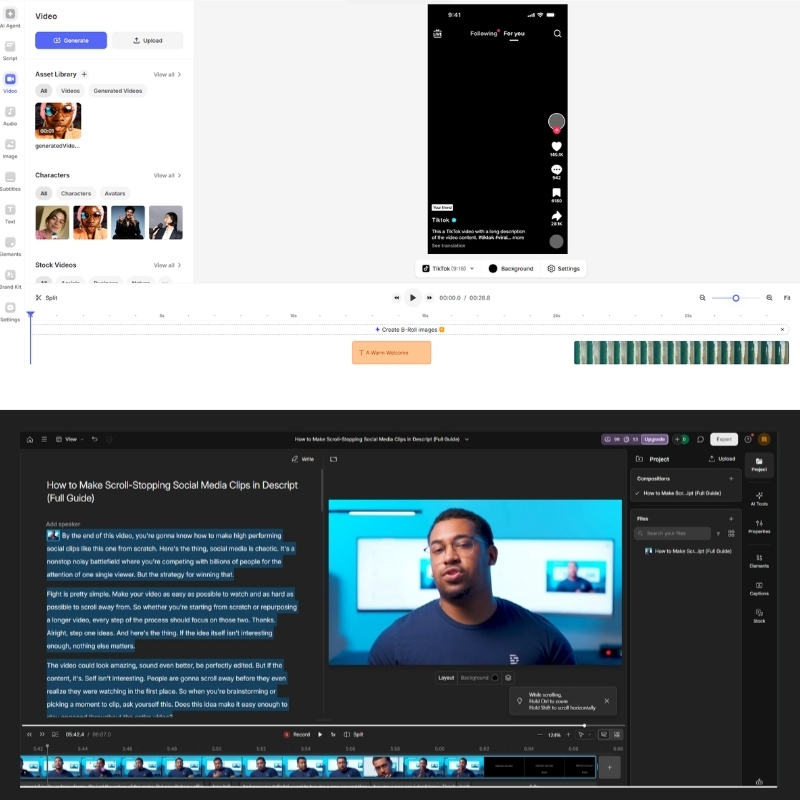
My Verdict: Choose Descript if your content is driven by spoken words. Choose VEED if your content is driven by visual engagement.
Try VEED.io Free Try Descript Free(Disclosure: If you purchase through links on this page, we may earn a small commission at no extra cost to you. This helps us maintain our “battle-tested” reviews.)
AI Audio Mastery vs. Visual AI Tools: Feature Battle
This section compares the “AI muscles” of both tools. In my testing, Descript is the undisputed king of audio manipulation, while VEED dominates visual “hooks” that stop the scroll.
Round 1: Audio Enhancement (Studio Sound vs. Clean Audio):
Descript’s Studio Sound is widely regarded as the industry standard. It doesn’t just reduce noise; it regenerates the voice to sound like it was recorded in a professional studio.
VEED’s “Clean Audio” is effective for basic background noise removal. However, it lacks the regenerative quality of Descript. If you record in echoey rooms, Descript is the non-negotiable winner here.
Round 2: Voice Cloning (Overdub vs. TTS):
Descript’s Overdub feature allows you to train the AI on your voice. If you misspoken a word, you can simply type the correction, and it generates the audio seamlessly.
VEED offers standard Text-to-Speech (TTS) and AI Avatars. It lacks this specific “correction” workflow. VEED focuses more on generating entirely new audio from scratch rather than fixing existing recordings.
Round 3: Visual Engagement (AI Eye-Contact & Avatars):
This is where VEED shines. Its AI Eye-Contact Correction automatically redirects your gaze to the camera, a crucial feature for reading scripts.
Descript has similar features but they feel less integrated into a visual workflow. VEED also excels with AI Avatars, allowing you to create faceless channels or training videos without being on camera.
Round 4: Subtitles & Captions:
VEED is the king of “flashy” social captions. You can customize animations, colors, and highlight keywords (Karaoke style) instantly. Descript creates accurate captions, but they are more functional and less “viral-ready” by default.
Workflow & Speed Test: Which Tool Saves More Time?
Marketers care about ROI and time saved. I ran two specific workflows to see which tool helps me hit “Export” faster. The results depend entirely on what you are creating.
Scenario A: The Podcast Workflow:
Descript is significantly faster here. Its “Silence Removal” feature cuts all dead air in one click. Combined with text-based cutting, I edited a 30-minute interview in 10 minutes.
Doing this in VEED felt clunky. The timeline approach requires manual scrubbing through audio waves to find pauses. For long-form content, Descript’s transcript-first workflow is unbeatable.
Scenario B: The Social Media Workflow:
VEED wins for short-form content. I used its “Magic Cut” to find viral clips from a long video, then used Canvas Resize to switch from YouTube landscape to TikTok vertical instantly.
Adding progress bars took seconds. Descript can do this, but the visual placement feels less intuitive. For creators optimizing for engagement on Instagram or TikTok, VEED’s design-first approach saves significant time.
Performance & Stability:
VEED is fully Cloud-based, meaning you can edit from any browser, even on a Chromebook. Descript requires a desktop app download. While the app is powerful, it uses significant local resources.
Best Use Cases: When to Choose Descript vs. VEED.io
To help you decide, I have mapped these tools to specific user avatars. Don’t try to force a tool to do a job it wasn’t designed for.
For Podcasters & Interviewers (Choose Descript):
If you deal with multi-track audio and long conversations, Descript is essential. The transcript-first workflow allows you to edit the narrative structure without getting lost in a timeline.
You can rearrange entire sections by cutting and pasting text. For anyone creating interview-based content, this is the only workflow that makes sense at scale.
For Social Media Marketers & Agencies (Choose VEED):
If your goal is high retention on TikTok or Instagram, VEED is superior. The visual templates, auto-emojis, and eye-correction features are built to grab attention in the first 3 seconds.
VEED’s ability to resize videos for multiple platforms instantly is a massive time-saver. If you’re repurposing one video across YouTube, Instagram, and TikTok, VEED does it in clicks.
For Internal Communications/L&D:
For quick screen recordings to share with a team, VEED is faster because it’s browser-based. For polished, scripted tutorials that need voice overdubbing, Descript provides a more professional finish.
Pricing & ROI Comparison: Is the Subscription Worth It?
Both tools operate on a subscription model, but they tax different things. Descript limits your transcription hours, while VEED limits your export length and quality.
| Feature | VEED.io (Pro) | Descript (Creator) |
|---|---|---|
| Price | $29/user/mo | $24/user/mo |
| Primary Limit | Export Length / Storage | 30 Transcription Hours/mo |
| 4K Export | Included in Pro | Included in Creator |
| Watermark | Removed in Paid | Removed in Paid |
| Killer Feature | AI Avatars / Eye Contact | Studio Sound / Overdub |
| Verdict | Check VEED Price | Check Descript Price |
The Free Plan Reality:
VEED’s free plan places a large watermark on your video, making it unusable for professional work. Descript’s free plan allows for watermark-free exports but severely limits transcription hours (1 hour/month).
For casual creators testing the waters, Descript’s free tier is more usable. For agencies needing unlimited projects, VEED’s paid plan offers better value if you use their stock library frequently.
The “Pro” Sweet Spot:
Descript offers incredible value at $24/month for audio-focused creators. The 30 transcription hours/month is generous for most podcasters. However, VEED’s $29/month price point is justified if you use their stock library and AI avatars.
If you are replacing Envato Elements and a separate avatar tool, VEED can actually save you money. The ROI depends entirely on your specific workflow needs.
Frequently Asked Questions About VEED.io vs Descript
Is VEED better than Descript for YouTube?
For “Talking Head” videos or Vlogs with lots of B-roll, VEED is better due to its visual layout. For long-form video essays or podcasts, Descript is better for structuring the narrative.
Can I use both tools together?
Yes, this is a common pro workflow. We often edit the raw audio and narrative in Descript, export it, and then import it into VEED to add visual effects, captions, and branding.
Does Descript have a mobile app?
Descript has no full mobile editing app; it is a desktop power tool. VEED runs in a mobile browser, allowing for quick edits on the go.
Which tool has better multi-language support?
VEED excels here with its ability to translate subtitles into over 100 languages instantly. This is a massive advantage for global creators looking to repurpose content.
Do they offer stock footage libraries?
VEED has a built-in stock library of videos and audio, integrated directly into the timeline. Descript also has stock media, but VEED’s integration feels more seamless for quick B-roll insertion.
Read More From AI Video Editing
If you found this comparison helpful, check out our other battle-tested reviews and guides in the AI video space:
- VEED.io Pricing Explained: Which Plan?
- Descript Pricing Explained: Tiers & Features
- veed.io vs invideo: Which AI Tool Do You Actually Need? (2025)
last update : 10/12/2025
