
CapCut Review 2025: Is It the Best Free AI Video Editor?
CapCut dominates short-form video creation through generous free tier providing unlimited auto-captions, 350+ AI voices, and professional timeline editing without watermarks. ByteDance-owned platform evolved from mobile-only TikTok companion to comprehensive desktop + web ecosystem supporting 4K exports, cloud synchronization across devices, and trending visual effects targeting viral social media workflows.
This comprehensive AI Video Editing analysis evaluates 2025 feature depth across desktop and mobile versions, subscription pricing (Free unlimited, Standard $9.99/month, Pro $19.99/month), AI automation capabilities, and competitive positioning determining suitability for social media managers versus professional videographers requiring broadcast-quality color grading.
Table of Contents
CapCut Free Tier Value Proposition Analysis
Free plan provides professional-grade editing capabilities exceeding typical freemium limitations. Unlimited video exports without forced watermarks (removable ending clip), complete timeline editor access, and core AI features create sustainable workflow for budget-conscious creators and casual users testing platform capabilities.
Platform Strengths
- Unlimited auto-captions: 95%+ accuracy transcription without monthly quote restrictions
- Zero learning curve: Intuitive interface enabling immediate productivity
- Generous free tier: Professional features accessible without subscription
- Cross-platform sync: Cloud workspace connecting mobile and desktop workflows
- Trending effects library: Viral social media templates updated continuously
Platform Limitations
- ByteDance privacy concerns: Corporate data policies restrict enterprise adoption
- Limited audio engineering: Lacks advanced EQ and compression versus desktop DAWs
- Export codec restrictions: Optimized for social H.264/MP4 not broadcast ProRes
- Free storage cap: 1GB cloud space insufficient for large project libraries
Free tier justifies professional use for creators publishing 10-20 monthly social videos. Subscription upgrades provide expanded cloud storage and advanced AI tools rather than removing artificial limitations common in competing freemium models.
Desktop and Web Editor Cross-Platform Capabilities
CapCut Desktop application (Windows 7+, macOS 10.14+) provides mouse-and-keyboard precision leveraging local GPU acceleration for real-time 4K preview without cloud rendering delays. Desktop version includes magnetic timeline, keyframe animation, multi-track audio mixing, and extensive effects library matching professional NLE feature expectations.
Cross-Device Cloud Synchronization
Integrated cloud workspace enables mobile-to-desktop workflow continuity:
- Mobile capture upload: Transfer smartphone footage directly to cloud space
- Desktop refinement: Access uploaded media on computer for precise timeline editing
- Custom font support: Desktop enables system font integration unavailable on mobile
- Project versioning: Cloud backup prevents work loss from device failure
- 1GB free storage: Accommodates 5-10 short projects before requiring subscription upgrade
Desktop Performance and Hardware Acceleration
Local processing advantages versus browser-based competitors:
- GPU rendering utilization: Leverages dedicated graphics cards for real-time playback
- 4K 60fps handling: Smooth timeline scrubbing without proxy generation
- Instant preview: Zero render queue delays common in web editors
- Offline capability: Project editing continues without internet connection
AI Automation Features Performance Evaluation
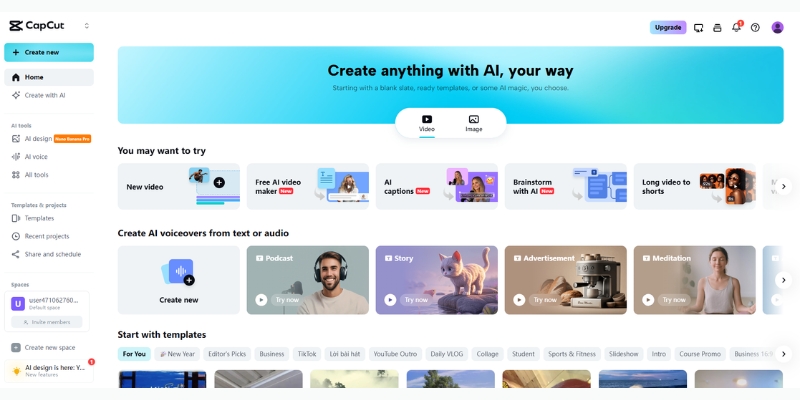
Five AI-powered tools target social media content production workflows. Testing methodology evaluated time savings quantification and accuracy limitations determining practical deployment scenarios beyond marketing hype.
Auto-Caption Generation
Industry-leading transcription capability available on free tier:
- 95%+ transcription accuracy: Clear English audio achieves near-perfect text generation
- Unlimited monthly quota: No artificial caps versus competitors charging per minute
- Karaoke-style animations: One-click trending caption aesthetics matching viral content
- Multi-language support: 20+ languages including Spanish, Japanese, Korean, Hindi
- Manual editing interface: Click-to-correct transcription errors within timeline
- Export SRT capability: Download subtitle files for external platform uploads
Script-to-Video AI Generation
Automated content creation from text prompts:
- Ad script templates: Pre-structured formats for promotional video generation
- Stock footage matching: AI selects relevant clips from integrated library
- Voiceover synthesis: 350+ AI voice options across genders, ages, and accents
- Generic output quality: Suitable for filler content requiring manual brand asset replacement
Auto Cutout 2.0 Background Removal
AI subject isolation without physical green screens:
- Advanced edge detection: Superior hair separation versus earlier algorithms
- Busy background handling: Removes complex street scenes isolating talking heads
- Real-time preview: Instant cutout visualization before rendering
- Comparable paid plugins: Matches Adobe After Effects Rotobrush quality
Pippit AI Avatar Integration
Synthetic presenter generation for faceless content:
- 80+ avatar styles: Diverse ethnicities, ages, and appearances
- Lip sync accuracy: Mouth movements synchronize naturally with voiceover audio
- 20+ language support: Multilingual content creation without translators
- Realistic expressions: Subtle facial movements and body language gestures
Trending Visual Effects Library
Viral retention optimization tools:
- 3D Zoom effects: Dynamic camera movements matching popular creator styles
- Manga filters: Anime-style transformations increasing watch time
- Body tracking effects: Visual elements follow subject movements automatically
- Algorithm-driven recommendations: Suggestions based on current TikTok trending content
Complete workflow tutorial available at CapCut AI feature guide.
CapCut Subscription Pricing December 2025
Four-tier structure serves casual users through enterprise teams. Free plan exceptional value with Standard and Pro tiers providing cloud storage expansion and advanced AI capabilities rather than unlocking basic editing functionality.
| Plan | Monthly Price | Annual Price | Cloud Storage | AI Credits |
|---|---|---|---|---|
| Free | $0 | $0 | 1 GB | Limited |
| Standard | $9.99 | $89.99 | 100 GB | 550/month |
| Pro | $19.99 | $179.99 | 1 TB | 1,200/month |
| Commerce Pro | $26 | $250 | 1 TB+ | Unlimited |
Plan Feature Differentiation
Subscription tier capabilities beyond storage expansion:
- Free limitations: 1GB storage, removable ending clip, basic AI tools, community support
- Standard additions: 100GB cloud, 550 AI credits monthly, priority rendering queue, watermark-free premium effects
- Pro enhancements: 1TB storage, 1,200 AI credits, 4K export capability, advanced vocal isolation, brand kit management
- Commerce Pro: E-commerce integrations, automated publishing workflows, analytics dashboard, priority customer support
Subscription Selection by Creator Profile
Optimal tier matching production requirements:
- Choose Free: Casual creators producing 5-10 monthly short videos requiring basic editing without cloud storage dependency
- Choose Standard ($9.99): Active social media managers creating 20-30 monthly videos needing expanded cloud workspace and AI quota
- Choose Pro ($19.99): Professional creators requiring 4K exports, extensive AI usage, and large project file storage
- Choose Commerce Pro ($26): E-commerce businesses automating product video creation with publishing integrations
Detailed pricing analysis at comprehensive cost breakdown guide.
Competitive Platform Positioning Analysis
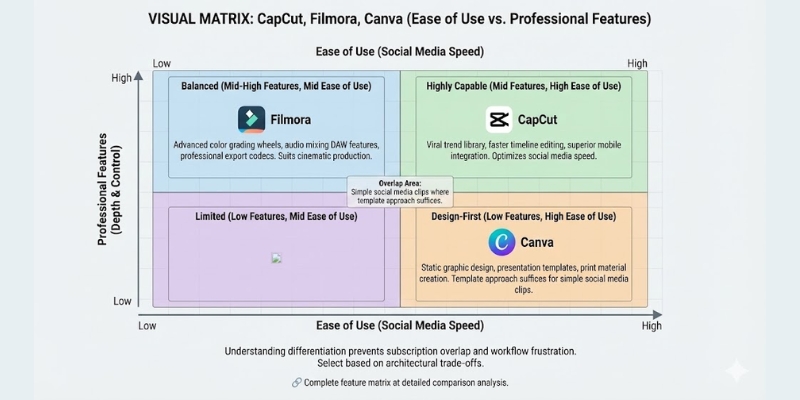
Three primary competitors serve overlapping workflows with distinct architectural trade-offs. Understanding differentiation prevents subscription overlap and workflow frustration from mismatched tool selection.
CapCut vs Filmora Comparison
Desktop editing depth versus social media optimization:
- Filmora strength: Advanced color grading wheels, audio mixing DAW features, professional export codecs
- CapCut strength: Viral trend library, faster timeline editing, superior mobile integration
- Selection guidance: Filmora suits cinematic production; CapCut optimizes social media speed
Complete feature matrix at detailed comparison analysis.
CapCut vs Canva Evaluation
Video editor versus design platform specialization:
- Canva strength: Static graphic design, presentation templates, print material creation
- CapCut strength: Timeline-based editing, audio synchronization, keyframe animation
- Overlap area: Simple social media clips where template approach suffices
CapCut vs Adobe Premiere Pro
Social media workflow versus broadcast production:
- CapCut optimization: TikTok/Reels/Shorts requiring rapid turnaround and trending effects
- Premiere optimization: Long-form documentaries, commercials, broadcast television requiring professional color science
- 10× speed advantage: CapCut automated tools versus Premiere manual timeline control
- Quality ceiling difference: Premiere achieves cinematic depth unavailable in social media tools
Platform Limitations and Privacy Considerations
Three significant constraints affect enterprise adoption and specific production requirements. Understanding limitations prevents workflow disruption and compliance violations in regulated industries.
ByteDance Ownership Privacy Concerns
Parent company relationship creating enterprise hesitation:
- Data sovereignty questions: Server location ambiguity affecting GDPR and corporate compliance
- Government restrictions: Some public sector organizations prohibit ByteDance software usage
- Corporate policy blocks: IT departments restricting installation on managed devices
- Alternative recommendations: Organizations with data restrictions should evaluate Adobe or Apple ecosystem tools
Audio Engineering Depth Limitations
Sound design capabilities versus professional DAW software:
- Basic noise reduction: AI cleanup suitable for moderate background suppression
- No parametric EQ: Lacks frequency-specific correction for professional audio balancing
- Limited compression control: Automatic leveling without manual threshold adjustment
- Visual mixing constraints: Cannot fine-tune audio levels with dB precision
Export Format and Codec Restrictions
Social media optimization creating broadcast workflow gaps:
- H.264/MP4 focus: Optimized for YouTube, TikTok upload not professional finishing
- No ProRes support: Lacks intermediate codec preferred by broadcast television
- Limited bitrate control: Automatic quality selection without manual specification
- Suitable applications: Social media, YouTube, online platforms not cinema exhibition
Platform Verdict and Deployment Recommendations
CapCut dominates short-form vertical video production through exceptional free tier, intuitive interface, and ByteDance algorithm insights integrated as trending effects. The desktop version elevates platform from mobile toy to professional social media workflow tool justifying consideration alongside established editors.
Optimal Use Cases
Recommended for: Social media managers publishing daily TikTok/Reels/Shorts content, influencers requiring viral trend effects immediately, freelancers producing client social videos on budget constraints, content repurposers transforming long-form material into multiple platform-specific clips, beginners learning video editing without financial commitment.
Not recommended for: Corporate environments with ByteDance software restrictions, professional videographers delivering broadcast commercials requiring ProRes outputs, projects demanding advanced color grading and audio engineering depth, creators prioritizing data privacy over feature access, wedding videographers needing cinema-quality finishing tools.
ROI justification: Free tier provides unlimited professional editing capability eliminating subscription costs entirely. Standard upgrade ($9.99 monthly) justifies after 20+ monthly videos requiring expanded cloud storage. Pro tier ($19.99) necessary only for 4K output requirements or exceeding 550 AI credit quota.
(Disclosure: Purchases through this link may earn a commission at no extra cost to you.)
Common Questions About CapCut Platform
Does CapCut require payment for desktop PC use?
No. Desktop application free to download providing complete editing functionality without subscription. Paid tiers unlock expanded cloud storage and advanced AI features not core editing capabilities.
Can CapCut watermarks be removed from free exports?
Free tier includes removable ending clip (not overlay watermark) deleted before export. Premium asset watermarks require subscription upgrade for commercial-use licensing rights.
Are CapCut videos licensed for commercial purposes?
Depends on asset usage. Platform music and fonts licensed for personal social media use. Commercial advertising requires bringing externally-licensed music or upgrading to Pro tier accessing commercial-rights library.
How does CapCut compare to Adobe Premiere Pro?
CapCut optimizes short-form social media workflows through automated tools and trending effects. Premiere provides professional depth for broadcast television and cinema requiring advanced color science unavailable in social media editors.
What method removes CapCut ending clip from exports?
Settings gear icon provides “Add default ending” toggle disabling automatic insertion. Alternatively delete ending clip directly from timeline before export requiring two-second removal.
Related AI Video Production Platform Reviews
- Best Free AI Video Generators Comparison 2025
- Filmora Review: Desktop AI Editing Analysis
- Best AI Content Repurposing Tools for Viral Growth
last update : 09/12/2025
