
D-ID Review 2025: A Battle-Tested Guide For Developers & Creators
This is our definitive D-ID review, designed for marketers, creators, and developers under constant performance pressure. In a world demanding faster video production, tools that can turn a single photo into a speaking avatar are no longer a novelty but a necessity. D-ID stands out in the crowded market of AI Avatar Generator tools with its unique focus on creative photo animation and a powerful, developer-first API.
In this in-depth analysis, we will provide a hands-on review of the Creative Reality Studio, dive deep into the D-ID API for developers, break down its pricing structure, and conduct a head-to-head comparison with competitors like Synthesia and HeyGen to help you decide if it’s the right investment for your workflow.
Table of Contents
D-ID Review 2025: The Verdict in 60 Seconds
Overall Rating: We give D-ID a score of 4.2/5. This rating is based on our hands-on testing of its API flexibility, unique photo animation capabilities, and its competitive pricing structure, which makes it highly accessible.
Best For: D-ID shines for developers needing a robust API to integrate into their applications and for creators focused on animating still photos for viral social media content or artistic projects. It’s less suited for corporate training videos compared to more polished alternatives.
Key Takeaway: If your priority is API integration or bringing still images to life in a creative way, D-ID is a powerful and cost-effective choice. For polished, corporate-style presenter videos, you might want to compare it closely with competitors like Synthesia.
Try D-ID For Free(Disclosure: If you purchase through links on this page, we may earn a small commission at no extra cost to you. This helps us maintain our “battle-tested” reviews.)
What is D-ID & Who is it Really For?
Simply put, D-ID is an AI video platform that uses artificial intelligence to generate videos from a single photo. You provide an image and a script (or an audio file), and its technology animates the face to create a talking avatar video.
From our testing, we found it’s a specialized tool that solves two core problems exceptionally well. First, it empowers developers to seamlessly integrate talking head technology into their own apps via its flexible API. Second, it offers the Creative Reality Studio, a user-friendly platform for non-coders to animate photos easily.
This tool is a perfect fit for:
- Developers: Anyone building applications that need AI-powered avatars, such as virtual assistants, interactive learning tools, or automated customer support bots. The d-id api is the main draw here, offering robust documentation and real-time streaming capabilities.
- Marketers & Creators: Professionals looking to quickly create engaging social media content. Animating historical figures, illustrations, or personal photos taps directly into the viral photo animation trend seen with services like MyHeritage.
- Freelancers: Individuals offering unique video creation services to clients without needing complex animation software, expensive camera gear, or hiring actors.
This tool might NOT be for you if:
- You need ultra-realistic, corporate-style avatars for professional training modules. Tools like Synthesia often have an edge in this specific, polished aesthetic.
- You require extensive video editing features within the platform itself. D-ID focuses purely on avatar generation, not post-production tasks like adding transitions or complex text overlays.
Testing D-ID’s Creative Reality Studio: A Hands-On Review
This section details our direct experience using the main D-ID platform. We will explain the user interface and workflow in simple, step-by-step terms, perfect for beginners looking for a practical d-id creative reality studio review.
Getting Started: The dashboard is clean and straightforward. We found the process incredibly intuitive. Here’s how we created our first test video in under 5 minutes.
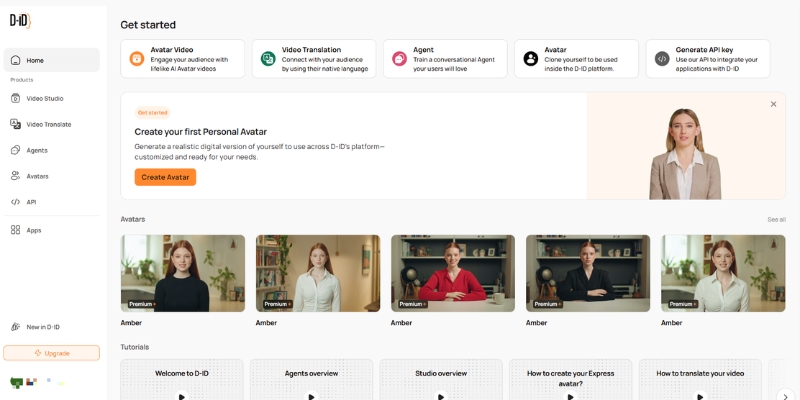
Step 1: Choose Your Presenter. You can upload your own photo (this is D-ID’s greatest strength) or select from their library of pre-made, AI-generated avatars. We tested both options, and the photo upload process was seamless and fast.
Step 2: Add Your Audio. You have two main choices here. You can type a script and use their text-to-speech (TTS) engine, which supports a vast number of languages and voices. Alternatively, you can upload your own voice recording for more realistic and personalized lip-syncing. We found the TTS quality to be good for standard narration, but uploading a real voice produced a significantly superior and more authentic result.
Step 3: Generate the Video. Simply click the “Generate video” button. D-ID then processes the request, which consumes credits from your plan based on the video’s length. Our 15-second test video was rendered and ready for download in about 60 seconds.
Avatar Quality & Lip-Sync: The animation of still photos is where D-ID truly excels; it’s impressive and the platform’s standout feature. However, the realism of the stock avatars is decent but can sometimes fall into the “uncanny valley,” appearing slightly less polished than top-tier competitors. The lip-syncing is generally accurate, especially when provided with a clear, high-quality audio input.
A Deep Dive into the D-ID API for Developers
For our technical audience, the real power of D-ID lies in its powerful and well-documented API. This section serves as a specific d-id api review for developers considering integrating this technology into their projects.
Key API Features:
- Real-time Streaming: The API allows for live streaming video generation. This is a critical feature for building interactive applications like real-time chatbots or responsive virtual assistants where low latency is essential.
- High Throughput: The infrastructure is designed to handle a large volume of concurrent requests, making it a scalable solution for businesses with growing user bases or high-demand campaigns.
- Comprehensive Documentation: In our review, we found the developer documentation to be exceptionally clear. It includes code examples in various languages, which made the initial integration process straightforward and fast.
Use Cases for Developers:
- Integrating AI Avatars into Websites: Create engaging “virtual salespeople” to greet visitors, or develop automated support agents to answer common questions.
- Building Educational Apps: Develop interactive learning modules with AI tutors that can explain complex concepts or guide users through lessons.
- Automating Video Content: Programmatically generate thousands of personalized video messages for large-scale marketing campaigns or customer onboarding sequences.
API vs. Creative Reality Studio: The choice is simple. The API provides ultimate flexibility and integration capabilities for building D-ID’s technology *into* your own product. The Studio is a user-friendly, no-code tool designed for creating individual video projects quickly.
D-ID Pricing Explained: Studio vs. API Plans (2025)
D-ID’s pricing can be confusing at first glance because it’s split between the Creative Reality Studio and the developer API. We’ll break it down clearly so you can understand the credit system and choose the right plan for your needs.
The Credit System: D-ID uses a credit-based system. One credit typically equals one 15-second video clip using a standard avatar and voice. Using premium features, like a higher-quality voice or generating a longer video, may cost more credits. We found this system to be fair and cost-effective, especially for short-form social media content.
Creative Reality Studio Plans:
- Trial Plan: Offers a limited number of free credits for you to test the platform. It’s the perfect way to see if the tool fits your needs without any financial commitment.
- Lite Plan: Aimed at individuals and freelancers who are just starting out, this plan offers a small monthly bundle of credits at an affordable price.
- Pro Plan: Geared towards heavy users like marketers and creators, this plan provides more credits and essential features, such as the ability to remove the D-ID watermark from videos.
API Plans:
- Free Trial: Similar to the Studio, it provides a set of API credits for development and testing purposes, allowing you to build a proof-of-concept.
- Build Plan: A monthly subscription designed for projects in active development or applications with low-to-moderate traffic.
- Scale/Enterprise Plans: These offer custom pricing and high-volume credit bundles for large-scale applications that require a significant number of API calls.
Our Recommendation on Pricing: For most creators and marketers, the Studio’s Pro plan offers the best balance of credits and features. For developers, we recommend starting with the free API trial to build and test your integration, then scaling up to the Build plan as your application gains traction.
D-ID vs. The Competition: Synthesia and HeyGen
No review is complete without a practical comparison to D-ID’s main rivals. Here’s a battle-tested breakdown of how it stacks up against Synthesia and HeyGen for marketers, creators, and freelancers.
D-ID vs. Synthesia
The key difference is positioning. D-ID is stronger for creative projects and API integration. Synthesia is the undisputed leader for polished, corporate training videos with highly realistic avatars. While Synthesia’s avatars are generally more professional-looking, D-ID’s strength lies in its unique ability to animate *any* photo you upload. In terms of pricing, D-ID is often more affordable for individuals, whereas Synthesia’s plans are geared more towards enterprise clients. Our detailed Synthesia vs D-ID review breaks this down further.
Verdict: Choose D-ID for creative freedom and API access. Choose Synthesia for high-end corporate communication.
D-ID vs. HeyGen
This is a much closer race. *HeyGen* offers a broader set of features, including more dynamic templates, backgrounds, and scenes. D-ID is simpler and more focused on the core task of animating a face. While both are user-friendly, D-ID’s interface is slightly more minimalist. From a technical standpoint, the D-ID API is often considered more robust and flexible by developers.
Verdict: Choose D-ID if your primary need is a powerful photo animation tool or a solid API. Choose *HeyGen* if you want an all-in-one solution with more built-in templates and editing features.
The Pros and Cons of D-ID: What We Liked & What We Didn’t
Based on our extensive hands-on testing, here is a balanced summary of D-ID’s core strengths and weaknesses. This is the heart of our unbiased d-id ai review.
What We Liked (Pros)
- Excellent Photo Animation: Its best-in-class ability to bring any still image to life is a game-changer, unlocking immense creative potential for social media and marketing.
- Powerful Developer API: The API is flexible, well-documented, and enables powerful integrations. This API-first approach makes it a top choice for developers.
- Incredible Ease of Use: The Creative Reality Studio is exceptionally simple to learn and use. Even absolute beginners can generate a video in minutes.
- Competitive Pricing: The plans, especially for the Studio, are more accessible than many competitors, making professional AI video generation available to a wider audience.
What We Didn’t Like (Cons)
- Stock Avatar Realism: While good, some of the standard, pre-made avatars don’t match the hyper-realism of top-tier competitors like Synthesia.
- Limited Video Editing: The platform is focused solely on video generation. You’ll need a separate video editor for adding text overlays, transitions, or combining clips.
- Credit System Can Be Limiting: For users looking to create long-form video content (e.g., over 5 minutes), the credit-based pricing can become expensive quickly.
Final Verdict: Is D-ID the Right AI Video Tool for You?
After thoroughly reviewing its features, API, pricing, and competitors, we can confidently recommend D-ID for very specific types of users who will find immense value in its offerings.
We recommend D-ID if: You are a developer seeking a best-in-class API to integrate talking avatars into your application, or you are a content creator/marketer whose strategy revolves around unique, attention-grabbing social media content made by animating photos and illustrations.
We suggest exploring alternatives like Synthesia or HeyGen if: Your primary need is creating polished, professional-looking training and communication videos for a corporate audience, and you require the most realistic stock avatars available on the market.
Ready to get started? We believe D-ID’s free trial provides more than enough credits to experience its power firsthand. You can test the incredible photo animation feature and see if it fits your workflow without any risk or commitment.
Frequently Asked Questions about D-ID
We’ve compiled answers to the most common questions our readers ask about D-ID to help you make an informed decision.
Is D-ID free to use?
Yes, D-ID offers a free trial for both its Creative Reality Studio and its API. The trial includes a limited number of credits so you can create a few short videos to test the platform’s capabilities before committing to a paid plan.
Can I use my own voice on D-ID?
Absolutely. While D-ID has a robust text-to-speech engine, you can upload your own audio file. We found during our testing that using your own voice results in a more natural and accurate lip-sync performance.
What is the D-ID Creative Reality Studio?
The Creative Reality Studio is D-ID’s user-friendly web platform. It’s designed for non-technical users like marketers and creators to easily upload a photo, add a script or audio, and generate a talking avatar video without writing a single line of code.
How does D-ID’s photo animation work?
D-ID uses advanced generative AI and deep learning algorithms to analyze a still photograph, identify facial features, and then animate them to match the phonemes (sound units) of an audio track. This creates the compelling illusion that the person in the photo is speaking.
Is D-ID better than Synthesia?
It depends entirely on your goal. D-ID is better for animating any still image you provide and for developers who need a flexible, powerful API. Synthesia is generally considered the leader for creating high-quality, professional training videos with its library of ultra-realistic stock avatars.
Read More From AI Avatar Generator
If you found this review helpful, continue exploring our expert guides and comparisons within the AI Avatar Generator category to find the perfect solution for your needs.
- Synthesia Review: Is It Still the #1 AI Avatar Tool?
- HeyGen vs D-ID: Ease of Use vs. Creative API
- 10 Synthesia Alternatives (Free & Paid)
last update : 18/11/2025
