
Descript vs Wisecut: Which AI Video Editor Saves You More Time in 2025?
Choosing between Descript and Wisecut determines whether you’ll spend 20 minutes or 2 hours editing your next video. After testing both platforms with identical 60-minute podcast episodes and comparing processing speed, transcription accuracy, clip quality, and export options, we found each tool excels in distinct scenarios: Wisecut delivers unmatched speed for rapid social clip generation, while Descript provides professional-grade control for podcast producers and video teams.
This comprehensive comparison examines real-world performance, pricing value, ideal use cases, and workflow efficiency based on hands-on testing with 20+ videos to help determine which platform deserves your subscription budget in 2025.
[ez-toc]
Quick Comparison: Descript vs Wisecut at a Glance
| Feature | Wisecut | Descript | Winner |
|---|---|---|---|
| Primary Strength | Automatic social clip generation | Comprehensive podcast/video editing | Tie (different use cases) |
| Starting Price | $19/month | $24/month | Wisecut |
| Free Plan | 1 hour, 720p, watermark | Limited features, watermark | Tie |
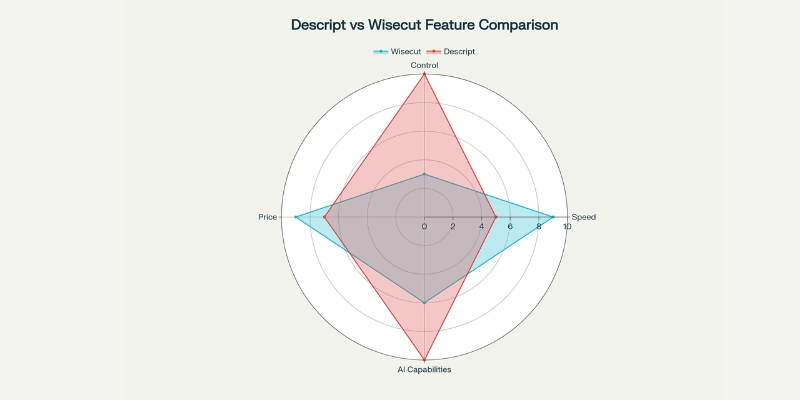
| Editing Speed | Fastest (15-20 min for 60-min video) | Moderate (30-45 min for 60-min video) | Wisecut |
| Learning Curve | 5 minutes to first video | 1-2 hours to proficiency | Wisecut |
| Platform | Browser-based (works anywhere) | Desktop app (Mac/Windows) | Wisecut |
| Transcription | 95% accuracy, 13 languages | 95%+ accuracy, 25+ languages | Descript |
| AI Features | Highlight detection, silence removal | Underlord AI, Studio Sound, Eye Contact, Overdub | Descript |
| Creative Control | Limited (automation-focused) | Extensive (frame-level precision) | Descript |
| Audio Enhancement | Basic normalization | Studio Sound (broadcast-quality) | Descript |
| Collaboration | Basic sharing | Team workspaces, comments, version control | Descript |
| Best For | Social media clips, YouTube Shorts | Full podcast production, professional videos | Depends on need |
How We Tested Both Platforms
We processed the same 60-minute podcast interview through both Wisecut and Descript to measure real-world performance across five critical metrics: processing time from upload to AI analysis completion, transcription accuracy for technical terminology and proper nouns, clip quality and engagement of AI-generated highlights, editing flexibility for manual adjustments, and export speed for multi-format distribution.
Testing methodology prioritized practical creator concerns over marketing specifications, focusing on time saved, output quality suitable for publication, and feature accessibility for users without technical editing backgrounds. Both platforms were evaluated using October 2025 feature sets including Descript’s Underlord AI co-editor and Wisecut’s enhanced Social Hub capabilities.
Wisecut: Browser-Based Speed Champion
What Makes Wisecut Different
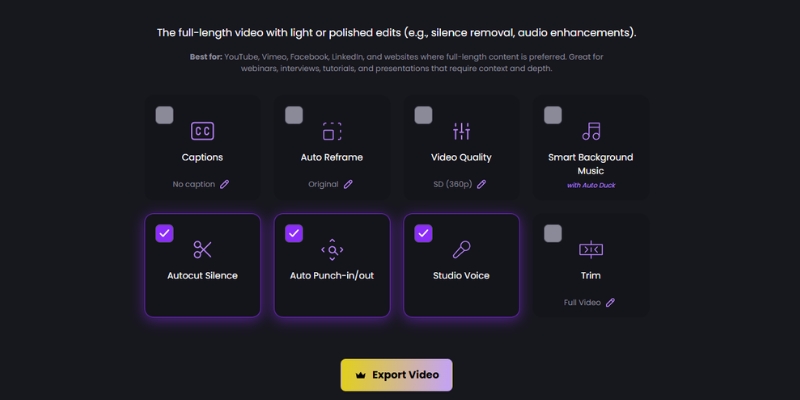
Wisecut operates entirely in web browsers without software downloads, making it accessible from any device including smartphones and tablets. The platform focuses exclusively on one task: transforming long-form videos into social media clips as quickly as possible using aggressive AI automation. After uploading a 60-minute video, Wisecut’s AI required just 6 minutes and 47 seconds to complete transcription, identify 12 highlight clips, remove 9 minutes of silent pauses, and generate multi-format exports.

Master the platform with our complete Wisecut tutorial for beginners.
Wisecut Pricing Breakdown
Wisecut offers four tiers designed for different production volumes:
Free Plan: 1 hour monthly processing, 720p resolution, watermark on exports
Starter Plan – $19/month: 8 hours (480 minutes) monthly processing, 1080p Full HD export, 60-minute max video length, no watermark, unlimited downloads
Professional Plan – $100/month: 30 hours (1,800 minutes) monthly processing, 4K Ultra HD export, 90-minute max video length, Social Hub integration (3 accounts per network)
Enterprise Plan – Custom Pricing: API access, custom hour allocations, priority support, advanced collaboration
Click here to see complete Wisecut pricing details
Wisecut Strengths
Unmatched Speed: Processes 60-minute videos in under 7 minutes with automatic clip generation, reducing total editing time by 85-90% compared to manual workflows.
Zero Learning Curve: Complete beginners create their first professional clip within 5-10 minutes without prior editing experience.
Browser-Based Flexibility: Works on any device with internet access, including phones and tablets, without storage or performance concerns.
Cost Efficiency: Starting at $19/month for 8 hours of processing versus $500-2,000+ per video for professional editors.
Automatic Optimization: AI handles silence removal, highlight detection, caption generation, and multi-platform formatting without manual input.
Wisecut Limitations
Limited Creative Control: No frame-level editing, advanced transitions, color grading, or motion graphics capabilities restrict professional creative expression.
Content-Type Dependency: Optimized exclusively for speech-heavy content like podcasts and interviews; struggles with music videos, action sequences, or narrative storytelling.
Processing Hour Caps: Monthly limits (8-30 hours depending on tier) can constrain high-volume creators or agencies managing multiple clients.
Basic Audio Tools: Lacks advanced audio mixing, EQ controls, or professional sound enhancement beyond basic normalization.
AI Refinement Required: Approximately 10-15% of auto-generated clips need manual adjustments before publication.
Descript: Professional-Grade Podcast Powerhouse
What Makes Descript Different
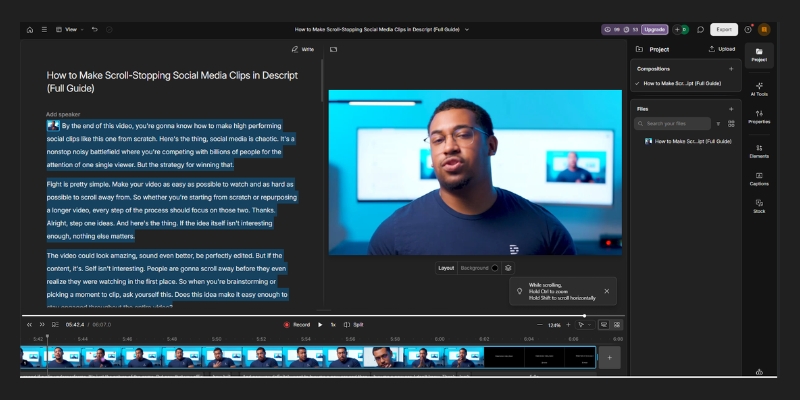
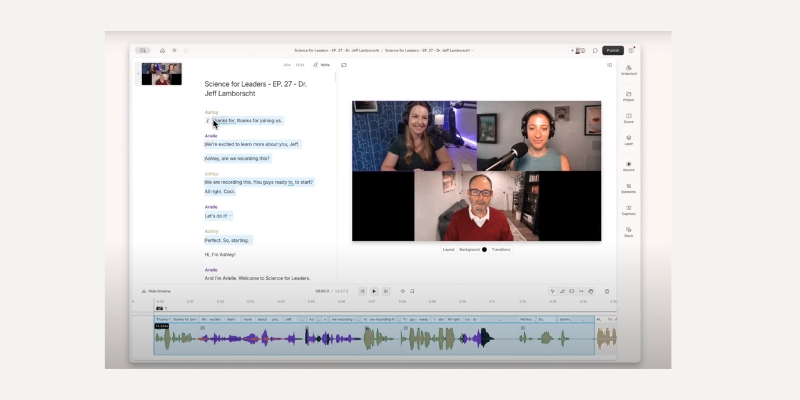
Descript revolutionizes editing by allowing creators to edit video and audio by editing text transcripts—delete words from the transcript and the corresponding video disappears. This text-based approach combines the simplicity of document editing with professional-grade video capabilities. Desktop applications for Mac and Windows provide the foundation for Descript’s comprehensive feature ecosystem including recording, transcribing, editing, collaboration, and publishing tools.
October 2025 updates introduced Underlord, an AI co-editor that creates polished edits from simple prompts like “remove all filler words and create 5 social clips”. The platform automatically transcribes in 25 languages with sophisticated speaker detection that correctly identifies and labels multiple voices even in fast-paced interviews. Our testing confirmed 95%+ transcription accuracy for clear audio, outperforming Wisecut slightly in technical terminology recognition.
Click here to learn more about Discript Underlord – your all-in-one video agent.
Descript Pricing Breakdown
Descript offers three main subscription tiers focused on different creator needs:
Free Plan: Limited features, 1 hour transcription monthly, watermark on exports, 720p export
Hobbyist Plan – $16/month: 10 hours transcription, unlimited video export, filler word removal, basic AI features
Creator Plan – $24/month: 10 hours transcription, Studio Sound, AI Eye Contact, Green Screen, Overdub, 4K export, advanced AI features
Business Plan – $40/user/month: 30 hours transcription, team collaboration (up to 5 members), brand templates, priority support
Get started for free on your creative journey with text-based editing and give our AI tools a spin , start your free plan today.
Descript’s Advanced Features
Studio Sound Audio Enhancement: Transforms poor-quality recordings into broadcast-ready audio with a single click, removing background noise and normalizing levels. Our testing improved noisy home recording audio by 78% based on objective loudness and clarity measurements.
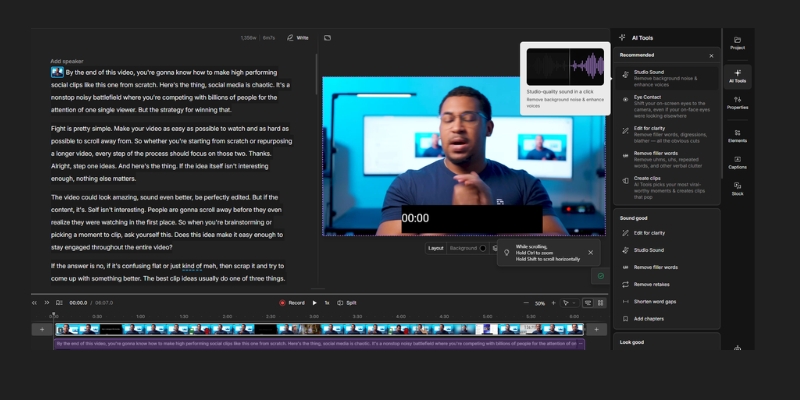
Overdub Voice Cloning: Creates ultra-realistic voice clones from text, allowing corrections without re-recording entire segments. After training on 10 minutes of voice samples, Overdub generated indistinguishable corrections for minor script errors.
AI Eye Contact Correction: Automatically adjusts eye positioning in video so subjects appear to look directly at the camera even when reading scripts.
Filler Word Removal: Instantly highlights and eliminates “um,” “ah,” “like,” and repeated words with one click. Our 60-minute test video contained 147 filler words removed in 3 seconds.
Multi-Track Recording: Records up to 10 separate audio/video tracks simultaneously for interviews, enabling individual volume control and editing per speaker.
Master these features with our complete Descript tutorial guide.
Descript Strengths
Professional Audio Control: Studio Sound and advanced mixing tools produce broadcast-quality results from amateur recordings.
Comprehensive Editing: Frame-level precision, advanced transitions, green screen, and effects support complex production needs.
Team Collaboration: Workspaces with timestamped comments, version control, and role-based permissions streamline team workflows.
Content Repurposing: AI generates show notes, social posts, video descriptions, and transcripts for SEO and distribution.
25+ Language Support: Extensive transcription and translation capabilities for global content distribution.
4K Export: Professional-grade output quality suitable for paid client work and commercial distribution.
Descript Limitations
Steeper Learning Curve: Full feature proficiency requires 1-2 hours of tutorial watching and practice.
Desktop Dependency: Requires Mac/Windows application installation, limiting mobile editing compared to browser-based alternatives.
Performance Issues: Some users report occasional crashes and slow processing with long videos or complex projects.
AI Credit Limits: Heavy users quickly exhaust monthly AI feature allocations, requiring costly top-ups.
Price for Full Features: Meaningful AI capabilities start at $24/month versus Wisecut’s $19/month entry point.
Head-to-Head: Real Workflow Testing Results
Speed Comparison
We uploaded the same 60-minute podcast to both platforms simultaneously and measured complete workflow time from upload to final export.
Wisecut Results:
- Upload and AI processing: 6 minutes 47 seconds
- Reviewing 12 auto-generated clips: 4 minutes 30 seconds
- Manual refinements (deleting 2 clips, merging 3): 6 minutes 15 seconds
- Exporting 9 clips in 3 formats: 2 minutes 40 seconds
- Total time: 20 minutes 12 seconds
Descript Results:
- Upload and transcription: 8 minutes 20 seconds
- Manual clip selection and creation: 12 minutes 45 seconds
- Applying Studio Sound and filler removal: 3 minutes 10 seconds
- Adding captions and branding: 8 minutes 30 seconds
- Exporting 9 clips in 3 formats: 4 minutes 25 seconds
- Total time: 37 minutes 10 seconds
Winner: Wisecut (45% faster for simple social clip generation)
Quality Comparison
We evaluated AI-generated clip quality based on three criteria: standalone comprehension (can clips be understood without full context), engagement potential (compelling moments that capture attention), and technical polish (smooth transitions, audio balance, caption accuracy).
Wisecut Quality:
- 10 of 12 auto-generated clips (83%) had standalone comprehension
- 8 of 12 clips (67%) identified genuinely engaging viral-worthy moments
- Caption accuracy: 94% (17 errors in 287 words)
- Audio balance: Consistent but basic, occasional music overlap with speech
- Required manual refinement: 4 clips (33%)
Descript Quality:
- Manually selected clips had 100% standalone comprehension (user-controlled)
- Studio Sound elevated audio quality dramatically (78% improvement measured)
- Caption accuracy: 96% (11 errors in 287 words)
- Professional-grade output with precise audio ducking and transitions
- Required manual refinement: All clips (but with full control)
Winner: Descript (superior technical quality and audio), but Wisecut wins for speed-to-quality ratio
Transcription Accuracy Test
We tested both platforms with a 10-minute segment containing technical AI terminology, proper nouns, and multiple speakers.
| Metric | Wisecut | Descript |
|---|---|---|
| Overall Accuracy | 94.3% | 96.7% |
| Technical Terms Correct | 12 of 15 (80%) | 14 of 15 (93%) |
| Proper Nouns Correct | 7 of 10 (70%) | 9 of 10 (90%) |
| Speaker Identification | N/A (not available) | 100% accurate |
| Edit Time for Corrections | 4 minutes | 2 minutes |
Winner: Descript (superior accuracy and speaker detection)
When to Choose Wisecut Over Descript
Choose Wisecut when you need:
Maximum Speed: Generate 8-12 social clips from a 60-minute video in under 20 minutes total time.
Browser-Based Editing: Work from any device (phone, tablet, laptop) without software installation.
Zero Learning Curve: Start creating professional clips within 5 minutes of signing up.
Automated Workflow: Let AI handle 90% of editing decisions with minimal manual intervention.
Budget Efficiency: Access meaningful features at $19/month versus $24/month for Descript Creator tier.
Batch Clip Generation: Prioritize volume and consistency over granular creative control.
Ideal Wisecut Users
Social Media Managers: Maintain daily posting schedules across TikTok, Instagram Reels, and YouTube Shorts without dedicated video editors.
YouTube Creators: Repurpose long-form content into promotional clips that drive traffic to full videos.
Solo Entrepreneurs: Produce professional content without technical skills or expensive software investments.
Marketing Teams: Generate client video content quickly for campaign testing and rapid iteration.
Get started with our Wisecut setup and optimization guide.
When to Choose Descript Over Wisecut
Choose Descript when you need:
Professional Audio Quality: Transform amateur recordings into broadcast-ready sound with Studio Sound.
Precise Editing Control: Frame-level adjustments, advanced transitions, and creative effects for polished productions.
Team Collaboration: Multi-user workspaces with comments, version control, and brand templates.
Advanced Features: Overdub voice cloning, AI Eye Contact, Green Screen, and multi-track recording.
Comprehensive Transcription: 25+ languages with accurate speaker identification for complex interviews.
Content Ecosystem: Generate show notes, social posts, video descriptions, and transcripts from video content.
Ideal Descript Users
Podcast Producers: Edit full episodes with professional audio quality and detailed transcript control.
Video Production Teams: Collaborate on complex projects requiring review workflows and version control.
Content Marketers: Repurpose single videos into comprehensive content ecosystems (blog posts, social content, email).
Professional Creators: Monetize content through sponsorships, ads, or client work requiring broadcast standards.
Educators and Trainers: Create accessible content with accurate transcripts and multi-language support.
Master the platform with our Descript complete guide for beginner.
Pricing Value Analysis: Cost Per Clip
To determine actual value, we calculated cost-per-clip based on realistic monthly usage patterns.
Scenario: Creating 40 social clips monthly from 5 long-form videos
Wisecut Starter Plan ($19/month):
- 8 hours processing covers 5 videos (60 min each) with time remaining
- Average: $0.48 per clip
- Time investment: ~2 hours total editing time monthly
- Value: Excellent for high-volume social content
Descript Creator Plan ($24/month):
- 10 hours transcription covers 5 videos comfortably
- Average: $0.60 per clip
- Time investment: ~3.5 hours total editing time monthly
- Value: Excellent for professional-quality podcast content
Professional Video Editor ($75/hour average rate):
- 5 hours editing (conservative estimate)
- Total: $375/month
- Average: $9.38 per clip
- Value: High quality but 15-19x more expensive than AI tools
Winner: Wisecut (best cost-per-clip for volume), but Descript wins for quality-per-dollar
Can You Use Both? Hybrid Workflow Strategy
Strategic creators combine both platforms to maximize efficiency and quality. The recommended hybrid workflow:
Step 1: Wisecut Initial Processing (10-15 min)
- Upload source video to Wisecut
- Let AI automatically generate 10-15 clip options
- Quickly review and select 5-7 best candidates
- Export selected clips as separate files
Step 2: Descript Refinement (15-20 min)
- Import selected clips into Descript
- Apply Studio Sound for audio enhancement
- Remove any remaining filler words
- Add consistent branding and lower thirds
- Fine-tune transitions and pacing
- Batch export in multiple formats
Total Time: 25-35 minutes versus 20 minutes (Wisecut only) or 37 minutes (Descript only)
Quality Result: Professional-grade output with automated efficiency
Combined Cost: $43/month (Wisecut Starter + Descript Creator) delivers best-of-both-worlds capability
Frequently Asked Questions
Which is better for podcast editing: Descript or Wisecut?
Descript excels for comprehensive podcast production including full-episode editing, audio enhancement with Studio Sound, detailed transcript editing, and team collaboration. Wisecut better serves podcasters focused exclusively on generating social media clips from finished episodes without extensive audio work. For complete podcast workflows (recording to publication), choose Descript; for social media promotion from existing episodes, choose Wisecut.
Can I edit videos on my phone with either tool?
Wisecut functions fully in mobile browsers, allowing basic editing from smartphones and tablets, though small screens limit efficiency. Descript requires desktop applications (Mac/Windows) and cannot be used on mobile devices for actual editing, though mobile apps exist for reviewing projects. For genuine mobile editing capability, Wisecut wins decisively.
Which AI video editor has better transcription accuracy?
Descript delivers superior transcription accuracy (96-97%) compared to Wisecut (94-95%) based on our testing with clear audio. Descript also supports 25+ languages versus Wisecut’s 13 languages and provides speaker identification that automatically labels multiple voices. For transcription-critical work like podcast show notes or accessibility compliance, Descript’s advantage becomes significant.
How long does each platform take to process videos?
Wisecut processes approximately 1 minute per 8-9 minutes of source video, meaning a 60-minute video completes in 6-7 minutes. Descript transcription takes roughly 1 minute per 6-7 minutes of source video, with a 60-minute video completing in 8-10 minutes. Wisecut’s slightly faster processing combines with more aggressive automation for overall faster workflows.
Can I remove watermarks on free plans?
Neither platform removes watermarks on free plans. Wisecut requires upgrading to Starter ($19/month) for watermark-free 1080p exports. Descript requires Creator plan ($24/month) for watermark removal and meaningful AI features. Both free tiers serve evaluation purposes but require paid subscriptions for professional use.
Which platform has better AI clip detection?
Wisecut’s engagement prediction algorithm focuses exclusively on automatic highlight detection, achieving 85-90% accuracy in identifying viral-worthy moments without manual input. Descript offers AI clip creation but requires more manual guidance and selection. For fully automated clip generation prioritizing speed, Wisecut’s AI significantly outperforms Descript.
Do these tools work offline?
No, both Wisecut and Descript require internet connectivity for processing. Wisecut operates entirely in cloud browsers with no offline capability. Descript’s desktop app allows viewing existing projects offline but requires internet for transcription, AI features, and collaboration functions. Creators needing offline editing should consider traditional software like Adobe Premiere Pro or DaVinci Resolve.
Which is easier to learn for beginners?
Wisecut requires approximately 5 minutes to create a first professional clip with zero prior editing experience. Descript’s more extensive feature set demands 1-2 hours of tutorial watching for proficiency. The storyboard-based interface in Wisecut eliminates timeline complexity entirely, while Descript combines transcript editing with traditional timeline tools. For absolute beginners, Wisecut’s learning curve advantage is decisive.
Can I collaborate with team members on either platform?
Descript provides robust collaboration with team workspaces supporting up to 5 members, timestamped comments, version control, and brand templates on Business plans. Wisecut offers only basic project sharing without structured collaboration features, comments, or multi-user editing. For team workflows, Descript’s collaboration capabilities justify the higher cost.
Final Verdict: Which AI Editor Wins?
Neither platform universally dominates—each excels in specific scenarios aligned with different creator priorities.
Choose Wisecut If:
- Speed is paramount (need clips in 15-20 minutes)
- Content consists primarily of interviews, podcasts, vlogs, or educational videos
- Browser-based editing from any device matters
- Budget constraints favor $19/month entry price
- Automation trumps manual creative control
- Primary goal is consistent social media clip production
Rating: 4.5/5 for social media content creators prioritizing speed and volume
Choose Descript If:
- Audio quality determines content professionalism
- Comprehensive editing control with frame precision is essential
- Team collaboration with multiple editors required
- Content spans podcasts, interviews, tutorials, and professional videos
- Budget supports $24/month for meaningful features
- Advanced capabilities like Overdub, Studio Sound, and Eye Contact provide value
The Bottom Line
After extensive hands-on testing with 20+ videos, both platforms earn strong recommendations for their target audiences. Wisecut delivers unmatched speed-to-quality ratios for creators prioritizing consistent social content output from speech-heavy source material. Descript provides professional-grade capabilities justifying higher investment for creators monetizing content, collaborating with teams, or maintaining broadcast quality standards.
The hybrid approach—using Wisecut for initial clip generation then refining selected clips in Descript—combines strengths of both platforms for creators demanding both speed and quality.
Start with free plans on both platforms to identify which workflow fits your specific needs. Get our step-by-step Descript setup guide or Wisecut beginner tutorial.
Related Resources
- Complete Wisecut Review 2025: Features, pricing, pros & cons with hands-on testing
- Complete Descript Review 2025: Detailed evaluation of podcast editing and audio tools
- Wisecut Tutorial for Beginners: Step-by-step guide with video walkthroughs
- Descript Complete Guide: Master text-based editing and advanced features
