
Fliki vs Pika: Which AI Video Tool Is Right For You? (2025 Comparison)
If you are struggling to decide between fliki vs pika, you are likely comparing two completely different types of tools. In the rapidly evolving landscape of AI Generative Video, these two platforms sit on opposite ends of the spectrum.
I have spent hundreds of hours testing both platforms for different marketing campaigns. While both use “AI” to create video, they solve fundamentally different problems for creators.
This comparison will break down the specific use cases, pricing models, and “battle-tested” workflows. I will help you decide if you need a blog-to-video repurposing engine or a creative generative art tool.
Table of Contents
Fliki vs Pika: The Core Difference (Stock Repurposing vs. Generative Video)
The most critical thing to understand is that Fliki and Pika are not direct competitors in function. They serve different stages of the content funnel. We often use them together, but rarely for the same task.
Fliki is an efficiency tool designed to scale content production. Pika is a creative tool designed to generate novel visuals that never existed before. Mixing them up will lead to frustration.
Here is the bottom line up front on how they differ fundamentally:
Fliki – The Content Repurposing Powerhouse:
Fliki is a “Blog-to-Video” tool. It takes your text script or URL and automatically matches it with stock media (images/videos) from libraries like Storyblocks. Its core strength is YouTube Automation and creating educational videos at scale.
Pika – The Creative Generative Engine:
Pika is a “Text-to-Video” generative model. It creates pixels from scratch based on your text prompts. It does not use stock footage. Its core strength is creating high-fidelity, cinematic, or surreal visuals for short creative clips.
In our workflow, if we need to turn a 2,000-word article into a 5-minute video, we use Fliki. If we need a specific 3-second clip of an “astronaut eating pizza on Mars,” we use Pika.
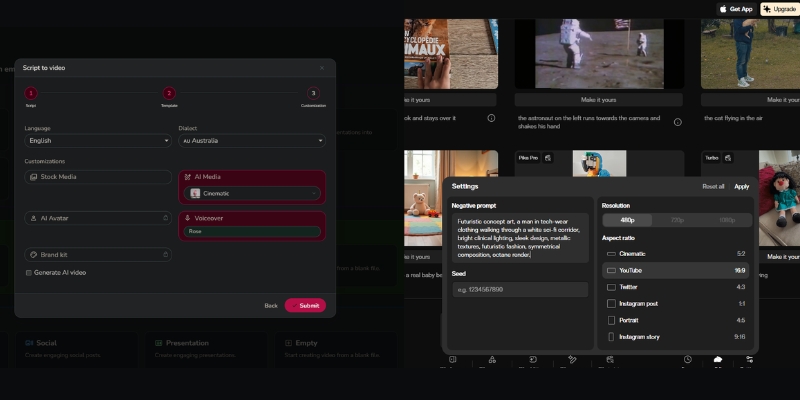
Visual Output & Style: Stock Library vs. AI Hallucinations
The visual quality determines where you can use the final video. Your choice depends heavily on whether you need “brand safety” or “creative novelty.”
Fliki’s Visual Approach (Asset-Based):
Fliki produces “safe” and corporate-ready videos. Because it pulls from millions of licensed stock clips (Unsplash, Pixabay, Storyblocks), the visuals are realistic and high quality. You won’t see weird AI morphing or glitches.
We find Fliki ideal for B2B marketing. You can also upload your own assets. The visual consistency makes it perfect for long-form explainer videos where clarity is more important than artistic flair.
Pika’s Visual Approach (Diffusion-Based):
Pika 2.5 creates “experimental” and artistic visuals with enhanced realism. The November 2025 update delivers more realistic motion, sharper details, and smoother expressions. However, it can still suffer from occasional “hallucinations”—where faces might distort slightly.
During our testing with Pika 2.5, we created incredible cinematic shots with improved consistency. The latest model requires fewer re-rolls than previous versions. It is best for music videos, social media hooks, and stylized content.
Expert Verdict: Use Fliki if you need a reliable 10-minute video for YouTube today. Use Pika if you need a 5-10 second viral clip for TikTok that looks like a Pixar movie.
Audio Capabilities: Hyper-Realistic Voices vs. Lip Sync
Audio is half the video experience. This is where Fliki absolutely dominates the comparison, as Pika focuses almost entirely on visuals.
Fliki’s Audio Engine:
Fliki started as a Text-to-Speech tool. It offers over 2,000 neural AI voices that are nearly indistinguishable from humans. It handles pauses, intonation, and emotions perfectly.
For our faceless YouTube channels, Fliki is the go-to choice. We can generate a full 10-minute narration in seconds. It also supports voice cloning, allowing you to narrate videos without recording.
Pika’s Audio Features:
Pika offers Lip Sync and sound effects generation. You can upload an audio file, and Pika will animate a character’s mouth to match. It creates sound effects based on the prompt for enhanced immersion.
However, Pika is not a narration tool. You cannot paste a 1,000-word script and expect a coherent voiceover. It is strictly for short character animations and ambient sounds.
Workflow & Ease of Use: Script-to-Video vs. Prompt Engineering
Marketers under performance pressure need speed. Creators seeking art need control. The workflow of these two tools reflects that divide.
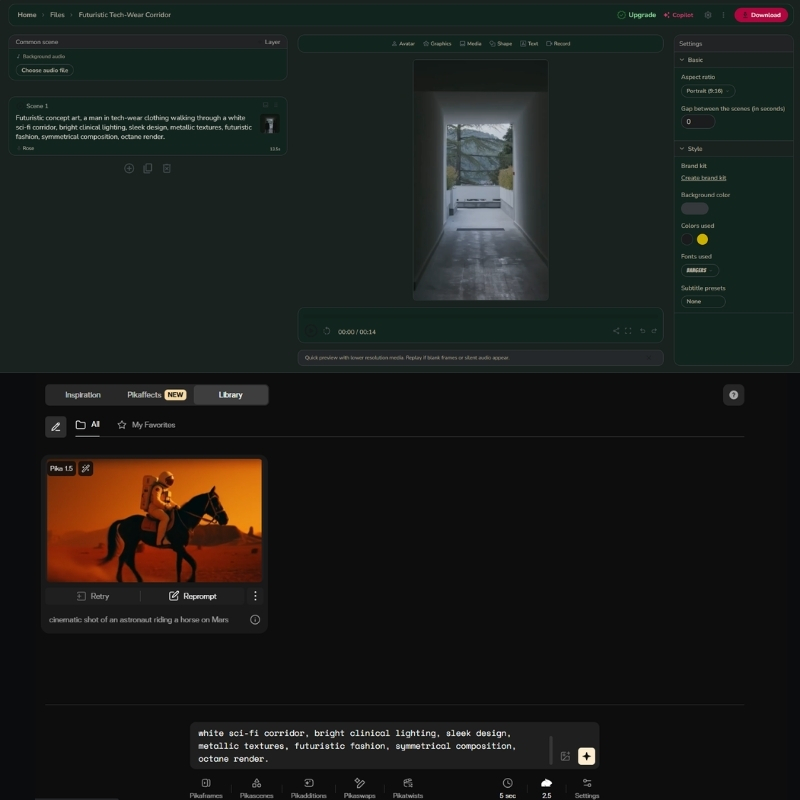
Creating with Fliki (The Editor):
Fliki uses a timeline-based editor. You paste a blog URL, and the “Magic Create” feature summarizes it, picks visuals, and adds voiceovers. You get a full draft in under 2 minutes.
We love the “bulk create” feature. You can produce 50 YouTube Shorts from a CSV file. It is designed for mass production and efficiency.
Creating with Pika 2.5 (The Generator):
Pika operates via a web app at pika.art. You type a prompt with camera directions like “dolly shot, cinematic lighting, slow motion.” Pika 2.5 now supports up to 10-second generations in 1080p resolution.
The workflow is iterative. You generate a 5-10 second clip. If you like it, you can extend it or apply Pikaffects for creative transformations. Stitching a full story requires external editing software like Premiere Pro.
Best Use Cases: When to Choose Fliki or Pika?
Based on our industry data, users often buy the wrong tool because they misunderstand the “Text-to-Video” label. Here is exactly when to use each.
Choose Fliki If:
You are a marketer or business owner. You need to repurpose blog posts into videos for SEO. You run a faceless YouTube automation channel. You need consistent, long-form educational content with professional voiceovers.
Choose Pika If:
You are a creative director or artist. You need specific B-roll that you can’t find on stock sites. You are making a music video, an AI film trailer, or surreal social media shorts with unique visual effects.
The Hybrid Strategy:
Advanced creators use both. We often use Pika to generate a unique character or scene, then import that clip into Fliki to add voiceover and subtitles for a complete video package.
Pricing & Value: Subscription Credits vs. Token Generation
Both tools use a credit system, but they consume credits differently. Understanding this will save you money.
| Feature | Fliki (Standard) | Pika 2.5 (Pro) |
|---|---|---|
| Pricing Model | Subscription (Minutes) | Subscription (Credits) |
| Free Tier | 5 mins/month (Watermarked) | 80 credits/month (Watermarked) |
| Entry Plan | $28/mo (180 mins) | $10/mo (700 credits) |
| Pro Plan | $88/mo (600 mins) | $35/mo (2,300 credits) |
| Commercial Rights | Included in paid plans | Pro plan and above |
| Best Value | Try Fliki Free | Try Pika Free |
Fliki Pricing Model:
Fliki charges based on the duration of the video you export. If you make a 5-minute video, it costs 5 minutes of credits. It is very predictable for budgeting. The Standard plan ($28/mo) gives you 180 minutes of export.
Pika 2.5 Pricing Model:
Pika charges for every generation attempt. If you generate a clip and don’t like it, you still pay. The Pro plan ($35/mo) includes 2,300 credits, commercial rights, and no watermarks. High-quality upscaling and Pikaffects cost extra credits.
(Disclosure: If you purchase through links on this page, we may earn a small commission at no extra cost to you. This helps us maintain our “battle-tested” reviews.)
Final Verdict
If you want to build a business on YouTube, go with Fliki. If you want to create art, go with Pika 2.5.
Frequently Asked Questions About Fliki vs Pika
Can I use Fliki and Pika together?
Yes, absolutely. Generating custom clips in Pika and importing them into Fliki is a powerful workflow. This gives you the best of both worlds: unique visuals and professional voiceovers.
Which tool is better for YouTube Automation?
Fliki is the definitive winner for YouTube Automation. Its ability to turn text into a finished video with voiceovers and captions in minutes is unmatched by Pika.
Do Pika videos have copyright issues?
Copyright for generative AI is still evolving. While Pika grants you commercial rights on Pro plans and above, the legal standing of AI-generated art varies by jurisdiction. Fliki’s stock media is safer for big brands.
Is there a free version for both?
Yes. Fliki allows you to create 5 minutes of video per month for free. Pika gives you 80 credits monthly to generate short clips. Both add watermarks on the free tier.
Read More From AI Generative Video
Dive deeper into our battle-tested reviews and comparisons to find the perfect tool for your creative stack.
- Fliki Review: AI Voice & Video Creation Suite
- Best AI Short-form & Repurposing Tools (Go Viral Guide)
- Pictory AI Review: The Ultimate Blog-to-Ad Tool?
last update : 06/12/2025
