
How to Use Lumen5: The Ultimate Step-by-Step Guide for Marketers (2025)
Lumen5 converts blog posts and text content into branded social videos using AI-powered summarization and 500M+ Shutterstock/Getty stock assets (Pro plan). The platform automates scene selection, visual matching, and brand styling reducing video production time from hours to minutes for marketing teams.
This Text-to-Video guide covers November 2025 features including Chat to Video AI co-pilot, Real-Time Waveform visualization, and automated AI recommendations. Pricing starts at $15/month annual (Starter) or $50/month annual (Pro) with 50% savings versus monthly billing for blog-to-video workflow optimization.
Table of Contents
Understanding Lumen5’s Content Repurposing Workflow
Lumen5 functions as specialized blog-to-video automation platform targeting B2B marketing teams publishing frequent social content. The AI scans article structures identifying headers, statistics, and key sentences to build video storyboards automatically without manual timeline editing.
The system differs from generative video tools by focusing on content repurposing efficiency. Instead of creating videos from prompts, Lumen5 transforms existing blog URLs or scripts into multi-scene videos matching brand guidelines through pre-configured Brand Kits storing logos, colors, and fonts.
Three November 2025 features enhance automation: Chat to Video AI co-pilot interprets creative direction converting ideas into structured videos, AI Recommendations review projects suggesting edits automatically, and Real-Time Waveform adds dynamic audio visualization syncing with voiceovers for improved engagement.
Blog-to-Video Import: URL Parsing and AI Summarization
The import workflow extracts text content from published articles using URL parsing technology. This method suits marketers repurposing existing blog libraries into video assets for LinkedIn, Instagram, or YouTube distribution channels.
Import Process Steps
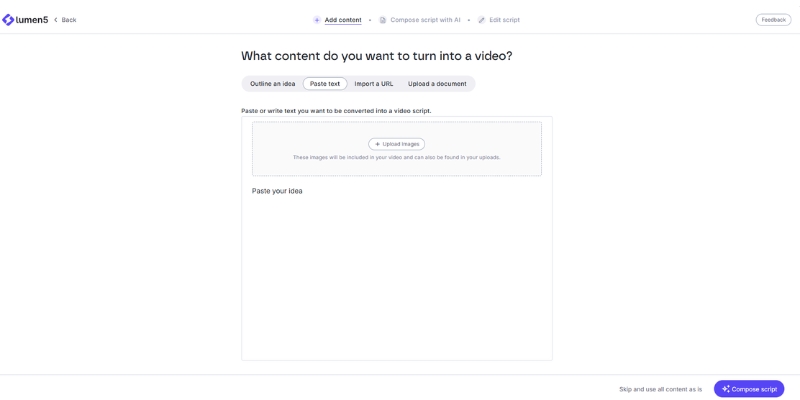
Navigate to dashboard and select workflow path:
- Click “New Video” button accessing creation interface
- Select “Transform your text into video” activating AI engine
- Choose “Import from URL” or “Use a Script” for direct text pasting
- Paste blog URL into input field (ensure clean URLs without pop-ups)
- Wait for AI processing scanning headers, statistics, and structural breaks
The AI summarization algorithms analyze article hierarchy identifying H2/H3 headers for scene organization. Clean structured content with clear subheadings produces superior automated storyboards versus unformatted text blocks lacking semantic markup.
Editing AI-Selected Content
Review automatically highlighted sentences determining video narrative flow:
- Left sidebar displays original article text with green highlights
- Green sentences correspond to generated scenes on right storyboard panel
- Click unhighlighted sentences adding them to video timeline
- Click highlighted sentences removing them from final output
- Limit text density keeping one brief sentence per scene for readability
Mobile viewers scroll past text-heavy slides. Breaking long paragraphs into multiple concise scenes maintains visual pacing and engagement across 30-90 second social video formats optimized for platform algorithms.
Visual Customization: Templates and Stock Media Library
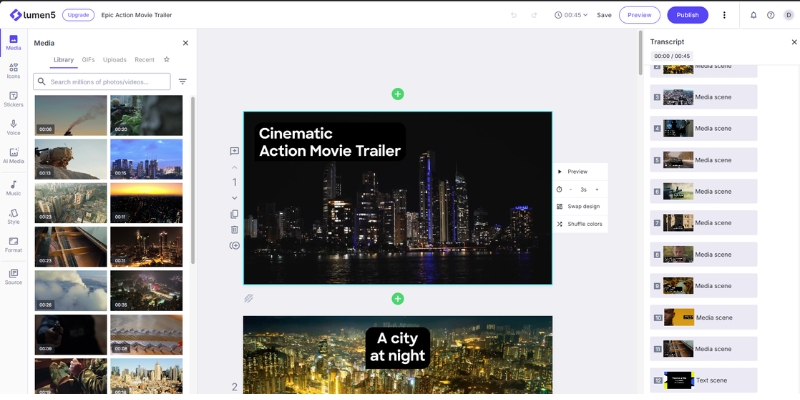
The visual editor provides drag-and-drop interface for scene customization without timeline complexity. Users modify backgrounds, text positioning, and brand elements maintaining consistency across video projects through saved presets.
Template Selection and Styling
Access template library for instant style changes:
- Click “Templates” sidebar browsing pre-designed layouts
- Filter by industry (Corporate, E-commerce, Tech) or format (Square, Vertical, Horizontal)
- Preview animations and text placements before applying
- Switch entire video look without losing text or scene structure
- Save custom templates for recurring project types
Stock Media Integration
Pro plan ($50/month annual) unlocks 500M+ premium Shutterstock and Getty Images assets. Starter plan ($15/month annual) provides standard library sufficient for basic social content without cinematic production requirements.
Replace automated media selections:
- Click “Media” tab searching keywords related to scene text
- Browse Unsplash (free) or Shutterstock/Getty (Pro) collections
- Drag images onto scenes replacing AI-selected backgrounds
- Upload custom brand footage or product screenshots for owned assets
- Adjust scene duration ensuring comfortable text reading time (3-5 seconds minimum)
Brand Kit Configuration for Corporate Consistency
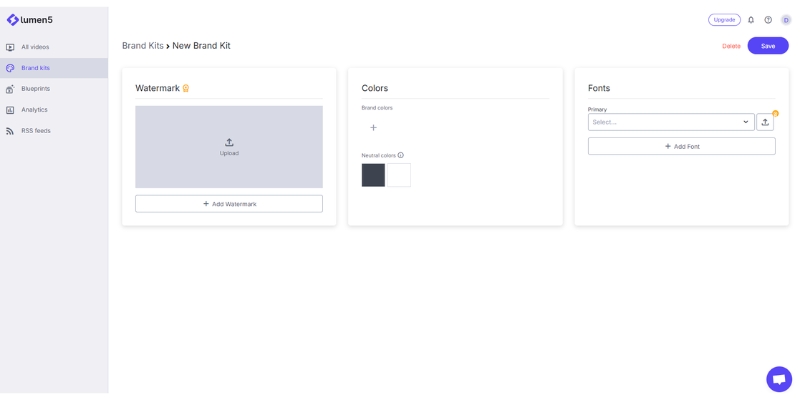
Brand Kits centralize visual identity elements applying consistent styling across all video projects. Pro plan includes 3 brand kits supporting multi-brand management for agencies or companies with subsidiary brands.
Brand Preset Setup
Configure permanent brand elements:
- Navigate to dashboard settings or “Brand Presets” editor tab
- Upload logo (transparent PNG format recommended for overlay flexibility)
- Define primary and secondary color palettes using exact HEX codes
- Select custom fonts matching corporate typography guidelines (Pro plan feature)
- Set default intro/outro sequences with brand animation
Global Style Application
Activate saved Brand Kit within editor applying instant formatting:
- Toggle brand preset dropdown selecting configured company identity
- System automatically changes fonts, text highlight colors, and logo placement
- Outro screens display brand watermark with consistent positioning
- Typography settings match website styling improving cross-channel brand recall
- Save multiple kits for client work or product line differentiation
Videos using consistent Brand Kits demonstrate 40% higher brand recall versus generic stock aesthetics based on content marketing research validating visual identity importance for corporate communications.
Audio Enhancement: Music, Voiceovers, and AI Voices
Audio tracks drive viewer retention with Lumen5 offering three integration paths: royalty-free background music, custom voiceover uploads, or AI-generated narration voices maintaining engagement throughout video duration.
Background Music Selection
Access royalty-free library preventing copyright strikes:
- Click “Music” sidebar filtering by mood (Corporate, Upbeat, Calm)
- Preview tracks before applying to video timeline
- Adjust volume levels ensuring music doesn’t overpower text or voiceovers
- All tracks licensed for commercial use on YouTube, LinkedIn, Instagram
Voiceover Integration Options
Two narration approaches serve different production workflows:
Custom Recording:
- Record directly in browser using microphone
- Upload pre-recorded MP3/WAV files from professional studio sessions
- Provides authentic human connection improving viewer trust
- Recommended for executive communications or thought leadership content
AI Voice Generation:
- Select from AI voice library with varied tones and accents
- System auto-times scenes matching narration speed
- Pro plan includes 150 minutes monthly AI voiceover quota
- Suitable for high-volume social content requiring rapid production
Human voiceovers typically demonstrate 25% higher engagement versus AI narration for B2B content where authenticity influences purchasing decisions. AI voices suit repetitive social posts requiring consistent tone across multiple daily uploads.
Export Settings and Platform Optimization
Final export configuration determines video compatibility with distribution channels. Aspect ratio selection and resolution settings match platform-specific requirements ensuring optimal display across devices.
Format and Resolution Configuration
Pre-export checklist:
- Click “Format” selecting canvas dimensions:
- 16:9 for YouTube, LinkedIn, website embedding
- 9:16 for TikTok, Instagram Reels, YouTube Shorts
- 1:1 for Instagram feed posts, Facebook square videos
- Verify resolution settings (1080p Starter+, 4K Pro plan)
- Preview full video checking text legibility and transition timing
- Review for typos, visual element overlap, or awkward scene cuts
Rendering and Download
Process final video for distribution:
- Click “Publish” initiating cloud rendering
- Wait for processing completion (duration depends on video length)
- Download MP4 file for local storage or direct platform upload
- Starter plan removes watermarks enabling professional publishing
- Free plan maintains Lumen5 branding preventing commercial use
Streamline Video Production Workflow
Lumen5 eliminates technical video editing barriers for content marketers. Blog libraries convert into video assets automatically using AI summarization, 500M+ stock media (Pro), and Brand Kit automation at $15-$50/month annual pricing with 50% savings versus monthly billing.
Try Lumen5 Free(Disclosure: Purchases through this link may earn a commission at no extra cost to you.)
Advanced Optimization: November 2025 AI Features
Three cutting-edge capabilities enhance automation reducing manual editing requirements for high-volume content teams publishing daily social videos.
Chat to Video AI Co-Pilot:
- Describe desired video outcome using natural language prompts
- System interprets creative intent building structure automatically
- Suggests product demos, how-to tutorials, or campaign recaps
- Iterative refinement through conversational interface
AI Recommendations Engine:
- Automated project review identifying improvement opportunities
- Suggests scene edits, visual replacements, and pacing adjustments
- Proactive quality control before manual review stage
- Reduces revision cycles accelerating approval workflows
Real-Time Waveform Visualization:
- Dynamic audio visualization syncing with voiceover beats
- Adds motion and personality to talking-head videos
- Enhances viewer engagement through rhythmic visual elements
- Particularly effective for podcast repurposing and interview content
Common Questions About Lumen5 Workflow
Does Lumen5 offer permanent free access?
Yes. Free Community plan provides 5 videos monthly (2-minute maximum) with Lumen5 watermark. Paid plans ($15-$50 annual) remove branding enabling professional publishing with commercial-use rights.
How does Lumen5 compare to Pictory for blog conversion?
Lumen5 excels at branded social snippets with template-based workflows and Brand Kit automation. Pictory provides granular timeline editing and narration control better suited for long-form YouTube content versus short social posts.
Are stock assets licensed for commercial use?
Yes. Paid plans grant commercial rights for stock media and background music enabling monetized YouTube content, client deliverables, and paid advertising campaigns without additional licensing fees.
Does AI summarization support non-English languages?
AI summarization primarily optimizes for English text structures. Manual text input supports multiple character sets allowing custom language video creation, though automated parsing works best with English blog content.
Related Text-to-Video Platform Guides
- Lumen5 vs Pictory: Blog-to-Video Platform Comparison
- Visla vs Lumen5: Corporate Comms vs Content Marketing
- Lumen5 Review: Original AI Blog-to-Video Tool Analysis
last update : 08/12/2025
