
How to Use Steve AI: A Battle-Tested Guide for Marketers (2025)
Steve AI transforms written scripts into animated videos using 300+ character library and automated text-to-animation workflow. The platform targets marketers and content creators requiring explainer videos without animation expertise through AI-powered scene generation, stock footage integration, and multi-language voice synthesis.
This tutorial covers 2025 features including URL-to-video conversion for blog repurposing, generative AI credits for custom asset creation (120 seconds Basic, 15 minutes Pro), and character customization with adjustable actions and expressions. Pricing starts $20/month Basic (720p, 100 mins monthly) or $60/month Starter (1080p, 300 mins monthly) with annual billing available.
Table of Contents
Understanding Steve AI Text-to-Animation Engine
Steve AI operates as browser-based video creation platform emphasizing automation over manual editing. The semantic engine analyzes script context extracting keywords to automatically select relevant characters, backgrounds, and animations from library eliminating keyframe animation requirements.
Two primary creation modes serve different content needs: Animation utilizes 300+ illustrated characters suitable for explainer videos and educational content, while Live-Action integrates premium stock footage from Getty Images for professional presentations and corporate communications.
The dashboard simplifies project initiation through clear workflow separation. Users select creation mode before script input preventing confusion between animation and stock footage approaches common in multi-purpose video editors.
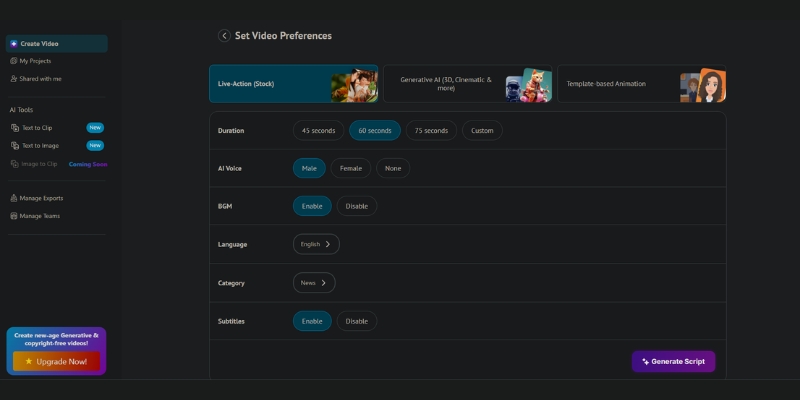
Text-to-Animation Workflow Step-by-Step Process
The text-to-animation creation process consists of five sequential stages from script input to final export. Each stage offers customization opportunities balancing automation speed with creative control.
Script Input and Context Definition
Navigate to animation creation workflow:
- Click “Text to Animation” button on dashboard main screen
- Select input method: manual script entry or AI script generator
- Paste prepared script separating sentences with line breaks
- Each line break creates individual scene for granular editing control
- AI script writer generates structured narrative from topic keywords if needed
Context selection critically influences automated asset selection. Video type categories (Explainer, Advertisement, Educational, Corporate) bias character and scene selection toward appropriate visual styles. Corporate selection prioritizes business attire characters and office environments versus Cartoon favoring whimsical designs.
Keyword Highlighting for Asset Control
Manual keyword emphasis overrides default AI associations:
- Highlight critical terms forcing engine to prioritize related assets
- Prevent literal interpretation mismatches (e.g., “Apple” technology versus fruit)
- Essential for brand-specific terminology and product names
- Improves first-draft accuracy reducing revision cycles
Design Style Selection
Visual theme determines global aesthetic across entire project:
- Corporate: Professional characters, office settings, muted color palettes
- Cartoon: Exaggerated features, bright colors, playful animations
- Hand-drawn: Sketch-style visuals for authentic educational content
- Minimalist: Simple shapes and limited colors for modern tech brands
Theme selection applies consistently preventing visual inconsistency across scenes. Switching themes mid-project requires regeneration from script stage.
Automated Scene Generation
Click “Generate” initiating AI storyboard creation:
- System analyzes script semantics matching keywords to asset library
- Selects characters based on context and defined video type
- Assigns character actions and expressions matching sentence sentiment
- Places background environments supporting narrative context
- Sets default scene timing based on text length and speaking pace
Initial generation typically produces 70-80% accuracy requiring manual refinement. The automated draft saves hours versus building from blank canvas but demands editorial review before finalization.
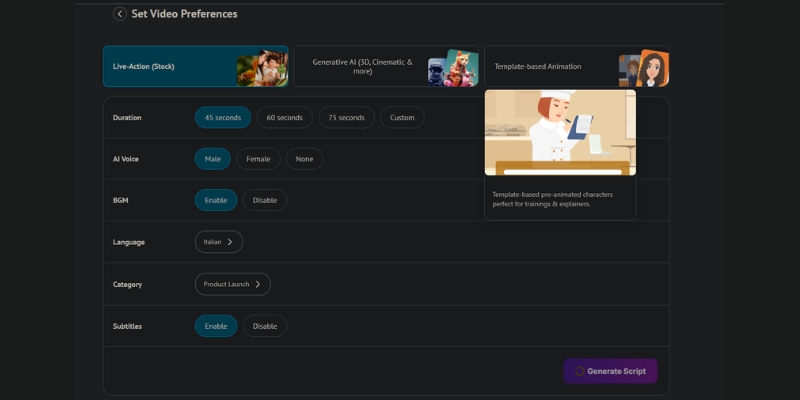
Scene Customization and Character Control
Post-generation editing refines automated output achieving professional polish. Steve AI provides granular scene-level control uncommon in fully-automated platforms.
Character Replacement and Library Navigation
Swap incorrectly-selected characters maintaining scene context:
- Click character opening right-sidebar asset browser
- Filter library by category (Business, Medical, Education, Technology)
- Preview characters before applying to scene
- Maintain consistent character across scenes for protagonist continuity
- 300+ character library supports diverse demographic representation
Action and Expression Modification
Advanced emotional control differentiates Steve AI from template-based tools:
- Actions: Standing, Walking, Sitting, Typing, Presenting, Thinking
- Expressions: Neutral, Happy, Sad, Angry, Surprised, Confused
- Combinations create nuanced storytelling (e.g., “Presenting + Happy” = enthusiastic pitch)
- Match action/expression to script sentiment improving narrative coherence
This feature elevation requires manual intervention but significantly enhances emotional resonance versus generic standing characters with neutral expressions common in automated outputs.
Scene Timing Adjustment
Default duration calculation occasionally mismatches actual narration pacing:
- Extend scenes allowing viewers to read on-screen text comfortably
- Reduce duration tightening pacing for fast-moving promotional content
- Sync timing with voiceover ensuring audio-visual alignment
- Preview playback after adjustments verifying natural flow
Audio Integration
Professional audio elevates animation from amateur to broadcast quality:
- Select AI voice from library filtered by language, gender, and accent
- Up to 90% human-like voices (Basic/Starter) or 100% realistic (Pro tier)
- Upload custom voiceover recordings for personal brand consistency
- Add background music from licensed library preventing copyright issues
- Balance audio levels ensuring music doesn’t overpower narration
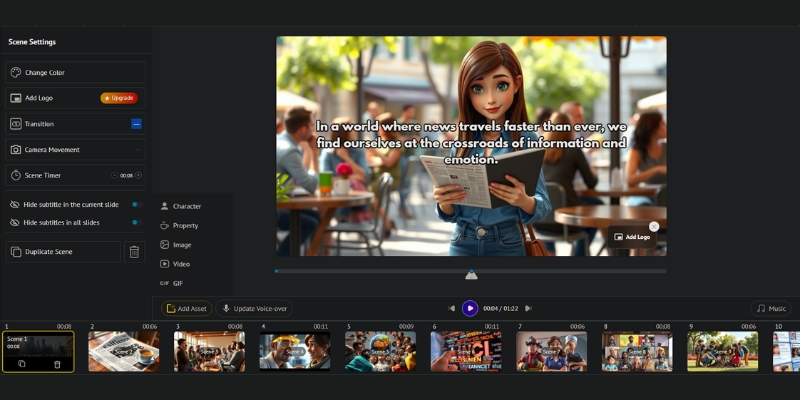
URL-to-Video Content Repurposing Workflow
Blog-to-video conversion automates content marketing video creation from existing written assets. This workflow particularly benefits content marketers maximizing ROI from blog libraries through multi-platform distribution.
Live-Action Mode Selection
Stock footage integration suits professional contexts requiring photographic realism:
- Select “Text to Live Video” for premium stock footage workflow
- Choose “URL to Video” input method instead of manual script
- Paste blog post URL into input field
- AI scrapes article extracting headers and key sentences
- System auto-generates summarized script from article structure
Automated Script Summarization
AI condensation transforms long-form articles into digestible video scripts:
- Algorithm identifies primary topic and supporting points
- Extracts statistics and data points as key scenes
- Maintains logical flow from article’s original structure
- Typical 2000-word article condenses to 200-300 word script
Stock Footage Assignment
Getty Images integration provides professional video clips:
- AI matches script keywords to relevant stock footage
- Premium assets require generative credits (120 sec Basic, 15 min Pro monthly)
- Manual clip replacement available when AI selection misinterprets context
- Search stock library directly for specific visual requirements
- Commercial-use rights included in paid subscriptions
Stock footage accuracy typically lower than animation character selection requiring more manual replacement. AI struggles with abstract concepts and metaphorical language demanding literal interpretation workarounds.
Steve AI Subscription Pricing 2025
Four pricing tiers target different production volumes from testing to enterprise collaboration. Credit-based limits on AI generation and premium stock access determine actual monthly output beyond advertised video counts.
| Plan | Monthly Price | AI Minutes | Resolution | Key Features |
|---|---|---|---|---|
| Free | $0 | Limited | 720p | Watermarked, feature testing only |
| Basic | $20 | 100 mins | 720p | No watermark, 800 AI images, 120s generative credits |
| Starter | $60 | 300 mins | 1080p | 2400 AI images, 120s generative credits |
| Pro | $80 | 400 mins | 2K | 3200 AI images, 15min generative credits |
Plan Selection by Creator Type
Basic tier ($20/month) suits individual creators producing 5-10 monthly explainer videos requiring watermark removal for YouTube monetization. The 720p resolution acceptable for social media platforms but suboptimal for website embedding on large displays.
Starter tier ($60/month) targets professional content creators needing 1080p Full HD quality. The 300-minute monthly allocation supports 15-20 videos depending on length and revision frequency providing optimal balance between cost and capacity.
Pro tier ($80/month) serves agencies and high-volume channels producing 25-30 monthly videos. The 2K resolution and 15-minute generative credits enable longer-form content and custom asset generation unavailable on lower tiers.
Strengths
- Rapid text-to-animation workflow (5-10 minutes draft creation)
- 300+ character library supporting diverse demographics
- URL-to-video conversion automating blog repurposing
- Action and expression customization beyond template-based tools
- Multi-language AI voice support (90-100% human-like quality)
Limitations
- 2D flat animation style lacks 3D depth and cinematic quality
- Stock footage selection requires frequent manual replacement
- Limited advanced editing features versus professional animation software
- Generative credit limits restrict custom asset creation (Basic/Starter)
- Character library fixed preventing brand-specific mascot creation
Platform Assessment
Steve AI optimizes for production speed over animation sophistication. The platform suits marketers requiring consistent explainer video output without animation expertise or dedicated production teams. Custom 3D character animation or Pixar-quality output requires professional software and animators.
The URL-to-video conversion particularly valuable for content marketing teams repurposing blog libraries. Automated summarization and stock footage matching saves 80% production time versus manual video editing workflows.
(Disclosure: Purchases through this link may earn a commission at no extra cost to you.)
Start Free TrialCommon Questions About Steve AI Workflow
Can custom voiceovers replace AI voices?
Yes. All paid plans support custom audio uploads. Users record narration externally and upload MP3/WAV files to scenes. This option recommended for brand consistency or specific vocal qualities AI cannot replicate.
Does Steve AI support languages beyond English?
Yes. The platform provides AI voices across 20+ languages with multiple accent variations per language. Text input and generation support multi-language projects enabling localized content creation without translation services.
What maximum video duration limits exist?
Video length restrictions vary by subscription tier. Basic and Starter plans typically cap individual videos at 10-15 minutes, while Pro plans extend to 20-30 minutes suitable for detailed tutorials and training content.
Are exported videos copyright-free for commercial use?
Paid subscriptions include commercial-use rights for all platform assets including characters, stock footage, and music library. Free tier maintains watermark and restricts commercial usage requiring upgrade for monetized content.
How does Steve AI compare to Vyond for animation?
Steve AI prioritizes automation and speed through text-to-animation workflow. Vyond provides superior manual control with timeline-based editing and custom character creation but requires steeper learning curve and longer production times.
Related Text-to-Video Platform Guides
- Steve AI Review: Animation Generator Analysis
- Pictory vs Steve AI: Stock Video vs Animation
- Best Text-to-Video Tools Comparison 2025
last update : 08/12/2025
