
Kling AI vs Vidu: Which Chinese “Sora Killer” Is Best for Creators?
If you are looking for the best kling ai vs vidu comparison to replace OpenAI’s Sora, you have come to the right place. While the world waits for Sora’s full public release, these two Chinese powerhouses are already redefining the AI Generative Video landscape.
I have battle-tested both tools extensively. In this guide, we dive deep into the kling ai vs vidu ai comparison to help you decide which one fits your creative workflow. Whether you need hyper-realistic physics or cinematic anime styles, I will break down the differences that matter.
By the end of this article, you will know exactly which sora competitor delivers the best ROI for your projects. We compare video quality, motion consistency, and pricing models directly.
Table of Contents
Kling AI vs Vidu: The Battle of the Chinese “Sora Killers”
The race for the top chinese ai video generator comparison is fierce. Kling AI, developed by the tech giant Kuaishou, has quickly gained fame for its ability to simulate real-world physics. It feels like a serious tool for VFX artists.
On the other hand, Vidu, created by ShengShu Technology, positions itself as an agile storyteller. It excels in single-shot cinematic aesthetics and anime styles. While Kling aims for reality, Vidu aims for “style” and emotional resonance.
Too Long; Didn’t Read (TL;DR): If you need realistic movement and complex object interactions (like pouring water), choose Kling AI. If you want stylish, anime-quality clips or dramatic camera angles, Vidu is your winner.
| Feature | Kling AI | Vidu AI |
|---|---|---|
| Developer | Kuaishou | ShengShu Technology |
| Core Strength | Physics & Realism | Cinematic & Anime |
| Max Duration | Up to 2-3 minutes (Pro) | Up to 16 seconds |
| Best For | VFX, Realistic Stock | Storytelling, Ads |
Video Quality and Realism: Which Tool Generates Better Footage?
When it comes to text-to-video quality, both tools output stunning 1080p clips. However, the texture quality differs. I noticed Kling generates incredibly sharp skin textures and fabric details that look authentic even in close-ups.
Motion Consistency is where Kling truly shines. In my tests, characters maintained their identity perfectly over long clips. It doesn’t suffer from the “morphing” effect as much as other tools like Luma Dream Machine.
Kling’s Strength: It handles complex sequences effortlessly. The famous “eating noodles” demo wasn’t a fluke. I generated a clip of a cat jumping over a fence, and the landing weight felt physically correct.
Vidu’s Strength: Vidu focuses on the “look.” The lighting often looks professionally graded straight out of the generation. It creates dramatic shadows and “movie-ready” compositions that require less color correction in post-production.
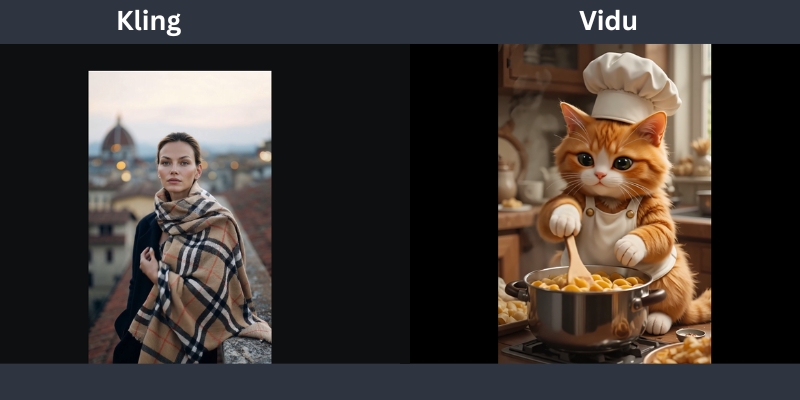
Feature Face-Off: Physics Simulation vs. Cinematic Storytelling
Kling’s Physics Simulation: This is the killer feature. Kling understands how liquids flow and how gravity works. I prompted a “glass shattering on the floor,” and the debris scattered logically. This Physics Simulation capability makes it a top Generative AI Tool.
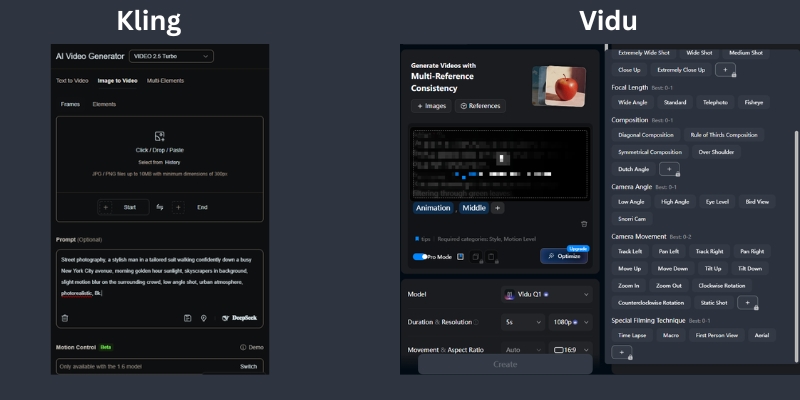
Vidu’s Camera Control: Vidu listens to camera terminology very well. Prompts like “drone shot,” “pan right,” or “dolly zoom” are executed with high precision. It feels like you are directing a virtual camera operator.
The “Anime” Factor: Vidu is hands-down the best for anime content. Its model seems fine-tuned on stylized data, producing vibrant 2D and 2.5D animations that Kling often struggles to replicate with the same soul.
Reference Handling: Vidu’s new multi-reference feature allows you to upload up to 7 images to define a character. This creates consistent actors across different scenes, a massive win for storytellers.
Prompt Adherence and Control: How Well Do They Listen?
I tested the “brain” of both models. Kling AI is a strict follower. If you ask for a “red car in the rain,” you get exactly that. However, it sometimes ignores subtle emotional cues in the text.
Text-to-Video Capabilities: Vidu tends to be more creative. It might add a neon sign to that “rainy street” to enhance the vibe. This can be great for inspiration but frustrating if you need specific control.
Image-to-Video Control: Both tools offer “First Frame” control. I found Vidu to be slightly better at animating static images without warping the original face. Kling sometimes tries too hard to move the subject, causing distortion.
Creator Perspective: For professional client work, I lean towards Kling because the output is predictable. For my personal art channels, I prefer Vidu’s happy accidents and stylistic flair.
Accessibility and Pricing: Can You Actually Use Them?
The biggest hurdle for chinese ai video tools used to be access. That has changed. Both are now available globally via web interfaces, removing the need for Chinese phone numbers.
Kling AI Access: You can sign up easily at klingai.com. They use a daily free credit system (approx. 66 credits), which is generous for testing. Subscription plans start around $10/month for watermark removal.
Vidu Access: Vidu is accessible at vidu.com. It also offers a free tier, but the watermark is quite prominent. Their starter plan is around $10/month, making it a budget-friendly option.
Cost Efficiency: If you are a heavy user, Kling’s “Pro” tiers offer better cost-per-second value. You get longer generation times (up to 2-3 minutes), which means you burn fewer credits trying to stitch short clips together.
Final Verdict: Who Wins the AI Video Race?
My Recommendation: The winner depends entirely on your project goals. Don’t look for a single “best” tool, but rather the right tool for the job.
Choose Kling AI If: You need hyper-realism, complex physics (water, fire, crashes), or long-duration clips. It is the closest thing we have to a virtual reality engine. It is ideal for VFX artists and realistic stock footage.
Choose Vidu If: You are an anime creator or need cinematic storytelling with precise camera moves. Its character consistency features are superior for narrative work. It is perfect for music videos and social media ads.
The Sora Comparison: While Sora remains the benchmark, it is often gated or expensive. Kling and Vidu are usable today. They are the practical choices for creators who need to ship content now.
Try Kling AI for Free Try Vidu AI for Free(Disclosure: If you purchase through links on this page, we may earn a small commission at no extra cost to you. This helps us maintain our “battle-tested” reviews.)
Frequently Asked Questions About Kling AI and Vidu
Is Kling AI available outside of China?
Yes, Kling AI has released a global web version accessible via email registration. You no longer need a Chinese phone number to access its powerful features.
Is Vidu AI free to use?
Vidu offers a free tier that grants daily credits. However, free videos come with a watermark and have limited duration compared to the premium plans.
Which is better, Kling or Sora?
Sora is theoretically more powerful, but Kling is publicly available now. Kling offers comparable realism for most use cases, making it the better choice for immediate production needs.
Can I use Kling AI for commercial projects?
Yes, if you subscribe to their paid plans (Standard or Pro), you generally get commercial rights to the videos you generate. Always check the latest Terms of Service.
Does Vidu support image-to-video?
Absolutely. Vidu excels at image-to-video, especially for anime characters. It can animate a static drawing while maintaining the original art style perfectly.
Read More From AI Generative Video
Stay ahead of the curve with our latest comparisons and deep dives into the world of AI video generation tools.
- Luma Dream Machine vs Kling AI: The “Sora Killer” Battle
- The Future of AI Video: Trends & Predictions for 2026
- Kling AI Review: The Newest Contender (First Look)
last update : 02/12/2025
