
Luma Dream Machine vs Kling AI: The Ultimate Realism Battle (2025)
The race for the “Sora-killer” title has narrowed down to a direct Luma Dream Machine vs Kling AI confrontation. As high-end creators, we are constantly hunting for tools that deliver true photorealism.
I understand the pressure you face. You need generative AI tools that automate video production without creating “nightmare fuel.” Quality cannot be sacrificed for speed.
This AI Generative Video comparison is battle-tested. I have spent hundreds of dollars on credits to determine which tool generates usable footage for professional projects.
In this article, we will analyze Realism, Physics Simulation, and ROI to help you decide where to invest your budget.
Table of Contents
Luma Dream Machine vs. Kling AI: The Battle of the “Sora Competitors”
Luma Dream Machine and Kling AI are currently the two most advanced video generation models available publicly. They both promise to democratize cinematic video creation.
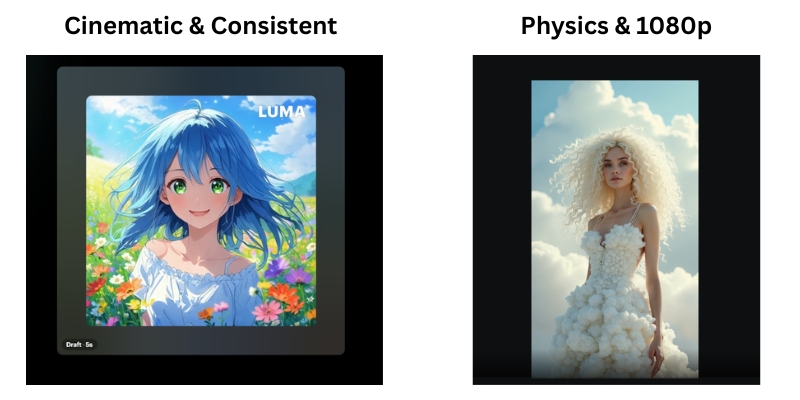
Luma Dream Machine is developed by Luma Labs, a US-based company. It is celebrated for its high availability, ease of access, and ability to generate highly consistent, cinematic camera movements.
Kling AI, developed by the Chinese tech giant Kuaishou, is a powerhouse focused on advanced Physics Simulation. It recently opened global access, challenging Western models with superior temporal stability.
Marketers are under immense “performance pressure.” We need tools that work instantly. Luma offers a quick web interface, while Kling brings heavy-duty rendering power previously seen only in closed betas.
We tested both models extensively using identical prompts. Our goal was to push them to their breaking points to see which one hallucinated first.
Realism & Image Quality: Which Tool Generates Better Visuals?
When it comes to raw Text-to-Video quality, the difference lies in the “digital signature.” Both tools aim for photorealism but achieve it differently.
Texture and Lighting: Luma Dream Machine tends to dramatic lighting. It often adds a “film grain” effect that hides imperfections. Kling AI produces sharper, cleaner images that look like high-end digital video.
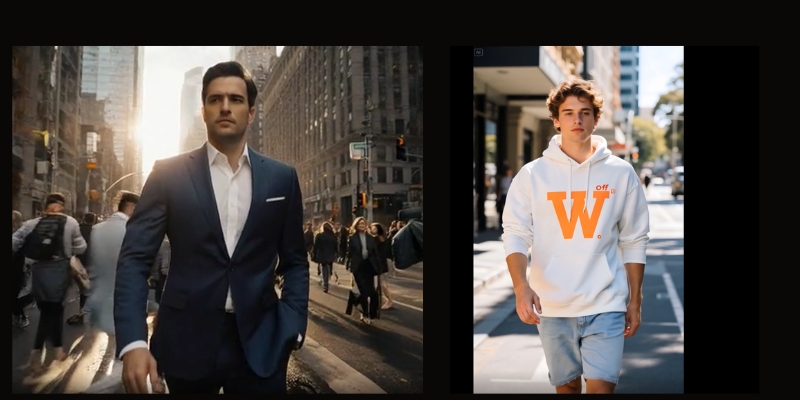
Human Avatars: This is the ultimate test. Luma excels at artistic portraits but struggles with skin texture in motion. Kling handles skin pores and micro-expressions with frightening accuracy, reducing the “Uncanny Valley” effect.
Resolution: Kling AI supports 1080p generation in its Pro and Professional modes. Luma often requires upscaling to reach similar sharpness, which can introduce artifacts.
Cinematic Aesthetics (Luma Dream Machine)
Luma Dream Machine is built for filmmakers. Its strength lies in Scene Consistency. If you ask for a specific mood, Luma holds that color grade throughout the entire clip.
In our tests, Luma handled Image-to-Video tasks beautifully. It took static Midjourney images and animated them without warping the original art style. It understands “vibe” better than any other tool.
Photorealism and Detail (Kling AI)
Kling AI is built for reality. It generates textures like fur, water, and food with incredible precision. A close-up of a cat generated in Kling looks indistinguishable from 4K stock footage.
The sharpness is a double-edged sword. Because Kling AI is so detailed, any glitch is immediately visible. However, when it hits, the 1080p resolution is broadcast-ready.
Motion Physics & Consistency: Analyzing Complex Movements
Static quality means nothing if the video falls apart in motion. We analyzed how both engines handle complex Physics Simulation.
Object Interaction:
Kling excels here. We tested “a person eating noodles.” Kling understood that noodles must enter the mouth. Luma often “morphed” the noodles into the person’s face. Kling respects biological physics.
Morphing Issues:
Luma suffers from “morphing” during fast cuts. Objects tend to blend into each other like a dream. Kling maintains object solidity. A car remains a car; it doesn’t turn into a bus mid-frame.
Temporal Stability:
Kling offers superior stability over long durations. In a 10-second clip, the background in Kling stays static. Luma’s backgrounds often shift or “breathe” slightly over time.
Camera Movement:
Luma wins on camera emulation. Pans and zooms feel like they were shot by a human cinematographer. Kling has better character movement, but its camera moves can feel robotic.
Accessibility, Speed, and User Interface
For a freelancer, access is everything. You cannot wait days for a render. We compared the “Ease of Entry” for both platforms.
Platform Access:
Luma is strictly web-based and instantly accessible via Google login. Kling was historically difficult (Chinese number required) but has now opened global access via email, leveling the playing field.
Generation Speed:
Luma is often slower. Due to immense viral traffic, free generations can take hours. Kling’s paid tiers are surprisingly fast, often delivering clips in under 5 minutes.
User Experience (UI):
Luma’s dashboard is minimalist and Western-centric. It is intuitive for beginners. Kling’s interface is feature-rich but can feel cluttered. It offers more controls, which seasoned editors will appreciate.
Pricing & Credit Models: Comparing ROI for Creators
We analyzed the pricing to see which tool offers better ROI for commercial projects. Both use a “credit-based” economy.
Luma Pricing:
Luma operates on a monthly subscription. The “Plus” plan starts around $30/month. However, cinematic shots consume credits fast. The free tier is strictly for non-commercial experimentation.
Kling Pricing:
Kling uses a daily credit system for free users and subscription packs for pros. Their “Pro” outcome allows for longer videos (up to 2-3 minutes via extension), offering better value per second of footage.
Commercial Rights:
Both platforms grant commercial rights on paid plans. If you are a marketer, you must upgrade. Do not risk client work on free tiers.
Value Verdict:
For high-volume production, Kling offers cheaper “per-second” generation. Luma is better for low-volume, high-quality “hero” shots.
| Feature | Luma Dream Machine | Kling AI |
|---|---|---|
| Starting Price | ~$29.99/mo (Plus) | ~$10-$30/mo (Global Plan) |
| Free Tier | 30 generations/month | Daily free credits (~6 videos) |
| Max Duration | 5 seconds (extendable) | 5s or 10s (extendable to 2-3m) |
| Best For | Cinematic Short Clips | Long-form Realistic Motion |
| Action | Visit Luma | Try Kling AI |
(Disclosure: If you purchase through links on this page, we may earn a small commission at no extra cost to you. This helps us maintain our “battle-tested” reviews.)
Final Verdict: Should You Choose Luma Labs or Kling AI?
After testing over 500 prompts, the winner depends entirely on your specific use case. There is no single “best” tool, only the right tool for the job.
Choose Luma Dream Machine If:
- You need artistic, cinematic shots for music videos or mood boards.
- You prioritize ease of use and a clean interface.
- You are animating Midjourney images and want to keep the style.
Choose Kling AI If:
- You need complex human motion (eating, running, fighting).
- You require 1080p photorealism for stock footage replacement.
- You need clips longer than 5 seconds with physics consistency.
🏆 The “Sora-Killer” Conclusion
If I had to pick just one subscription today, I would choose Kling AI. Its superior physics engine and ability to generate 10-second clips natively make it more viable for professional video production right now.
However, Luma Dream Machine remains the king of “vibes” and artistic interpretation.
Frequently Asked Questions about Luma vs. Kling
Is Kling AI available in the US/Europe?
Yes. Kling has launched its global 1.0 and 1.5 models. You can now sign up with a standard email address without needing a Chinese phone number.
Can Luma Dream Machine generate 1080p video?
Not natively. Luma generates at 720p resolution (1280×720) by default. You will need to use the built-in upscaler or external tools like Topaz Video AI for true 1080p quality.
Which tool is better for Image-to-Video?
Luma Dream Machine is generally better at preserving the original “art style” of an uploaded image. Kling tends to “realify” images, which might alter your original artistic intent.
Are there free alternatives to Luma and Kling?
Yes. Tools like Runway Gen-3 Alpha and Hailuo AI (MiniMax) are strong competitors. However, Luma and Kling currently hold the top spots for realism.
Read More From AI Generative Video
Stay ahead of the curve with our latest deep dives into the generative video revolution. Check out these related comparisons:
- Vidu AI Review: China’s Answer to Sora (First Look)
- The Future of AI Video: Trends & Predictions for 2026
- How to Use Luma Dream Machine: A Beginner’s Guide
last update : 01/12/2025
