
Pictory vs Steve AI: Which Text-to-Video Tool is Best in 2025?
Choosing between pictory vs steve ai is the biggest dilemma for creators looking to automate video production in the Text-to-Video category with November 2025 pricing updates. As an experienced content creator, I know that making the wrong choice here can waste hours of rendering time and budget on the wrong output style. While both are marketed as powerful AI Video Generators, they serve two completely different purposes with Pictory’s Storyblocks integration versus Steve AI’s 300+ animated characters. This guide cuts through marketing noise to compare their output style, asset libraries (Pictory: unlimited Storyblocks vs Steve AI: 800-3200 AI images/month), and real-world ROI with accurate November 2025 cost analysis.
Table of Contents
The Core Difference: Live-Action Stock Footage (Pictory) vs. Text-to-Animation (Steve AI)
The fundamental battle of pictory vs steve ai boils down to one simple question: Do you want stock footage or cartoons? This distinction defines your entire video strategy with completely different content workflows and target audiences.
Pictory Architecture:
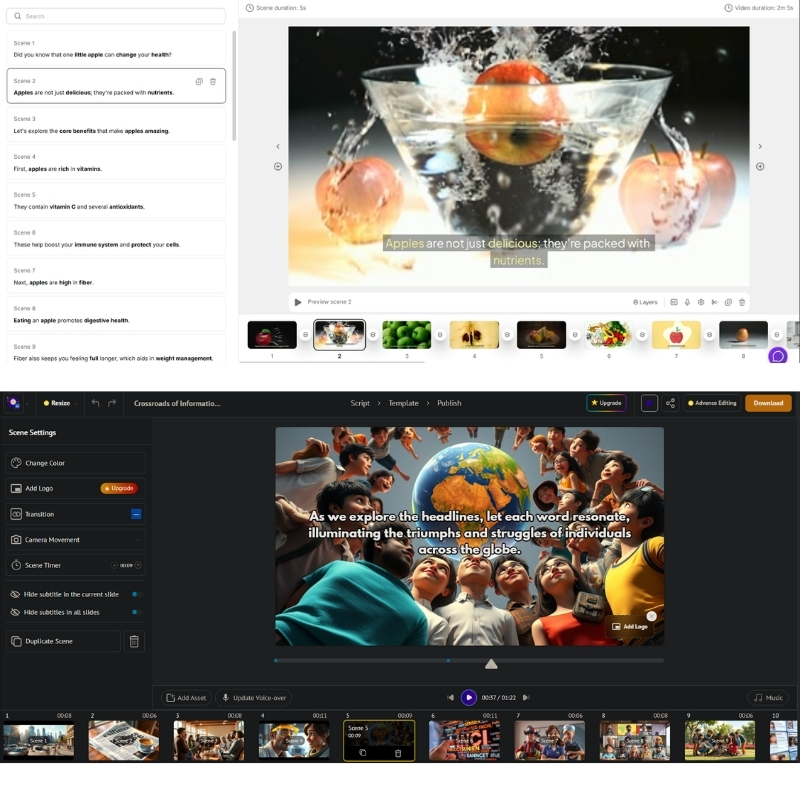
Specializes in Live-Action/Stock Footage with unlimited Storyblocks access (Starter plan up). When we tested its “Text-to-Video” feature, AI immediately matched script with real-world clips of people and business environments with text-based editing that trims by deleting transcript words. Acts like high-speed editor for corporate content with 30-90 videos/month ($19-$99 annual).
Steve AI Architecture:
Positions itself primarily as Text-to-Animation tool with 300+ animated characters. While it claims to handle live-action, engine defaults to creating animated avatars and colorful, cartoon-style explainer videos with 100-400 mins AI videos/month ($29-Custom). Feels like modern version of Vyond with 90-100% human-like voices depending on plan tier.
Pricing & Plans Comparison 2025: Subscription Models & Cost-Per-Video Analysis
Pricing structures with November 2025 updates reveal completely different value propositions. We need to calculate “value per video” to understand real ROI based on your output volume and content type preferences.
| Feature | Pictory AI | Steve AI |
|---|---|---|
| Starter Plan | $25/mo ($19 annual, 50% OFF) | $29/mo – 100 mins AI videos |
| Pro/Professional | $49/mo ($29 annual) – 60 videos | $59/mo – 300 mins AI videos |
| Primary Asset | Storyblocks (Unlimited stock footage) | Animation (800-3200 AI images/month) |
| Resolution | 1080p (Starter), 1080p (Pro) | 720p (Starter), 2K (Pro), 4K (Enterprise) |
| Characters/Voices | 34+ voices (Starter), expanded (Pro) | 300+ characters, 90-100% human-like voices |
| Action | Try Pictory Free | Try Steve AI Free |
(Disclosure: If you purchase through links on this page, we may earn a small commission at no extra cost to you.)
Pictory Pricing (November 2025):
Starter: $25/month ($19 annual, 50% savings) – 30 videos/month, 10-min max, 34 AI voices, Storyblocks unlimited, 600 transcription minutes. Professional: $49/month ($29 annual) – 60 videos/month, 20-min max, expanded voices, 1200 transcription minutes, brand kits, text-based editing. Teams: $119/month ($99 annual) – 90 videos/month, collaboration, 3600 transcription minutes.
Steve AI Pricing (November 2025):
Starter: $29/month – 100 mins AI videos, 800 AI images, 720p, 90% human-like voices, 300+ characters. Pro: $59/month – 300 mins AI videos, 2400 AI images, 2K resolution, 95% human-like voices, unlimited exports, 3 custom avatars. Enterprise: Custom – 400 mins, 3200 AI images, 4K resolution, 100% human-like voices, team collaboration, reseller rights.
Feature Deep Dive: Blog-to-Video Summarization vs. Script-to-Animation Logic
How well does AI actually read your text? We ran same 500-word blog post through both tools with November 2025 AI improvements to test their processing logic and content understanding capabilities.
Blog Repurposing (Pictory Strength):
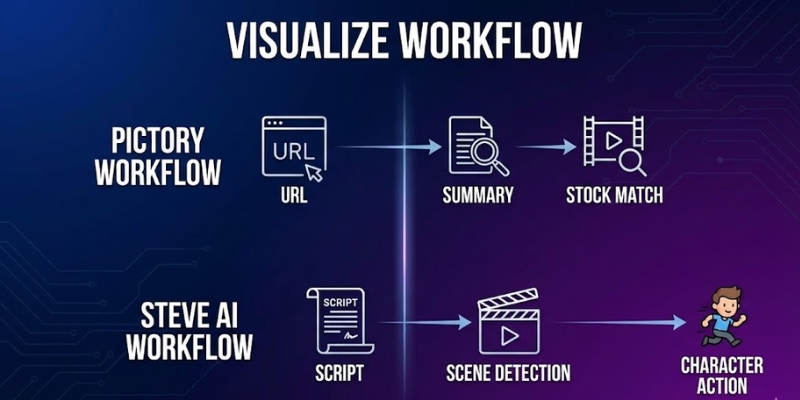
Pictory is undisputed king of Summarization. Paste URL, it automatically highlights “golden sentences” with NLP understanding context. Turns long article into punchy video script in seconds making it ideal for Content Repurposing with text-based editing that trims by deleting transcript words eliminating timeline scrubbing.
Script-to-Animation (Steve AI Strength):
Steve AI parses scripts differently looking for “actions” with 300+ animated characters. If script says “The teacher walks into the room,” Steve AI attempts to animate character walking with lip-sync to voiceover (90-100% human-like depending on plan). This Text-to-Animation logic creates narrative flow that Pictory cannot match for storytelling content.
Final Verdict: When to Choose Pictory vs Steve AI Based on Content Strategy?
After extensively testing both with November 2025 features, the winner depends entirely on your target audience and content type. There is no single “best” tool, only right tool for specific job and workflow requirements.
Choose Pictory If:
You are Marketer, Blogger, or run Faceless YouTube Channel producing 30-90 videos/month at $19-$99 annual. Need to turn text into professional, realistic videos quickly with unlimited Storyblocks access and text-based editing. Blog-to-Video feature makes it unbeatable for business with Pictory AI specializing in content repurposing.
Choose Steve AI If:
You are Educator, HR Manager, or creating Storytime Videos producing 100-400 mins/month at $29-Custom. Need 300+ animated characters to act out scenarios or explain complex concepts with 90-100% human-like voices and lip-sync. Best tool for engagement through storytelling with Steve AI excelling at animation workflows.
Frequently Asked Questions About Pictory vs Steve AI Comparison
Which is better for YouTube?
For informational or “Top 10” channels, Pictory is better due to realistic stock footage with 30-90 videos/month and unlimited Storyblocks access. For storytelling or kids’ channels, Steve AI’s 300+ animated characters with lip-sync (90-100% human-like voices) are superior.
Can Steve AI create realistic videos?
Yes, Steve AI has live-action mode, but library and matching logic not as robust as Pictory’s integration with Storyblocks unlimited and text-based editing capabilities that revolutionize content repurposing workflows.
Does Pictory have animated characters?
No, Pictory focuses exclusively on stock footage, images, and text overlays with 34+ voices (Starter) and expanded options (Pro). Does not support character animation or avatars like Steve AI’s 300+ animated characters.
Is there a free alternative to both?
Tools like Canva offer basic video creation, but lack AI automation of Pictory (URL-to-video, text-based editing) or Steve AI (script-to-animation, lip-sync). For serious creators, paid features pay for themselves in time saved.
Read More From Text-to-Video Comparisons and Reviews
Explore more comparisons and reviews to find the perfect AI video generation stack for your business with detailed feature analysis.
- Pictory AI Review: The Ultimate Blog-to-Video Tool?
- Steve AI Review: AI Animation & Cartoon Video Generator
- Best AI Animation Generators
last update : 04/12/2025
