
Runway ML Pricing Explained (2025): Costs, Credits & Hidden Fees
If you are serious about AI filmmaking, understanding the Runway ML pricing structure is the first hurdle you must clear. It is not as simple as paying a flat fee; it is a complex ecosystem of credits, generation models, and tier-specific features.
In this guide, we dive deep into the Generative AI market’s most comprehensive subscription model. We have spent thousands of dollars on credits to determine if the “Unlimited Plan” is a genuine bargain or a marketing gimmick.
We will break down the math behind the credit system, compare the Standard vs. Pro tiers, and reveal exactly how much a minute of Gen-3 or Gen-4 video truly costs. Here is everything you need to know about Runway ML costs before you swipe your card.
Table of Contents
Runway ML Pricing Overview: Is It Worth the Investment?
Runway ML positions itself as the “Adobe of AI Video,” and its pricing reflects that premium status. It operates on a SaaS pricing model that combines a monthly subscription with a consumption-based credit system.
Unlike basic apps, Runway is a professional video suite. You are paying for advanced features like Gen-4 character consistency, camera controls, timeline editing, and the high-fidelity Gen-3 Alpha model—not just random video generation.
For casual users, the cost might seem steep compared to competitors like Luma or Pika. However, for professionals needing precise control over camera movement, character consistency across scenes, and integrated editing tools, the investment ROI is justified.
Buy Immediately if: You are a professional editor, agency, or filmmaker who needs high-resolution output and “Unlimited” relaxed generations for background rendering and iteration.
Wait if: You are just experimenting. The Free Trial with 125 one-time credits is enough to learn the interface and test your workflow before committing to a paid plan.
It is important to note that the Free Plan is not a forever-free tier. It gives you a one-time allocation of 125 credits that never renew. Once they are gone, you must upgrade to continue using the platform’s generation tools.
Try Runway ML Free(Disclosure: If you purchase through links on this page, we may earn a small commission at no extra cost to you. This helps us maintain our “battle-tested” reviews.)
The Runway Credit System Explained: How Much Does Video Actually Cost?
The most confusing part of the Runway ML cost is the credit currency. You do not buy “minutes of video”; you buy “Credits.” Understanding the exchange rate between credits and video seconds is crucial for accurate budgeting.
We have calculated the exact burn rate for the current generation models. Keep in mind that higher quality models like Gen-3 Alpha and Gen-4 consume credits significantly faster than legacy models.
Credit Consumption by Model:
Gen-3 Alpha (High Quality): Approximately 10 credits per second of video generation.
Gen-3 Turbo (Fast Mode): Approximately 5 credits per second—ideal for rapid iteration.
Gen-4 (Character Consistency): Varies by complexity, typically 10-15 credits per second due to advanced processing.
Let’s do a Reality Check on the Standard Plan. You get 625 credits per month. If you exclusively use Gen-3 Alpha, that equals approximately 62 seconds of high-quality footage per month—just over one minute.
This math reveals why professional creators often skip the Standard plan. Sixty seconds of footage is barely enough for a single social media teaser, let alone iterating on a full project with multiple takes.
However, if you strategically use Gen-3 Turbo for testing and iteration, your 625 credits will generate approximately 125 seconds (over 2 minutes) of video. Managing your credit allocation wisely across different models is the key to staying within budget.
Breakdown of Runway ML Pricing Plans (Free vs. Standard vs. Pro vs. Unlimited)
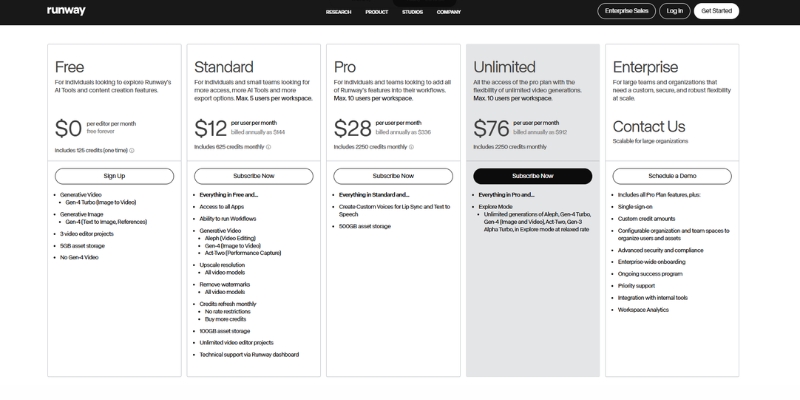
Choosing the right plan depends entirely on your production volume and feature needs. Below is a detailed breakdown of the Runway ML plans, focusing on the hidden limits and perks of each tier.
Free Plan ($0/forever):
This is strictly for testing and learning the interface. You get 125 one-time credits that never renew. You are locked to 720p resolution and cannot access upscaling. Crucially, all videos include a permanent watermark. Use this to verify your workflow before committing financially.
Standard Plan ($12/month):
The entry-level paid tier. It removes the watermark and unlocks 1080p generation and upscaling capabilities. You get 625 credits monthly. This is best for hobbyists creating occasional content who need clean, watermark-free outputs but don’t require high volume.
Pro Plan ($28/month):
This is where professional features unlock. You get 2,250 credits/month—approximately 3.5 minutes of Gen-3 Alpha footage or 7.5 minutes using Gen-3 Turbo. It includes increased cloud storage (500GB) and access to all generation models including Gen-4 for character consistency work.
Unlimited Plan ($76/month):
The “Holy Grail” for high-volume creators and agencies. You get the same 2,250 “Fast Credits” as Pro, but you also gain Unlimited Relaxed Generations. “Relaxed Mode” allows infinite video generation at slower processing speeds without consuming credits—essential for drafting, experimentation, and overnight batch rendering.
| Feature | Standard | Pro | Unlimited |
|---|---|---|---|
| Monthly Price | $12 | $28 | $76 |
| Monthly Credits | 625 | 2,250 | 2,250 + Unlimited Relaxed |
| Watermark | None | None | None |
| Gen-4 Access | Limited | ✅ Full | ✅ Full |
| Action | Choose Standard | Choose Pro | Go Unlimited |
Which Runway ML Plan Should You Choose? (Real-World Scenarios)
We have tested these plans across various production workflows. Here is our consultative advice on which tier fits your specific use case, helping you avoid overspending on features you won’t fully utilize.
For the Hobbyist & Explorer:
Stick to the Standard Plan. If you are creating occasional content for TikTok or learning prompt engineering, 625 credits suffices. The key benefit is removing the watermark so your content maintains a professional appearance.
For the Freelancer & Content Creator:
We strongly recommend the Pro Plan. You need the higher credit volume for trial-and-error iteration. More importantly, full access to Gen-4 enables character consistency across scenes, which is essential for branded content and serialized storytelling.
For the Agency & Production Studio:
The Unlimited Plan is mandatory. In a studio environment, you will exhaust 2,250 credits within days during active projects. The “Relaxed Mode” allows overnight batch processing of hundreds of experimental renders without credit costs, dramatically improving workflow efficiency.
Strategic Budgeting Advice:
If you are on the Pro plan and consistently run out of credits, purchasing “Top-up credits” becomes expensive. It is often more cost-effective to upgrade to Unlimited for intensive project months and then downgrade during quieter periods.
Runway ML vs. Competitors: Pricing Comparison (Pika & Luma)
When comparing Runway ML vs Pika or Luma Dream Machine, you must look beyond simple price tags. You are comparing a comprehensive production suite against specialized generation tools.
Runway vs. Pika Labs:
Pika’s Pro plan at $35/month offers 2,300 credits—similar to Runway’s Pro plan credit count. However, Pika lacks Runway’s integrated timeline editor, advanced camera controls, and Gen-4 character consistency. You pay more for Runway to access a complete production ecosystem.
Runway vs. Luma Dream Machine:
Luma’s Plus plan at $29.99/month provides 10,000 credits—significantly more than Runway. However, Luma’s credit consumption per generation is also higher, and it lacks Runway’s professional editing tools. For pure generation volume, Luma wins; for production control, Runway justifies its premium.
The Value Proposition:
If you just need quick, random video generations, Luma or Pika offer better credit-per-dollar ratios. If you need to *direct* shots—controlling camera pan, zoom, character consistency, and timeline compositing—Runway’s feature suite justifies its higher cost per credit.
How to Manage Your Subscription and Save Money
Smart users develop “credit hygiene” habits that can save hundreds of dollars annually. We have developed several strategies through extensive testing.
Strategy 1: Test with Lower-Cost Models:
Never start with Gen-3 Alpha or Gen-4 for initial prompt testing. Use Gen-3 Turbo (half the credit cost) to test composition and motion. Once the prompt works, upgrade to the premium model for the final render.
Strategy 2: Maximize Relaxed Mode:
If you are on the Unlimited plan, reserve “Fast Credits” exclusively for time-sensitive client deliverables. Use Relaxed Mode for all experimentation, iteration, and overnight batch rendering—it costs zero credits.
Strategy 3: The Annual Billing Discount:
Runway offers approximately 20% savings on annual billing. If you know you will use the tool for at least 8 months, the Annual Billing option pays for itself and provides budget predictability.
Cancellation Policy:
Monthly plan credits typically do not roll over upon cancellation. Always exhaust your remaining credit balance before canceling to avoid wasting purchased credits. Top-up credits may have different expiration terms.
Frequently Asked Questions About Runway ML Costs
Do unused credits roll over to the next month?
Monthly subscription credits generally do not roll over. However, separately purchased “Top-up” credits typically have longer validity periods. Always check your account dashboard for specific credit expiration dates.
Can I upgrade my plan mid-month?
Yes. If you start on Standard and realize you need more capacity, you can perform an immediate plan upgrade. Runway typically prorates the cost difference or starts a new billing cycle depending on timing.
Is there a student or educational discount?
Runway has offered educational pricing programs in the past. We recommend contacting their support team directly with your .edu email address to inquire about current student discount availability before subscribing.
Does the Free plan reset every month?
No. This is a common misconception. The Free plan provides a one-time allocation of 125 credits that never renew. Once exhausted, you must subscribe to a paid plan to continue generating videos.
Read More From AI Generative Video
Expand your knowledge on AI video tools with our detailed comparisons and tutorials. These guides help you maximize the potential of your creative software stack.
- How to Use Runway ML: Complete Studio Guide (2025)
- Pika Pricing Explained: Is the Pro Plan Worth It?
- Pika vs Runway ML: The Ultimate Showdown
last update : 30/11/2025
