
Visla Review (2025): The #1 AI Video Tool for Internal Comms?
If you are managing a remote team or handling corporate training, Visla is likely on your radar. While most tools focus on viral social media clips, Visla has quietly positioned itself as the Swiss Army Knife for business video communication. I have tested dozens of Text-to-video tools tools, from Lumen5 to Synthesia, but Visla offers something different with its revolutionary text-based editing and 100+ AI avatars. In this battle-tested review, I will dissect whether Visla is truly the best tool for Team Collaboration and screen recording, analyzing pricing, features, and real-world ROI for businesses.
Table of Contents
What Is Visla AI & How Does It Work for Business?
Visla is an all-in-one AI video creation platform designed specifically for business teams, shifting focus from “viral content” to effective corporate communication with multi-modal inputs including text, scripts, URLs, audio, video, PDF, and PowerPoint presentations.
At its core, Visla acts as your Text-to-Video assistant with NLP that automatically selects relevant stock footage from premium libraries including Storyblocks (4M videos) and Getty Images (16M videos for Business/Enterprise plans). Unlike standard editors, Visla excels at Screen Recording with built-in teleprompter and Screen Step Recording that creates dynamic step-by-step guides with AI annotations.
Text-Based Editing (Game-Changer):
Instead of scrubbing through a timeline, you edit the video by editing the transcript. If you delete a sentence in the text, Visla cuts that section from the video automatically. The enhanced Auto Cut feature with “Bad Takes” removal intelligently identifies and removes poorly delivered lines or repeated takes.
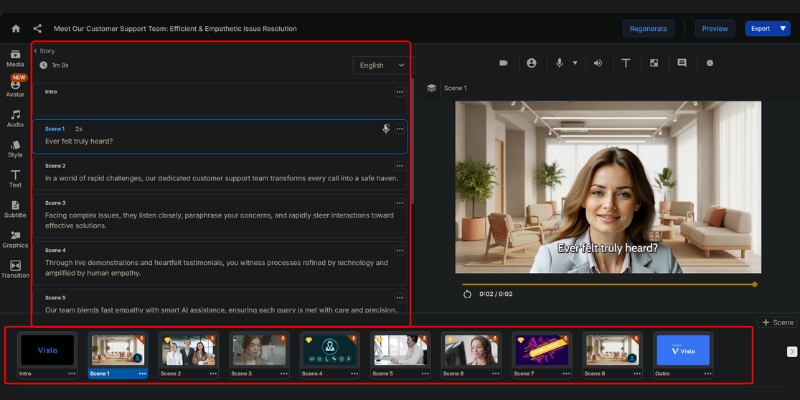
Revolutionary Features: AI Avatars, Voice Cloning & Getty Access
Visla moves beyond simple stock footage compilation by adding robust recording and collaboration tools. Here are the specific features that make it a powerhouse for Team Collaboration in 2025.
100+ Public AI Avatars (All Plans):
Choose from a diverse set of photorealistic characters available to all users, including Free plan. Great for creating professional, camera-free videos without uploading a photo or recording voice. Custom avatars: Pro (2), Business (3), Enterprise (unlimited).
Instant Voice Cloning:
Clone your own voice for natural, personalized voiceovers in multiple languages. Pro plans get 3 custom voices, while Business/Enterprise enjoy unlimited voice cloning. Perfect for branded content and consistent narration across global teams.
Getty Images Premium Access (16M+ Videos):
Business and Enterprise tiers unlock Getty Images with 16 million+ premium videos in addition to Storyblocks’ 4 million assets. This massive 20M+ total stock library ensures you find the perfect B-roll for any corporate message.
Screen Step Recording with GIF Creation:
Capture every action on your screen and create dynamic step-by-step guides with AI annotations, text overlays, narration, and background music. Convert recorded steps into shareable GIFs perfect for tutorials and customer support content.
Video Maker GPT Integration:
For users embedded in the OpenAI ecosystem, Visla offers a GPT in the GPT Store enabling automated video creation workflows. Scan trending news, generate scripts with GPT-5, feed to Visla API, and auto-post to social channels.
Visla Pricing 2025: Credit-Based System Explained
Visla operates on a usage-based credit system with significantly updated pricing for 2025. Here is how the Pricing Plans break down with transparent credit allocation.
| Plan | Price | Base Credits | Export Quality | Best For |
|---|---|---|---|---|
| Free | $0 | 5,000/month | 1080p | Testing (50 min publish) |
| Pro | $9/month* | 20,000/month | 1080p | Creators (~16-17 min text videos) |
| Business | $39/month* | Custom | 4K | Teams/HR (Getty + 3 custom avatars) |
| Enterprise | Custom | Custom | 4K | Large orgs (unlimited avatars/voices) |
*Billed annually. Monthly pricing available at higher rates.
(Disclosure: If you purchase through links on this page, we may earn a small commission at no extra cost to you.)
Credit System Breakdown:
Text-based projects (Idea/Script to Video): ~1 credit/second (~60 credits/minute). Voice-based projects: ~1.5 credits/second (~90 credits/minute). Visual-based projects: ~3 credits/second (~150-200 credits/minute). Avatar videos: ~5 credits/second of lip-sync animation used.
Pro Plan ($9/month – BEST VALUE):
With 20,000 base credits monthly, create approximately 16-17 minutes of text-based videos or 11 minutes of voice-based projects. Includes 4M Storyblocks library, 2 custom avatars, 3 voice clones, and 1080p export. Flexible credits available at 150 credits/$1.
Business Plan ($39/month – FOR TEAMS):
Unlocks 4K export, Getty Images (16M+ premium videos), 3 custom avatars, unlimited voice clones, Private Stock AI auto-labeling, and comprehensive admin controls. Flexible credits at 100 credits/$1 provide better value for heavy usage.
Visla vs. Lumen5: Which Tool Suits Your Needs?
Primary Focus:
Lumen5 is a “Blog-to-Video” tool for external marketing snippets. Visla is a “Record-and-Edit” platform for Business Communication with robust collaboration features including timestamped comments and secure enterprise sharing.
Editing Capabilities:
Visla is superior for working with original footage through text-based editing of recordings. Lumen5 relies on a timeline editor better suited for arranging stock assets and text overlays from blog content.
AI Features:
Visla offers 100+ AI avatars, custom avatar creation, voice cloning, and Video Maker GPT integration. Lumen5 focuses on keyword-to-footage matching without avatar or voice cloning capabilities, making Visla more comprehensive for corporate video needs.
Pros and Cons: Transparent Evaluation
✅ Pros
- All-in-One Workflow: Combines recording, AI editing, and hosting in one dashboard.
- Text-Based Editing: Revolutionary approach saves hours of timeline scrubbing.
- 100+ AI Avatars: Accessible on all plans including Free for camera-free videos.
- Voice Cloning: Instant personal voice creation in multiple languages.
- Getty Images Access: 20M+ total stock library (Business/Enterprise).
- Bad Takes Removal: AI auto-identifies and removes flubbed lines.
❌ Cons
- Credit System Complexity: Usage-based pricing requires monitoring to avoid overages.
- Learning Curve: Feature-rich interface more complex than simple drag-and-drop makers.
- Avatar Quality Variance: Some public avatars less natural than custom-created ones.
- Stock Match Accuracy: AI sometimes picks generic footage requiring manual swaps.
Final Verdict: Should Your Team Invest in Visla?
Expert Recommendation: Visla is a comprehensive communication platform ideal for Internal Comms, HR, L&D managers, and marketing teams producing consistent branded updates. At $9/month (Pro) or $39/month (Business), it replaces Loom, Zoom clips, and basic editors for 90% of business tasks.
Who Should Buy: Remote teams needing professional video communication, corporate trainers creating scalable learning materials, and marketers requiring 100+ AI avatars with voice cloning for personalized content at scale.
Who Should Skip: Influencers seeking highly stylized “trendy” editing with meme inserts. Visla is built for professionals valuing clarity and speed over flashiness. Consider CapCut or OpusClip for social-first content.
Final Rating: 4.5/5 for Business Utility.
Frequently Asked Questions About Visla
Is Visla completely free to use?
Visla has a Free plan with 5,000 credits monthly (approximately 50 minutes of video publishing). It includes watermarks and basic features but allows unlimited recordings for testing the platform.
How many custom avatars can I create?
Pro plans get 2 custom avatars, Business gets 3, and Enterprise enjoys unlimited custom avatars. All plans access 100+ public avatars at no extra cost.
Does Visla support voice cloning?
Yes. Pro plans get 3 custom voice clones (2,000 credits one-time per voice), while Business and Enterprise have unlimited voice cloning for personalized multilingual narration.
What’s the difference between Storyblocks and Getty Images?
Storyblocks (4M videos) is available on Pro, Business, and Enterprise. Getty Images (16M premium videos) is exclusive to Business/Enterprise, totaling 20M+ stock assets for maximum creative flexibility.
Can I use Visla for screen recording?
Absolutely. Visla includes comprehensive screen recording with teleprompter, Screen Step Recording for dynamic guides, GIF creation, annotation tools, and auto-zooming—making it superior to Loom for polished training content.
Read More From Text-to Video
Expand your knowledge on AI video tools with detailed comparisons tailored for business professionals.
- How to Use AI Videos for Corporate Training
- Synthesia Review: Is It Still the #1 AI Avatar Tool?
- Lumen5 Review: The Original AI Blog-to-Video Tool
last update : 29/11/2025
