
Wave.video Review (2025): Is This All-in-One Platform Worth It?
If you have been looking for an honest, battle-tested wave.video review, you have landed in the right place. In the crowded world of AI video tools, finding a platform that actually simplifies your workflow is rare. I know the struggle: you are paying for Zoom to record, Premiere Pro to edit, and Vimeo to host. It is expensive and fragmented. As part of our Text-to Video analysis, I spent weeks testing Wave.video’s claims about being a true all-in-one solution. In this guide, we will dissect its Video Editor, Hosting, and Live Streaming features to see if it truly replaces your current stack.
Table of Contents
What Is Wave.video? The Swiss Army Knife for Video
Wave.video is not just an editor; it is a comprehensive All-in-One Video Platform designed to replace five different subscriptions. It combines video editing, hosting, live streaming, recording, and thumbnail creation into a single dashboard optimized for marketers and small agencies who need battle-tested assets, not Hollywood-level films.
The platform unifies an Online Video Editor, a Live Streaming Studio, a Secure Video Hosting platform (like Vimeo), a Video Recorder, and a Thumbnail Maker. Most AI Video Generators focus solely on creation, but Wave.video covers the entire content lifecycle from production to distribution.
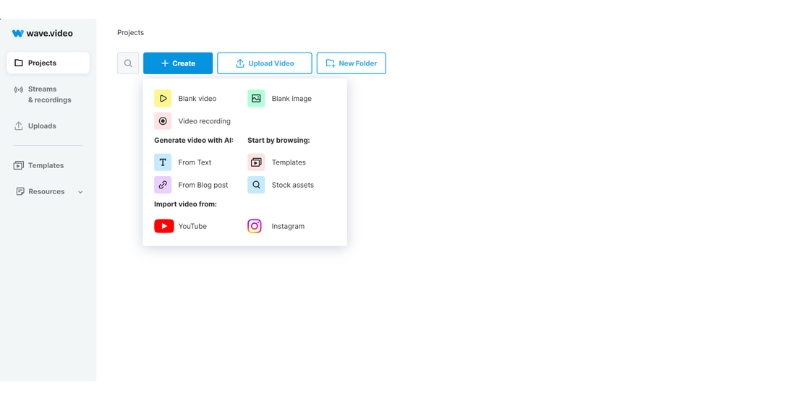
The biggest selling point is consolidation. Instead of paying $20/month for hosting and $30/month for an editor, Wave.video gives you both starting at $16/month. It is perfect for digital marketers, social media managers, and small business owners who prioritize speed and ROI over complex cinematic editing.
Wave.video Editor: 400M+ Assets and Smart Features
The Wave.video editor is the heart of the platform. While it includes “Text-to-Video” capabilities, it uses smart stock matching rather than generative pixel creation like Sora, making it ideal for rapid content production using proven visual assets.
400 Million+ Stock Assets:
You get built-in access to over 400 million royalty-free clips, images, and audio tracks from giants like Getty Images and Storyblocks. This alone is worth the subscription price for many creators, eliminating the need for separate stock subscriptions and hours of searching on external sites.
Text-to-Video Generation:
Paste a blog post URL or script, and the AI analyzes the text to find matching stock clips. It automatically adds enhanced auto-captions (2025 update) and music, giving you a rough cut in minutes that you can then refine in the timeline editor.
Brand Kits & One-Click Resizing:
Upload your logos, fonts, and hex codes once, then apply your brand style to any video with a single click ensuring consistency. The intelligent resize feature lets you create a YouTube video (16:9) and instantly duplicate it for TikTok (9:16) or Instagram (1:1) with AI reframing.
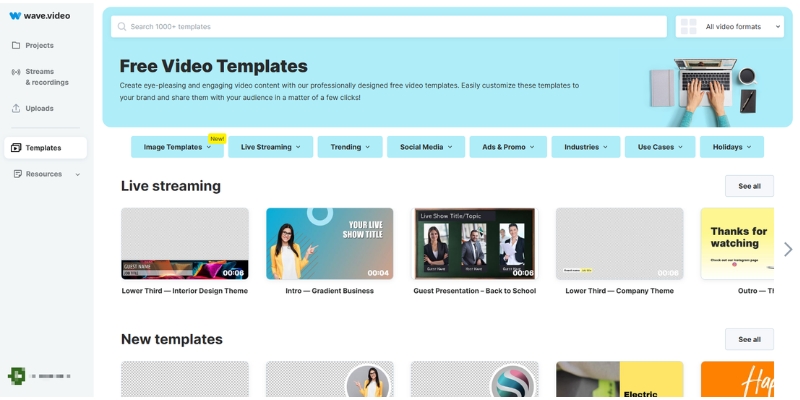
The drag-and-drop templates save beginners from design paralysis. Pre-made intros, outros, and lower thirds look professional without requiring keyframe animation skills, while the audio library offers cleared-for-monetization tracks that prevent copyright strikes on platforms like YouTube.
Video Hosting: A Valid Vimeo Alternative
This is a Rare Attribute that competitors like InVideo or Canva lack. Wave.video offers secure Video Hosting, making it a legitimate alternative to expensive platforms like Vimeo or Wistia for professional businesses who can’t rely on YouTube due to ads and competitor recommendations.
Ad-Free Customizable Player:
Your viewers see your content, not ads. The player is fully customizable with brand colors, and every video automatically gets a dedicated landing page with customizable headlines and descriptions, turning simple videos into shareable marketing assets.
Call-to-Action & Security:
Add clickable CTA buttons directly inside the video player to capture emails or drive sales when viewers are most engaged. Password-protect internal training videos or whitelist specific domains for course content security to prevent unauthorized embedding.
Bandwidth Allocation:
Free plan includes 10GB/month, Creator gets 150GB/month, and Business receives 500GB/month. Additional bandwidth costs 1¢ per GB, making it cost-effective for growing channels compared to premium hosting alternatives.
Live Streaming Studio: Multistreaming Made Simple
Wave.video includes a browser-based Live Streaming studio that rivals tools like StreamYard. It integrates seamlessly with the editor, allowing you to repurpose live content immediately after broadcasts end without complex workflows or downloads.
Multistreaming Power:
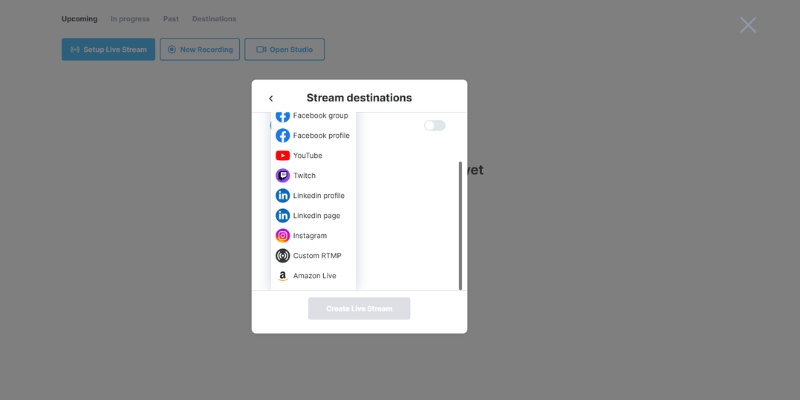
Broadcast to YouTube, Facebook Business pages, and LinkedIn simultaneously to maximize reach. Invite guests via browser links with no downloads required, and control their audio/video levels directly from your dashboard for professional production quality.
Scenes, Overlays & Recording:
Switch between camera layouts, share your screen, and display pre-recorded video clips or branded overlays on the fly to make streams look like TV shows. Every stream is automatically recorded in high quality and saved to your hosting library, ready to edit or embed on your site.
Wave.video Pricing: Calculating Real ROI
Understanding Wave.video pricing is crucial because the value lies in the bundles. You aren’t just buying an editor; you are buying hosting and streaming together. The limitations on video length differ by tier, so choose based on your content type.
| Plan | Price | Edit Limit | Best For |
|---|---|---|---|
| Free | $0 | 15 sec | Testing interface |
| Streamer | $16/month | 5 min | Live streamers |
| Creator | $24/month | 30 min | Marketers (Sweet Spot) |
| Business | $48/month | 2 hours | Agencies & Teams |
(Disclosure: If you purchase through links on this page, we may earn a small commission at no extra cost to you.)
Creator Plan ($24/mo – RECOMMENDED):
This is the sweet spot for most marketers. Edit videos up to 30 minutes long, use background removal and text-to-speech, get 30GB storage and 150GB bandwidth, plus 20 embedded videos. This plan unlocks the full potential of Wave.video for professional marketing use.
Business Plan ($48/mo):
For heavy users and agencies. Edit videos up to 2 hours long, get 200GB storage and 500GB bandwidth, unlimited embedded videos (first 200 free, then 20¢ each), and advanced shared login permissions for team collaboration with brand manager features.
Wave.video vs. InVideo vs. Canva
Wave.video vs. InVideo:
InVideo is superior for AI generative scripts and speed with 5000+ templates. Wave.video excels if you need hosting, live streaming, and asset management in one place. Choose InVideo for quick AI generation; Choose Wave.video for a complete marketing toolkit with distribution capabilities.
Wave.video vs. Canva:
Canva is a graphic design tool that does video. Wave is a dedicated video engine offering timeline editor, 400M+ stock video libraries, and professional hosting that Canva cannot match. Wave offers far better precision for video editing and audio syncing critical for marketing content.
Pros and Cons: The Honest Truth
✅ Pros
- True All-in-One: Replaces Vimeo, StreamYard, and basic editors.
- 400M+ Asset Library: Unmatched stock access with royalty-free licensing.
- Hosting Value: Saves significant budget on external video hosting with ad-free player.
- Multistreaming: Broadcast to multiple platforms simultaneously from browser.
- Enhanced Auto-Captions: 2025 update improved accuracy significantly.
❌ Cons
- Edit Length Limits: Lower plans restrict video duration frustratingly.
- Render Speed: Cloud rendering slower than desktop software during peak hours.
- Browser Dependency: Requires stable internet; no offline editing capability.
- AI Features: Not as advanced in generative creation as newer tools like Sora.
Final Verdict: Is Wave.video Worth It?
Expert Verdict: Wave.video is a top-tier investment for small businesses and marketers wanting to consolidate tools. It may not have the most advanced generative AI, but it creates a solid workflow for consistent production across creation, hosting, and distribution.
Who Should Buy: Small business owners, social media managers, and solo marketers who need to produce, host, and stream video content without hiring a team or managing multiple subscriptions.
Who Should Pass: Professional filmmakers needing 4K raw editing, users looking specifically for AI text-to-pixel generation (like Sora), or creators exclusively working offline without stable internet.
Final Rating: 4.3/5 for Marketing Utility.
Frequently Asked Questions About Wave.video
Does Wave.video have a watermark?
Yes, the Free plan applies a watermark. However, all paid plans (Streamer, Creator, Business) remove the watermark entirely for commercial use.
Is Wave.video better than Vimeo?
For marketers, yes. It offers similar ad-free hosting plus a full video editor and live streaming studio for comparable pricing, delivering more value per dollar spent.
What are the video length limits?
Editing limits depend on your plan: 15 seconds (Free), 5 minutes (Streamer), 30 minutes (Creator), and 2 hours (Business). Choose based on your content type and production volume.
Can I cancel Wave.video anytime?
Yes, subscriptions are month-to-month or annual. You can cancel directly from your dashboard at any time without penalties, and access continues until the end of your billing cycle.
Read More From Text-to Video
Explore more reviews and comparisons to find the perfect tool for your video marketing stack.
- InVideo Review: AI Video Ads with 5000+ Templates
- Best AI Video Editing Software
- Renderforest Review: All-in-One Branding Platform
last update : 29/11/2025
