
Deepbrain AI Review 2025: Is The Hyper-Realistic Avatar Quality Worth The Enterprise Price?
This Deepbrain AI review provides a battle-tested analysis for Marketers, Creators, and Enterprises feeling the immense pressure to produce high-quality video content faster and cheaper. As a premium AI Avatar Generator, Deepbrain AI positions itself as the go-to solution for creating hyper-realistic digital humans, aiming to replace costly traditional video shoots. But does its performance justify its enterprise-level price tag, especially when compared to major players like Synthesia?
In this in-depth review, we go hands-on to test the platform’s core promises. We’ll provide a detailed analysis of its hyper-realistic avatar quality, walk you through the AI Studios workflow, explore unique features like the AI Interview function, and deliver a direct Deepbrain AI vs Synthesia comparison to help you make a confident investment decision.
Table of Contents
Deepbrain AI Review: Our Final Verdict for Marketers, Creators & Enterprises
After extensive testing, Deepbrain AI is undeniably worth the investment for enterprises that require the highest level of avatar realism for high-stakes communications, but it’s overkill for simpler projects.
| Overall Rating | 4.7/5 |
| Best For | Enterprise-level training, broadcast media, and high-end client-facing video content. |
| Key Strengths | Hyper-realistic avatars, innovative AI Interview feature, robust API access. |
| Main Drawback | High price point makes it inaccessible for small businesses and solo creators. |
| Final Verdict | The gold standard for realism and a powerful tool for large-scale operations. |
In our analysis, Deepbrain AI is a game-changer for large corporations and media outlets needing top-tier avatar realism that builds trust and credibility. However, solo creators or small businesses on a tight budget will likely find more practical value in more affordable tools. If maximum quality is your non-negotiable priority, Deepbrain AI is the clear choice.
Try Deepbrain AI for Free(Disclosure: If you purchase through links on this page, we may earn a small commission at no extra cost to you. This helps us maintain our “battle-tested” reviews.)
What is Deepbrain AI and Which Problem Does It Solve?
Deepbrain AI is an enterprise-grade AI video generator designed to solve one major challenge: creating studio-quality, human-led video content at scale, without the costs and logistical headaches of traditional filming. It directly addresses the “performance pressure” on modern teams to produce more video content in less time.
Its core function is to leverage “AI Humans”—or hyper-realistic avatars—to convert simple text scripts into professional, engaging videos. This technology is purpose-built for industries where trust and professionalism are paramount, such as Finance, Broadcast Media, and Enterprise Training.
While many tools can create AI-generated videos, Deepbrain AI differentiates itself by focusing on the absolute highest level of realism. It positions itself as a premium solution for demanding corporate applications, serving as a direct competitor to the enterprise plans of tools like Synthesia but with a stronger emphasis on broadcast-grade quality and conversational AI capabilities.
Testing the “Hyper-Realistic” AI Avatars: A Hands-On Look
We put Deepbrain AI’s biggest claim—hyper-realism—to the test. Here’s what we found after generating over 10 videos for a sample corporate training module. Our goal was to see if the avatars could genuinely replace a human presenter without creating the dreaded “uncanny valley” effect.
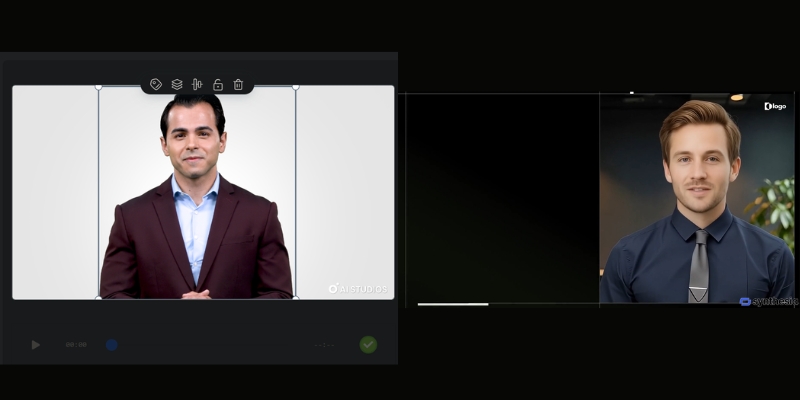
The visual fidelity is exceptional. The lip-syncing is precise, and the subtle facial expressions, blinks, and head movements are incredibly convincing. Unlike the more identifiably digital look of many lower-tier tools, Deepbrain’s avatars achieve a broadcast-grade quality that is suitable for public-facing news segments or high-stakes investor updates.
Voice Synthesis and CloningThe default text-to-speech engine is impressively natural, with very little robotic intonation. The platform supports 80+ languages, making it ideal for global enterprises. We tested the custom voice cloning feature by submitting a few minutes of audio, and the result was a highly accurate digital replica of the speaker’s voice, which is crucial for maintaining brand consistency in corporate communications.
Custom Avatar CreationFor enterprises, the ability to create a custom avatar of a key executive (like a CEO or lead trainer) is a major selling point. The process involves a professional studio session to capture the person’s likeness and mannerisms. This feature transforms the tool from a simple video maker into a strategic communication asset.
The Verdict on RealismThe ‘hyper-realistic’ claim holds up. The quality is noticeably superior to most competitors, making it ideal for client-facing or high-stakes internal communications where trust and professionalism are paramount. This is where the premium Deepbrain AI cost begins to show its value.
A Deep Dive into AI Studios: Key Features and Workflow
AI Studios is the heart of Deepbrain AI’s platform. We found it to be a full production suite, not just a simple text-to-video tool. It’s designed for users who need granular control over their final video output.
Here’s a breakdown of the typical workflow we followed:
Step 1: Choose Your AI Human
The platform offers a library of 100+ high-quality stock avatars. For enterprise users, this is where you would select your custom-made avatar to represent your brand or executive.
Step 2: Input Your Script
You can type, paste, or upload your script directly into the editor. The multilingual support is robust, with 80+ languages allowing for seamless creation of content for global audiences.
Step 3: Customize Your Scene
This step feels like using a simplified video editor. You can upload custom backgrounds (images or videos), add your company logo, insert text overlays, and even embed other media elements like screen recordings.
Step 4: Generate and Review
Once everything is set, you click generate. The rendering time is reasonable for the quality produced. The final video can be downloaded or shared directly.
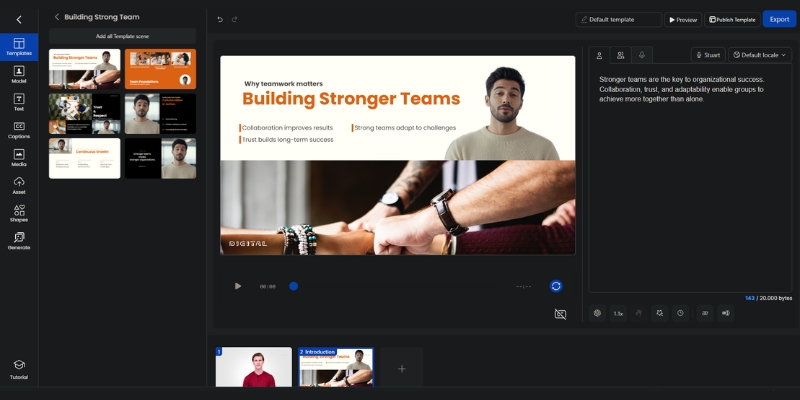
Beyond the standard workflow, AI Studios has standout features that cater specifically to enterprise needs:
AI InterviewThis is a true differentiator. The AI Interview feature allows you to create interactive, conversational AI humans. We tested this by creating a pre-screening interview for a fictional job role. The AI avatar asks questions and can be programmed to respond based on user input, making it a powerful tool for HR, recruitment, and customer service training simulations.
Real-time Conversation & API AccessFor high-end enterprise use cases, Deepbrain AI provides API access. This allows developers to integrate the hyper-realistic avatars into their own applications to create real-time conversational experiences, such as an AI Concierge in a hotel lobby, an interactive kiosk at a trade show, or a digital assistant on a banking website.
Deepbrain AI vs Synthesia: Which Enterprise Solution is Right for You?
For many enterprises, the final decision comes down to two names: Deepbrain AI and Synthesia. We’ve used both extensively in real-world projects, and here’s our direct comparison to help you choose. This isn’t just about features; it’s about which tool aligns with your specific production goals. For a more granular analysis, check out our full Deepbrain AI vs Synthesia breakdown.
| Factor | Deepbrain AI | Synthesia |
|---|---|---|
| Avatar Realism | Broadcast-grade, hyper-realistic with superior facial nuances. | High-quality and professional, but more identifiably digital. |
| Languages Supported | 80+ languages | 140+ languages |
| Unique Features | AI Interview, Real-time Conversational API. | Strong template library, broader stock avatar diversity, screen recorder. |
| Ease of Use | More complex, feature-rich platform suited for production teams. | Extremely intuitive and user-friendly, great for general business users. |
| Ideal Use Case | AI news anchors, high-end corporate training, interactive kiosks. | Scalable internal comms, marketing videos, employee onboarding. |
| Pricing Model | Custom enterprise quoting with a higher entry point. | More transparent tier-based pricing with a lower starting point. |
Our recommendation is clear: Choose Deepbrain AI if your primary, non-negotiable need is unparalleled realism for high-stakes, client-facing, or broadcast applications. Choose Synthesia if your goal is to rapidly scale good-quality video production across multiple teams with a strong focus on ease of use and speed.
Deepbrain AI Pricing Plans Explained: Is the Investment Justified?
Let’s address the crucial question of cost. Deepbrain AI is a premium tool, and its pricing reflects its positioning as an enterprise-level solution. Here’s a breakdown of the Deepbrain AI pricing structure and how to analyze the potential ROI.
Starter PlanThis plan starts at $24/month when billed yearly (or $30/month for monthly billing) and is designed for small teams or businesses wanting to test the platform’s capabilities. It typically includes 10 minutes of video per month, access to 100+ stock avatars, and the core features of AI Studios. While functional, it lacks the advanced customization that makes Deepbrain AI unique.
Enterprise PlanThis is the main offering and where the platform truly shines. It requires contacting the sales team for a custom quote based on your specific needs (video volume, number of users, etc.). This plan unlocks the most powerful features, including API access, custom avatar creation, custom voice cloning, and dedicated support.
Calculating the ROIThe investment is justified when you compare it to the alternative. Consider the hard costs of a traditional video shoot: hiring a film crew, an actor, a studio, and an editor can easily exceed $5,000 for a single high-quality training video. An annual Deepbrain AI Enterprise plan allows you to create hundreds of videos for a comparable cost, drastically reducing per-video expenses and slashing production time from weeks to hours.
Deepbrain AI Pros and Cons: A Balanced View for Professionals
No tool is perfect. After our hands-on testing, here are the key advantages and disadvantages of implementing Deepbrain AI that professional Marketers and Creators should consider.
Pros (What We Loved)
- Unmatched Avatar Realism: The most lifelike and believable AI humans currently available on the market.
- Innovative Features: The AI Interview function is a genuine differentiator for interactive training and HR use cases.
- High-End Customization: The ability to create custom avatars and clone voices is crucial for deep brand integration.
- Robust API: Offers powerful integration capabilities for large-scale, custom enterprise projects.
- Multilingual Support: 80+ languages make it ideal for global enterprises.
Cons (Where It Could Improve)
- Very High Cost: The premium pricing is prohibitive for individuals, freelancers, and most small businesses.
- Steeper Learning Curve: The feature-rich AI Studios platform is more complex than simpler tools like Synthesia.
- Limited Stock Avatar Diversity: The library of pre-made avatars, while high-quality, could be more extensive in terms of ethnicity and style.
Frequently Asked Questions about Deepbrain AI
What is Deepbrain AI best used for?
Deepbrain AI excels in enterprise-level applications where realism and professionalism are critical. This includes corporate training videos, financial news reports, AI-powered kiosks for events, and broadcast media presentations where a digital human needs to be indistinguishable from a real one.
How much does Deepbrain AI cost?
Deepbrain AI offers a Starter plan starting at $24/month (when billed yearly) or $30/month for monthly billing, and a custom Enterprise plan. The Enterprise plan, which includes most advanced features like custom avatars and API access, requires a direct quote from their sales team and is considered a significant business investment.
Is Deepbrain AI better than Synthesia?
It depends on your primary need. Deepbrain AI is generally considered better for “hyper-realistic” avatar quality and specialized features like AI Interview. In contrast, Synthesia is often superior for its ease of use, speed, wider variety of stock avatars (230+), and scalability across general business teams. For a full breakdown, explore our guide to the best AI avatar generators.
Can I create a custom AI avatar of myself?
Yes, creating a custom “AI Human” is a key feature of Deepbrain AI’s Enterprise plan. This is a premium service that involves a professional studio recording process to capture your likeness, voice, and mannerisms for maximum realism.
Does Deepbrain AI offer a free trial?
Deepbrain AI typically offers a free demo or a limited free video creation so you can test the platform’s basic functionality. This allows you to experience the quality of the avatars and the workflow of AI Studios before committing to a paid plan. You can learn the basics with our tutorial on how to use Deepbrain AI.
Read More From AI Avatar Generator
If you found this review helpful, continue exploring our expert (“battle-tested”) guides and comparisons within the AI Avatar Generator category to find the perfect solution for your needs.
- Synthesia Review: Is It Still the #1 AI Avatar Tool?
- Colossyan Review: Enterprise AI Avatars Put to the Test
- 10 Synthesia Alternatives (Free & Paid)
last update : 21/11/2025
