
Descript Review (2025): Is This Text-Based Video Editor Worth the Hype?
Descript revolutionizes video editing through document-style workflow treating multimedia files as editable transcripts. The desktop application enables podcast producers, course creators, and talking-head YouTubers to slash rough-cut assembly time 50-70% by deleting transcript text automatically removing corresponding audio-visual segments versus traditional timeline scrubbing.
This comprehensive AI Video Editing analysis evaluates 2025 text-based workflow efficiency, Studio Sound noise removal accuracy, Overdub voice cloning limitations, and pricing structure (Creator $24/month, 30 transcription hours, unlimited AI features) determining optimal use cases for narrative content versus visual-effects-heavy production requiring Adobe Premiere Pro capabilities.
Table of Contents
Descript Platform Architecture and Target User Segments
Descript operates as desktop application (Mac/Windows) consolidating recording, transcription, editing, and mixing into unified workspace eliminating software stack fragmentation. The architecture leverages cloud processing for AI features while maintaining local project storage preventing internet dependency common in browser-based editors.
The platform fundamentally reimagines editing workflow prioritizing transcript manipulation over visual timeline control. Transcript-to-video mapping technology automatically synchronizes text deletions with frame removal enabling document-style editing familiar to non-technical creators avoiding traditional NLE complexity.
Primary Creator Segments
Four user categories benefit from text-centric workflow:
- Podcasters: Hour-long interview editing compressed to 10-15 minutes through filler word removal and transcript-based scene rearrangement
- Course creators: Tutorial production accelerated through automatic bad-take removal and transcript correction without video timeline navigation
- Talking-head YouTubers: Dialogue-heavy content editing achieving 60% time reduction versus manual timeline cutting
- Marketing teams: Webinar repurposing into multiple short clips through text-based scene extraction and captioning
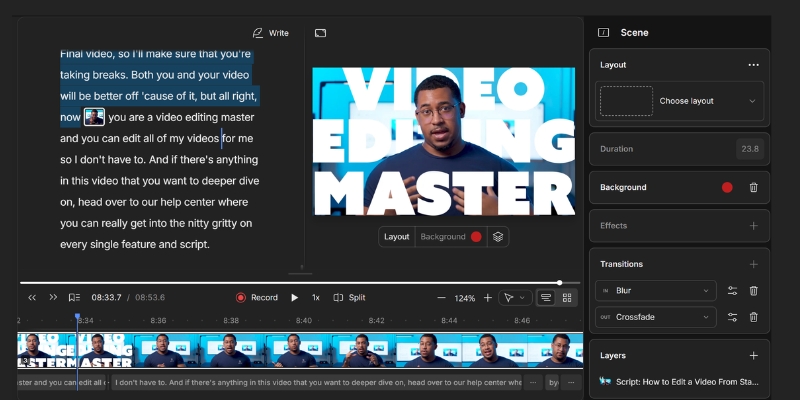
Text-Based Editing Workflow Efficiency Analysis
Document-style editing represents Descript’s core differentiation versus timeline-based competitors. Workflow testing with 30-minute unscripted footage quantifies actual time savings and accuracy limitations determining realistic production capacity improvements.
Transcript Generation and Speaker Identification
Upload process and AI transcription capabilities:
- Drag-and-drop import: Direct file upload or screen recording integration without external transfer steps
- 95-98% transcription accuracy: Clear English audio with standard microphones achieves near-perfect text generation
- Automatic speaker separation: AI distinguishes multiple voices assigning labels for multi-person interviews
- Real-time processing: 30-minute video generates complete transcript within 5-7 minutes
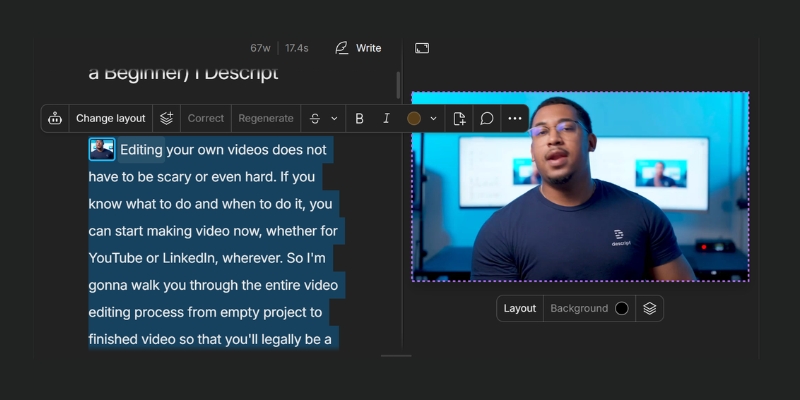
- Manual correction support: Click-to-edit transcript updating underlying audio-visual timing automatically
Document-Style Video Manipulation
Core editing operations through text interface:
- Delete text removes video: Highlight transcript sentence and press Delete key automatically removing corresponding frames
- Copy-paste scene rearrangement: Text block repositioning moves associated video clips maintaining sync
- Search and replace: Find specific words or phrases across entire transcript jumping to timeline locations instantly
- Multi-select editing: Batch delete multiple non-contiguous text sections eliminating repeated phrases across project
Time Savings Quantification
Workflow comparison testing results:
- Traditional timeline editing: 45-60 minutes required for 30-minute podcast rough cut through waveform review
- Descript text editing: 15-20 minutes achieves equivalent rough cut through transcript reading and deletion
- 67% time reduction: Document workflow eliminates timeline navigation cognitive load
- Accuracy trade-off: Text-based cutting lacks frame-perfect precision suitable for action sequences or music videos
Complete workflow tutorial available at Descript step-by-step guide.
Studio Sound AI Audio Processing Evaluation
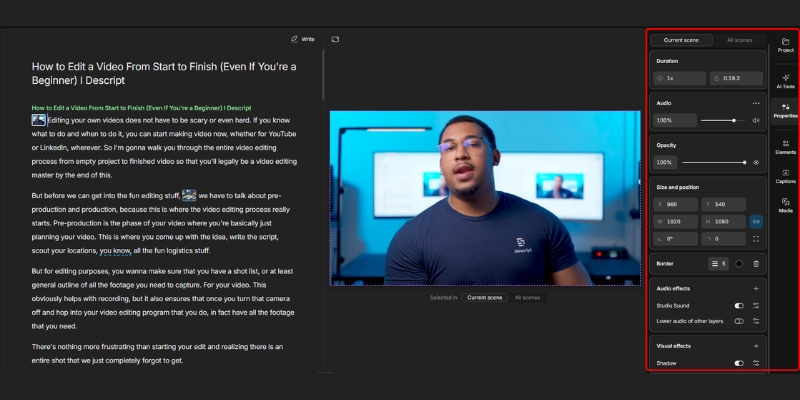
Studio Sound employs machine learning audio cleanup removing background noise, room echo, and volume inconsistencies through single-click automation. Testing methodology evaluated recording quality improvements across various acoustic environments determining practical restoration limits.
Noise Removal Capabilities
AI audio enhancement features:
- Background noise elimination: HVAC hum, keyboard typing, and street traffic removal without vocal artifacts
- Room echo reduction: Reverb suppression simulating acoustic treatment for untreated recording spaces
- Volume normalization: Automatic gain leveling maintaining consistent loudness across multiple speakers
- Voice enhancement: Frequency boosting improving vocal presence and intelligibility
- Adjustable intensity: 0-100% slider controlling processing strength preventing over-processing robotic quality
Processing Quality Testing Results
Kitchen laptop recording transformation analysis:
- Source audio: Echoey environment with refrigerator hum and dish clattering background
- 60-80% intensity optimal: Sweet spot removing noise while maintaining natural voice character
- 100% intensity artifacts: Robotic clipping and unnatural compression degrading perceived quality
- Salvageability threshold: Recordings previously considered unusable become publishable with moderate processing
Professional Audio Engineering Comparison
Studio Sound limitations versus manual processing:
- Speed advantage: One-click versus 10-15 minutes manual parametric EQ and multiband compression
- Quality ceiling: Professional engineers achieve superior results through dedicated plugins and critical listening
- Consistency benefit: AI maintains uniform processing across hours of content preventing manual fatigue errors
- Optimal deployment: Podcast rough cuts and social content versus broadcast-quality production requiring manual mixing
Overdub Voice Cloning Technology Assessment
Overdub generates synthetic speech matching user voice profile enabling post-production corrections without microphone re-recording. Voice model training requires 10 minutes clear audio samples creating unlimited text-to-speech capacity within voice characteristics limitations.
Voice Cloning Process
Model creation and deployment workflow:
- 10-minute training requirement: Read provided script aloud in quiet environment capturing voice characteristics
- Automatic model generation: AI analyzes prosody, pitch, and cadence creating personalized voice synthesis model
- Text-to-speech deployment: Type correction into transcript generating audio matching speaker tone
- 30 minutes monthly AI speech (Hobbyist): Quota limits synthetic generation preventing unlimited usage
- 2 hours monthly AI speech (Creator): Expanded capacity supporting extensive post-production corrections
Quality and Realism Limitations
Synthetic speech accuracy evaluation:
- Single-word corrections: Near-perfect integration for mispronounced names or factual errors
- Short phrase quality: 5-10 word sentences maintain natural intonation and speaker cadence
- Long passage degradation: Extended synthetic speech reveals robotic quality and unnatural pacing
- Emotional limitation: Difficulty capturing sarcasm, enthusiasm, or subtle vocal emotion
- Optimal use case: Quick corrections avoiding full segment re-recording not wholesale script generation
Practical Deployment Scenarios
Overdub justifies for specific corrections:
- Product name mispronunciation fixed without re-recording entire tutorial segment
- Factual error correction (date, statistic) updating audio without video retake
- Filler word replacement improving sentence flow post-recording
- NOT recommended: Generating entire podcast episodes or lengthy narration from scratch
Supplementary AI Feature Suite Analysis
Four additional automation tools accelerate post-production workflows beyond core text-based editing. Feature effectiveness varies significantly by content type and quality requirements determining optimal deployment contexts.
Filler Word Automatic Detection
Speech pattern cleanup capabilities:
- Automatic identification: AI flags “um,” “uh,” “like,” “you know” across entire transcript
- One-click removal: Batch delete all instances versus manual timeline hunting
- Gap shortening option: Reduce silence duration preventing jarring jump cuts
- Selective preservation: Manually retain intentional pauses maintaining natural speech rhythm
- 20 monthly uses (Hobbyist): Limited quota restricting frequent application
- Unlimited uses (Creator): Unrestricted deployment for daily editing workflows
AI Green Screen Background Removal
Physical chromakey elimination technology:
- Subject isolation: Separate foreground person from background without physical green screen
- Static scene optimization: Talking-head content achieves clean separation
- Motion blur limitations: Fast movements cause edge artifacting and transparency issues
- Lighting sensitivity: High-contrast environments improve separation accuracy
Eye Contact Correction Technology
Gaze redirection for script reading:
- Pupil tracking algorithm: Detects downward teleprompter reading automatically
- Camera gaze simulation: Redirects eyes toward lens maintaining viewer connection
- Subtle application: Natural appearance for short segments under 30 seconds
- Extended use uncanny valley: Prolonged correction reveals artificial quality
Template Library and Caption Automation
Social media optimization tools:
- Pre-designed vertical video templates for TikTok and Reels instant reformatting
- Animated caption styles matching trending creator aesthetics
- Aspect ratio conversion (16:9 to 9:16) with intelligent subject framing
- Comparable capabilities to VEED.io social tools
Descript vs VEED.io Platform Positioning
Two platforms dominate AI-assisted editing serving distinct workflow philosophies and content types. Fundamental architectural differences determine optimal platform selection beyond superficial feature parity.
Core Workflow Philosophy Divergence
Platform approach comparison:
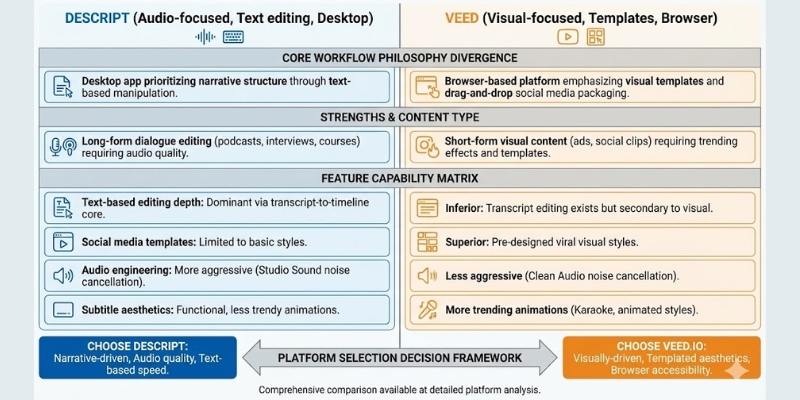
- Descript model: Desktop application prioritizing narrative structure through text-based manipulation
- VEED model: Browser-based platform emphasizing visual templates and drag-and-drop social media packaging
- Descript strength: Long-form dialogue editing (podcasts, interviews, courses) requiring audio quality
- VEED strength: Short-form visual content (ads, social clips) requiring trending effects and templates
Feature Capability Matrix
Competitive positioning by function:
- Text-based editing depth: Descript dominates through transcript-to-timeline core architecture
- Social media templates: VEED superior for pre-designed viral visual styles
- Audio engineering: Descript Studio Sound more aggressive noise cancellation versus VEED Clean Audio
- Subtitle aesthetics: VEED offers more trending caption animations (Karaoke, animated styles)
- Deployment flexibility: VEED accessible from any device; Descript requires software installation
Platform Selection Decision Framework
Choose Descript for narrative-driven content requiring audio quality and text-based speed advantages. Choose VEED.io for visually-driven social media content prioritizing templated aesthetics and browser accessibility. Comprehensive comparison available at detailed platform analysis.
Descript Subscription Pricing November 2025
Four pricing tiers serve different production volumes from casual testing to enterprise team collaboration. Transcription hours represent primary quota currency determining actual monthly output capacity. Detailed pricing breakdown available at comprehensive cost analysis.
| Plan | Monthly Price | Transcription Hours | Key Features |
|---|---|---|---|
| Free | $0 | 1 hour | Watermark, 720p, text-based editing trial |
| Hobbyist | $16-24 | 10 hours | 1080p, 20 AI uses/month, 30 min AI speech |
| Creator | $24 | 30 hours | 4K, unlimited AI, 2 hrs speech, 30 min dubbing |
| Business | $50-65 | 40 hours | Team collaboration, priority support |
Plan Selection by Creator Profile
Subscription optimization guidance:
- Free Plan: Interface testing only; watermark prevents professional publishing
- Hobbyist ($16-24): Casual creators producing 2-3 monthly videos requiring basic AI features
- Creator ($24): Optimal tier for weekly content producers needing unlimited Studio Sound and 4K exports
- Business ($50-65): Teams requiring shared projects, collaboration tools, and expanded quota pools
(Disclosure: Purchases through this link may earn a commission at no extra cost to you.)
Platform Strengths and Limitations Comprehensive Assessment
Extensive testing reveals distinct advantages and constraints determining suitability for specific creator workflows. Understanding limitations prevents disappointment from mismatched expectations versus platform capabilities.
Strengths
- Revolutionary text-based editing reducing dialogue content production time 50-70%
- Studio Sound salvages unusable recordings through aggressive noise removal
- All-in-one workflow consolidating recording, transcription, editing, and mixing
- Overdub corrections avoid microphone re-setup for minor fixes
- Desktop application providing offline editing without internet dependency
- Automated filler word detection eliminating tedious manual timeline hunting
Limitations
- Software stability issues causing crashes on large projects exceeding 2 hours
- Limited visual effects depth versus Premiere Pro or After Effects
- Render speeds slower than native video editing applications
- Text-based workflow unsuitable for action sequences requiring frame-perfect timing
- Overdub robotic quality for extended synthetic speech passages
- No mobile editing capability restricting workflows to desktop computers
Platform Verdict and Deployment Recommendations
Descript fundamentally transforms narrative content production workflows but remains specialized tool versus universal video editor. The text-based paradigm delivers massive efficiency gains for dialogue-heavy content while proving inadequate for visually-driven cinematic production.
Optimal Use Cases
Recommended for: Podcast producers editing hour-long interviews weekly, course creators producing tutorial content requiring transcript corrections, talking-head YouTubers prioritizing editing speed over visual effects, marketing teams repurposing webinars into multiple social clips through text-based scene extraction.
Not recommended for: Cinematic productions requiring complex color grading and visual effects, music videos demanding frame-perfect beat synchronization, action sequences needing precise visual timing control, creators lacking consistent desktop computer access preferring mobile workflows.
Workflow integration: Optimal deployment involves rough cut assembly in Descript leveraging text-based speed then XML export to Premiere Pro for final visual polish combining efficiency automation with creative granular control.
Start Free TrialCommon Questions About Descript Platform
Does Descript support complete beginners without editing experience?
Yes. Text-based interface removes timeline complexity enabling document editing skills transfer. Users capable of editing Word documents possess sufficient proficiency for Descript video manipulation.
Can Descript handle video projects or audio-only podcast editing?
Both. Platform began as podcast tool but evolved supporting full video workflows including 4K export, green screen removal, and multi-camera editing capabilities.
Does Descript export to Premiere Pro for advanced finishing?
Yes. XML export preserves edit decisions enabling rough cut transfer to professional NLE software maintaining timeline structure for final color grading and effects application.
Is Descript mobile app available for smartphone editing?
No. Desktop application (Mac/Windows) represents only deployment option currently. Mobile editing capability nonexistent limiting workflows to computer-based production environments.
How accurate is automatic transcription for various accents?
95-98% accuracy for clear standard English audio. Regional accents and technical terminology reduce precision requiring manual transcript corrections through click-to-edit interface.
Related AI Video Editing Platform Reviews
- VEED.io Review: Browser-Based Editor Analysis 2025
- Descript vs Murf AI: Which AI Tool Wins? (2025)
- Kapwing Review (2025): Is It Best for Teams?
last update : 28/11/2025
