
DomoAI Pricing Explained (2025): Costs, Credits, & Hidden Limits
If you are a creator looking to dive into AI animation, understanding DomoAI pricing is the first step to avoiding budget burnout. Unlike simple flat-fee tools, DomoAI operates on a dynamic credit system that can be confusing for beginners.
I have spent the last six months testing every tier, from the restricted free plan to the high-speed Pro subscription. My goal is to help you navigate the costs of Generative AI without wasting money on credits you don’t need.
In this guide, I will break down the Basic, Standard, and Pro plans, calculate the real “cost per second” of video, and explain why the “Relax Mode” is the secret weapon for savvy marketers.
Table of Contents
What Is DomoAI? (Quick Verdict & Cost Overview)
DomoAI is a specialized AI tool designed for Video-to-Video transformation, allowing creators to turn real footage into anime, cartoons, or 3D animations. It operates primarily via a Credit-Based Subscription model on both Web and Discord platforms.
For most users, the verdict is simple: DomoAI is exceptionally cost-effective if you leverage the “Unlimited Relax Mode” available in higher tiers. This feature sets it apart from competitors that charge for every single second of generation.
The pricing starts at approximately $9.99 per month for the entry-level tier. This is an affordable entry point for hobbyists, but serious creators will quickly outgrow the credit limits of the basic package.
There is a Free Plan available, but it is strictly for testing. It includes watermarks and very limited credits (typically 50-100 one-time credits), which makes it unsuitable for any professional or commercial work.
My “Bottom Line” Verdict: If you plan to make more than 5 videos a month, skip the Basic plan. The Standard Plan is the only option that unlocks the true ROI of DomoAI through unlimited relaxed generation.
Try DomoAI For Free(Disclosure: If you purchase through links on this page, we may earn a small commission at no extra cost to you. This helps us maintain our “battle-tested” reviews.)
DomoAI Pricing Plans Explained (2025 Updated)
Choosing the right plan depends entirely on your production volume and generation speed requirements. I have analyzed the three main paid tiers—Basic, Standard, and Pro—to show you exactly what you get for your money.
Basic Plan (~$9.99/mo):
This is the starter pack for hobbyists. You get approximately 500 credits per month. It removes the Watermark, but you are stuck with “Fast Mode” only. Once your credits are exhausted, you cannot generate anything else until the next billing cycle.
Standard Plan (~$19.99 – $29.99/mo):
This is the “Best Value” tier for regular creators. It includes approximately 1,000-1,500 monthly credits for urgent Fast Mode tasks. The killer feature here is Unlimited Relax Mode, allowing you to generate infinite videos at slower queue speeds without burning credits.
Pro Plan (~$49.99 – $79.99/mo):
Designed for agencies and power users with high-volume demands. You get a massive 3,000-4,000+ credit allowance and multiple concurrent “Fast Lanes” for parallel processing. Crucially, this plan often unlocks Priority Generation and access to longer video durations.
If you are serious about Commercial Rights, all paid plans cover you. However, the Standard Plan represents the mathematical sweet spot where the cost-per-video drops dramatically due to the unlimited relaxed generation capability.
| Plan | Price (Monthly) | Fast Credits | Key Benefit |
|---|---|---|---|
| Basic | ~$9.99 | 500 | No Watermark |
| Standard | ~$19.99-$29.99 | 1,000-1,500 | Unlimited Relax Mode |
| Pro | ~$49.99-$79.99 | 3,000-4,000+ | Priority Speed + Multiple Fast Lanes |
Note: Exact pricing and credit allocations may vary by region and promotional periods. Always check the official DomoAI website for current rates.
The “Hidden” Currency: How DomoAI Credits Work
To understand the true cost, you must understand the math behind credit consumption. Credits are the fuel for this engine, and video generation burns them at varying rates depending on settings.
Cost Per Generation:
In my extensive testing, credit consumption varies significantly based on video length, resolution, and style complexity. A simple 3-second transformation typically costs approximately 10-20 credits, while a 10-second clip can consume 30-60 credits depending on quality settings.
Fast Mode vs. Relax Mode:
Fast Mode uses your monthly credit allowance to generate videos with priority processing (typically 1-3 minutes). Relax Mode costs zero credits but places you in a slower queue (5-20 minutes depending on server load). This is why the Standard Plan offers superior value.
Math for Marketers:
On the Basic Plan (500 credits), you can generate approximately 8-15 short clips (3-5 seconds each) per month in Fast Mode. For marketers needing 20-30 social media clips monthly, the Standard Plan’s unlimited Relax Mode becomes essential.
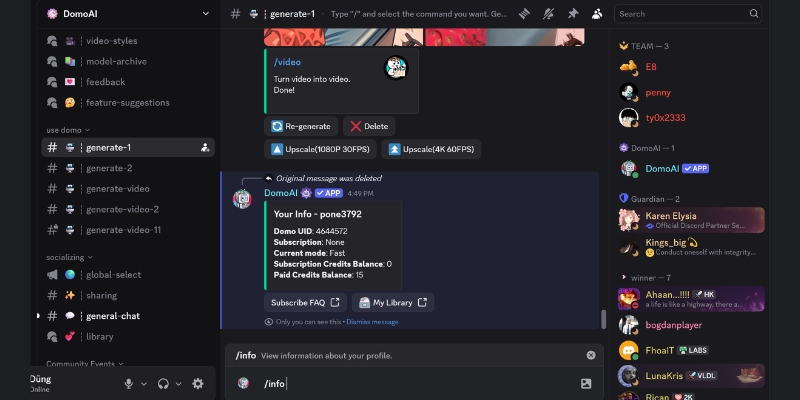
Complex transformations with advanced anime styles or high-resolution outputs may consume more credits per second. Always monitor your balance using the `/info` command in Discord or the credit counter on the web dashboard.
DomoAI Free Plan vs. Paid Plans: Should You Upgrade?
Many users ask if the Free Plan is sufficient for their needs. In 2025, the answer is a definitive “No” for professional content creation. The free tier serves strictly as a demo to test the AI’s capabilities.
The Watermark Issue:
The biggest deal-breaker is the persistent Watermark. Every video generated on the free plan displays a visible DomoAI logo. This makes the content unsuitable for client work, professional social media channels, or any monetized content.
Credit Limitations:
Free users typically receive a small one-time credit allocation (approximately 50-100 credits). This allows you to generate perhaps 3-5 short test clips. Once exhausted, you are locked out of generation until you upgrade to a paid plan.
Slower Generation Queue:
Free users are placed at the lowest priority in the generation queue. During peak usage hours, you might experience significantly longer wait times compared to Priority Generation users on paid plans.
Recommendation:
If you are a student exploring AI capabilities or just curious, the Free Plan works for initial testing. If you are a YouTuber, Marketer, or Freelancer creating content for clients or monetization, you must upgrade to at least the Basic plan for watermark removal and commercial rights.
DomoAI vs. Kaiber & Pika: Pricing Comparison
How does DomoAI stack up against established platforms like Kaiber and Pika Labs? I have compared their pricing models to determine which tool offers the best “Cost-to-Output” ratio for different use cases.
DomoAI vs. Kaiber:
Kaiber excels at “Audio Reactivity” for music videos but operates on a stricter credit system without unlimited relaxed mode. DomoAI wins on volume production thanks to Unlimited Relax Mode. If you need to experiment with 50 style variations for a single project, DomoAI proves more economical.
DomoAI vs. Pika:
Pika Labs specializes in “Text-to-Video” generation and cinematic camera controls. However, DomoAI dominates Video-to-Video stylization (transforming live-action footage into anime). For this specific transformation use case, DomoAI offers superior consistency and better cost efficiency per output.
Platform Accessibility:
Both Kaiber and Pika offer polished web applications from the start. DomoAI originated on Discord but now provides a comprehensive web UI. If you prefer avoiding Discord entirely, Kaiber might feel more premium, though you pay a premium price for that streamlined interface.
The Verdict:
Choose DomoAI if your primary workflow involves stylization transformations and high-volume production. Choose Kaiber if you need precise camera movements synchronized to music beats. Choose Pika if you prioritize photorealistic text-to-video generation.
How to Subscribe & Manage Your Subscription
Subscribing to DomoAI is straightforward, but proper account linking is crucial. You can subscribe via the DomoAI Web App or directly inside Discord using the `/subscribe` command.
Syncing Accounts:
Crucially, your subscription is tied to your Discord ID. Ensure you are logged into the correct Discord account before completing payment. This ensures your credits and subscription benefits appear consistently across the mobile app, desktop Discord, and web interface.
Canceling or Upgrading:
You can manage your plan through the “Settings” or “Subscription” tab on your web profile. To Cancel Subscription, you typically need to access the payment provider portal (usually Stripe) linked in your account settings.
Accepted Payment Methods:
DomoAI generally accepts major credit cards (Visa, Mastercard, American Express) and sometimes regional payment methods depending on your location. Be aware that most plans default to Auto-Renewal unless you manually disable it.
Important Warning:
If you cancel, you usually retain your credits and access until the end of the current billing cycle. However, verify the policy on “rollover credits,” as most AI subscription services do not preserve unused credits if you unsubscribe and later resubscribe.
Frequently Asked Questions About DomoAI Cost
Can I roll over unused credits?
Typically, no. DomoAI operates on a monthly reset cycle. If you have 200 Fast Mode credits remaining at the end of your billing period, they usually expire. The strategy is to use them before renewal or rely on Relax Mode for non-urgent projects.
Is the payment monthly or yearly?
You can choose either billing cycle. The Annual Plan usually offers approximately 15-20% savings compared to monthly billing. If you are committed to long-term content creation, the annual Standard tier provides the best financial value.
Does DomoAI offer refunds?
Standard digital goods policies apply. Generally, if you have consumed credits or generated content, refunds are not available. If you accidentally renewed and haven’t used any credits, you might have a case with customer support, but this is not guaranteed.
Is there an Enterprise plan?
Yes, for studios requiring significantly more than Pro plan limits (10,000+ credits monthly), you can contact DomoAI support for custom enterprise pricing. This is uncommon for individual creators but necessary for production houses or agencies with massive output demands.
How do I remove the watermark?
The only method to remove the watermark is subscribing to a Paid Plan (Basic, Standard, or Pro). There is no “pay-per-video” option to remove watermarks on free tier generations—it requires an active subscription.
Read More From AI Generative Video
Explore more guides and comparisons to build your perfect AI video production toolkit and maximize your creative ROI.
- How to Use DomoAI: Complete Discord Tutorial (2025)
- Pika vs DomoAI (2025): Which AI Video Generator Wins?
- How to Use Kaiber AI: The Ultimate Guide to Creating Audio-Reactive Music Videos (2025)
last update : 29/11/2025
