
HeyGen Review 2025: The Marketer’s Verdict on Its AI Avatars & Features
This in-depth HeyGen review is the result of over 10 hours of hands-on testing to see if it can truly solve the “performance pressure” faced by today’s marketers and creators. As a leading platform in the AI Avatar Generator space, HeyGen promises to slash video production time. But does the quality hold up? In this analysis, I’ll break down its standout features like Instant Avatar, its unique pricing model, and the critical HeyGen vs Synthesia comparison to help you decide if it’s the right investment for you.
Table of Contents
HeyGen Review: The Final Verdict After 10+ Hours of Testing
After extensively testing every core feature, I’m ready to share my in-depth HeyGen review. Is it truly the game-changing AI video generator for marketers and creators, or just hype? Let’s get straight to the point.
| Attribute | Score |
|---|---|
| Ease of Use | 4.8/5 |
| Avatar Realism (Instant & Photo) | 4.5/5 |
| Voice Quality & Cloning | 4.3/5 |
| Unique Features (e.g., Video Translate) | 4.9/5 |
| Value for Money (Pricing) | 4.6/5 |
| Overall Score | 4.6/5 |
Who It’s For:
In my opinion, HeyGen is a perfect fit for marketers, creators, and small businesses who need to produce high-quality videos at scale without a steep learning curve or a Hollywood budget.
Who It’s NOT For:
However, if you’re an enterprise-level company needing the absolute highest-end, SOC 2 compliant custom avatars, you might still consider a more established player like Synthesia.
Try HeyGen for Free(Disclosure: If you purchase through links on this page, we may earn a small commission at no extra cost to you. This helps us maintain our “battle-tested” reviews.)
What is HeyGen & How Does It Solve Your Video Production Bottleneck?
We’ve all faced the “performance pressure” – the constant need for more video content. Traditional video production is slow, expensive, and a logistical nightmare. HeyGen tackles this head-on.
HeyGen is an AI video generation platform. Simply put, you provide a script, choose an AI avatar (or create your own), and the tool generates a professional video of that avatar speaking your words.
The process is incredibly simple, which is a huge plus for busy freelancers and marketing teams. Our guide on how to use HeyGen goes into more detail, but here’s the quick version:
Step 1: Write or Import Your Script.
You can type directly, paste text, or even use their AI scriptwriter for ideas.
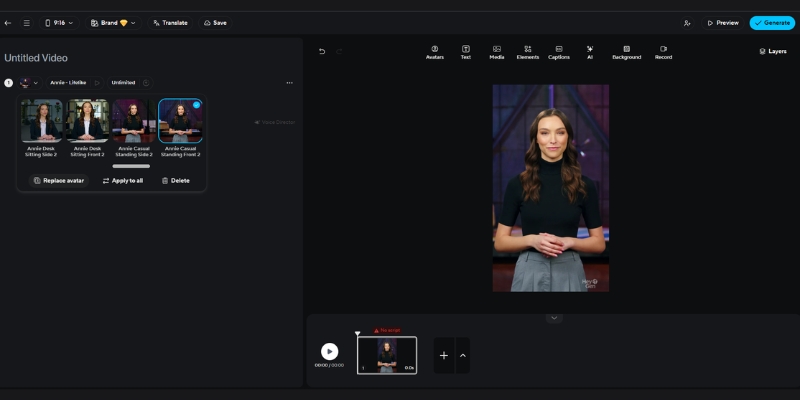
Step 2: Choose Your Presenter.
Select from a library of stock avatars, create an “Instant Avatar” from your webcam, or upload a photo to create a “Photo Avatar.”
Step 3: Generate & Export.
Click generate. In minutes, your video is ready to download, saving you hours of filming and editing.
HeyGen’s Standout Features (A Deep Dive for Marketers & Creators)
HeyGen isn’t just another AI tool. Based on my tests, a few specific features make it a powerful asset for any content arsenal. Here’s my hands-on review of what matters most.
Instant Avatar
This feature is a game-changer for speed and personalization. I created my own digital twin in about two minutes just by using my laptop’s webcam. The quality is surprisingly good for onboarding videos, internal communications, or personalized sales outreach. It captures your likeness well enough to be instantly recognizable, adding a layer of authenticity that stock avatars can’t match.
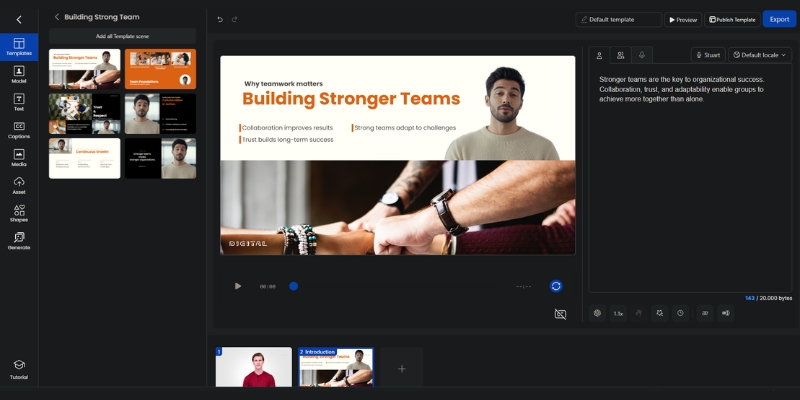
Photo Avatar (Talking Photo)
I tested this by uploading a single professional headshot. HeyGen animates the face and syncs the lips perfectly to your audio script. This is a massive time-saver for content repurposing. It’s perfect for turning text-based testimonials, tweets, or blog post snippets into engaging social media video clips without any filming required. My HeyGen talking photo review is overwhelmingly positive for this specific use case.
Video Translate
This is one of HeyGen’s most powerful and unique features for marketers targeting global audiences. I uploaded a video of myself speaking in English, and HeyGen translated the audio into both Spanish and Japanese. The tool not only dubbed the audio but also cloned my voice and matched the lip movements to the new language. The result was impressively seamless and far more natural than a simple voiceover.
Voice Cloning
The ability to clone your own voice adds a huge layer of authenticity to your videos. It requires a 2-minute audio sample where you read a provided script. The cloned voice I generated was very close to my real voice’s tone and cadence, which is crucial for maintaining brand consistency in marketing videos.
AI Script Writer & Templates
For times when you’re facing writer’s block, the integrated GPT-powered script writer is a helpful brainstorming partner. The template library is also solid, providing ready-made scenes and layouts for social media ads, e-learning modules, and corporate presentations. This speeds up the workflow significantly, as you’re not starting from a blank canvas.
HeyGen Pricing and Plans Review: Is the Free Plan Worth Your Time?
Let’s talk cost and ROI. HeyGen uses a credit-based system, which can be confusing at first glance. I’ll break down the HeyGen cost so you know exactly what you’re getting and if the free plan is sufficient for your needs. For a more granular analysis, check our full HeyGen pricing guide.
The Credit System Explained
Think of credits as your currency. One credit generally equals one minute of generated video with a stock avatar. However, using premium features like your Instant Avatar, voice cloning, or exporting in higher resolutions (like 4K) will consume more credits per minute. It’s a flexible model but requires you to monitor your usage.
HeyGen Free Plan Review
You get 3 free video credits per month that automatically renew, with each video up to 3 minutes long. In my view, this plan is perfect for testing the core functionality and creating multiple test videos. You can create short videos, test the Photo Avatar feature, and evaluate the quality for yourself before committing. Videos export at 720p resolution, which is suitable for most social media platforms. It’s a genuine free trial, not just a limited demo, making it incredibly valuable for anyone wanting to try before they buy.
Creator Plan
Priced at $29/month (or $24/month when billed annually), this is the ideal entry point for most freelancers and individual creators. It provides enough monthly credits to produce several short videos for social media or a couple of longer marketing videos, making it a cost-effective solution compared to traditional video production costs.
Business Plan
Aimed at marketing teams and agencies, this plan offers more credits, priority video processing, and collaboration features. The increased credit allowance and team-focused tools make it a better value for high-volume video production and streamlined workflows.
HeyGen vs Synthesia: Which is the Best AI Avatar Tool for You?
This is the main event. HeyGen is often called the best Synthesia alternative, but are they for the same user? I compared both platforms on the factors that matter most to creators and marketers. This is a critical question we explore in our detailed HeyGen vs Synthesia battle-tested review.
| Key Feature | HeyGen | Synthesia |
|---|---|---|
| Avatar Realism | Excellent, especially with Instant Avatar for speed. | Industry-leading, slightly more polished and corporate. |
| Unique Selling Point | Instant Avatar, Photo Avatar, Video Translate. | Enterprise-grade security (SOC 2), custom brand assets, deepfake detection. |
| Ease of Use | More intuitive and faster for beginners. | Very user-friendly, but with more advanced options that can have a slight learning curve. |
| Pricing Model | Flexible credit system, generous free plan. | Subscription-based, more expensive entry point. |
| Ideal User | Creators, Marketers, Small/Medium Businesses. | Enterprise, Large Corporations, Training Departments. |
Choose HeyGen if:
You prioritize speed, innovative features like Photo Avatar, and a flexible, affordable pricing model. It’s the better choice for agile marketing, content creation, and small teams that need to move fast.
Choose Synthesia if:
You’re a large organization that needs top-tier security, the highest level of avatar polish for corporate training videos, and have a larger budget to support enterprise needs. It is one of the best AI avatar generator tools for corporate use.
The Pros and Cons of HeyGen (My Unbiased Opinion)
No tool is perfect. After my testing, here is a straightforward breakdown of what I loved and what could be improved in this HeyGen AI review.
What I Liked (Pros)
- Unmatched Speed & Ease of Use: You can go from script to final video in under 5 minutes. The interface is clean and intuitive.
- Innovative Features: The Instant Avatar and Photo Avatar features are practical, well-executed, and open up new content possibilities.
- Excellent Free Plan: The free plan is genuinely useful for thorough testing, allowing you to create multiple real videos each month.
- High-Quality Video Translate: A powerful and rare feature for global marketing campaigns that actually works well.
- Competitive Pricing: The credit model offers great value, especially when compared to the high cost of traditional video production.
What Could Be Improved (Cons)
- Credit System Can Be Confusing: New users might need a moment to understand how credits are consumed by different features and resolutions.
- Avatar Realism Varies: While very good, some stock avatars can still fall into the “uncanny valley.” Custom avatars are always the better choice.
- Fewer Enterprise Features: Lacks some of the advanced security (like SOC 2 compliance on lower tiers) and collaboration tools found in Synthesia.
Frequently Asked Questions About HeyGen
I’ve gathered and answered some of the most common questions I’ve received about HeyGen.
Is HeyGen better than Vidnoz?
In my testing, HeyGen’s overall avatar quality, voice cloning realism, and advanced feature set, particularly Video Translate and Instant Avatar, are more polished and professional than what Vidnoz currently offers. HeyGen feels like a more mature and robust tool designed for business use cases.
Can you really use HeyGen for free?
Yes, the HeyGen free plan gives you 3 free video credits per month that automatically renew, with each video up to 3 minutes long. This is enough to create multiple test videos to evaluate the platform’s quality and features before you decide to purchase a plan. Videos export at 720p resolution. You can sign up for the free plan here to test it yourself.
How realistic are the HeyGen avatars and voices?
They are among the best in the industry for this price point. The lip-syncing is excellent, and the standard voices are very natural. For the best results, using the voice cloning feature combined with a custom Instant Avatar provides the most authentic and realistic output.
Is HeyGen safe to use for my business?
Yes, HeyGen is a reputable platform used by thousands of businesses for marketing, sales, and training content. For standard content creation, it is perfectly safe. For enterprise-level security requirements, such as SOC 2 compliance, you will want to look at their Business or Enterprise plans or compare it directly with Synthesia’s offerings.
Read More From AI Avatar Generator
If you found this review helpful, continue exploring our expert (“battle-tested”) guides and comparisons within the AI Avatar Generator category to find the perfect solution for your needs.
- HeyGen vs Vidnoz: The Free AI Avatar Tool Battle
- 10 Synthesia Alternatives (Free & Paid)
- Best AI Video Generators 2025: The Ultimate Battle-Tested Review
last update : 20/11/2025
