
HeyGen vs Vidnoz: Which AI Avatar Generator Wins? (2025 Battle-Tested)
If you are stuck choosing between heygen vs vidnoz to scale your video production, you are not alone in this dilemma. In the rapidly evolving world of AI Avatar Generator tools, deciding between a premium powerhouse and a generous free alternative can directly impact your content ROI and workflow efficiency.
After 10 years of testing marketing technology and producing hundreds of AI-generated videos, we have put these two giants head-to-head. Whether you are looking for a free HeyGen alternative or wondering if HeyGen’s “Instant Avatar” is worth the price tag, this guide covers it all.
In this battle-tested comparison, we will dissect their pricing models, lip-sync accuracy, unique features like Face Swap, and output quality to help you make the final decision.
Table of Contents
Quick Verdict: HeyGen vs. Vidnoz – Which AI Video Generator Wins?
If you are in a rush and need a decisive answer, here is the bottom line based on our extensive testing of both platforms.
For Professional Marketers & Agencies:
The clear winner is HeyGen. Its unmatched lip-sync accuracy, 4K resolution support, and professional “Instant Avatar” capabilities make it the gold standard for high-stakes business communications. If your goal is to build trust and brand authority, HeyGen’s output is virtually indistinguishable from reality.
For Beginners & Budget-Conscious Creators:
Vidnoz takes the crown as the best free AI video generator. While the lip-sync and voice quality are a tier below HeyGen, Vidnoz offers a generous free plan with daily credits and unique viral features like Face Swap. It is the perfect entry point for social media creators who prioritize volume and entertainment over studio-level perfection.
The Core Difference: HeyGen is built for “Premium Professionalism” (think sales pitches, training videos), while Vidnoz excels at “Budget Accessibility” (think TikToks, memes, and quick social posts).
(Disclosure: If you purchase through links on this page, we may earn a small commission at no extra cost to you. This helps us maintain our “battle-tested” reviews.)
HeyGen Review: The Gold Standard for AI Avatars (But at a Price)
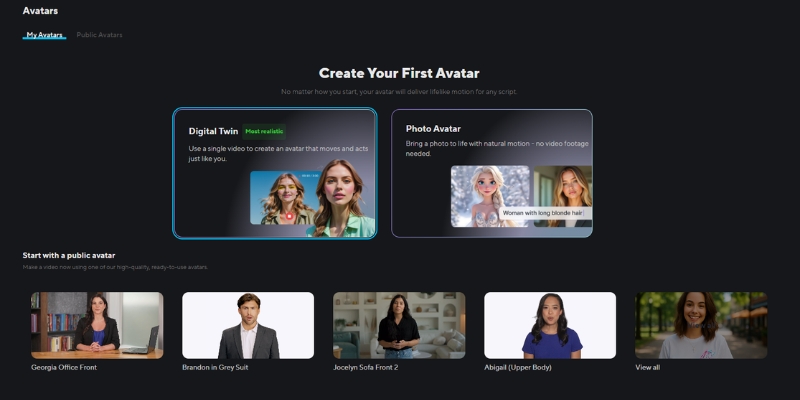
When discussing the HeyGen review, we are talking about the tool that currently defines the “state of the art” in this industry. We have tested it extensively for client deliverables, and the results are often shocking in their realism.
Visual Quality & Realism:
The standout feature of HeyGen is the total absence of the “uncanny valley” effect. The avatars feature realistic skin texture, natural lighting, and micro-gestures (like slight head nods or eyebrow raises) that sync perfectly with the speech. In our tests, audiences often couldn’t tell the avatar was AI-generated.
The “Instant Avatar” Feature:
This is HeyGen’s killer entity. You can upload a 2-minute video of yourself recorded on a smartphone, and within minutes, HeyGen creates a digital twin. Unlike older tech, this Instant Avatar allows you to produce unlimited content without ever filming again. It is a game-changer for CEOs and course creators.
Video Translation Capabilities:
HeyGen doesn’t just dub audio; it modifies the lip movements of the avatar to match the new language. This “Video Translate” feature allows a marketing video in English to be effortlessly localized into Spanish, Japanese, or German with perfect lip-sync.
The Downside:
Quality comes at a cost. HeyGen operates on a strict credit-based system. One credit equals one minute of video, and these credits can burn fast if you are iterating. It is a premium tool positioned against competitors like Synthesia, not free mobile apps.
Vidnoz AI Review: Is It the Best Free HeyGen Alternative?
Moving on to our Vidnoz review, this tool positions itself aggressively as the “free AI video generator” for the masses. If HeyGen is the expensive studio, Vidnoz is the bustling, accessible creative workshop.
The Free Plan Advantage:
Vidnoz understands its users perfectly. They offer a “daily free credit” system, meaning you can come back every day to generate short videos without ever pulling out a credit card. For students or freelancers with zero budget, this makes Vidnoz the ultimate free HeyGen alternative.
Unique Feature – AI Face Swap:
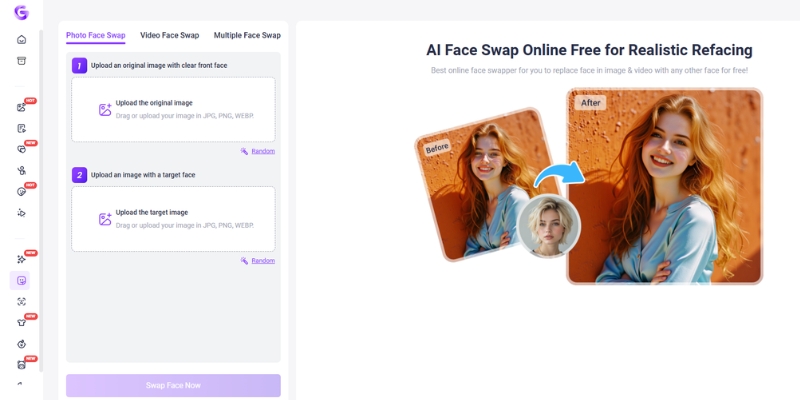
This is a feature HeyGen explicitly avoids. Vidnoz allows you to take any photo or video and swap faces with another character. It is incredibly popular for creating viral memes or entertaining social media content. While less “corporate,” it is a powerful tool for engagement.
Ease of Use & Templates:
The platform is gamified and intuitive. Vidnoz provides hundreds of pre-made templates specifically designed for vertical formats like TikTok and Instagram Reels. You don’t need to be a video editor; you just drag, drop, and type your script.
The Trade-off:
We must be honest: the output quality is lower than HeyGen. The avatars can feel slightly “floaty,” and the voices may sound a bit more robotic. Also, the free plan stamps a Vidnoz watermark on your videos, which might be a dealbreaker for professional client work.
Head-to-Head Feature Comparison: Capabilities & Output Quality
Let’s break down the technical specifications. We analyzed heygen vs vidnoz across four critical performance metrics.
Avatar Realism (Lip-Sync):
HeyGen: Offers near-perfect lip synchronization. The mouth movements match phonemes accurately, even with fast-paced speech.
Vidnoz: Good, but looser. You might notice a slight delay or “mouthing” effect where the lips move generically rather than precisely matching the words.
Voice Quality (TTS Engines):
HeyGen: Integrates top-tier voice engines (including ElevenLabs technology), resulting in warm, breathing, and emotionally resonant voices.
Vidnoz: Offers a wide variety of voices, but they tend to sound flatter. They are perfectly functional for tutorials but lack the emotional nuance for storytelling.
Video Customization:
HeyGen: The editor feels like “Canva for Pros.” You have granular control over layers, assets, and even script timing. It supports 4K resolution export.
Vidnoz: A simpler, more streamlined editor. It focuses on speed. You have fewer fine-tuning options, but it’s faster to slap together a quick video.
Processing Speed:
HeyGen: Slower rendering times (approx. 1-2 minutes for a 1-minute video) due to high-fidelity processing.
Vidnoz: Faster rendering for standard quality, making it ideal for quick iterations.
The “Face Swap” vs. “Instant Avatar” Battle: Which Feature Do You Need?
Understanding the difference between these two core entities is crucial for choosing the right tool. They serve entirely different user intents.
HeyGen’s Instant Avatar (For Personal Branding):
This feature is about identity extension. It is designed for you to clone yourself. It requires strict consent (you must record a video statement granting permission). This is for scaling a founder’s presence, automating sales outreach, or creating consistent educational content.
Vidnoz’s Face Swap (For Content Creation):
This feature is about entertainment and creativity. It allows you to swap faces onto other bodies or existing videos. It is less about “identity” and more about “virality.” You use this to create funny clips, parody videos, or dynamic social media posts that grab attention quickly.
Use Case Scenarios:
– Use HeyGen if you need to send a personalized video email to 100 prospects appearing to be recorded by you.
– Use Vidnoz if you want to put your friend’s face on a superhero body for a funny birthday greeting video.
Pricing Analysis: Credits, Plans, and Hidden Costs
Price is often the deciding factor. Here is how the heygen vs vidnoz free plan comparison stacks up financially.
| Feature | HeyGen (Paid Focus) | Vidnoz (Free Focus) |
|---|---|---|
| Free Plan | Limited Trial (1 credit, non-renewable) | Daily Free Credits (Renewable) |
| Starting Price | ~$24/month (15 credits) | ~$19.99/month (Higher limits) |
| Watermark | None on Paid Plans | Yes (Removable on Paid) |
| Video Resolution | Up to 4K | 1080p (720p on Free) |
| Best For | ROI-focused Businesses | Budget-conscious Creators |
| Link | View Pricing | View Pricing |
HeyGen Pricing Structure:
HeyGen uses a credit system where 1 credit = 1 minute of video. The credits reset monthly. It is an investment. If you are a business, the ROI comes from the time saved not filming. However, if you run out of credits, you must upgrade or wait.
Vidnoz Pricing Structure:
Vidnoz is cheaper per minute. Their “Generous Free Plan” is their biggest hook, allowing you to use the tool indefinitely with limitations. Upgrading removes the watermark and unlocks better processing, but the gap between free and paid is smaller than HeyGen.
The “Free” Reality:
Don’t be fooled. HeyGen’s free plan is a “Demo” – it’s there to test the tech. Vidnoz’s free plan is a “Tier” – it’s a usable product for hobbyists. If you need a free HeyGen alternative for the long term, Vidnoz is the only viable option here.
Who Should Choose What? Final Recommendations
To wrap up this comparison, let’s simplify your decision based on who you are.
Choose HeyGen If:
You are a business owner, marketing agency, or educator. You need content that builds trust. You cannot afford low-resolution video or mismatched lip-sync. You view the monthly subscription as a production cost that replaces a camera crew.
Choose Vidnoz If:
You are a freelancer, student, or social media manager starting with zero budget. You need to pump out content for TikTok or Shorts where “perfect quality” matters less than “entertainment value.” You specifically want to use the Face Swap feature for creative projects.
The “Hybrid” Approach:
We often recommend using Vidnoz to draft ideas and storyboard concepts because it’s free. Once the script and flow are approved, use HeyGen to render the final high-quality version for your client or website.
Ready to start creating?
Frequently Asked Questions About HeyGen vs Vidnoz
Is Vidnoz completely free?
Vidnoz offers a “forever free” plan that provides free credits daily. However, these videos will have a watermark, lower resolution, and shorter duration limits compared to the paid plans.
Can I use HeyGen avatars in Vidnoz?
No, the platforms are not compatible. You cannot export a custom avatar from HeyGen and import it into Vidnoz. You must choose one ecosystem for your avatar assets.
Which tool is better for YouTube automation?
For long-form YouTube content (faceless channels), HeyGen is superior. The viewer retention will be higher due to the natural voice and non-robotic movements, which prevents viewers from clicking away.
Does Vidnoz have a watermark?
Yes, the free plan includes a visible watermark. You must upgrade to a paid subscription to remove it.
What is the best free HeyGen alternative?
Based on our testing, Vidnoz is the top free contender due to its renewable daily credits. Other options exist, but they often have stricter limits or lower quality.
Read More From AI Avatar Generator
If you found this comparison helpful, dive deeper into our other battle-tested reviews and guides to master your AI video production workflow.
- HeyGen Pricing Explained: Is the Free Plan Enough?
- How to Use Vidnoz (Get Started with the Best Free Tool)
- Best AI Video Generators 2025: The Ultimate Battle-Tested Review
last update : 19/11/2025
