
How to Use HeyGen: The Ultimate Step-by-Step Guide for Marketers (2025)
Learning how to use HeyGen is the single most effective skill you can acquire to automate your video production workflow in 2025. In the current content landscape, speed is everything, and this tool allows you to generate professional results without ever touching a camera.
As an AI Avatar Generator expert, I know that relying on traditional filming crews is no longer sustainable for daily social media content. The industry pressure to perform is real, and you need tools that deliver high ROI immediately.
This article acts as a practical, battle-tested guide for marketers and creators. We will cover everything from creating your first video to mastering the Instant Avatar feature and maximizing your credits.
Table of Contents
Getting Started: What Is HeyGen and Why Use It?
HeyGen creates videos from text. Put simply, it is an AI video generator platform that allows you to produce studio-quality videos using AI avatars and synthetic voiceovers. It eliminates the need for cameras, lighting equipment, and actors.
For marketers and freelancers, this tool addresses a critical pain point: the lack of time and resources. In our experience, traditional video production is slow and expensive. HeyGen serves as a scalable alternative for creating training videos, marketing clips, and social content.
The key benefit here is Marketing Content Creation efficiency. You can update a script and regenerate a video in minutes, keeping your content fresh. This is vital for maintaining a consistent presence on social media platforms.
While there are other tools on the market, HeyGen stands out for its ease of use and realistic output. It is not just a tool; it is a complete production studio in your browser.
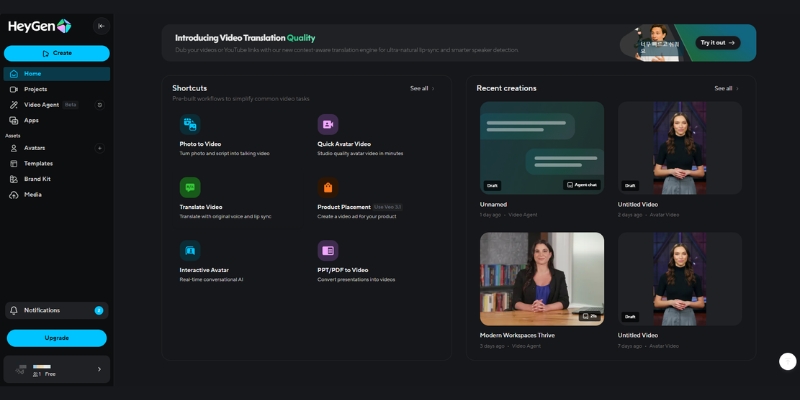
Master the Workflow: How to Use HeyGen to Create Videos (Step-by-Step)
Creating a video with the HeyGen tutorial workflow is straightforward. We have broken down the process into four actionable steps that will take you from a blank canvas to a finished video in under 10 minutes.
Step 1: Select Your Avatar
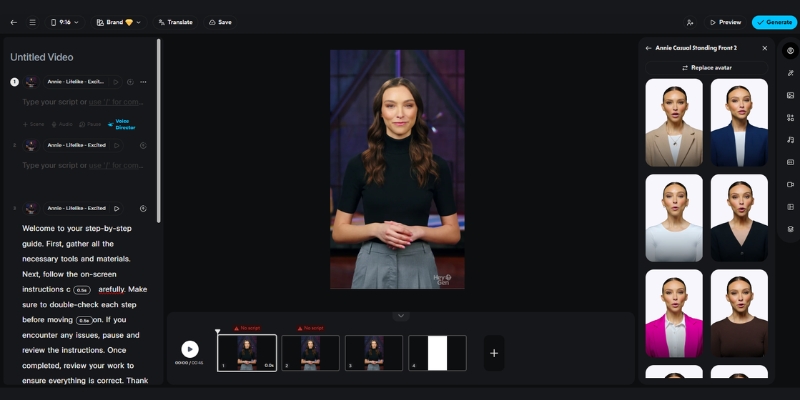
Navigate to the “Avatar” tab. Here you can choose a Stock Avatar (professional actors), an Instant Avatar (your digital twin), or a Photo Avatar. For generic marketing videos, stock avatars work best. For personal branding, use your own custom avatar.
Step 2: Input Your Script
Once your avatar is placed on the canvas, paste your script into the text box. You can type it manually or use the built-in ChatGPT integration to generate ideas. Alternatively, upload an audio file if you already have a real voiceover recording.
Step 3: Choose a Voice
Click on the voice settings to browse the library. You can filter by language, accent, and gender. In our tests, the Text-to-Speech engine is highly accurate, but we recommend previewing a few options to find one that matches your brand’s tone.
Step 4: Customize and Generate
Add text overlays, change the background color, or insert images to support your message. When satisfied, click “Submit” to generate video. This action will consume your credits, so double-check your work before finalizing.
Customization Guide: How to Create a HeyGen Instant Avatar & Photo Avatar
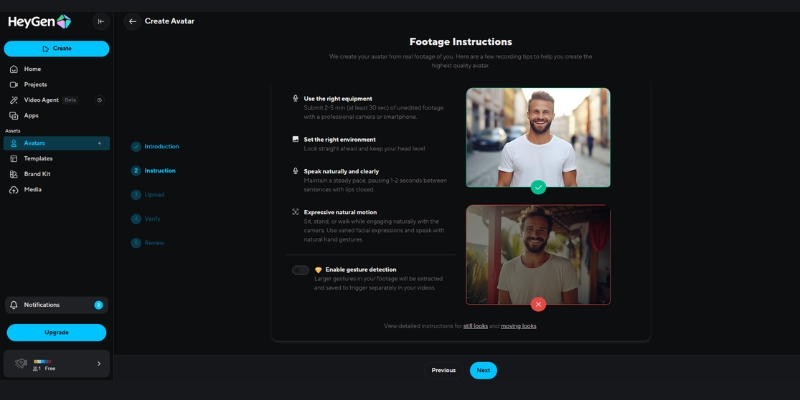
The real power of this platform lies in its custom avatar capabilities. Knowing how to use HeyGen Instant Avatar can transform your workflow by allowing you to “film” videos without actually being on camera every time.
Creating an Instant Avatar (Webcam)
This feature creates a high-quality digital twin. To start, click “Instant Avatar” and follow the instructions to record a 2-minute footage of yourself via webcam or upload a file. Ensure you have good lighting and look directly at the camera lens.
Using the Photo Avatar (Talking Photo)
This is perfect for animating static images, such as historical figures or mascots. Upload a portrait photo, type your script, and the AI will animate the mouth and facial expressions. It is a fun feature for engagement but less professional than the Instant Avatar.
Practical Use Cases
We recommend using Instant Avatars for daily social media updates or personalized sales outreach. It builds trust because it looks like you. Use Photo Avatar for explainer videos where a mascot or character fits the narrative better.
Going Global: How to Use HeyGen Video Translate Feature
One of the most impressive features we have tested is the Video Translate tool. It allows you to localize your content for international markets without re-recording a single frame. This is a game-changer for global marketing teams.
The Power of Translation
HeyGen does not just dub the audio; it uses AI to adjust the lip movements of the avatar (lip-sync) to match the new language. This results in a natural-looking video that feels native to the viewer.
How to Execute Video Translate
First, upload your source video file to the “Video Translate” lab. Next, select your target language from the list of over 40 supported languages (e.g., Spanish, French, Japanese). Finally, click to process the translation.
Benefit for Marketers
We found that using this feature can instantly multiply your content’s reach. Instead of creating one video for one market, you can repurpose a single asset into ten different languages, maximizing your content ROI significantly.
Expert Tips: How to Make Your HeyGen Videos Look Natural & Professional
While the AI is powerful, a few human touches can make the difference between a robotic clip and a professional production. Here are our expert tips on how to create AI videos that feel authentic.
Script Optimization
Don’t just copy-paste a block of text. Add commas, periods, and line breaks to force the AI voice to pause naturally. This mimics human breathing patterns and makes the delivery less monotonous.
Background Choice
Avoid cluttered backgrounds. We recommend using clean, solid colors or professional office environments provided in the library. This keeps the viewer’s focus strictly on the avatar and your message.
Editing and B-roll
For the best results, treat the generated video as “raw footage.” Export it and use a tool like CapCut or Premiere Pro to add B-roll, dynamic text, and background music. This significantly elevates the production value.
Avatar Selection Strategy
Match the avatar’s outfit and style to your platform. Use casual avatars for TikTok or Instagram Reels, and switch to formal, suit-wearing avatars for LinkedIn or corporate training videos.
The Investment: HeyGen Pricing, Credits, and Free Trial Explained
Before committing, it is crucial to understand the cost structure. The HeyGen pricing model is credit-based, which can be confusing for new users. Here is the breakdown of what you are actually paying for.
Understanding the Credit System
Typically, 1 credit equals 1 minute of generated video. If you generate a 30-second clip, it uses 0.5 credits. This means you need to plan your scripts carefully to avoid wasting paid credits on draft versions.
Free Trial vs. Paid Plans
The free trial usually offers 1 free credit with a watermark. This is enough to test the Instant Avatar feature and render time. Paid plans remove the watermark, unlock 4K resolution, and provide API access.
ROI Analysis
While the monthly fee might seem high compared to basic apps, compare it to the cost of a studio day. For $29-$59/month, you get a “studio” available 24/7. For high-volume creators, the time saved justifies the expense immediately.
| Plan | Best For | Key Feature | Action |
|---|---|---|---|
| Free | Beginners / Testing | 1 Credit, Watermarked | Try For Free |
| Creator | Freelancers | 15 Credits/mo, No Watermark | View Plan |
| Team | Agencies | 30 Credits/mo, 4K Resolution | View Plan |
(Disclosure: If you purchase through links on this page, we may earn a small commission at no extra cost to you. This helps us maintain our “battle-tested” reviews.)
Expert Verdict
If you are a marketer looking to scale video production, HeyGen is currently the best-in-class tool for realistic AI avatars. The learning curve is minimal, and the Instant Avatar feature is a genuine innovation that saves hours of filming time.
Start Your Free Trial NowFrequently Asked Questions About Using HeyGen
Is HeyGen free to use?
HeyGen offers a free trial that includes 1 credit to test the platform. However, the videos will have a watermark. To remove it and unlock more features, you will need to upgrade to a paid subscription.
How long does it take to generate a video?
Generation time depends on server load and video length. In our experience, a 1-minute video typically takes about 5 to 10 minutes to render. Instant Avatars may take slightly longer during the initial setup phase.
Can I use my own voice in HeyGen?
Yes, you can. You can upload a pre-recorded audio file, and the avatar will lip-sync to it. There is also a voice cloning feature that allows you to create a synthetic version of your own voice for text-to-speech.
Is HeyGen better than Synthesia?
Both are excellent, but they serve different needs. We find HeyGen superior for personal branding due to its “Instant Avatar” (webcam) feature. Synthesia is often preferred for large-scale corporate training libraries.
Read More From AI Avatar Generator
Expand your knowledge with our detailed comparisons and reviews of other top tools in the industry. We have battle-tested these platforms so you don’t have to.
- Synthesia vs HeyGen: Which AI Avatar Tool Wins?
- HeyGen vs Vidnoz: The Free AI Avatar Tool Battle
- How to Create AI Videos (Tutorials & Best Practices)
- Top Rated AI Avatar Generators Reviewed
- In-Depth HeyGen Review: Is It Worth The Hype?
last update : 21/11/2025
