
Vidnoz Review 2025: The Ultimate Verdict for Marketers & Creators
This Vidnoz review dives deep into a tool that tackles the “performance pressure” many marketers and creators face today. If you’re looking for a free alternative to expensive platforms like HeyGen or Synthesia to speed up video production, you’ve come to the right place. As a leading AI Avatar Generator, Vidnoz offers a compelling set of features, but does it truly deliver for professional use? In this battle-tested analysis, we break down its Free Plan, put its core features like Face Swap and Talking Photo to the test, and give you a clear verdict on whether it’s the right fit for your workflow.
Table of Contents
Vidnoz Review 2025: The Verdict for Marketers & Creators
Let’s get straight to the point. For marketers, creators, and freelancers on a tight or non-existent budget, Vidnoz is an absolute game-changer. It is, without a doubt, the best free AI video generator on the market right now.
Our final verdict is this: Vidnoz is the go-to choice for creating short-form social media videos, personal projects, or testing AI video concepts without any financial commitment. However, this comes with specific trade-offs in avatar quality and features when compared to paid giants like HeyGen and Synthesia.
We’ve spent hours conducting this Vidnoz AI review, testing both the free and paid plans across real-world marketing scenarios to give you a truly practical breakdown.
Quick Ratings Snapshot:
- Ease of Use: 4.5/5
- Free Plan Generosity: 5/5
- Avatar Quality: 3.5/5
- Features (Face Swap, etc.): 4/5
- Overall Value: 4.5/5
(Disclosure: If you purchase through links on this page, we may earn a small commission at no extra cost to you. This helps us maintain our “battle-tested” reviews.)
What is Vidnoz AI and How Does It Solve Your Content Bottleneck?
In simple terms, Vidnoz is an AI-powered tool that lets you create videos featuring a talking avatar (a “talking head”) just by typing in text. It eliminates the need for cameras, microphones, or actors.
For creators and marketers under immense ‘performance pressure,’ Vidnoz solves a core problem: it automates the most repetitive and time-consuming video tasks. This allows you to produce content at scale, saving countless hours of filming and editing, and reducing costs associated with hiring talent.
With Vidnoz, you can easily:
- Create professional-looking talking avatar videos from text scripts.
- Make any static photo come to life and speak with the Talking Photo feature.
- Swap faces in videos and images for fun, viral content.
- Choose from hundreds of pre-made video templates to start creating in seconds.
Ultimately, Vidnoz serves as a powerful and accessible entry point into the world of AI video creation, offering significant value without the hefty price tag of premium tools like Synthesia.
A Deep Dive into the Vidnoz Free Plan: What You *Really* Get
This is where Vidnoz truly stands out. The Vidnoz free plan is the most generous we’ve seen in the entire AI avatar generator market, making it incredibly appealing for anyone wanting to test the waters or those with zero budget.
Video Minutes Per Day
You get between 1 to 3 minutes of video generation credits per day. This credit pool resets every 24 hours. While it’s not a lot, it’s more than enough to create a short TikTok video, an Instagram Reel, or a quick explainer clip for a social media post each day, for free.
Number of AI Avatars
The free plan gives you access to a solid library of over 300 free stock avatars. The diversity is quite good, covering various ethnicities, ages, and professional attire, though the overall quality isn’t as polished as premium competitors.
Voice Options
You can access a wide range of AI voices in over 100 languages. The quality of the free AI voices is decent and clear, but some can sound slightly robotic and lack the natural intonation found in higher-end tools.
The Watermark
This is the biggest trade-off. All videos created with the free plan will have a Vidnoz watermark. It’s noticeable but not overly distracting, typically placed in a corner. For professional client work, this is a dealbreaker, but for personal projects or internal tests, it’s a fair price for a free service.

Video Resolution
Free videos are exported at 720p resolution. This quality is perfectly acceptable and suitable for most social media platforms like TikTok, LinkedIn, or Instagram Reels where users are viewing on smaller screens.
Feature Access
Impressively, key features like the Face Swap tool and Talking Photo are included in the free plan. They have their own usage limits but allowing free users to access these powerful, often-paid features is a major advantage for Vidnoz.
Testing Vidnoz’s Core Features: AI Avatars, Face Swap, and More
We put Vidnoz’s most popular features to the test to see if they deliver on their promises for real-world marketing and content creation tasks. Here’s our hands-on review of Vidnoz features.
AI Avatar Generator (Talking Head)
Creating a standard talking avatar video is incredibly straightforward. You pick an avatar, type or paste your script, choose a voice, and generate. The lip-syncing is surprisingly accurate for a free tool, and the basic head movements are natural enough for social media content. While the avatar quality and realism are not at the same level as the hyper-realistic avatars from Synthesia alternatives, they are more than sufficient for many use cases.
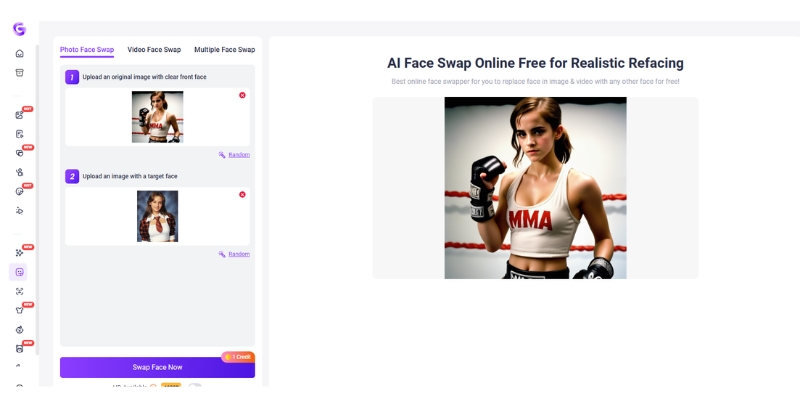
Face Swap Feature
The Vidnoz Face Swap is a unique and powerful feature not commonly found in other AI avatar tools. It allows you to upload a photo of a face and swap it onto a person in a video or another image. We found its accuracy to be quite impressive for creating funny memes or engaging, viral-style marketing content. It’s a fantastic tool for creators looking to stand out.
AI Talking Photo (Photo Avatar)
This feature lets you animate a static portrait photo, making it speak your script. It’s an excellent tool for personalizing sales outreach (imagine sending a prospect a talking photo of yourself) or creating unique content from historical figures or even illustrations. The animation is limited mostly to the mouth and slight head movements, but the effect is convincing and a huge value-add on the free plan.
Video Templates
Vidnoz offers a large library of pre-made video templates for various use cases like social media ads, e-learning, and corporate communications. For beginners, these templates are a massive time-saver. They provide a solid starting point with backgrounds, text overlays, and avatar placements already set up. The designs are modern and genuinely useful for marketers.
Vidnoz vs HeyGen: Is the Free Alternative Good Enough?
Many users come to Vidnoz looking for a free HeyGen alternative. We compared them head-to-head to see where Vidnoz shines and where HeyGen’s price is justified. Our detailed HeyGen vs Vidnoz comparison covers more ground, but here’s the quick breakdown.
| Feature | Vidnoz (Free Plan) | HeyGen (Free Plan) |
|---|---|---|
| Daily Video Credits | 1-3 minutes per day | 1 minute total (1 credit) |
| Watermark | Yes, Vidnoz logo | Yes, HeyGen logo |
| Avatar Quality & Realism | Good (3.5/5) | Excellent (4.5/5) |
| Included Unique Features | Face Swap, Talking Photo | Basic Avatar Creation |
| Voice Cloning | No | No (Paid feature) |
| Export Quality | 720p | 1080p |
Analysis: For users with zero budget who need to produce short-form content regularly, Vidnoz is the undisputed winner. Its daily renewing credits are far more generous than HeyGen’s one-time total credit. However, for users who need the absolute highest quality avatars and a more polished final product for professional presentations or corporate training, HeyGen’s paid plans are superior and worth the investment.
Vidnoz Pricing Plans Explained: When to Upgrade from the Free Tier
While the free plan is fantastic, there are clear triggers for when upgrading makes sense. The Vidnoz cost structure is designed to scale with your needs, from individual projects to full team collaboration.
Free Plan
Recap: Best for testing the platform, personal projects, and very light use where a watermark is acceptable.
Starter Plan (Approx. $14.99/mo billed annually)
This plan is perfect for freelancers and small content creators. The key benefits of upgrading are game-changing for professional use: no watermark, more video minutes per month (e.g., 15 mins), and 1080p export quality. If you need to produce videos for clients or your own brand, this is the essential next step. You can explore the Starter Plan here.
Business Plan (Approx. $37.49/mo billed annually)
Aimed at marketing teams and agencies, this tier includes everything in Starter plus advanced features. You get significantly more video minutes, custom avatar uploads, team collaboration workspaces, and priority support. This is the choice for businesses integrating AI video deeply into their content strategy.
Our Advice: Start with the free plan to learn the ropes and see if it fits your workflow. Upgrade to the Starter plan the moment you need to remove the watermark for client work or professional branding. The value is immediate and well worth the cost.
My Honest Take: The Pros and Cons of Using Vidnoz AI
After extensive testing, here is our straightforward breakdown of the Vidnoz pros and cons.
Pros
- Unbeatable Free Plan: The most generous daily limits in the industry make it truly usable without paying.
- Unique Features: The built-in Face Swap and Talking Photo tools provide creative possibilities not found in many competitors.
- User-Friendly Interface: It’s extremely intuitive. Beginners can create their first video in under 5 minutes.
- Large Template Library: A huge selection of templates significantly speeds up the video production process.
Cons
- Avatar Quality: While good for a free tool, the avatars are not as realistic or polished as top-tier competitors like Synthesia or HeyGen.
- Prominent Watermark: The watermark on the free plan is noticeable and can be a dealbreaker for professional use cases.
- Slightly Robotic Voices: Some of the free AI voices lack the natural cadence and intonation of premium voice engines.
- Limited Customization: You have less control over avatar appearance and movements on the free plan compared to paid tools.
Who is Vidnoz AI Best For? (And Who Should Avoid It)
Is Vidnoz AI free good enough for you? Here’s our clear, actionable advice tailored to our audience.
Vidnoz is a perfect fit for:
- Marketers & Freelancers on a Budget: Ideal for creating social media ads, short explainer videos, and testing campaign ideas without any upfront investment. It’s one of the best free AI video generators available.
- Content Creators: A fantastic tool for quickly producing short-form video content for TikTok, Instagram Reels, and YouTube Shorts.
- Students & Hobbyists: A powerful, completely free tool for creating impressive personal projects and school presentations.
You might want to consider alternatives if:
- You Need Maximum Realism: For high-stakes corporate training videos or presentations to enterprise clients, the superior polish of Synthesia may be required.
- You Cannot Have a Watermark (and can’t pay): If your project has a strict no-watermark policy and you have zero budget, you’ll be out of luck with any free AI tool.
- You Need Advanced Voice Cloning: If creating a perfect clone of a specific voice is your priority, the paid plans from HeyGen offer more advanced capabilities.
Frequently Asked Questions About Vidnoz
Is Vidnoz AI really free to use?
Yes, Vidnoz has a permanently free plan that offers generous daily video creation credits. The main limitations are a watermark on exported videos and a maximum resolution of 720p.
How good is the Vidnoz AI avatar generator?
For a free tool, the Vidnoz AI avatar generator is excellent. The lip-sync is accurate, and the selection of stock avatars is large. However, premium competitors like HeyGen and Synthesia offer avatars with a higher degree of realism and more natural movements.
Can I use Vidnoz without a watermark?
Not on the free plan. To download videos without the Vidnoz watermark, you must upgrade to a paid subscription, such as the entry-level Starter plan.
Is Vidnoz better than HeyGen?
Vidnoz’s free plan is significantly better and more generous than HeyGen’s free plan due to its daily renewing credits. However, HeyGen’s paid plans generally offer higher-quality avatars, more natural voices, and more advanced features like voice cloning.
Is Vidnoz AI safe and legit?
Yes, Vidnoz AI is a legitimate and safe software company. It is a widely-used AI video generation tool with millions of users and is not a scam. Your data is handled according to their privacy policy.
Read More From AI Avatar Generator
If you found this Vidnoz review helpful, continue exploring our expert, battle-tested guides and comparisons within the AI Avatar Generator category to find the perfect solution for your creative and marketing needs.
- HeyGen Review: The Best Synthesia Alternative?
- Best AI Video Generators 2025: The Ultimate Battle-Tested Review
- 10 Synthesia Alternatives (Free & Paid)
last update : 18/11/2025
