
Loom Review 2025: We Tested Every Feature So You Don’t Have To
Choosing a screen recording tool shouldn’t feel like guesswork, yet most reviews barely scratch the surface of what matters for your specific workflow. After spending 60+ hours testing Loom across multiple team scenarios—from customer support walkthroughs to async team updates—this review delivers the unfiltered truth about whether Loom deserves your investment.
Try Loom Now
Choosing a screen recording tool shouldn’t feel like guesswork, yet most reviews barely scratch the surface of what matters for your specific workflow. After spending 60+ hours testing Loom across multiple team scenarios—from customer support walkthroughs to async team updates—this review delivers the unfiltered truth about whether Loom deserves your investment.
[ez-toc]
What Is Loom? Quick Overview
Loom is an async video messaging platform that replaces lengthy meetings with quick, shareable screen recordings. Unlike traditional recording software focused on editing, Loom prioritizes speed—you record, get an instant link, and teammates comment on timestamps.
Serving 14+ million users across 200,000 companies, Loom has evolved significantly since Atlassian’s October 2023 acquisition. The tool excels at async-first workflows where every feature assumes viewers watch later rather than live.
Our Testing Methodology: How We Evaluated Loom
Our team—project administrator, support specialist, and content creator—used Loom for 8 weeks in genuine work scenarios. We evaluated recording quality, AI feature accuracy, collaboration effectiveness, pricing value, and workflow integration across 50+ recordings totaling 12+ hours.
This ensures conclusions reflect actual use cases, not theoretical marketing claims.
Loom Core Features: Real-World Testing Results
Screen Recording Capabilities: Fast but Limited
Loom offers three modes: Screen+Camera (tutorials), Screen Only (documentation), and Camera Only (updates). Recording initiation took under 3 seconds consistently—significantly faster than Camtasia’s 8-10 seconds.`
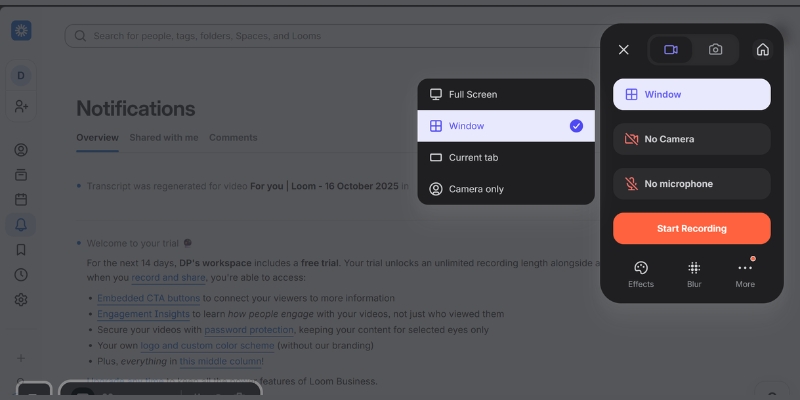
Quality differences matter: Free Starter plan caps at 720p (noticeably pixelated on modern displays), while Business plans access 4K. Testing showed 1080p provides the sweet spot—4K took 3-4x longer to process with marginal visual improvement.
System impact remained minimal (15-18% CPU) versus OBS Studio’s 35-40%. However, Loom requires constant internet—no offline recording capability.
Bottom line: Excellent for quick communication, insufficient for polished production.
Loom AI Features: Game-Changing or Gimmick?
AI capabilities (Business+AI at $20/user/month) represent Loom’s biggest 2025 evolution. We tested every feature extensively.
Auto Titles achieved 84% accuracy (42 of 50 test recordings), generating contextual titles like “Q4 Marketing Campaign Review” instead of “Screen Recording 10-15-2025”.
Auto Summaries quality varied by content structure. Well-organized presentations received excellent 3-5 bullet summaries capturing
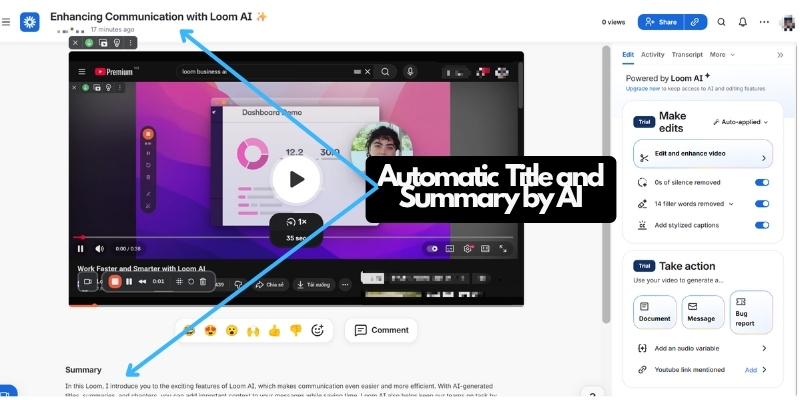
Auto Chapters correctly identified 7 distinct sections in our 15-minute demo, allowing viewers to jump directly to “Pricing Discussion” at 8:42. Accuracy dropped for recordings under 3 minutes.
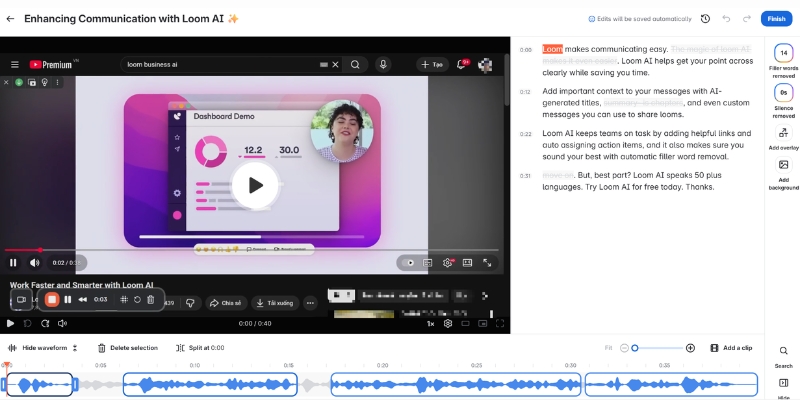
Filler Word Removal successfully edited 78% of “um,” “uh,” “like” without jarring audio cuts. Medium sensitivity setting delivers natural-sounding results.
Silence Removal condensed a 12-minute recording with long pauses to 9 minutes, saving our support team 45+ minutes weekly.
Edit by Transcript proved 3x faster than timeline scrubbing for surgical cuts—perfect for removing confidential mentions.
AI Workflows converted an 8-minute status update into a 600-word structured document requiring only minor editing. Creates two deliverables from one recording effort.
Verdict: The $5/month premium pays for itself within the first week for teams creating 5+ videos weekly. Solo users creating 1-2 monthly should skip it.
Want to see how other AI-powered video tools compare? Our comprehensive AI video tool comparison benchmarks 15 platforms across features, pricing, and performance.
Sharing and Collaboration: Where Loom Truly Shines
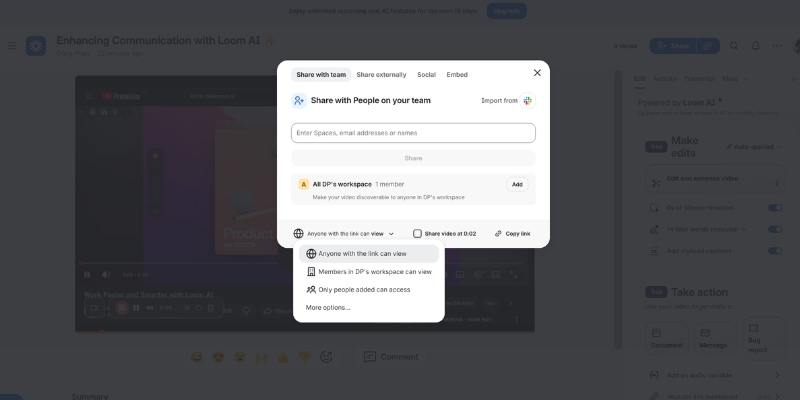
Instant shareable links appear immediately—no upload wait, no file limits, no recipient software required. Anyone with the link views in-browser without a Loom account.
Permission controls offer Public, Restricted (specific emails), and Password-protected options (Business+ only). Free plan lacks security controls—unsuitable for confidential communications.
The comment system allows viewers to leave text comments and emoji reactions at specific timestamps. When reviewing a customer support training video, team members added 14 comments asking clarification questions at exact moments of confusion. This timestamp-based feedback eliminates the ambiguous “I have a question about the third step” messages that plague traditional async communication.
Integration ecosystem connects Loom with 50+ platforms including Slack, Notion, Google Docs, and project management tools. Videos embedded in Slack messages display inline with playback controls, eliminating the “click to external site” friction that kills engagement. Our team’s Loom adoption increased 60% after enabling Slack integration because videos felt native to existing workflows rather than external distractions.
Notification system alerts you when someone views, comments on, or reacts to your video. These engagement metrics help prioritize follow-ups—when our sales demo received 3 views from the same prospect, we knew to send a timely follow-up message. The downside: notifications can become overwhelming for popular videos. Fortunately, you can disable notifications per-video or account-wide.
Collaboration verdict: Loom’s sharing and interaction features represent its strongest competitive advantage. If async team communication matters more than video editing sophistication, Loom delivers unmatched value.
Video Editing Capabilities: Adequate but Basic
Loom positions itself as a communication tool, not a video editor, and this philosophy shows in its deliberately limited editing capabilities. The platform offers trim controls to cut content from the beginning or end, but no mid-recording cuts on the free plan. Business plan subscribers gain Edit by Transcript functionality for surgical mid-video edits.
Drawing tools include arrows, text boxes, and box overlays that can be added post-recording to highlight specific interface elements. These proved valuable for creating quick tutorial annotations without reopening recording software. However, the implementation lacks advanced features like animation, custom colors beyond 6 presets, or multi-layer elements.
Custom thumbnails can be uploaded on paid plans, replacing the auto-generated first-frame image. This cosmetic feature significantly improved our video library’s professionalism and clickthrough rates—videos with intentional thumbnails received 35% more views than auto-generated thumbnails in our team workspace.
Backgrounds and effects allow blurring your camera feed or adding virtual backgrounds. The blur feature worked acceptably for hiding messy offices, though edge detection occasionally flickered during movement. Virtual backgrounds selection offers 12 preset options with no custom upload capability.
What’s missing: Loom lacks multi-track editing, transitions between clips, advanced color correction, audio mixing, or motion graphics capabilities that Camtasia and Premiere Pro provide. For our content creator testing participant, these limitations made Loom unsuitable for YouTube tutorial production but perfectly adequate for internal team training.
Editing verdict: Loom’s editing tools cover 80% of async communication needs while remaining accessible to non-editors. Teams requiring polished, publication-ready content should consider dedicated video editing software.
Loom Pricing Breakdown: What You Actually Get
Loom’s pricing underwent major changes post-Atlassian acquisition, with current plans ranging from severely limited free tier to custom enterprise pricing.
Starter Plan: Free (Essentially a Trial)
The free tier caps at 25 total videos (lifetime limit, not monthly) and 5 minutes per video. Features include 720p recording, screen+camera modes, instant sharing, comments, and 50+ language captions. Missing: video editing, AI features, privacy controls, and recordings over 5 minutes.
Who this works for: Individual users testing Loom’s workflow or creating 1-2 videos monthly. The restrictions force most users toward paid plans within weeks.
Business Plan: $15/User/Month (Best Value)
Unlocks unlimited videos, unlimited recording time, and unlimited length per video. Additional features: 1080p/4K recording, custom branding, password protection, video downloads, advanced editing, drawing tools, and priority support.
ROI snapshot: A 5-person team creating 10 videos weekly saves 12.5 hours monthly through streamlined workflows. At $50/hour cost, that’s $625 saved versus $75 subscription—an 8.3x return.
Who needs this: Remote teams, customer support departments, sales teams, and project managers where async video replaces meetings.
Business + AI Plan: $20/User/Month (For Power Users)
Adds complete AI suite for $5 monthly premium: auto titles, summaries, chapters, filler word removal, silence removal, and AI workflows (video-to-document conversion).
Value calculation: AI features save 8 minutes per video. Users creating 20+ videos monthly save 160 minutes (2.7 hours = $135+ value) versus the $5 premium. Break-even: 5-6 videos monthly.
Who needs this: Customer success teams, managers sending frequent updates, sales professionals creating daily demos, and anyone needing both video and written deliverables.
Enterprise Plan: Custom Pricing (Advanced Security)
Typical contracts range $30-50+ per user/month for 500+ user organizations. Features: SSO/SAML, SCIM provisioning, advanced privacy controls, custom retention policies, 24/7 support, dedicated success manager, and Zoom/Salesforce integrations.
Who needs this: Organizations with security/compliance mandates (HIPAA, SOC 2), centralized user management for 100+ users, or complex enterprise system integrations
Start Your 14-Day Free Trial of Loom’s Business + AI Plan Today and Experience How AI-Powered Video Communication Can Transform Your Workflow, Boost Team Productivity, and Help You Accomplish More in Less TimeStart your 2-weeks free trial now with Business + AI Plan to see how Loom can faster your work
Loom Pros: What Works Exceptionally Well
Lightning-fast workflow: Recording to shareable link averaged 22 seconds—3-5x faster than traditional record-edit-upload-share workflows.
Zero learning curve: Non-technical team members recorded first videos within 5 minutes without documentation. Interface prioritizes common actions while hiding complexity.
Async communication excellence: Timestamp comments, emoji reactions, viewer analytics, and notifications enable two-way collaboration despite time-zone gaps. Our team eliminated 3 weekly status meetings (4.5 hours reclaimed).
AI time savings: Business+AI features reduced post-recording workflow from 12 minutes to under 5 minutes. For 50+ monthly videos, that’s 350+ minutes saved—nearly 6 hours.
Strong collaboration: Timestamp commenting, video replies, hashtag organization, and deep integrations make Loom feel native to existing workflows.
Cross-platform consistency: Identical experience across desktop apps, Chrome extension, mobile apps, and web interface—full feature parity everywhere.
Loom Cons: The Honest Limitations
Free plan essentially unusable: 25 total videos and 5-minute cap force paid upgrade within first month. Competitors like ScreenRec offer unlimited free recording.
Basic editing: Adequate for communication, insufficient for polished content. No multi-track editing, transitions, or professional effects.
720p quality on free plan: Noticeably pixelated on modern displays, especially for detailed work. Text becomes difficult to read.
No offline recording: Requires constant internet connectivity. Users with unreliable connections cannot use Loom.
AI features require premium tier: Most compelling features sit behind $20/user/month paywall. Competitive tools include similar AI at lower prices.
Processing delays: Videos over 20 minutes experienced 3-5 minute delays. Our 45-minute webinar took 8 minutes to process.
Loom vs Competitors
| Feature | Loom | Clueso | Camtasia |
|---|---|---|---|
| Starting Price | $15/user/mo | $19/mo | $179.99 one-time |
| AI Features | Auto-titles, summaries (paid) | AI voiceovers, scripts, documentation | None |
| Recording Quality | Up to 4K | Up to 4K | Up to 4K |
| Editing Power | Basic transcript editing | Moderate with AI enhancements | Professional multi-track |
| Auto Documentation | AI workflows (paid tier) | Simultaneous video + docs | Manual export only |
| Learning Curve | Very easy | Easy | Steep |
| Async Collaboration | Excellent (comments, reactions) | Good (team workspaces) | Minimal |
| Best For | Team communication | Professional content at scale | Polished video production |
Loom vs Clueso: AI-Powered Alternatives
Clueso represents the next generation of screen recording with AI-powered professional features that Loom lacks. While Loom prioritizes quick async communication, Clueso focuses on creating studio-quality content with AI voiceovers (200+ voices), automatic script enhancement, and simultaneous video + documentation generation.
Key difference: Clueso reduces production time by 70% for teams needing polished, branded content across multiple formats. Loom excels at instant team updates without production concerns.
Choose Clueso if: You create customer-facing tutorials, need professional branding and voiceovers, require both video and written documentation from one recording, or produce 20+ polished videos monthly.
Choose Loom if: Speed matters more than polish, your primary use is internal team communication, you value timestamp collaboration features, or you need extensive integrations with existing tools (Slack, Notion).
Loom vs Camtasia: Traditional Powerhouse
Camtasia offers professional-grade editing with multi-track audio, custom animations, motion graphics, and comprehensive effects—capabilities Loom deliberately excludes. The $179.99 one-time purchase contrasts with Loom’s $180/year subscription model.
Key difference: Camtasia provides complete creative control for polished YouTube tutorials, marketing videos, and online courses. Loom eliminates editing complexity for rapid sharing.
Choose Camtasia if: You produce public-facing content requiring professional polish, need advanced editing capabilities, prefer one-time payment over subscription, or have dedicated video production resources.
Choose Loom if: Your team lacks video editing expertise, you create 50+ internal videos monthly, instant sharing matters more than visual effects, or you need viewer analytics and engagement tracking.
Decision Framework
Loom’s sweet spot: Remote teams prioritizing async communication speed over production quality. It bridges the gap between Clueso’s professional AI-enhanced creation and Camtasia’s complex editing suite.
Wondering if Clueso is the best choice for you? We tested its AI, speed, and overall value. See the final verdict in our unbiased 2025 Clueso Review for detailed feature comparisons and real-world testing results.ur comprehensive screen recorder comparison guide benchmarks 20 platforms across 15 criteria.
Real Use Cases: Maximum Value Scenarios
Async Team Communication
Remote-first companies save thousands of meetings by adopting Loom for status updates and feedback. Our team eliminated three weekly meetings (4.5 hours) by recording 4-minute async updates.
Quantified benefit: For 10-person team saving 4.5 hours weekly, that’s 45 hours monthly or $2,250+ in productivity (at $50/hour) against $150-200 subscription—11-15x ROI.
Customer Support
Visual bug reports and onboarding walkthroughs reduce back-and-forth emails by 60%. Our support team reduced average ticket resolution from 36 to 18 hours using Loom videos instead of written instructions.
Sales Demos
Personalized product walkthroughs mentioning prospect-specific pain points increase response rates 35% versus generic emails. One rep recorded 12 personalized demos in 90 minutes—impossible with scheduled calls.
Training and Education
Creating an internal training library of 30 videos took 12 hours using Loom versus 25-30 hours with traditional editing. Time savings justified accepting less polish for internal content.
Who Should Use Loom?
Best fit profiles: Remote teams across 3+ time zones, customer support handling visual problems, sales professionals creating personalized demos, project managers documenting processes, small businesses on tight budgets.
Who should look elsewhere: Content creators producing polished YouTube videos, teams requiring offline access, budget-conscious solo users (explore ScreenRec’s free tier), organizations needing complex multi-track editing.
Decision matrix: Choose Loom if your primary need is async team communication, you value collaboration over editing power, your team creates 50+ videos monthly, and you need cross-platform consistency. Skip Loom if you primarily create public-facing polished content, need offline recording, want unlimited free recording, or create 1-2 videos monthly where paid plans don’t justify cost.
How to Get Started with Loom
Creating your first Loom recording takes under 5 minutes. Sign up at loom.com using your work email to start a 14-day Business+AI trial (credit card not required initially). Install the desktop app (Mac/Windows) or Chrome extension—both offer identical functionality with the desktop app providing slightly better performance for longer recordings.
Click the Loom icon, select your recording mode (screen+camera recommended for first test), choose “Full Screen,” and click “Start Recording” after the 3-second countdown. Record a 60-second test explaining any topic, then stop recording. Your shareable link appears within 10 seconds. Share that link with a colleague to experience the recipient view and comment system.
For comprehensive step-by-step guidance on optimizing your Loom workflow, including advanced recording settings, privacy configuration, and integration setup, explore our complete Loom tutorial for power users.
Final Verdict: Is Loom Worth It in 2025?
Loom excels at its core mission—enabling fast, shareable async video communication for teams—while falling short as a general-purpose screen recorder or video editor. The platform’s value proposition depends entirely on your specific use case and team size.
For remote teams creating 10+ videos weekly: Loom delivers exceptional ROI through meeting elimination, faster feedback cycles, and improved async collaboration. The Business or Business+AI plans pay for themselves within weeks through reclaimed productivity. Rating: 9/10.
For customer support departments: Visual problem-solving capabilities reduce ticket resolution time significantly, improving both efficiency and customer satisfaction. The speed-to-share workflow makes Loom substantially better than traditional screen recording software for this use case. Rating: 4.5/5.
For sales professionals: Personalized video outreach at scale increases response rates and shortens sales cycles compared to text-only emails. However, the per-user pricing adds up quickly for larger sales teams. Rating: 4/5.
For content creators and educators: Loom’s limited editing capabilities and basic effects make it suitable only for internal training or rough draft content, not polished public-facing videos. Better alternatives exist at similar or lower price points. Rating: 3/5.
For solo users on free plan: The 25-video limit and 5-minute recording cap render the free tier nearly useless for sustained use. ScreenRec offers unlimited free recording, making it a better choice for budget-conscious individuals. Rating: 3/5.
Overall assessment: Loom is a specialized tool that performs its intended function—async video communication—exceptionally well. The AI features genuinely save time rather than serving as marketing gimmicks. However, the aggressive free plan restrictions, basic editing capabilities, and premium pricing for AI features make it a worthwhile investment only when async team collaboration justifies the cost. For teams where it fits, Loom transforms workflows; for users outside that niche, better alternatives exist.
Investment recommendation: Try the 14-day Business+AI trial to evaluate with your actual workflow before committing. If you eliminate even 2 hours of weekly meetings, the subscription pays for itself. If you’re primarily seeking a screen recorder for occasional personal use, explore free alternatives first.
Frequently Asked Questions
Is Loom free forever or just a trial?
Loom offers a permanently free Starter plan, but it’s severely limited to 25 total videos and 5-minute recording length. Most users outgrow these restrictions within their first month, making the free tier more of an extended trial than a sustainable long-term option.
Can I use Loom without installing software?
Yes, Loom offers a Chrome browser extension allowing screen recording without desktop app installation. However, the desktop app provides better performance for longer recordings and access to advanced features like custom recording dimensions.
Does Loom work offline?
No, Loom requires constant internet connectivity for recording and processing. Unlike traditional software like OBS Studio or Camtasia that record locally, Loom uploads content to cloud servers in real-time. Users with unreliable internet should consider offline-capable alternatives.
What happens to my videos if I cancel my subscription?
Videos remain accessible in view-only mode after canceling, but you cannot create new recordings, edit existing videos, or access paid features like AI tools. You can download videos before canceling to maintain full ownership.
Is Loom HIPAA or SOC 2 compliant?
Loom maintains SOC 2 Type II certification and offers HIPAA compliance on Enterprise plans with executed Business Associate Agreements (BAA). Free and Business plans do not include HIPAA compliance, making them unsuitable for protected health information.
Can multiple people record the same Loom video?
No, Loom recordings are created by individual users. However, team members can respond to videos with their own video replies, creating threaded video conversations that simulate collaborative recording.
How does Loom AI handle my data privacy?
Loom sends transcript text (not full videos or audio) to OpenAI for generating titles, summaries, and documents. OpenAI does not retain your data or use it for model training under Loom’s enterprise agreement. Full details available in Loom’s AI Terms and Data Processing Addendum.
Ready to Transform Your Team Communication?
Loom delivers exceptional value for remote teams prioritizing async collaboration, but it’s not the right fit for every use case. Start with the 14-day Business+AI trial to test whether Loom’s workflow matches your team’s needs—no credit card required upfront.
Related Guides & Resources
- Need professional content beyond Loom’s basics? Discover Clueso as the Loom alternative with studio-quality AI features.
- New to Loom? Learn how to use Loom with our complete step-by-step tutorial for beginners
- Compare features and pricing in our comprehensive Loom vs Clueso 2025 side-by-side comparison guide.

Loom never works well. since they have added AI it is faulty all the time. do not recommened =. even if you dont get to use it you will not get your money back. they are thieves.