CapCut Review 2025: Is It the Best Free AI Video Editor?

CapCut Review 2025: Is It the Best Free AI Video Editor?

CapCut Review 2025: Is It the Best Free AI Video Editor?

CapCut dominates short-form video creation through generous free tier providing unlimited auto-captions, 350+ AI voices, and professional timeline editing without watermarks. ByteDance-owned platform evolved from mobile-only TikTok companion to comprehensive desktop + web ecosystem supporting 4K exports, cloud synchronization across devices, and trending visual effects targeting viral social media workflows.

This comprehensive AI Video Editing analysis evaluates 2025 feature depth across desktop and mobile versions, subscription pricing (Free unlimited, Standard $9.99/month, Pro $19.99/month), AI automation capabilities, and competitive positioning determining suitability for social media managers versus professional videographers requiring broadcast-quality color grading.

Table of Contents

CapCut Free Tier Value Proposition Analysis

Free plan provides professional-grade editing capabilities exceeding typical freemium limitations. Unlimited video exports without forced watermarks (removable ending clip), complete timeline editor access, and core AI features create sustainable workflow for budget-conscious creators and casual users testing platform capabilities.

Platform Strengths

  • Unlimited auto-captions: 95%+ accuracy transcription without monthly quote restrictions
  • Zero learning curve: Intuitive interface enabling immediate productivity
  • Generous free tier: Professional features accessible without subscription
  • Cross-platform sync: Cloud workspace connecting mobile and desktop workflows
  • Trending effects library: Viral social media templates updated continuously

Platform Limitations

  • ByteDance privacy concerns: Corporate data policies restrict enterprise adoption
  • Limited audio engineering: Lacks advanced EQ and compression versus desktop DAWs
  • Export codec restrictions: Optimized for social H.264/MP4 not broadcast ProRes
  • Free storage cap: 1GB cloud space insufficient for large project libraries

Free tier justifies professional use for creators publishing 10-20 monthly social videos. Subscription upgrades provide expanded cloud storage and advanced AI tools rather than removing artificial limitations common in competing freemium models.

Desktop and Web Editor Cross-Platform Capabilities

CapCut Desktop application (Windows 7+, macOS 10.14+) provides mouse-and-keyboard precision leveraging local GPU acceleration for real-time 4K preview without cloud rendering delays. Desktop version includes magnetic timeline, keyframe animation, multi-track audio mixing, and extensive effects library matching professional NLE feature expectations.

Cross-Device Cloud Synchronization

Integrated cloud workspace enables mobile-to-desktop workflow continuity:

  • Mobile capture upload: Transfer smartphone footage directly to cloud space
  • Desktop refinement: Access uploaded media on computer for precise timeline editing
  • Custom font support: Desktop enables system font integration unavailable on mobile
  • Project versioning: Cloud backup prevents work loss from device failure
  • 1GB free storage: Accommodates 5-10 short projects before requiring subscription upgrade

Desktop Performance and Hardware Acceleration

Local processing advantages versus browser-based competitors:

  • GPU rendering utilization: Leverages dedicated graphics cards for real-time playback
  • 4K 60fps handling: Smooth timeline scrubbing without proxy generation
  • Instant preview: Zero render queue delays common in web editors
  • Offline capability: Project editing continues without internet connection
CapCut Desktop editor displaying multi-track timeline and cloud synchronization features
Desktop version provides professional timeline control with mobile project accessibility.

AI Automation Features Performance Evaluation

Five AI-powered tools target social media content production workflows. Testing methodology evaluated time savings quantification and accuracy limitations determining practical deployment scenarios beyond marketing hype.

Auto-Caption Generation

Industry-leading transcription capability available on free tier:

  • 95%+ transcription accuracy: Clear English audio achieves near-perfect text generation
  • Unlimited monthly quota: No artificial caps versus competitors charging per minute
  • Karaoke-style animations: One-click trending caption aesthetics matching viral content
  • Multi-language support: 20+ languages including Spanish, Japanese, Korean, Hindi
  • Manual editing interface: Click-to-correct transcription errors within timeline
  • Export SRT capability: Download subtitle files for external platform uploads

Script-to-Video AI Generation

Automated content creation from text prompts:

  • Ad script templates: Pre-structured formats for promotional video generation
  • Stock footage matching: AI selects relevant clips from integrated library
  • Voiceover synthesis: 350+ AI voice options across genders, ages, and accents
  • Generic output quality: Suitable for filler content requiring manual brand asset replacement

Auto Cutout 2.0 Background Removal

AI subject isolation without physical green screens:

  • Advanced edge detection: Superior hair separation versus earlier algorithms
  • Busy background handling: Removes complex street scenes isolating talking heads
  • Real-time preview: Instant cutout visualization before rendering
  • Comparable paid plugins: Matches Adobe After Effects Rotobrush quality

Pippit AI Avatar Integration

Synthetic presenter generation for faceless content:

  • 80+ avatar styles: Diverse ethnicities, ages, and appearances
  • Lip sync accuracy: Mouth movements synchronize naturally with voiceover audio
  • 20+ language support: Multilingual content creation without translators
  • Realistic expressions: Subtle facial movements and body language gestures

Trending Visual Effects Library

Viral retention optimization tools:

  • 3D Zoom effects: Dynamic camera movements matching popular creator styles
  • Manga filters: Anime-style transformations increasing watch time
  • Body tracking effects: Visual elements follow subject movements automatically
  • Algorithm-driven recommendations: Suggestions based on current TikTok trending content

Complete workflow tutorial available at CapCut AI feature guide.

CapCut Subscription Pricing December 2025

Four-tier structure serves casual users through enterprise teams. Free plan exceptional value with Standard and Pro tiers providing cloud storage expansion and advanced AI capabilities rather than unlocking basic editing functionality.

Plan Monthly Price Annual Price Cloud Storage AI Credits
Free $0 $0 1 GB Limited
Standard $9.99 $89.99 100 GB 550/month
Pro $19.99 $179.99 1 TB 1,200/month
Commerce Pro $26 $250 1 TB+ Unlimited

Plan Feature Differentiation

Subscription tier capabilities beyond storage expansion:

  • Free limitations: 1GB storage, removable ending clip, basic AI tools, community support
  • Standard additions: 100GB cloud, 550 AI credits monthly, priority rendering queue, watermark-free premium effects
  • Pro enhancements: 1TB storage, 1,200 AI credits, 4K export capability, advanced vocal isolation, brand kit management
  • Commerce Pro: E-commerce integrations, automated publishing workflows, analytics dashboard, priority customer support

Subscription Selection by Creator Profile

Optimal tier matching production requirements:

  • Choose Free: Casual creators producing 5-10 monthly short videos requiring basic editing without cloud storage dependency
  • Choose Standard ($9.99): Active social media managers creating 20-30 monthly videos needing expanded cloud workspace and AI quota
  • Choose Pro ($19.99): Professional creators requiring 4K exports, extensive AI usage, and large project file storage
  • Choose Commerce Pro ($26): E-commerce businesses automating product video creation with publishing integrations

Detailed pricing analysis at comprehensive cost breakdown guide.

Competitive Platform Positioning Analysis

Three primary competitors serve overlapping workflows with distinct architectural trade-offs. Understanding differentiation prevents subscription overlap and workflow frustration from mismatched tool selection.

CapCut vs Filmora Comparison

Desktop editing depth versus social media optimization:

  • Filmora strength: Advanced color grading wheels, audio mixing DAW features, professional export codecs
  • CapCut strength: Viral trend library, faster timeline editing, superior mobile integration
  • Selection guidance: Filmora suits cinematic production; CapCut optimizes social media speed

Complete feature matrix at detailed comparison analysis.

CapCut vs Canva Evaluation

Video editor versus design platform specialization:

  • Canva strength: Static graphic design, presentation templates, print material creation
  • CapCut strength: Timeline-based editing, audio synchronization, keyframe animation
  • Overlap area: Simple social media clips where template approach suffices

CapCut vs Adobe Premiere Pro

Social media workflow versus broadcast production:

  • CapCut optimization: TikTok/Reels/Shorts requiring rapid turnaround and trending effects
  • Premiere optimization: Long-form documentaries, commercials, broadcast television requiring professional color science
  • 10× speed advantage: CapCut automated tools versus Premiere manual timeline control
  • Quality ceiling difference: Premiere achieves cinematic depth unavailable in social media tools
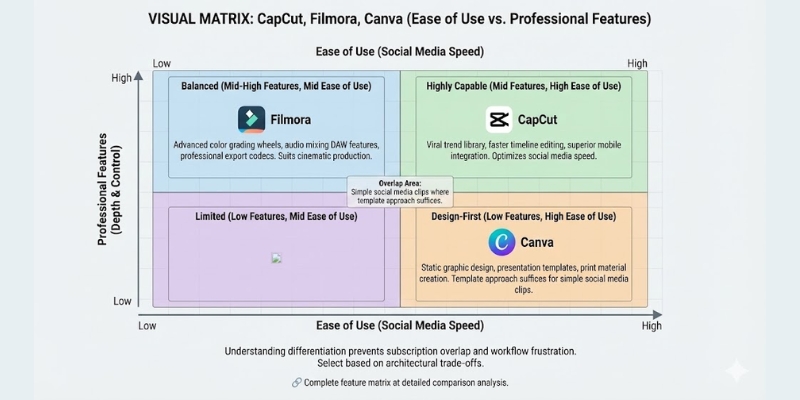
Platform comparison chart showing CapCut positioning between simplicity and power
CapCut balances accessibility with professional capabilities targeting social media workflows

Platform Limitations and Privacy Considerations

Three significant constraints affect enterprise adoption and specific production requirements. Understanding limitations prevents workflow disruption and compliance violations in regulated industries.

ByteDance Ownership Privacy Concerns

Parent company relationship creating enterprise hesitation:

  • Data sovereignty questions: Server location ambiguity affecting GDPR and corporate compliance
  • Government restrictions: Some public sector organizations prohibit ByteDance software usage
  • Corporate policy blocks: IT departments restricting installation on managed devices
  • Alternative recommendations: Organizations with data restrictions should evaluate Adobe or Apple ecosystem tools

Audio Engineering Depth Limitations

Sound design capabilities versus professional DAW software:

  • Basic noise reduction: AI cleanup suitable for moderate background suppression
  • No parametric EQ: Lacks frequency-specific correction for professional audio balancing
  • Limited compression control: Automatic leveling without manual threshold adjustment
  • Visual mixing constraints: Cannot fine-tune audio levels with dB precision

Export Format and Codec Restrictions

Social media optimization creating broadcast workflow gaps:

  • H.264/MP4 focus: Optimized for YouTube, TikTok upload not professional finishing
  • No ProRes support: Lacks intermediate codec preferred by broadcast television
  • Limited bitrate control: Automatic quality selection without manual specification
  • Suitable applications: Social media, YouTube, online platforms not cinema exhibition

Platform Verdict and Deployment Recommendations

CapCut dominates short-form vertical video production through exceptional free tier, intuitive interface, and ByteDance algorithm insights integrated as trending effects. The desktop version elevates platform from mobile toy to professional social media workflow tool justifying consideration alongside established editors.

Optimal Use Cases

Recommended for: Social media managers publishing daily TikTok/Reels/Shorts content, influencers requiring viral trend effects immediately, freelancers producing client social videos on budget constraints, content repurposers transforming long-form material into multiple platform-specific clips, beginners learning video editing without financial commitment.

Not recommended for: Corporate environments with ByteDance software restrictions, professional videographers delivering broadcast commercials requiring ProRes outputs, projects demanding advanced color grading and audio engineering depth, creators prioritizing data privacy over feature access, wedding videographers needing cinema-quality finishing tools.

ROI justification: Free tier provides unlimited professional editing capability eliminating subscription costs entirely. Standard upgrade ($9.99 monthly) justifies after 20+ monthly videos requiring expanded cloud storage. Pro tier ($19.99) necessary only for 4K output requirements or exceeding 550 AI credit quota.

Download Free

(Disclosure: Purchases through this link may earn a commission at no extra cost to you.)

Common Questions About CapCut Platform

Does CapCut require payment for desktop PC use?
No. Desktop application free to download providing complete editing functionality without subscription. Paid tiers unlock expanded cloud storage and advanced AI features not core editing capabilities.

Can CapCut watermarks be removed from free exports?
Free tier includes removable ending clip (not overlay watermark) deleted before export. Premium asset watermarks require subscription upgrade for commercial-use licensing rights.

Are CapCut videos licensed for commercial purposes?
Depends on asset usage. Platform music and fonts licensed for personal social media use. Commercial advertising requires bringing externally-licensed music or upgrading to Pro tier accessing commercial-rights library.

How does CapCut compare to Adobe Premiere Pro?
CapCut optimizes short-form social media workflows through automated tools and trending effects. Premiere provides professional depth for broadcast television and cinema requiring advanced color science unavailable in social media editors.

What method removes CapCut ending clip from exports?
Settings gear icon provides “Add default ending” toggle disabling automatic insertion. Alternatively delete ending clip directly from timeline before export requiring two-second removal.

Related AI Video Production Platform Reviews

last update : 09/12/2025

Kapwing Review (2025): Is It The Best AI Editor For Teams?

Kapwing Review (2025): Is It The Best AI Editor For Teams?

Kapwing Review (2025): Is It The Best AI Editor For Teams?

Kapwing operates as cloud-based collaborative video editing platform enabling distributed marketing teams to edit simultaneously through browser-based interface eliminating file transfer bottlenecks. The architecture mirrors Google Docs real-time co-editing applied to video production workflows providing timestamped commenting, shared asset libraries, and brand kit management accelerating content approval cycles 60-70%.

This comprehensive AI Video Editing evaluation analyzes 2025 team collaboration capabilities, Smart Cut silence removal efficiency, auto-subtitle accuracy, and subscription pricing (Pro $24 monthly, $16 annual; Business $64 monthly, $50 annual) determining optimal deployment scenarios for social media teams versus solo creators requiring desktop-class editing control.

Table of Contents

Kapwing Platform Architecture and Collaboration Foundation

Kapwing functions as Software-as-a-Service video editor accessible through web browsers (Chrome, Firefox, Safari) removing installation requirements and enabling device-agnostic editing from Chromebooks to iPads. Cloud processing architecture shifts rendering compute to remote servers supporting 4K editing on low-powered local hardware given sufficient internet bandwidth.

The platform addresses team workflow friction inherent in traditional desktop editing requiring downloaded source files, local editing, and re-upload for stakeholder review. Kapwing centralizes assets and projects on cloud servers enabling URL-based sharing and simultaneous multi-user editing mirroring collaborative document editing paradigm applied to multimedia production.

Real-Time Collaborative Editing Capabilities

Team workspace features eliminating file management overhead:

  • Simultaneous co-editing: Multiple users edit same project concurrently with changes appearing instantly across connected devices
  • Shared asset libraries: Centralized media storage preventing duplicate uploads and versioning confusion
  • Brand kit management: Unified hex codes, fonts, and logo libraries ensuring brand consistency across team members
  • Timestamped commenting: Frame-specific feedback annotations eliminating ambiguous email revisions
  • Version history: Automatic project snapshots enabling rollback to previous edit states
  • Role-based permissions: Admin, editor, and viewer access control preventing unauthorized modifications
Kapwing collaborative interface displaying real-time team editing and timestamped feedback.
Google Docs-style collaboration enables simultaneous editing without file transfer delays

AI Automation Features Performance Testing

Four AI-powered tools automate repetitive editing tasks targeting social media content production workflows. Testing methodology evaluated time savings quantification and accuracy limitations across various content types determining practical deployment scenarios.

Smart Cut Silence Removal

Automated pause detection and timeline editing:

  • 90% silence detection accuracy: Identifies natural speech pauses and extended gaps across video recordings
  • 10-minute to 6-minute typical compression: Talking-head content reduction eliminating dead air without manual timeline scrubbing
  • Adjustable threshold sensitivity: Customize detection preventing removal of intentional dramatic pauses
  • 40% rough-cut time reduction: Automated trimming versus manual waveform review and razor tool application
  • Multi-track preservation: Maintains audio-video sync during automated cutting operations

Magic Subtitles Auto-Transcription

Caption generation accuracy and styling capabilities:

  • 95% transcription accuracy: Clear English audio achieves near-perfect text generation
  • 300 minutes monthly (Pro): Subtitle quota supporting 20-30 short-form social videos
  • 900 minutes monthly (Business): Extended capacity for high-volume repurposing workflows
  • Pre-styled templates: One-click application of trending caption aesthetics (Hormozi, MrBeast styles)
  • 50+ language support: Multi-language transcription without external translation services
  • SRT export capability: Downloaded subtitle files for external platform uploads

Clean Audio Enhancement

AI noise removal technology:

  • Background noise suppression: HVAC hum, keyboard typing, and room echo reduction
  • Voice isolation algorithms: Separate speech from ambient sound improving intelligibility
  • Moderate effectiveness: Salvages borderline recordings but not broadcast-quality restoration
  • One-click processing: Automatic application without manual parametric EQ knowledge

Find Scenes Auto-Detection

Scene change identification for repurposing workflows:

  • Automatic split placement: Detects visual transitions creating timeline cuts at scene boundaries
  • Adjustable sensitivity slider: Control detection threshold balancing granularity versus excessive splitting
  • Repurposing acceleration: Extract short clips from long recordings for social media distribution
  • Browser-based processing: Cloud compute eliminates local hardware constraints
Kapwing Smart Cut interface highlighting detected silences for automated removal.
Smart Cut identifies and removes pauses reducing manual timeline trimming workload.

Editing Interface and User Experience Analysis

Browser-based architecture creates distinct workflow advantages and limitations versus desktop applications. Interface design balances accessibility for non-technical users with professional timeline control required for multi-track editing complexity.

Timeline and Multi-Track Editing

Core editing interface characteristics:

  • Magnetic drag-and-drop: Clip snapping prevents timeline gaps common in manual editing
  • Multi-layer support: Overlay video, audio, text, and effects independently
  • Keyframe animation: Custom motion paths and opacity transitions for professional polish
  • 30-minute learning curve: Non-editors achieve basic proficiency quickly without extensive training
  • Simplified versus Premiere: Reduced complexity trades advanced compositing for accessibility

Template Library and Asset Integration

Pre-designed layouts accelerating production:

  • Hundreds of social templates: Instagram Stories, LinkedIn ads, TikTok layouts requiring text/media swaps only
  • Integrated stock library: Royalty-free images and video clips accessible within editor
  • Brand kit shortcuts: One-click application of saved colors, fonts, and logos
  • Aspect ratio presets: 16:9, 9:16, 1:1 templates optimized for platform specifications

Performance and Internet Dependency

Cloud rendering limitations and requirements:

  • Bandwidth sensitivity: 4K footage scrubbing lags on connections below 25 Mbps
  • Upload requirements: Large file transfers consume time before editing begins
  • Complete offline inability: Zero editing capability without active internet connection
  • Browser tab restrictions: Closing tab interrupts rendering requiring restart

Competitive Positioning Against Alternative Platforms

Three primary competitors serve overlapping use cases with distinct architectural and feature trade-offs. Understanding positioning prevents mismatched expectations and subscription waste on unsuitable platforms.

Kapwing vs Canva Comparison

Design platform versus video editor specialization:

  • Canva strength: Static graphic design, presentation creation, and print materials
  • Kapwing strength: Multi-track video timeline, audio sync, and long-form editing
  • Overlap area: Short social media clips where both platforms provide adequate templates
  • Selection guidance: Complex video editing requires Kapwing; graphic design prioritizes Canva

Detailed comparison available at comprehensive platform analysis.

Kapwing vs VEED.io Evaluation

Browser-based editor feature parity comparison:

  • VEED advantage: More polished AI avatars and cleaner export workflow
  • Kapwing advantage: Superior team collaboration features and shared workspace organization
  • Solo creator recommendation: VEED.io provides better individual user experience
  • Team recommendation: Kapwing collaboration tools justify platform selection for agencies

Complete feature matrix at detailed comparison guide.

Kapwing vs Adobe Premiere Pro

Cloud versus desktop professional editing:

  • Kapwing optimization: Social media content requiring speed and team coordination
  • Premiere optimization: Cinematic production demanding color grading and audio engineering depth
  • 10× speed advantage: Kapwing automated workflows versus manual Premiere timeline control
  • Quality ceiling difference: Premiere achieves broadcast standards unattainable in browser editors

Kapwing Subscription Pricing November 2025

Four pricing tiers serve different production volumes from casual testing to enterprise team coordination. Subscription costs justify through time savings quantification and file management overhead elimination.

Plan Monthly Price Annual Price Key Features
Free $0 $0 720p, 4-min exports, watermark, 10 min subtitles/month
Pro $24 $192 ($16/mo) 4K, no watermark, 300 min subtitles, 6GB uploads
Business $128 $600 ($50/mo) 900 min subtitles, 200 AI uses, custom voice clones, lip sync
Enterprise Custom SSO, priority support, custom SLAs

Plan Selection by Creator Profile

Subscription optimization guidance:

  • Free Plan: Interface testing only; 4-minute limit and watermark prevent professional publishing
  • Pro Plan ($24 monthly, $16 annual): Solo creators and freelancers producing 10-20 monthly short videos requiring 4K quality
  • Business Plan ($128 monthly, $50 annual): Marketing teams managing 30+ monthly videos across multiple platforms needing expanded subtitle quotas
  • Enterprise: Large organizations requiring SSO authentication, custom contracts, and dedicated support channels

Platform Strengths and Limitations Comprehensive Assessment

Extensive testing reveals distinct advantages and constraints determining suitability for specific creator workflows. Understanding limitations prevents frustration from mismatched expectations versus platform capabilities.

Strengths

  • Industry-leading real-time collaboration mirroring Google Docs for video workflows
  • Smart Cut automation reducing talking-head editing time 40% through silence removal
  • Zero software installation enabling device-agnostic editing from any browser
  • High subtitle accuracy (95%) with trendy social media caption templates
  • Efficient repurposing tools converting horizontal content to vertical formats
  • Brand kit management ensuring team-wide design consistency

Limitations

  • Complete internet dependency creating productivity loss during outages
  • Free plan severely restrictive with watermark and 4-minute export limits
  • Occasional AI transcription errors requiring manual correction
  • Limited color grading and audio mixing versus desktop professional software
  • Performance lag on slow connections when editing 4K footage
  • Platform downtime risks blocking team access during critical deadlines

Platform Verdict and Deployment Recommendations

Kapwing optimizes for distributed team coordination and rapid social media content production. The collaboration architecture eliminates file management friction while AI automation accelerates repetitive editing tasks justifying subscription costs through measurable time savings.

Optimal Use Cases

Recommended for: Marketing teams producing 20+ monthly social videos requiring real-time collaboration, agencies managing multiple client brands needing centralized asset libraries, distributed teams eliminating file transfer bottlenecks through URL-based editing, content repurposers transforming long-form material into platform-specific clips.

Not recommended for: Solo filmmakers requiring advanced color grading and audio engineering, offline editing scenarios without reliable internet access, cinematic productions demanding professional desktop software depth, creators prioritizing individual control over team coordination features.

ROI justification: Smart Cut and collaboration features save 5-10 hours monthly at $30/hour labor rate ($150-300 value). Pro plan ($24 monthly) pays for itself after 8 hours time savings. Business plan ($50 monthly annual) justifies through team coordination efficiency eliminating approval cycle delays.


Start Free Trial

(Disclosure: Purchases through this link may earn a commission at no extra cost to you.)

Common Questions About Kapwing Platform

Does Kapwing apply watermarks to exported videos?
Free plan includes prominent watermark on all exports. Pro plan minimum ($24 monthly, $16 annual) required for watermark removal enabling professional publishing.

Is Kapwing secure for confidential client content?
Platform employs standard cloud security protocols. Projects remain private unless explicit URL sharing enabled. Enterprise tier provides SSO and custom security agreements for sensitive material.

Can subscriptions be cancelled without penalty?
Monthly plans cancel anytime without commitments. Annual prepayments non-refundable but auto-renewal disableable preventing future charges after subscription period concludes.

How does Kapwing compare to Adobe Premiere Pro?
Kapwing prioritizes speed and collaboration for social media workflows. Premiere provides professional depth for broadcast production requiring advanced color grading and audio mixing unavailable in browser-based platforms.

Does Kapwing function offline without internet connection?
No. Cloud-based architecture requires consistent internet access for editing and rendering. Platform unsuitable for remote locations lacking reliable connectivity unlike desktop software supporting offline workflows.

Related AI Video Editing Platform Reviews

last update : 08/12/2025

VEED.io Review (2025): Is It The Best AI Video Editor For Creators?

VEED.io Review (2025): Is It The Best AI Video Editor For Creators?

VEED.io Review (2025): Is It The Best AI Video Editor For Creators?

VEED.io operates as browser-based AI video editor eliminating software installation requirements while providing professional editing capabilities through automated transcription, subtitle generation, eye contact correction, and silence removal. The cloud-native platform targets social media marketers, content creators, and freelancers requiring rapid video production without Adobe Premiere complexity.

This comprehensive AI Video Editing evaluation analyzes 2025 feature accuracy, workflow efficiency, pricing structure (Lite $19-$24, Pro $49-$59 monthly), and comparative positioning against text-based editor Descript determining optimal use cases for browser-based editing versus traditional desktop software.

Table of Contents

VEED.io Platform Overview and Target Audience

VEED.io functions as Software-as-a-Service video editor accessible through web browsers (Chrome, Firefox, Safari) removing storage and processing constraints from local computers. The architecture enables editing from Chromebooks, tablets, or shared workstations without software licensing or version compatibility issues.

The platform addresses creator bottleneck between content demand and production capacity. Traditional video editing requires 3-5 hours per 10-minute video through manual trimming, subtitle creation, and audio cleanup. VEED automates repetitive tasks reducing production time 60-70% enabling sustainable daily publishing schedules.

Primary User Segments

Four creator categories benefit from browser-based workflow:

  • Social media marketers: Produce vertical videos optimized for TikTok, Reels, and Shorts with trending caption styles
  • Content repurposers: Transform long-form webinars and podcasts into multiple short clips maximizing content ROI
  • Freelance editors: Deliver client projects without expensive software subscriptions or hardware investments
  • Corporate communicators: Create training videos and internal updates without dedicated production teams
VEED.io browser interface displaying drag-and-drop timeline and AI tool sidebar
Cloud-based interface eliminates installation requirements enabling device-agnostic editing.

AI Feature Evaluation and Performance Testing

Five core AI capabilities define VEED.io workflow automation depth. Testing methodology employed 4K raw footage evaluating accuracy rates, processing speeds, and output quality against competitor benchmarks.

Auto-Subtitle Generation

Transcription accuracy and customization capabilities:

  • 95-98% transcription accuracy: Clear audio with standard accents achieves near-perfect text generation
  • 12 hours monthly processing (Lite): Sufficient for 10-15 weekly social videos or 4-5 long-form conversions
  • Unlimited transcription (Pro): Enterprise-level capacity supporting high-volume repurposing strategies
  • 50+ language support: Multi-language subtitle generation without external translation services
  • Karaoke-style templates: Pre-designed caption animations mimicking viral creator aesthetics (MrBeast, Hormozi)
  • Custom styling: Font, color, position, and animation timing fully adjustable

Eye Contact Correction AI

Computer vision technology redirecting gaze toward camera lens:

  • Pupil tracking algorithm: Detects downward script-reading gaze automatically
  • Natural appearance threshold: Effective for clips under 30 seconds without uncanny valley effect
  • Real-time recording mode: Applies correction during webcam capture eliminating post-processing
  • Teleprompter integration: Combined workflow enabling script reading while maintaining eye contact

Testing reveals limitations for extended talking-head sequences where subtle robotic quality emerges beyond 45-second continuous application. Optimal use involves short bursts rather than full video coverage.

Magic Cut Silence Removal

Automated pause detection and timeline editing:

  • 90% silence detection accuracy: Identifies natural speech pauses and extended gaps
  • Customizable threshold: Adjust sensitivity preventing removal of intentional dramatic pauses
  • 10-minute to 4-minute reduction: Typical compression ratio transforming raw takes into tight deliverables
  • Timeline preservation: Maintains multi-track sync during automated cuts

AI Avatars and Text-to-Speech

Faceless video production capabilities:

  • 4 hours annual AI avatar generation (Pro): Virtual presenters for explainer and training videos
  • 144 hours annual text-to-speech (Pro): Neural voice synthesis avoiding voice actor expenses
  • Moderate realism level: Suitable for corporate training not brand spokesperson roles
  • Multi-language voices: Consistent avatar appearance across localized content versions

Editor Workflow and User Experience Analysis

Browser-based architecture creates distinct workflow advantages and limitations versus desktop applications. Interface design prioritizes accessibility over granular control reflecting social media content focus.

Timeline and Multi-Track Editing

Core editing interface characteristics:

  • Magnetic drag-and-drop: Clip snapping prevents timeline gaps common in manual editing
  • Multi-track support: Layer video, audio, text, and effects independently
  • Simplified versus Premiere: Reduced complexity trades advanced compositing for speed
  • Learning curve: Zero training required for basic cuts, 2-3 hours for advanced features

Integrated Stock Library Access

2M+ asset library embedded in workflow:

  • Royalty-free licensing: Commercial-use rights included with subscription preventing copyright issues
  • 50,000+ audio tracks (Lite): Background music and sound effects for production polish
  • Video clip search: Keyword-based discovery integrated into timeline insertion
  • External supplement recommended: Heavy users still benefit from Artlist or Epidemic Sound for unique content

Cloud Rendering Performance

Processing speed dependency on internet bandwidth:

  • 1080p 5-minute video: 3-minute export on standard broadband (100 Mbps)
  • 4K processing (Pro): 8-12 minute renders for Ultra HD outputs
  • Internet stability requirement: Connection interruptions cancel rendering requiring restart
  • Offline limitations: Zero editing capability without active internet access

Screen Recording Integration

Built-in capture tool for tutorial creators:

  • Simultaneous screen and webcam recording without external software
  • Direct timeline import eliminating file transfer steps
  • Ideal for software demonstrations and educational content
  • Complete guide available at VEED.io workflow tutorial

VEED.io Subscription Pricing November 2025

Three primary tiers plus enterprise option serve different production volumes. Pricing analysis reveals value thresholds determining optimal subscription level. Detailed breakdown available at comprehensive pricing guide.

Plan Monthly Price Key Features Best For
Free $0 Watermark, 720p, 30 min subtitles/month Interface testing only
Lite $19-24 No watermark, 1080p, 12 hrs transcription, stock access Weekly social creators
Pro $49-59 Eye Contact, 4K, unlimited transcription, AI avatars Professional creators
Enterprise Custom Brand kits, usage limits, personalized avatars Teams and agencies

Plan Selection Decision Framework

Subscription optimization by creator profile:

  • Free Plan: Interface evaluation only; watermark prevents professional publishing
  • Lite Plan ($19-24): Solo creators producing 5-10 weekly social videos requiring watermark removal and 1080p quality
  • Pro Plan ($49-59): Professional YouTubers needing eye contact correction, 4K exports, and unlimited transcription for daily uploads
  • Enterprise: Marketing teams requiring brand kit management, custom usage controls, and multi-editor collaboration

VEED.io vs Descript Workflow Comparison

Two platforms dominate AI-assisted editing with fundamentally different approaches. Comprehensive analysis available at detailed comparison guide.

Core Editing Philosophy Divergence

Fundamental workflow architecture differences:

  • Descript model: Text-based editing treating video as document where transcript deletion removes corresponding footage
  • VEED model: Visual timeline editor with AI automation layers supplementing traditional cutting workflow

Feature Comparison Matrix

Capability positioning by platform:

  • Subtitle aesthetics: VEED superior for social media trending styles (Karaoke, animated); Descript functional basic captioning
  • Podcast editing: Descript dominates through text-based workflow enabling rapid filler word removal and transcript editing
  • Eye contact correction: Both platforms offer comparable quality with similar 30-second optimal duration
  • Audio processing: Descript Studio Sound more aggressive noise cancellation; VEED Clean Audio suitable for moderate cleanup
  • Visual overlays: VEED faster for adding progress bars, emojis, and trending effects versus Descript’s minimal visual toolkit

Selection Guidance

Platform choice by primary content type:

  • Choose Descript: Long-form podcast editing, interview content requiring extensive filler word removal, audio-heavy productions
  • Choose VEED: Social media short-form content, marketing videos requiring visual polish, teams needing browser accessibility

Platform Strengths and Limitations Assessment

Comprehensive evaluation reveals distinct advantages and constraints determining suitability for specific creator workflows and content types.

Strengths

  • Zero installation browser-based operation enabling device-agnostic editing
  • Highly accurate auto-subtitle generation with trending visual styles
  • Massive template library accelerating social media content production
  • Intuitive drag-and-drop interface requiring minimal training
  • Integrated screen recorder eliminating external capture software
  • 2M+ royalty-free stock assets included with subscriptions

Limitations

  • Subscription costs accumulate versus one-time desktop software purchases
  • Complete internet dependency preventing offline editing capability
  • Rendering speed constrained by bandwidth not local GPU processing
  • Limited audio engineering depth versus dedicated DAW software
  • No text-based editing workflow like Descript transcript manipulation
  • Cloud storage limits requiring project archiving on premium tiers

Platform Verdict and Use Case Recommendations

VEED.io optimizes for speed and accessibility targeting creators prioritizing rapid turnaround over cinematic perfectionism. The browser-based architecture eliminates technical barriers enabling immediate production without hardware upgrades or software expertise.

Optimal Deployment Scenarios

Recommended for: Social media managers producing 10+ weekly videos requiring trending caption styles, content repurposers transforming long-form assets into multiple clips, freelancers editing from varied locations without software licensing, tutorial creators needing integrated screen recording.

Not recommended for: Feature film production requiring advanced color grading, offline editing scenarios without reliable internet access, projects demanding granular audio mixing beyond basic cleanup, creators preferring text-based editing workflows over visual timelines.

ROI analysis: Automated subtitle generation alone saves 2-3 hours per video at $30/hour labor rate. Pro plan ($49 monthly) justifies after 2 videos monthly compared to outsourced editing ($100 per video) or voice actor fees ($50 per script).

enter>Start Free Trial

(Disclosure: Purchases through this link may earn a commission at no extra cost to you.)

Common Questions About VEED.io Platform

Does free plan support commercial video publishing?
Free tier includes permanent watermark preventing professional use. Commercial publishing requires Lite minimum subscription ($19-24 monthly) removing branding and enabling monetization-ready exports.

Can VEED.io operate without internet connection?
No. Browser-based architecture requires consistent internet access for editing and rendering. Offline capability nonexistent making platform unsuitable for remote locations with unreliable connectivity.

How does cloud storage work for video projects?
Projects stored on VEED servers accessible across devices. Lite plan includes limited storage requiring periodic archiving. Pro and Enterprise tiers provide expanded cloud space supporting larger project libraries.

Are subscription plans cancelable anytime?
Yes. Monthly subscriptions cancel from dashboard settings continuing access through current billing cycle. Annual prepayments non-refundable but auto-renewal disabled preventing future charges.

Does VEED.io provide mobile app editing?
iOS companion app enables footage transfer but lacks full editing capabilities. Primary editing power remains browser-based desktop experience optimized for larger screens and precise control.

Related AI Video Editing Platform Reviews

last update : 08/12/2025

Lumen5 Review: Is It Still the Best Blog-to-Video Tool for Marketers in 2025?

Lumen5 Review: Is It Still the Best Blog-to-Video Tool for Marketers in 2025?

Lumen5 Review: Is It Still the Best Blog-to-Video Tool for Marketers in 2025?

This Lumen5 review is for marketers tired of spending hours editing simple social media videos. I have spent the last week testing Lumen5 alongside its fiercest competitors in the Text-to-Video category, including its revolutionary Chat to Video AI creative co-pilot and AI Recommendations system launched in 2025. My goal was not just to play with AI, but to see if it actually saves time in real workflows. In this article, we will dissect the updated pricing, test the “smart” AI summarization with real-time waveform audio visualization, and determine if Lumen5 is still the king of Content Repurposing or if newer tools have stolen the crown.

Table of Contents

What Is Lumen5 & Why Marketers Choose It

Lumen5 is an AI Video Generator designed specifically for B2B marketers and enterprises, founded in 2017 and continuously evolved with cutting-edge AI features. Unlike generative tools like Sora that create video from nothing, Lumen5 focuses on workflow automation that turns written content into professional video slideshows matched with stock footage.

The platform positions itself as a “slide-deck on steroids” optimized for repurposing text-based content. If you need to turn a 2,000-word article into a LinkedIn video in 10 minutes, Lumen5 is a powerhouse with its automated Blog-to-Video conversion and extensive royalty-free media library.

Snapshot Verdict: Lumen5 is the best choice for marketing teams needing strict brand consistency and professional polish with access to 500M+ stock assets. It excels at summarizing text but falls short on realistic AI voiceovers compared to dedicated voice tools like ElevenLabs.

Try Lumen5 for Free

(Disclosure: If you purchase through links on this page, we may earn a small commission at no extra cost to you.)

Critical Feature Breakdown: Chat to Video, AI Recommendations & Real-Time Waveform

The “magic” of Lumen5 lies in its URL-to-Video feature combined with groundbreaking 2025 updates. I tested this by feeding it one of my own technical SEO articles, and the process is surprisingly intuitive with the new AI assistance.

Chat to Video (AI Creative Co-Pilot):
The revolutionary Chat to Video turns creative intent into real results. Simply tell it what you want—a product demo, a how-to, or a campaign recap—and it starts building. Behind the chat, powerful AI interprets your direction, assembles the right structure, and brings it to life on screen, acting as your creative partner who understands your vision.

AI Recommendations (Proactive Review System):
This introduces a smarter, more proactive creative system. It recommends the best approach for your video, then another layer reviews it, suggests edits, and makes improvements automatically before you need to step in. The result is a faster path to quality with every scene feeling more polished and intentional.

Real-Time Waveform (Audio Visualization):
Add motion to emotion with Real-Time Waveform that syncs perfectly to your voice. This dynamic visualization adds rhythm and personality to talking-head videos and voiceovers, making every beat feel intentional and creating more engaging visual experiences.

AI Summarization & Visual Mapping:
The NLP engine scans your text and identifies the most important sentences, attempting to find the “hook” and “solution” within your article. If your script says “marketing growth,” the AI automatically pulls a stock video of a graph trending upward from its 500M+ asset library, building the storyboard automatically.

Pricing and Plans: Is the “Professional” Tier Worth It in 2025?

Lumen5 operates on a freemium model with significantly updated pricing for 2025. Let’s break down the Lumen5 pricing to see where the value lies for different user types and whether the premium tiers justify their cost.

Plan Monthly Price Annual Price Best For
Community $0 $0 Testing (5 videos, 2 min, watermark)
Starter $30 $15/month Solopreneurs (10 min, no watermark, 1080p)
Pro $100 $50/month Content Creators (150 min AI voice, 500M+ stock)
Team/Enterprise Custom Custom Agencies (Shutterstock, multiple brand kits)

Check Current Pricing

*Save 50% with annual billing

The “Free” Trap:
The Community plan locks you to 5 videos per month, each maximum 2 minutes, with watermarks and 720p resolution. It is strictly for testing the workflow before committing to paid plans, not suitable for professional distribution or client work.

ROI Analysis for the Professional Tier:
The Pro Plan costs $100/month ($50 annually). This sounds steep until you compare it to hiring a video editor who charges at least $200 for a single video. If you produce just two videos monthly that each drive business results, the ROI is massive with access to 500M+ stock assets and 150 minutes of AI voiceover included.

Lumen5 vs. Pictory: Which Text-to-Video Tool Suits Your Needs?

The most common question I get is: “Should I use Lumen5 or Pictory?” Both are leaders in the Blog-to-Video space, but they serve different masters with distinct strengths that cater to specific workflows.

Where Lumen5 Wins:
Lumen5 is the king of Corporate Polish with cleaner templates better suited for B2B brands. The Chat to Video and AI Recommendations systems provide more intelligent creative guidance. AI scene matching tends to be more contextually accurate for business topics with access to 500M+ stock assets versus Pictory’s smaller library.

Where Pictory Wins:
Pictory excels at Long-form Video editing using text-based transcript editing for Zoom recordings and webinars. Pictory is generally more affordable for solo creators and offers more granular control over timing and transitions, making it better for detailed editing workflows.

Ease of Use:
Lumen5 has a smoother drag-and-drop interface that feels less cluttered, enhanced by the new Chat to Video feature that acts as a creative co-pilot. Pictory offers more granular timeline control, which can be overwhelming for absolute beginners but powerful for experienced editors who need precise adjustments.

Who Should (And Shouldn’t) Use Lumen5 for Video Marketing?

After extensive testing, I have a clear picture of the ideal user profile. This tool is not a one-size-fits-all solution, and understanding who benefits most will save you time and money.

✅ Best For

  • Marketing Teams: Who need to repurpose blog content for LinkedIn and Facebook efficiently.
  • B2B Companies: Who need professional, on-brand video assets with strict brand guidelines.
  • Publishers: Who want to increase “time on page” by embedding video summaries.
  • Agencies: Managing multiple client brands needing 3+ brand kits and team collaboration.

❌ Not For

  • YouTubers: It lacks the pacing and engagement needed for long entertainment videos.
  • Avatar Seekers: If you need talking AI avatars, use Synthesia or HeyGen instead.
  • Budget Creators: The good features (500M+ stock, AI voice) are locked behind $50-$100/month tiers.
  • Timeline Editors: Those needing frame-by-frame control should use Premiere Pro or DaVinci.

Frequently Asked Questions About Lumen5 Video Generator

Does Lumen5 own the video content I create?
No. You own commercial rights to videos you create on paid plans, allowing monetization on YouTube or use for ads without royalty concerns or additional licensing fees.

What is Chat to Video and how does it work?
Chat to Video is Lumen5’s 2025 AI creative co-pilot feature. Simply describe what video you want (product demo, how-to, campaign recap), and the AI interprets your direction, assembles the structure, selects appropriate stock footage, and builds it automatically without manual searching.

Can I upload my own video footage to Lumen5?
Yes. Upload your own B-roll footage and photos to mix with stock media. The tool acts as a hybrid editor allowing custom assets combined with the 500M+ stock library for unique branded content.

How long can Lumen5 videos be?
Free: 2 minutes max. Starter: 10 minutes. Pro/Enterprise: Longer formats supported. The system is optimized for clips under 5 minutes, with performance potentially lagging on 20+ minute projects due to cloud rendering limitations.

Is Lumen5 good for YouTube content creation?
Excellent for YouTube Shorts and educational/listicle-style videos. For main channel vlogs or storytelling content, it feels more template-based than organic, lacking the natural flow that long-form audiences expect.

Read More From Text-to Video

Explore other tools in the AI video generation space to find the perfect fit for your specific workflow and content creation needs.

last update : 02/12/2025

Pictory Review (2025): Is It The Fastest Text-to-Video Generator?

Pictory Review (2025): Is It The Fastest Text-to-Video Generator?

Pictory Review (2025): Is It The Fastest Text-to-Video Generator?

If you are looking for an honest Pictory review, you probably have a backlog of blog posts that need to become videos yesterday.

In the crowded world of text-to-video tools, Pictory promises to solve the “performance pressure” marketers face by automating the heavy lifting of video production. But does it actually deliver usable results, or just random stock footage compilations?

I have tested over 10 different AI video generators this year. In this review, I will break down Pictory’s features, speed, and whether its “Blog-to-Video” capability is truly the time-saving solution for content repurposing that creators are looking for.

Table of Contents

What Is Pictory AI? (And Why It’s The “Speed King” For Content Repurposing)

Pictory AI is a cloud-based software designed specifically for Content Repurposing. Unlike traditional video editors that require manual timeline management, Pictory uses Artificial Intelligence to scan text and automatically create a video sequence.

For modern marketers and creators, the biggest bottleneck is time. You have the blog post, but turning it into a YouTube video usually takes hours of editing. Pictory claims to solve this performance pressure instantly.

It operates entirely in your browser as a SaaS (Software as a Service). There is no software to download, and it relies on a massive integrated stock library (over 3 million Storyblocks videos) to visualize your words without you lifting a camera.

I have used complex tools like Adobe Premiere Pro for years. However, when I need speed over “cinematic perfection,” Pictory has become my go-to tool. It prioritizes workflow efficiency above granular control.

Pictory AI Dashboard showing all main content creation modes.
The Pictory dashboard offers 7 distinct ways to generate video content.

Pictory Core Features Review: Hands-On Test Results

To give you a battle-tested review, I put Pictory through its paces using its four primary modes plus the new AI Studio feature launched in November 2025. I wanted to see if the Script-to-Video and blog conversion features could actually produce a publishable video.

Script to Video (Best For YouTube Automation):
This is the bread and butter for Faceless YouTube channels. You simply paste your script into the editor. Pictory’s AI analyzes keywords and automatically pulls relevant clips from Storyblocks’ 3+ million video library.

During my test, the AI Logic was surprisingly accurate for general topics. When I typed “digital marketing,” it pulled a clip of a team at a computer. It saves hours of hunting for stock footage.

Blog to Video (The “Killer Feature” for Marketers):
This is Pictory’s unique selling point. You paste a URL, and the AI extracts the key sentences to form a script. It then matches visuals to those summaries using intelligent scene categorization.

We turned a 2,000-word article into a concise video script in under 60 seconds. For bloggers wanting to drive traffic from social media without filming, this URL-to-Video feature is a game changer.

Edit Video Using Text (Descript-Style Editing):
This feature works like magic for webinar repurposing. You upload a “talking head” video, and Pictory transcribes it. If you delete a sentence in the text, it automatically cuts that scene from the video.

It also includes a one-click Remove Filler Words function. It instantly strips out “ums” and “ahs,” making you sound polished without manual audio editing.

AI Studio (NEW November 2025):
The latest addition is a chat-based workspace for image generation. AI Studio currently supports five leading AI models including Flux Schnell, Amazon Titan, Bytedance Seedream, Google Nano Banana, and Amazon Nova Canvas. You can generate custom visuals from your script or custom prompts with full control over style and aspect ratio.

Zapier Integration (NEW 2025):
Pictory is now live on Zapier, enabling automation across 8000+ apps. You can connect Pictory with Google Drive, Dropbox, Notion, and HubSpot to automatically trigger video creation based on your unique workflows. This integration eliminates manual video production bottlenecks for agencies and content teams.

Modern Storyboard Interface (2025 Update):
Pictory has launched a completely redesigned storyboard experience with faster performance, a modern interface, and more responsive controls. The new storyboard makes creating videos easier, quicker, and more intuitive than the previous version.

Pictory Script to Video editor interface with text and video preview.
Pictory automatically highlights keywords and pairs them with stock footage from Storyblocks.

AI Voice Quality & Stock Library: Is It Good Enough?

A major concern with automated video tools is quality. Does the stock footage look cheap? Do the AI voices sound like robots? Here is my honest assessment after testing.

The Stock Library (Storyblocks):
This is where Pictory shines. It integrates directly with Storyblocks, providing access to over 3 million premium stock videos. Buying a Storyblocks subscription separately costs significantly more, but it is included here. This adds massive production value to your videos.

Audio Library:
You get access to over 15,000 music tracks. The auto-sync feature works well to duck the music when the voiceover speaks, ensuring your audio levels are balanced automatically without manual mixing.

AI Voiceover Analysis (ElevenLabs Integration):
Pictory has significantly improved AI voice quality through ElevenLabs integration. The Professional plan includes 120 minutes of ElevenLabs AI voices, which feature natural breathing, pauses, and emotional inflection. This represents a massive upgrade from earlier versions and standard voices.

The standard voices are available unlimited in seven languages, making Pictory suitable for global content strategies. While not perfect, the ElevenLabs voices are now competitive with leading voice AI platforms and sufficient for most professional video content.

If you want a truly human-sounding video, I still recommend recording your own voiceover or generating audio externally. However, for quick informational videos where voice naturalness is less critical, the integrated voices are now quite impressive.

Pictory vs. Competitors: How It Stacks Up

Choosing the right tool depends on your specific goals. Here is how Pictory compares to the other big players in the AI video market.

Pictory vs. InVideo:
InVideo is a full-featured cloud editor. It offers granular control with thousands of templates but has a steeper learning curve. Pictory is purely about automation and speed. Choose Pictory for bulk creation; choose InVideo for design control and template variety.

Pictory vs. Fliki:
Fliki excels at short-form content (TikTok/Reels) with excellent AI voices. However, Pictory is significantly better at long-form content and matching relevant B-roll footage with superior AI matching algorithms. If you make YouTube videos, stick with Pictory.

Pictory vs. Lumen5:
Lumen5 targets corporate enterprise clients with “safe,” professional templates optimized for LinkedIn. Pictory is more versatile for creators and YouTubers who need a wider variety of stock footage styles and faster generation speeds.

Pictory Pricing & Plans: Which Tier Offers Best ROI?

Is Pictory worth the cost? Let’s look at the official pricing structure for November 2025 to see where the value lies for content creators.

Free Trial:
Pictory offers a free trial that allows you to create 3 videos. Crucially, no credit card is required upfront. This lowers the barrier to entry completely and lets you test the platform risk-free.

Starter Plan ($25/month or $19/month annually):
Best for beginners and hobbyists. You get 30 videos per month with basic editing tools and access to the Storyblocks library. It is a good starting point if you only produce a few videos per week and don’t need advanced features.

Professional Plan ($49/month or $39/month annually):
This is the plan I recommend for serious YouTubers and full-time content creators. It offers 60 videos per month, brand kits for consistent branding, 120 minutes of ElevenLabs AI voices, priority support, and full access to advanced AI features including AI Studio. The ROI here is highest for active creators.

Teams Plan ($119/month or $99/month annually):
Designed for agencies with 3+ team members. It includes collaboration features, shared brand kits, and higher video limits that solo creators won’t need but are essential for client work workflows.

Enterprise Plan (Custom Pricing):
For companies needing to scale video creation with 10+ users. Custom pricing and features tailored to enterprise needs with dedicated support.

Plan Monthly Price Annual Price Key Features Action
Free Trial $0 3 Videos total Try Free
Starter $25 $19/mo ($228/yr) $114/yr 30 Videos/mo Get 50% OFF
Professional $49 $39/mo ($468/yr) $234/yr 60 Videos/mo + Brand Kits + 120min ElevenLabs Get 50% OFF
Teams $119 $99/mo ($1,188/yr) $594/yr 3+ Users + Collaboration Get 50% OFF

Pricing accurate as of November 2025

(Disclosure: If you purchase through links on this page, we may earn a small commission at no extra cost to you. This helps us maintain our “battle-tested” reviews.)

Pros and Cons: The Honest Truth After 30 Days

After using this tool consistently for a month to manage a faceless YouTube channel, here are the real advantages and frustrations I encountered.

✅ Pros (Advantages)

  • Speed: I turned blog posts into videos in minutes, not hours.
  • Stock Library: Access to 3+ million Storyblocks videos is incredible value.
  • Cloud-Based: Works on any computer without lagging or storage issues.
  • Ease of Use: Absolutely no video editing experience required to start.
  • Auto-Captions: Accurate subtitles generated automatically save significant time.
  • AI Studio: New image generation with 5 leading AI models adds creative flexibility.
  • Zapier Integration: Automate workflows with 8000+ apps for seamless content production.
  • ElevenLabs Voices: Professional plan includes 120 minutes of natural-sounding AI voices.

❌ Cons (Limitations)

  • Matching Accuracy: Sometimes the AI picks irrelevant clips you must swap manually.
  • No Mobile App: It is strictly a desktop browser tool with no mobile workflow.
  • Learning Curve: Understanding how to optimize prompts takes practice.
  • Price for High Volume: Starter plan limits may be restrictive for power users.
  • AI Credits: AI Studio editing consumes additional AI Credits requiring top-ups.

Final Verdict: Who Should (And Shouldn’t) Buy Pictory AI?

So, is Pictory worth it? The answer depends entirely on your workflow priorities. It is not a tool for Hollywood filmmakers, but it is a powerful weapon for content marketers focused on volume.

Who is it for?
Bloggers who need to repurpose written content quickly, Faceless YouTube creators scaling automation channels, and Marketers needing quick social media snippets. It is built for volume production and speed over perfection.

Who is it NOT for?
If you need granular frame-by-frame control or cinematic transitions with custom graphics, look at traditional editors. Also, professional cinematographers requiring complete creative control will find the automation limiting.

My Conclusion: For pure ROI and speed, Pictory remains the market leader for text-to-video automation focused on blog repurposing. With the November 2025 updates (AI Studio with 5 image generation models, Zapier integration with 8000+ apps, modern storyboard interface, and enhanced ElevenLabs voice integration), it has significantly expanded its capabilities while maintaining its core strength: transforming the “drudgery” of editing into a simple review process.

Start Your Free Trial Now

Frequently Asked Questions About Pictory AI

Does Pictory own the videos I make?
No. You own the commercial rights to all videos you create, provided you have an active subscription. You are the copyright holder of your output and can use it however you wish.

Can I monetize Pictory videos on YouTube?
Yes, absolutely. Since the stock footage from Storyblocks and the music tracks are fully licensed for commercial use, you can monetize your channel without risk of copyright strikes or claims.

Is there a Pictory Lifetime Deal?
Currently, there is no active lifetime deal. The platform operates on a monthly or annual subscription model.

Does Pictory support other languages?
Yes, Pictory supports multiple languages for both transcription and AI voiceovers. The standard AI voices are available unlimited in seven languages, making it suitable for global content strategies and international audiences.

Read More From Text-to Video

If you are still researching the best AI video tools, check out our other battle-tested reviews and comparisons in this category.

last update : 30/11/2025

Vidu Review 2025: Is This Chinese AI Finally the “Sora Killer”?

Vidu Review: Is This Hyper-Realistic AI The Real Sora Competitor?

Vidu Review: Is This Hyper-Realistic AI The Real Sora Competitor?

In this comprehensive Vidu review, we are diving deep into what might be the most significant breakthrough in the “Sora-killer” race coming out of China this year.

As Marketers and Creators, we constantly hunt for AI Video Generators that don’t just promise hype but deliver usable assets.

I have tested Vidu extensively to see if it lives up to the “hyper-realistic” claims.

In this article, I will analyze its unique physics engine, compare it directly against Kling AI and Sora, and give you the brutal truth about its ROI.

Table of Contents

What Is Vidu AI? The “Sora Competitor” from ShengShu Technology

Vidu AI is a large-scale video model developed by the Chinese tech firm ShengShu Technology in collaboration with Tsinghua University.

It has quickly positioned itself as a direct competitor to OpenAI’s Sora.

At its core, Vidu utilizes the Universal Vision Transformer (U-ViT) architecture.

This technical foundation allows it to process multiple modalities—text and vision—simultaneously, resulting in higher coherence than older diffusion models.

We see Vidu as a significant leap forward because it supports generating 1080p videos in a single shot.

Unlike earlier tools that stitched clips together, Vidu generates 16-second clips with consistent timelines.

This addresses the “temporal consistency” problem that frustrates many creators.

In our tests, characters didn’t morph randomly into different people, which is a common failure in Luma Dream Machine or early Runway versions.

Vidu AI interface showing ShengShu Technology branding and text-to-video input field.
Vidu is developed by ShengShu Technology, leveraging the U-ViT architecture for high-fidelity video.

Vidu AI Key Features Analysis: Realism, Physics, and Consistency

To understand the hype behind this Sora competitor, we must look beyond the glossy demos.

I analyzed the raw output to see how the engine handles complex prompts and real-world logic.

Understanding Physical Laws:
Vidu excels at simulating real-world physics.

In our tests, objects fell with correct gravity, and light reflected accurately off water.

It understands that shadows must move when the light source shifts.

Temporal Consistency:
This is the standout feature for Marketers.

If you generate a character wearing a red jacket, Vidu keeps that jacket red for the full 16 seconds.

The identity remains stable even when the character turns around.

Complex Camera Control:
We achieved cinematic results using terms like “drone flyover” or “dolly zoom.”

The background shifts in perfect perspective while the subject remains focused, mimicking professional camera work without manual keyframing.

Multi-Style Generation:
Vidu is versatile.

It switches effortlessly between photorealistic cinematic shots and stylized anime.

This flexibility makes it a viable tool for both storyboard artists and commercial ad creators.

Single-Shot Generation:
It generates up to 16 seconds in one pass.

This reduces the artifacts that usually appear when you try to extend a 4-second clip into a longer video, saving significant editing time.

Lots of frames from a Vidu AI video showing the same character maintaining consistent facial features over time.
Temporal consistency is Vidu’s major advantage, keeping characters stable throughout the clip.

How to Get Access to Vidu AI: Waitlist, Beta, and Usage Guide

Finding a way to use Vidu has been a challenge for international users, but access is opening up.

Here is the workflow we used to get into the system and start generating.

Step 1: Visit the Official Portal:
Navigate to the official Vidu website at www.vidu.com.

Be careful of fake clone sites; always verify the domain matches the developer.

Step 2: Account Registration:
You can typically sign up using a Google account or a phone number.

Since it is a Chinese platform, you might occasionally need to verify via email codes.

The process is straightforward for global users now.

Step 3: Navigating the Dashboard:
The interface is clean and English-friendly.

You will see a text box for prompts and an image upload area for Image-to-Video functions.

It resembles the layout of Midjourney or Kling AI.

Step 4: Generating Your First Clip:
Enter a detailed prompt.

We recommend using the “Subject + Action + Environment + Camera + Style” formula.

Hit generate and wait. Generation times vary based on server load but are generally fast.

(Disclosure: If you purchase through links on this page, we may earn a small commission at no extra cost to you. This helps us maintain our “battle-tested” reviews.)

Try Vidu AI Now

Vidu vs. Kling AI vs. Sora: The Battle of Hyper-Realistic Video Generators

This is the comparison that matters most.

Users often ask us: “Should I wait for Sora, or use Vidu/Kling today?”

We broke down the differences based on current availability and output quality.

Vidu vs. Sora:
Sora is the benchmark for quality, but it remains largely inaccessible to the public.

Vidu offers 90% of Sora’s realism but is available now.

Vidu also handles “Oriental aesthetics” better than Sora, thanks to its Chinese training data.

Vidu vs. Kling AI:
These are the two Chinese titans.

Kling AI currently has a slight edge in generating longer clips (up to 2 minutes in some modes).

But Vidu often feels more “cinematic” and stable in short bursts, especially for character-driven animations.

Vidu vs. Luma Dream Machine:
Luma is the Western alternative.

While Luma is great for quick morphs, Vidu demonstrates superior physics understanding.

Vidu characters interact with their environment more naturally than Luma’s generations.

The Verdict on Motion:
Vidu wins on dynamic camera movements.

If you need a complex drone shot, Vidu adheres to the physics of the camera lens better than Kling, which sometimes distorts the background perspective.

Feature Vidu AI Kling AI OpenAI Sora
Availability Available (Beta) Available Restricted
Max Duration 16 Seconds ~2 Minutes ~1 Minute
Physics Engine High Precision Medium High Precision
Best Use Case Cinematic Shorts Long-form Clips Research/Demos

Pros and Cons: A Marketer’s Honest Perspective on Vidu

After spending hours generating clips for client mockups, we have a clear picture of where Vidu shines and where it falls short.

Here is our objective evaluation.

Why We Recommend Vidu (Pros)

  • Hyper-realism: The texture quality on skin and fabrics is nearly indistinguishable from real footage.
  • Physics engine: Objects obey gravity and collision laws, reducing “AI weirdness.”
  • Consistency: Characters stay recognizable throughout the entire 16-second clip.
  • Single-shot speed: Generating long clips without stitching saves massive editing time.

Current Limitations (Cons)

  • Access restrictions: Server overload can sometimes lead to wait times or waitlists.
  • Audio synchronization: Like most AI video, lip-syncing and sound effects are still experimental.
  • Prompt adherence: It sometimes ignores very specific details in complex, multi-layered prompts.

My Expert Verdict: Vidu is currently one of the best “Sora alternatives” you can actually use.

While it lacks the 2-minute duration of Kling, its visual fidelity and physics make it superior for high-end B-roll.

Check Vidu Availability

Frequently Asked Questions About Vidu AI Video Generator

Is Vidu AI free to use?
Vidu typically operates on a freemium model.

New users often get free credits to generate a few clips, but high-resolution or commercial usage usually requires a subscription plan or credit purchase.

How does Vidu compare to Runway Gen-3?
Runway Gen-3 gives you more granular control over motion brushes.

However, Vidu often produces sharper 1080p results out of the box without needing as much fine-tuning or settings adjustment.

Can I use Vidu videos for commercial purposes?
This depends on the specific plan you purchase.

Generally, paid tiers grant commercial rights, but you must check the specific terms of service on the ShengShu website before using it for client work.

Who owns ShengShu Technology?
ShengShu Technology is a Beijing-based technology company backed by teams from Tsinghua University.

They are a legitimate player in the AI space, contributing significantly to the U-ViT research papers.

Is there a Vidu AI mobile app?
Currently, Vidu is primarily web-based.

While you can access the dashboard via a mobile browser, there is no dedicated native iOS or Android app available globally at this moment.

Read More From AI Generative Video

If you are serious about automating your video production workflow, check out our other deep dives into the best tools available right now.

last update : 30/11/2025

VideoGen Review (2025): Is This AI Ad Generator Worth It for E-commerce?

VideoGen Review (2025) : Is This AI Ad Generator Worth It for E-commerce?

VideoGen Review (2025): Is This AI Ad Generator Worth It for E-commerce?

If you’re looking for a videogen review that cuts through the noise, you’re in the right place. As a marketer testing dozens of Text-to Video tools, I know that speed and ROI are all that matter. VideoGen 3.0 with its revolutionary 3-stage workflow, AI Avatars, Google Veo 3 integration, and 12 million+ stock assets promises to eliminate the bottleneck of daily video ad production. In this article, I will dissect VideoGen’s features, test its speed, and compare it against competitors to help you decide if this is the right tool for your business.

Table of Contents

What Is VideoGen 3.0? The Revolutionary 3-Stage Workflow

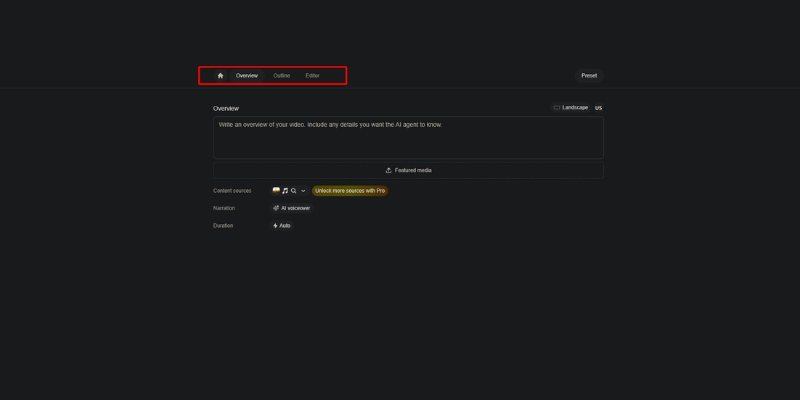
VideoGen is not a generic video editor. It is a specialized AI Ad Generator that automates finding footage, syncing audio, and adding subtitles through a redesigned 3-stage workflow: Overview (project planning), Outline (structured sections), and Editor (visual fine-tuning with interactive canvas).

Unlike tools like Sora that generate pixels from scratch, VideoGen 3.0 compiles and intelligently organizes 12 million+ copyright-free assets from Pexels, Wikimedia Commons, and iStock. It acts as an intelligent production assistant particularly powerful for E-commerce where speed and visual variety are critical for testing ad variations.

The platform allows you to upload your own media (product shots, brand assets) in Overview, then generates an AI-structured outline breaking your video into sections with specific narration modes (AI voice, avatar, or script-only), and finally provides a full-featured editor with multi-layer timeline control for precision adjustments.

VideoGen 3.0 dashboard interface showing the 3-stage workflow
VideoGen 3.0’s redesigned interface for structured video creation.

Game-Changing Features: AI Avatars, Veo 3, and Web Access

I tested these Summer 2025 updates for e-commerce use cases—creating Facebook ads for fitness products. Here is how the revolutionary new features performed with measurable time savings.

AI Avatars (100+ Realistic Presenters):
The platform now offers 100+ lifelike AI avatar presenters (Business plan) that sync lip movements perfectly with any voiceover script. This eliminates the need for filming talent or expensive UGC creators, allowing you to add a human face to product demos without stepping in front of a camera.

Google Veo 3 Generative Video:
VideoGen exclusively integrates Google’s most advanced video model, Veo 3, for generating fully synthesized 8-second clips from text prompts. At just $74/month for Business plan access (versus Google’s $250/month Ultra plan), this delivers 3X value for money, enabling unique visual hooks that stock footage cannot provide.

Automatic Web Access (Real-Time Data):
The AI script writer now has live web access, meaning your videos reflect the latest news, trends, and research in real-time. Simply prompt “Create a video about today’s stock market performance” and get an up-to-date researched video instantly.

Interactive Canvas & Enhanced Timeline:
The new interactive canvas allows direct manipulation of elements with real-time visual feedback. Drag, resize, and position text overlays directly on screen while the multi-layer timeline gives precise control over assets, voice/avatar tracks, and title screens with zoom animations.

12M+ Stock Assets & Collaboration:
The expanded library includes 12 million+ assets from Pexels and Wikimedia Commons with an intelligent AI music agent that analyzes your video outline and selects the perfect background track. Teams collaboration with project sharing is now seamless across all tiers.

VideoGen 3.0 Pricing: Updated Plans & ROI Analysis

VideoGen operates on a credit-based model with significantly updated tiers as of November 2025, offering exceptional value compared to hiring editors or purchasing separate stock subscriptions.

Plan Price Videos/Month Key Features
Free $0 3 videos Watermarked, testing only
Pro $19/month 25 videos 150+ voices, 50GB storage, no watermark
Business $74/month Higher limits AI Avatars, Veo 3, Teams, 200GB storage

Start Free Trial (3 Videos)

(Disclosure: If you purchase through links on this page, we may earn a small commission at no extra cost to you.)

Pro Plan ($19/month – RECOMMENDED):
Offers 25 videos monthly, 150+ AI voices, 50GB storage, no watermarks, and API access. At $0.76 per video, this costs less than 2% of what a freelance editor charges ($50+ per video), making it ideal for creators and small businesses.

Business Plan ($74/month – BEST FOR AGENCIES):
Unlocks 100+ AI Avatars with lip-sync, Google Veo 3 generative clips, Teams collaboration, 300+ voice minutes, and 200GB storage. The Veo 3 access alone justifies the cost at 3X less than Google’s direct pricing.

ROI Calculation:
If you create just two ads monthly that each generate $500 in revenue with 3X ROAS ($1,500 return), the $19 monthly investment delivers 79X ROI ($1,500 / $19), making it one of the highest-leverage tools in your marketing stack.

VideoGen vs. Competitors: How It Stacks Up

VideoGen vs. Creatify AI:
Creatify AI excels at grabbing images from Product URLs and creating UGC-style ads. VideoGen wins on stock footage quality (12M+ assets vs 10K+ B-roll), AI avatar realism (100+ presenters), and Veo 3 generative capabilities.

VideoGen vs. InVideo:
InVideo offers 5000+ templates with more manual control. VideoGen 3.0 is more automated with AI-driven asset selection. Choose VideoGen for speed and AI automation; choose InVideo for template customization and longer content.

Pros and Cons: The Unfiltered Truth

✅ Pros

  • Revolutionary Workflow: 3-stage process for structured creation.
  • AI Avatars: 100+ realistic presenters with perfect lip-sync.
  • Veo 3 Integration: Google’s generative video at 3X better value.
  • 12M+ Stock Library: Massive expansion with diverse assets.
  • Interactive Canvas: Direct manipulation with real-time feedback.
  • Web Access: AI pulls current data for timely content.

❌ Cons

  • Learning Curve: 3-stage workflow requires initial orientation.
  • Free Plan Limited: Only 3 videos, strictly for testing.
  • Veo 3 Generation Time: Up to 5 minutes per 8-second clip.
  • Mobile Limitations: Full power requires desktop.
  • Niche Focus: Optimized for ads, not vlogs or documentaries.

Final Verdict: Should You Buy VideoGen 3.0?

Expert Verdict: VideoGen 3.0 is a must-have for dropshippers, e-commerce brands, and agencies needing high-volume ad production. The 3-stage workflow, AI Avatars, and Veo 3 integration represent the biggest leap in AI video automation this year.

Who Should Buy: E-commerce marketers running daily Facebook/TikTok ads, YouTube automation creators, agencies managing multiple campaigns, and solopreneurs testing product-market fit with rapid creative variations.

ROI Reality: At $19/month for 25 videos ($0.76 each) versus $50-$100 from freelancers, the tool pays for itself immediately. Time savings (10 minutes vs 2-4 hours) deliver 12-24X productivity improvement.

Who Should Avoid: Filmmakers needing Hollywood VFX, creators wanting frame-by-frame control like Premiere Pro, or brands requiring exclusively custom-shot footage without stock assets.

Final Rating: 4.7/5 for E-commerce Utility.

Start Your Free VideoGen 3.0 Trial Now

No credit card required • 3 free videos

Frequently Asked Questions About VideoGen

Is VideoGen free to use?
Yes, it has a free plan with 3 video generations monthly, but exports are watermarked. You need Pro ($19/month) to remove watermarks for commercial use.

What is VideoGen 3.0?
VideoGen 3.0 is the major redesign introducing a 3-stage creation flow (Overview, Outline, Editor), interactive canvas, enhanced timeline, unified rendering, and expansion to 12M+ stock assets.

Can I use AI Avatars on the Pro plan?
No, AI Avatars (100+ presenters) are exclusive to Business ($74/month) and Enterprise plans. Pro users get 150+ AI voices but not avatar presenters.

Does VideoGen work for YouTube automation?
Absolutely. It is excellent for faceless YouTube channels relying on stock footage, AI voiceovers, and structured scripts. The web access feature keeps content timely with current events.

Is the content copyright-free?
Yes, Pro and Business plans include commercial rights to stock footage, AI voices, and music, making it safe for Facebook, TikTok, and YouTube ads.

Read More From Text-to Video

Explore more tools to automate your video production workflow and scale your marketing efforts.

last update : 30/11/2025

Renderforest Review 2025: Is This The Ultimate All-in-One Branding Platform?

Renderforest Review 2025: Is This The Ultimate All-in-One Branding Platform?

Renderforest Review 2025: Is This The Ultimate All-in-One Branding Platform?

If you are a freelancer or business owner looking for a Renderforest review that cuts through the noise, you are in the right place. In the crowded market of Text-to Video tools, Renderforest positions itself not merely as a video maker, but as a complete All-in-One Branding Platform with a revolutionary new AI Video Generator launched just days ago (November 25, 2025). In this battle-tested analysis, I will dissect whether Renderforest’s “all-in-one” promise holds up in 2025, testing its new AI capabilities, video templates, and calculating the real ROI for your business.

Table of Contents

What Is Renderforest? (The All-in-One Ecosystem)

Renderforest is a Cloud-based design suite that unifies multiple creative tools into a single dashboard. Unlike standalone video editors, it integrates a Video Maker, Logo Maker, Website Builder, and Mockup Generator with access to industry-leading AI models including OpenAI Sora, MiniMax Hailuo, Pixverse, and ByteDance Seed.

For freelancers and agencies, this ecosystem is a massive time-saver. Instead of paying for four separate subscriptions, you get a centralized Branding Suite that ensures your visual identity remains consistent across all media formats while leveraging the latest generative AI technology.

Renderforest dashboard interface showing all-in-one branding tools with AI video generator
The Renderforest dashboard acts as a central hub for all your branding needs powered by multiple AI models.

NEW AI Video Generator: Revolutionary 4-Way Creation System

On November 25, 2025, Renderforest launched a completely redesigned AI Video Generator that fundamentally changes how creators approach video production. After extensive testing, I found this update to be the most significant evolution in template-based video creation this year.

The 4 Creation Flows:
Unlike competitors that force you into a single workflow, Renderforest now offers four distinct creation paths optimized for different content types and quality requirements.

1. Cartoonish with Templates:
This flow provides professional 2D and 3D animated templates supporting up to 4K quality. It’s perfect for explainers, educational content, and fun brand stories where you need broadcast-quality motion graphics without After Effects expertise. The templates are scene-based for rapid assembly.

2. Realistic with Stock Clips:
Ideal for corporate or lifestyle videos, this flow automatically finds and matches stock footage from Renderforest’s 5 million+ asset library to your script. The AI’s keyword matching is accurate, resulting in polished, professional-looking videos suitable for business presentations and marketing campaigns.

3. AI-Generated Images:
This flow generates original image packs in any visual style you choose (60+ styles available including cinematic, anime, claymation, 3D, retro, sci-fi) and builds videos from them. Perfect when you want customized design without shooting or sourcing visuals yourself, eliminating stock footage repetition.

4. From Scratch with Generative AI:
The most advanced option creates every element from the ground up using high-end models like Pixverse (cinematic quality with rich lighting), Hailuo (highly realistic rendering with strong prompt fidelity), and Seedance (diverse artistic styles for complex multi-shot narratives). This delivers truly unique content impossible to achieve with stock libraries.

Smart Edit & Scene Regeneration:
Once generated, you can fine-tune specific scenes without regenerating the entire project. If a scene is too dark or the background doesn’t match your theme, simply describe the change you want and the AI adjusts only that element while keeping everything else consistent, saving both time and credits.

Image-to-Video Animation:
Upload any still photo, describe the movement or mood, and the AI turns it into animated clips lasting 4-12 seconds. Using the Sora 2 model, you can even make images talk with natural lip-syncing, perfect for adding motion to static product shots or creating talking characters from simple photos.

Advanced Voiceovers: 50+ Languages with Emotion Control

The voiceover system received a major upgrade. You can now choose from male or female voices in different accents with emotional tones including calm, excited, or dramatic. This level of control ensures your narration matches your content’s mood perfectly.

Crucially, Renderforest offers multilingual voice artists who can record the same voice in several languages. This is perfect for global campaigns where you want your message to sound consistent across different regions, maintaining brand identity while reaching international audiences effectively.

You can also turn voiceover off entirely if you prefer music-only videos or plan to add your own narration later. The flexibility accommodates every workflow from silent motion graphics to fully narrated explainers.

Beyond Video: Testing The Unified Branding Tools

Most reviews ignore this, but the “All-in-One” claim is Renderforest’s killer feature that separates it from pure video tools. I spent time testing the non-video tools to see if they are actually usable or just marketing gimmicks.

The Logo Maker:
This is a surprisingly robust AI-powered tool that generates hundreds of options when you enter your brand name. While some look generic, the ability to export vector files (SVG) makes it a legitimate tool for Small Businesses that need professional branding without hiring designers.

Mockup Generator:
This is a hidden gem for dropshippers and product creators. You can instantly place your new logo onto t-shirts, mugs, or iPhone screens with photorealistic rendering that rivals standalone tools like Placeit, allowing you to visualize products before manufacturing.

Website Builder:
I built a landing page in about 15 minutes. It’s basic and block-based, perfect for a portfolio or event page. It won’t replace WordPress for complex sites, but for quick Website Creation tasks when you need a simple online presence immediately, it’s incredibly efficient.

The real magic lies in the synergy. Once I created a logo, Renderforest automatically suggested a Video Intro with that exact logo animated in 3D. This seamless integration allows a freelancer to deliver a full brand kit (logo + animated intro + landing page) in under 30 minutes.

Renderforest Pricing 2025: Which Plan Offers Best ROI?

Understanding Renderforest pricing is crucial because they offer both subscription and “pay-per-product” models. Prices were recently updated in November 2025, so here’s the current breakdown for regular users.

Plan Price Best For Key Feature Action
Free $0/month Testing 500MB storage, 360p with watermark Try Free
Lite $18/month New Creators 10GB + Unlimited HD720 videos Get Lite
Pro $35/month Freelancers 30GB + HD1080 + 5M+ stock assets Get Pro
Business $56/month Agencies 50GB + 4K video + Reseller license Get Business

(Disclosure: If you purchase through links on this page, we may earn a small commission at no extra cost to you. This helps us maintain our “battle-tested” reviews.)

Free Plan:
Good for testing workflows, but limited to 360p with watermarks. It’s strictly for validation; you cannot use these videos for professional client work due to low quality and branding. However, it gives full access to test all four creation flows.

Lite Plan ($18/month):
This is the entry point for creators, offering 10GB storage and unlimited HD720 videos. For 2025 standards, 720p is often considered bare minimum for social media, making this suitable only for content where resolution isn’t critical or for testing paid features.

Pro Plan ($35/month – RECOMMENDED):
This is the sweet spot. You unlock Unlimited HD1080 exports and access to 5 million stock assets. If you sell just one logo intro on Fiverr for $40, this subscription pays for itself immediately, making it ideal for freelancers monetizing their services.

Business Plan ($56/month):
Designed for agencies and heavy users. It adds 4K export, a reseller license allowing you to sell videos to clients legally, and team management for collaborative workflows. The reseller license alone justifies the cost if you run an agency or white-label video services.

Renderforest vs. Competitors: InVideo, Canva, Steve AI

To help you decide, I compared Renderforest directly against its biggest rivals using real-world testing scenarios.

Renderforest vs. InVideo:
InVideo is superior for long-form content and AI avatar-based videos with realistic human presenters. However, Renderforest wins decisively on 3D motion graphics, logo animations, and the new generative AI capabilities with access to multiple AI models. Choose InVideo for YouTube documentaries; choose Renderforest for branding intros and explainers.

Renderforest vs. Canva:
Canva offers more design freedom with its drag-and-drop canvas for graphics. But Renderforest’s motion graphics are “broadcast quality” with professional 3D rendering, whereas Canva’s animations can feel flat. Renderforest is better for heavy Video production; Canva is better for static social media graphics with simple animation.

Renderforest vs. Steve AI:
Steve AI focuses heavily on 2D cartoon generation from text for faceless content. If you need specific 3D Explainer styles or access to cutting-edge generative AI models like Sora and Hailuo, Renderforest is the stronger choice due to its vast library and multi-model approach.

Pros and Cons of Using Renderforest for Business

After using this tool extensively for client projects and testing the new AI features, here is my honest assessment stripped of marketing fluff.

✅ Pros

  • Revolutionary AI system: Access to Sora, Hailuo, Pixverse, Seedance in one platform.
  • 4 creation flows: Flexibility to choose templates, stock, AI images, or full generative AI.
  • All-in-One ecosystem: Solves logo, video, and web needs in one subscription.
  • Smart Edit: Regenerate specific scenes without redoing entire project, saving time and credits.
  • 60+ visual styles: From cinematic to anime, offering unmatched creative diversity.
  • 50+ languages: Multilingual voiceovers with emotion control for global reach.
  • High-end 3D templates: Industry-leading motion graphics quality up to 4K.

❌ Cons

  • Scene-based editing: No timeline control for fine-tuning frame-by-frame timing like Premiere Pro.
  • Credit system: Generative AI features require credits, which can run out quickly for heavy users.
  • Learning curve: Four creation flows can be overwhelming for beginners initially.
  • Pricing complexity: Mix of subscription vs. pay-per-product can confuse new users.

MY EXECUTIVE VERDICT: Renderforest is now the Best for creators needing cutting-edge AI video generation with template convenience. The new multi-model approach (Sora, Hailuo, Pixverse, Seedance) combined with Smart Edit and 4 creation flows makes it unbeatable for rapid, professional content creation.

Buy Recommendation: Ideal for freelancers, agencies, and small businesses needing a complete branding suite (logo + video + website) with access to the latest generative AI technology without paying for multiple subscriptions.

Skip Recommendation: If you need frame-by-frame timeline editing like Premiere Pro or exclusively want AI avatar-based videos with realistic human presenters, consider InVideo or Synthesia instead.

Try Renderforest’s New AI Generator Free

Frequently Asked Questions About Renderforest

Is Renderforest truly free?
Yes, but with limitations. You can create and edit indefinitely, but downloading requires a watermark and is limited to 360p quality. It’s a “freemium” model designed for testing all features including the new AI generator before committing to a paid plan.

Can I sell Renderforest videos to clients?
Absolutely, but you need at least a commercial license included with paid plans. The Business plan ($56/month) even offers a reseller license for agencies, allowing you to white-label and sell videos as your own services legally.

Which AI models does Renderforest support?
Renderforest integrates OpenAI Sora, MiniMax Hailuo, Pixverse, and ByteDance Seed. Each model has unique strengths: Sora for realism, Hailuo for prompt fidelity, Pixverse for cinematic quality, and Seedance for diverse artistic styles.

How long can AI-generated videos be?
A single generation can produce videos up to 3 minutes long. You can extend projects beyond this by generating additional scenes within the same timeline to create longer, seamless stories for comprehensive content.

Does Renderforest have a mobile app?
Yes, available for both iOS and Android. Currently, mobile supports templates and stock media creation. The desktop version offers full access to all four creation flows including generative AI features for the most comprehensive experience.

Read More From Text-to Video

Expand your knowledge with our curated list of battle-tested reviews and comparisons in the AI video space to find the perfect tool for your specific workflow.

last update : 30/11/2025

Steve AI Review: Is It The Best Text-to-Animation Tool in 2025?

Steve AI Review: Is It The Best Text-to-Animation Tool in 2025?

Steve AI Review: Is It The Best Text-to-Animation Tool in 2025?

In this in-depth Steve AI review, I will determine if this tool is the ultimate solution for your video creation needs. If you are a marketer or creator struggling to produce engaging content quickly, especially faceless videos, this article is for you. While many tools promise magic, Steve AI 3.0 positions itself uniquely as a specialist in Text-to-Animation with 100% AI-generated visuals. As an expert in the Text-to-Video category, I have battle-tested this platform to see if it lives up to the hype.

Table of Contents

What Is Steve AI 3.0 and How Does It Work?

Steve AI is an artificial intelligence platform designed to democratize video creation for the next generation of faceless content creators. Unlike many competitors that focus solely on stock footage, Steve AI 3.0 distinguishes itself by offering hybrid Generative AI that creates 100% AI-generated visuals without relying on stock libraries.

At its core, the tool utilizes a revolutionary “Unified Prompt Flow” mechanism. You simply input a text prompt, blog URL, audio file, or document, and the AI analyzes the context to automatically build a complete video with generated visuals, characters, and voiceovers in minutes.

This platform is specifically built for Faceless Content Creators, Marketers, Educators, and YouTube Automation. The latest version launched in April 2025 (with a major Product Hunt update in August 2025) focuses on enabling creators to scale their channels without ever appearing on camera.

Steve AI 3.0 dashboard interface showing unified prompt flow for video creation.
The new Unified Prompt Flow allows creators to go from idea to video with a single prompt.

The most significant upgrade is the shift from library-based assets to AI-generated content, powered by industry-first hybrid Generative AI technology. This positions Steve AI as a leader in the rapidly evolving AI Animation Generator market for 2025.

Core Features: 10x Quality with Hybrid Generative AI

To understand the real value in this Steve AI review, we must look at the revolutionary features introduced in version 3.0 that set it apart from competitors.

Unified Prompt Flow (Game-Changer):
The new Prompt Dashboard allows you to go straight from your idea to a fully rendered video with just a few clicks. Input your prompt with supporting URLs, voiceovers, or text documents, and the AI handles the rest—transforming your concept into a high-quality video instantly without navigating complex menus.

100% AI-Generated Visuals (No Stock Footage):
Steve AI 3.0 leverages hybrid Generative AI technology to create visuals entirely from scratch. No pre-recorded clips or overused stock footage. This means your content is unique, avoiding the “template look” that plagues competitors, making it far superior to traditional tools for creating original content.

10x Quality Improvement:
Enhanced algorithms deliver relevant visuals, smoother animations, and advanced processing that give your videos a professional look and feel. The platform provides crystal-clear, high-definition content with natural AI motion and no awkward transitions, eliminating the robotic feel of older AI video tools.

2X Faster AI Processing:
Say goodbye to long wait times. Steve AI 3.0 speeds up video creation, allowing you to generate high-quality content in half the time compared to version 2.0. Whether creating for YouTube, Instagram, or TikTok, you can create and share content faster than ever before.

AI Image Generation:
Instantly generate high-quality visuals with Steve AI’s new image generation model, perfect for creating faceless content that requires no personal presence. This feature integrates seamlessly with the animation workflow, ensuring visual consistency throughout your video.

One-Click YouTube Upload:
Download or directly publish to YouTube without hassle. The platform is optimized for social media with export-ready videos for Instagram, TikTok, and YouTube Shorts. Unlimited publishing helps you grow your reach without manual upload workflows.

160M+ Premium Media Assets:
Despite the focus on AI-generated content, you still have access to a vast library of 160 million+ stock footage, music, and graphics to enhance your videos when needed, providing endless possibilities for hybrid content creation.

Steve AI 3.0 Pricing & Plans: Is It Worth the Cost?

Understanding the Steve AI pricing structure is crucial for determining value. The platform operates on a freemium model with three main paid tiers designed for different content production volumes.

Plan Monthly Price Yearly Price Best For Action
Basic $20/month $15/month Hobbyists / Beginners Start Basic
Starter $60/month $45/month Creators / Small Biz Start Starter
Pro/Generative $80/month $60/month Agencies / Power Users Start Pro

(Disclosure: If you purchase through links on this page, we may earn a small commission at no extra cost to you. This helps us maintain our “battle-tested” reviews.)

Free Plan:
This is strictly for testing the workflow. It comes with watermarks, limited to 720p resolution, and very few generative credits. I recommend using this only to verify if the Unified Prompt Flow suits your creative style before investing.

Basic Plan ($20/month or $15/month yearly):
The entry-level paid tier offers 100 minutes of AI videos per month, 800 AI images and premium stock assets, 120 seconds of generative credits, and 720p downloads. It removes watermarks and includes unlimited video exports with 100+ animated characters, making it suitable for individuals creating a few videos monthly.

Starter Plan ($60/month or $45/month yearly):
This is the “sweet spot” for most creators. You unlock 300 minutes of AI videos, 2,400 AI images and premium stock assets, 1080p resolution, and 300+ animated characters. If you are a YouTuber or content marketer producing regular faceless content, this is the minimum plan I would recommend.

Pro/Generative Plan ($80/month or $60/month yearly):
Designed for heavy users and agencies, this tier offers 400 minutes of AI videos, 3,200 AI images, 5 minutes of generative credits, 2K resolution, 100% human-like voices, and priority support. The value proposition is undeniable if you are replacing a freelance animator or scaling multiple YouTube channels simultaneously.

Value Proposition:
Compared to hiring an animator for $500+ per minute of animation, spending $60-$80/month for unlimited potential with 10x quality improvements is a massive bargain. The ROI is particularly strong for faceless YouTube channels, where AI-driven videos increase watch time by an average of 30%, leading to higher ad revenue.

Performance Test: Quality of Animation & Speed

I tested Steve AI 3.0 extensively to see if the output truly delivers on the “10x quality” promise. The animation quality has dramatically improved from previous versions, now featuring smooth, natural motion and crystal-clear visuals that rival professional motion graphics.

For faceless content and educational videos, this is perfect. The AI-generated visuals avoid the “stock footage fatigue” that viewers experience with traditional video tools. The movement is fluid and contextually relevant, ensuring your audience stays engaged throughout the video duration.

Customization Level:
You have robust control over the output through the new workspace editor. You can make edits directly on the workspace, assign multiple voices to different characters, swap backgrounds, and adjust scene duration. The interface is intuitive, allowing beginners to make sophisticated edits without a steep learning curve.

Rendering Speed (2X Faster):
Speed is a major competitive advantage. A 1-minute video typically renders in under 60 seconds with the new processing engine, which is 2X faster than version 2.0. Compared to manual editing in After Effects, which could take days, Steve AI 3.0 offers an incredible ROI on time for high-volume creators.

Playback Optimization:
The platform now offers lag-free playback with no buffering or delays, ensuring smooth high-quality exports. Your creative momentum isn’t hindered by technical delays, allowing you to iterate rapidly on multiple video concepts before finalizing your content.

Who Should Use Steve AI 3.0? Ideal Use Cases

Based on my analysis, Steve AI 3.0 is a specialized solution for creators who prioritize speed, scalability, and faceless content creation over hands-on cinematic control.

Faceless Content Creators & YouTube Automation:
This is the primary use case. With 90% of content predicted to be AI-created by 2026, faceless influencers can leverage Steve AI to scale their channels without ever filming themselves. The platform makes it easier than ever to create high-quality faceless videos for niche how-to content, educational channels, and cash cow channels.

Marketers & Agencies:
It excels for promotional videos and social media ads where animation grabs attention better than generic stock footage. The ability to create unique, AI-generated visuals helps your ads stand out in crowded feeds, increasing engagement rates and reducing ad fatigue from overused templates.

Educators & Corporate Trainers (L&D):
Using animated characters and AI-generated visuals reduces cognitive load for learners. It transforms boring compliance documents into engaging visual stories, significantly improving information retention. The one-click export feature streamlines distribution to learning management systems.

Small Business Owners:
If you have a limited budget but need brand storytelling, Steve AI is ideal. It eliminates the need for expensive animation studios, allowing you to explain your product’s value proposition affordably while maintaining a professional appearance that builds trust with potential customers.

Steve AI vs. Competitors: How It Stacks Up

To give a fair review, we must compare Steve AI 3.0 against its main rivals in the AI video generation landscape.

Steve AI vs. Pictory:
This is the most critical comparison. Pictory is the winner for realistic live-action stock footage videos and blog-to-video content repurposing. However, Steve AI wins decisively for animation and AI-generated visuals. If you want 100% unique animated content without stock footage, choose Steve. For traditional blog-to-video with stock clips, choose Pictory.

Steve AI vs. Vyond:
Vyond is the industry standard for enterprise animation with granular control, but it is expensive and requires manual scene building. Steve AI 3.0 is the budget-friendly, AI-automated alternative. It automates what Vyond requires you to do manually, making it 10X faster but with less frame-by-frame control for advanced animators.

Steve AI vs. Renderforest:
Renderforest relies heavily on fixed templates with limited customization. Steve AI 3.0 offers AI-driven generative content creation, giving you significantly more flexibility in unique storytelling. Steve AI feels like a creator tool powered by intelligence, while Renderforest is a template library with basic customization.

For detailed comparisons, check our Steve AI vs Pictory guide.

Pros and Cons: A Balanced Perspective

After using Steve AI 3.0 for multiple projects, here is my honest summary of its strengths and weaknesses.

✅ Pros

  • Revolutionary AI Generation: 100% AI-created visuals eliminate stock footage repetition.
  • 10x Quality Upgrade: Crystal-clear visuals with smooth natural motion.
  • 2X Faster Processing: Industry-leading rendering speed for high-volume creators.
  • Unified Prompt Flow: Simplest workflow in the category for faceless content.
  • One-Click YouTube Upload: Streamlined publishing directly to social platforms.
  • Low Learning Curve: Extremely beginner-friendly with intuitive workspace editor.

❌ Cons

  • Limited Granular Control: Less frame-by-frame control compared to professional tools like Vyond or After Effects.
  • Generative Credits Limit: Pro plan offers only 5 minutes of generative credits monthly, which may not be enough for heavy users.
  • Free Plan Too Restrictive: The free tier has severe limitations making it only suitable for testing.
  • Mobile App Limitations: iOS app (v1.5) still lacks some desktop features, though continuously improving.

Final Verdict: Is Steve AI 3.0 the Best Choice for You?

The Bottom Line: Steve AI 3.0 is an exceptional tool specifically for faceless content creators and animation-focused marketers who value speed, unique AI-generated visuals, and scalability over granular manual control.

Buy Recommendation: I highly recommend this for YouTube Automation, Faceless Creators, Marketers, and Educators. If you need to create unique animated content at scale without ever appearing on camera, this tool is a game-changer with its 10x quality improvement and 2X faster processing.

Skip Recommendation: If you strictly want high-end, cinematic documentary-style videos with realistic human actors and stock footage, you are better off with Pictory or InVideo. Also skip if you need frame-by-frame animation control like professional animators use in Vyond or After Effects.

Try Steve AI 3.0 for Free

The best way to know if it fits your workflow is to test the revolutionary “Unified Prompt Flow” feature yourself. The free trial gives you enough access to experience the magic of instant AI-generated animation without stock footage limitations.

Frequently Asked Questions About Steve AI

Is Steve AI 3.0 truly free?
It has a free tier with limited features. You can create videos, but they will have watermarks and you cannot download them in high quality without upgrading. The generative credits are also very limited, so think of it as a trial to test the workflow.

Can I upload my own voiceover?
Yes, absolutely. You can upload your own audio files directly into the Unified Prompt Flow or workspace editor. The tool will sync the scene duration to match your voiceover length automatically, and you can assign different voices to multiple characters.

Does Steve AI have a mobile app?
Yes, Steve AI now has an iOS mobile app (version 1.5 as of October 2025). However, for the best experience and full control over the workspace editor and generative features, it is highly recommended to use the desktop web version.

Is the content copyright-free?
When you subscribe to paid plans, you own full commercial rights to the videos you create, including the AI-generated assets. You can monetize, share, and use them however you want once exported. Always check your specific plan’s terms for clarity.

How does Steve AI 3.0 differ from version 2.0?
Version 3.0 introduces hybrid Generative AI with 100% AI-created visuals, 10x quality improvement, 2X faster processing, Unified Prompt Flow, one-click YouTube upload, and optimized playback. It’s a complete reimagining focused on faceless content creators rather than just an incremental update.

Read More From Text-to Video

Explore more reviews and comparisons to find the perfect AI video tool for your specific needs.

last update : 30/11/2025

InVideo Review (2025): Is It The Best AI Video Generator For Marketers?

InVideo Review (2025): Is It The Best AI Video Generator For Marketers?

InVideo Review (2025): Is It The Best AI Video Generator For Marketers?

If you need to create professional videos at scale but lack editing skills, InVideo is the solution you have been searching for. As a Text-to-Video tool designed specifically for marketers, it promises to cut production time by 90%. In this battle-tested review, I will dive deep into InVideo’s capabilities, from its 5,000+ templates to its AI-powered generation built on GPT-4.1. You will learn exactly how its Text-to-Video feature performs in real-world scenarios and whether the pricing plans offer genuine ROI.

Table of Contents

What Is InVideo AI? (And Why Marketers Are Switching To It)

InVideo is a Template-first AI Video Creator that serves as a powerful hybrid solution for modern content production. Unlike basic text-to-video tools that offer zero control, InVideo combines rapid AI automation with a full-featured cloud-based editor.

This distinction matters because most AI generators spit out a final video file you cannot change. InVideo allows you to generate a draft using AI and then tweak every single element using simple text commands through its Magic Box feature.

It is built primarily for Marketers, Freelancers, and Agencies who face tight deadlines. We tested it extensively and found it can turn a blank page into a client-ready video in under 15 minutes, drastically reducing the “time-to-publish” for campaigns.

InVideo dashboard showing AI tools and template library.
InVideo acts as a central hub for both AI generation and manual video editing.

InVideo AI Text-to-Video Feature: A Hands-On Test

I put the core AI Text-to-Video feature to the test to see if it could genuinely replace a junior editor. The goal was to create a 30-second promotional video for a fictional coffee brand using just a simple text script.

Step 1: Input Script
I pasted a 150-word blog excerpt into the editor. The NLP engine built on GPT-4.1 immediately analyzed the text, suggesting relevant images and breaking the script into logical scenes. It felt intuitive, like working with a smart assistant that understands visual storytelling.

Step 2: Select Workflow
I chose the “Script to Video” workflow and selected a “Modern Promo” style from the presets. You can also paste a URL to convert an article directly, which is one of the best text-to-video tools features for repurposing content.

The Generation Speed
The AI generated a complete video with stock footage, text overlays, and background music in approximately 2-3 minutes. This speed is unmatched for “rough cut” production compared to manual editing workflows.

The Output Quality
The AI’s selection of stock footage was surprisingly accurate, matching “morning energy” with high-quality clips from the 8 million+ iStock library. While 2 out of 10 clips needed manual swapping using the Magic Box text editor, the initial draft was 80% ready to publish.

Magic Box Editing
The text-based editing feature is a game-changer. I simply typed “Replace the cat with a snow leopard” and the AI understood and executed the command instantly, eliminating the need to manually search through the media library.

The Asset Library: 5000+ Templates and iStock Integration

The strongest selling point of InVideo is undoubtedly its massive asset library. While competitors often gate their best assets, InVideo provides access to over 5,000 professionally designed templates covering almost every niche imaginable.

During my review, I found specific templates for Real Estate listings, Fitness tutorials, and even “Breaking News” updates. This variety means you rarely have to start from a blank canvas, which helps overcome creative block for agencies working on tight deadlines.

Crucially, InVideo integrates iStock Media directly into the platform, giving you access to over 8 million premium stock photos and videos without needing a separate expensive subscription to Shutterstock or Getty Images. The search function allows you to filter by resolution, style, and content type.

InVideo single prompt to video templates search results.
The library offers niche-specific designs that are ready to use.

InVideo Pricing Plans: Which One Offers the Best ROI?

InVideo offers a tiered pricing structure split into two product lines: InVideo Studio (template-based) and InVideo AI (text-to-video). Understanding which plan provides the best value depends entirely on your output volume and workflow needs.

Plan Price Best For Key Feature Action
Free Plan $0/month Testing 5000+ Templates (Watermarked) Try Free
Studio Business $30/month Small Businesses 60 exports + 10 iStock clips/mo Get Business
Studio Unlimited $60/month Agencies (Templates) Unlimited exports + 120 iStock clips/mo Get Unlimited
AI Plus $25/month AI Creators 50 min AI generation + 80 iStock clips/mo Get AI Plus
AI Max $60/month Agencies (AI-first) 200 min AI generation + 320 iStock clips/mo Get AI Max

Free Plan
This is strictly for testing. It allows you to use the editor and see the templates, but exports will have a watermark. It is useful to verify if the workflow suits you before committing financially.

Studio Business Plan ($30/month)
This is the sweet spot for small businesses and solo creators who prefer template-based editing. You get 60 video exports per month with watermark removal, but you are limited to 10 iStock media clips monthly.

AI Plus Plan ($25/month)
This is ideal for creators who want to leverage AI text-to-video generation. You get 50 minutes of AI generation time, 80 iStock clips, and 2 voice clones, perfect for marketers testing AI workflows.

Studio Unlimited & AI Max Plans ($60/month)
Both plans are designed for agencies and heavy users. Studio Unlimited offers unlimited video exports with 120 iStock clips for template-based work, while AI Max provides 200 minutes of AI generation with 320 iStock clips and 5 voice clones for AI-first workflows.

InVideo vs. Competitors: Pictory and Canva

To help you validate your decision, I compared InVideo directly against its two biggest rivals in the AI video space.

InVideo vs. Pictory
Pictory is the superior choice for long-form content repurposing, such as turning webinars into short clips. However, InVideo is better for creating ads and promotional videos from scratch using templates and AI avatars. InVideo offers superior manual editing control with its timeline and Magic Box text commands, whereas Pictory is more rigid.

InVideo vs. Canva
Canva is primarily a graphic design tool that added video features, while InVideo is a dedicated video editor first with professional-grade AI capabilities. InVideo’s integration with iStock provides a much deeper library of professional video clips compared to Canva’s stock options, which are often overused.

If you want a detailed comparison, read our Pictory vs InVideo guide.

Pros and Cons: The Honest Truth

After weeks of testing, here is the transparent breakdown of what I loved and what could be improved.

✅ Pros

  • Massive Library: Access to 8M+ stock assets and 5000+ templates.
  • Hybrid Workflow: Combines AI generation speed with full manual timeline control and Magic Box text editing.
  • AI Avatars: Create realistic UGC-style ads without hiring actors.
  • Voice Cloning: Clone your voice for consistent branded content across all videos.
  • Support: Their 24/7 Live Support is responsive and helpful for beginners.
  • Value: The inclusion of iStock media saves roughly $30-$50/month in separate subscriptions.

❌ Cons

  • Rendering Time: Exporting complex projects in 1080p can sometimes be slow during peak hours.
  • Mobile Experience: The mobile app is improving but lacks the full power of the desktop version.
  • Learning Curve: It is slightly steeper than Canva because it offers more professional editing features.
  • iStock Quota Limits: Premium asset quotas can run out quickly if you are producing high-volume content.

Final Verdict: Is InVideo Worth the Investment in 2025?

After putting InVideo through its paces, my conclusion is clear. InVideo is currently the Best Overall AI Video Generator for marketers who refuse to sacrifice quality for speed.

My Recommendation: Buy InVideo if you are a marketer, freelancer, or agency owner who needs to produce high-quality ads, promos, and YouTube content cheaply. It effectively replaces the need for a junior video editor while offering AI avatar creation and voice cloning for advanced campaigns.

Avoid It If: You need Hollywood-level VFX (use After Effects) or if you only need very simple photo slideshows (Canva is sufficient).

Start Creating With InVideo for Free

(Disclosure: If you purchase through links on this page, we may earn a small commission at no extra cost to you. This helps us maintain our “battle-tested” reviews.)

Frequently Asked Questions About InVideo

Is InVideo truly free?
Yes, InVideo has a free-forever plan that lets you use all features, but your exported videos will have a watermark. You need to upgrade to a paid plan to remove it.

Can I upload my own media to InVideo?
Absolutely. You can upload your own logos, images, video clips, and audio files to use alongside the stock library assets.

Does InVideo own the rights to my video?
No, you own the full commercial rights to any video you create and export, provided you have a paid subscription for the premium assets used.

What is the difference between InVideo Studio and InVideo AI?
InVideo Studio is template-based editing with manual control. InVideo AI is text-to-video generation powered by GPT-4.1 for rapid content creation from prompts.

Read More From Text-to-Video

If you found this review helpful, explore our other detailed guides on AI video tools to find the perfect stack for your workflow.

last update : 30/11/2025