A photo of Jun Pham, AI Tools Strategist at Aibrainjet

About the Author

Jun Pham

Jun Pham is an AI tools strategist, a video creator and tech writer passionate about the future of AI in editing video. As the face of a dedicated team of creators and researchers, Jamie leads hands-on testing of the latest AI video tools. Together, they share honest reviews, workflow insights, and practical tips to help creators turn ideas into cinematic videos with minimal effort.

Latest Posts

Onepage Website Builder Review: Features, Pros, Cons, and Use Cases

Onepage Website Builder Review: Features, Pros, Cons, and Use Cases
Jun Pham

SendShort AI Review (2025): The Best AI Clipper for Agencies?

Our SendShort AI review tests its white-label features for agencies. Discover how it automates viral shorts, enhances client perception. Try now!
Jun Pham

Zebracat Review (2025): Is This Hybrid AI Ad Generator Worth It?

Our Zebracat review (2025) assesses this hybrid AI video tool for marketers. Is it worth it for generating ads & repurposing content fast? See it now!
Jun Pham

Vizard Review (2025): Is This Hybrid AI Clipper & Editor Better Than OpusClip?

Our expert vizard review reveals if this AI video clipper & editor beats OpusClip for control. Get superior editing & branding for viral shorts. Try now!
Jun Pham

Klap Review (2025): The Best 4K AI Clipper for High-Quality Shorts?

Klap Review (2025): The Best AI Clipper for High-Quality Shorts? Klap Review (2025): The Best 4K AI Clipper for High-Quality Shorts? I have spent ...
Jun Pham

Submagic Review (2025): Is It The Best AI Tool For Hormozi Captions?

This Submagic review (2025) reveals if it's the ultimate AI tool for "Hormozi-style" viral video captions & B-roll. We battle-tested its features, speed, and ROI!
Jun Pham

Best AI Avatar Generators of 2025: The Ultimate Battle-Tested Review

Best AI Avatar Generators of 2025: The Ultimate Battle-Tested Review

Best AI Avatar Generators of 2025: The Ultimate Battle-Tested Review

Finding the best AI avatar generator is crucial for Marketers, Creators, and Freelancers facing immense performance pressure to produce video content faster and cheaper. These powerful tools allow you to create professional videos with an AI presenter, eliminating the need for cameras, actors, or studios. In the world of **AI Avatar Generator** software, platforms like Synthesia and HeyGen are leading the charge by leveraging advanced lip-sync and text-to-speech technology to create a convincing digital human. In this comprehensive guide, we’ll break down the top 5 platforms, compare their avatar realism and core features, and provide our expert verdict on which AI talking head generator is right for your specific goals.

Table of Contents

    Top 5 AI Avatar Generators of 2025: A Quick Comparison

    This is our top-level summary based on hours of real-world testing. Use this table for a quick overview before diving into our detailed reviews of each AI presenter software below.

    Tool Best For Key Feature Realism Score Starting Price
    Synthesia Enterprise & Corporate Training Custom Studio Avatars 4.8/5 $22/month (Personal)
    HeyGen Marketers & Creators Instant Webcam & Photo Avatars 4.6/5 $24/month (Creator)
    Deepbrain AI Real-time & Conversational AI API for Interactive Avatars 4.7/5 $29/month (Starter)
    Colossyan Learning & Development Teams AI Script Assistant 4.4/5 $28/month (Starter)
    D-ID Developers & Creative Projects Powerful API for Photo Animation 4.3/5 $5.99/month (Lite)

    How We Test and Rank: Our Criteria for the “Best” AI Avatar Tool

    As an expert hub, our reviews are based on real-world testing. Here are the 5 core aspects we use to evaluate every AI presenter software:

    Avatar Realism & Lip-Sync Quality
    We rigorously test for natural micro-expressions, smooth movement, and precise lip-syncing. The goal is to avoid the “uncanny valley,” ensuring the digital human is believable. This is the hallmark of truly photorealistic AI avatar tools.

    Voice Quality (TTS & Voice Cloning)
    We assess the naturalness of the built-in text-to-speech voices and the fidelity of AI voice cloning features. We look for clarity, emotional range, and broad multilingual support, as these are critical for engaging content.

    Core Features & Customization
    We evaluate the essential features that matter most to users: options for custom avatar creation (from studio sessions or a simple webcam), photo avatar generation, and robust API access for developers needing custom integrations.

    Ease of Use & Workflow Speed
    We analyze each platform’s interface from the perspective of a Marketer or Creator. The key question is: how quickly can a new user go from a script to a polished final video? This directly addresses the performance pressure pain point.

    Pricing & ROI (Return on Investment)
    We break down the true value. This involves analyzing the cost per minute of generated video and comparing it to the significant costs of traditional video production, including hiring human presenters, camera crews, and studio time.

    #1 Synthesia Review: The Gold Standard for Corporate Training

    In our tests, Synthesia consistently proves why it’s the leading AI video presenter, especially for enterprise-level corporate training and e-learning modules.

    What It Is & Who It’s For
    Synthesia is an elite **AI human generator** designed for businesses that need to create professional, scalable training and internal communication videos without cameras or crews. It is the premier choice for large teams prioritizing brand consistency and quality.

    Key Features that Stand Out
    We found its most powerful feature to be the custom ‘Studio’ avatars, which offer unparalleled realism. The platform also provides excellent multilingual support with over 120 languages and robust API access for deep integration into enterprise workflows.

    Avatar & Voice Realism
    The premium avatars from Synthesia are among the most realistic we’ve tested, with lip-sync technology that is nearly flawless. While the standard TTS voices are very good, the ability to integrate with specialized tools like ElevenLabs for voice cloning can elevate the final output to an even higher level of quality.

    Pricing Breakdown
    Synthesia operates on a subscription model based on the number of video minutes generated per year. While it commands a premium price, the ROI for businesses replacing costly traditional training video production is substantial.

    Pros

    • Unmatched custom avatar quality
    • Polished, professional, and intuitive platform
    • Excellent for maintaining corporate branding

    Cons

    • Higher price point than most competitors
    • Custom ‘Studio’ avatars are an expensive add-on

    Our Verdict: For enterprises needing the absolute highest quality and scalability for training materials, Synthesia is the undisputed best investment. Its polish and realism set the industry standard for professional use cases.

    Try Synthesia Today

    (Disclosure: If you purchase through links on this page, we may earn a small commission at no extra cost to you. This helps us maintain our “battle-tested” reviews.)

    #2 HeyGen Review: Best for Marketers and Content Creators

    HeyGen shines as the best AI talking head generator for marketers and creators who need to produce high-quality content quickly and affordably. Its emphasis on speed and innovative features makes it a powerful and flexible tool.

    What It Is & Who It’s For
    HeyGen is a versatile AI avatar tool focused on ease of use and rapid video creation. It’s ideal for generating content for social media, marketing campaigns, and explainer videos where speed and volume are key.

    Key Features that Stand Out
    We were most impressed by the ‘Instant Avatar’ feature, which lets you create a custom avatar using just your webcam in a matter of minutes. The ‘Photo Avatar’ feature, which animates a still image into a talking head, is another game-changer for creators looking to repurpose content.

    Avatar & Voice Realism
    While not as hyper-realistic as Synthesia’s premium studio avatars, HeyGen’s realism is excellent for its price point and far surpasses most competitors. The built-in AI voice cloning is surprisingly effective and simple to use, making it the **best ai avatar generator for YouTube** creators wanting personal branding.

    Pricing Breakdown
    HeyGen offers a more accessible subscription model, including a free trial to test the platform. Its per-minute cost is generally lower than Synthesia, making it a more attractive option for freelancers and smaller marketing teams on a budget.

    Pros

    • Incredibly fast and easy custom avatar creation
    • Excellent and versatile photo avatar feature
    • More affordable and flexible pricing plans

    Cons

    • Avatar realism is slightly behind Synthesia’s best
    • The interface can feel a bit cluttered with features

    Our Verdict: If your priority is speed, flexibility, and affordability for marketing and social media content, HeyGen is our top recommendation. It is an exceptionally powerful tool for creators. To see how it stacks up directly, check out our detailed Synthesia vs HeyGen comparison.

    Try HeyGen for Free

    #3 Deepbrain AI Review: Best for Real-Time & Conversational AI Avatars

    Deepbrain AI distinguishes itself from the competition with its strong focus on real-time, conversational digital humans. This makes it the best option for interactive kiosks, virtual assistants, and live presentations.

    What It Is & Who It’s For
    This tool is more than a simple text-to-video platform; it’s an AI human generator designed for interactive applications. It enables the creation of a digital human that users can have a real-time conversation with, powered by chatbot technology.

    Key Features that Stand Out
    Its core strength lies in its real-time API generation and its native integration with chatbot technology like ChatGPT. We found its ability to create AI presenters for live events and interactive virtual assistants to be particularly impressive and a clear market differentiator.

    Avatar & Voice Realism
    The avatar quality is very high, with a strong focus on photorealism. The lip-sync technology holds up remarkably well even during real-time conversations, which represents a significant technical achievement and opens up unique use cases.

    Pros

    • Market leader in real-time and conversational AI
    • High-quality, photorealistic avatars
    • Powerful API for custom interactive integrations

    Cons

    • More complex and expensive than standard tools
    • Overkill for simple marketing or training videos

    Our Verdict: For developers and businesses looking to build the next generation of interactive AI experiences, Deepbrain AI is in a class of its own. It’s the go-to platform for any project requiring a truly conversational digital human.

    Explore Deepbrain AI

    Other Notable AI Avatar Generators (Colossyan & D-ID)

    Colossyan: A Strong Synthesia Alternative for Learning & Development.
    We found Colossyan to be a powerful competitor focused specifically on workplace learning. Its AI script assistant and automatic translation features are excellent for creating multilingual training modules quickly. It offers a fantastic balance of quality, features, and ease of use for L&D teams.

    Check out Colossyan

    D-ID: The Go-To for Developers and Creative Projects.
    D-ID is famous for its Creative Reality™ Studio and a very powerful API. It excels at animating still photos (Photo Avatars) and is a favorite among developers who need to integrate AI talking heads into their own applications. Its free trial is a great starting point for experimentation and creative projects.

    Try D-ID for Free

    Which AI Avatar Generator is Right For Your Goal?

    The “best” tool truly depends on your specific needs. Here’s our recommendation based on common goals for Marketers, Creators, and Freelancers:

    If you need the highest quality for corporate training videos…
    …choose Synthesia. Its professional polish and custom studio avatars are unmatched for creating professional e-learning content that reflects your brand’s quality standards.

    If you need to create marketing videos for YouTube or social media quickly…
    …choose HeyGen. Its ‘Instant Avatar’ and affordable plans are built for speed and high-volume content production, making it perfect for agile marketing teams and individual creators.

    If you want to animate a still photo to create a talking head…
    …start with HeyGen or D-ID. Both excel at this task. HeyGen is more user-friendly for creators, while D-ID’s API is more powerful and flexible for developers building custom applications.

    If you need the best custom AI voice for your avatar…
    …use a dedicated **AI voice cloning** tool like ElevenLabs and import the audio file into Synthesia or HeyGen. This combination yields the most realistic and emotionally nuanced results we’ve found in our testing.

    Frequently Asked Questions about AI Avatar Generators

    What is an AI Avatar Generator?
    An AI Avatar Generator is a software tool (SaaS) that uses artificial intelligence to create a digital human presenter from a text script. It combines **Text-to-Speech (TTS)** technology with advanced **lip-sync** algorithms to make a photorealistic avatar appear to speak the words you provide.

    Can I create an AI avatar of myself for free?
    Yes, several tools offer this on a limited basis. HeyGen’s free plan allows you to create an ‘Instant Avatar’ from your webcam. D-ID also offers a free trial for animating a photo of yourself. These free versions usually include a brand watermark and provide a small number of credits to start.

    Which AI has the most realistic avatars?
    In our extensive testing, Synthesia’s premium ‘Studio’ avatars currently offer the highest level of realism and are the least likely to fall into the “uncanny valley.” However, tools like HeyGen and Deepbrain AI are improving at a very rapid pace.

    Is HeyGen better than Synthesia?
    Neither is strictly “better”—they serve different needs effectively. Synthesia is better for high-end corporate production where premium quality and brand consistency are paramount. HeyGen is better for individual creators and marketers who prioritize speed, flexibility, and more affordable options.

    Can I use my own voice for an AI avatar?
    Yes, this advanced feature is called AI Voice Cloning. Top-tier tools like HeyGen and specialized AI voice software like our top-rated Murf AI or ElevenLabs allow you to create a high-fidelity digital copy of your voice from a short audio sample. You can then use this custom voice with your avatar for perfect brand alignment.

    Read More From AI Avatar Generator

    If you found this guide helpful, continue exploring our expert, battle-tested reviews and comparisons within the AI Avatar Generator category to master these powerful tools.

    last update : 18/11/2025

    A photo of Jun Pham, AI Tools Strategist at Aibrainjet

    About the Author

    Jun Pham

    Jun Pham is an AI tools strategist, a video creator and tech writer passionate about the future of AI in editing video. As the face of a dedicated team of creators and researchers, Jamie leads hands-on testing of the latest AI video tools. Together, they share honest reviews, workflow insights, and practical tips to help creators turn ideas into cinematic videos with minimal effort.

    Latest Posts

    Onepage Website Builder Review: Features, Pros, Cons, and Use Cases

    Onepage Website Builder Review: Features, Pros, Cons, and Use Cases
    Jun Pham

    SendShort AI Review (2025): The Best AI Clipper for Agencies?

    Our SendShort AI review tests its white-label features for agencies. Discover how it automates viral shorts, enhances client perception. Try now!
    Jun Pham

    Zebracat Review (2025): Is This Hybrid AI Ad Generator Worth It?

    Our Zebracat review (2025) assesses this hybrid AI video tool for marketers. Is it worth it for generating ads & repurposing content fast? See it now!
    Jun Pham

    Vizard Review (2025): Is This Hybrid AI Clipper & Editor Better Than OpusClip?

    Our expert vizard review reveals if this AI video clipper & editor beats OpusClip for control. Get superior editing & branding for viral shorts. Try now!
    Jun Pham

    Klap Review (2025): The Best 4K AI Clipper for High-Quality Shorts?

    Klap Review (2025): The Best AI Clipper for High-Quality Shorts? Klap Review (2025): The Best 4K AI Clipper for High-Quality Shorts? I have spent ...
    Jun Pham

    Submagic Review (2025): Is It The Best AI Tool For Hormozi Captions?

    This Submagic review (2025) reveals if it's the ultimate AI tool for "Hormozi-style" viral video captions & B-roll. We battle-tested its features, speed, and ROI!
    Jun Pham

    Synthesia Review 2025: Is It The Best AI Video Generator For You?

    Synthesia Review 2025: Is It The Best AI Video Generator For You?

    Synthesia Review 2025: Is It The Best AI Video Generator For You?

    Our in-depth Synthesia review comes from hours of real-world testing, designed to cut through the hype and give marketers, creators, and corporate teams the data they need. Under immense performance pressure, the demand for scalable video is exploding, and Synthesia positions itself as a premium *AI Avatar Generator* to solve this exact problem. In this battle-tested analysis, we’ll break down Synthesia’s key features, test its video quality, dissect its pricing and ROI, and see how it truly compares to top competitors.

    Table of Contents

      Synthesia Review 2025: The Final Verdict From Our Tests

      After extensive testing, our verdict is clear: Synthesia is worth it for enterprise teams and corporate L&D departments that need to produce high-quality, branded training and communication videos at scale. Its custom avatar realism and enterprise-grade security are currently market-leading, providing a significant ROI over traditional video production.

      Our Expert Rating: 4.6/5

      • Realism: 4.7/5
      • Ease of Use: 4.8/5
      • Features: 4.5/5
      • Value for Money: 4.3/5

      Pros

      • ✅ Unmatched custom avatar quality and realism.
      • ✅ Enterprise-level security (SOC 2) and brand controls.
      • ✅ Drastically reduces video production time and cost.
      • ✅ Excellent lip-syncing across 140+ languages.
      • ✅ Intuitive, user-friendly interface.

      Cons

      • ❌ Premium pricing makes it expensive for individuals.
      • ❌ Custom avatars require a significant upfront investment.
      • ❌ Minor “uncanny valley” effects can still occur.
      • ❌ Stock voices can lack deep emotional range.

      Who We Recommend Synthesia For:

      Synthesia is the best choice for enterprise teams and corporate L&D departments needing to scale high-quality training video production, ensure brand consistency, and maintain high-security standards.

      Who Should Look Elsewhere:

      Freelancers or marketers on a tight budget may find competitors like HeyGen to be a more cost-effective starting point for their AI video needs. You can explore our guide to the best AI avatar generators for more options.

      Try Synthesia’s Free Demo

      (Disclosure: If you purchase through links on this page, we may earn a small commission at no extra cost to you. This helps us maintain our “battle-tested” reviews.)

      Now, let’s dive into the details of what makes Synthesia a leader in AI video generation.

      What Is Synthesia & How Does It Actually Work?

      In simple terms, Synthesia is an AI video generation platform that creates professional videos from text in minutes. It uses hyper-realistic AI avatars (digital presenters) to speak your script, eliminating the need for cameras, microphones, or actors.

      The core workflow is straightforward and designed for efficiency:

      1. Choose Your AI Avatar

      You can select from a diverse library of over 230+ stock avatars or, with the Enterprise plan, create a custom avatar of yourself or a designated company presenter for perfect brand alignment.

      2. Type Your Script

      Simply paste or type your video script into the text editor. Synthesia’s powerful text-to-video engine supports over 140 languages and accents, with an impressive selection of AI voices.

      3. Customize Your Video

      You can then customize the video by adding backgrounds, uploading brand assets like logos and fonts, incorporating screen recordings, and adding background music or text overlays to enhance your message.

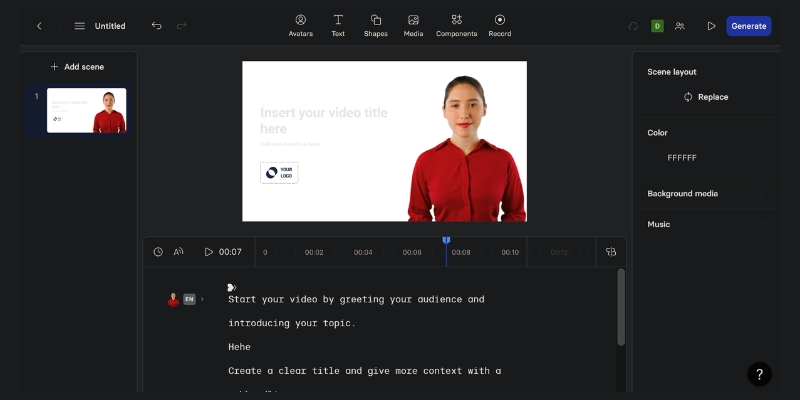
      The Synthesia.io review shows the user interface for creating an AI video, with an AI presenter, script box, and customization options visible.
      Synthesia’s editor allows users to type a script, choose an AI avatar, and customize video elements in a single, streamlined interface.
      4. Generate and Share

      Once you’re ready, you click “Generate.” The video renders in the cloud, typically within a few minutes, and you receive an email notification when it’s ready to be downloaded, embedded, or shared.

      In essence, Synthesia replaces the need for cameras, actors, and studios, drastically reducing the time and cost of video production for professional use cases.

      Deep Dive into Synthesia’s Key Features: Beyond the Hype

      While many tools can create AI videos, Synthesia’s feature set is specifically tailored for professional and enterprise environments. We tested the features that truly matter for marketers and corporate trainers.

      Custom AI Avatars

      This is Synthesia’s flagship feature and a key differentiator. It involves a professional studio recording session to capture your unique likeness, voice, and mannerisms. The result is a photorealistic digital twin that provides perfect brand consistency and a personal touch for corporate training or marketing messages. While the realism is exceptional, it represents a significant upfront investment, making it a feature exclusive to the Enterprise plan.

      230+ Stock AI Avatars

      For users who don’t need a custom presenter, Synthesia offers a high-quality, diverse library of 230+ stock avatars. These are ready to use immediately and are the go-to option for users on the Starter plan or for teams that need to produce videos quickly on various topics without being tied to a single presenter.

      140+ Languages and Voices

      Synthesia’s global reach is one of its greatest strengths. The platform’s multilingual support is seamless; you can type a script in Spanish, select a German-accented voice, and the AI avatar will speak it with incredibly accurate lip-syncing. This is a game-changer for international companies needing to localize training content efficiently across 140+ languages.

      AI Script Assistant

      To speed up the pre-production process, Synthesia includes an integrated AI Script Assistant. This tool can help brainstorm ideas, refine existing text, or generate an entire video script from a simple prompt, saving valuable time for content creators.

      Brand Asset Integration

      A crucial feature for corporate clients is the ability to maintain brand guidelines. Synthesia allows enterprise users to upload custom fonts, logos, and color palettes. This *brand asset integration* ensures every video produced aligns perfectly with the company’s visual identity.

      Enterprise-Level Security (SOC 2)

      For large corporations, data security is non-negotiable. Synthesia has achieved *SOC 2* Type II compliance, a rigorous, third-party audited security standard. This certification assures enterprise clients that their data and content are handled securely, a critical factor for legal and IT departments.

      Testing Synthesia’s Video Quality: How Realistic Are the AI Avatars?

      We generated a series of videos for common business scenarios—a compliance training module, a product marketing explainer, and an internal company announcement—to evaluate the output quality under real-world conditions.

      Avatar Realism and Lip-Sync

      Synthesia is undoubtedly a market leader in avatar realism. The avatars are sharp, well-lit, and avoid the “cartoony” look of some competitors. However, minor “uncanny valley” effects can still be noticed, particularly in longer, static shots. The lip-sync, on the other hand, is nearly flawless. We tested it with complex sentences in multiple languages, and the synchronization was consistently accurate and impressive.

      Voice Quality and Cloning

      The stock AI voices are professional and clear, suitable for most training and corporate communication needs, though they sometimes lack a wide emotional range. The real power lies in the voice cloning feature available with custom avatars. It creates a highly accurate replica of the speaker’s voice. We also appreciate the integration with third-party tools like *ElevenLabs*, which allows for even more premium voice options.

      Gestures and Expressions

      Synthesia allows you to add subtle micro-gestures like head nods, raised eyebrows, or smiling. These small additions add a valuable layer of non-verbal communication and help make the AI presenter feel more natural. While this is a step in the right direction, expressive gesture control remains a key area for improvement across the entire AI video generation industry.

      Overall, Synthesia’s video quality is top-tier for the AI avatar industry, making it perfectly suitable for professional use cases like corporate training and internal communications where clarity and consistency are paramount.

      Synthesia Pricing Explained: Is The ROI Worth The Cost in 2025?

      Let’s be direct: Synthesia is a premium tool with a price tag to match. The conversation shouldn’t just be about cost, but about the value and return on investment (ROI) it delivers, especially for its target audience. For a more detailed breakdown, check our complete guide to Synthesia pricing.

      Starter Plan

      Priced at $18/month (billed annually) or $29/month (monthly billing), this plan is for individuals and small teams. It includes 10 minutes of video per month, access to 125+ stock avatars and voices, 3 personal avatars, and all standard editing features. It’s best for freelancers or creators who need to produce a few high-quality videos and don’t require advanced collaboration or branding features.

      Enterprise Plan

      This plan uses custom pricing, and you’ll need to contact their sales team for a quote. This is where Synthesia’s true power is unlocked. Key features include unlimited video generation, the ability to create Custom Avatars, access to all 230+ stock avatars, API access for workflow automation, advanced brand asset kits, and the all-important *SOC 2* security compliance. This is built for corporate L&D, enterprise marketing teams, and organizations that need to scale video production with maximum control.

      Calculating the ROI

      For a business, the ROI is clear. Consider the traditional cost of producing one 5-minute training video: hiring an actor, renting a studio and equipment, and paying for a video editor’s time can easily run into thousands of dollars. With a Synthesia Enterprise plan, a team can produce hundreds of videos for a fixed annual fee, update them instantly, and translate them into dozens of languages at no extra cost.

      Synthesia vs The Competition: How It Compares to HeyGen & Colossyan

      While Synthesia is a leader, it doesn’t exist in a vacuum. We’ve put it head-to-head with its two most significant competitors, HeyGen and Colossyan, to help you decide which platform is right for you.

      Feature Synthesia HeyGen Colossyan
      Custom Avatar Quality Excellent (Studio Quality) Good (Instant Avatar) Good (Studio Quality)
      Stock Avatar Variety Excellent (230+) Excellent (100+) Good (50+)
      Languages Supported 140+ 175+ 70+
      Ease of Use Excellent Excellent Very Good
      Pricing Model Premium (Per User) Accessible (Credit-based) Mid-range (Per User)
      Enterprise Security Excellent (SOC 2) Basic Good (GDPR Compliant)
      Synthesia vs. HeyGen

      Synthesia excels in hyper-realistic custom avatars and enterprise-grade features, making it the choice for corporate training. *HeyGen* offers a more accessible entry point with competitive pricing and innovative features like talking photos and instant avatars, appealing to social media marketers and startups. See our full Synthesia vs HeyGen breakdown for more.

      Synthesia vs. Colossyan

      While Synthesia focuses on the presenter’s realism, Colossyan shines in its interactive learning features, allowing creators to add quizzes and questions directly into the video. Choose Colossyan if your primary goal is creating active e-learning modules rather than passive communication videos.

      Our Recommendation: For ultimate realism and enterprise-level needs, Synthesia remains the top choice. For budget-conscious creators and social media, *HeyGen* is the best alternative. For interactive e-learning, Colossyan is worth strong consideration.

      Who is Synthesia Best For? Real-World Use Cases

      Synthesia’s platform is versatile, but it truly excels in specific professional environments where scale, consistency, and efficiency are critical.

      Corporate Training & L&D

      This is Synthesia’s primary and most powerful use case. Companies use it to create consistent onboarding materials, compliance training, and software tutorials. The ability to quickly update a script and regenerate a video—or translate it into 10 languages—saves thousands of dollars and hundreds of hours compared to traditional methods.

      Marketing & Sales Teams

      Marketers leverage Synthesia to create personalized sales outreach videos at scale, develop product explainer videos for websites, and produce social media content without the logistical challenge of filming new footage for every single campaign or product update.

      Content Creators & Freelancers

      While the cost can be a barrier, creators on the Starter plan can efficiently produce YouTube channel content, online course materials, or client videos. This allows them to create presenter-led content without ever needing to appear on camera themselves, a huge benefit for those who prefer to work behind the scenes.

      Frequently Asked Questions About Synthesia

      Is there a free version of Synthesia?

      No, Synthesia is a premium paid tool. However, they offer a free demo video creator on their website where you can test the technology by creating a short sample video.

      How long does it take to create a custom avatar?

      The process typically takes around 10 business days after your studio recording session is complete. It’s a one-time process, and the avatar is then yours to use indefinitely on the platform.

      Can Synthesia videos be monetized on YouTube?

      Yes, videos created with Synthesia can be used for commercial purposes, including monetization on platforms like YouTube, as long as you are on a paid plan.

      Is Synthesia better than HeyGen?

      It depends on your needs. Synthesia is generally considered better for high-end corporate and training videos due to its superior custom avatars and security. HeyGen is often a better choice for social media marketing and those on a tighter budget.

      How realistic are the AI voices in Synthesia?

      The stock voices are very clear and professional. The custom voice cloning feature provides a highly realistic replica of your own voice, making it almost indistinguishable from a real recording.

      Read More From AI Avatar Generator

      If you found this review helpful, continue exploring our expert (“battle-tested”) guides and comparisons within the AI Avatar Generator category to find the perfect solution for your needs.

      last update : 21/11/2025

      A photo of Jun Pham, AI Tools Strategist at Aibrainjet

      About the Author

      Jun Pham

      Jun Pham is an AI tools strategist, a video creator and tech writer passionate about the future of AI in editing video. As the face of a dedicated team of creators and researchers, Jamie leads hands-on testing of the latest AI video tools. Together, they share honest reviews, workflow insights, and practical tips to help creators turn ideas into cinematic videos with minimal effort.

      Latest Posts

      Onepage Website Builder Review: Features, Pros, Cons, and Use Cases

      Onepage Website Builder Review: Features, Pros, Cons, and Use Cases
      Jun Pham

      SendShort AI Review (2025): The Best AI Clipper for Agencies?

      Our SendShort AI review tests its white-label features for agencies. Discover how it automates viral shorts, enhances client perception. Try now!
      Jun Pham

      Zebracat Review (2025): Is This Hybrid AI Ad Generator Worth It?

      Our Zebracat review (2025) assesses this hybrid AI video tool for marketers. Is it worth it for generating ads & repurposing content fast? See it now!
      Jun Pham

      Vizard Review (2025): Is This Hybrid AI Clipper & Editor Better Than OpusClip?

      Our expert vizard review reveals if this AI video clipper & editor beats OpusClip for control. Get superior editing & branding for viral shorts. Try now!
      Jun Pham

      Klap Review (2025): The Best 4K AI Clipper for High-Quality Shorts?

      Klap Review (2025): The Best AI Clipper for High-Quality Shorts? Klap Review (2025): The Best 4K AI Clipper for High-Quality Shorts? I have spent ...
      Jun Pham

      Submagic Review (2025): Is It The Best AI Tool For Hormozi Captions?

      This Submagic review (2025) reveals if it's the ultimate AI tool for "Hormozi-style" viral video captions & B-roll. We battle-tested its features, speed, and ROI!
      Jun Pham

      Best AI Video Generators 2025: The Ultimate Battle-Tested Review

      Best AI Video Generators 2025: The Ultimate Battle-Tested Review

      Best AI Video Generators 2025: The Ultimate Battle-Tested Review

      For Marketers, Creators, and Freelancers, the performance pressure to produce high-quality video content faster and more efficiently has never been greater. The search for the Best AI Video Generators is no longer about novelty; it’s a critical business decision driven by the need to automate repetitive tasks and maximize ROI. In the world of AI Video Generation, choosing the right tool can be the difference between scaling your content strategy and falling behind. This battle-tested review cuts through the hype, focusing on real-world performance, ROI comparisons, and practical use cases to help you find the perfect fit. We will provide a data-driven toplist, break down the core types of AI video tools, offer in-depth reviews of market leaders like Synthesia, Pika, and OpusClip, and deliver a final head-to-head AI video generator comparison.

      Table of Contents

      The 5 Best AI Video Generators: A Data-Driven Toplist for 2025

      As a Marketer, Creator, or Freelancer, you’re under constant “performance pressure” to deliver results. Wasting time on the wrong tool isn’t an option. This toplist is your shortcut to the most effective AI video software on the market, designed for quick, high-level comparison. We’ve analyzed dozens of options to identify the top-tier platforms that deliver tangible value and a strong ROI.

      A
      Our curated toplist of the best AI video tools, ranked by performance, features, and ROI for professionals.>
      Tool Name Core Category Best For Starting Price Our Rating
      Synthesia AI Avatar Corporate Training & Marketing Teams $22/month (billed annually) 4.8 / 5.0
      Pika Generative AI Video Solo Creators & Social Media Ads $8/month (billed annually) 4.7 / 5.0
      OpusClip AI Video Repurposing Content Creators & Podcasters $9.50/month (billed annually) 4.9 / 5.0
      VEED.io AI Video Editing All-in-One Video Workflows $12/month (billed annually) 4.6 / 5.0
      Fliki Text-to-Video Bloggers & Affiliate Marketers $21/month (billed annually) 4.5 / 5.0

      Understanding the 3 Core Types of AI Video Generators

      “AI Video Generator” is a broad term, and the “best” tool for you depends entirely on your primary goal. Choosing the wrong category is a common and costly mistake. To make an informed purchasing decision, it’s crucial to understand the main types of AI video software and how they solve different problems for Marketers and Creators.

      AI Avatar Generators (e.g., Synthesia)

      This category focuses on creating professional, presenter-led videos without needing cameras, microphones, or actors. You simply type a script, choose a digital avatar, and the AI generates a video of them speaking. These are ideal for corporate training modules, HR onboarding, and scalable marketing presentations where consistency and clarity are paramount. For a deeper dive, explore our guide to the best AI avatar generator.

      Generative AI Video (e.g., Pika)

      These are the most creatively focused AI video tools. They generate entirely new video clips from simple text or image prompts, transforming your imagination into motion. This category is perfect for creating unique B-roll, eye-catching social media content, conceptual ads, and storyboarding ideas. The focus here is on originality and visual impact rather than informational delivery. See our top picks in the best generative video tools category for more options.

      AI Video Repurposing Tools (e.g., OpusClip)

      These tools are a game-changer for content creators sitting on a library of long-form content. An AI repurposing tool automatically analyzes long videos—like podcasts, webinars, or speeches—and extracts the most engaging, viral-worthy short clips. It then auto-captions and reformats them for platforms like TikTok, YouTube Shorts, and Reels. This is an essential solution for maximizing reach and engagement without hours of manual editing. Discover more powerful options in our review of the best AI repurposing tools.

      Best AI Avatar Generator: Synthesia In-Depth Review

      Synthesia stands as the market leader in the AI Avatar space, offering a polished, enterprise-ready platform designed for scalable video production. This isn’t just a tool; it’s a solution for businesses that need to create professional, consistent training and communication videos without the high costs and logistical headaches of traditional filming. Our battle-tested review focuses on its practical application and ROI for marketing teams.

      The
      Synthesia’s intuitive dashboard allows users to generate AI avatar videos by simply typing a script and selecting design elements.>
      What is Synthesia & How Does It Work?

      At its core, Synthesia is a text-to-video platform that uses AI to animate photorealistic digital presenters (avatars). Users type or paste a script, select one of over 150 stock avatars or create a custom one, and the software generates a high-quality video of the avatar speaking the script with realistic lip-syncing. This process replaces the need for cameras, actors, and studios.

      Key Features for Marketers & Creators: Realistic AI Avatars: Synthesia offers a massive library of diverse, high-quality stock avatars. The ability to create a custom digital twin of a key stakeholder or brand ambassador is a powerful feature for maintaining brand consistency. Multi-Language Voice Cloning: With support for over 120 languages and accents, this feature is invaluable for global marketing campaigns and international corporate training. You can clone your own voice to ensure a consistent audio brand across all video assets. Customizable Video Templates: To accelerate production, Synthesia provides a wide range of professionally designed templates. These can be customized with your brand’s logos, colors, and fonts, saving countless hours for your design team. API & Integrations: For enterprise-level automation, the Synthesia API allows for the programmatic creation of personalized videos at scale, such as dynamic sales outreach or customized onboarding videos. Synthesia Pricing Analysis:

      Synthesia’s pricing is structured to serve users from individuals to large enterprises, with the ROI increasing significantly with scale.

      • Personal Plan: Aimed at individual users, this plan provides access to the core features for creating simple videos.
      • Creator Plan: Built for professionals and small teams, offering more video minutes, premium features, and better support. The ROI here comes from replacing the cost of small-scale video shoots and freelance editors.
      • Enterprise Plan: Designed for large organizations, this custom plan includes features like custom avatars, API access, and robust security compliance (like SOC 2), delivering massive savings on large-scale training and communication budgets.
      Real-World Use Case: Marketing Update in 5 Minutes

      Imagine you need to create a weekly internal marketing update. Traditionally, this would involve recording, editing, and distributing a video, taking hours. With Synthesia, you paste your bullet points into the script box, choose your company’s branded template and custom avatar, and click “Generate.” In under 5 minutes, you have a professional, on-brand video ready to share via email or Slack.

      Our Verdict:

      Synthesia is the undisputed best AI video generator for corporate communications, sales enablement, and professional training. If your primary need is to create polished, presenter-led videos at scale while maintaining strict brand control, Synthesia offers an unbeatable ROI. It’s less suited for highly creative or artistic projects but excels in its designated commercial use case.

      Best Generative AI Video Tool: Pika Battle-Tested

      Pika has rapidly emerged as a leader in the purely creative realm of generative video. Positioned as a tool to “give your imagination motion,” Pika excels at translating text, images, or even existing videos into new, dynamic, and often surreal visual content. It’s the go-to AI video software for projects where originality and high visual impact are the primary goals.

      What is Pika & How Does It Work?

      Pika is an AI model that creates video from a variety of inputs. Its core functions are text-to-video (generating a clip from a descriptive prompt), image-to-video (animating a static image), and video-to-video (transforming the style or elements of an existing video clip). It’s designed for a fast, iterative creative process, making it a favorite among solo creators and social media marketing teams.

      Key Features for Creative Projects: Prompt Interpretation Quality: Pika’s strength lies in its ability to understand and execute complex, artistic prompts. It can generate video in various styles—from cinematic and anime to 3D animation—giving creators a vast creative canvas. Lip Sync & Sound Effects: A standout feature is the ability to upload an audio track and have an AI-generated or uploaded character lip-sync to it. Users can also generate sound effects directly within the platform, adding a layer of polish and engagement to their creations. Expand Canvas & Modify Region: Similar to features in advanced image editors, Pika allows users to expand the video’s canvas (e.g., from a square to a 16:9 aspect ratio) or modify specific regions of the video with a new prompt, offering a level of control that many competitors lack. Pika Pricing Tiers:

      Pika’s pricing model is accessible, with a robust free offering to encourage experimentation.

      • Free Plan: Includes a set number of credits with a Pika watermark on all videos. It’s perfect for learning the platform and casual use.
      • Standard & Pro Plans: These paid tiers remove the watermark, provide significantly more credits, allow for faster generation times, and unlock premium features. For any serious creator or marketer, a paid plan is essential for professional output.
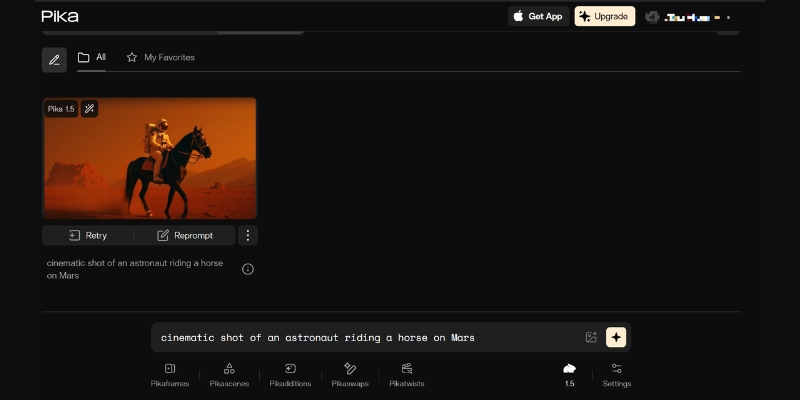
      The
      Pika transforms simple text prompts into compelling video clips, offering powerful creative control for social media content.>
      Real-World Use Case: Engaging Social Media Ad

      A small e-commerce brand wants to create a scroll-stopping video ad for a new line of fantasy-themed candles. Instead of using generic stock footage, the marketer uses Pika with the prompt: “A magical, glowing candle on an ancient wooden table, with wisps of sparkling smoke rising, cinematic, moody lighting.” In seconds, Pika generates several unique, eye-catching clips that are far more engaging than anything they could find or afford to shoot traditionally.

      Our Verdict:

      Pika is the best generative AI video tool for solo creators, artists, and marketing teams focused on high-impact social media and advertising content. If your priority is creating original, attention-grabbing visuals from scratch, Pika’s creative power and ease of use are unmatched. It’s not designed for creating long-form or corporate-style videos but is a powerhouse in the short-form creative niche.

      Best AI Video Repurposing Tool: OpusClip Performance Review

      For content creators, the “content treadmill” is a relentless challenge. OpusClip directly addresses this pain point, positioning itself as the ultimate solution for creators struggling to keep up with the demand for short-form video. It’s an AI-powered efficiency machine designed to maximize the value and reach of your existing long-form content library.

      What is OpusClip & How Does It Solve the Content Treadmill?

      OpusClip is a specialized AI video tool that takes a single long video and, with one click, automatically generates multiple short, viral-ready clips. It uses AI to identify the most compelling hooks and segments, intelligently reframes them for vertical viewing, adds dynamic captions, and even provides a “virality score” to help you prioritize what to post. It automates what would typically be hours of tedious work for a human editor.

      Key Features for Maximizing Content ROI: AI Curation & Virality Score™: This is OpusClip’s core value proposition. Its AI analyzes the transcript and video content to find the most engaging and coherent segments, ranking them with a predictive score to indicate their potential to go viral. Auto Re-framing & Captions: The tool automatically detects and tracks the main speaker, ensuring they are always in the frame in a vertical 9:16 format. It also adds highly engaging, word-by-word animated captions, which are crucial for viewer retention on platforms like TikTok and YouTube Shorts. Brand Templates & B-Roll: Users can create and apply brand templates (custom fonts, colors, logos) to all clips instantly, ensuring brand consistency. The AI can also automatically add relevant b-roll footage to make the clips more visually interesting, a feature that sets it apart from simpler clipping tools. OpusClip Pricing Breakdown:

      OpusClip’s pricing is based on the number of upload minutes processed, making it a scalable solution.

      • Essential Plan: A starting point for creators who are regularly producing long-form content and want to establish a consistent short-form presence.
      • Pro Plan: Designed for serious content creators, agencies, and freelancers managing multiple clients. The value proposition is clear: the cost of the plan is a fraction of the cost of hiring a video editor to perform the same tasks.
      Real-World Use Case: Podcast to 10+ TikToks

      A podcaster uploads a 1-hour interview to OpusClip. Within minutes, the AI returns 10-15 distinct, high-potential clips, each 30-60 seconds long. Each clip is already reframed for mobile, has engaging captions, and is scored for virality. The podcaster can now schedule a week’s worth of content for TikTok, Reels, and Shorts in less than 30 minutes, drastically increasing their show’s discovery and audience growth.

      Our Verdict:

      OpusClip is an essential, non-negotiable AI video tool for any creator or marketer with a library of long-form video content. It is the best AI video repurposing tool on the market. The time and money it saves are immense, making its ROI almost immediate. If you create podcasts, webinars, interviews, or educational videos, OpusClip will fundamentally change your content distribution workflow for the better.

      Head-to-Head Comparison: Pika vs Synthesia vs OpusClip

      Now that we’ve reviewed the leaders in each core category, this direct AI video generator comparison will help you make the final purchasing decision. The right choice depends entirely on your specific use case. This table breaks down the key differences between these top AI video tools to clarify which platform aligns with your goals.

      Criteria Synthesia Pika OpusClip
      Core Function AI Avatar Video Generation Generative Video from Prompts AI Repurposing of Long Videos
      Best For (Use Case) Corporate training, sales videos Creative ads, social media content Podcast clips, YouTube Shorts
      Ease of Use Very Easy (Script-based) Easy (Prompt-based) Extremely Easy (One-click)
      Video Output Quality High (Polished, Professional) Varies (Creative, Artistic) High (Optimized for Social)
      Pricing Model Subscription (Per User) Subscription (Credit-based) Subscription (Minutes-based)
      ROI for Marketers High (Saves on production costs) High (Saves on creative/ad spend) Very High (Saves on editing time)

      Analysis: Which Tool Should You Choose?

      Choose Synthesia if: You need to create polished, consistent, presenter-led videos for corporate communications, e-learning, or training at scale. Your priority is professionalism, brand control, and replacing traditional video shoots.

      Choose Pika if: Your priority is creating completely original, eye-catching creative visuals for social media campaigns, music videos, or conceptual ads. You value artistic freedom and want to generate video content that doesn’t exist anywhere else.

      Choose OpusClip if: You already produce long-form video content (like podcasts or webinars) and your biggest challenge is efficiently distributing it as short-form clips. Your priority is maximizing content ROI, saving editing time, and growing your audience on social platforms.

      How We Test & Rank AI Video Tools

      Our recommendations are not based on surface-level feature lists. As an expert hub, we are committed to providing “battle-tested” reviews that reflect real-world application. Our ranking methodology is built on a foundation of trust and transparency, ensuring our audience of Marketers, Creators, and Freelancers receives actionable insights.

      Our Testing Criteria: Real-World Performance: We test each AI video creator with projects that our target audience faces daily. For Synthesia, it’s a corporate training module. For Pika, it’s a social media ad campaign. For OpusClip, it’s repurposing a one-hour podcast. ROI & Time-Saving Analysis: We don’t just look at the price; we analyze the value. We measure the hours saved compared to traditional video production workflows and calculate the potential cost savings from reducing reliance on freelance editors or production studios. Feature Set & Usability: A powerful tool is useless if it’s impossible to use. We evaluate the learning curve of the software, the intuitiveness of its interface, and the practical utility of its core features for achieving a specific outcome. Output Quality & Customization: We assess the final video output for professionalism, visual appeal, and audio clarity. We also test the limits of customization—how much control does the user have to align the video with their brand identity?

      Frequently Asked Questions (FAQ)

      What is the best free AI video generator?

      For generative video, Pika offers a generous free plan that includes a watermark, making it one of the best AI video generators free for experimentation. For general editing with AI features, CapCut is another powerful free option. However, for professional, watermark-free results, a paid plan is almost always necessary.

      Which AI video generator is best for YouTube automation?

      For YouTube automation that relies on faceless channels or documentary-style content, a combination of tools is often best. Fliki is excellent for turning blog posts or scripts into videos with stock footage and AI voices. For creators who already have long-form content, OpusClip is the best for automating the creation of YouTube Shorts to drive traffic to the main channel.

      Can AI create realistic videos?

      Yes, AI can create remarkably realistic videos, but the level of realism varies by category. AI Avatar tools like Synthesia produce highly realistic digital presenters. Generative AI tools like Pika are rapidly improving but can sometimes produce results that are more artistic or surreal than photorealistic.

      How do AI video makers compare to traditional video editing software like Adobe Premiere?

      AI video makers are designed to automate and accelerate specific tasks, not to replace the comprehensive control of traditional editors like Adobe Premiere Pro. AI tools excel at speed and efficiency for tasks like avatar generation (Synthesia), creative ideation (Pika), or clip creation (OpusClip). Premiere Pro offers deep, manual control over every frame, making it better for complex, bespoke editing projects. Many professionals use both—AI tools for initial creation and Premiere for final polishing. For more on this, check our guide on the best AI video editing software.

      Is Synthesia better than other AI avatar tools?

      In our testing, Synthesia consistently ranks as the best for enterprise and professional use cases due to its superior avatar quality, extensive feature set, security compliance, and robust platform stability. While other alternatives exist, Synthesia remains the market leader for teams that prioritize quality and scalability.

      Does Pika have a watermark on free videos?

      Yes, videos created using Pika’s free plan will have a Pika watermark. To download videos without a watermark for professional or commercial use, you will need to subscribe to one of their paid plans.

      Read More From AI Video Generation

      If you found this toplist helpful, continue exploring our expert, battle-tested guides and comparisons within the AI Video Generation category to find the perfect solution for your needs.

      last update : 14/11/2025

      A photo of Jun Pham, AI Tools Strategist at Aibrainjet

      About the Author

      Jun Pham

      Jun Pham is an AI tools strategist, a video creator and tech writer passionate about the future of AI in editing video. As the face of a dedicated team of creators and researchers, Jamie leads hands-on testing of the latest AI video tools. Together, they share honest reviews, workflow insights, and practical tips to help creators turn ideas into cinematic videos with minimal effort.

      Latest Posts

      Onepage Website Builder Review: Features, Pros, Cons, and Use Cases

      Onepage Website Builder Review: Features, Pros, Cons, and Use Cases
      Jun Pham

      SendShort AI Review (2025): The Best AI Clipper for Agencies?

      Our SendShort AI review tests its white-label features for agencies. Discover how it automates viral shorts, enhances client perception. Try now!
      Jun Pham

      Zebracat Review (2025): Is This Hybrid AI Ad Generator Worth It?

      Our Zebracat review (2025) assesses this hybrid AI video tool for marketers. Is it worth it for generating ads & repurposing content fast? See it now!
      Jun Pham

      Vizard Review (2025): Is This Hybrid AI Clipper & Editor Better Than OpusClip?

      Our expert vizard review reveals if this AI video clipper & editor beats OpusClip for control. Get superior editing & branding for viral shorts. Try now!
      Jun Pham

      Klap Review (2025): The Best 4K AI Clipper for High-Quality Shorts?

      Klap Review (2025): The Best AI Clipper for High-Quality Shorts? Klap Review (2025): The Best 4K AI Clipper for High-Quality Shorts? I have spent ...
      Jun Pham

      Submagic Review (2025): Is It The Best AI Tool For Hormozi Captions?

      This Submagic review (2025) reveals if it's the ultimate AI tool for "Hormozi-style" viral video captions & B-roll. We battle-tested its features, speed, and ROI!
      Jun Pham

      Future Of AI Video: Unveiling The Next-Gen Trends And Predictions In Real-Time Generation (2025)

      Future Of AI Video: Unveiling The Next-Gen Trends And Predictions In Real-Time Generation (2025)

      Future Of AI Video: Unveiling The Next-Gen Trends And Predictions In Real-Time Generation

      The future of AI video is no longer a distant sci-fi concept; it’s the next frontier for marketers, creators, and freelancers facing immense “performance pressure.” As the demand for high-quality video content skyrockets, the current tools are merely scratching the surface of what’s possible. The conversation is rapidly shifting beyond simple text-to-video prompts towards a more integrated, intelligent, and instantaneous creative process. Within the evolving world of AI Video Generation, we are on the cusp of a revolution driven by real-time generative video and hyper-personalization at scale. This expert analysis will unpack the core trends and predictions, moving past the hype to deliver a battle-tested roadmap. We will explore the 5 key AI video predictions that will redefine content creation, the next technological leaps beyond milestones like Sora, the tangible real-world impact for professionals, the transformative power of interactive video, and actionable strategies to stay ahead of the curve.

      Table of Contents

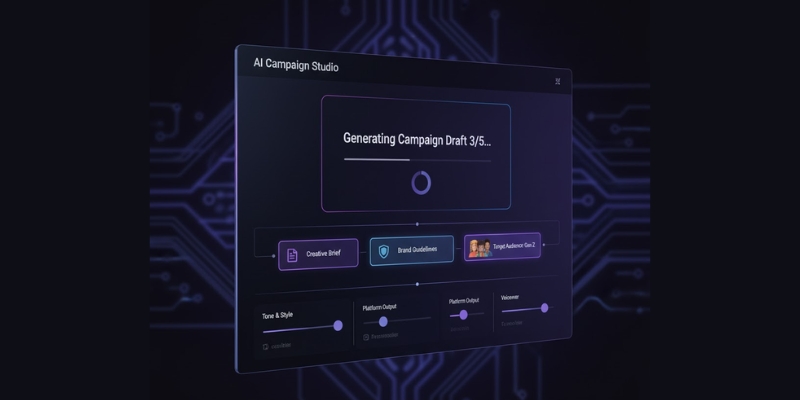
        A
        The evolution of AI video generation is moving from simple prompts to complex, real-time creative partnerships.

        5 Key AI Video Predictions That Will Redefine Marketing and Content Creation by 2026

        For marketers and creators, understanding upcoming AI video trends is not just about curiosity; it’s about anticipating the tools that will solve tomorrow’s problems. These predictions are grounded in the current trajectory of technology and address the core need for faster, more effective, and scalable video production.

        Prediction 1: The Shift from Text-to-Video to Idea-to-Video
        The future of generative video AI will move beyond literal prompt-to-clip generation. Instead, AI will function as a creative strategist, interpreting complex inputs like creative briefs, full scripts, brand style guides, and even target audience personas. Imagine uploading a campaign document and receiving a series of cohesive, on-brand video drafts. This leap will drastically reduce pre-production bottlenecks, allowing freelancers and marketing teams to move directly from strategy to execution, transforming a multi-week process into a matter of hours.

        Prediction 2: Real-Time Generative Video Becomes Mainstream
        The “holy grail” of AI video is real-time generation—the ability to create or modify video content instantly, much like a video game engine renders a world on the fly. This technology will unlock a new class of interactive brand experiences. Think of a live-stream where the background changes based on audience polls, personalized sales videos generated during a video call, or dynamic social media ads that adapt to real-time events. This directly tackles the industry’s need for faster content velocity.

        Prediction 3: Hyper-Personalization at Scale
        Current personalization is often limited to inserting a name into a text overlay. The next evolution involves creating thousands of unique video variations tailored to individual user data, behavior, and context. For example, a single e-commerce campaign could generate 10,000 distinct video ads, each featuring products a specific user viewed, set in a location matching their IP address, with a voiceover in their native language. This level of hyper-personalization will be a game-changer for ad campaign ROI and customer communication.

        Prediction 4: The Rise of AI-Generated Avatars and Digital Actors
        We will move beyond the slightly robotic avatars of today to photorealistic, emotionally expressive digital actors. These AI-powered talents can be licensed and directed without the logistical and financial constraints of traditional film shoots. For businesses, this means eliminating costs associated with location scouting, crew, and talent contracts. A solo creator could “hire” a digital actor to star in their short film, with full control over performance and dialogue, democratizing high-production-value content.

        Prediction 5: AI as a Co-Director in Filmmaking and Creative Projects
        The future of AI in filmmaking sees the technology as a collaborative partner, not just a replacement tool. Advanced AI will suggest camera angles, recommend editing styles based on genre conventions, propose narrative tweaks to improve pacing, and even generate entire B-roll sequences to match a primary shot. This empowers small teams and solo creators to produce professional-grade films and creative projects, bridging the gap between ambitious vision and limited resources.

        Beyond Sora: The Next Technological Leaps in Generative Video AI

        While models like OpenAI’s Sora and Kling AI have demonstrated incredible potential, they represent a milestone, not the final destination. The predictions above are powered by several underlying technological shifts that are currently in development. Understanding these concepts is key to grasping what comes next in the history of AI video generation.

        From Latent Diffusion to State Space Models: The Engine of Next-Gen Coherence
        Early AI video models struggled with maintaining consistency over more than a few seconds. The next generation of architecture, likely involving State Space Models (SSMs) or similar technologies, will enable the creation of much longer, logically coherent videos. These models have a more sophisticated “memory,” allowing them to track objects, characters, and environmental physics over extended durations, solving the problem of disjointed and nonsensical clips.

        Multi-Modal AI: Unifying Video, Audio, and Interactive Elements
        Future AI video generators will be multi-modal systems. They won’t just create pixels; they will generate a complete package. When you ask for a “scene of a rainy cafe,” the AI will generate the visuals, the synchronized sound of rain and clinking cups, a fitting ambient music track, and potentially even interactive elements. This means a single generative process can output a complete, ready-to-publish product, which is the essence of what generative video aims to achieve.

        The Role of AGI (Artificial General Intelligence) in Creative Autonomy
        Looking further into the future, the ultimate goal is Artificial General Intelligence (AGI). In the context of video, an AGI could be given a high-level business objective like “launch a campaign for our new product targeting Gen Z on TikTok.” It would then autonomously handle the entire workflow: conceptualizing the creative, scripting, generating the video assets, editing, creating variations, and distributing them, all while optimizing for performance. This represents the ultimate solution to the “performance pressure” felt by modern creative teams.

        Real-World Impact: How AI Video Will Solve Core Challenges for Marketers, Creators, and Freelancers

        These future trends directly translate into solutions for the most significant pain points faced by professionals today. The focus shifts from technical execution to strategic creativity, fundamentally altering workflows and ROI calculations.

        A
        The future of AI video tools will focus on interpreting strategic goals, not just executing simple commands..

        Challenge: Overcoming “Performance Pressure” and Tight Deadlines
        With real-time generation and idea-to-video capabilities, production timelines will collapse. A marketing team could conceive, produce, and launch a multi-channel video campaign in the same week. This allows for more timely, reactive content that capitalizes on current trends. For freelancers, it means the ability to take on more projects without sacrificing quality. The result is a dramatic increase in output, potentially reducing an average video turnaround from 2 weeks to just 2 days.

        Challenge: Breaking Through Content Saturation
        In a world flooded with generic content, relevance is the key to engagement. Hyper-personalization and interactive AI video provide a powerful competitive advantage. An ad that speaks directly to a user’s recent behavior is far more likely to convert than a one-size-fits-all message. This allows brands to build deeper connections and achieve significantly better engagement metrics in a crowded digital landscape, a clear advantage when comparing AI video vs. traditional video production.

        Challenge: High Production Costs and Limited Budgets
        High-quality video has historically been expensive. AI-generated actors, automated set creation, and AI co-direction will drastically lower the barrier to entry. A small business or solo creator will have access to production capabilities that were once the exclusive domain of large agencies and studios. This directly impacts the bottom line, making professional-grade video a viable option for virtually any budget.

        Challenge: Scaling Content Repurposing and Distribution
        A single long-form video contains dozens of potential social media clips, promotional snippets, and ad creatives. Future AI tools will analyze a master video and automatically generate a complete package of repurposed assets. It will reformat a YouTube video into multiple TikToks and Reels, complete with auto-generated captions, and even suggest the most engaging 15-second clips to use, maximizing the value and reach of every single creative asset.

        The Future is Interactive: How Real-Time Generative Video Will Transform User Engagement

        Perhaps the most exciting application of future AI video technology is its ability to create truly interactive experiences. When video can be generated and modified in real-time, it stops being a passive medium and becomes a dynamic conversation. This has profound implications for how businesses engage with their customers.

        Use Case: E-commerce and Retail
        Imagine viewing a product on a website and being able to interact with a photorealistic AI avatar. A customer could ask, “Can you show me this jacket in blue?” and the video would instantly change to show the blue version. They could ask to see the product from a different angle or see it paired with another item, creating an immersive and personalized shopping experience that goes far beyond static images.

        Use Case: Education and Training
        Corporate training and online courses will become adaptive learning journeys. An AI could generate personalized educational videos that change based on a user’s progress. If a user answers a quiz question incorrectly, the AI could generate a new video segment on the spot to re-explain the concept in a different way, tailored to that specific knowledge gap.

        Use Case: Lead Generation and Sales
        A sales professional on a live call with a potential client could use a real-time generative tool to build a personalized video walkthrough. As the client asks questions about a proposal, the salesperson could instantly generate visuals to illustrate their points, creating a dynamic and highly persuasive presentation that is built collaboratively with the client.

        Preparing for the AI Video Revolution: Actionable Strategies & Tools to Watch

        The future of AI video is approaching quickly. For marketers, creators, and freelancers, preparing for these shifts now is crucial for staying competitive. The key is to build foundational skills and a strategic mindset that will be valuable no matter which specific tools come to dominate the market.

        Start Integrating Current AI Video Tools into Your Workflow
        The future builds on the present. Don’t wait for AGI to arrive. Start using today’s leading AI video tools to automate simple tasks. Experiment with AI for subtitling, basic editing, or creating simple videos from articles. Familiarizing yourself with the current landscape will give you a significant advantage as more advanced platforms emerge. Build a foundation of understanding now.

        Develop Your Prompting and “AI Directing” Skills
        As AI handles more of the technical execution, the most valuable human skill will be the ability to clearly and creatively communicate a vision to the AI. This goes beyond writing simple text prompts; it’s a new form of creative direction. Learn to think like a director, providing the AI with context, goals, emotional tone, and stylistic references to guide its output.

        Focus on Strategy, Not Just Production
        When anyone can generate a high-quality video in minutes, the value is no longer in the technical production but in the strategy behind it. The most successful professionals will be those who excel at audience research, creative ideation, storytelling, and campaign strategy. Let the AI be your production crew while you focus on being the creative visionary.

        Build a “Testing” Budget for New AI Tools
        The pace of innovation is staggering. Advise your business or allocate a small portion of your freelance budget specifically for experimenting with emerging AI video platforms. The goal is to continuously test new tools to discover which ones provide the best ROI and workflow integration for your specific needs. Being an early adopter of a breakthrough tool can provide a massive competitive edge.

        Frequently Asked Questions About the Future of AI Video

        What is the next step for AI video after Sora?
        The next major steps after Sora-like models involve achieving longer-form narrative coherence, enabling real-time generation and interactivity, and integrating multi-modal capabilities like synchronized audio and sound effects generation in a single model.

        Will AI video generation replace human creators and filmmakers?
        It is more likely to augment them. AI will automate tedious technical tasks, acting as a powerful co-director or production assistant. This will free up human creators to focus on higher-level strategy, storytelling, and creative direction, ultimately democratizing filmmaking rather than replacing it.

        How will the future of AI video handle issues like copyright and deepfakes?
        This is a critical challenge. The future will likely involve a combination of technological solutions (like digital watermarking and content authenticity verification), new legislation, and evolving platform policies. Addressing the ethics of AI video is paramount for its responsible development.

        What is real-time generative video AI?
        Real-time generative video AI is the ability to create or alter video footage instantaneously in response to live inputs. Instead of waiting minutes or hours for a video to render, the changes happen on-the-fly, similar to how a video game engine renders graphics.

        When can we expect AI-generated movies to become a reality?
        While AI can already generate impressive short clips, a feature-length, coherent, AI-generated film is still several years away. Major hurdles in long-form narrative consistency, character coherence, and computational power need to be overcome. However, we can expect to see AI play an increasingly significant role in generating scenes, special effects, and other elements of filmmaking in the very near future.

        Read More From AI Video Generation

        If you found this analysis helpful, continue exploring our expert (“battle-tested”) guides and comparisons within the AI Video Generation category to find the perfect solution for your needs.

        last update : 14/11/2025

        A photo of Jun Pham, AI Tools Strategist at Aibrainjet

        About the Author

        Jun Pham

        Jun Pham is an AI tools strategist, a video creator and tech writer passionate about the future of AI in editing video. As the face of a dedicated team of creators and researchers, Jamie leads hands-on testing of the latest AI video tools. Together, they share honest reviews, workflow insights, and practical tips to help creators turn ideas into cinematic videos with minimal effort.

        Latest Posts

        Onepage Website Builder Review: Features, Pros, Cons, and Use Cases

        Onepage Website Builder Review: Features, Pros, Cons, and Use Cases
        Jun Pham

        SendShort AI Review (2025): The Best AI Clipper for Agencies?

        Our SendShort AI review tests its white-label features for agencies. Discover how it automates viral shorts, enhances client perception. Try now!
        Jun Pham

        Zebracat Review (2025): Is This Hybrid AI Ad Generator Worth It?

        Our Zebracat review (2025) assesses this hybrid AI video tool for marketers. Is it worth it for generating ads & repurposing content fast? See it now!
        Jun Pham

        Vizard Review (2025): Is This Hybrid AI Clipper & Editor Better Than OpusClip?

        Our expert vizard review reveals if this AI video clipper & editor beats OpusClip for control. Get superior editing & branding for viral shorts. Try now!
        Jun Pham

        Klap Review (2025): The Best 4K AI Clipper for High-Quality Shorts?

        Klap Review (2025): The Best AI Clipper for High-Quality Shorts? Klap Review (2025): The Best 4K AI Clipper for High-Quality Shorts? I have spent ...
        Jun Pham

        Submagic Review (2025): Is It The Best AI Tool For Hormozi Captions?

        This Submagic review (2025) reveals if it's the ultimate AI tool for "Hormozi-style" viral video captions & B-roll. We battle-tested its features, speed, and ROI!
        Jun Pham

        What Is Generative Video: A Creator’s Guide To AI Video Synthesis & The Generative Models Redefining Content (2025)

        What Is Generative Video: A Creator’s Guide To AI Video Synthesis & The Generative Models Redefining Content (2025)

        What Is Generative Video: A Creator’s Guide To AI Video Synthesis & The Generative Models Redefining Content (2025)

        At its core, generative video is a groundbreaking subfield of Generative AI that creates entirely new video content from scratch based on user inputs like text or images. For Marketers, Creators, and Freelancers feeling the immense “performance pressure” to produce more content faster, this isn’t just a novel technology—it’s a direct solution to the production bottleneck. Within the broader world of AI Video Generation, understanding the concept of generative video is crucial for unlocking unprecedented speed and creativity. This battle-tested guide will demystify this powerful concept, exploring the core definition of generative video, the critical difference between generative and traditional AI video tools, the underlying generative models that power them, and a practical look at battle-tested tools that can accelerate your workflow today.

        Table of Contents

          What is Generative Video & Why It’s a Game-Changer for Creators

          Generative Video is a specific type of AI video generation that synthesizes entirely new video pixels, frames, and scenes from prompts, rather than simply editing, automating, or repurposing existing video footage. It’s a fundamental shift from modification to creation. This technology directly addresses the “performance pressure” felt by modern creators by providing a way to produce high-quality video content rapidly and cost-effectively, eliminating the need for cameras, film crews, or complex editing software for many tasks.

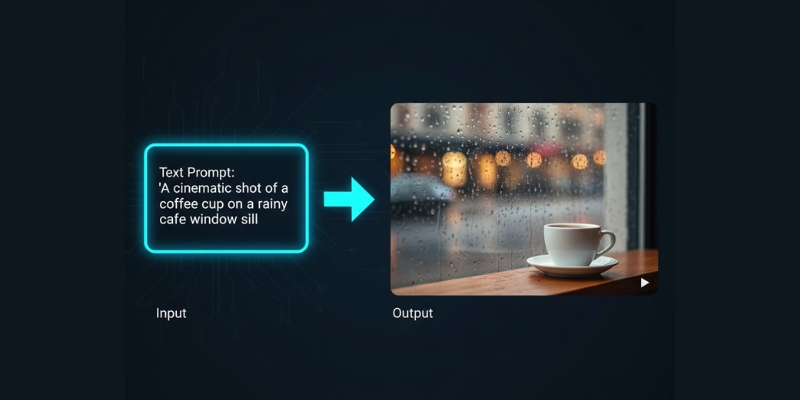
          Imagine creating a cinematic B-roll of a futuristic cityscape for a product ad in minutes, just by describing it in a sentence. That is the power of generative video. This capability is built on core concepts like Text-to-Video, where a written prompt is turned into moving images, and Video-to-Video, which can transform an existing video into a completely different style. The entire process is driven by powerful Generative AI models designed specifically for video synthesis, making it a true game-changer for content velocity and creative exploration.

          A
          Generative video models translate natural language prompts directly into novel video content, bypassing traditional production steps.

          Generative Video vs. Traditional AI Video: What’s the Real Difference?

          The term “AI Video” is broad and often causes confusion. While both generative and traditional AI video tools aim to make video production easier, their core functions are fundamentally different. Understanding this distinction is key to choosing the right tool for the job. We break down the key differences in our comparison table below. As you’ll see, one is about creating something from nothing, while the other is about making existing workflows smarter. For a deeper dive into the overall landscape, explore our guide on what is AI video generation.

          Parameter Generative Video Traditional AI Video
          Core Function Creation of new, synthetic video pixels from scratch (synthesis). It generates content that never existed before. Automation of tasks on existing video footage (e.g., editing, subtitling, avatar animation).
          Technology Relies on Diffusion Models and Generative Adversarial Networks (GANs) to imagine and construct visuals. Uses machine learning for analysis, lip-syncing algorithms, object tracking, and speech-to-text.
          Best For Creating original B-roll, conceptual ads, artistic visuals, animated storyboards, and prototyping ideas quickly. Corporate training videos with AI avatars, repurposing long-form content into social clips, and automated editing tasks.
          Example Tool Prominent text-to-video models like Pika or Runway ML. Prominent AI avatar and editing tools like Synthesia or Descript.

          Crucially, these two categories are not mutually exclusive. A modern, efficient workflow can leverage both. A Marketer could use a generative video tool to create a unique background scene and then use a traditional AI avatar tool to overlay a presenter on top of it, combining the strengths of both technologies to solve different problems.

          How Generative Video Models Actually Work: The Core Technologies Explained

          While the results can seem like magic, generative video is grounded in complex but understandable technologies. For creators and marketers, knowing the basics of how these AI video generators work helps in writing better prompts and understanding a tool’s capabilities and limitations. Here are the core generative models explained in practical terms.

          Text-to-Video Synthesis: This is the most common method you’ll encounter. Think of it as a two-step process. First, the AI model is “taught” by analyzing billions of images and videos paired with text descriptions, learning the relationship between words and visuals. Then, when you provide a prompt, it uses that knowledge to “paint” a sequence of images (frames) that logically match your text description. This is the core of generative video from text.

          Video Diffusion Models: This is the technology behind many of today’s most stunningly realistic results. The process starts with a screen of pure visual “noise,” like old TV static. Step-by-step, guided by your text prompt, the model refines this noise, removing randomness and adding structure until a coherent, clear video emerges. The primary benefit of generative video diffusion models is their ability to produce incredibly high-fidelity and detailed output.

          Generative Adversarial Networks (GANs): A clever approach that uses a “competition” to achieve realism. Imagine an “artist” AI (the Generator) that creates a video, and a “critic” AI (the Discriminator) whose only job is to determine if the video is fake or real. The Generator constantly tries to fool the Discriminator, and this competitive loop forces it to produce increasingly sharp, believable videos. Video GANs are particularly effective at creating crisp details in the final output.

          Battle-Tested Generative Video Tools to Accelerate Your Workflow

          Moving from theory to practice, the market is now filled with powerful generative video tools designed to solve real-world problems for creators. Instead of a simple feature list, we’ve curated these solutions based on the primary job they accomplish, directly addressing the commercial investigational intent of users looking for the right tool. To get a complete overview of this technology, check out our guide to Text-to-Video AI.

          For Rapid Prototyping & Social Media Clips:

          These tools are built for speed and ease of use, perfect for when you need to visualize an idea or create a short, engaging clip quickly.

          • Pika (2.2): Known for its fast generation times and user-friendly interface. The latest version features advanced tools like Pikaswaps (video inpainting), Pikaffects, and Pikaframes, with support for 10-second videos in 1080p. Its strengths include excellent image-to-video animation capabilities and seamless object modification.
          • InVideo AI: Great for marketers who need to produce social media videos with text overlays, voiceovers, and stock media integration alongside its generative features.
          For High-Fidelity Marketing & Ad Creatives:

          When quality, realism, and control are paramount, these platforms offer more advanced features for professional-grade output.

          • Runway Gen-3 Alpha: A leader in cinematic output and a major improvement over Gen-2 in fidelity, consistency, and motion. It offers fine-grained controls for camera motion (pan, tilt, zoom), Motion Brush, Advanced Camera Controls, and Director Mode. The platform supports Text-to-Video, Image-to-Video, and Video-to-Video capabilities, making it ideal for maintaining brand consistency.
          • Luma Dream Machine: Praised for its high-quality, coherent, and physically plausible video generation. Features include “Modify with Instructions” and “Reframe” tools that allow plain-language editing, making it a strong contender for creating realistic marketing assets and short films.
          For Unique Artistic & Conceptual Videos:

          For creators looking to push creative boundaries, these tools are known for their distinct visual styles and flexibility.

          • Kaiber: Delivers highly stylized and often psychedelic visuals, making it perfect for music videos, abstract concepts, and eye-catching artistic content.
          • Haiper: A newer tool that is gaining traction for its creative flexibility and active community, which provides a great source of inspiration for unique prompts and visual styles.

          Note: The generative video landscape is evolving rapidly. Major platforms like Google (Veo 3), OpenAI (Sora 2), and others are continuously releasing new models with enhanced capabilities. Always check the latest version and features when evaluating tools for your specific needs.

          Measuring the ROI of Generative Video: A Practical Guide for Marketers

          For any professional, purchasing decisions hinge on clear ROI comparisons. Generative video’s value isn’t just in its creative potential but in its tangible impact on your budget and timeline. Here is a simple framework to evaluate the return on investment when considering these tools.

          Time Savings Calculation:

          The most immediate return is in hours saved. Use this simple formula: (Hours spent on traditional video production) – (Hours spent on generative video production) = Hours Saved. For example, a 30-second B-roll shoot for a product might take 8 hours (setup, travel, shooting, editing). A generative tool could produce five different high-quality options in 30 minutes. The value of the 7.5 hours saved can be directly calculated based on your or your team’s hourly rate.

          Cost Reduction Analysis:

          Generative video can significantly reduce or completely eliminate many direct production costs. Consider the savings from no longer needing to pay for:

          Crew hire: No need for a videographer, director, or production assistants. Location rental fees: Create any setting you can imagine without booking a space. Actor or talent fees: Generate human-like characters or abstract visuals on demand. Stock footage subscription costs: Create perfectly tailored, royalty-free clips instead of searching through libraries. Equipment rental: Forget about cameras, lighting, and microphones. Content Velocity & A/B Testing:

          Perhaps the most significant ROI comes from increased content velocity. The low cost and high speed of generation allow for robust A/B testing that was previously impossible. Instead of producing one expensive video ad, you can generate 10 variations—with different visuals, tones, and settings—for the same cost or less. This dramatically improves campaign optimization by allowing you to find the most effective creative for your audience based on real performance data.

          Frequently Asked Questions About Generative Video

          Is generative video the same as deepfake?

          No. While both technologies use Generative AI, their goals differ. Deepfakes typically involve swapping a person’s face onto an existing video. Generative video, in contrast, aims to create the entire scene—characters, background, and action—from scratch based on a prompt.

          Can I use generative video for commercial projects?

          It depends on the tool’s terms of service. Most leading platforms like Runway and Pika now offer clear commercial licenses, giving you copyright ownership of the output. However, you must always check the specific terms of the service you are using to ensure compliance.

          How realistic is generative video today?

          The realism of generative video is improving at an exponential rate. While some artifacts (like inconsistent hands or strange physics) can still occur, the best generative video models can produce short clips that are incredibly difficult to distinguish from real camera footage, especially for atmospheric B-roll and product shots.

          What is the biggest limitation of current generative video models?

          The primary limitations are maintaining perfect temporal consistency (ensuring objects and characters look identical from frame to frame) and realistically depicting complex physics or detailed human interactions over longer durations (typically beyond 5-10 seconds).

          How much does a generative video tool cost?

          Pricing varies widely. Many tools offer free trials with limited credits. Paid plans typically follow a subscription model, ranging from $20 per month for entry-level access to over $100 per month for pro plans with higher generation volume, faster processing, and advanced features.

          Read More From AI Video Generation

          If you found this guide helpful, continue exploring our expert, battle-tested reviews and comparisons within the AI Video Generation category to find the perfect solution for your creative and marketing needs.

          last update : 21/11/2025

          A photo of Jun Pham, AI Tools Strategist at Aibrainjet

          About the Author

          Jun Pham

          Jun Pham is an AI tools strategist, a video creator and tech writer passionate about the future of AI in editing video. As the face of a dedicated team of creators and researchers, Jamie leads hands-on testing of the latest AI video tools. Together, they share honest reviews, workflow insights, and practical tips to help creators turn ideas into cinematic videos with minimal effort.

          Latest Posts

          Onepage Website Builder Review: Features, Pros, Cons, and Use Cases

          Onepage Website Builder Review: Features, Pros, Cons, and Use Cases
          Jun Pham

          SendShort AI Review (2025): The Best AI Clipper for Agencies?

          Our SendShort AI review tests its white-label features for agencies. Discover how it automates viral shorts, enhances client perception. Try now!
          Jun Pham

          Zebracat Review (2025): Is This Hybrid AI Ad Generator Worth It?

          Our Zebracat review (2025) assesses this hybrid AI video tool for marketers. Is it worth it for generating ads & repurposing content fast? See it now!
          Jun Pham

          Vizard Review (2025): Is This Hybrid AI Clipper & Editor Better Than OpusClip?

          Our expert vizard review reveals if this AI video clipper & editor beats OpusClip for control. Get superior editing & branding for viral shorts. Try now!
          Jun Pham

          Klap Review (2025): The Best 4K AI Clipper for High-Quality Shorts?

          Klap Review (2025): The Best AI Clipper for High-Quality Shorts? Klap Review (2025): The Best 4K AI Clipper for High-Quality Shorts? I have spent ...
          Jun Pham

          Submagic Review (2025): Is It The Best AI Tool For Hormozi Captions?

          This Submagic review (2025) reveals if it's the ultimate AI tool for "Hormozi-style" viral video captions & B-roll. We battle-tested its features, speed, and ROI!
          Jun Pham

          Limitations Of AI Video Generators: Uncanny Valley, Quality Issues, And Other Problems You Can’t Ignore (2025)

          Limitations Of AI Video Generators: Uncanny Valley, Quality Issues, And Other Problems You Can’t Ignore (2025)

          Limitations Of AI Video Generators: Uncanny Valley, Quality Issues, And Other Problems You Can’t Ignore (2025)

          The promise of AI video generation is immense, but the current reality for Marketers, Creators, and Freelancers is often a frustrating gap between hype and execution. While these tools are evolving at a breakneck pace, it’s crucial to understand the very real limitations of AI video generators before investing significant time and budget. These disadvantages go beyond simple bugs; they are fundamental technological hurdles related to the *uncanny valley*, a lack of *temporal coherence*, and unpredictable *physics simulation*. This article moves past the marketing claims to provide a battle-tested reality check. We’ll dissect the core visual & quality issues, the surprising true costs, the frustrating lack of control, and offer practical advice on when to use—and when to avoid—these tools.

          Table of Contents

          The 7 Core Limitations of AI Video Generators: A Reality Check for Marketers & Creators

          For professionals under immense “performance pressure” to produce video content faster and cheaper, AI tools seem like the perfect solution. However, battle-tested reviews reveal several recurring problems with AI video generators that can derail a project. Here’s a high-level look at the primary disadvantages you need to be aware of.

          1. Visual & Quality Issues (The “Uncanny Valley”)
          AI-generated humans often look subtly “off,” creating a sense of unease that can erode brand trust and kill viewer engagement before your message even lands.

          2. Lack of Coherence & Consistency
          Characters, objects, and backgrounds can morph or change inexplicably from one frame to the next, making the final video look amateurish and unusable for professional campaigns.

          3. Poor Understanding of Physics & Logic
          AI struggles to replicate real-world physics, leading to unrealistic movements and interactions that can make a product demo look fake or low-quality.

          4. High Cost vs. Perceived ROI
          The “pay-per-render” credit systems and hidden compute costs mean that generating a single, usable clip often costs far more than the subscription price suggests, especially for budget-conscious freelancers.

          5. Steep Learning Curve & Complexity
          The idea of “one-click” video is a myth. Achieving decent results requires complex prompt engineering and countless “rerolls,” turning a promised time-saver into a time-sink.

          6. Ethical & Copyright Concerns
          The datasets used to train these models are often opaque, creating significant risks related to copyright infringement and the potential for creating deepfakes. For more on this, explore our guide on the ethics of AI video.

          7. Limited Customization & Control
          You are a director, not a creator. The inability to make fine-tuned edits to gestures, expressions, or camera angles is a major frustration for anyone with a specific creative vision.

          The “Uncanny Valley” in Detail: Why AI-Generated Avatars Can Kill Your Conversion Rates

          One of the most significant AI video quality issues is the Uncanny Valley. This concept describes the eerie feeling viewers experience when an artificial human looks *almost* real, but subtle flaws make it feel unsettling. For marketers whose success hinges on building authentic connections, this is a deal-breaker. Understanding what AI video generation is at a technical level helps explain why this happens; the AI is predicting pixels, not truly understanding human emotion.

          This limitation directly impacts campaign performance. An avatar that fails to make proper eye contact or has robotic prosody (unnatural vocal rhythm) can’t build the trust needed to drive conversions. The result is lower audience engagement and a damaged brand perception.

          What AI Promises What AI Delivers (The Reality)
          Lifelike, engaging digital presenters to build trust. Stiff, robotic gestures and unnatural eye movements that create distrust.
          Perfect lip-syncing in any language. Mismatched mouth movements and a lack of emotional expression.
          Flawless, high-resolution human details. Common artifacting issues like morphing hands and waxy skin textures.
          A comparison showing a real human versus an AI avatar to illustrate the Uncanny Valley concept in AI video generators.
          The subtle flaws in AI-generated avatars (right) can create a sense of unease known as the Uncanny Valley, harming audience trust compared to a real person (left).

          The Coherence Crisis: Tackling Inconsistency in AI Video Scenes

          Beyond single avatars, a major problem with AI video generators is maintaining temporal coherence—the logical consistency of objects, characters, and environments over time. When a video lacks coherence, it feels disjointed and unprofessional, shattering the illusion of reality. These AI video artifacts are not minor glitches; they are fundamental failures in the model’s ability to maintain context from one frame to the next.

          For creators making tutorials or marketers producing narrative ads, these inconsistencies are fatal flaws that render the output useless.

          Character Inconsistency
          This is when a character’s core attributes change mid-video. A blue tie might suddenly turn red, or a character’s hairstyle subtly morphs between shots. This *contextual drift* makes the video jarring and unusable for professional branding.

          Object Permanence Failure
          An object placed on a table might vanish in the next shot or be replaced by something else entirely. This is a critical failure for product demos where the product itself needs to remain consistent.

          Background & Environment Instability
          The setting itself can be unstable. A clock on the wall might show different times in sequential frames, or the entire background subtly shifts and warps, distracting the viewer and undermining the video’s credibility.

          When Physics Fails: The Challenge of Realistic Motion and Interaction

          A core limitation tied to coherence is the AI’s poor grasp of physics simulation. Generative video models don’t understand concepts like gravity, mass, or fluid dynamics. Instead, they predict what pixels *should* come next based on training data, leading to physically impossible scenarios. For a freelancer trying to create a quick product video, this physics-defiance can make the item look cheap or fake, forcing them back to traditional methods and wasting time and money.

          This is a critical “gotcha” for users trying to create dynamic scenes. Common examples of this AI video challenge include:

          • A ball bouncing with an unnatural trajectory or failing to compress on impact.
          • Liquid being poured from a bottle in a way that defies gravity.
          • Characters interacting with objects without a sense of weight—lifting a heavy box as if it were a feather.
          • Errors in generating extremities, such as hands that bend the wrong way or have the incorrect number of fingers when interacting with an object.

          The True Cost of “Free” AI Video: A Battle-Tested ROI Analysis

          For users with commercial and investigational intent, the advertised subscription price is just the tip of the iceberg. The true cost of using AI video generators is a complex equation involving compute resources, time, and the business impact of the final output. This is a critical disadvantage of AI video that many overlook.

          Compute Costs & Credit Systems
          Most platforms operate on a credit system where every generation—successful or not—consumes credits. Due to the limitations mentioned above (coherence, physics, uncanny valley), you will inevitably burn through credits on failed attempts. To get one usable 30-second clip, a creator might spend 5x the credits on rerolls and prompt adjustments, dramatically increasing the effective *compute cost*.

          Time Investment in Prompting & Rerolls
          The “performance pressure” on marketing teams is about saving time as much as money. The hours spent on “prompt engineering”—crafting the perfect text description and repeatedly tweaking it—is a direct operational cost. What is marketed as an automated solution often becomes a manual process of trial and error.

          Cost of Sub-Par Output
          The biggest hidden cost is publishing a low-quality video. If an AI video with uncanny valley avatars or coherence issues damages your brand’s perception or results in low engagement, it negates any initial savings. The potential loss of customer trust is an ROI-killer.

          The verdict is clear: the ROI for AI video makes sense for internal drafts, brainstorming, or low-stakes social media content. For high-stakes, client-facing campaigns, the risk and hidden costs often outweigh the benefits.

          Beyond the Hype: Practical Workarounds & When to AVOID AI Video Generators

          As an expert hub, our goal is to provide solutions, not just problems. Understanding these limitations allows you to use AI video generators strategically. This isn’t about abandoning the technology, but about deploying it where it excels and knowing when to opt for established methods. While the benefits of AI video creation are clear for certain tasks, it’s not a universal replacement for all video production.

          Use AI Video When:

          • You are creating conceptual animations or abstract visuals where realism is not the goal.
          • You are producing internal communication videos, training materials, or initial storyboards.
          • You need to repurpose audio content (like podcasts) into simple videos with static visuals (audiograms).
          • You are generating B-roll footage where minor inconsistencies or artifacts are not deal-breakers.

          Avoid AI Video When:

          • You need precise, nuanced control over character emotions, expressions, and specific actions.
          • The video is a product demonstration that requires absolute physical accuracy and realism.
          • The content is a flagship brand advertisement for a major campaign where quality and trust are paramount.
          • You must guarantee 100% copyright and ethical compliance for commercial distribution. In these cases, the clear winner in the AI video vs. traditional video debate is still traditional production.

          Frequently Asked Questions (FAQs) About AI Video Generator Limitations

          Why does my AI video look so weird and unrealistic?
          This is likely due to the “Uncanny Valley” effect and a lack of temporal coherence. The AI model is good at creating plausible individual frames, but struggles to make them consistent over time and often fails to capture the subtle nuances of human expression and movement, resulting in a strange or eerie final product.

          Will AI video generators replace professional videographers?
          Not in the foreseeable future. While AI can automate simple tasks, it currently lacks the creative control, emotional understanding, and problem-solving skills of a professional human creator. It’s a tool for assistance and rapid prototyping, not a replacement for high-level creative work.

          What is the biggest disadvantage of using AI for video creation?
          The biggest disadvantage is the lack of fine-tuned control. Users cannot directly edit elements within a scene, correct consistency errors, or adjust an avatar’s specific micro-expressions. This makes it nearly impossible to achieve a precise creative vision, a limitation that is a significant hurdle for professional-grade productions.

          How can I fix coherence and consistency issues in my AI video?
          Unfortunately, you often can’t “fix” them directly. The best workarounds involve keeping your prompts extremely simple, generating very short clips (1-3 seconds) and stitching them together in a traditional editor, or using the same seed for multiple generations if the tool allows it. However, there is no guaranteed solution, as this is a core technological limitation.

          Are there any AI video tools that have solved the “uncanny valley” problem?
          No tool has completely “solved” it, but some are better than others. Tools that specialize in avatars, like Synthesia, often produce more polished results for presenters than text-to-video models like Pika or Sora, which struggle more with realistic human generation. However, even the best avatars can still exhibit subtle flaws that trigger the uncanny valley effect.

          Read More From AI Video Generation

          If you found this analysis helpful, continue exploring our expert, battle-tested guides and comparisons within the AI Video Generation category to find the perfect solution for your needs.

          last update : 12/11/2025

          A photo of Jun Pham, AI Tools Strategist at Aibrainjet

          About the Author

          Jun Pham

          Jun Pham is an AI tools strategist, a video creator and tech writer passionate about the future of AI in editing video. As the face of a dedicated team of creators and researchers, Jamie leads hands-on testing of the latest AI video tools. Together, they share honest reviews, workflow insights, and practical tips to help creators turn ideas into cinematic videos with minimal effort.

          Latest Posts

          Onepage Website Builder Review: Features, Pros, Cons, and Use Cases

          Onepage Website Builder Review: Features, Pros, Cons, and Use Cases
          Jun Pham

          SendShort AI Review (2025): The Best AI Clipper for Agencies?

          Our SendShort AI review tests its white-label features for agencies. Discover how it automates viral shorts, enhances client perception. Try now!
          Jun Pham

          Zebracat Review (2025): Is This Hybrid AI Ad Generator Worth It?

          Our Zebracat review (2025) assesses this hybrid AI video tool for marketers. Is it worth it for generating ads & repurposing content fast? See it now!
          Jun Pham

          Vizard Review (2025): Is This Hybrid AI Clipper & Editor Better Than OpusClip?

          Our expert vizard review reveals if this AI video clipper & editor beats OpusClip for control. Get superior editing & branding for viral shorts. Try now!
          Jun Pham

          Klap Review (2025): The Best 4K AI Clipper for High-Quality Shorts?

          Klap Review (2025): The Best AI Clipper for High-Quality Shorts? Klap Review (2025): The Best 4K AI Clipper for High-Quality Shorts? I have spent ...
          Jun Pham

          Submagic Review (2025): Is It The Best AI Tool For Hormozi Captions?

          This Submagic review (2025) reveals if it's the ultimate AI tool for "Hormozi-style" viral video captions & B-roll. We battle-tested its features, speed, and ROI!
          Jun Pham

          Prompts For AI Video: A Practical Prompt Engineering Guide To Unlock Pro-Level Results (2025)

          Prompts For AI Video: A Practical Prompt Engineering Guide To Unlock Pro-Level Results (2025)

          Prompts For AI Video: A Practical Prompt Engineering Guide To Unlock Pro-Level Results (2025)

          For Marketers and Creators under constant performance pressure, mastering prompts for ai video is no longer a niche skill—it’s a critical lever for efficiency and creative control. If you’ve ever felt frustrated by the generic, blurry, or nonsensical clips from your generative video tools, you understand that the quality of your output is directly tied to the quality of your input. Within the world of AI Video Generation, a well-crafted prompt is the difference between a wasted credit and a scroll-stopping asset. This guide moves beyond basic theory to deliver a battle-tested framework for writing effective text-to-video prompts.

          We will deconstruct the core anatomy of a high-impact prompt, show you how to master descriptive language to turn vague ideas into vivid scenes, and reveal the power of negative prompts to eliminate unwanted flaws. Furthermore, we’ll provide battle-tested examples for real-world marketing and creative projects, so you can stop guessing and start generating.

          Table of Contents

            The Core Anatomy of a High-Impact AI Video Prompt

            A great AI video prompt isn’t just a sentence; it’s a recipe with four key ingredients. Understanding this prompt structure is the first step in your journey of prompt engineering. By providing the AI with clear, structured instructions, you reduce randomness and gain precise control over the final output. This foundational knowledge is essential before you can begin exploring more advanced AI video prompt techniques and achieve professional results.

            Subject & Action: This is the “who” and “what” of your scene. It forms the core of your command. Instead of a generic subject like “a lion,” use vivid, descriptive language to create a specific image for the AI. Think about what makes your subject unique. A powerful prompt specifies the action with equal clarity. An effective prompt focuses on verbs that imply motion and intent.

            • Instead of: “a lion”
            • Use: “a majestic lion with a dark mane roaring powerfully on a rocky cliff overlooking the savanna”

            Visual Style & Medium: This ingredient dictates the entire aesthetic of your video. It’s where you define the look and feel. You can invoke the style of famous artists, specify a particular art medium, or set the lighting conditions. This is often called a Style Command and has a massive impact on the result. For anyone working with generative tools, understanding how to control the visual style is a non-negotiable skill.

            • Artist Styles: “in the style of Studio Ghibli,” “impressionistic painting like Monet”
            • Mediums: “cinematic 4K film,” “anime aesthetic,” “shot on 35mm film,” “vintage documentary footage”
            • Lighting: “dramatic cinematic lighting,” “soft golden hour glow,” “neon-drenched cityscape”

            Composition & Camera Work: This is how you direct the virtual camera, giving you granular control over the shot. By specifying camera angles, shot types, and movement, you transform a static idea into a dynamic scene. This is a key differentiator between prompting for static images and prompting for video. You must think like a director. To fully grasp the power of this, it’s helpful to understand the fundamentals of what AI video generation is at its core.

            • Camera Angles: “low-angle shot,” “drone footage,” “top-down view,” “eye-level shot”
            • Shot Types: “extreme close-up,” “medium shot,” “wide shot,” “establishing shot”
            • Camera Movement: “slow panning shot to the right,” “dolly zoom,” “handheld shaky camera effect”

            Parameters & Technical Commands: These are short commands, typically added at the end of a prompt, that fine-tune the technical aspects of the output. They are specific to the tool you’re using, whether it’s *Pika* or *Luma Dream Machine*. Common parameters control the video’s shape, the amount of motion, and other technical details.

            • Aspect Ratio: --ar 16:9 for widescreen (YouTube), --ar 9:16 for vertical (TikTok/Reels).
            • Motion Level: --motion 4 for higher-energy scenes, --motion 1 for subtle movement.
            • Version Control: Some tools allow you to specify which version of their model to use for different results.

            Mastering Descriptive Language: From Vague Ideas to Vivid Scenes

            The core principle of effective prompt engineering for video is to “Show, Don’t Tell” the AI. A vague prompt forces the model to make assumptions, often leading to generic or irrelevant results. An engineered prompt, rich with descriptive language, provides a detailed blueprint, leaving little to chance. This technique is central to transforming your text prompts into compelling visual narratives. As you get more comfortable with this, you’ll see how it elevates the output from any text-to-video AI tool.

            The following table illustrates how adding layers of detail creates a much richer context for the AI, resulting in a more dynamic and specific video clip.

            Vague Prompt Engineered Prompt Why It Works
            A car driving in a city. A gleaming, cherry-red 1960s convertible cruising down a rain-slicked neon-lit Tokyo street at night, reflections shimmering on the asphalt, cinematic wide shot. Specifies car type, color, era, location, weather, and lighting. This rich visual context is paired with a clear camera command (“cinematic wide shot”) for a professional result.
            A person working. A focused female graphic designer in her late 20s, with headphones on, working on a sleek laptop in a modern, sunlit co-working space with plants in the background, close-up shot of her hands on the keyboard. Defines the subject’s profession, age, and actions. It also describes the environment, lighting, and a specific camera focus, creating a relatable and professional scene.
            A fantasy landscape. Epic fantasy landscape of floating islands with cascading waterfalls, bioluminescent flora glowing at dusk, in the style of a detailed digital painting, majestic and serene atmosphere, slow panning drone shot. Builds a specific fantasy concept (floating islands), adds unique details (bioluminescent flora), sets a mood (“majestic and serene”), defines the style (“digital painting”), and directs the camera.

            To consistently craft powerful prompts, incorporate a checklist of sensory and contextual details into your workflow:

            Emotion & Mood: Describe the feeling of the scene. Examples: a melancholic and lonely atmosphere, a joyful and chaotic celebration, a tense and suspenseful mood.

            Environment & Setting: Ground your subject in a specific place. Examples: a dense, foggy old-growth forest at dawn, a futuristic cyberpunk cityscape with flying vehicles, a cluttered and cozy artist's studio.

            Color Palette: Guide the AI’s color choices for a specific aesthetic. Examples: vibrant, saturated tropical colors, a monochromatic, high-contrast noir-style palette, soft, pastel colors of a spring morning.

            Texture & Detail: Add specific details that give the scene realism and depth. Examples: a rough-hewn wooden table with intricate carvings, a delicate, antique lacework dress, the smooth, reflective surface of a still lake.

            A
            The difference is clear: mastering descriptive language is the key to unlocking high-quality results from AI video generators.>

            The Power of Negative Prompts: What Not to Include in Your AI Video

            One of the most effective AI video prompt techniques for troubleshooting and quality control is the use of negative prompts. A negative prompt is an instruction, often using a command like --no or --negative_prompt, that tells the AI what to avoid generating. This is an essential tool for cleaning up common errors, removing unwanted elements, and refining the aesthetic of your video. For any Marketer or Creator frustrated with artifacts or ugly results from tools like Pika 1.0 or *Luma Dream Machine*, mastering negative prompts is a game-changer.

            Here’s how to use negative prompts to solve common problems:

            Problem: Deformed Hands or Extra Limbs.
            A notorious issue in AI generation. Negative prompts are your first line of defense against anatomical errors, which can instantly make a video look unprofessional.

            • Negative Prompt Example: --no deformed hands, extra fingers, mutated limbs, poorly drawn hands, fused fingers

            Problem: Blurry or Low-Quality Output.
            If your videos look fuzzy, pixelated, or generally low-resolution, you can explicitly instruct the AI to avoid these characteristics.

            • Negative Prompt Example: --no blurry, grainy, low resolution, jpeg artifacts, pixelated, out of focus

            Problem: Unwanted Objects or Text.
            AI models sometimes add random text, watermarks, or user interface elements into scenes. A negative prompt can ensure your output is clean.

            • Negative Prompt Example: --no text, watermarks, signatures, UI elements, logos, writing

            Problem: Ugly or Unappealing Aesthetics.
            “Ugly” is subjective, but you can guide the AI away from common traits that detract from a professional look, such as jarring colors or strange compositions.

            • Negative Prompt Example: --no ugly, morbid, oversaturated, generic, boring, deformed face

            Pro-Tip: Develop a standard set of negative prompts that you use as a baseline for quality control on almost every video. A good starting point is --no blurry, grainy, text, watermark, ugly, deformed. Then, add specific exclusions as needed for each unique video you create. This simple habit will significantly improve the consistency and quality of your work.

            Battle-Tested Prompt Examples for Marketers & Creators

            Theory is great, but results are what matter. Here are proven prompt formulas you can adapt for your projects, tested on leading AI video generators like Pika and Luma Dream Machine. These examples demonstrate how to combine subject, style, camera work, and technical parameters to create professional-grade video content. They are designed to serve as a starting point for your own creative explorations and are far more effective than generic prompts you might find elsewhere. For more tool-specific guidance, check out our deep dives on the best generative video tools available today.

            For a Social Media Ad:
            This prompt is designed to create a high-end, visually appealing product shot perfect for platforms like Instagram Reels or TikTok.

            • Prompt: cinematic product shot of a new skincare bottle on a marble pedestal, surrounded by fresh water droplets and green leaves, soft studio lighting, ultra-realistic, 4K, slow rotating motion --ar 9:16 --no blurry, text

            Analysis: This prompt is optimized for vertical video (--ar 9:16) and uses specific, high-value keywords (‘cinematic,’ ‘ultra-realistic,’ ‘studio lighting’) to create a premium look for a marketing campaign. The ‘slow rotating motion’ adds a dynamic element without being distracting, and the negative prompt ensures a clean output.

            An
            This ultra-realistic product shot was created with a detailed prompt combining aesthetic keywords, motion commands, and technical parameters.>

            For a YouTube B-Roll Scene:
            This prompt is ideal for creating stunning, atmospheric footage that can be used as background visuals in a YouTube video.

            • Prompt: drone footage flying over a misty mountain range at sunrise, golden hour light breaking through the clouds, epic and majestic, wide shot, peaceful atmosphere --ar 16:9 --motion 2

            Analysis: The ‘drone footage’ and ‘wide shot’ commands create a sense of scale perfect for landscape cinematography. Keywords like ‘golden hour’ and ‘peaceful atmosphere’ effectively set the mood. A low motion level (--motion 2) ensures the movement is smooth and cinematic, suitable for B-roll.

            For an Animated Explainer Video Character:
            This prompt focuses on generating a specific animation style for corporate or educational content.

            • Prompt: 2D animated character, a friendly female professional in a business suit, smiling and talking directly to the camera, minimalist flat design style, on a solid blue background, simple animation, corporate style --ar 16:9 --no shadows, complex textures, 3D

            Analysis: This prompt uses ‘2D animated’ and ‘flat design style’ to precisely define the medium, which is perfect for clean corporate explainers. The negative prompts (--no shadows, complex textures, 3D) are crucial for maintaining a simple, modern aesthetic and preventing the AI from adding unwanted visual clutter.

            Common Prompting Mistakes and How to Fix Them

            Even with a good understanding of prompt structure, it’s easy to fall into common traps that lead to frustrating results. This section directly addresses the pitfalls that many users of tools like Pika and Luma face. By identifying and fixing these errors, you can dramatically increase your success rate and save valuable time and credits.

            Mistake How to Fix It
            Mistake #1: Being Too Vague
            Example: “A man walking.”
            Fix: Be hyper-specific. Who is the man? Where is he? What is the mood? Give the AI a detailed story to work with.
            Example: “An elderly man with a long grey coat and a fedora walking thoughtfully through a foggy Victorian London street at dusk, cobblestones glistening under gaslights.”
            Mistake #2: Contradictory Commands
            Example: “A minimalist photo, full of intricate, ornate details.”
            Fix: Ensure your terms align. Focus on a single, clear aesthetic. Contradictory terms confuse the AI, leading to a muddled output. Choose either ‘minimalist’ or ‘intricate,’ not both in the same context.
            Mistake #3: Forgetting the Camera
            Example: “A futuristic city.”
            Fix: Always direct the camera. A prompt without camera direction is like filming without a cameraperson. Add terms like ‘eye-level shot,’ ‘panning up,’ or ‘aerial drone view’ to control the perspective and make the scene dynamic.
            Mistake #4: Ignoring Negative Prompts
            Example: Getting weird artifacts, extra limbs, or ugly results.
            Fix: Always include a baseline negative prompt. This is your quality control. Start every prompt with a standard set of exclusions like --no blurry, ugly, watermark, deformed, text and then build from there for more specific needs.

            Frequently Asked Questions About AI Video Prompts

            As you delve deeper into AI video creation, certain questions inevitably arise. This section addresses the most common queries we see from Marketers, Creators, and Freelancers who are working to refine their prompting skills.

            How long should my AI video prompt be?

            There’s no magic length, but the goal should always be clarity and detail over brevity. A good range to aim for is 20-60 words. The most important thing is to include the core components discussed earlier: a clear subject and action, a defined visual style and medium, and some form of composition or camera direction.

            Does prompt engineering for video work the same as for images (like Midjourney)?

            The core principles of using descriptive language and style commands are very similar to *Midjourney* prompts. However, video adds the crucial element of motion. For video, you must include terms that describe movement (e.g., “slow panning,” “fast-paced action,” “a character walking towards the camera,” “static shot”) which are not as critical for generating static images.

            Can I use brand names or specific characters in my prompts?

            You can try, but results vary wildly and you should be mindful of copyright. Most AI models are trained on general data and may not accurately reproduce copyrighted characters or specific brand logos. It’s often better and legally safer to describe the style of the character or brand. For example, instead of “a video of Mickey Mouse,” try “a cheerful cartoon mouse with big round ears in the style of classic 1930s American animation.”

            What is the most important part of a prompt?

            The descriptive language used for the subject and action is the absolute foundation. If this part is weak, the rest of the prompt can’t save it. However, the style commands often have the biggest and most immediate impact on transforming a generic scene into something visually stunning and professional.

            How do I get consistent characters across different video clips?

            This is one of the biggest challenges in the current state of AI video generation. While some advanced tools are introducing specific character consistency features, the best general practice is to be extremely detailed and consistent in your character description in every single prompt. Define their clothing, hair color and style, facial features, and even their body type identically in each prompt to maximize the chance of the AI rendering them similarly.

            Read More From AI Video Generation

            If you found this guide helpful, continue exploring our expert, battle-tested guides and tutorials within the AI Video Generation category to find the perfect solution for your creative and marketing needs.

            last update : 14/11/2025

            A photo of Jun Pham, AI Tools Strategist at Aibrainjet

            About the Author

            Jun Pham

            Jun Pham is an AI tools strategist, a video creator and tech writer passionate about the future of AI in editing video. As the face of a dedicated team of creators and researchers, Jamie leads hands-on testing of the latest AI video tools. Together, they share honest reviews, workflow insights, and practical tips to help creators turn ideas into cinematic videos with minimal effort.

            Latest Posts

            Onepage Website Builder Review: Features, Pros, Cons, and Use Cases

            Onepage Website Builder Review: Features, Pros, Cons, and Use Cases
            Jun Pham

            SendShort AI Review (2025): The Best AI Clipper for Agencies?

            Our SendShort AI review tests its white-label features for agencies. Discover how it automates viral shorts, enhances client perception. Try now!
            Jun Pham

            Zebracat Review (2025): Is This Hybrid AI Ad Generator Worth It?

            Our Zebracat review (2025) assesses this hybrid AI video tool for marketers. Is it worth it for generating ads & repurposing content fast? See it now!
            Jun Pham

            Vizard Review (2025): Is This Hybrid AI Clipper & Editor Better Than OpusClip?

            Our expert vizard review reveals if this AI video clipper & editor beats OpusClip for control. Get superior editing & branding for viral shorts. Try now!
            Jun Pham

            Klap Review (2025): The Best 4K AI Clipper for High-Quality Shorts?

            Klap Review (2025): The Best AI Clipper for High-Quality Shorts? Klap Review (2025): The Best 4K AI Clipper for High-Quality Shorts? I have spent ...
            Jun Pham

            Submagic Review (2025): Is It The Best AI Tool For Hormozi Captions?

            This Submagic review (2025) reveals if it's the ultimate AI tool for "Hormozi-style" viral video captions & B-roll. We battle-tested its features, speed, and ROI!
            Jun Pham

            Ethics of AI Video: Unmasking Deepfake Dangers, Copyright Issues, and Legal Risks for Creators

            Ethics of AI Video: Unmasking Deepfake Dangers, Copyright Issues, and Legal Risks for Creators

            Ethics of AI Video: Unmasking Deepfake Dangers, Copyright Issues, and Legal Risks for Creators

            Navigating the ethics of AI video has become a critical challenge for Marketers, Creators, and Freelancers under immense performance pressure to produce content faster. While the world of AI Video Generation offers powerful tools to automate production and boost ROI, it also opens a Pandora’s box of complex legal and ethical issues. The rise of deepfake technology, murky copyright questions, and potential for algorithmic bias can expose brands to significant reputational damage and legal liability. With new regulations like the EU AI Act (enforced February 2025) and the US TAKE IT DOWN Act (signed May 2025), understanding compliance is no longer optional. This article provides a battle-tested framework for leveraging AI video tools responsibly, ensuring you can innovate without compromising brand safety. We will explore how to navigate the minefield of misinformation, understand the legal tightrope of copyright and data privacy, unmask algorithmic bias, and implement a practical framework for responsible generation.

            Table of Contents

              The Creator’s Dilemma: Balancing AI Video Power with Ethical Responsibility

              Marketers and Creators today are caught in a constant “performance pressure” cooker, where the demand for high-volume, high-quality video content is relentless. AI video generators have emerged as a game-changing solution, offering the ability to automate repetitive tasks, repurpose content at scale, and create professional-grade videos with AI avatars in a fraction of the time. This technology promises an unprecedented return on investment by slashing production costs and timelines. However, this power is a double-edged sword.

              The core conflict lies between the immense potential for efficiency and the significant ethical and legal risks that accompany these tools. The same technology that can create a helpful product demo can also be used to generate convincing misinformation. The datasets used to train these models raise serious questions about copyright infringement and data privacy. With 2025 bringing major regulatory changes—including the EU AI Act requiring explicit AI disclosure and the federal TAKE IT DOWN Act targeting harmful deepfakes—compliance is now mandatory, not optional. This article serves as a practical guide for Marketers, Creators, and Freelancers to use these tools not just effectively for ROI, but responsibly for long-term brand safety and legal compliance. Understanding what AI video generation is at its core is the first step toward mastering its ethical application.

              Navigating the Minefield: Deepfake, Misinformation, and Brand Protection

              The rapid advancement of AI video tools brings powerful capabilities but also introduces significant risks, chief among them being the creation of deepfakes and the spread of misinformation. For any brand, maintaining audience trust is paramount, and understanding these dangers is the first step toward proactive protection.

              What is a “Deepfake” in a Marketing Context?
              In simple terms, a deepfake is a piece of synthetic media where a person’s likeness has been replaced or altered with AI to make them appear to say or do something they never did. For a brand, this isn’t just a technical curiosity; it’s a reputational threat. Imagine a competitor creating a video of your CEO appearing to endorse their product, or a disgruntled customer generating a fake video of your product malfunctioning in a dangerous way. The resulting damage to public trust could be catastrophic and immediate.

              The Link Between AI Video and Misinformation
              Beyond malicious deepfakes, AI video generators can inadvertently facilitate misinformation. The ease of creating realistic-looking videos can be used to produce misleading product demonstrations, generate fake testimonials from non-existent customers, or even create “news-style” reports containing false information about a competitor. Because these videos look professional, audiences may accept them as fact. For brands that rely on authenticity, transparency is the only antidote to prevent the erosion of audience trust.

              A
              Protecting your brand requires a proactive strategy against the risks of AI-generated content.

              Practical Steps for Brand Protection
              To safeguard your brand while using AI video, implement these non-negotiable rules:

              Always Disclose AI-Generated Content: Transparency is your best defense and now legally required in many jurisdictions. The EU AI Act (February 2025) mandates explicit disclosure of AI-generated content. Major platforms like YouTube now require creators to label AI-generated videos. Add a small, clear disclaimer in your video description, as an on-screen text overlay (e.g., “This video features an AI avatar”), or a verbal mention. This simple act builds trust, manages audience expectations, and ensures compliance.

              Establish Internal Usage Policies: Don’t let your team use AI video tools without clear guidelines. Create a policy that dictates when and how AI-generated content can be used, who needs to approve it, and what disclosure requirements are mandatory. This prevents accidental misuse and ensures brand consistency.

              Verify Your Sources: Never use AI to generate content, such as informational videos or news summaries, based on unverified information. The AI will present the information confidently, regardless of its accuracy. Always use primary, trusted sources for any factual claims you make in your videos.

              The Legal Tightrope: AI Video Copyright, Fair Use, and Data Privacy

              Beyond the risk of misinformation, the use of AI video generators places creators on a legal tightrope, balancing innovation against complex laws governing Copyright, Fair Use, and Data Privacy. These are not abstract legal theories; they are real-world issues with financial and legal consequences, now actively enforced through 2025 regulations.

              Who Owns an AI-Generated Video?
              This is the central copyright question. Currently, the legal landscape, particularly rulings from the U.S. Copyright Office (USCO), emphasizes that copyright protection only applies to works with human authorship. This means that a video generated entirely by an AI with a simple text prompt may not be copyrightable by the user. However, many popular AI video tools address this in their Terms of Service, often assigning ownership of the output to the user. It is crucial to read the terms of the specific tool you use, as this agreement will likely govern your rights to the content you create.

              Understanding “Fair Use” (and Its Limits)
              The Fair Use doctrine allows for the limited use of copyrighted material without permission for purposes like commentary, criticism, or news reporting. However, its application to AI is highly contested, especially regarding the data used to train AI models.
              Likely NOT Fair Use: Training an AI model on thousands of copyrighted films to replicate their style for a commercial project. Using a clip from a new blockbuster movie as source material to generate a new scene.
              Potentially Fair Use: Using a few seconds of a news broadcast in an AI-generated commentary video that critiques the broadcast.

              Data Privacy and Biometric Information (GDPR & EU AI Act Compliance)
              When you create a custom AI avatar of yourself or an employee, you are using biometric data (your face and voice). This raises significant data privacy concerns. Regulations like the GDPR in Europe and the new EU AI Act (enforced February 2025) require explicit, informed consent for the collection and processing of such personal data. The EU AI Act specifically mandates transparency in personal data processing and imposes severe penalties—up to €35 million or 7% of global turnover for non-compliance. Using a person’s image or voice without their written permission is a major legal risk. The same principles apply to the emerging field of AI voice cloning, where consent is paramount. Always choose AI video tools that are transparent about their data privacy practices, are GDPR-compliant, and have clear processes for managing consent for custom avatars.

              Unmasking Algorithmic Bias in AI Video: Is Your Content Truly Inclusive?

              While legal issues like copyright are often top-of-mind, a more subtle but equally damaging risk is Algorithmic Bias. This refers to systematic errors in an AI system that result in unfair or prejudiced outcomes. In the context of AI video generators, this bias often stems from the data used to train the models. If the training data predominantly features a certain demographic, the AI will learn to generate avatars and characters that reflect that limited worldview.

              This can manifest in subtle ways, such as AI avatars defaulting to a specific race or gender, or struggling to accurately represent features of underrepresented ethnic groups. For Marketers and Creators aiming to connect with a diverse global audience, this is a serious problem. Using content that unintentionally excludes or misrepresents segments of your target audience can harm brand perception, alienate potential customers, and undermine inclusivity efforts.

              A conceptual image illustrating algorithmic bias, with some demographics represented clearly by an AI while others are rendered poorly or inaccurately.
              Algorithmic bias can unintentionally exclude parts of your audience if not actively addressed.

              Actionable Advice for Marketers and Creators:

              Actively test for diversity: Don’t just accept the default avatar. When using a tool, make a conscious effort to generate avatars and characters across a wide variety of demographics, including different ethnicities, ages, and genders. See how the tool performs and if it represents them accurately and respectfully.

              Report biased outputs: If you encounter biased or poor-quality outputs for certain demographics, use the platform’s feedback features to report it. Developers need this data to improve their models and make them more equitable. Your feedback contributes to a better tool for everyone.

              Customize for inclusivity: Many leading AI video tools now offer features that allow for greater control over avatar appearance, including skin tone, facial features, and hair styles. Utilize these customization options to create content that genuinely reflects the diversity of your audience, rather than relying on the model’s default, potentially biased, assumptions.

              A Practical Framework for Responsible AI Video Generation

              To move from theory to practice, every Marketer, Creator, and Freelancer should adopt a standardized ethical framework. This checklist provides actionable steps to ensure your use of AI video is responsible, legally compliant with 2025 regulations, and aligned with your brand values.

              Step 1: Vet Your AI Video Tool
              Before you even generate a single video, scrutinize the platform’s policies. Look specifically for their Terms of Service sections on content ownership (do you own the output?), data privacy (are they GDPR and EU AI Act compliant?), and their acceptable use policy. A responsible provider will have clear rules against creating deceptive, hateful, or illegal content. Check for certifications like SOC 2 Type II, ISO 27001, and the new ISO 42001 (AI governance standard).

              Step 2: Secure Necessary Rights and Consent
              Never assume you have the right to use someone’s likeness or work. Follow this checklist:
              Custom Avatars: Obtain explicit, written consent from any individual whose likeness (image) or voice you plan to use for an AI avatar. The consent form should specify exactly how the avatar will be used, in compliance with GDPR and EU AI Act requirements.
              Source Material: Ensure you have the proper licenses for any copyrighted source material, including background music, stock footage, or brand assets you incorporate into your AI video.

              Step 3: Implement a Transparency Protocol
              Trust is built on transparency, and it’s now legally mandated in many regions. Always make it clear when content is AI-generated. This doesn’t have to be intrusive. Simple methods include:
              – A subtle watermark (e.g., “AI-Generated”). Some tools offer built-in watermarking features.
              – A short text disclaimer at the beginning or end of the video.
              – A clear statement in the video’s description or accompanying post.
              – Metadata labeling (invisible digital signatures) as required by some regulations.

              Step 4: Conduct a Pre-Publication Ethical Review
              Before you hit “publish,” pause and ask these critical questions:
              Misrepresentation: Does this video misrepresent any person or entity? Could it be mistaken for a real person saying or doing something they did not?
              Misinterpretation: Could this content be easily misinterpreted as a factual news report when it is not?
              Brand Values: Does this video align with our core brand values of honesty, respect, and inclusivity?
              Legal Compliance: Have we met all disclosure requirements under applicable regulations?
              If the answer to any of these is uncertain, it’s a sign to revise or reconsider the content.

              Battle-Tested: Comparing Ethical Features of Leading AI Video Generators

              Choosing an AI video generator isn’t just about features and price; it’s about mitigating risk. A tool with strong ethical safeguards is a better long-term investment because it reduces your legal exposure and protects your brand’s trust. Here is a comparison framework to evaluate leading tools based on their 2025 certifications and compliance.

              AI Video Tool Name Content Ownership Policy (Who owns the output?) Data Privacy & Custom Avatars Transparency Features Ethical Use Guidelines
              Synthesia User owns the video content they create, as per their ToS. Strong consent process for custom avatars; GDPR compliant; SOC 2 Type II, ISO 27001, and ISO 42001 certified (2025). Content is watermarked on personal plans; disclosure is encouraged. Clear policy against political, sexual, and deceptive content. Content moderation in place.
              HeyGen User owns the video content they create, per their ToS. Requires video confirmation for custom avatar consent; GDPR compliant. No forced watermarks on paid plans; user is responsible for disclosure. Prohibits misleading, harmful, and illegal content. Moderation system is in place.
              Runway User owns the output, but Runway retains a license to use it to improve services. Does not focus on custom avatars, primarily on video editing and generation. Data policy is standard. No built-in disclosure tools; user is responsible for transparency and compliance. Standard policy against creating harmful, hateful, or illegal content.

              Analysis: For businesses prioritizing compliance and brand safety in 2025, tools like Synthesia stand out due to their explicit commitment to ethical AI, including robust consent procedures, comprehensive certifications (SOC 2, ISO 27001, and the new ISO 42001 for AI governance), and clear moderation policies. While tools like HeyGen also have strong safeguards, the responsibility for transparency often falls more heavily on the user. Platforms focused more on creative generation like Runway provide great freedom but require the creator to be more vigilant in implementing their own ethical framework and ensuring compliance with new 2025 regulations. Ultimately, the best tool is one that aligns with your risk tolerance and commitment to responsible AI practices.

              Frequently Asked Questions on AI Video Ethics

              Can I get sued for a video I make with AI?
              Yes. You can be sued for several reasons, including copyright infringement (if you use protected source material without a license), defamation (if the video creates a false and damaging statement about someone), or violating an individual’s “right of publicity” by using their likeness without permission. With new 2025 legislation like the TAKE IT DOWN Act, penalties for harmful deepfakes now include federal criminal charges.

              Do I have to say my video was made with AI?
              In many jurisdictions, yes—this is now legally mandated, not just best practice. The EU AI Act (enforced February 2025) requires explicit disclosure of AI-generated content. YouTube and other major platforms now mandate AI content labeling. Transparency is crucial for maintaining audience trust, meeting legal requirements, and avoiding deception charges. Failing to disclose that an avatar is not a real person can be seen as deceptive and can result in legal penalties and damage your brand’s reputation.

              Is it legal to create an AI avatar of a celebrity?
              Generally, no. This is a direct violation of their “right of publicity,” which is the right to control the commercial use of their name, image, and likeness. Creating a celebrity avatar without their explicit permission and a licensing agreement is a significant legal risk. Several US states passed specific deepfake legislation in 2025 making this explicitly illegal with criminal penalties.

              Who is responsible if an AI video creates misinformation?
              The primary responsibility falls on the person who created and published the content. The AI tool is just that—a tool. The user who directs its creation and distributes the final product is typically held accountable for its impact and any resulting damages. Under the TAKE IT DOWN Act (May 2025), creators of harmful deepfakes can face federal criminal charges.

              Are there any “ethically safe” AI video generators?
              Ethical safety depends more on the user’s actions than the tool itself. However, some tools are “safer” because they have better safeguards. As shown in the comparison table, platforms with strict consent policies for avatars, comprehensive certifications (SOC 2, ISO 27001, ISO 42001), clear ethical use guidelines, and content moderation systems provide a more responsible environment for creators. Look for tools that are certified compliant with 2025 regulations.

              Read More From AI Video Generation

              If you found this guide on ethics helpful, continue exploring our expert, battle-tested guides and comparisons within the AI Video Generation category to master every aspect of this technology.

              last update : 21/11/2025

              A photo of Jun Pham, AI Tools Strategist at Aibrainjet

              About the Author

              Jun Pham

              Jun Pham is an AI tools strategist, a video creator and tech writer passionate about the future of AI in editing video. As the face of a dedicated team of creators and researchers, Jamie leads hands-on testing of the latest AI video tools. Together, they share honest reviews, workflow insights, and practical tips to help creators turn ideas into cinematic videos with minimal effort.

              Latest Posts

              Onepage Website Builder Review: Features, Pros, Cons, and Use Cases

              Onepage Website Builder Review: Features, Pros, Cons, and Use Cases
              Jun Pham

              SendShort AI Review (2025): The Best AI Clipper for Agencies?

              Our SendShort AI review tests its white-label features for agencies. Discover how it automates viral shorts, enhances client perception. Try now!
              Jun Pham

              Zebracat Review (2025): Is This Hybrid AI Ad Generator Worth It?

              Our Zebracat review (2025) assesses this hybrid AI video tool for marketers. Is it worth it for generating ads & repurposing content fast? See it now!
              Jun Pham

              Vizard Review (2025): Is This Hybrid AI Clipper & Editor Better Than OpusClip?

              Our expert vizard review reveals if this AI video clipper & editor beats OpusClip for control. Get superior editing & branding for viral shorts. Try now!
              Jun Pham

              Klap Review (2025): The Best 4K AI Clipper for High-Quality Shorts?

              Klap Review (2025): The Best AI Clipper for High-Quality Shorts? Klap Review (2025): The Best 4K AI Clipper for High-Quality Shorts? I have spent ...
              Jun Pham

              Submagic Review (2025): Is It The Best AI Tool For Hormozi Captions?

              This Submagic review (2025) reveals if it's the ultimate AI tool for "Hormozi-style" viral video captions & B-roll. We battle-tested its features, speed, and ROI!
              Jun Pham

              What Is AI Voice Cloning: The Ultimate Guide to Voice Synthesis and AI Voice Replication Technology (2025)

              What Is AI Voice Cloning: The Ultimate Guide to Voice Synthesis and AI Voice Replication Technology (2025)

              What Is AI Voice Cloning: The Ultimate Guide to Voice Synthesis and AI Voice Replication Technology (2025)

              For Marketers, Creators, and Freelancers facing constant “performance pressure,” the endless cycle of recording, re-recording, and editing voiceovers is a major bottleneck. This is where AI voice cloning emerges as a game-changing solution, moving far beyond the robotic tones of the past. In the rapidly evolving world of AI video generation, understanding this technology is no longer optional—it’s a strategic advantage. This battle-tested guide will explain exactly what voice cloning is, how the technology works, a breakdown of the best AI voice cloning software available, and a clear-eyed look at the ethical dangers of deepfake audio you must navigate.

              Table of Contents

                AI Voice Cloning Explained: Beyond Standard Text-to-Speech (TTS)

                AI Voice Cloning is a sophisticated process that uses artificial intelligence to create a digital replica, or a “clone,” of a specific person’s voice. Unlike traditional Text-to-Speech (TTS) systems that use generic, pre-recorded voices, voice cloning technology captures the unique essence of an individual’s speech—including their pitch, tone, accent, and emotional inflections. This allows for the creation of a custom AI voice that can speak any new text you provide with uncanny realism.

                For creators and marketers, this technology directly solves the problem of consistency and scalability in video production. Instead of booking studio time or relying on your own vocal performance for every new project, you can generate perfectly consistent voiceovers on demand. This audio-based, replicative technology drastically reduces production time and costs, eliminating the need for countless retakes to fix a single misspoken word. It’s the ultimate tool for achieving a professional, uniform sound across all your marketing videos, e-learning modules, and repurposed content.

                How Does AI Voice Cloning Actually Work? From Audio Sample to Digital Replica

                The magic behind creating a synthesized voice isn’t as complex as it sounds. The process breaks down into three core, data-driven stages that transform a simple audio sample into a fully functional digital voice.

                Step 1: Data Input (The Audio Sample)
                Everything starts with the source material: an audio sample of the target voice. The quality of this input is critical—the cleaner the audio (free of background noise, music, or echoes), the more accurate the final clone will be. A common question is, “How much audio is needed?” The answer varies dramatically by platform. In 2025, advanced AI models have made remarkable progress: some cutting-edge platforms can achieve impressive results with as little as 3-7 seconds of audio, while tools like ElevenLabs offer “Instant Voice Cloning” with just 1 minute. For the highest-fidelity professional results, you’ll still need 30 minutes or more of clear, consistent speech. This sample serves as the blueprint for the AI.

                Step 2: AI Model Training
                Once the audio is uploaded, deep learning models begin analyzing its unique characteristics. The AI deconstructs the voice into its fundamental components: pitch variations, pace, emotional intonation, accent, and the subtle nuances that make a voice human. This stage is where the core voice synthesis happens. The AI isn’t just copying words; it’s learning the underlying vocal DNA to understand *how* the person speaks. This training process creates a unique voice model tied exclusively to the provided sample.

                Step 3: Generating the Synthesized Voice
                With the model fully trained, it’s ready for use. You can now input any text, and the AI will generate new speech in the cloned voice. This is the output phase, where the custom AI voice functions as an advanced Text-to-Speech engine. The synthesized voice (the output) can be used to narrate videos, create podcasts, or serve as a character voice, delivering a consistent performance every time without ever getting tired.

                Best AI Voice Cloning Software: A Battle-Tested Review for Marketers & Creators

                Choosing the right AI voice generator depends entirely on your specific goals—whether you need hyper-realistic narration, an all-in-one video production toolkit, or robust API access. Here’s a breakdown of the leading platforms, reviewed from a practical, ROI-focused perspective for creators and marketers. For a more detailed comparison, see our guide to the best AI voice cloning tools.

                ElevenLabs: Best for Hyper-Realistic Emotional Range
                ElevenLabs has set the industry standard for incredibly natural and emotionally expressive voice replication. In 2025, it continues to lead with dynamic emotional tone detection that automatically adjusts voice style based on context (excitement, empathy, calmness). Its standout capability is ultra-realistic cloning with customizable pitch, pace, and warmth using minimal audio samples. The platform supports 30+ languages while maintaining the same emotional tone and rhythm. Key features include an extensive Voice Library for creating new synthetic voices, advanced API access for developers, and text-to-dialogue with character-level timestamps for precise subtitle synchronization.

                Murf AI: The All-in-One Solution for Video Voiceovers
                Murf AI positions itself as a complete video voiceover toolkit. The 2025 Voice Cloning 2.0 update is a game-changer, requiring only 2 minutes of audio (down from 10 minutes in previous versions) while delivering remarkably accurate results. It combines a powerful voice cloner with enhanced emotion management systems that control tone, pace, and delivery style. The platform now features an expanded royalty-free background music library with automatic volume ducking that lowers music during voice narration and raises it during pauses. Real-time voice collaboration features allow teams to work simultaneously, and an adaptive pronunciation system learns technical terms and brand names, applying corrections automatically across all future projects. This makes it perfect for marketers and corporate teams who need to produce entire video projects efficiently within a single platform.

                Resemble.ai: Best for Real-Time Voice Changing & API Integration
                This platform is geared towards more technical users and businesses. Resemble.ai excels with advanced features like real-time voice conversion (voice changing) and a powerful API for integrating custom voices into applications, games, or call centers. Its strength lies in its flexibility and developer-friendly tools, making it ideal for those building products that require integrated, dynamic voice capabilities.

                Play.ht: Ideal for Scalable Article-to-Audio Conversion
                Play.ht shines in its ability to convert written content into audio at scale. For creators looking to repurpose blog posts into podcasts or audio versions, this tool is a massive time-saver. It offers a straightforward workflow for transforming articles into engaging audio, helping you maximize content reach across different platforms with minimal additional effort.

                Hear the Difference: Real-World AI Voice Cloning Examples

                The best way to understand the power of AI voice cloning technology is to hear it in action. These examples demonstrate how different tools are used in practical, real-world scenarios for marketing, content creation, and education.

                Example 1: Marketing Video Voiceover
                This example showcases the natural intonation and persuasive tone needed for promotional content. The voiceover was generated using a high-fidelity tool to create an engaging and professional narration that builds trust with the audience.

                Notice the natural-sounding intonation and pacing, generated entirely by ElevenLabs’ AI voice replication technology.

                Example 2: Podcast Content Repurposing
                Here, a blog post has been converted into an audio segment using a cloned voice. This demonstrates how creators can effortlessly expand their content into a new format, reaching audiences who prefer listening over reading.

                This audio was generated directly from text, providing a scalable way to create podcasts from existing articles.

                Example 3: E-Learning Module Narration
                Consistency is key in educational content. This clip from an online course uses a single, consistent AI voice from Murf AI to guide the learner through the material, ensuring a uniform and professional learning experience across all modules.

                Using a cloned voice for e-learning ensures consistency and makes it easy to update course content without re-recording audio.

                Frequently Asked Questions About AI Voice Cloning

                How much audio is needed to effectively clone a voice?
                It varies dramatically by platform and desired quality. In 2025, technology has advanced significantly: some cutting-edge platforms can achieve impressive results with as little as 3-7 seconds of clean audio. Tools like ElevenLabs offer “Instant Voice Cloning” with just 1 minute of speech. For higher-fidelity “Professional Voice Cloning” with maximum accuracy and emotional range, you’ll typically need 30 minutes or more of high-quality speech without background noise. The better the input quality, the more authentic the clone.

                Can I clone my own voice for free?
                Yes, many of the best AI voice cloning software providers offer free or trial tiers that allow you to clone your own voice. These plans usually come with limitations on the number of voices you can create or the amount of speech you can generate per month, but they are perfect for testing the technology.

                What is the main difference between AI Voice Cloning vs. standard Text-to-Speech (TTS)?
                The core difference is specificity. Standard TTS uses a generic, pre-built voice to convert text to speech. AI Voice Cloning uses a specific person’s voice as a blueprint to create a unique, custom AI voice that mimics their exact vocal characteristics, making it a form of personalized, replicative Text-to-Speech.

                For video production, is ElevenLabs or Murf AI a better choice?
                It depends on your workflow. If your priority is the absolute highest quality and most emotionally realistic voiceover with dynamic tone control, ElevenLabs is the superior choice. If you need an all-in-one platform that combines good-quality voice cloning (now requiring only 2 minutes of audio) with a video editor, script timer, background music integration, and team collaboration tools, Murf AI offers a more complete and efficient solution.

                What are the legal consequences of cloning a famous person’s voice?
                Cloning a famous person’s voice without their permission can lead to serious legal action. Their voice is part of their identity and brand, protected by “right of publicity” laws. Unauthorized use can result in lawsuits demanding financial compensation and the immediate removal of the content.

                Read More From AI Video Generation

                If you found this guide helpful, continue exploring our expert, battle-tested reviews and comparisons within the AI Video Generation category to find the perfect solution for your creative and marketing needs.

                last update : 21/11/2025

                A photo of Jun Pham, AI Tools Strategist at Aibrainjet

                About the Author

                Jun Pham

                Jun Pham is an AI tools strategist, a video creator and tech writer passionate about the future of AI in editing video. As the face of a dedicated team of creators and researchers, Jamie leads hands-on testing of the latest AI video tools. Together, they share honest reviews, workflow insights, and practical tips to help creators turn ideas into cinematic videos with minimal effort.

                Latest Posts

                Onepage Website Builder Review: Features, Pros, Cons, and Use Cases

                Onepage Website Builder Review: Features, Pros, Cons, and Use Cases
                Jun Pham

                SendShort AI Review (2025): The Best AI Clipper for Agencies?

                Our SendShort AI review tests its white-label features for agencies. Discover how it automates viral shorts, enhances client perception. Try now!
                Jun Pham

                Zebracat Review (2025): Is This Hybrid AI Ad Generator Worth It?

                Our Zebracat review (2025) assesses this hybrid AI video tool for marketers. Is it worth it for generating ads & repurposing content fast? See it now!
                Jun Pham

                Vizard Review (2025): Is This Hybrid AI Clipper & Editor Better Than OpusClip?

                Our expert vizard review reveals if this AI video clipper & editor beats OpusClip for control. Get superior editing & branding for viral shorts. Try now!
                Jun Pham

                Klap Review (2025): The Best 4K AI Clipper for High-Quality Shorts?

                Klap Review (2025): The Best AI Clipper for High-Quality Shorts? Klap Review (2025): The Best 4K AI Clipper for High-Quality Shorts? I have spent ...
                Jun Pham

                Submagic Review (2025): Is It The Best AI Tool For Hormozi Captions?

                This Submagic review (2025) reveals if it's the ultimate AI tool for "Hormozi-style" viral video captions & B-roll. We battle-tested its features, speed, and ROI!
                Jun Pham

                History of AI Video Generation: The Full AI Video Timeline From GANs to Sora

                History of AI Video Generation: The Full AI Video Timeline From GANs to Sora

                History of AI Video Generation: The Full AI Video Timeline From GANs to Sora

                The history of AI video generation is not just an academic timeline; it’s the battle-tested origin story of the tools that Marketers, Creators, and Freelancers now rely on to survive intense performance pressure. From the controversial emergence of Deepfakes to the cinematic power of Sora, each milestone represents a solution to a real-world production problem. Within the world of AI Video Generation, understanding this evolution from foundational models like GANs to the more robust Diffusion Models is crucial to mastering the modern toolkit. This expert guide unpacks the key technological leaps that took us from flickering, unstable clips to high-fidelity, narrative-driven content. We will explore a visual timeline of key milestones, unpack the spark of creation with GANs and Deepfakes, detail the leap to realism with Diffusion Models, chart the cinematic revolution led by Sora and Pika, and connect these breakthroughs to the features in your toolkit today by highlighting the foundational research papers that made it all possible.

                Table of Contents

                  A Visual Timeline: Key Milestones in AI Video Generation

                  To grasp the rapid evolution of AI video, it’s best to visualize the journey. The technology has progressed through distinct eras, each building upon the last to deliver the powerful tools creators use today. This timeline summarizes the pivotal moments that transformed AI video from a research concept into a practical solution for content production.

                  A visual timeline of AI video generation history, showing key milestones from the invention of GANs in 2014 to the emergence of Sora in 2024, divided into four eras of development.
                  The evolution of AI video generation, from foundational research to the cinematic era, highlights a rapid acceleration in capabilities over the past decade.

                  The Foundational Era (pre-2014): While modern AI video feels new, its roots trace back to academic experiments in the 1990s, such as the Video Rewrite program in 1997, which used machine learning to alter a speaker’s mouth movements in a video to match a new audio track. These early projects were foundational but lacked the realism and scalability needed for practical use.

                  The GAN Revolution (2014-2020): The true starting point for the modern era was 2014 with the invention of Generative Adversarial Networks (GANs). This breakthrough provided the first viable framework for generating realistic synthetic media. This era was defined by the public’s first encounter with AI-generated video through the controversial rise of Deepfakes around 2017, which used GANs for face-swapping.

                  The Rise of Diffusion Models (2021-2023): The next major leap came with the refinement of Diffusion Models. These models proved to be superior to GANs in producing high-fidelity, coherent, and temporally consistent images and videos. This technological shift was the catalyst for the development of commercially viable tools like Runway and Pika, which brought advanced AI video features to the mainstream.

                  The Era of Cinematic AI (2024-Present): The launch of models like OpenAI’s Sora in early 2024 marked a new paradigm. These tools demonstrated the ability to generate longer, high-definition videos (up to a minute) that understood narrative prompts and simulated real-world physics, moving AI video from short clips to a potential tool for cinematic storytelling.

                  The Spark of Creation: How GANs and Deepfakes Started It All

                  The modern AI video revolution began with a single, powerful idea: Generative Adversarial Networks (GANs). Invented by researcher *Ian Goodfellow* in 2014, a GAN is a clever system where two neural networks are pitted against each other in a constant competition. For a Marketer or Creator, the concept is simple: one network, the “Generator,” is like an apprentice artist trying to create a realistic image (or video frame). The second network, the “Discriminator,” is like a seasoned art critic trying to spot if the artwork is a forgery. The generator keeps trying to fool the discriminator, and in doing so, it gets progressively better at creating incredibly realistic outputs.

                  Before GANs, generating novel, photorealistic media from scratch was largely theoretical. GANs were the first technology to truly unlock this capability, laying the groundwork for everything that would follow. They were the engine that powered the first wave of AI-generated media.

                  The first widely known—and highly controversial—application of GANs for video was the emergence of Deepfakes around 2017. The term was coined on Reddit, where users employed open-source face-swapping technology to place celebrities’ faces into existing videos. While the initial use cases were often unethical, Deepfakes served as a crucial proof of concept. For the first time, the general public witnessed the power of AI to synthesize and manipulate video content convincingly. This moment, though fraught with ethical concerns which you can explore in our guide to the ethics of AI video, was the catalyst that set the stage for more productive and creative applications, making it clear that AI video was no longer science fiction.

                  The Leap to Realism: Why Diffusion Models Were a Game-Changer

                  While GANs kicked off the revolution, early GAN-based video generation had significant limitations that were major roadblocks for professional use by Marketers and Creators. Videos often suffered from a flickering effect, known as temporal incoherence, where details would shift or change unnaturally between frames. They also struggled with fine detail and maintaining consistency over longer clips, making them unsuitable for any “battle-tested” marketing campaign or creative project.

                  The next evolutionary step that solved these problems was the rise of Diffusion Models. The core concept behind a diffusion model is both elegant and powerful. It works by taking a clear image, systematically adding “noise” (random visual static) until it’s completely unrecognizable, and then training the AI to meticulously reverse that process. By learning to denoise the image step-by-step, the model becomes incredibly adept at creating highly detailed and coherent imagery from pure noise, guided by a text prompt.

                  This technological shift was a true game-changer. For a detailed explanation of the mechanics, see our article on how AI video generators work. Diffusion models produce significantly higher-quality, more stable, and more realistic video outputs than their GAN predecessors. They excel at maintaining temporal consistency, meaning objects and environments stay stable from one frame to the next, eliminating the distracting flicker of early AI videos. Key academic models like Latent Video Diffusion Models (LVDM) and architectures like the Video Diffusion Transformer (VDT) pushed the technology forward, proving that diffusion was the path to achieving the photorealism required for professional applications.

                  From Tech Demos to Blockbusters: Sora, Pika, and the Cinematic Revolution

                  The recent, explosive growth in AI video is where historical evolution meets practical application for Marketers, Creators, and Freelancers. This new era is defined by tools that moved beyond short, glitchy clips to produce stunning, narratively coherent video content. The landmark moment was the unveiling of OpenAI’s Sora in February 2024. Sora demonstrated an unprecedented ability to generate up to a minute of high-fidelity 1080p video from a simple text prompt. More importantly, it showed a grasp of real-world physics and the ability to maintain character and environmental consistency, directly addressing the “from deepfakes to Sora” journey many users are curious about.

                  While Sora captured headlines, other key players like Pika and Runway democratized these advanced capabilities, making them accessible to mainstream creators. These platforms offered intuitive interfaces that allowed Freelancers and marketing teams to generate high-quality B-roll, animate static images, and produce entire video clips without specialized skills. This directly addresses the industry’s immense “performance pressure” on creators to produce more video content faster and cheaper. For a full breakdown, our comparison of AI video vs. traditional video production offers deep ROI insights.

                  This cinematic revolution connects directly to tangible outcomes for the target audience. The ability to create promotional videos, educational content, and engaging social media clips without large teams, expensive equipment, or lengthy post-production cycles is a massive competitive advantage. These tools are the direct solution for automating repetitive tasks and maximizing ROI in a video-first world.

                  How Historical Breakthroughs Power Your AI Video Toolkit Today

                  The history of AI video is not just a timeline of academic papers; it’s the direct foundation for the features that Marketers, Creators, and Freelancers use every day. Each technological leap powers a specific capability in modern AI video generators, turning abstract research into practical, ROI-driven solutions. Understanding what AI video generation is requires knowing these pillars.

                  GANs’ Legacy: The Rise of AI Avatars
                  The core technology pioneered by Generative Adversarial Networks (GANs) is the bedrock for the realistic digital avatars found in leading tools like Synthesia and HeyGen. The generator-discriminator competition was perfect for learning and replicating human faces with high fidelity. This addresses a key pain point for creators: the need to produce scalable, repeatable training or marketing videos without constantly being on camera. The ability of GANs to synthesize photorealistic faces is directly responsible for the AI avatar industry.

                  Diffusion Models’ Impact: Text-to-Video & Content Repurposing
                  The superior quality and temporal stability of Diffusion Models power the core “text-to-video” functionality that is transforming content strategy. When a marketer turns a blog post into a video or a creator visualizes a script, it’s the diffusion model’s ability to denoise random static into a coherent sequence that makes it possible. This technology enables the rapid content repurposing that is essential for modern, multi-platform marketing efforts.

                  Transformers and NLP: The Power of the Prompt
                  The final piece of the puzzle is understanding the prompt itself. Advancements in Natural Language Processing (NLP), specifically the Transformer architecture (the “T” in GPT), allow AI video tools to comprehend complex, nuanced text prompts. When a user requests “a golden retriever running through a field of flowers during golden hour in a cinematic style,” the transformer architecture deconstructs that sentence into meaningful components the diffusion model can execute. This gives creators the precise creative control needed to achieve their vision, turning natural language into a powerful directorial tool.

                  The Research That Paved the Way: 5 Foundational Papers

                  For those who want an expert deep dive, understanding the seminal research papers is key to building authority and trust. These academic milestones are the direct source code for the AI video tools we use today. Here are five papers whose impact is still felt in every AI-generated video.

                  “Generative Adversarial Networks” (Ian Goodfellow, et al., 2014):
                  This is the paper that started it all. It introduced the revolutionary generator-vs-discriminator framework, providing the first viable method for creating realistic, novel synthetic media and kicking off the modern era of generative AI.

                  “Denoising Diffusion Probabilistic Models” (Jonathan Ho, et al., 2020):
                  While the theory of diffusion existed earlier, this paper was a critical milestone that demonstrated the power of diffusion models for high-quality image synthesis, popularizing the approach and showing it could surpass GANs in fidelity, which directly paved the way for its application in video.

                  “Make-A-Video: Text-to-Video Generation without Text-Video Data” (Uriel Singer, et al., 2022):
                  This paper from Meta AI was a significant step in text-to-video generation. It demonstrated how a model could learn video dynamics from unlabeled video footage, decoupling the need for massive, paired text-video datasets and accelerating the development of text-to-video tools.

                  “Photorealistic Text-to-Image Diffusion Models with Deep Language Understanding” (Chitwan Saharia, et al., for Google’s Imagen):
                  Although focused on images, the principles in this paper were foundational for high-quality video. It showcased the importance of using powerful, pre-trained large language models to deeply understand text prompts, leading to an unprecedented level of photorealism and prompt fidelity that later video models like Sora would build upon.

                  Frequently Asked Questions about the History of AI Video

                  When did AI video generation officially start?
                  While academic experiments in video manipulation have roots going back to the 1990s, the modern era of AI video generation began in 2014 with the invention of Generative Adversarial Networks (GANs). This provided the first robust framework for creating new, realistic synthetic media from data.

                  What is the difference between GANs and Diffusion Models for video?
                  GANs use a competing generator and discriminator to create media; they are often faster but can be unstable, leading to visual artifacts. Diffusion models work by systematically removing noise to construct a video, a process that generally produces higher-fidelity, more realistic, and temporally consistent results, making them the foundation for cutting-edge tools like Sora and influencing the future of AI video.

                  Was Deepfake the first AI video technology?
                  While not the absolute first academic experiment, Deepfakes were the first application of modern AI (specifically GANs) for video synthesis to gain widespread public attention around 2017. It powerfully showcased the potential—and ethical risks—of the underlying technology.

                  How has Sora changed AI video generation?
                  Sora represents a major leap forward in quality, coherence, and length. It was the first widely demonstrated model capable of generating up to a minute of high-definition video that understands complex narrative prompts and basic physics, shifting the perception of AI video from a tool for short clips to one with potential for cinematic storytelling.

                  Are AI video generators ready to replace professional video production?
                  Currently, AI video generators are powerful tools for accelerating production, creating marketing content, generating B-roll, and automating repetitive tasks. They significantly reduce costs and time for marketers and creators. While they are not yet replacing high-end, complex filmmaking, they are already disrupting many segments of the traditional video production workflow by offering a viable, cost-effective alternative for many common use cases.

                  Read More From AI Video Generation

                  If you found this historical overview helpful, continue exploring our expert, battle-tested guides and comparisons within the AI Video Generation category to find the perfect solution for your needs.

                  last update : 13/11/2025