A photo of Jun Pham, AI Tools Strategist at Aibrainjet

About the Author

Jun Pham

Jun Pham is an AI tools strategist, a video creator and tech writer passionate about the future of AI in editing video. As the face of a dedicated team of creators and researchers, Jamie leads hands-on testing of the latest AI video tools. Together, they share honest reviews, workflow insights, and practical tips to help creators turn ideas into cinematic videos with minimal effort.

Latest Posts

Onepage Website Builder Review: Features, Pros, Cons, and Use Cases

Onepage Website Builder Review: Features, Pros, Cons, and Use Cases
Jun Pham

SendShort AI Review (2025): The Best AI Clipper for Agencies?

Our SendShort AI review tests its white-label features for agencies. Discover how it automates viral shorts, enhances client perception. Try now!
Jun Pham

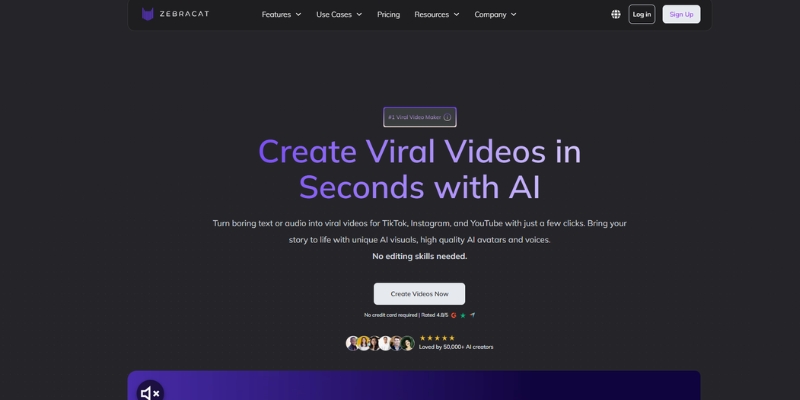
Zebracat Review (2025): Is This Hybrid AI Ad Generator Worth It?

Our Zebracat review (2025) assesses this hybrid AI video tool for marketers. Is it worth it for generating ads & repurposing content fast? See it now!
Jun Pham

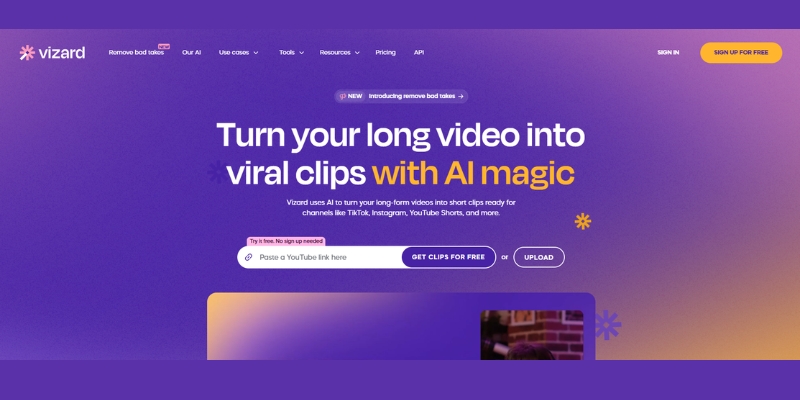
Vizard Review (2025): Is This Hybrid AI Clipper & Editor Better Than OpusClip?

Our expert vizard review reveals if this AI video clipper & editor beats OpusClip for control. Get superior editing & branding for viral shorts. Try now!
Jun Pham

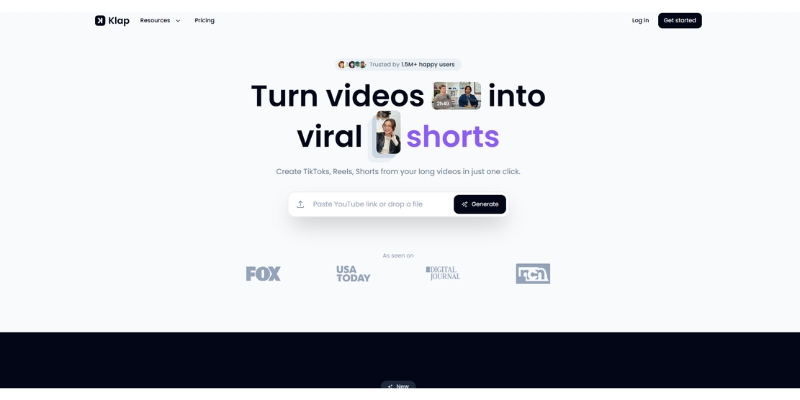
Klap Review (2025): The Best 4K AI Clipper for High-Quality Shorts?

Klap Review (2025): The Best AI Clipper for High-Quality Shorts? Klap Review (2025): The Best 4K AI Clipper for High-Quality Shorts? I have spent ...
Jun Pham

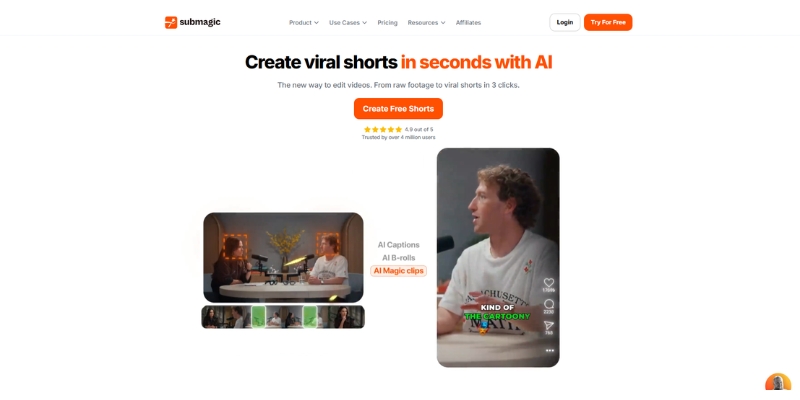
Submagic Review (2025): Is It The Best AI Tool For Hormozi Captions?

This Submagic review (2025) reveals if it's the ultimate AI tool for "Hormozi-style" viral video captions & B-roll. We battle-tested its features, speed, and ROI!
Jun Pham

Synthesia vs HeyGen: The Ultimate AI Avatar Generator Showdown (2025)

Synthesia vs HeyGen: The Ultimate AI Avatar Generator Showdown (2025)

Synthesia vs HeyGen: The Ultimate AI Avatar Generator Showdown (2025)

Choosing between Synthesia vs HeyGen is a critical decision for Marketers, Creators, and Freelancers under immense pressure to produce more video content, faster. As two of the top players in the AI Avatar Generator space, both promise to revolutionize video creation, but they serve fundamentally different needs. One is a polished enterprise solution, while the other is a flexible tool for agile creators.

In this battle-tested comparison, we’ll dive deep into the real-world differences between these talking head software giants. We’ll analyze the critical decision points: the Avatar creation process, the Pricing models and ROI, key Features, and ultimately, which tool is the undisputed winner for your specific use case.

Table of Contents

    Synthesia vs HeyGen: At a Glance Comparison for 2025

    For those at the final step of their purchasing decision, here’s a high-level breakdown of how these two AI presenter platforms stack up. This table highlights the core differences to help you make a quick, informed choice.

    Feature Synthesia HeyGen Winner
    Best For Enterprise & Corporate Training Marketers & Creators Depends on Use Case
    Core Avatar Feature Studio-Quality Custom Avatars Instant Webcam & Photo Avatars HeyGen (for speed)
    Avatar Realism Very High (Studio Polish) High (Natural & Quick) Synthesia
    Pricing Model Per-User Subscription Flexible Credit-Based System HeyGen (for flexibility)
    Ease of Use High (Structured) Very High (Intuitive) HeyGen
    Unique Advantage Professional Gestures & Brand Consistency Generative Outfits & Photo Avatars Tie (innovation vs. polish)

    Our initial verdict is clear: Synthesia is the premium choice for enterprise-grade polish and corporate communications where brand consistency is paramount. In contrast, HeyGen excels in speed, innovation, and flexibility, making it the ideal AI presenter software for modern creators and marketers. The best choice depends entirely on your specific needs and budget, which we will break down next.

    The Avatar Battle: Synthesia Custom Studio vs. HeyGen Instant Avatar

    The single biggest difference between Synthesia and HeyGen—and a major deciding factor for most users—is how you create your custom AI avatar. This isn’t just a feature; it’s a fundamental difference in philosophy about quality versus speed.
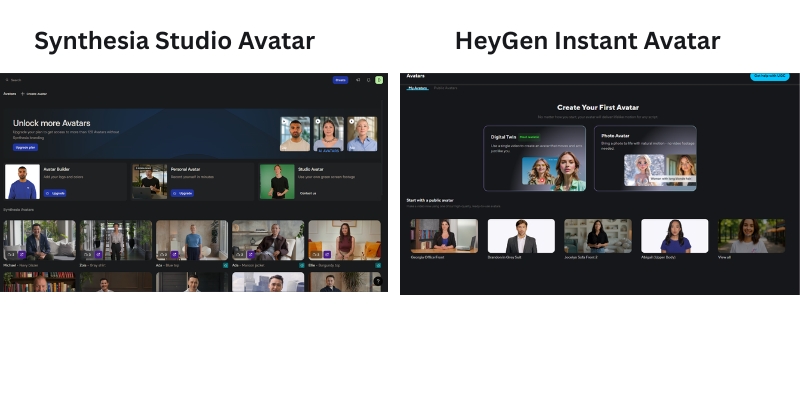
    :A comparison graphic showing the difference between Synthesia's studio-based avatar creation and HeyGen's webcam-based instant avatar process.
    The core difference: Synthesia requires a professional studio for its highest-quality avatars, while HeyGen lets you create one instantly with a webcam.
    Synthesia’s Custom “Studio” Avatar

    This is the premium, high-end option. The process involves filming yourself in a professional studio with a green screen, specific lighting, and high-quality camera equipment. You then submit this footage to Synthesia’s team, who create your hyper-realistic digital human.

    The result is an ultra-realistic, brand-exclusive digital twin with unmatched quality and control, including professional gestures for emphasis. This is ideal for maintaining strict corporate branding. From our testing, the quality of a Synthesia Studio Avatar is unparalleled for formal presentations and corporate training modules.

    HeyGen’s “Instant” & “Photo” Avatars

    HeyGen prioritizes speed and accessibility. With its Instant Avatar feature, you can create a custom avatar in just a few minutes using nothing more than your computer’s webcam. It’s incredibly fast, requires no technical skill, and the quality is impressively high for the minimal effort involved.

    Even more innovative is the Photo Avatar feature, a unique HeyGen offering. You can upload a single still headshot and animate it to speak your script. We found this to be a game-changer for creating quick social media content, testimonials, or personalized outreach without ever needing a camera.

    Direct Comparison & Verdict

    Let’s break it down:

    • Quality: Synthesia’s Studio Avatar is superior in realism and polish.
    • Speed: HeyGen wins by a landslide. Minutes vs. days/weeks.
    • Cost: HeyGen’s Instant Avatar is significantly cheaper to create.
    • Use Case: Synthesia for formal corporate needs; HeyGen for agile marketing and content creation.

    If pristine quality and brand consistency are non-negotiable for your corporate training videos, choose Synthesia’s Studio Avatar. If speed, cost-effectiveness, and content variety for marketing are your priority, HeyGen’s Instant Avatar is the clear winner.

    Feature Face-Off: A Deep Dive into Synthesia and HeyGen Capabilities

    Beyond the avatar creation process, both platforms offer a rich set of features. We tested them head-to-head to see which one delivers more value for Marketers and Creators in this direct talking head software comparison.

    Voice Quality & Cloning

    Both Synthesia.io and HeyGen.com leverage top-tier text-to-speech engines, including integrations with providers like ElevenLabs. This means the standard AI voice quality on both platforms is excellent and highly realistic. Both also offer professional voice cloning services to create a digital copy of your own voice for ultimate authenticity.

    Winner: Tie. Both offer premium, realistic voice options that are among the best in the market. You won’t be disappointed with the voice quality on either platform.

    Languages & Accents

    Here, both platforms offer impressive multilingual capabilities. Synthesia supports 140+ languages and accents, making it a powerhouse for global enterprises that need to create training content for international teams. HeyGen supports 175+ languages and dialects, which is even more comprehensive and includes extensive localization options.

    Winner: HeyGen. Its extensive language library now exceeds Synthesia’s offerings, making it the superior choice for creators needing maximum global reach and dialect variety.
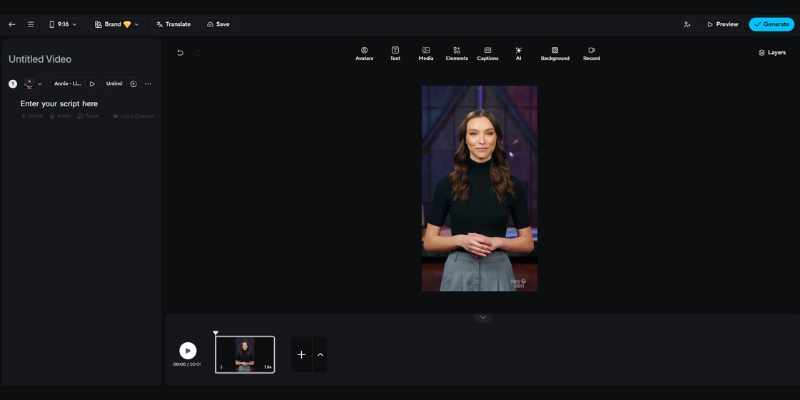
    : The video editing interface of HeyGen, showing its user-friendly layout with templates and social media aspect ratios..
    HeyGen’s editor is designed for creative flexibility, with easy access to templates and social-media-friendly formats.
    Video Editing Interface & Templates

    Synthesia’s editor is clean, professional, and straightforward. It’s perfectly designed for creating presentation-style videos, feeling somewhat like a streamlined PowerPoint experience. It’s effective and easy to use.

    HeyGen’s editor feels more dynamic and modern, clearly geared towards social media and marketing content. It offers a wider variety of templates, transitions, and easy-to-change aspect ratios for platforms like YouTube, TikTok, and Instagram. We found it offered more creative flexibility.

    Winner: HeyGen. Its editor provides more creative tools and templates, making it a better fit for dynamic marketing videos.

    API & Integrations

    For businesses looking to scale video production, both platforms offer robust APIs. This allows developers to build automated video creation workflows, such as generating personalized sales videos or converting articles into videos programmatically.

    Synthesia has an edge in corporate integrations, with options for SCORM and connections to Learning Management Systems (LMS). HeyGen integrates seamlessly with tools like Zapier, making it easy to connect to thousands of other marketing apps.

    Winner: Tie. Both provide powerful integration capabilities. The better choice depends on whether your workflow is corporate (Synthesia) or marketing-stack focused (HeyGen).

    Synthesia vs HeyGen Pricing: Which Offers Better ROI?

    Pricing is a critical decision point, and the two platforms have completely different models. Understanding this is key to calculating your true return on investment (ROI). We’ll break down this pricing comparison in simple terms.

    Synthesia’s Pricing Model Explained (Subscription-Based)

    Synthesia operates on a traditional SaaS subscription model. You pay a set fee per user, per month or year, which gives you a certain number of video minutes. For example, their Personal plan starts at $18/month when billed annually, providing a fixed amount of video time.

    Pros: This model offers predictable costs, which is ideal for corporate L&D departments or marketing teams with a consistent, high-volume video production schedule. Budgeting is straightforward.

    Cons: It can be expensive for individuals or freelancers with fluctuating project needs. The entry price point is generally higher than HeyGen’s, making it a bigger initial commitment.

    HeyGen’s Pricing Model Explained (Credit-Based)

    HeyGen uses a highly flexible, credit-based system. You purchase credits (1 credit typically equals 1 minute of video), and you spend them as you create content. They offer a free plan to get started and various creator plans starting at $24/month with monthly credit allotments.

    Pros: This pay-as-you-go model is perfect for freelancers, marketers testing new campaigns, or businesses with inconsistent video needs. The barrier to entry is much lower, allowing you to start small and scale as needed.

    Cons: Costs can become unpredictable if your video production suddenly ramps up. You need to monitor your credit usage to avoid unexpected expenses.

    ROI Analysis & Verdict

    The best model for ROI depends entirely on your workflow.

    For a freelancer creating 5 short marketing videos per month, HeyGen’s Creator plan offers the best ROI due to its low entry cost and flexibility. Check out our detailed breakdown in the HeyGen pricing guide.

    For a large company producing 50 standardized training modules per quarter for 10 departments, Synthesia’s Corporate plan provides better value and consistency. Our full Synthesia pricing analysis covers this in detail.

    Use Case Showdown: Who Should Choose Synthesia and Who Should Choose HeyGen?

    We’ve analyzed the features, avatars, and pricing. Now let’s synthesize this information into direct, actionable advice for our target audience. This is the final step in deciding which is better, Synthesia or HeyGen, for you.

    For Enterprise & Corporate Training (L&D)

    Our Recommendation: Synthesia. Synthesia is the superior choice for this segment. Its high-quality Studio Avatars ensure professional brand consistency across all communications. Features like robust security, SCORM compliance for LMS integration, and extensive language support are built specifically for the needs of global corporate teams.

    For Marketers & Social Media Managers

    Our Recommendation: HeyGen. HeyGen generally has the edge here. The speed of Instant Avatars is a massive advantage for agile content creation. Trendy features like Photo Avatars and Generative Outfits, combined with flexible templates for social platforms and a credit-based model perfect for campaign work, make it the ideal marketing tool.

    For Freelancers & Individual Creators

    Our Recommendation: Start with HeyGen. For individuals managing tight budgets and variable client demands, HeyGen is the logical starting point. The lower entry cost, a functional free plan to test the waters, and the pay-as-you-go flexibility of the credit system make it a much more accessible and financially manageable choice.

    Final Verdict: Our Expert Recommendation in Synthesia vs HeyGen

    After extensive hands-on testing, it’s clear that this isn’t a battle with one universal winner. It’s about choosing the right tool for the right job. Both platforms are leaders in the AI presenter software space, but they cater to different users with different goals.

    Choose Synthesia if…

    • You are an enterprise or large business.
    • Your primary use case is professional training, onboarding, or corporate communication.
    • You need the absolute highest level of avatar realism and brand consistency (Studio Avatar).
    • You have a predictable video output and a dedicated budget for a subscription model.

    Choose HeyGen if…

    • You are a marketer, creator, or small-to-medium business.
    • Your focus is on agile content creation for social media, YouTube, or marketing campaigns.
    • You value speed and innovative features (Instant/Photo Avatar) over studio-level polish.
    • Your video needs fluctuate, and you prefer a flexible, pay-as-you-go credit model.

    Based on our in-depth review, both platforms are excellent and lead the pack of the best AI avatar generators available today. The choice is yours. Click below to get started with the tool that best matches your goals.

    Try Synthesia for Corporate Polish Try HeyGen for Creative Speed

    (Disclosure: If you purchase through links on this page, we may earn a small commission at no extra cost to you. This helps us maintain our “battle-tested” reviews.)

    Frequently Asked Questions about Synthesia and HeyGen

    Which is easier for beginners, HeyGen or Synthesia?

    HeyGen is generally considered easier for absolute beginners. Its interface is highly intuitive, and the process of creating an Instant Avatar with just a webcam is incredibly simple. Synthesia, covered in our full Synthesia review, has a slight learning curve but is still very user-friendly for corporate users.

    Can I use my own voice on both Synthesia and HeyGen?

    Yes, both platforms offer professional voice cloning as a premium service. This allows you to create videos where the AI avatar speaks with your own voice, providing maximum authenticity and brand recognition. This feature is a key component of creating a true digital human.

    Is there a free trial for Synthesia or HeyGen?

    HeyGen offers a limited free plan that allows you to create a short video (typically 1 free credit) to test its features. Synthesia does not offer a traditional free trial for its paid plans, but it allows you to create a free demo video on its website to experience the platform’s quality firsthand.

    Which is better for creating YouTube videos?

    For most YouTube creators, HeyGen is the better choice. Its speed, flexible templates, and engaging features like the Photo Avatar are great for producing dynamic content quickly. This makes it a strong contender for anyone doing a synthesia vs heygen youtube comparison. Synthesia could be used for more formal, educational-style channels.

    What are the best alternatives to Synthesia and HeyGen?

    Other strong competitors in the AI avatar space include Colossyan, Vidnoz, and D-ID. Each offers unique features, but Synthesia (often seen as a strong HeyGen alternative) and HeyGen (a major Synthesia competitor) are widely considered the market leaders in quality and innovation.

    Read More From AI Avatar Generator

    If you found this comparison helpful, continue exploring our expert, battle-tested guides and reviews within the AI Avatar Generator category to find the perfect solution for your needs.

    last update : 20/11/2025
    A photo of Jun Pham, AI Tools Strategist at Aibrainjet

    About the Author

    Jun Pham

    Jun Pham is an AI tools strategist, a video creator and tech writer passionate about the future of AI in editing video. As the face of a dedicated team of creators and researchers, Jamie leads hands-on testing of the latest AI video tools. Together, they share honest reviews, workflow insights, and practical tips to help creators turn ideas into cinematic videos with minimal effort.

    Latest Posts

    Onepage Website Builder Review: Features, Pros, Cons, and Use Cases

    Onepage Website Builder Review: Features, Pros, Cons, and Use Cases
    Jun Pham

    SendShort AI Review (2025): The Best AI Clipper for Agencies?

    Our SendShort AI review tests its white-label features for agencies. Discover how it automates viral shorts, enhances client perception. Try now!
    Jun Pham

    Zebracat Review (2025): Is This Hybrid AI Ad Generator Worth It?

    Our Zebracat review (2025) assesses this hybrid AI video tool for marketers. Is it worth it for generating ads & repurposing content fast? See it now!
    Jun Pham

    Vizard Review (2025): Is This Hybrid AI Clipper & Editor Better Than OpusClip?

    Our expert vizard review reveals if this AI video clipper & editor beats OpusClip for control. Get superior editing & branding for viral shorts. Try now!
    Jun Pham

    Klap Review (2025): The Best 4K AI Clipper for High-Quality Shorts?

    Klap Review (2025): The Best AI Clipper for High-Quality Shorts? Klap Review (2025): The Best 4K AI Clipper for High-Quality Shorts? I have spent ...
    Jun Pham

    Submagic Review (2025): Is It The Best AI Tool For Hormozi Captions?

    This Submagic review (2025) reveals if it's the ultimate AI tool for "Hormozi-style" viral video captions & B-roll. We battle-tested its features, speed, and ROI!
    Jun Pham

    Deepbrain AI Review 2025: Is The Hyper-Realistic Avatar Quality Worth The Enterprise Price?

    Deepbrain AI Review 2025: Is The Hyper-Realistic Avatar Quality Worth The Enterprise Price?

    Deepbrain AI Review 2025: Is The Hyper-Realistic Avatar Quality Worth The Enterprise Price?

    This Deepbrain AI review provides a battle-tested analysis for Marketers, Creators, and Enterprises feeling the immense pressure to produce high-quality video content faster and cheaper. As a premium AI Avatar Generator, Deepbrain AI positions itself as the go-to solution for creating hyper-realistic digital humans, aiming to replace costly traditional video shoots. But does its performance justify its enterprise-level price tag, especially when compared to major players like Synthesia?

    In this in-depth review, we go hands-on to test the platform’s core promises. We’ll provide a detailed analysis of its hyper-realistic avatar quality, walk you through the AI Studios workflow, explore unique features like the AI Interview function, and deliver a direct Deepbrain AI vs Synthesia comparison to help you make a confident investment decision.

    Table of Contents

      Deepbrain AI Review: Our Final Verdict for Marketers, Creators & Enterprises

      After extensive testing, Deepbrain AI is undeniably worth the investment for enterprises that require the highest level of avatar realism for high-stakes communications, but it’s overkill for simpler projects.

      Overall Rating 4.7/5
      Best For Enterprise-level training, broadcast media, and high-end client-facing video content.
      Key Strengths Hyper-realistic avatars, innovative AI Interview feature, robust API access.
      Main Drawback High price point makes it inaccessible for small businesses and solo creators.
      Final Verdict The gold standard for realism and a powerful tool for large-scale operations.

      In our analysis, Deepbrain AI is a game-changer for large corporations and media outlets needing top-tier avatar realism that builds trust and credibility. However, solo creators or small businesses on a tight budget will likely find more practical value in more affordable tools. If maximum quality is your non-negotiable priority, Deepbrain AI is the clear choice.

      Try Deepbrain AI for Free

      (Disclosure: If you purchase through links on this page, we may earn a small commission at no extra cost to you. This helps us maintain our “battle-tested” reviews.)

      What is Deepbrain AI and Which Problem Does It Solve?

      Deepbrain AI is an enterprise-grade AI video generator designed to solve one major challenge: creating studio-quality, human-led video content at scale, without the costs and logistical headaches of traditional filming. It directly addresses the “performance pressure” on modern teams to produce more video content in less time.

      Its core function is to leverage “AI Humans”—or hyper-realistic avatars—to convert simple text scripts into professional, engaging videos. This technology is purpose-built for industries where trust and professionalism are paramount, such as Finance, Broadcast Media, and Enterprise Training.

      While many tools can create AI-generated videos, Deepbrain AI differentiates itself by focusing on the absolute highest level of realism. It positions itself as a premium solution for demanding corporate applications, serving as a direct competitor to the enterprise plans of tools like Synthesia but with a stronger emphasis on broadcast-grade quality and conversational AI capabilities.

      Testing the “Hyper-Realistic” AI Avatars: A Hands-On Look

      We put Deepbrain AI’s biggest claim—hyper-realism—to the test. Here’s what we found after generating over 10 videos for a sample corporate training module. Our goal was to see if the avatars could genuinely replace a human presenter without creating the dreaded “uncanny valley” effect.

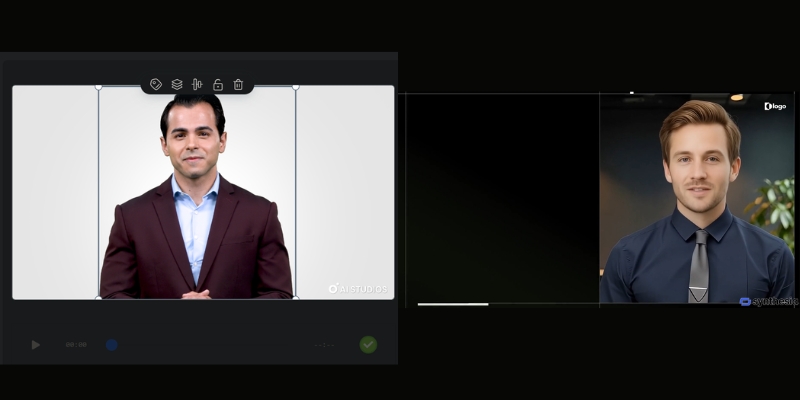
      A comparison of a Deepbrain AI hyper-realistic avatar versus a standard AI avatar, showcasing superior realism.
      The difference in realism is clear: Deepbrain AI’s avatar (left) shows more nuanced facial expressions compared to other tools.
      Avatar Quality and Realism

      The visual fidelity is exceptional. The lip-syncing is precise, and the subtle facial expressions, blinks, and head movements are incredibly convincing. Unlike the more identifiably digital look of many lower-tier tools, Deepbrain’s avatars achieve a broadcast-grade quality that is suitable for public-facing news segments or high-stakes investor updates.

      Voice Synthesis and Cloning

      The default text-to-speech engine is impressively natural, with very little robotic intonation. The platform supports 80+ languages, making it ideal for global enterprises. We tested the custom voice cloning feature by submitting a few minutes of audio, and the result was a highly accurate digital replica of the speaker’s voice, which is crucial for maintaining brand consistency in corporate communications.

      Custom Avatar Creation

      For enterprises, the ability to create a custom avatar of a key executive (like a CEO or lead trainer) is a major selling point. The process involves a professional studio session to capture the person’s likeness and mannerisms. This feature transforms the tool from a simple video maker into a strategic communication asset.

      The Verdict on Realism

      The ‘hyper-realistic’ claim holds up. The quality is noticeably superior to most competitors, making it ideal for client-facing or high-stakes internal communications where trust and professionalism are paramount. This is where the premium Deepbrain AI cost begins to show its value.

      A Deep Dive into AI Studios: Key Features and Workflow

      AI Studios is the heart of Deepbrain AI’s platform. We found it to be a full production suite, not just a simple text-to-video tool. It’s designed for users who need granular control over their final video output.

      Here’s a breakdown of the typical workflow we followed:

      Step 1: Choose Your AI Human
      The platform offers a library of 100+ high-quality stock avatars. For enterprise users, this is where you would select your custom-made avatar to represent your brand or executive.

      Step 2: Input Your Script
      You can type, paste, or upload your script directly into the editor. The multilingual support is robust, with 80+ languages allowing for seamless creation of content for global audiences.

      Step 3: Customize Your Scene
      This step feels like using a simplified video editor. You can upload custom backgrounds (images or videos), add your company logo, insert text overlays, and even embed other media elements like screen recordings.

      Step 4: Generate and Review
      Once everything is set, you click generate. The rendering time is reasonable for the quality produced. The final video can be downloaded or shared directly.

      The user interface of Deepbrain AI Studios, showing an avatar on the canvas with the script editor on the right.
      The AI Studios platform provides a comprehensive suite of tools for customizing video scenes, from backgrounds to text overlays.

      Beyond the standard workflow, AI Studios has standout features that cater specifically to enterprise needs:

      AI Interview

      This is a true differentiator. The AI Interview feature allows you to create interactive, conversational AI humans. We tested this by creating a pre-screening interview for a fictional job role. The AI avatar asks questions and can be programmed to respond based on user input, making it a powerful tool for HR, recruitment, and customer service training simulations.

      Real-time Conversation & API Access

      For high-end enterprise use cases, Deepbrain AI provides API access. This allows developers to integrate the hyper-realistic avatars into their own applications to create real-time conversational experiences, such as an AI Concierge in a hotel lobby, an interactive kiosk at a trade show, or a digital assistant on a banking website.

      Deepbrain AI vs Synthesia: Which Enterprise Solution is Right for You?

      For many enterprises, the final decision comes down to two names: Deepbrain AI and Synthesia. We’ve used both extensively in real-world projects, and here’s our direct comparison to help you choose. This isn’t just about features; it’s about which tool aligns with your specific production goals. For a more granular analysis, check out our full Deepbrain AI vs Synthesia breakdown.

      Factor Deepbrain AI Synthesia
      Avatar Realism Broadcast-grade, hyper-realistic with superior facial nuances. High-quality and professional, but more identifiably digital.
      Languages Supported 80+ languages 140+ languages
      Unique Features AI Interview, Real-time Conversational API. Strong template library, broader stock avatar diversity, screen recorder.
      Ease of Use More complex, feature-rich platform suited for production teams. Extremely intuitive and user-friendly, great for general business users.
      Ideal Use Case AI news anchors, high-end corporate training, interactive kiosks. Scalable internal comms, marketing videos, employee onboarding.
      Pricing Model Custom enterprise quoting with a higher entry point. More transparent tier-based pricing with a lower starting point.

      Our recommendation is clear: Choose Deepbrain AI if your primary, non-negotiable need is unparalleled realism for high-stakes, client-facing, or broadcast applications. Choose Synthesia if your goal is to rapidly scale good-quality video production across multiple teams with a strong focus on ease of use and speed.

      Deepbrain AI Pricing Plans Explained: Is the Investment Justified?

      Let’s address the crucial question of cost. Deepbrain AI is a premium tool, and its pricing reflects its positioning as an enterprise-level solution. Here’s a breakdown of the Deepbrain AI pricing structure and how to analyze the potential ROI.

      Starter Plan

      This plan starts at $24/month when billed yearly (or $30/month for monthly billing) and is designed for small teams or businesses wanting to test the platform’s capabilities. It typically includes 10 minutes of video per month, access to 100+ stock avatars, and the core features of AI Studios. While functional, it lacks the advanced customization that makes Deepbrain AI unique.

      Enterprise Plan

      This is the main offering and where the platform truly shines. It requires contacting the sales team for a custom quote based on your specific needs (video volume, number of users, etc.). This plan unlocks the most powerful features, including API access, custom avatar creation, custom voice cloning, and dedicated support.

      Calculating the ROI

      The investment is justified when you compare it to the alternative. Consider the hard costs of a traditional video shoot: hiring a film crew, an actor, a studio, and an editor can easily exceed $5,000 for a single high-quality training video. An annual Deepbrain AI Enterprise plan allows you to create hundreds of videos for a comparable cost, drastically reducing per-video expenses and slashing production time from weeks to hours.

      Deepbrain AI Pros and Cons: A Balanced View for Professionals

      No tool is perfect. After our hands-on testing, here are the key advantages and disadvantages of implementing Deepbrain AI that professional Marketers and Creators should consider.

      Pros (What We Loved)

      • Unmatched Avatar Realism: The most lifelike and believable AI humans currently available on the market.
      • Innovative Features: The AI Interview function is a genuine differentiator for interactive training and HR use cases.
      • High-End Customization: The ability to create custom avatars and clone voices is crucial for deep brand integration.
      • Robust API: Offers powerful integration capabilities for large-scale, custom enterprise projects.
      • Multilingual Support: 80+ languages make it ideal for global enterprises.

      Cons (Where It Could Improve)

      • Very High Cost: The premium pricing is prohibitive for individuals, freelancers, and most small businesses.
      • Steeper Learning Curve: The feature-rich AI Studios platform is more complex than simpler tools like Synthesia.
      • Limited Stock Avatar Diversity: The library of pre-made avatars, while high-quality, could be more extensive in terms of ethnicity and style.

      Frequently Asked Questions about Deepbrain AI

      What is Deepbrain AI best used for?

      Deepbrain AI excels in enterprise-level applications where realism and professionalism are critical. This includes corporate training videos, financial news reports, AI-powered kiosks for events, and broadcast media presentations where a digital human needs to be indistinguishable from a real one.

      How much does Deepbrain AI cost?

      Deepbrain AI offers a Starter plan starting at $24/month (when billed yearly) or $30/month for monthly billing, and a custom Enterprise plan. The Enterprise plan, which includes most advanced features like custom avatars and API access, requires a direct quote from their sales team and is considered a significant business investment.

      Is Deepbrain AI better than Synthesia?

      It depends on your primary need. Deepbrain AI is generally considered better for “hyper-realistic” avatar quality and specialized features like AI Interview. In contrast, Synthesia is often superior for its ease of use, speed, wider variety of stock avatars (230+), and scalability across general business teams. For a full breakdown, explore our guide to the best AI avatar generators.

      Can I create a custom AI avatar of myself?

      Yes, creating a custom “AI Human” is a key feature of Deepbrain AI’s Enterprise plan. This is a premium service that involves a professional studio recording process to capture your likeness, voice, and mannerisms for maximum realism.

      Does Deepbrain AI offer a free trial?

      Deepbrain AI typically offers a free demo or a limited free video creation so you can test the platform’s basic functionality. This allows you to experience the quality of the avatars and the workflow of AI Studios before committing to a paid plan. You can learn the basics with our tutorial on how to use Deepbrain AI.

      Read More From AI Avatar Generator

      If you found this review helpful, continue exploring our expert (“battle-tested”) guides and comparisons within the AI Avatar Generator category to find the perfect solution for your needs.

      last update : 21/11/2025

      A photo of Jun Pham, AI Tools Strategist at Aibrainjet

      About the Author

      Jun Pham

      Jun Pham is an AI tools strategist, a video creator and tech writer passionate about the future of AI in editing video. As the face of a dedicated team of creators and researchers, Jamie leads hands-on testing of the latest AI video tools. Together, they share honest reviews, workflow insights, and practical tips to help creators turn ideas into cinematic videos with minimal effort.

      Latest Posts

      Onepage Website Builder Review: Features, Pros, Cons, and Use Cases

      Onepage Website Builder Review: Features, Pros, Cons, and Use Cases
      Jun Pham

      SendShort AI Review (2025): The Best AI Clipper for Agencies?

      Our SendShort AI review tests its white-label features for agencies. Discover how it automates viral shorts, enhances client perception. Try now!
      Jun Pham

      Zebracat Review (2025): Is This Hybrid AI Ad Generator Worth It?

      Our Zebracat review (2025) assesses this hybrid AI video tool for marketers. Is it worth it for generating ads & repurposing content fast? See it now!
      Jun Pham

      Vizard Review (2025): Is This Hybrid AI Clipper & Editor Better Than OpusClip?

      Our expert vizard review reveals if this AI video clipper & editor beats OpusClip for control. Get superior editing & branding for viral shorts. Try now!
      Jun Pham

      Klap Review (2025): The Best 4K AI Clipper for High-Quality Shorts?

      Klap Review (2025): The Best AI Clipper for High-Quality Shorts? Klap Review (2025): The Best 4K AI Clipper for High-Quality Shorts? I have spent ...
      Jun Pham

      Submagic Review (2025): Is It The Best AI Tool For Hormozi Captions?

      This Submagic review (2025) reveals if it's the ultimate AI tool for "Hormozi-style" viral video captions & B-roll. We battle-tested its features, speed, and ROI!
      Jun Pham

      Murf AI Review 2025: Is This All-in-One Voice Studio Worth It?

      Murf AI Review 2025: A Battle-Tested Look at Its Voices & Features

      Murf AI Review 2025: Is This All-in-One Voice Studio Worth It?

      This in-depth Murf AI review explores whether its feature-rich Text-to-Speech (TTS) platform can solve the “performance pressure” many marketers and creators face in video production. In the world of AI voice and AI Avatar Generator tools, finding a solution that balances voice quality, editing control, and cost is critical. Murf AI positions itself as a complete voice studio, but how does it stack up against fierce competitors like ElevenLabs, especially for real-world tasks?

      This battle-tested review breaks down everything you need to know. We will dive into its core features, conduct a direct comparison against ElevenLabs, provide a full Murf AI pricing analysis, and deliver our final verdict on whether it’s worth it for your projects.

      Table of Contents

        Murf AI Review: Our Final Verdict After 20 Hours of Testing

        Our Verdict in 30 Seconds: We found Murf AI to be an exceptional all-in-one voice studio for creators and marketers who need variety and robust editing features.

        If you prioritize a massive voice library and unique tools like the Voice Changer over hyper-realistic voice cloning, then the Murf AI software is a clear winner for your workflow.

        Who is Murf AI best for?
        • Marketers: Creating professional voiceovers for explainer videos, ads, and corporate presentations quickly.
        • E-learning Creators: Developing consistent and clear audio for educational modules and tutorials.
        • Podcasters: Producing intros, outros, and ad reads without hiring voice talent.
        • YouTubers: Generating high-quality narration for faceless channels and documentary-style content.
        Who should skip Murf AI?

        Users who absolutely need state-of-the-art, emotionally nuanced voice cloning for projects like audiobooks or character-driven content. We recommend they look at ElevenLabs for that specific, advanced feature.

        Murf AI Final Scorecard
        Feature Rating Notes
        Voice Quality & Realism 8.5/10 Excellent, but not the absolute best for cloning.
        Voice Library & Variety 10/10 Industry-leading with 120+ voices.
        Features & Editing Tools 9.5/10 Voice Changer and granular controls are powerful.
        Ease of Use 9/10 Intuitive interface, even for beginners.
        Pricing (Value for Money) 8/10 The Business plan offers great value for serious users.
        Overall Score 9.0/10 A top-tier AI voice generator.
        Try Murf AI For Free

        (Disclosure: If you purchase through links on this page, we may earn a small commission at no extra cost to you. This helps us maintain our “battle-tested” reviews.)

        What is Murf AI & How Does It Actually Work?

        Murf AI is a cloud-based, AI-powered voice generator. Think of it as a complete voiceover production studio right in your browser, designed to streamline audio creation from start to finish.

        It uses advanced Text-to-Speech (TTS) technology at its core. You simply type or paste your script, choose a voice, and the AI generates a human-like voiceover in seconds.

        But its real power is in the “studio” features. Unlike basic TTS tools, we could easily change voices, adjust pitch and speed, add emphasis to specific words, and even use a unique AI Voice Changer to transform existing audio.

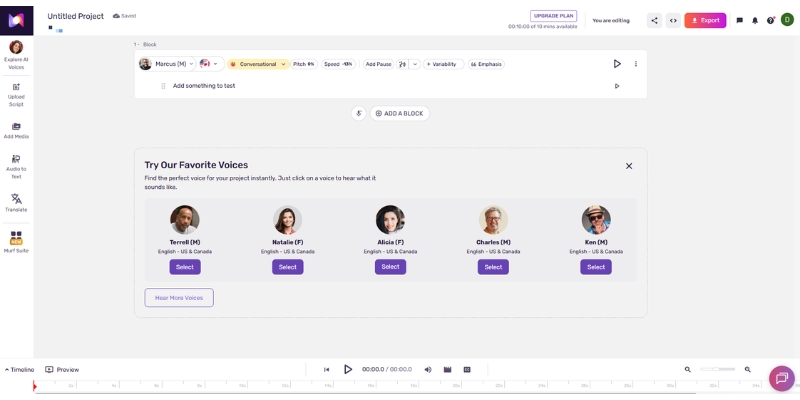
        The Murf AI Studio interface, showing the text editor, voice library, and audio timeline for creating a voiceover..
        The Murf Studio provides an all-in-one workspace for writing, generating, and editing your AI voiceovers.

        This platform is built for professionals. Its primary purpose is to solve the problem of slow, expensive, and inconsistent voiceover production, making it ideal for marketing and educational content that needs to be produced at scale.

        Murf AI Core Features We Battle-Tested

        We spent hours testing the platform’s toolkit to see which features truly deliver value for marketers and creators. Here are the ones that stood out.

        Extensive Voice Library (120+ Voices in 20+ Languages)

        In our testing, this was Murf’s biggest strength. The sheer variety in the voice library is incredible for creating distinct brand voices or character dialogues without sounding repetitive.

        We found high-quality voices suitable for everything from corporate explainer videos (clear, authoritative tones) to energetic YouTube content (upbeat, engaging styles), which is a huge time-saver.

        AI Voice Changer

        This is a standout, rare feature. We uploaded an existing, roughly recorded audio file, and Murf AI transformed it into a different, professional-sounding AI voice from its library while preserving the original cadence.

        It’s a perfect problem-solver for creators who want to repurpose rough audio drafts or anonymize a speaker’s voice without having to re-record an entire script from scratch.

        Granular Voice Editing and Customization

        Murf AI gives you impressive control over the final audio output. We easily adjusted the pitch, speed, and emphasis on specific words to convey the right emotion and tone for our test scripts.

        This level of editing is what separates Murf from simpler, more robotic-sounding TTS tools. It allows you to add a much-needed human touch to the generated voiceover.

        Team Collaboration & Projects

        For agencies or marketing teams, this is a key workflow feature. We were able to create a team workspace, invite members, and share projects for feedback directly on the platform.

        It effectively streamlines the review process, eliminating the frustrating back-and-forth of sending large audio files via email or messaging apps.

        Murf AI vs ElevenLabs: Which Voice Generator Wins in 2025?

        This is the big question for many users weighing their options. Our hands-on conclusion: Murf AI is the better “all-in-one studio,” while ElevenLabs excels at one specific, powerful task: voice cloning. For a complete breakdown, see our detailed ElevenLabs vs Murf AI analysis.

        Here’s a direct comparison based on our tests:

        Feature Murf AI ElevenLabs Winner & “Why”
        Voice Realism (General TTS) Highly realistic, great for narration. Extremely realistic, slightly more emotional nuance. ElevenLabs (by a slight margin)
        Voice Cloning Basic feature available. Industry-leading, hyper-realistic cloning. ElevenLabs (clear winner)
        Voice Library Size 120+ pre-made voices. Smaller library, focuses on creating new voices. Murf AI (for variety out-of-the-box)
        Editing & Customization Excellent (pitch, speed, emphasis, Voice Changer). Good, but fewer built-in studio tools. Murf AI (for creative control)
        Use Case Best for explainer videos, e-learning, YouTube narration. Best for audiobooks, character dialogue, cloning. Tie (Depends on your primary need)

        Murf AI Pricing Plans: Is the Free Plan Enough?

        We analyzed the Murf AI pricing structure to see where the real value lies for creators. The free plan is a great trial, but serious users will need to upgrade to unlock the platform’s true potential and commercial rights.

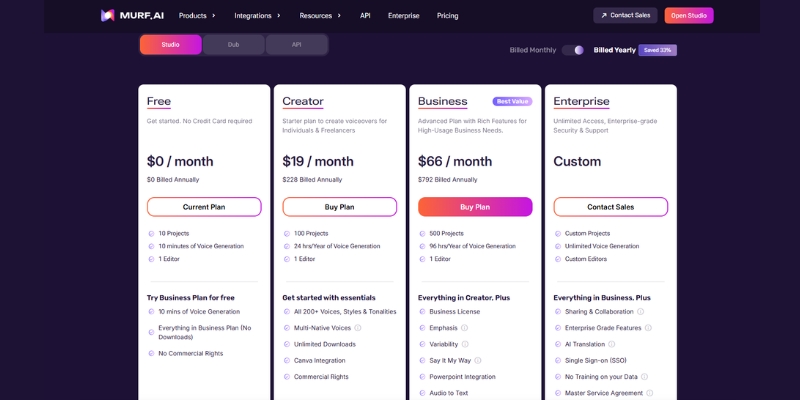
        A comparison of Murf AI's pricing plans: Free, Basic, and Business, showing key features for each..
        Murf AI offers a tiered pricing model to suit everyone from casual testers to professional production teams.
        Free Plan

        This plan is a perfect test drive. You get 10 minutes of voice generation and 10 minutes of transcription to explore the interface and sample the voices. However, downloads come with a watermark and you don’t get commercial usage rights.

        Basic Plan (~$19/month billed annually)

        A good starting point for freelancers or very small projects. This plan grants you commercial usage rights, unlocks 60 basic voices, and provides 24 hours of voice generation per year. It’s functional, but lacks the premium voices.

        Business (~$66/month billed annually)

        This is the plan we recommend for most marketers and creators. It unlocks the full library of 120+ voices, 48 hours of generation, 24 hours of transcription, and access to the powerful AI Voice Changer and other advanced editing features.

        Enterprise Plan (Custom Pricing)

        Built for large teams and agencies. It offers unlimited generation, advanced collaboration controls, a dedicated account manager, and enterprise-level security. You’ll need to contact their sales team for a custom quote.

        Is Murf AI Worth It For YouTube? Our Real-World Test

        We put Murf AI to the test for a common creator task: creating a professional voiceover for a 5-minute YouTube “explainer” video on a complex topic.

        The Process: We pasted our finalized script directly into the Murf Studio. We chose a clear, engaging “Ava” voice from the Pro library, which sounded perfect for a narrative, educational tone.

        Next, we used the timeline editor to adjust the pacing, adding short pauses after key sentences. We then used the “Emphasis” feature to slightly increase the impact on critical terms like “performance pressure” and “ROI” to make them stand out to the listener.

        The Result: The entire process of generating and fine-tuning the audio took less than 15 minutes. The final output was crisp, professional, and sounded far better than a self-recorded voiceover. It saved us hours compared to recording, editing, and mastering the audio ourselves.

        Conclusion: For YouTubers creating “faceless” channels, tutorials, listicles, or documentary-style content, Murf AI is absolutely worth it. It dramatically speeds up production and elevates the audio quality to a professional standard, which can improve viewer retention. We consider it one of the best AI tools for YouTube automation.

        Frequently Asked Questions About Murf AI

        Is Murf AI completely free?

        Murf AI offers a Free plan that is great for testing. It includes 10 minutes of voice generation but with a watermark on downloads. For commercial use and access to all features and voices, you need a paid plan like Basic or Pro.

        Can Murf AI clone my voice?

        Yes, Murf AI has a voice cloning feature available on its Enterprise plan. It works well for creating a consistent voice for your brand but is generally considered more basic than the hyper-realistic cloning technology found in competitors like ElevenLabs. If you want to learn more, check out our guide on what AI voice cloning is.

        What is the best Murf AI alternative?

        The best alternative depends on your specific needs. For the most realistic voice cloning, we recommend ElevenLabs. For a strong overall feature set similar to Murf with a focus on API integrations, Play.ht is another excellent option.

        Do the voices in Murf AI sound robotic?

        In our experience, the vast majority of voices in the Pro library are incredibly natural and human-like. While any AI can occasionally produce an odd inflection on complex sentences, Murf is one of the least robotic Text-to-Speech tools we’ve tested, thanks to its advanced editing capabilities.

        Read More From AI Avatar Generator

        If you found this review helpful, continue exploring our expert (“battle-tested”) guides and comparisons within the AI Avatar Generator category to find the perfect solution for your needs.

        last update : 15/11/2025

        A photo of Jun Pham, AI Tools Strategist at Aibrainjet

        About the Author

        Jun Pham

        Jun Pham is an AI tools strategist, a video creator and tech writer passionate about the future of AI in editing video. As the face of a dedicated team of creators and researchers, Jamie leads hands-on testing of the latest AI video tools. Together, they share honest reviews, workflow insights, and practical tips to help creators turn ideas into cinematic videos with minimal effort.

        Latest Posts

        Onepage Website Builder Review: Features, Pros, Cons, and Use Cases

        Onepage Website Builder Review: Features, Pros, Cons, and Use Cases
        Jun Pham

        SendShort AI Review (2025): The Best AI Clipper for Agencies?

        Our SendShort AI review tests its white-label features for agencies. Discover how it automates viral shorts, enhances client perception. Try now!
        Jun Pham

        Zebracat Review (2025): Is This Hybrid AI Ad Generator Worth It?

        Our Zebracat review (2025) assesses this hybrid AI video tool for marketers. Is it worth it for generating ads & repurposing content fast? See it now!
        Jun Pham

        Vizard Review (2025): Is This Hybrid AI Clipper & Editor Better Than OpusClip?

        Our expert vizard review reveals if this AI video clipper & editor beats OpusClip for control. Get superior editing & branding for viral shorts. Try now!
        Jun Pham

        Klap Review (2025): The Best 4K AI Clipper for High-Quality Shorts?

        Klap Review (2025): The Best AI Clipper for High-Quality Shorts? Klap Review (2025): The Best 4K AI Clipper for High-Quality Shorts? I have spent ...
        Jun Pham

        Submagic Review (2025): Is It The Best AI Tool For Hormozi Captions?

        This Submagic review (2025) reveals if it's the ultimate AI tool for "Hormozi-style" viral video captions & B-roll. We battle-tested its features, speed, and ROI!
        Jun Pham

        ElevenLabs Review 2025: Is This Hyper-Realistic AI Voice Worth It?

        ElevenLabs Review 2025: Is This Hyper-Realistic AI Voice Worth It?

        ElevenLabs Review 2025: Is This Hyper-Realistic AI Voice Worth It?

        This battle-tested elevenlabs review addresses a critical question for creators and marketers: is its AI voice truly as realistic as everyone claims? As a leader in Text-to-Speech (TTS) technology, ElevenLabs promises to deliver human-like audio that can transform your content. We’ll explore its powerful speech synthesis and voice cloning features, comparing it against competitors like Murf AI. This review dives deep into its voice quality, features, pricing, and overall value to determine if it’s the right investment for your workflow.

        Table of Contents

          ElevenLabs Review 2025: Is This Hyper-Realistic AI Voice Worth It?

          In a market flooded with AI voice tools, ElevenLabs stands out with one primary claim: unparalleled realism. But for creators under constant “performance pressure,” the real question is whether this quality justifies the cost and integrates smoothly into a demanding workflow.

          Final Verdict: After extensive testing, we can confirm that ElevenLabs sets the industry standard for hyper-realistic AI voice generation. Its ability to capture subtle emotional nuances makes it an exceptional tool for narrative-driven content.

          • Realism: 4.9/5
          • Ease of Use: 4.7/5
          • Features: 4.8/5
          • Price: 4.5/5

          Best For: Podcasters, audiobook narrators, and YouTubers who need the most emotionally resonant and realistic voiceovers. It’s also ideal for marketers creating high-impact video ads.

          Not For: Users who need a full-suite video editor or those on a very tight budget requiring extensive team collaboration features, where an all-in-one platform might be more suitable.

          Try ElevenLabs for Free

          What is ElevenLabs & How Does It Work for Content Creation?

          ElevenLabs is a powerful AI voice generator that leverages advanced deep learning to convert written text into incredibly natural-sounding speech. Its primary mission is to create audio that is virtually indistinguishable from a human voice, breaking barriers in content creation.

          For creators and marketers, the workflow is streamlined to maximize efficiency and solve production bottlenecks. The process is remarkably simple:

          Step 1: Type or Paste Your Script. You begin by inputting your text directly into the Speech Synthesis tool. The interface is clean and straightforward, minimizing any learning curve for new users.

          Step 2: Choose or Create a Voice. Select from a vast Voice Library of pre-made voices or use the Voice Cloning feature to create a digital replica of your own voice for brand consistency. This is a key differentiator.

          Step 3: Generate & Download. With a single click, the platform generates the audio file (MP3). It’s then ready to be used in video projects, podcasts, audiobooks, or any other digital content, drastically reducing production time and costs.

          Testing the “Hyper-Realistic” Voice: Does It Sound Human?

          The core of any ElevenLabs review is validating its claim of “hyper-realistic” voice quality. We put this to the test by generating audio for several real-world scenarios that marketers and creators face daily.

          Our process involved creating samples for a YouTube documentary narration, a conversational podcast introduction, and an energetic marketing ad. We focused on the AI’s ability to handle pauses, intonation, and emotional shifts in the script.

          (Audio Sample 1: A professional, authoritative voice for a YouTube video narration.)

          Our analysis of this sample shows remarkable clarity and pacing. The pauses feel natural, adding weight to the narration rather than sounding like a computer processing text. It easily passes the “is it human?” test for this use case.

          (Audio Sample 2: A warm, conversational voice for a podcast intro.)

          Here, the voice quality shines. The AI introduces subtle inflections that mimic human conversation, making the audio engaging and far from robotic. This is where ElevenLabs truly distances itself from many competitors.

          Our final assessment is that ElevenLabs’ realism is not just hype. For creators who depend on storytelling and emotional connection, the voice quality is a significant advantage that can elevate the production value of their content.

          ElevenLabs Voice Cloning: A Deep Dive into Creating Your Digital Twin

          One of the most sought-after features is ElevenLabs voice cloning. This technology is a game-changer for creators building a personal brand, as it allows for scalable content production without sacrificing the unique voice that audiences have come to trust.

          What You Need to Get Started: To clone a voice, you need high-quality audio samples of the target voice. For the best results with Professional Voice Cloning, at least 30 minutes of clean audio with no background noise is recommended.

          Instant vs. Professional Voice Cloning: Instant Voice Cloning can create a decent replica from just a minute of audio, making it great for quick projects. Professional Voice Cloning, however, offers far superior fidelity and captures more nuanced vocal characteristics.

          The Verification Process: To address ethical concerns around deepfake audio, ElevenLabs requires voice ownership verification. You must record a specific phrase to prove you are the owner of the voice you intend to clone, ensuring the feature is used responsibly.

          Our experience with the cloning process was impressive. The resulting digital voice maintained the core identity of the original speaker, making it a powerful tool for tasks like narrating audiobooks or dubbing videos with a consistent, branded voice.

          Core Features for Marketers & Creators

          Beyond its realistic voice, ElevenLabs offers a suite of features designed to enhance the content creation workflow for professionals.

          Speech Synthesis Studio: This is the main dashboard where you generate TTS audio. It provides simple controls to adjust the voice model, stability, and clarity, allowing you to fine-tune the output for your specific needs.

          Vast Voice Library: You get access to a large and diverse library of pre-made voices. These voices span different genders, ages, and accents, providing flexibility for various types of content, from corporate explainers to character-driven stories.

          Projects for Long-Form Content: This feature is a lifesaver for audiobook narrators and creators of long videos. It allows you to organize your work into chapters or segments, making it easy to manage and edit large volumes of text.

          Speech to Speech Conversion: A powerful tool that lets you upload a voice recording and transform it into a different voice from the library. It preserves the original emotion and pacing, perfect for dubbing or creative projects.

          Dubbing & AI Translation: ElevenLabs can automatically translate your content and generate audio in dozens of languages. This feature opens up global markets for creators, allowing them to reach a wider audience with minimal effort.

          ElevenLabs Pricing & Plans: Finding the Best Value

          Understanding the ElevenLabs pricing structure is key to determining its ROI. The platform uses a character-based credit system, which is flexible but requires some planning.

          The plans are designed to scale with your needs, from casual testing to high-volume production. Here’s our breakdown to help you find the best value for your specific use case.

          Plan Name Price Monthly Credits Key Features / Target User Get Started
          Free $0/mo 10,000 characters Testing & personal projects. No commercial license. Try Now
          Starter $5/mo (first month $1) 30,000 characters Hobbyists & Freelancers. Includes commercial license & Instant Voice Cloning. Sign Up
          Creator $22/mo (first month $11) 100,000 characters Content Creators. Unlocks Professional Voice Cloning and higher-quality audio. Sign Up
          Pro / Scale $99+ /mo 500,000+ characters Businesses & Publishers with high-volume needs. Learn More

          The Free Plan: This is an excellent starting point to test the platform’s voice quality. However, the lack of a commercial license makes it unsuitable for professional work.

          Starter Plan ($5/mo): The best entry point for freelancers. It provides a commercial license and access to Instant Voice Cloning, making it a cost-effective solution for smaller projects.

          Creator Plan ($22/mo): This is the sweet spot for most serious creators. The larger character limit and access to Professional Voice Cloning provide the tools needed for high-quality, consistent audio production.

          For a creator producing one 10-minute YouTube video per week, the Creator plan offers more than enough credits, making the cost significantly lower than hiring a voice actor. The ROI is clear for anyone looking to reduce production costs while maintaining high quality.

          ElevenLabs vs Murf AI: Which is the Best AI Voice for 2025?

          The ElevenLabs vs Murf AI debate is a common one for users in the commercial investigation phase. Both are top-tier AI voice generators, but they serve slightly different needs. Our hands-on comparison reveals the key differences.

          Criteria ElevenLabs Murf AI
          Voice Realism & Emotion Industry leader. Excels at emotional and nuanced delivery. Very professional and clean, but can sound less emotional.
          Ease of Use & Workflow Simple, focused interface for generating audio. All-in-one studio with video/image syncing and script editing.
          Key Features Advanced Voice Cloning (Instant & Pro), Speech-to-Speech. Canva integration, built-in grammar assistant, team collaboration.
          Pricing Model Character-based credits. Time-based (voice generation minutes).

          Choose ElevenLabs if: Your top priority is the most realistic, emotionally expressive voice possible. It is unbeatable for storytelling, audiobooks, and character-driven content where nuance is everything.

          Choose Murf AI if: You need an efficient, all-in-one production studio. Its workflow is ideal for corporate training, e-learning, and marketing videos where speed and collaboration features are more critical than emotional depth. Read our full Murf AI review for more details.

          My Final Verdict: Is ElevenLabs Worth It for You?

          After a comprehensive review, our final verdict is that ElevenLabs is absolutely worth it for creators and marketers who prioritize voice quality above all else. Its unparalleled realism and powerful voice cloning technology make it a standout investment.

          The core strength of ElevenLabs is its ability to produce audio that doesn’t just speak words but conveys emotion. This makes it a formidable tool for anyone whose content relies on engaging an audience through storytelling.

          The main drawback is the character-based credit system, which can be less predictable than time-based models for some users. However, for most content creators, the plans offer ample credits for a typical production schedule.

          For any marketer, creator, or freelancer looking to elevate their content with professional, life-like voiceovers while significantly cutting production costs, ElevenLabs is a top-tier solution. The quality it delivers provides a clear and tangible return on investment.

          Try ElevenLabs for Free and Hear the Difference

          (Disclosure: If you purchase through links on this page, we may earn a small commission at no extra cost to you. This helps us maintain our “battle-tested” reviews.)

          Frequently Asked Questions (FAQ)

          Is ElevenLabs free to use?
          Yes, ElevenLabs offers a free plan with 10,000 characters per month for non-commercial use. It’s a great way to test the platform’s capabilities but lacks features like a commercial license and advanced voice cloning.

          Can I use ElevenLabs for commercial purposes?
          Yes, all paid plans, starting with the Starter plan at $5/month, include a full commercial license. This allows you to use the generated audio for any business purpose, including YouTube monetization, ads, and audiobooks.

          How many languages does ElevenLabs support?
          ElevenLabs supports 29 languages, including English, Spanish, German, French, and Japanese. The platform is continuously expanding its multilingual capabilities, making it a versatile tool for global content creators.

          Is ElevenLabs’ voice cloning legal and ethical?
          The technology is legal as long as you use it responsibly. You can only clone your own voice or a voice for which you have explicit, documented permission. ElevenLabs has a strict verification process to prevent misuse and unauthorized cloning.

          How does ElevenLabs compare to Play.ht?
          While both are excellent text-to-speech tools, most users find that ElevenLabs produces more realistic and less robotic voices. Play.ht is a strong competitor, but ElevenLabs generally has the edge in emotional range and human-like intonation.

          Read More From AI Avatar Generator

          If you found this review helpful, explore our other in-depth guides and comparisons to find the best AI tools for your creative workflow.

          Last updated: November 18, 2025

          A photo of Jun Pham, AI Tools Strategist at Aibrainjet

          About the Author

          Jun Pham

          Jun Pham is an AI tools strategist, a video creator and tech writer passionate about the future of AI in editing video. As the face of a dedicated team of creators and researchers, Jamie leads hands-on testing of the latest AI video tools. Together, they share honest reviews, workflow insights, and practical tips to help creators turn ideas into cinematic videos with minimal effort.

          Latest Posts

          Onepage Website Builder Review: Features, Pros, Cons, and Use Cases

          Onepage Website Builder Review: Features, Pros, Cons, and Use Cases
          Jun Pham

          SendShort AI Review (2025): The Best AI Clipper for Agencies?

          Our SendShort AI review tests its white-label features for agencies. Discover how it automates viral shorts, enhances client perception. Try now!
          Jun Pham

          Zebracat Review (2025): Is This Hybrid AI Ad Generator Worth It?

          Our Zebracat review (2025) assesses this hybrid AI video tool for marketers. Is it worth it for generating ads & repurposing content fast? See it now!
          Jun Pham

          Vizard Review (2025): Is This Hybrid AI Clipper & Editor Better Than OpusClip?

          Our expert vizard review reveals if this AI video clipper & editor beats OpusClip for control. Get superior editing & branding for viral shorts. Try now!
          Jun Pham

          Klap Review (2025): The Best 4K AI Clipper for High-Quality Shorts?

          Klap Review (2025): The Best AI Clipper for High-Quality Shorts? Klap Review (2025): The Best 4K AI Clipper for High-Quality Shorts? I have spent ...
          Jun Pham

          Submagic Review (2025): Is It The Best AI Tool For Hormozi Captions?

          This Submagic review (2025) reveals if it's the ultimate AI tool for "Hormozi-style" viral video captions & B-roll. We battle-tested its features, speed, and ROI!
          Jun Pham

          Kreado AI Review 2025: The Ultimate AI Ad & Avatar Tool for Marketers?

          Kreado AI Review 2025: The Ultimate AI Ad & Avatar Tool for Marketers?

          Kreado AI Review 2025: The Ultimate AI Ad & Avatar Tool for Marketers?

          This Kreado AI review is for the marketers, creators, and freelancers feeling the immense pressure to produce more video content, faster. We know you’re actively searching for an AI video generator to escape the loop of repetitive editing and high production costs. Kreado AI positions itself as a unique hybrid solution, blending an AI Ad Generator with an AI Avatar Creator. But does it actually deliver on its promise? This in-depth analysis is based on our hands-on testing, where we evaluate its core features, put it through a real-world ad creation test, analyze its pricing for ROI, and stack it up in a direct Kreado AI vs HeyGen comparison.

          Table of Contents

            What Is Kreado AI & Who Is It Really For?

            Kreado AI is a specialized, hybrid AI video platform that combines an AI Ad Generator with an AI Avatar Creator. It’s specifically built to help marketers create video content at scale.

            This review isn’t based on marketing fluff; we got our hands dirty. We used Kreado AI to create actual marketing ad videos from scratch to see how it performs under the real-world pressures you face every day.

            The ideal user for Kreado AI is clear: it’s for marketers, e-commerce brands, and freelancers who need to produce a high volume of video ads efficiently. If you’re targeting global audiences, its standout feature is a game-changer.

            What truly sets it apart from more general-purpose tools is its powerful combination of ad creation templates and robust multilingual capabilities, making it a powerful asset for international marketing campaigns.

            Kreado AI’s Core Features: A “Real-World” Breakdown

            Let’s move past the homepage claims and dissect the two core functions we tested hands-on. We wanted to see if the Kreado AI features could genuinely reduce our production time and effort.

            AI Ad Generator

            This is the engine designed for speed. The AI Ad Generator allows you to create complete video ads from simple text prompts or by customizing pre-built templates. Our testing focused on how quickly we could go from a product idea to a campaign-ready video.

            The AI Script for Ads function was surprisingly effective. We fed it a simple one-sentence product description, and it generated several compelling ad copy variations, complete with hooks and calls-to-action. It’s a solid starting point that saves significant brainstorming time.

            Its library of Ad Templates is the key to its efficiency. These templates are pre-structured for platforms like TikTok, YouTube Shorts, and Instagram Reels, ensuring the format and pacing are optimized right out of the box. This drastically speeds up the creation process.

            A screenshot of Kreado AI's ad templates library, showing options for TikTok, Instagram, and YouTube video ads.
            Kreado AI provides a range of pre-built templates tailored for different marketing platforms to accelerate ad creation.
            AI Avatar Video Creator

            This is the second half of Kreado AI’s hybrid offering, focusing on creating presenter-style videos. We found this function most useful for creating ad-reads, short product explainers, or tutorial snippets to use in marketing materials.

            In our opinion, the Avatar Quality & Selection is good, but not top-tier. When compared to the hyper-realism of industry leaders like Synthesia, Kreado’s avatars are a step behind. However, the library offers over 700 avatars with decent diversity in appearance and ethnicity, which is a plus for creating inclusive marketing content.

            The standout feature here is the Multilingual Voice & Lip-Syncing. This is a major selling point. We tested this by generating a video with a Spanish script. The AI voice was natural-sounding from a library of 1,600+ AI voices, and the lip-syncing was impressively accurate. For brands targeting multiple regions, this feature alone could justify the cost.

            Testing Kreado AI: We Created a Marketing Ad in Under 5 Minutes

            Theory is one thing, but practical application is what matters to busy marketers. We put Kreado AI to the test with a simple goal: create a social media ad for a fictional product as quickly as possible. Here’s our step-by-step breakdown.

            Step 1: Choosing a Template.

            We immediately navigated to the ad generator and selected a template designed for an Instagram Reel. The library was easy to browse, with clear previews showing the style and animations of each option.

            Step 2: Generating the Script.

            Using the built-in AI scriptwriter, we entered the prompt: “An ad for ‘Glow,’ a natural vitamin C serum for brighter skin.” Within seconds, it produced a short, punchy script that we could use immediately with minor tweaks.

            Step 3: Selecting an AI Avatar and Voice.

            We browsed the avatar library and chose a presenter that matched our target demographic. We then selected an English (US) female voice from the extensive multilingual library. The process was straightforward and took less than a minute.

            The Kreado AI editor interface showing the selection of AI avatars and the dropdown menu for choosing from over 140 languages.
            Users can easily select a digital presenter and a corresponding voice from Kreado AI’s extensive multilingual library.
            Step 4: Customization and Branding.

            This part was intuitive. We uploaded our fictional brand’s logo, changed the background colors to match our brand palette, and added a piece of stock background music from their library. The drag-and-drop interface made this process simple.

            The Result: Performance and Quality.

            The video rendered in about two minutes. The final output was surprisingly polished and definitely good enough to run as a real social media ad. The combination of templates and AI scripting delivered on its promise of speed, solving the “performance pressure” problem head-on.

            Kreado AI Pricing and Plans (2025): Is It a Good ROI?

            Understanding the cost is crucial to determining value. Kreado AI pricing is structured in a straightforward way. We’ve broken down the plans to help you decide if it offers a positive return on investment for your specific needs.

            Feature Free Plan Premium Plan Pro Plan
            Price $0 $24/month ($12/month yearly) $50/month ($25/month yearly)
            Video Credits 180,000 K-coins (~3 mins) 500,000 K-coins/Month 1,000,000 K-coins/Month
            Video Resolution 720p 1080p 1080p
            Watermark Yes No No
            Languages Supported 140+ 140+ 140+
            Voice Cloning No 1 Instant Voice Clone 3 Instant Voice Clones
            AI Ad Generator Limited Full Access Full Access + API
            Get Started Try for Free Choose Premium Choose Pro

            (Disclosure: If you purchase through links on this page, we may earn a small commission at no extra cost to you. This helps us maintain our “battle-tested” reviews.)

            Free Plan

            The free plan is perfect for testing the waters. It gives you 180,000 K-coins (approximately 3 minutes of video) valid for 30 days to explore the interface, but the watermark and limited minutes make it unsuitable for any professional marketing use.

            Premium Plan

            This plan is the ideal entry point for freelancers, solopreneurs, or small businesses just starting with AI video ads. At $24/month (or just $12/month when billed yearly with 50% savings), it provides enough credits for a small-scale campaign, includes 1 instant voice clone, and removes the watermark, giving your videos a professional look.

            Pro Plan

            Aimed at marketing agencies or brands with consistent video production needs, the Pro plan offers a significant jump in video credits at $50/month ($25/month yearly). This tier includes 3 instant voice clones, API access, and is for users who plan to make Kreado AI a core part of their content workflow.

            Our ROI Verdict

            For its target audience, Kreado AI offers a strong ROI. The time saved on scripting, editing, and coordinating shoots can easily outweigh the monthly cost. Its ability to produce multilingual ads with voice cloning in 40+ languages from a single tool provides immense value that is hard to quantify but critical for global growth.

            Pros and Cons of Kreado AI: The Honest Truth

            After our hands-on testing, here’s our balanced summary of Kreado AI’s strengths and weaknesses. No tool is perfect, and it’s important to know where this one shines and where it falls short.

            What We Liked (Pros)

            • Excellent for Multilingual Ads: This is Kreado AI’s killer feature. The combination of an ad-focused workflow with 140+ supported languages and 1,600+ AI voices is a powerful advantage for any brand aiming for global reach.
            • Voice Cloning Feature: With 99% accuracy voice cloning in 40+ languages available in just 1-2 minutes, you can create authentic, personalized content at scale. This is included in Premium (1 clone) and Pro (3 clones) plans.
            • Extremely Fast Workflow: From template selection to final render, the entire process is optimized for speed. This is a massive benefit for marketers under tight deadlines who need to produce content quickly.
            • Hybrid Functionality: Having both a dedicated AI ad generator and an AI avatar creator with 700+ avatars in a single platform is convenient and cost-effective. It simplifies the tech stack for marketing teams.

            What Could Be Improved (Cons)

            • Avatar Realism vs. Top Tier: While functional, the digital avatars are not as hyper-realistic as those from specialized platforms like HeyGen. For a complete list of options, see our guide to the best AI avatar generator tools.
            • Limited Creative Customization: The template-based system is fast but restrictive. Users looking for the creative freedom of a traditional video editor might find the customization options limited.
            • Lesser-Known Tool: As a newer player in the market, Kreado AI has a smaller community and fewer third-party tutorials compared to more established competitors, which can affect the support ecosystem.

            Kreado AI vs HeyGen: Which Is Better for Your Marketing Videos?

            This is a critical question for many potential users. While both tools create AI avatar videos, their core focus is different. We’ve created a direct comparison to help you choose the right tool for your specific marketing goals.

            Feature Kreado AI HeyGen
            Primary Use Case Template-based AI video ads High-quality, customizable avatar videos
            Avatar Quality Good (700+ avatars) Excellent (Industry Leader)
            Multilingual Support Excellent (140+ Languages) Excellent (175+ Languages)
            Voice Cloning Yes (40+ languages, 99% accuracy) Yes (Professional-grade)
            Ad Creation Features Strong (AI scriptwriter, ad templates) Basic (Relies on user’s script)
            Best For Marketers needing speed & multilingual ads Creators needing top-tier realism
            Choose Kreado AI if…

            Your main priority is to rapidly produce templated video ads for social media campaigns, especially if you need to create them in multiple languages with voice cloning capabilities. Its strength is in workflow efficiency and scalability for advertising with 1,600+ voices and 700+ avatars.

            Choose HeyGen if…

            Your primary goal is creating the most realistic and polished presenter-style videos possible. If avatar quality is non-negotiable for your training modules, corporate communications, or high-end explainers, HeyGen is the superior choice. For a detailed breakdown, check our HeyGen vs Kreado AI deep dive.

            Our Recommendation

            For marketers focused squarely on ad performance, campaign speed, and reaching a global audience with voice cloning, Kreado AI’s specialized feature set gives it a unique and compelling edge. For creators who need the best possible digital human for general-purpose videos, HeyGen remains the industry benchmark.

            Final Verdict: Is Kreado AI Worth the Investment for Marketers?

            After thorough testing, our verdict is clear: Kreado AI is a highly effective and valuable tool, but for a very specific niche. It excels as a solution for marketers and e-commerce businesses who need to scale their video ad production, particularly across different languages, without a large creative team.

            You should buy Kreado AI if you value speed and workflow efficiency above all else. If your goal is to quickly launch multilingual ad campaigns with voice cloning (99% accuracy in 40+ languages) and you need a tool that combines scripting, avatar presentation, and ad templates, Kreado AI is built for you.

            You should skip Kreado AI if your projects demand the most hyper-realistic avatars on the market, require deep video editing capabilities, or are not focused on advertising. Specialized tools would be a better fit for high-end corporate training or creative storytelling.

            Ready to see if its workflow can accelerate your marketing? The best way to know for sure is to try it yourself. Use the free plan (180,000 K-coins for 30 days) to create your first ad and experience the speed firsthand.

            Try Kreado AI for Free

            (Disclosure: If you purchase through links on this page, we may earn a small commission at no extra cost to you. This helps us maintain our “battle-tested” reviews.)

            Frequently Asked Questions About Kreado AI

            Is Kreado AI free to use?

            Yes, Kreado AI offers a free plan with 180,000 K-coins (approximately 3 minutes of video) valid for 30 days. This is great for testing the platform. However, it includes a watermark on the final video and provides limited credits, making it more suitable for trial purposes than for professional marketing campaigns.

            Can I use my own voice in Kreado AI?

            Yes, Kreado AI supports instant voice cloning with 99% accuracy in over 40 languages. The Premium plan includes 1 instant voice clone, while the Pro plan includes 3 instant voice clones. Voice cloning can be completed in just 1-2 minutes, allowing you to create authentic, personalized content with your own voice.

            What languages does Kreado AI support?

            Kreado AI’s multilingual support is one of its greatest strengths. The platform supports over 140 languages and various accents with a library of 1,600+ AI voices, making it an excellent choice for businesses aiming to create marketing videos for a diverse, global audience.

            Is Kreado AI better than InVideo?

            They serve different primary functions. Kreado AI is a specialized hybrid tool for quickly creating video ads using AI avatars and templates with 700+ avatars and voice cloning. InVideo is a more general-purpose online video editor with a broader set of features for all types of videos, but with less emphasis on the specialized AI avatar workflow for ads. InVideo fits better within the general category of the best AI ad & UGC generators.

            Read More From AI Avatar Generator

            If you found this review helpful, continue exploring our expert (“battle-tested”) guides and comparisons within the AI Avatar Generator category to find the perfect solution for your needs.

            last update : 21/11/2025

            A photo of Jun Pham, AI Tools Strategist at Aibrainjet

            About the Author

            Jun Pham

            Jun Pham is an AI tools strategist, a video creator and tech writer passionate about the future of AI in editing video. As the face of a dedicated team of creators and researchers, Jamie leads hands-on testing of the latest AI video tools. Together, they share honest reviews, workflow insights, and practical tips to help creators turn ideas into cinematic videos with minimal effort.

            Latest Posts

            Onepage Website Builder Review: Features, Pros, Cons, and Use Cases

            Onepage Website Builder Review: Features, Pros, Cons, and Use Cases
            Jun Pham

            SendShort AI Review (2025): The Best AI Clipper for Agencies?

            Our SendShort AI review tests its white-label features for agencies. Discover how it automates viral shorts, enhances client perception. Try now!
            Jun Pham

            Zebracat Review (2025): Is This Hybrid AI Ad Generator Worth It?

            Our Zebracat review (2025) assesses this hybrid AI video tool for marketers. Is it worth it for generating ads & repurposing content fast? See it now!
            Jun Pham

            Vizard Review (2025): Is This Hybrid AI Clipper & Editor Better Than OpusClip?

            Our expert vizard review reveals if this AI video clipper & editor beats OpusClip for control. Get superior editing & branding for viral shorts. Try now!
            Jun Pham

            Klap Review (2025): The Best 4K AI Clipper for High-Quality Shorts?

            Klap Review (2025): The Best AI Clipper for High-Quality Shorts? Klap Review (2025): The Best 4K AI Clipper for High-Quality Shorts? I have spent ...
            Jun Pham

            Submagic Review (2025): Is It The Best AI Tool For Hormozi Captions?

            This Submagic review (2025) reveals if it's the ultimate AI tool for "Hormozi-style" viral video captions & B-roll. We battle-tested its features, speed, and ROI!
            Jun Pham

            D-ID Review 2025: A Battle-Tested Guide For Developers & Creators

            D-ID Review 2025: A Battle-Tested Guide For Developers & Creators

            D-ID Review 2025: A Battle-Tested Guide For Developers & Creators

            This is our definitive D-ID review, designed for marketers, creators, and developers under constant performance pressure. In a world demanding faster video production, tools that can turn a single photo into a speaking avatar are no longer a novelty but a necessity. D-ID stands out in the crowded market of AI Avatar Generator tools with its unique focus on creative photo animation and a powerful, developer-first API.

            In this in-depth analysis, we will provide a hands-on review of the Creative Reality Studio, dive deep into the D-ID API for developers, break down its pricing structure, and conduct a head-to-head comparison with competitors like Synthesia and HeyGen to help you decide if it’s the right investment for your workflow.

            Table of Contents

              D-ID Review 2025: The Verdict in 60 Seconds

              Overall Rating: We give D-ID a score of 4.2/5. This rating is based on our hands-on testing of its API flexibility, unique photo animation capabilities, and its competitive pricing structure, which makes it highly accessible.

              Best For: D-ID shines for developers needing a robust API to integrate into their applications and for creators focused on animating still photos for viral social media content or artistic projects. It’s less suited for corporate training videos compared to more polished alternatives.

              Key Takeaway: If your priority is API integration or bringing still images to life in a creative way, D-ID is a powerful and cost-effective choice. For polished, corporate-style presenter videos, you might want to compare it closely with competitors like Synthesia.

              Try D-ID For Free

              (Disclosure: If you purchase through links on this page, we may earn a small commission at no extra cost to you. This helps us maintain our “battle-tested” reviews.)

              What is D-ID & Who is it Really For?

              Simply put, D-ID is an AI video platform that uses artificial intelligence to generate videos from a single photo. You provide an image and a script (or an audio file), and its technology animates the face to create a talking avatar video.

              From our testing, we found it’s a specialized tool that solves two core problems exceptionally well. First, it empowers developers to seamlessly integrate talking head technology into their own apps via its flexible API. Second, it offers the Creative Reality Studio, a user-friendly platform for non-coders to animate photos easily.

              This tool is a perfect fit for:

              • Developers: Anyone building applications that need AI-powered avatars, such as virtual assistants, interactive learning tools, or automated customer support bots. The d-id api is the main draw here, offering robust documentation and real-time streaming capabilities.
              • Marketers & Creators: Professionals looking to quickly create engaging social media content. Animating historical figures, illustrations, or personal photos taps directly into the viral photo animation trend seen with services like MyHeritage.
              • Freelancers: Individuals offering unique video creation services to clients without needing complex animation software, expensive camera gear, or hiring actors.

              This tool might NOT be for you if:

              • You need ultra-realistic, corporate-style avatars for professional training modules. Tools like Synthesia often have an edge in this specific, polished aesthetic.
              • You require extensive video editing features within the platform itself. D-ID focuses purely on avatar generation, not post-production tasks like adding transitions or complex text overlays.

              Testing D-ID’s Creative Reality Studio: A Hands-On Review

              This section details our direct experience using the main D-ID platform. We will explain the user interface and workflow in simple, step-by-step terms, perfect for beginners looking for a practical d-id creative reality studio review.

              Getting Started: The dashboard is clean and straightforward. We found the process incredibly intuitive. Here’s how we created our first test video in under 5 minutes.

              The user interface of D-ID's Creative Reality Studio, showing the avatar selection panel and script input box.
              D-ID’s Creative Reality Studio offers a clean and intuitive interface, making video generation a simple three-step process.

              Step 1: Choose Your Presenter. You can upload your own photo (this is D-ID’s greatest strength) or select from their library of pre-made, AI-generated avatars. We tested both options, and the photo upload process was seamless and fast.

              Step 2: Add Your Audio. You have two main choices here. You can type a script and use their text-to-speech (TTS) engine, which supports a vast number of languages and voices. Alternatively, you can upload your own voice recording for more realistic and personalized lip-syncing. We found the TTS quality to be good for standard narration, but uploading a real voice produced a significantly superior and more authentic result.

              Step 3: Generate the Video. Simply click the “Generate video” button. D-ID then processes the request, which consumes credits from your plan based on the video’s length. Our 15-second test video was rendered and ready for download in about 60 seconds.

              Avatar Quality & Lip-Sync: The animation of still photos is where D-ID truly excels; it’s impressive and the platform’s standout feature. However, the realism of the stock avatars is decent but can sometimes fall into the “uncanny valley,” appearing slightly less polished than top-tier competitors. The lip-syncing is generally accurate, especially when provided with a clear, high-quality audio input.

              A Deep Dive into the D-ID API for Developers

              For our technical audience, the real power of D-ID lies in its powerful and well-documented API. This section serves as a specific d-id api review for developers considering integrating this technology into their projects.

              Key API Features:

              • Real-time Streaming: The API allows for live streaming video generation. This is a critical feature for building interactive applications like real-time chatbots or responsive virtual assistants where low latency is essential.
              • High Throughput: The infrastructure is designed to handle a large volume of concurrent requests, making it a scalable solution for businesses with growing user bases or high-demand campaigns.
              • Comprehensive Documentation: In our review, we found the developer documentation to be exceptionally clear. It includes code examples in various languages, which made the initial integration process straightforward and fast.

              Use Cases for Developers:

              • Integrating AI Avatars into Websites: Create engaging “virtual salespeople” to greet visitors, or develop automated support agents to answer common questions.
              • Building Educational Apps: Develop interactive learning modules with AI tutors that can explain complex concepts or guide users through lessons.
              • Automating Video Content: Programmatically generate thousands of personalized video messages for large-scale marketing campaigns or customer onboarding sequences.

              API vs. Creative Reality Studio: The choice is simple. The API provides ultimate flexibility and integration capabilities for building D-ID’s technology *into* your own product. The Studio is a user-friendly, no-code tool designed for creating individual video projects quickly.

              D-ID Pricing Explained: Studio vs. API Plans (2025)

              D-ID’s pricing can be confusing at first glance because it’s split between the Creative Reality Studio and the developer API. We’ll break it down clearly so you can understand the credit system and choose the right plan for your needs.

              The Credit System: D-ID uses a credit-based system. One credit typically equals one 15-second video clip using a standard avatar and voice. Using premium features, like a higher-quality voice or generating a longer video, may cost more credits. We found this system to be fair and cost-effective, especially for short-form social media content.

              Creative Reality Studio Plans:

              • Trial Plan: Offers a limited number of free credits for you to test the platform. It’s the perfect way to see if the tool fits your needs without any financial commitment.
              • Lite Plan: Aimed at individuals and freelancers who are just starting out, this plan offers a small monthly bundle of credits at an affordable price.
              • Pro Plan: Geared towards heavy users like marketers and creators, this plan provides more credits and essential features, such as the ability to remove the D-ID watermark from videos.

              API Plans:

              • Free Trial: Similar to the Studio, it provides a set of API credits for development and testing purposes, allowing you to build a proof-of-concept.
              • Build Plan: A monthly subscription designed for projects in active development or applications with low-to-moderate traffic.
              • Scale/Enterprise Plans: These offer custom pricing and high-volume credit bundles for large-scale applications that require a significant number of API calls.

              Our Recommendation on Pricing: For most creators and marketers, the Studio’s Pro plan offers the best balance of credits and features. For developers, we recommend starting with the free API trial to build and test your integration, then scaling up to the Build plan as your application gains traction.

              D-ID vs. The Competition: Synthesia and HeyGen

              No review is complete without a practical comparison to D-ID’s main rivals. Here’s a battle-tested breakdown of how it stacks up against Synthesia and HeyGen for marketers, creators, and freelancers.

              D-ID vs. Synthesia

              The key difference is positioning. D-ID is stronger for creative projects and API integration. Synthesia is the undisputed leader for polished, corporate training videos with highly realistic avatars. While Synthesia’s avatars are generally more professional-looking, D-ID’s strength lies in its unique ability to animate *any* photo you upload. In terms of pricing, D-ID is often more affordable for individuals, whereas Synthesia’s plans are geared more towards enterprise clients. Our detailed Synthesia vs D-ID review breaks this down further.
              Verdict: Choose D-ID for creative freedom and API access. Choose Synthesia for high-end corporate communication.

              D-ID vs. HeyGen

              This is a much closer race. *HeyGen* offers a broader set of features, including more dynamic templates, backgrounds, and scenes. D-ID is simpler and more focused on the core task of animating a face. While both are user-friendly, D-ID’s interface is slightly more minimalist. From a technical standpoint, the D-ID API is often considered more robust and flexible by developers.
              Verdict: Choose D-ID if your primary need is a powerful photo animation tool or a solid API. Choose *HeyGen* if you want an all-in-one solution with more built-in templates and editing features.

              The Pros and Cons of D-ID: What We Liked & What We Didn’t

              Based on our extensive hands-on testing, here is a balanced summary of D-ID’s core strengths and weaknesses. This is the heart of our unbiased d-id ai review.

              What We Liked (Pros)

              • Excellent Photo Animation: Its best-in-class ability to bring any still image to life is a game-changer, unlocking immense creative potential for social media and marketing.
              • Powerful Developer API: The API is flexible, well-documented, and enables powerful integrations. This API-first approach makes it a top choice for developers.
              • Incredible Ease of Use: The Creative Reality Studio is exceptionally simple to learn and use. Even absolute beginners can generate a video in minutes.
              • Competitive Pricing: The plans, especially for the Studio, are more accessible than many competitors, making professional AI video generation available to a wider audience.

              What We Didn’t Like (Cons)

              • Stock Avatar Realism: While good, some of the standard, pre-made avatars don’t match the hyper-realism of top-tier competitors like Synthesia.
              • Limited Video Editing: The platform is focused solely on video generation. You’ll need a separate video editor for adding text overlays, transitions, or combining clips.
              • Credit System Can Be Limiting: For users looking to create long-form video content (e.g., over 5 minutes), the credit-based pricing can become expensive quickly.

              Final Verdict: Is D-ID the Right AI Video Tool for You?

              After thoroughly reviewing its features, API, pricing, and competitors, we can confidently recommend D-ID for very specific types of users who will find immense value in its offerings.

              We recommend D-ID if: You are a developer seeking a best-in-class API to integrate talking avatars into your application, or you are a content creator/marketer whose strategy revolves around unique, attention-grabbing social media content made by animating photos and illustrations.

              We suggest exploring alternatives like Synthesia or HeyGen if: Your primary need is creating polished, professional-looking training and communication videos for a corporate audience, and you require the most realistic stock avatars available on the market.

              Ready to get started? We believe D-ID’s free trial provides more than enough credits to experience its power firsthand. You can test the incredible photo animation feature and see if it fits your workflow without any risk or commitment.

              Frequently Asked Questions about D-ID

              We’ve compiled answers to the most common questions our readers ask about D-ID to help you make an informed decision.

              Is D-ID free to use?
              Yes, D-ID offers a free trial for both its Creative Reality Studio and its API. The trial includes a limited number of credits so you can create a few short videos to test the platform’s capabilities before committing to a paid plan.

              Can I use my own voice on D-ID?
              Absolutely. While D-ID has a robust text-to-speech engine, you can upload your own audio file. We found during our testing that using your own voice results in a more natural and accurate lip-sync performance.

              What is the D-ID Creative Reality Studio?
              The Creative Reality Studio is D-ID’s user-friendly web platform. It’s designed for non-technical users like marketers and creators to easily upload a photo, add a script or audio, and generate a talking avatar video without writing a single line of code.

              How does D-ID’s photo animation work?
              D-ID uses advanced generative AI and deep learning algorithms to analyze a still photograph, identify facial features, and then animate them to match the phonemes (sound units) of an audio track. This creates the compelling illusion that the person in the photo is speaking.

              Is D-ID better than Synthesia?
              It depends entirely on your goal. D-ID is better for animating any still image you provide and for developers who need a flexible, powerful API. Synthesia is generally considered the leader for creating high-quality, professional training videos with its library of ultra-realistic stock avatars.

              Read More From AI Avatar Generator

              If you found this review helpful, continue exploring our expert guides and comparisons within the AI Avatar Generator category to find the perfect solution for your needs.

              last update : 18/11/2025

              A photo of Jun Pham, AI Tools Strategist at Aibrainjet

              About the Author

              Jun Pham

              Jun Pham is an AI tools strategist, a video creator and tech writer passionate about the future of AI in editing video. As the face of a dedicated team of creators and researchers, Jamie leads hands-on testing of the latest AI video tools. Together, they share honest reviews, workflow insights, and practical tips to help creators turn ideas into cinematic videos with minimal effort.

              Latest Posts

              Onepage Website Builder Review: Features, Pros, Cons, and Use Cases

              Onepage Website Builder Review: Features, Pros, Cons, and Use Cases
              Jun Pham

              SendShort AI Review (2025): The Best AI Clipper for Agencies?

              Our SendShort AI review tests its white-label features for agencies. Discover how it automates viral shorts, enhances client perception. Try now!
              Jun Pham

              Zebracat Review (2025): Is This Hybrid AI Ad Generator Worth It?

              Our Zebracat review (2025) assesses this hybrid AI video tool for marketers. Is it worth it for generating ads & repurposing content fast? See it now!
              Jun Pham

              Vizard Review (2025): Is This Hybrid AI Clipper & Editor Better Than OpusClip?

              Our expert vizard review reveals if this AI video clipper & editor beats OpusClip for control. Get superior editing & branding for viral shorts. Try now!
              Jun Pham

              Klap Review (2025): The Best 4K AI Clipper for High-Quality Shorts?

              Klap Review (2025): The Best AI Clipper for High-Quality Shorts? Klap Review (2025): The Best 4K AI Clipper for High-Quality Shorts? I have spent ...
              Jun Pham

              Submagic Review (2025): Is It The Best AI Tool For Hormozi Captions?

              This Submagic review (2025) reveals if it's the ultimate AI tool for "Hormozi-style" viral video captions & B-roll. We battle-tested its features, speed, and ROI!
              Jun Pham

              Vidnoz Review 2025: The Ultimate Verdict for Marketers & Creators

              Vidnoz Review 2025: The Ultimate Verdict for Marketers & Creators

              Vidnoz Review 2025: The Ultimate Verdict for Marketers & Creators

              This Vidnoz review dives deep into a tool that tackles the “performance pressure” many marketers and creators face today. If you’re looking for a free alternative to expensive platforms like HeyGen or Synthesia to speed up video production, you’ve come to the right place. As a leading AI Avatar Generator, Vidnoz offers a compelling set of features, but does it truly deliver for professional use? In this battle-tested analysis, we break down its Free Plan, put its core features like Face Swap and Talking Photo to the test, and give you a clear verdict on whether it’s the right fit for your workflow.

              Table of Contents

                Vidnoz Review 2025: The Verdict for Marketers & Creators

                Let’s get straight to the point. For marketers, creators, and freelancers on a tight or non-existent budget, Vidnoz is an absolute game-changer. It is, without a doubt, the best free AI video generator on the market right now.

                Our final verdict is this: Vidnoz is the go-to choice for creating short-form social media videos, personal projects, or testing AI video concepts without any financial commitment. However, this comes with specific trade-offs in avatar quality and features when compared to paid giants like HeyGen and Synthesia.

                We’ve spent hours conducting this Vidnoz AI review, testing both the free and paid plans across real-world marketing scenarios to give you a truly practical breakdown.

                Quick Ratings Snapshot:

                • Ease of Use: 4.5/5
                • Free Plan Generosity: 5/5
                • Avatar Quality: 3.5/5
                • Features (Face Swap, etc.): 4/5
                • Overall Value: 4.5/5
                Try Vidnoz For Free

                (Disclosure: If you purchase through links on this page, we may earn a small commission at no extra cost to you. This helps us maintain our “battle-tested” reviews.)

                What is Vidnoz AI and How Does It Solve Your Content Bottleneck?

                In simple terms, Vidnoz is an AI-powered tool that lets you create videos featuring a talking avatar (a “talking head”) just by typing in text. It eliminates the need for cameras, microphones, or actors.

                For creators and marketers under immense ‘performance pressure,’ Vidnoz solves a core problem: it automates the most repetitive and time-consuming video tasks. This allows you to produce content at scale, saving countless hours of filming and editing, and reducing costs associated with hiring talent.

                With Vidnoz, you can easily:

                • Create professional-looking talking avatar videos from text scripts.
                • Make any static photo come to life and speak with the Talking Photo feature.
                • Swap faces in videos and images for fun, viral content.
                • Choose from hundreds of pre-made video templates to start creating in seconds.

                Ultimately, Vidnoz serves as a powerful and accessible entry point into the world of AI video creation, offering significant value without the hefty price tag of premium tools like Synthesia.

                A Deep Dive into the Vidnoz Free Plan: What You *Really* Get

                This is where Vidnoz truly stands out. The Vidnoz free plan is the most generous we’ve seen in the entire AI avatar generator market, making it incredibly appealing for anyone wanting to test the waters or those with zero budget.

                Video Minutes Per Day

                You get between 1 to 3 minutes of video generation credits per day. This credit pool resets every 24 hours. While it’s not a lot, it’s more than enough to create a short TikTok video, an Instagram Reel, or a quick explainer clip for a social media post each day, for free.

                Number of AI Avatars

                The free plan gives you access to a solid library of over 300 free stock avatars. The diversity is quite good, covering various ethnicities, ages, and professional attire, though the overall quality isn’t as polished as premium competitors.

                Voice Options

                You can access a wide range of AI voices in over 100 languages. The quality of the free AI voices is decent and clear, but some can sound slightly robotic and lack the natural intonation found in higher-end tools.

                The Watermark

                This is the biggest trade-off. All videos created with the free plan will have a Vidnoz watermark. It’s noticeable but not overly distracting, typically placed in a corner. For professional client work, this is a dealbreaker, but for personal projects or internal tests, it’s a fair price for a free service.

                A screenshot showing the Vidnoz watermark on an AI avatar video created with the free plan.
                The Vidnoz watermark is present on all videos exported from the free plan, located in the bottom right corner.

                Video Resolution

                Free videos are exported at 720p resolution. This quality is perfectly acceptable and suitable for most social media platforms like TikTok, LinkedIn, or Instagram Reels where users are viewing on smaller screens.

                Feature Access

                Impressively, key features like the Face Swap tool and Talking Photo are included in the free plan. They have their own usage limits but allowing free users to access these powerful, often-paid features is a major advantage for Vidnoz.

                Testing Vidnoz’s Core Features: AI Avatars, Face Swap, and More

                We put Vidnoz’s most popular features to the test to see if they deliver on their promises for real-world marketing and content creation tasks. Here’s our hands-on review of Vidnoz features.

                AI Avatar Generator (Talking Head)

                Creating a standard talking avatar video is incredibly straightforward. You pick an avatar, type or paste your script, choose a voice, and generate. The lip-syncing is surprisingly accurate for a free tool, and the basic head movements are natural enough for social media content. While the avatar quality and realism are not at the same level as the hyper-realistic avatars from Synthesia alternatives, they are more than sufficient for many use cases.

                Face Swap Feature

                The Vidnoz Face Swap is a unique and powerful feature not commonly found in other AI avatar tools. It allows you to upload a photo of a face and swap it onto a person in a video or another image. We found its accuracy to be quite impressive for creating funny memes or engaging, viral-style marketing content. It’s a fantastic tool for creators looking to stand out.

                A before-and-after comparison of an image processed with the Vidnoz Face Swap review, showing a face being successfully swapped onto another person.
                The Face Swap feature can be used to create humorous and shareable marketing content in minutes.

                AI Talking Photo (Photo Avatar)

                This feature lets you animate a static portrait photo, making it speak your script. It’s an excellent tool for personalizing sales outreach (imagine sending a prospect a talking photo of yourself) or creating unique content from historical figures or even illustrations. The animation is limited mostly to the mouth and slight head movements, but the effect is convincing and a huge value-add on the free plan.

                Video Templates

                Vidnoz offers a large library of pre-made video templates for various use cases like social media ads, e-learning, and corporate communications. For beginners, these templates are a massive time-saver. They provide a solid starting point with backgrounds, text overlays, and avatar placements already set up. The designs are modern and genuinely useful for marketers.

                Vidnoz vs HeyGen: Is the Free Alternative Good Enough?

                Many users come to Vidnoz looking for a free HeyGen alternative. We compared them head-to-head to see where Vidnoz shines and where HeyGen’s price is justified. Our detailed HeyGen vs Vidnoz comparison covers more ground, but here’s the quick breakdown.

                Feature Vidnoz (Free Plan) HeyGen (Free Plan)
                Daily Video Credits 1-3 minutes per day 1 minute total (1 credit)
                Watermark Yes, Vidnoz logo Yes, HeyGen logo
                Avatar Quality & Realism Good (3.5/5) Excellent (4.5/5)
                Included Unique Features Face Swap, Talking Photo Basic Avatar Creation
                Voice Cloning No No (Paid feature)
                Export Quality 720p 1080p

                Analysis: For users with zero budget who need to produce short-form content regularly, Vidnoz is the undisputed winner. Its daily renewing credits are far more generous than HeyGen’s one-time total credit. However, for users who need the absolute highest quality avatars and a more polished final product for professional presentations or corporate training, HeyGen’s paid plans are superior and worth the investment.

                Vidnoz Pricing Plans Explained: When to Upgrade from the Free Tier

                While the free plan is fantastic, there are clear triggers for when upgrading makes sense. The Vidnoz cost structure is designed to scale with your needs, from individual projects to full team collaboration.

                Free Plan

                Recap: Best for testing the platform, personal projects, and very light use where a watermark is acceptable.

                Starter Plan (Approx. $14.99/mo billed annually)

                This plan is perfect for freelancers and small content creators. The key benefits of upgrading are game-changing for professional use: no watermark, more video minutes per month (e.g., 15 mins), and 1080p export quality. If you need to produce videos for clients or your own brand, this is the essential next step. You can explore the Starter Plan here.

                Business Plan (Approx. $37.49/mo billed annually)

                Aimed at marketing teams and agencies, this tier includes everything in Starter plus advanced features. You get significantly more video minutes, custom avatar uploads, team collaboration workspaces, and priority support. This is the choice for businesses integrating AI video deeply into their content strategy.

                Our Advice: Start with the free plan to learn the ropes and see if it fits your workflow. Upgrade to the Starter plan the moment you need to remove the watermark for client work or professional branding. The value is immediate and well worth the cost.

                My Honest Take: The Pros and Cons of Using Vidnoz AI

                After extensive testing, here is our straightforward breakdown of the Vidnoz pros and cons.

                Pros

                • Unbeatable Free Plan: The most generous daily limits in the industry make it truly usable without paying.
                • Unique Features: The built-in Face Swap and Talking Photo tools provide creative possibilities not found in many competitors.
                • User-Friendly Interface: It’s extremely intuitive. Beginners can create their first video in under 5 minutes.
                • Large Template Library: A huge selection of templates significantly speeds up the video production process.

                Cons

                • Avatar Quality: While good for a free tool, the avatars are not as realistic or polished as top-tier competitors like Synthesia or HeyGen.
                • Prominent Watermark: The watermark on the free plan is noticeable and can be a dealbreaker for professional use cases.
                • Slightly Robotic Voices: Some of the free AI voices lack the natural cadence and intonation of premium voice engines.
                • Limited Customization: You have less control over avatar appearance and movements on the free plan compared to paid tools.

                Who is Vidnoz AI Best For? (And Who Should Avoid It)

                Is Vidnoz AI free good enough for you? Here’s our clear, actionable advice tailored to our audience.

                Vidnoz is a perfect fit for:

                • Marketers & Freelancers on a Budget: Ideal for creating social media ads, short explainer videos, and testing campaign ideas without any upfront investment. It’s one of the best free AI video generators available.
                • Content Creators: A fantastic tool for quickly producing short-form video content for TikTok, Instagram Reels, and YouTube Shorts.
                • Students & Hobbyists: A powerful, completely free tool for creating impressive personal projects and school presentations.

                You might want to consider alternatives if:

                • You Need Maximum Realism: For high-stakes corporate training videos or presentations to enterprise clients, the superior polish of Synthesia may be required.
                • You Cannot Have a Watermark (and can’t pay): If your project has a strict no-watermark policy and you have zero budget, you’ll be out of luck with any free AI tool.
                • You Need Advanced Voice Cloning: If creating a perfect clone of a specific voice is your priority, the paid plans from HeyGen offer more advanced capabilities.

                Frequently Asked Questions About Vidnoz

                Is Vidnoz AI really free to use?
                Yes, Vidnoz has a permanently free plan that offers generous daily video creation credits. The main limitations are a watermark on exported videos and a maximum resolution of 720p.

                How good is the Vidnoz AI avatar generator?
                For a free tool, the Vidnoz AI avatar generator is excellent. The lip-sync is accurate, and the selection of stock avatars is large. However, premium competitors like HeyGen and Synthesia offer avatars with a higher degree of realism and more natural movements.

                Can I use Vidnoz without a watermark?
                Not on the free plan. To download videos without the Vidnoz watermark, you must upgrade to a paid subscription, such as the entry-level Starter plan.

                Is Vidnoz better than HeyGen?
                Vidnoz’s free plan is significantly better and more generous than HeyGen’s free plan due to its daily renewing credits. However, HeyGen’s paid plans generally offer higher-quality avatars, more natural voices, and more advanced features like voice cloning.

                Is Vidnoz AI safe and legit?
                Yes, Vidnoz AI is a legitimate and safe software company. It is a widely-used AI video generation tool with millions of users and is not a scam. Your data is handled according to their privacy policy.

                Read More From AI Avatar Generator

                If you found this Vidnoz review helpful, continue exploring our expert, battle-tested guides and comparisons within the AI Avatar Generator category to find the perfect solution for your creative and marketing needs.

                last update : 18/11/2025

                A photo of Jun Pham, AI Tools Strategist at Aibrainjet

                About the Author

                Jun Pham

                Jun Pham is an AI tools strategist, a video creator and tech writer passionate about the future of AI in editing video. As the face of a dedicated team of creators and researchers, Jamie leads hands-on testing of the latest AI video tools. Together, they share honest reviews, workflow insights, and practical tips to help creators turn ideas into cinematic videos with minimal effort.

                Latest Posts

                Onepage Website Builder Review: Features, Pros, Cons, and Use Cases

                Onepage Website Builder Review: Features, Pros, Cons, and Use Cases
                Jun Pham

                SendShort AI Review (2025): The Best AI Clipper for Agencies?

                Our SendShort AI review tests its white-label features for agencies. Discover how it automates viral shorts, enhances client perception. Try now!
                Jun Pham

                Zebracat Review (2025): Is This Hybrid AI Ad Generator Worth It?

                Our Zebracat review (2025) assesses this hybrid AI video tool for marketers. Is it worth it for generating ads & repurposing content fast? See it now!
                Jun Pham

                Vizard Review (2025): Is This Hybrid AI Clipper & Editor Better Than OpusClip?

                Our expert vizard review reveals if this AI video clipper & editor beats OpusClip for control. Get superior editing & branding for viral shorts. Try now!
                Jun Pham

                Klap Review (2025): The Best 4K AI Clipper for High-Quality Shorts?

                Klap Review (2025): The Best AI Clipper for High-Quality Shorts? Klap Review (2025): The Best 4K AI Clipper for High-Quality Shorts? I have spent ...
                Jun Pham

                Submagic Review (2025): Is It The Best AI Tool For Hormozi Captions?

                This Submagic review (2025) reveals if it's the ultimate AI tool for "Hormozi-style" viral video captions & B-roll. We battle-tested its features, speed, and ROI!
                Jun Pham

                Elai.io Review 2025: The Ultimate Blog-to-Video Avatar Tool?

                Elai.io Review 2025: The Ultimate Blog-to-Video Avatar Tool?

                Elai.io Review 2025: The Ultimate Blog-to-Video Avatar Tool?

                This is our deep-dive Elai.io review, crafted for marketers, creators, and freelancers feeling the immense “performance pressure” to produce more video content, faster. If you’re looking for a practical way to turn your existing articles into engaging videos with an AI presenter, you’ve come to the right place. In the world of AI Avatar Generators, Elai.io carves out a unique niche by focusing on an all-in-one content repurposing workflow.

                We spent over 10 hours putting this tool through its paces to give you a real-world verdict. We’ll explore its killer URL-to-Video feature, analyze its AI Avatar quality, break down the Elai.io pricing for the best ROI, and conduct an honest Elai.io vs Synthesia vs Pictory showdown to help you make the right choice.

                Table of Contents

                  Elai.io Review: My Verdict After 10 Hours of Real-World Testing

                  After extensive testing, our verdict is clear: Elai.io is a powerful and efficient hybrid tool for marketers and creators whose primary goal is to repurpose blog content into presenter-led videos. Its URL-to-Video feature is a game-changer for speed and workflow automation.

                  While its AI avatars are professional and effective, they don’t quite reach the hyper-realistic level of specialists like Synthesia. If you need a good-enough avatar combined with a best-in-class repurposing engine, Elai.io is an excellent choice. If avatar realism is your only priority, you may want to look at dedicated Synthesia alternatives.

                  • Features: 4.5/5
                  • Ease of Use: 4.7/5
                  • Avatar Quality: 4.0/5
                  • Pricing (ROI): 4.2/5
                  • Support: 4.3/5
                  Try Elai.io For Free

                  (Disclosure: If you purchase through links on this page, we may earn a small commission at no extra cost to you. This helps us maintain our “battle-tested” reviews.)

                  What is Elai.io & Who is It Really For?

                  Elai.io is best described as a Content Repurposing Platform with AI Avatars. Unlike tools that focus solely on creating the most realistic digital human, Elai.io’s main strength is its ability to take existing content—like a blog post URL—and automatically transform it into a full video script, complete with scenes and a presenter.

                  But is it the right tool for you? Here’s who we believe will get the most value:

                  Content Marketers & Bloggers
                  For this group, Elai.io is a force multiplier. You can take one high-performing blog post and effortlessly turn it into a YouTube video, a social media clip, or an explainer for your website, drastically increasing the ROI of your original content.

                  Freelancers & Small Agencies
                  This platform allows you to offer video creation as a service without the high overhead of cameras, actors, or complex video editing software. The URL-to-Video feature means you can turn a client’s existing blog into a professional video in a fraction of the time.

                  Corporate L&D Teams
                  Elai.io is also effective for quickly creating training and development videos. You can paste a link to an internal knowledge base article or a presentation script and generate a consistent, professional training module with an AI presenter.

                  Who Should Avoid Elai.io?
                  If your project demands Hollywood-level special effects or intricate custom animations, Elai.io is not the right fit. Additionally, if your only need is to convert text into faceless videos with stock footage, a simpler and more focused tool like Pictory might be a more cost-effective solution.

                  Testing Elai.io’s Killer Feature: From Blog URL to AI Video in Minutes

                  The single biggest reason to consider Elai.io is its URL-to-Video (or Blog-to-Video) feature. This isn’t just about pasting text; it’s about giving the AI a link and having it build the entire foundation of your video. We tested this with one of our own blog posts, and the process was impressively smooth.

                  Step 1: Paste Your URL
                  The process begins on a clean, simple interface where you input the link to your blog post. There are no complicated settings here—just copy, paste, and go. The tool immediately starts analyzing the content.

                  :The Elai.io interface showing the 'URL-to-Video' input field where a blog post link is pasted.
                  Starting the process is as simple as pasting your blog post’s URL into Elai.io.

                  Step 2: AI Storyboard Generation
                  This is where the magic happens. Elai.io doesn’t just grab the text; it breaks it down into logical scenes, creating an AI Storyboard. This feature alone saves an enormous amount of time that would otherwise be spent manually creating a script and slides.

                  Step 3: Choose Your Avatar and Voice
                  Once the storyboard is ready, you can select from a diverse library of 80+ stock AI avatars and 450+ voices across 75+ languages. The platform offers a good range of options to match your brand’s tone and audience demographics. You can preview each combination before moving forward.

                  :A gallery of diverse AI avatars available for selection within the Elai.io video creation process.
                  Elai.io provides a wide selection of 80+ stock avatars to act as your video’s presenter.

                  Step 4: Customize and Generate
                  In the final step, you can make tweaks to the scenes, add your own branding (logos and colors), swap out background media, and then click “Generate.” The platform then renders the full video with the avatar speaking your script.

                  Our real-world verdict on this feature is overwhelmingly positive. For content repurposing, the speed and efficiency of the URL-to-Video with avatar workflow are unmatched. It successfully turns a time-consuming task into a streamlined, automated process.

                  Elai.io AI Avatars: A Hands-On Look at Quality and Customization

                  An AI video generator is only as good as its avatar. We know that realism and quality are critical factors in your purchasing decision. Elai.io’s avatars are professional and clean, making them perfectly suitable for most marketing, sales, and training videos.

                  A comparison slider showing the realism of an Elai.io AI avatar versus a Synthesia AI avatar.
                  While Elai.io avatars are highly professional, specialist tools like Synthesia often have a slight edge in hyper-realism.

                  Avatar Diversity
                  The stock avatar library offers 80+ diverse options with a respectable range of ethnicities, ages, and attire (from business casual to corporate). This ensures you can find a presenter that aligns with your brand and connects with your specific audience.

                  Voice Cloning & Lip-Sync
                  On higher-tier plans, Elai.io offers a voice cloning feature in 28 languages. We found the quality to be quite good for creating a consistent brand voice. The lip-syncing is accurate for the most part, though like all AI in this space, it can occasionally feel a hair off on complex words.

                  Custom Avatars
                  For ultimate brand consistency, you can commission a custom avatar of yourself or a team member. This is a premium feature that involves submitting footage of the person, but it’s a powerful option for businesses wanting a unique digital presenter.

                  Cartoon Avatars
                  A unique characteristic of Elai.io is the inclusion of cartoon avatars. This is a fantastic and rare attribute for brands that want a more playful or animated style for their explainer videos, setting it apart from more corporate-focused competitors.

                  In summary, Elai.io’s avatars are a solid 4 out of 5. They are more than capable for professional use cases, even if they don’t quite match the hyper-realism of the market leader, Synthesia.

                  Elai.io Pricing 2025: Which Plan Offers the Best ROI?

                  Choosing the right plan is crucial to maximizing your return on investment. Let’s break down the Elai.io pricing plans to help you decide which one fits your needs without overpaying for features you won’t use. The Elai.io cost is primarily based on the number of video minutes you can generate per month.

                  Free Plan
                  This plan is a no-risk entry point. It gives you 1 minute of free credit to test the core features, including the URL-to-Video engine and the avatar library. Your video will have an Elai.io watermark.

                  Basic/Creator Plan
                  Ideal for freelancers, solo creators, or marketers just starting with video. It includes 15 minutes of video per month at $23/month (when billed annually) or $29/month (monthly billing), access to 80+ stock avatars, and removes the watermark. This is enough for creating a few short videos each month.

                  Advanced/Team Plan
                  This is the sweet spot for most businesses, content marketers, and small agencies. You get 50 minutes per month at $100/month (when billed annually) or $125/month (monthly billing) and unlock premium features like Voice Cloning in 28 languages and API access for automation.

                  Enterprise Plan
                  Tailored for large organizations, this custom plan offers bulk video minutes, dedicated support, API access, and advanced features like creating custom avatars for your team.

                  The Hidden Cost: Video Minutes
                  A crucial piece of expert advice: the “credit” system is based on the final rendered video length. Before you choose a plan, estimate your monthly video output. If you plan to create two 5-minute videos per month, you’ll need at least 10 minutes of credit. Underestimating can lead to costly overages.

                  Elai.io vs Synthesia vs Pictory: The Ultimate Showdown

                  The biggest question marketers face is whether to choose an all-in-one tool like Elai.io or a specialized one. This choice directly impacts your workflow and final product. Here’s how Elai.io stacks up against its main competitors, Synthesia and Pictory.

                  Tool Best For Key Feature Avatar Quality Pricing Model
                  Elai.io All-in-one content repurposing URL-to-Video with Avatar Very Good (4/5) Per Minute
                  Synthesia Highest quality AI avatars Hyper-Realistic Avatars Excellent (5/5) Per Minute/Seat
                  Pictory Fast text-to-video (no avatar) Article-to-Video with Stock Footage N/A (Faceless) Per Video

                  Elai.io vs Synthesia Review
                  This is a battle of workflow vs. quality. Synthesia has the edge in pure avatar realism and naturalness. Their technology is top-of-the-line for creating believable digital humans. However, Elai.io wins on workflow efficiency with its superior Blog-to-Video engine, making it a much faster tool for content repurposing.

                  Elai.io vs Pictory Review
                  This comparison comes down to one thing: the avatar. If you need to quickly turn articles into engaging, faceless videos with stock footage and animated text, Pictory AI is faster and more focused. But if your video strategy requires a human (or AI human) presenter to build trust and connection, Elai.io is the clear winner.

                  Our final recommendation is simple:

                  • Choose Elai.io if your goal is an all-in-one solution for turning existing content into presenter-led videos.
                  • Choose Synthesia if your only priority is the most realistic AI avatar on the market for scripted presentations.
                  • Choose Pictory if you want the fastest way to create faceless videos from text, and check out other top AI repurposing tools as well.

                  Elai.io Pros and Cons: The Honest Truth

                  Here’s a quick, scannable summary of our findings from this Elai.io software review to help you make a final decision.

                  What We Liked (Pros)

                  • Powerful All-in-One Repurposing: The URL-to-Video and AI Storyboard features are massive time-savers that automate the most tedious parts of video creation.
                  • Good Feature Set: Advanced features like voice cloning in 28 languages, API access, and support for 75+ languages with 450+ voices make it a versatile and scalable platform.
                  • AI Storyboard: This is a key differentiator that drastically speeds up script creation by intelligently breaking down a blog post into video scenes.
                  • Ease of Use: The interface is clean and intuitive. Even users with no video editing experience can generate a professional video quickly.

                  What Could Be Improved (Cons)

                  • Avatar Realism: While the avatars are very good, they are a step behind the hyper-realism offered by dedicated market leaders like Synthesia or Colossyan.
                  • Credit-Based System: The per-minute pricing can be tricky to manage. Users need to carefully estimate their needs to avoid running out of credits or overpaying.
                  • Fewer Customization Options: The built-in video editor is functional for basic tasks but lacks the advanced timeline controls of dedicated video editing software.

                  Frequently Asked Questions about Elai.io

                  Is Elai.io free to use?
                  Yes, Elai.io offers a free plan that includes 1 minute of video credit. It’s a great way to test the platform’s core features, including the URL-to-Video function, before committing to a paid plan.

                  How many languages does Elai.io support?
                  Elai.io supports voice generation in 75+ languages with 450+ voices, making it a versatile tool for creating global marketing and training content.

                  Can I use my own voice in Elai.io?
                  Yes, on the Advanced plan and higher, Elai.io offers a voice cloning feature in 28 languages. You can upload a sample of your voice to create a custom AI voice for your avatars, ensuring brand consistency.

                  What is the difference between Elai.io and Pictory?
                  The main difference is the AI avatar. Elai.io creates videos presented by an AI avatar, making it ideal for tutorials, announcements, and training. Pictory specializes in creating faceless videos from text, pairing scripts with relevant stock footage and music.

                  Is Elai.io better than Synthesia?
                  It depends on your needs. Synthesia is often considered better for pure avatar realism and is a leader in that specific space. Elai.io is better if you need an all-in-one tool to quickly and efficiently repurpose existing content like blog posts into presenter-led videos. Read our detailed Colossyan vs Elai.io comparison for more options.

                  Read More From AI Avatar Generators

                  If you found this review helpful, continue exploring our expert (“battle-tested”) guides and comparisons within the AI Avatar Generator category to find the perfect solution for your needs.

                  last update : 21/11/2025

                  A photo of Jun Pham, AI Tools Strategist at Aibrainjet

                  About the Author

                  Jun Pham

                  Jun Pham is an AI tools strategist, a video creator and tech writer passionate about the future of AI in editing video. As the face of a dedicated team of creators and researchers, Jamie leads hands-on testing of the latest AI video tools. Together, they share honest reviews, workflow insights, and practical tips to help creators turn ideas into cinematic videos with minimal effort.

                  Latest Posts

                  Onepage Website Builder Review: Features, Pros, Cons, and Use Cases

                  Onepage Website Builder Review: Features, Pros, Cons, and Use Cases
                  Jun Pham

                  SendShort AI Review (2025): The Best AI Clipper for Agencies?

                  Our SendShort AI review tests its white-label features for agencies. Discover how it automates viral shorts, enhances client perception. Try now!
                  Jun Pham

                  Zebracat Review (2025): Is This Hybrid AI Ad Generator Worth It?

                  Our Zebracat review (2025) assesses this hybrid AI video tool for marketers. Is it worth it for generating ads & repurposing content fast? See it now!
                  Jun Pham

                  Vizard Review (2025): Is This Hybrid AI Clipper & Editor Better Than OpusClip?

                  Our expert vizard review reveals if this AI video clipper & editor beats OpusClip for control. Get superior editing & branding for viral shorts. Try now!
                  Jun Pham

                  Klap Review (2025): The Best 4K AI Clipper for High-Quality Shorts?

                  Klap Review (2025): The Best AI Clipper for High-Quality Shorts? Klap Review (2025): The Best 4K AI Clipper for High-Quality Shorts? I have spent ...
                  Jun Pham

                  Submagic Review (2025): Is It The Best AI Tool For Hormozi Captions?

                  This Submagic review (2025) reveals if it's the ultimate AI tool for "Hormozi-style" viral video captions & B-roll. We battle-tested its features, speed, and ROI!
                  Jun Pham

                  HeyGen Review 2025: The Marketer’s Verdict on Its AI Avatars & Features

                  HeyGen Review 2025: The Marketer’s Verdict on Its AI Avatars & Features

                  HeyGen Review 2025: The Marketer’s Verdict on Its AI Avatars & Features

                  This in-depth HeyGen review is the result of over 10 hours of hands-on testing to see if it can truly solve the “performance pressure” faced by today’s marketers and creators. As a leading platform in the AI Avatar Generator space, HeyGen promises to slash video production time. But does the quality hold up? In this analysis, I’ll break down its standout features like Instant Avatar, its unique pricing model, and the critical HeyGen vs Synthesia comparison to help you decide if it’s the right investment for you.

                  Table of Contents

                    HeyGen Review: The Final Verdict After 10+ Hours of Testing

                    After extensively testing every core feature, I’m ready to share my in-depth HeyGen review. Is it truly the game-changing AI video generator for marketers and creators, or just hype? Let’s get straight to the point.

                    Attribute Score
                    Ease of Use 4.8/5
                    Avatar Realism (Instant & Photo) 4.5/5
                    Voice Quality & Cloning 4.3/5
                    Unique Features (e.g., Video Translate) 4.9/5
                    Value for Money (Pricing) 4.6/5
                    Overall Score 4.6/5

                    Who It’s For:

                    In my opinion, HeyGen is a perfect fit for marketers, creators, and small businesses who need to produce high-quality videos at scale without a steep learning curve or a Hollywood budget.

                    Who It’s NOT For:

                    However, if you’re an enterprise-level company needing the absolute highest-end, SOC 2 compliant custom avatars, you might still consider a more established player like Synthesia.

                    Try HeyGen for Free

                    (Disclosure: If you purchase through links on this page, we may earn a small commission at no extra cost to you. This helps us maintain our “battle-tested” reviews.)

                    What is HeyGen & How Does It Solve Your Video Production Bottleneck?

                    We’ve all faced the “performance pressure” – the constant need for more video content. Traditional video production is slow, expensive, and a logistical nightmare. HeyGen tackles this head-on.

                    HeyGen is an AI video generation platform. Simply put, you provide a script, choose an AI avatar (or create your own), and the tool generates a professional video of that avatar speaking your words.

                    The process is incredibly simple, which is a huge plus for busy freelancers and marketing teams. Our guide on how to use HeyGen goes into more detail, but here’s the quick version:

                    Step 1: Write or Import Your Script.

                    You can type directly, paste text, or even use their AI scriptwriter for ideas.

                    Step 2: Choose Your Presenter.

                    Select from a library of stock avatars, create an “Instant Avatar” from your webcam, or upload a photo to create a “Photo Avatar.”

                    : The HeyGen dashboard showing the library of stock AI avatars and the options to create a new Instant Avatar or Photo Avatar.
                    HeyGen provides a diverse library of stock avatars and makes it simple to create your own personalized digital presenter.

                    Step 3: Generate & Export.

                    Click generate. In minutes, your video is ready to download, saving you hours of filming and editing.

                    HeyGen’s Standout Features (A Deep Dive for Marketers & Creators)

                    HeyGen isn’t just another AI tool. Based on my tests, a few specific features make it a powerful asset for any content arsenal. Here’s my hands-on review of what matters most.

                    Instant Avatar

                    This feature is a game-changer for speed and personalization. I created my own digital twin in about two minutes just by using my laptop’s webcam. The quality is surprisingly good for onboarding videos, internal communications, or personalized sales outreach. It captures your likeness well enough to be instantly recognizable, adding a layer of authenticity that stock avatars can’t match.

                    A HeyGen Instant Avatar review showing add and create with the AI-generated avatar and the user's original webcam video.
                    The Instant Avatar feature creates a usable digital version of yourself in just a couple of minutes.

                    Photo Avatar (Talking Photo)

                    I tested this by uploading a single professional headshot. HeyGen animates the face and syncs the lips perfectly to your audio script. This is a massive time-saver for content repurposing. It’s perfect for turning text-based testimonials, tweets, or blog post snippets into engaging social media video clips without any filming required. My HeyGen talking photo review is overwhelmingly positive for this specific use case.

                    Video Translate

                    This is one of HeyGen’s most powerful and unique features for marketers targeting global audiences. I uploaded a video of myself speaking in English, and HeyGen translated the audio into both Spanish and Japanese. The tool not only dubbed the audio but also cloned my voice and matched the lip movements to the new language. The result was impressively seamless and far more natural than a simple voiceover.

                    Voice Cloning

                    The ability to clone your own voice adds a huge layer of authenticity to your videos. It requires a 2-minute audio sample where you read a provided script. The cloned voice I generated was very close to my real voice’s tone and cadence, which is crucial for maintaining brand consistency in marketing videos.

                    AI Script Writer & Templates

                    For times when you’re facing writer’s block, the integrated GPT-powered script writer is a helpful brainstorming partner. The template library is also solid, providing ready-made scenes and layouts for social media ads, e-learning modules, and corporate presentations. This speeds up the workflow significantly, as you’re not starting from a blank canvas.

                    HeyGen Pricing and Plans Review: Is the Free Plan Worth Your Time?

                    Let’s talk cost and ROI. HeyGen uses a credit-based system, which can be confusing at first glance. I’ll break down the HeyGen cost so you know exactly what you’re getting and if the free plan is sufficient for your needs. For a more granular analysis, check our full HeyGen pricing guide.

                    The Credit System Explained

                    Think of credits as your currency. One credit generally equals one minute of generated video with a stock avatar. However, using premium features like your Instant Avatar, voice cloning, or exporting in higher resolutions (like 4K) will consume more credits per minute. It’s a flexible model but requires you to monitor your usage.

                    HeyGen Free Plan Review

                    You get 3 free video credits per month that automatically renew, with each video up to 3 minutes long. In my view, this plan is perfect for testing the core functionality and creating multiple test videos. You can create short videos, test the Photo Avatar feature, and evaluate the quality for yourself before committing. Videos export at 720p resolution, which is suitable for most social media platforms. It’s a genuine free trial, not just a limited demo, making it incredibly valuable for anyone wanting to try before they buy.

                    Creator Plan

                    Priced at $29/month (or $24/month when billed annually), this is the ideal entry point for most freelancers and individual creators. It provides enough monthly credits to produce several short videos for social media or a couple of longer marketing videos, making it a cost-effective solution compared to traditional video production costs.

                    Business Plan

                    Aimed at marketing teams and agencies, this plan offers more credits, priority video processing, and collaboration features. The increased credit allowance and team-focused tools make it a better value for high-volume video production and streamlined workflows.

                    HeyGen vs Synthesia: Which is the Best AI Avatar Tool for You?

                    This is the main event. HeyGen is often called the best Synthesia alternative, but are they for the same user? I compared both platforms on the factors that matter most to creators and marketers. This is a critical question we explore in our detailed HeyGen vs Synthesia battle-tested review.

                    Key Feature HeyGen Synthesia
                    Avatar Realism Excellent, especially with Instant Avatar for speed. Industry-leading, slightly more polished and corporate.
                    Unique Selling Point Instant Avatar, Photo Avatar, Video Translate. Enterprise-grade security (SOC 2), custom brand assets, deepfake detection.
                    Ease of Use More intuitive and faster for beginners. Very user-friendly, but with more advanced options that can have a slight learning curve.
                    Pricing Model Flexible credit system, generous free plan. Subscription-based, more expensive entry point.
                    Ideal User Creators, Marketers, Small/Medium Businesses. Enterprise, Large Corporations, Training Departments.

                    Choose HeyGen if:

                    You prioritize speed, innovative features like Photo Avatar, and a flexible, affordable pricing model. It’s the better choice for agile marketing, content creation, and small teams that need to move fast.

                    Choose Synthesia if:

                    You’re a large organization that needs top-tier security, the highest level of avatar polish for corporate training videos, and have a larger budget to support enterprise needs. It is one of the best AI avatar generator tools for corporate use.

                    The Pros and Cons of HeyGen (My Unbiased Opinion)

                    No tool is perfect. After my testing, here is a straightforward breakdown of what I loved and what could be improved in this HeyGen AI review.

                    What I Liked (Pros)

                    • Unmatched Speed & Ease of Use: You can go from script to final video in under 5 minutes. The interface is clean and intuitive.
                    • Innovative Features: The Instant Avatar and Photo Avatar features are practical, well-executed, and open up new content possibilities.
                    • Excellent Free Plan: The free plan is genuinely useful for thorough testing, allowing you to create multiple real videos each month.
                    • High-Quality Video Translate: A powerful and rare feature for global marketing campaigns that actually works well.
                    • Competitive Pricing: The credit model offers great value, especially when compared to the high cost of traditional video production.

                    What Could Be Improved (Cons)

                    • Credit System Can Be Confusing: New users might need a moment to understand how credits are consumed by different features and resolutions.
                    • Avatar Realism Varies: While very good, some stock avatars can still fall into the “uncanny valley.” Custom avatars are always the better choice.
                    • Fewer Enterprise Features: Lacks some of the advanced security (like SOC 2 compliance on lower tiers) and collaboration tools found in Synthesia.

                    Frequently Asked Questions About HeyGen

                    I’ve gathered and answered some of the most common questions I’ve received about HeyGen.

                    Is HeyGen better than Vidnoz?

                    In my testing, HeyGen’s overall avatar quality, voice cloning realism, and advanced feature set, particularly Video Translate and Instant Avatar, are more polished and professional than what Vidnoz currently offers. HeyGen feels like a more mature and robust tool designed for business use cases.

                    Can you really use HeyGen for free?

                    Yes, the HeyGen free plan gives you 3 free video credits per month that automatically renew, with each video up to 3 minutes long. This is enough to create multiple test videos to evaluate the platform’s quality and features before you decide to purchase a plan. Videos export at 720p resolution. You can sign up for the free plan here to test it yourself.

                    How realistic are the HeyGen avatars and voices?

                    They are among the best in the industry for this price point. The lip-syncing is excellent, and the standard voices are very natural. For the best results, using the voice cloning feature combined with a custom Instant Avatar provides the most authentic and realistic output.

                    Is HeyGen safe to use for my business?

                    Yes, HeyGen is a reputable platform used by thousands of businesses for marketing, sales, and training content. For standard content creation, it is perfectly safe. For enterprise-level security requirements, such as SOC 2 compliance, you will want to look at their Business or Enterprise plans or compare it directly with Synthesia’s offerings.

                    Read More From AI Avatar Generator

                    If you found this review helpful, continue exploring our expert (“battle-tested”) guides and comparisons within the AI Avatar Generator category to find the perfect solution for your needs.

                    last update : 20/11/2025

                    A photo of Jun Pham, AI Tools Strategist at Aibrainjet

                    About the Author

                    Jun Pham

                    Jun Pham is an AI tools strategist, a video creator and tech writer passionate about the future of AI in editing video. As the face of a dedicated team of creators and researchers, Jamie leads hands-on testing of the latest AI video tools. Together, they share honest reviews, workflow insights, and practical tips to help creators turn ideas into cinematic videos with minimal effort.

                    Latest Posts

                    Onepage Website Builder Review: Features, Pros, Cons, and Use Cases

                    Onepage Website Builder Review: Features, Pros, Cons, and Use Cases
                    Jun Pham

                    SendShort AI Review (2025): The Best AI Clipper for Agencies?

                    Our SendShort AI review tests its white-label features for agencies. Discover how it automates viral shorts, enhances client perception. Try now!
                    Jun Pham

                    Zebracat Review (2025): Is This Hybrid AI Ad Generator Worth It?

                    Our Zebracat review (2025) assesses this hybrid AI video tool for marketers. Is it worth it for generating ads & repurposing content fast? See it now!
                    Jun Pham

                    Vizard Review (2025): Is This Hybrid AI Clipper & Editor Better Than OpusClip?

                    Our expert vizard review reveals if this AI video clipper & editor beats OpusClip for control. Get superior editing & branding for viral shorts. Try now!
                    Jun Pham

                    Klap Review (2025): The Best 4K AI Clipper for High-Quality Shorts?

                    Klap Review (2025): The Best AI Clipper for High-Quality Shorts? Klap Review (2025): The Best 4K AI Clipper for High-Quality Shorts? I have spent ...
                    Jun Pham

                    Submagic Review (2025): Is It The Best AI Tool For Hormozi Captions?

                    This Submagic review (2025) reveals if it's the ultimate AI tool for "Hormozi-style" viral video captions & B-roll. We battle-tested its features, speed, and ROI!
                    Jun Pham

                    Colossyan Review 2025: The Best AI Video Generator for Corporate Training?

                    Colossyan Review 2025: The Best AI Video Generator for Corporate Training?

                    Colossyan Review 2025: The Best AI Video Generator for Corporate Training?

                    This in-depth Colossyan review addresses a critical pain point for L&D teams and marketers: the immense pressure to produce high-quality training videos faster and at scale. In the world of AI Avatar Generators, tools like Colossyan promise a solution by automating tedious creation processes. But does it deliver real-world results, especially for specialized tasks like converting presentations into videos or auto-translating content for global teams? This hands-on analysis dives deep into Colossyan’s core features, its pricing structure, a direct Colossyan vs Synthesia comparison for corporate training, and ultimately delivers our final verdict.

                    Table of Contents

                      Colossyan Review: My Final Verdict After 20 Hours of Testing

                      After more than 20 hours of rigorous testing, I can confirm that Colossyan is an exceptionally powerful AI video generator, but it’s strategically built for a specific user. It’s not trying to be a tool for everyone.

                      It excels for Corporate Training and Learning & Development (L&D) professionals who need to convert existing materials like PowerPoint presentations (PPTs) and PDFs into engaging, multi-language videos with maximum efficiency. While it may not have the brand recognition of Synthesia, its specialized L&D features provide a significantly better ROI for this specific use case.

                      Best For: Corporate L&D departments, instructional designers, and enterprise teams needing to scale video training content from existing documents.

                      Not For: YouTubers or social media creators who need hyper-expressive, character-driven avatars and advanced creative editing features.

                      Final Score:

                      • Ease of Use: 9/10
                      • Avatar & Voice Quality: 8/10
                      • L&D Features (PPT & Translation): 9.5/10
                      • Value for Money (ROI): 8.5/10
                      Try Colossyan For Free

                      (Disclosure: If you purchase through links on this page, we may earn a small commission at no extra cost to you. This helps us maintain our “battle-tested” reviews.)

                      What is Colossyan & Who is It Truly For?

                      Colossyan is an AI video generator that transforms text, PowerPoints, and PDFs into professional videos featuring AI avatars. It’s designed to automate the most repetitive and time-consuming parts of video production.

                      For L&D teams and Marketers under constant performance pressure, Colossyan acts as a force multiplier. Instead of spending weeks coordinating with actors, film crews, and editors, you can produce a polished training video in minutes. Its primary use cases are centered around Training Videos, corporate onboarding, and Internal Comms.

                      Think of it less as a general-purpose video tool and more as a dedicated platform for scalable Corporate L&D. Its entire workflow is optimized to take existing enterprise knowledge—locked away in slide decks and documents—and turn it into accessible, consistent video content.

                      Testing Colossyan’s Core Features: A Hands-On Analysis

                      We didn’t just look at the feature list; we put Colossyan’s most important capabilities to the test to see how they perform in a real-world scenario.

                      PPT to Video Conversion
                      This is where Colossyan truly shines for its target audience. We uploaded a 20-slide corporate onboarding deck. Colossyan automatically processed the file, converting each slide into a distinct video scene and pulling the text into the script editor in under 5 minutes. The layout was preserved remarkably well, requiring only minor manual tweaks to fit our branding.

                      : Colossyan's PPT to Video feature interface, showing PowerPoint slides converted into video scenes with an AI avatar presenter.
                      Colossyan instantly transforms each PowerPoint slide into a ready-to-edit video scene, drastically reducing production time.

                      AI Avatars & Voice Quality
                      The platform offers a library of over 50 diverse, high-quality AI avatars. The realism is impressive for corporate use cases, with natural-looking facial expressions and movements. While not quite at the level of a Hollywood VFX film, they are more than professional enough for training and communication videos. The voice quality is also very clear, with hundreds of voices across 70+ languages, though some can lack emotional range on very long scripts.

                      Auto-translation (AI Dubbing)
                      We tested the built-in auto-translation feature with an English script, translating it to both Spanish and German. The platform translated the text and generated a new, language-specific voiceover in seconds. The AI-dubbed voice synced almost perfectly with the avatar’s lip movements, a task that would traditionally require a specialized agency and significant budget. This is a game-changer for global organizations.

                      Scenario-Based Learning
                      This rare feature sets Colossyan apart for training purposes. It allows you to create interactive video scenarios where learners make choices that lead them down different paths in the video. We built a simple compliance quiz where viewers had to choose the correct response. This is incredibly effective for soft skills, sales, and compliance training, making learning active rather than passive.

                      Brand Kit
                      A crucial feature for any enterprise. The Brand Kit function allowed us to upload our company logo, define our primary color palette, and set default fonts. Once set up, every new video we created automatically adhered to these guidelines, ensuring all communications remained professional and consistent with our brand identity.

                      Colossyan vs Synthesia: Which is Better for Corporate Training in 2025?

                      While Synthesia is often seen as the market leader for general AI video creation, our tests reveal that Colossyan has a distinct and powerful edge specifically for corporate training and L&D. The choice between them depends entirely on your primary use case. For a full breakdown, check our detailed Colossyan vs Synthesia comparison.

                      Feature Colossyan Synthesia
                      Primary Target Audience Enterprise, Corporate L&D, Instructional Designers General Marketing, Corporate Comms, Creators
                      Key L&D Features Excellent (PPT to Video, Scenario Learning, SCORM) Good (Screen recording, templates)
                      Avatar Realism Very Good (Professional & clean) Excellent (Slightly more expressive)
                      Ease of Use Extremely intuitive, faster for document conversion Very user-friendly, more creative flexibility
                      Best ROI For… Rapidly converting training materials into videos Creating high-quality marketing & sales videos from scratch

                      Recommendation: If your primary, day-to-day task is turning existing presentations, manuals, or documents into training videos for internal teams, Colossyan offers a more streamlined workflow and specialized features that provide better value.

                      Colossyan Pricing Explained: Is It a Good Investment?

                      Colossyan’s pricing is structured based on the number of video minutes you can generate per month, with plans designed to scale from individual freelancers to large enterprises. The key is to evaluate the cost against the time and resources saved.

                      Starter Plan
                      Starting at $35 per month (billed annually), this plan is ideal for freelancers or small teams needing up to 10 minutes of video generation per month. It includes most core features, including all standard avatars and voices, making it a great entry point to evaluate the platform.

                      Pro Plan
                      Aimed at growing businesses and marketing teams, the Pro plan offers more video minutes (starting at 30 mins/month), access to premium avatars, Brand Kits, and collaboration features. This plan generally offers the best value for most professional users who create videos regularly.

                      Enterprise Plan
                      This is a custom-quoted plan for large organizations and dedicated L&D departments. It unlocks crucial enterprise features like *SCORM compliance* for seamless integration with Learning Management Systems (LMS), advanced security (SOC 2), and priority support. This is the plan for companies serious about scaling their video training initiatives.

                      For a corporate trainer, the time saved by using the PPT to Video feature for just one 20-slide onboarding deck—and then using Auto-translation to localize it into three languages—can easily justify the annual cost of a Pro plan.

                      Colossyan Pros and Cons: The Honest Truth

                      No tool is perfect. Based on our hands-on testing, here is a balanced summary of where Colossyan excels and where it could improve.

                      What I Liked (Pros)

                      • Excellent L&D-focused features: The PPT/PDF to video conversion and scenario-based learning tools are best-in-class and huge time-savers.
                      • Seamless Auto-translation: A massive cost and time saver for any organization with a global workforce or customer base.
                      • Intuitive and Clean UI: The platform is incredibly easy to learn. A beginner can produce a quality video in under 15 minutes.
                      • Strong Brand Consistency: The Brand Kit feature is well-executed and essential for maintaining a professional corporate image.

                      What Could Be Improved (Cons)

                      • Fewer Avatar Choices than Synthesia: While the avatars are high-quality, the library is smaller than some market leaders.
                      • Voice Emotion Can Be Limited: On longer, more complex scripts, some AI voices can still sound slightly monotonous.
                      • Pricing Can Be High for Casual Users: The value is undeniable for professionals, but the cost might be steep for someone who only needs one or two videos a month.

                      Frequently Asked Questions About Colossyan

                      Is Colossyan good for beginners?
                      Yes, absolutely. In our testing, we found its interface to be one of the most intuitive on the market. You can create your first video in under 15 minutes, especially if you’re using the PPT import feature.

                      Does Colossyan offer a free trial?
                      Yes, Colossyan offers a free trial that allows you to test the platform and create a short video. It’s the perfect way to evaluate the avatar quality and workflow before committing to a paid plan. You can sign up for a free trial here.

                      Can I upload my own voice in Colossyan?
                      Yes, on the Enterprise plan, Colossyan allows for voice cloning. You can upload a recording of your own voice to create a custom AI voice for your avatars, which is an excellent feature for brand consistency and personalization.

                      What is SCORM compliance and why does it matter?
                      SCORM is a technical standard for e-learning software products. Colossyan’s SCORM compliance (on its Enterprise plan) means the videos it creates can be easily imported into corporate Learning Management Systems (LMS) like Cornerstone or Moodle, allowing companies to track learner progress and completion rates.

                      Is Colossyan better than Deepbrain AI or Elai.io?
                      It depends on the use case. Colossyan specializes in L&D features like PPT to Video and interactive scenarios. Deepbrain AI is very strong in creating real-time conversational AI avatars, and Elai.io is a solid all-around alternative. For the specific task of corporate training, we believe Colossyan has the edge.

                      Read More From AI Avatar Generators

                      If you found this review helpful, continue exploring our expert guides and comparisons within the AI Avatar Generator category to find the perfect solution for your needs.

                      last update : 18/11/2025