Colossyan vs Elai.io Review (2025): Which AI Avatar Tool Fits Your Business?
Colossyan vs Elai.io Review (2025): Which AI Avatar Tool Fits Your Business?
I have spent weeks testing the nuances of colossyan vs elai-io to understand how they handle real-world corporate video workflows. Unlike generalist tools that try to do everything, these two platforms have carved out very specific niches in the AI video landscape.
While both serve as powerful AI Avatar Generator platforms, they solve completely different problems for different teams. One is a powerhouse for Learning & Development (L&D), while the other is a speed demon for content marketing.
If you are struggling to choose between Colossyan’s corporate training features and Elai.io’s blog-to-video automation, this guide is for you. I will break down the specific use cases, pricing models, and workflow differences to help you decide.
Table of Contents
Colossyan vs. Elai.io: The Quick Verdict for Busy Professionals
I know that B2B buyers do not have time to waste. After rigorous testing of both platforms, the distinction is crystal clear. Your choice depends entirely on your primary Use Case.
We tested Colossyan extensively for employee onboarding. It is the superior choice for L&D departments because of its Scenario-Based Learning mode and direct SCORM export. If you need to simulate workplace conversations, pick Colossyan.
We tested Elai.io for scaling SEO content. It wins easily for marketers due to its robust URL-to-Video feature. You can turn a blog post into a narrated video in minutes. If you need speed and volume, pick Elai.
(Disclosure: If you purchase through links on this page, we may earn a small commission at no extra cost to you. This helps us maintain our “battle-tested” reviews.)
Comparison Table: Features, Pricing & Best Use Cases
To help you visualize the colossyan vs elai.io comparison, I have compiled this data-rich matrix. This highlights the fundamental architectural differences between the two platforms.
Why Colossyan Creator is the “Gold Standard” for Corporate Training (L&D)
When I analyzed the Corporate Training (L&D) capabilities, Colossyan stood out immediately. It is built by people who understand instructional design. The features go far beyond just making a talking head.
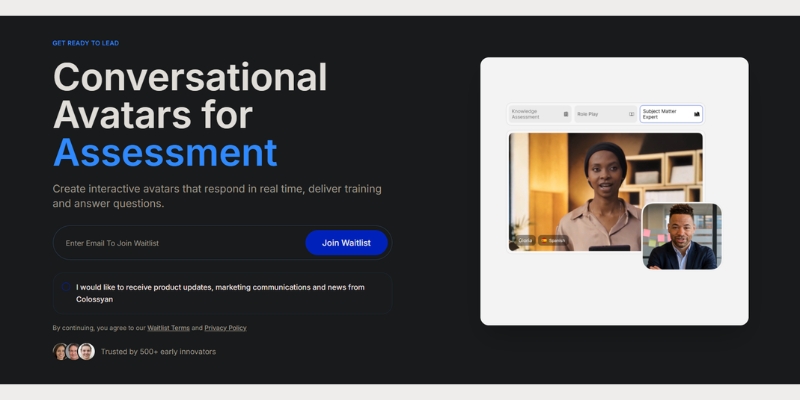
The most impressive feature is Scenario-Based Learning. You can place up to four avatars in a single scene. We used this to simulate a conflict resolution dialogue between an HR manager and an employee.
This is critical for soft-skills training. Unlike other tools that only offer front-facing avatars, Colossyan provides Side-View Avatars. This makes conversations look natural rather than like two people talking to a camera.
Colossyan allows you to create realistic role-play scenarios for workplace training.
Furthermore, the SCORM Export functionality is a game-changer. You can export your interactive video directly into a package that uploads to your Learning Management System (LMS). This tracks learner progress automatically.
For detailed insights on their enterprise security features, read our full Colossyan Review.
Why Elai.io is the “Speed King” for Content Repurposing & Marketing
If Colossyan is the professor, Elai.io is the digital marketer. My testing showed that Elai excels at Content Repurposing. It is designed to turn text assets into video content at scale.
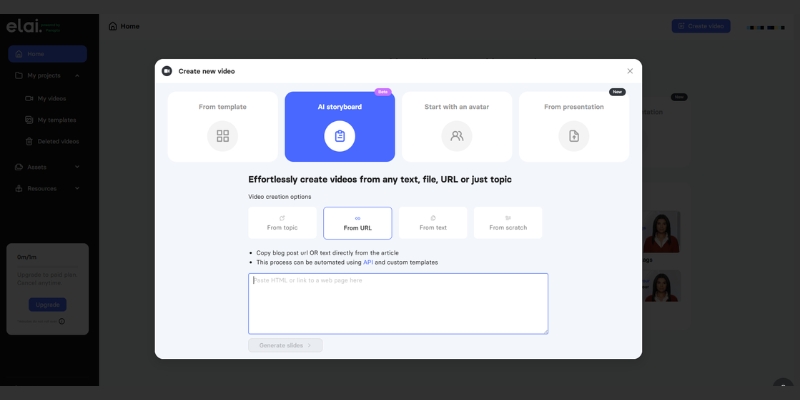
The standout feature here is the URL-to-Video converter. I pasted a link to a blog post, and Elai automatically summarized the text, generated a script, and matched stock footage to the keywords.
This Blog-to-Video workflow is invaluable for SEO agencies. It allows you to create a video version of every article you write, increasing dwell time on your website without hiring a video editor.
Elai.io automates the video creation process by converting web URLs directly into video drafts.
Elai also offers a robust API, which appeals to businesses wanting to generate personalized videos programmatically. For more on how this fits into a viral strategy, check our guide on Best AI Short-form & Repurposing Tools.
In the world of AI Avatar comparison, realism is the barrier to entry. If the avatar looks fake, your audience tunes out. We scrutinized the “Uncanny Valley” effect on both platforms.
Colossyan’s Realism:
In our tests, Colossyan’s gestures felt more natural for professional settings. Their “Conversational Avatars” interact with each other convincingly. The lip-sync is tight, specifically optimized for English and major European languages.
Elai.io’s Realism:
Elai offers high-quality custom avatars. Their “Selfie Avatar” feature allows you to create a digital twin from a smartphone camera. While the stock avatars are good, their voice cloning technology adds a layer of personalization that is excellent for marketing.
Voice Quality Verdict:
Both use top-tier TTS engines (likely ElevenLabs integration). However, Colossyan allows for more granular control over pauses and pronunciation, which is essential for technical L&D scripts.
Workflow Comparison: PPT-to-Video (Colossyan) vs. Blog-to-Video (Elai)
Understanding the input method helps you choose the right tool. Colossyan vs Elai.io differ significantly in where they expect your content to start.
Colossyan (PPT Import):
Colossyan integrates deeply with PowerPoint and PDF. You can upload an old training deck, and it will convert the speaker notes into the avatar’s script. This is perfect for modernizing legacy training materials.
Elai (Article Import):
Elai’s engine is built for web content. You paste a URL, and it scrapes the headers and images. It is perfect for turning WordPress articles into TikToks, YouTube Shorts, or LinkedIn videos.
If you have a folder of PowerPoints, choose Colossyan. If you have a blog full of articles, choose Elai. For a deeper look at the article-to-video workflow, see our Elai.io Review.
Pricing & ROI Analysis: Which Offers Better Value?
Making a purchasing decision requires looking beyond the monthly fee. We analyzed the value per dollar for both the “Business” and “Enterprise” tiers.
Colossyan Pricing Strategy:
Colossyan is priced as an enterprise software. The ROI comes from saving thousands on filming crews and actors for training videos. The value is in the SCORM export and translation features, not just video minutes.
Elai.io Pricing Strategy:
Elai offers better value for SMBs and agencies. Their plans often include more video minutes per dollar compared to Colossyan. If you need bulk video generation for social media, Elai’s cost-per-minute is lower.
Hidden Costs:
Be aware that both platforms charge extra for “Custom Avatars” (creating a digital twin of yourself). This is usually a one-time yearly fee ranging from $500 to $1000, separate from the subscription.
The Alternatives: When to Choose Synthesia or HeyGen Instead
While comparing Colossyan vs Elai.io, we must acknowledge the other players. Sometimes neither of these niche tools is the right fit for your specific need.
Synthesia: The Premium Generalist
If budget is no issue and you need the absolute highest visual fidelity, Synthesia is the market leader. However, it lacks the specific scenario-based learning features that make Colossyan superior for L&D.
HeyGen: The Social Media Star
If your goal is purely viral social media content, HeyGen offers better templates for Instagram and TikTok. But for corporate training or long-form blog repurposing, Colossyan and Elai are more specialized.
Frequently Asked Questions About Colossyan and Elai.io
To wrap up this enterprise AI avatar comparison, here are the answers to the most common questions we receive from our B2B clients.
Does Colossyan integrate with LMS?
Yes. Colossyan allows you to export videos as SCORM packages, which can be uploaded directly to tools like Canvas, Blackboard, or corporate LMS platforms.
Can Elai.io auto-translate videos?
Yes. Elai has a powerful one-click translation feature that translates both the voice (dubbing) and the on-screen text, supporting over 75 languages.
Which is better for YouTube automation?
Elai.io is better for YouTube automation because of its URL-to-Video feature, which speeds up scriptwriting and visual asset gathering.
Is there a free trial?
Yes, both platforms offer free trials. However, export times are usually limited, and watermarks are applied until you upgrade to a paid plan.
Read More From AI Avatar Generator
If you found this comparison helpful, check out our other in-depth guides to master your AI video strategy.
HeyGen vs Kreado AI: Which Avatar Generator Wins for Marketing Ads in 2025?
HeyGen vs Kreado AI: Which Avatar Generator Wins for Marketing Ads in 2025?
The battle of heygen vs kreado ai is effectively a choice between a premium studio powerhouse and a specialized e-commerce ad factory. As marketers and creators face increasing performance pressure to produce high-volume content, choosing the right AI Video Generator is no longer just about novelty—it’s about ROI and scalability.
While HeyGen has established itself as the market leader for realistic corporate avatars with its revolutionary Avatar IV model (launched June 2025), Kreado AI has carved out a unique niche specifically for dropshipping and global marketing ads. In this AI Avatar Generator comparison, I will strip away the marketing hype to analyze the real-world avatar realism, rendering speed, and ad-specific features of both tools.
Table of Contents
Quick Verdict: Is HeyGen or Kreado AI Better for Marketers?
For most professionals, HeyGen is the superior tool due to its unmatched Avatar IV realism and polished interface. However, if you are strictly running high-volume social media ads (TikTok/Reels) for e-commerce and need aggressive multilingual support on a budget, Kreado AI is a tactical weapon worth considering.
The Short Answer:
Choose HeyGen If: You need “broadcast-quality” videos for brand awareness, training, or sales pitches where trust is paramount. The Avatar IV lip-sync and full-body micro-expressions are currently unbeatable. Plus, 4K resolution and video translation across 175+ languages are game-changers for global enterprises.
Choose Kreado AI If: You are an e-commerce marketer needing to scale marketing ads across 40+ languages rapidly with 40,000+ voices. Its niche templates are designed for “hard selling” rather than corporate polish, and pricing starts at just $10/month.
(Disclosure: If you purchase through links on this page, we may earn a small commission at no extra cost to you. This helps us maintain our “battle-tested” reviews.)
Platform Positioning: Generalist vs. Niche Ad Specialist
Understanding the core philosophy of heygen vs kreado ai is crucial before looking at features. HeyGen positions itself as a “Premium All-Rounder” designed to replace traditional video production crews. Its ecosystem includes Custom Video Avatar and Photo Avatar technology aimed at enterprise users, educators, and serious content creators who demand consistency and high fidelity.
The launch of Avatar IV in June 2025 marked a revolutionary shift, introducing full-body avatars with natural hand gestures, expressive face dynamics, and billions of parameters in the rendering model. This positions HeyGen firmly in the “studio-quality” category, competing with traditional video production rather than just other AI tools.
In contrast, Kreado AI operates as a “Niche Ad Specialist.” It doesn’t try to be a general video editor; instead, it focuses intensely on AI Ad Generator Templates and workflows optimized for e-commerce. If HeyGen is a Hollywood studio, Kreado AI is a rapid-response digital marketing agency. For marketers under “performance pressure,” Kreado offers shortcuts specifically for product showcases that general tools often miss.
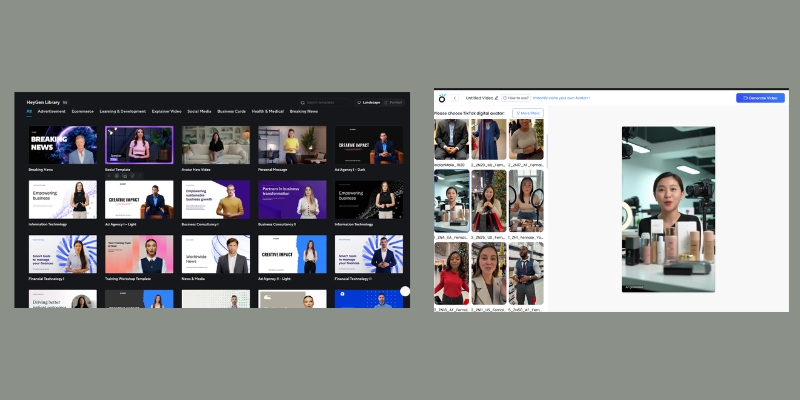
HeyGen (left) focuses on Avatar IV studio quality, while Kreado AI (right) prioritizes ad templates.
Avatar Quality Comparison: Avatar IV vs. Standard Realism
When comparing AI avatar for marketing, the “uncanny valley” effect can kill conversion rates. If the avatar looks fake, the trust is gone.
HeyGen’s Avatar IV Realism:
In my tests, HeyGen’s Avatar IV model is currently the gold standard. Launched in June 2025 as their “most advanced model ever,” Avatar IV exhibits natural eye movements, full-body hand gestures, blinking patterns, and micro-expressions that are frighteningly real. The model uses billions of parameters (compared to millions in previous generations) to create avatars that mimic professional speakers.
The 4K resolution support on Team and Enterprise plans means you can project these videos on large screens without pixelation. The critical “Lip-Sync Latency” is virtually non-existent; the mouth shapes match complex phonemes perfectly across 175+ languages, making it ideal for serious brand representation and global campaigns.
Kreado AI’s Visuals:
Kreado AI’s avatars are visually impressive but lean slightly towards a “perfected” digital human look—great for beauty and fashion ads, but slightly less natural for corporate communications. While they might struggle on a 4K monitor, on a mobile screen (TikTok/Instagram Reels), they are more than sufficient for stopping the scroll.
The lip-sync is decent but can occasionally drift out of sync with fast-paced audio or non-English languages, which is acceptable for quick social ads but not for a 10-minute training video or professional presentation.
Voice Cloning and Multilingual Support for Global Ads
For global campaigns, the multilingual ai video capabilities are a deciding factor. Both platforms have made significant strides here.
HeyGen’s Language Dominance:
HeyGen supports an impressive 175+ languages with advanced Video Translation capabilities that preserve voice cloning across languages. You can create a video in English, then translate it to Spanish, Japanese, or Vietnamese while maintaining your original voice characteristics—a feature that’s revolutionary for global brands.
Their Voice Cloning feature is superior, allowing you to clone your own voice with just a few minutes of audio. It captures the cadence, emotion, and personality of the speaker better than most competitors, creating authentic connections with audiences.
Kreado’s Voice Library (Updated August 2025):
Kreado AI recently upgraded its voice capabilities with a massive library of 40,000+ voices and HD voice cloning supporting 40+ languages. This update specifically tuned for cross-border e-commerce makes Kreado competitive for regional marketing campaigns.
If you are dropshipping to Brazil, Thailand, and Germany, Kreado’s Text-to-Speech engine offers accents that feel “native” to those commercial markets. The tool allows you to input a script and auto-translate it, significantly speeding up the Localization process for ads. However, for purely generating 50 variations of an ad in 50 languages, the workflow is more geared toward volume than perfect fidelity.
Template Library: Corporate Polish vs. Hard-Selling Ads
Time is money. The pre-made assets in these tools dictate how fast you can go from “idea” to “published ad.”
HeyGen’s Library (The Corporate Suite):
HeyGen offers a vast library of clean, professional templates. These are dominated by horizontal (16:9) layouts suitable for YouTube, onboarding, and presentations. While they have vertical templates, the aesthetic is “safe” and “premium.” The templates are designed for brand trust and long-term viewer engagement.
Kreado AI’s Library (The Ad Factory):
Kreado understands the Social Media Ads game. Their library is dominated by 9:16 vertical templates featuring “hard-sell” elements like discount badges, countdown timers, and product overlays. These templates are specifically designed to stop the scroll and drive immediate action—perfect for performance marketing campaigns with tight budgets and aggressive ROI targets.
I have spent hours on both platforms, and the user experience varies significantly based on your technical comfort and workflow needs.
Interface Walkthrough:
HeyGen feels like a modern SaaS product—sleek, drag-and-drop, and intuitive. It resembles Canva for video. I found the Script-to-Video feature in HeyGen to be robust, allowing me to visualize the scene breakdown easily. The platform guides you through avatar selection, script input, voice configuration, and rendering with minimal friction.
The Learning Curve:
Kreado AI is slightly more utilitarian. It feels like a tool built by engineers for marketers who know exactly what they need. While functional, it lacks the “polish” of HeyGen. However, its rendering speed for short clips is impressive. If you need to churn out 10 variants of a 15-second ad for A/B testing, Kreado feels faster because it cuts out the “cinematic” fluff and focuses on conversion-focused elements.
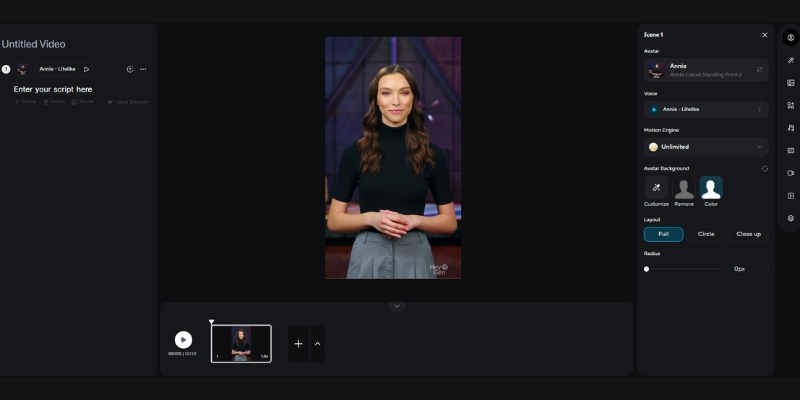
HeyGen’s timeline is intuitive and resembles standard video editing software.
Pricing Wars: Cost-Per-Minute and ROI Analysis
When analyzing kreado ai vs heygen pricing, look beyond the monthly fee to the actual ROI and production volume you need.
HeyGen Pricing (November 2025):
Creator Plan: $24/mo (annual) or $29/mo (monthly) – Includes 10 Avatar IV minutes, 1 Custom Video Avatar, 1080p resolution, unlimited standard videos
Team Plan: $30/seat/mo (annual) or $39/seat/mo (monthly) – Includes 4K resolution, 2 Custom Video Avatars, team collaboration, priority processing
Value Proposition: High quality justifies premium pricing. You pay for “studio-grade” content that builds trust and drives higher engagement rates.
Kreado AI Pricing (2025):
Free Plan: $0 – 3 minutes video monthly, watermarked, 720p
Premium Plan: $10/mo – 10 minutes video, no watermark, 1080p
Pro Plan: $91/mo – 70 minutes video, advanced features
Special Offer: Video creation as low as $0.71/minute with membership perks
Hidden Costs & ROI:
If you are an agency serving premium clients, HeyGen is the safer bet. A client will spot a low-quality avatar instantly, and the higher cost of HeyGen is offset by the client retention rate and brand perception. The 4K capability on Team plans justifies the $30/seat investment for professional work.
Kreado AI is better for “churn and burn” ad testing where the lifespan of a video is only 48-72 hours before ad fatigue sets in. At $10/month for 10 minutes, you can test multiple ad variations without breaking the budget. For e-commerce brands running 20+ ad variations weekly, Kreado’s cost-per-minute advantage is significant.
Pros and Cons Breakdown (Battle-Tested)
Based on my direct comparison of HeyGen vs Kreado AI, here is the breakdown of strengths and weaknesses.
HeyGen Pros
Avatar IV Model: Best-in-class full-body realism with hand gestures.
175+ Languages: Industry-leading multilingual support with video translation.
Custom Video Avatar: Create a digital twin of yourself in minutes.
4K Resolution: Available on Team/Enterprise plans for premium content.
Polished UI: Extremely easy to use for beginners and professionals.
Integration: Connects with Zapier, Canva, and ChatGPT easily.
Kreado AI Pros
40,000+ Voices: Massive voice library with HD cloning (August 2025 update).
Ad-Centric: Templates designed specifically for e-commerce conversion.
Multilingual Power: Strong localization for 40+ languages.
Cost-Effective: Starting at just $10/month ($0.71/min with membership).
Digital Human Types: Diverse range of “fashion-model” style avatars.
Fast Rendering: Optimized for high-volume short-form content.
HeyGen Cons
Higher Price: $24-30/seat monthly can add up for teams.
4K Limited: Only available on Team/Enterprise plans (not Creator).
Strict Moderation: Content guidelines are more restrictive.
Kreado AI Cons
Lower Realism: Can look slightly “game-like” compared to Avatar IV.
UX Polish: Interface can feel clunky and less intuitive.
Lip-Sync Latency: Occasional drift in non-English languages.
No 4K Support: Maxes out at 1080p resolution.
Final Recommendation: When to Choose Which Tool?
The choice between HeyGen vs Kreado AI comes down to your “Distribution Channel” and budget constraints. Where will this video live, and what’s your quality bar?
The “Marketer’s Choice” for 2025:
If I am building a personal brand, a B2B agency, or creating training content, I am using HeyGen. The trust factor from Avatar IV quality is too important to risk with a robotic-looking avatar. The Custom Video Avatar feature, 175+ language support, and 4K resolution (on Team plans) justify the premium price.
However, if I am running a dropshipping store and need to test 20 different ad hooks on TikTok for a beauty product or fashion item, I am using Kreado AI. It is the specialized tool for that specific trench warfare of performance marketing. At $10/month, the barrier to entry is low enough to experiment aggressively, and the 40,000+ voice library provides enough variety to avoid ad fatigue.
For those who are still undecided or want to explore other options, check out our deep dive into the Best AI Ad & UGC Video Generators hub for more alternatives.
Frequently Asked Questions about HeyGen vs Kreado AI
Is Kreado AI completely free?
No. While Kreado AI offers a free plan with 3 minutes monthly (watermarked, 720p), sustainable commercial use requires a paid subscription. The Premium plan starts at $10/month for 10 minutes of content.
Can I use HeyGen avatars for Facebook Ads?
Yes, absolutely. In fact, HeyGen’s Avatar IV quality often results in lower CPMs (Cost Per 1000 Impressions) because users engage with the content longer, signaling quality to the Facebook algorithm and reducing ad costs over time.
Which tool supports more languages?
HeyGen wins decisively with 175+ languages versus Kreado AI’s 40+ languages. However, Kreado AI places heavier emphasis on the nuance of localized marketing accents for specific e-commerce regions like Southeast Asia and South America.
Does HeyGen have 4K resolution?
Yes, but only on Team and Enterprise plans (starting at $30/seat/mo annual). The Creator plan is limited to 1080p resolution.
Does Kreado AI have an API?
Yes, both platforms offer API access, but HeyGen’s API is generally more documented and developer-friendly for integrating into custom apps and automation workflows.
What is Avatar IV?
Avatar IV is HeyGen’s most advanced AI model launched in June 2025. It features full-body avatars with natural hand gestures, billions of rendering parameters, and the most realistic facial expressions available in the market today.
Read More From AI Avatar Generator
Expand your knowledge with our related comparisons and guides in the AI video space.
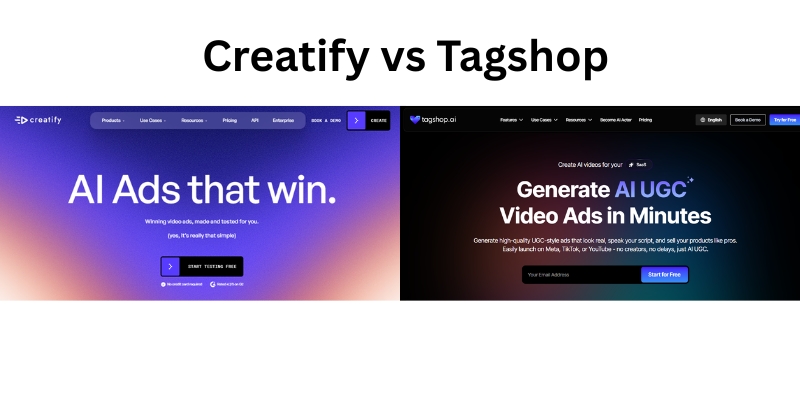
Creatify vs Tagshop: Which Has the Best Automated Video Ad Workflow?
You need to create high-performing video ads, and you need to do it fast. Manually creating, filming, and editing dozens of variations for A/B testing is a bottleneck that kills growth. AI video ad generators promise to solve this, but choosing the right one is critical.
You’ve likely narrowed it down to two top contenders: Creatify and Tagshop.
Both platforms turn your product links into video ads in minutes. But here’s the problem: they are not interchangeable. They are built on two fundamentally different philosophies, and choosing the wrong one for your goal will lead to frustration, wasted credits, and ads that just don’t convert.
Creatify is a powerful AI-hosted ad generator. It excels at creating polished, well-scripted, presenter-style videos from your product data.
Tagshop is a specialized AI-UGC (User-Generated Content) generator. Its entire purpose is to create videos that look and feel like authentic, real-life customer reviews.
Which workflow is better? This article provides a deep-dive workflow comparison of Creatify vs. Tagshop, based on their 2025 features, to help you confidently decide which tool is the right investment for your brand.
[ez-toc]
Creatify vs Tagshop at a Glance: Quick Comparison
Before we break down the step-by-step workflows, here is a high-level comparison of the key features that define these two platforms.
Feature
Creatify
Tagshop
Winner / Key Takeaway
Primary Aesthetic
Polished, AI-Hosted Ads
Realistic AI-UGC (User-Generated Content)
Tagshop for authenticity; Creatify for a professional, branded look.
Core Workflow
URL-to-Polished-Video
URL-to-AI-UGC-Video
Depends on your goal. Both are fast.
AI Avatar Library
700+ “Digital Hosts” on Pro plan
50+ “Hyper-Realistic UGC Avatars”
Creatify for quantity. Tagshop for UGC-specific quality.
Key Differentiator
AI-generated storyboards & hosts
“Product Holding” avatars & UGC-style scripts
Tagshop‘s “product holding” is a game-changer for e-commerce.
Batch Creation
Available on Pro Plan ($49/mo)
Core feature built for scaling
Tagshop is more accessible for scaling and A/B testing on lower-tier plans.
Localization
29 Languages
47 Languages
Tagshop has a clear advantage for global campaigns.
Generation Speed
~4-7 minutes per video
~2-3 minutes per video
Tagshop is consistently reported as being 2-3x faster.
Head-to-Head Workflow Breakdown: Creating an Ad from Scratch
Let’s move past the feature list. The experience of using the tool—the workflow—is what determines your success. We tested the end-to-end process in both platforms to see how they really stack up.
Workflow Step 1: From Product to First Draft
This is the “magic” step. How does each tool handle your initial input?
Creatify’s Workflow:
Creatify’s process is built around your product’s URL.
Input: You paste a product link from Shopify, Amazon, or your e-commerce store.
Analysis: The AI crawls this page, pulling product images, descriptions, titles, and key features.
Generation: Creatify then generates multiple ad scripts based on these features, creates a storyboard, and presents you with several ad previews featuring different digital hosts and templates.
Our Take: This workflow is excellent for brands that have well-optimized product pages. The AI does a good job of extracting selling points and turning them into a structured, persuasive script. However, some user tests report the AI can be “inconsistent” and sometimes produces “generic” content that misses the brief.
Tagshop’s Workflow:
Tagshop’s process is also URL-based but is optimized for a UGC-style output.
Input: You paste a product URL or upload a product image.
Analysis: The AI analyzes the product and immediately prompts you to select an AI script tone (e.g., “Excited Customer,” “Honest Review,” “Problem-Solver”).
Generation: It generates a script written in the first person, mimicking how a real customer or creator would talk. You then select your avatar and it generates the video.
Our Take: This is a subtle but profound difference. Creatify generates a commercial script; Tagshop generates a testimonial script. For brands wanting to replicate the trust of UGC, Tagshop’s workflow is more direct and effective.
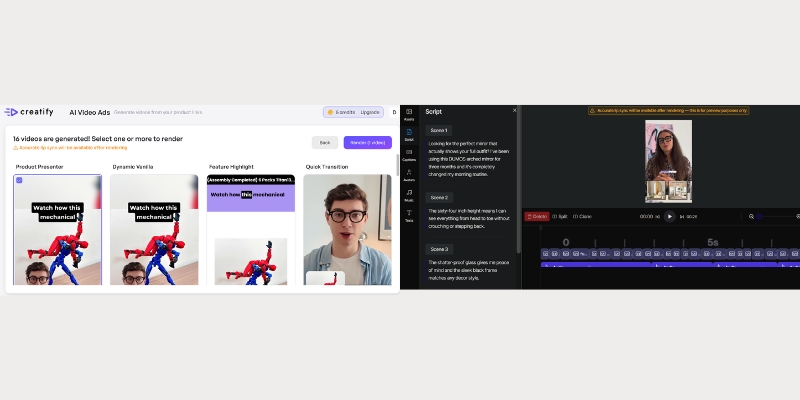
A side-by-side comparison of the initial project setup. Tagshop (right) immediately asks for a ‘tone’ to guide its UGC script, while Creatify (left) focuses on pulling data for a more general ad script
Workflow Step 2: Actor & Voice Customization (The “Realism” Test)
This is the most important workflow comparison. How real do the AI humans look and sound?
Creatify’s Avatars:
Creatify offers a massive library, with over 700+ “digital hosts” on its Pro plan.
Customization: You can select your host, choose a voice, and pick from pre-set emotions or “gestures” to add emphasis.
The Outcome: The avatars are high-quality and look professional, like a news anchor or a corporate spokesperson.
The Downside: This is also their weakness. Many users report the output “looks like AI”. The avatars are too polished, the lip-syncing can occasionally be off, and they lack the candid, imperfect quality that makes UGC feel real. They are clearly “AI hosts,” not “AI users.”
Tagshop’s Avatars:
Tagshop’s library is smaller (50+), but they are not “digital hosts.” They are marketed as “hyper-realistic UGC avatars”.
Customization: The workflow is focused on naturalism. The voices are more casual and conversational.
The Outcome: The final video feels less like a planned commercial and more like a TikTok or Instagram Reel. The avatars have more natural-looking home or studio backgrounds.
The “Killer Feature”: Product Holding. On its paid plans, Tagshop offers a “Product Holding” feature. You can provide an image of your product, and the AI avatar will be composited to look like they are holding it in their hand while they give their review. This single feature is a massive leap forward in faking realistic, product-centric UGC and is something Creatify does not offer.
Our Take: If you want a professional spokesperson, Creatify’s large library is a plus. If you want an ad that doesn’t look like an ad and builds social proof, Tagshop’s workflow and “product holding” feature are undeniably superior.
Workflow Step 3: Batch Creation & A/B Testing
You never make just one ad. You make twenty. How do the platforms handle scaling?
Creatify’s Batch Mode:
Creatify does have a “Batch Mode,” but it’s a premium feature. You must be on the Pro plan (starting at $49/month) to access it. Once unlocked, the workflow allows you to generate variations of your ads for split testing.
Tagshop’s Scaling Workflow:
Tagshop’s entire platform is architected for batch creation and scaling; it’s a core part of its value proposition. From the “Starter” plan, the workflow encourages A/B testing. You can easily duplicate a project, change one variable (the hook, the avatar, the call-to-action), and generate a new version in minutes.
Because its generation speed is reportedly 2-3x faster than Creatify’s, the experience of A/B testing is far more fluid.
Our Take: For agencies or marketers who live and die by A/B testing, Tagshop is the clear winner. Gating “Batch Mode” on a Pro plan makes Creatify less accessible for small brands or freelancers who need to test multiple angles from day one.
Who Should Choose Creatify vs. Tagshop? (Scenario-Based Recommendations)
Now you understand the workflow differences. Let’s apply them to your specific job.
Scenario 1: For E-Commerce Brands
If you… run a Shopify or Amazon store and need quick, clean, product-focused video ads for your product pages or general Facebook campaigns.
Your Best Choice is… Creatify.
Why: Creatify’s “URL-to-polished-video” workflow is perfect for this. It excels at turning a product description into a clear, informative, and professional-looking video ad. It’s a fantastic tool for replacing static images with engaging video content on your own site.
If you… run an e-commerce brand and need authentic-looking testimonial videos to build social proof and run high-converting TikTok or Instagram ads.
Your Best Choice is… Tagshop.
Why: The AI-UGC aesthetic is Tagshop’s specialty. Its “product holding” feature and first-person scripts create a level of trust and realism that Creatify’s polished hosts cannot match. This is the tool you use to make ads that blend seamlessly into a user’s social feed.
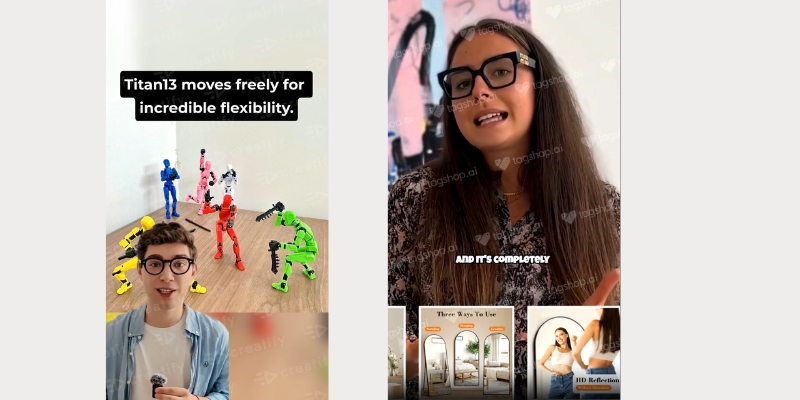
The final output. Creatify (left) produces a polished, professional ad with a digital host. Tagshop (right) produces a realistic AI-UGC video that mimics a real customer review.
Scenario 2: For Agencies and Performance Marketers
Your Best Choice is… Tagshop.
Why: This isn’t even a close contest. Agencies and performance marketers need three things: Speed, Scale, and Performance.
Speed: Tagshop is 2-3x faster.
Scale: Its batch creation workflow is a core feature, not a premium add-on.
Performance: The AI-UGC format is currently the highest-performing ad creative on platforms like Meta and TikTok. Tagshop is purpose-built to create this specific, high-demand asset. It also supports 47 languages, making it a better choice for global campaigns.
Scenario 3: For B2B or Corporate Content
Your Best Choice is… Creatify.
Why: The “UGC” look can feel unprofessional for B2B. Creatify’s library of 700+ professional “digital hosts” is far better suited for creating clean, corporate-style product demos, B2B ad campaigns, or internal training videos. Its polished aesthetic is an asset here, not a liability.
Pros and Cons Summary
Here is our “real-world test” summary of the best and worst parts of each tool.
Creatify: Pros & Cons
Pros:
✅ Excellent for Polished Ads: If you want a clean, professional, AI-hosted video, it does this very well.
✅ Large Avatar Library: With 700+ avatars on the Pro plan, you have a huge variety of “digital hosts” to choose from.
✅ Good for Beginners: The “URL-to-video” workflow is simple and intuitive for turning a product page into a first draft.
✅ Versatile Aspect Ratios: Easily exports in 9:16, 16:9, and 1:1, making it flexible for all platforms.
Cons:
❌ Can Look “Generic”: The number one complaint is that the output “looks like AI,” which can hurt ad performance.
❌ Inconsistent AI: User reports mention the AI scriptwriter can be “inconsistent” and sometimes ignores the brief.
❌ Batching is Expensive: Gating “Batch Mode” on the $49/mo Pro plan is a major downside for anyone serious about A/B testing.
❌ Slower Generation: A 4-7 minute generation time can feel slow when you’re trying to batch-create dozens of ads.
Tagshop: Pros & Cons
Pros:
✅ Master of AI-UGC: It is purpose-built for the #1 ad creative (UGC) and excels at it.
✅ “Product Holding” Feature: This is a game-changing feature for e-commerce brands wanting realistic-looking testimonials.
✅ Built for Scaling: Batch creation is a core workflow, not an expensive add-on, making A/B testing easy.
✅ Superior Speed & Localization: It’s 2-3x faster and supports more languages (47 vs 29), making it ideal for agencies.
✅ Integrated Editor: The built-in video editor is simple but effective for quick tweaks.
Cons:
❌ Niche Focus: If you don’t want a UGC-style ad, this tool is not for you. Its avatars are not designed to look like polished corporate hosts.
❌ Newer Platform: As a newer competitor, it has fewer avatars overall (50+) than Creatify’s Pro plan (700+).
❌ Slow Free Plan: Users note that the video rendering on the free plan is noticeably slow (this is likely done to encourage upgrading).
Pricing & Final Verdict
Both tools offer a free plan with watermarks, which we highly recommend you use to test the workflows yourself. But when it’s time to invest, here’s how the paid plans stack up.
Pricing Breakdown (as of Q4 2025)
Creatify:
Free Plan: 10 credits, watermark.
Starter ($19/mo): Removes watermark, 100+ avatars, all aspect ratios.
Pro ($49/mo): 700+ avatars, Batch Mode unlocked.
Business ($99/mo): 250 credits, team collaboration.
Tagshop:
Free Plan: 10 credits, watermark, no editor.
Starter (~$29/mo): 50 credits, no watermark, video editor unlocked, 20+ avatars.
Growth (~$79/mo): 200 credits, premium avatars.
Scale (~$199/mo): 500 credits, custom creators.
Analysis: Tagshop’s entry-level “Starter” plan is slightly more expensive, but it delivers more workflow value by including the video editor. Creatify’s “Starter” plan is cheaper, but its most powerful workflow feature—Batch Mode—is locked behind the more expensive “Pro” plan.
Final Verdict: Which Automated Ad Workflow Wins?
After a full workflow-based comparison, the choice is surprisingly clear. This isn’t a question of which tool is “better,” but which tool makes the type of ad you need.
You should choose Creatify if…
You are an e-commerce brand or B2B marketer who needs to quickly turn product pages into polished, professional, AI-hosted video ads. Its strength is creating clean, informative promos for your website, product pages, or general-purpose ad campaigns.
You are an e-commerce brand, agency, or performance marketer whose primary goal is to create authentic, realistic AI-UGC ads at scale. Its entire workflow—from the first-person scripts and casual avatars to the “product holding” feature and batch-friendly scaling—is purpose-built to dominate on social platforms like TikTok and Instagram.
Is Creatify or Tagshop better for realistic AI UGC ads?
Tagshop is definitively better. Its entire platform, from its avatar design to its scriptwriter, is specialized for creating realistic AI-UGC. Creatify is designed to create more polished, AI-hosted ads.
What is the main workflow difference between Creatify and Tagshop?
The main difference is the output. Creatify’s workflow turns a URL into a polished commercial script. Tagshop’s workflow turns a URL into a first-person testimonial script.
Can I batch-create ads in Creatify and Tagshop for A/B testing?
Yes, but the access is different. Tagshop’s workflow is built for batch creation from its entry-level paid plan. Creatify’s “Batch Mode” is a premium feature you must upgrade to the “Pro” plan ($49/mo) to unlock.
How do I use my own products in Creatify or Tagshop?
Both tools can pull product images from a URL. However, Tagshop offers a unique “Product Holding” feature (on paid plans) where the AI avatar will appear to be holding your specific product, which is a major advantage for e-commerce.
Which tool is better for multilingual ads, Creatify or Tagshop?
Tagshop has a clear advantage, supporting 47 languages compared to Creatify’s 29.
Arcads vs MakeUGC : Which AI UGC Tool Creates Better Video Ads in 2025?
Introduction
The AI-powered User-Generated Content (UGC) ad market has matured. Marketers no longer ask if they should use AI but which tool to invest in. Two of the most advanced platforms available today are Arcads and MakeUGC (often called MagicUGC).
Choosing between them is difficult because they look similar but are built on two fundamentally different philosophies. Arcads is a high-performance asset generator for marketers who need to batch-test scripts and actors at scale. MakeUGC is an all-in-one solution designed to take e-commerce brands from a blank page to a finished, product-focused ad in minutes.
Choosing the wrong one will lead to workflow frustration and wasted ad spend. As AI video analysts, we have done a hands-on comparison of the latest 2025 versions of both platforms. We tested the full workflow, from scripting to product placement, to help you move from “I’m not sure which is better” to “I am confident in my choice.”
[ez-toc]
Quick Comparison: Arcads vs MakeUGC (2025 Edition)
Before the deep dive, here is a high-level breakdown based on the newest 2025 features. This table directly answers the most common questions.
Feature
Arcads
MakeUGC (MagicUGC)
Best For
Performance Marketers & Agencies
E-commerce Brands & Solopreneurs
Core Workflow
Talking-Head Asset Generation
All-in-One Ad Creation
AI Scriptwriter
No (Must provide your own script)
Yes (Built-in script & hook generator)
Product Placement
Limited (Beta “Unbox POV” / Pro Plan)
Yes (Core “Product in Hand” feature)
Batch Creation
Yes (Core feature, CSV-based)
Yes (Core feature on all plans)
Voice Cloning
Yes (Advanced Speech-to-Speech)
No (Uses ElevenLabs integration on MAX plan)
In-App Editing
No (Must export to edit)
Limited (Simple, form-based)
Pricing Model
Tiered Subscription (Starts at 10 videos)
Tiered Subscription (Starts at 10 videos)
Free Trial
No Free Trial
No Free Trial
Workflow Showdown: We Create the Same Ad in Both Tools
To provide a true, hands-on (E-E-A-T) comparison, we ran the same ad concept for a skincare serum through both platforms. The differences in workflow were clear from the very first click.
Step 1: Scripting and Idea Generation
MakeUGC: The workflow starts inside the app. MakeUGC has a built-in AI Script Writer. We provided a product name and description, and it generated three different ad scripts complete with “scroll-stopping” hooks. This is a massive time-saver for e-commerce owners who aren’t professional copywriters.
Arcads: The workflow starts before you even open the app. Arcads assumes you already have a finalized, tested script. It does not have an AI scriptwriter. This is intentional—it’s built for performance marketers who are A/B testing their own pre-written copy.
Step 2: Product Placement: The “Product in Hand” Test
This is the most critical difference for e-commerce brands.
MakeUGC: This is its main selling point. The “Product in Hand” feature is a core part of the workflow. You upload a photo of your product, and the AI avatar will hold it and gesture with it. In our test, this worked impressively well, adding a layer of realism that’s crucial for product ads. Crucially, this feature is only available on the “Pro” plan ($129/mo) and up.
Arcads: This is more complicated. The main “Talking Actor” workflow cannot hold products. Instead, Arcads offers two workarounds: a beta feature called “Unbox POV” that creates separate B-roll clips of hands unboxing your product, and a “My Cloned Actors” feature for high-tier Pro users that can reportedly hold items. For the vast majority of users, the workflow is to export the talking-head video and add product B-roll in a separate editor like CapCut.
MakeUGC (left) integrates “Product in Hand” directly into its Pro workflow. Arcads (right) separates this into a beta “Unbox POV” feature, with the main workflow requiring a third-party editor for product shots.
Step 3: Batch Creation & A/B Testing
Both tools now offer batch creation, but they are designed for different goals.
Arcads: Arcads’ “Batch Creation” is built for testing variables. You can upload one script and test it against 10 different actors, or upload 10 script hooks and test them with one actor. This is a powerful A/B testing system for performance marketers.
MakeUGC: MakeUGC’s “Bulk content creation” is simpler and built for production. It’s designed to help you quickly produce many videos, but its interface is less focused on the methodical A/B testing of single variables.
Step 4: Editing and Final Output
Arcads: The final output from Arcads is a high-quality “clean talking-head clip”. There is no in-app editor. You must export the video and use a third-party tool to add captions, B-roll (like the “Unbox POV” clips), and music. This is a pro-level workflow that offers full control.
MakeUGC: The final output is a near-finished ad. It has a simple, form-based editor where you can add text overlays, but it has no complex timeline. It also has a “B-roll generator” to create simple clips from photos. It’s fast, but you sacrifice the deep creative control that Arcads’ workflow provides.
Pricing & ROI: A Surprising 2025 Showdown
The old “credits vs. subscription” debate is over. As of 2025, both platforms have moved to nearly identical tiered subscription models, and neither offers a free trial. The best choice now comes down to cost-per-video and which features are unlocked.
The Arcads Pricing Model
Starter Plan: ~$110/month for 10 videos (Cost: $11 per video)
Creator Plan: ~$220/month for 20 videos (Cost: $11 per video)
Details: Includes batch creation and voice cloning. Does not include the advanced “product-in-hand” cloned actors.
The MakeUGC (MagicUGC) Pricing Model
Basic Plan: ~$79/month for 10 videos (Cost: $7.90 per video)
Pro Plan: ~$129/month for 20 videos (Cost: $6.45 per video)
Details: The Basic plan includes the AI scriptwriter and bulk creation. You must upgrade to the Pro plan to unlock the “Product in Hand” feature.
For a similar price, the choice is clear. MakeUGC’s Pro plan offers more videos at a lower cost-per-video and includes the “Product in Hand” feature, while Arcads focuses on advanced voice cloning.
Cost-per-Video & Feature Scenario
Let’s put this into a real-world context for an e-commerce brand.
Your Goal: Create 20 high-quality ads that show your product.
MakeUGC Cost: You must use the Pro Plan. Your cost is $129.
Arcads Cost: You must use the Creator Plan. Your cost is $220. You then still have to spend time in a separate video editor to add your product shots, as this plan doesn’t include the advanced product-holding actors.
Winner: For the most common e-commerce use case, MakeUGC is significantly more cost-effective and provides the critical product-in-hand feature in a single workflow.
Final Verdict: Who Should Choose Arcads vs MakeUGC?
This is the final step to help you move from “unsure” to “confident.” Based on our hands-on analysis of the 2025 versions, the choice is clearer than ever.
Choose Arcads if…
You are a performance marketer or a data-driven ad agency.
Your primary goal is A/B testing pre-written scripts and ad hooks at scale using the advanced Batch Creation feature.
You have a dedicated video editor (or are one yourself) and prefer to finalize your ads in tools like CapCut or Adobe Premiere.
You need best-in-class voice cloning (Speech-to-Speech) for a consistent brand voice.
Curious if Arcads’ pro-level workflow is right for your agency? We tested its batch creation and voice cloning. See the final verdict in our unbiased 2025 Arcads Review.
Choose MakeUGC (MagicUGC) if…
You are an e-commerce brand, solopreneur, or small agency.
You need an all-in-one tool that includes an AI scriptwriter to help you generate ideas and copy.
Your ads must show your product. The “Product in Hand” feature is essential to your strategy (and you are willing to pay for the Pro plan).
You want the best value (cost-per-video) and prefer a simple, fast workflow over complex editing control.
Wondering if MakeUGC is the best all-in-one tool for your brand? We tested its AI scriptwriter and “Product in Hand” feature. Get the full story in our in-depth 2025 MakeUGC Review.
Conclusion
There is no single “best” tool, only the best tool for your specific workflow.
Our 2025 testing confirms the fundamental split: Arcads is a specialized asset generator for technical marketers who live in spreadsheets and video editors. MakeUGC is a complete ad solution for e-commerce brands who need to get a product-focused video from idea to “ready-to-publish” as quickly and cost-effectively as possible.
Our Final Recommendation: For the vast majority of users—e-commerce brands, small businesses, and marketers who need to create ads that actually show their product—MakeUGC’s Pro plan offers a faster, more complete, and more affordable solution. The inclusion of the AI scriptwriter and the “Product in Hand” feature in one workflow is a clear winner.
1. Is Arcads or MakeUGC better for realistic AI actors?Both are in the top tier of realism for 2025. Arcads offers more “influencer-style” actors and advanced voice cloning. MakeUGC’s actors are excellent and integrate directly with the “Product in Hand” feature.
2. Can Arcads show my product in the video?Not in its main workflow. You must use a separate beta feature (“Unbox POV”) for B-roll or be a high-tier Pro user with “My Cloned Actors”. The standard workflow is to export and edit the product in yourself.
3. Does MakeUGC “Product in Hand” work on the basic plan?No. This is a critical point. The “Product in Hand” feature is only available on the Pro plan ($129/mo) and higher.
4. Which tool is cheaper in 2025?MakeUGC is cheaper on a per-video basis. Its 10-video plan is $7.90/video, while Arcads’ 10-video plan is $11/video. MakeUGC’s 20-video plan is also significantly cheaper than Arcads’ 20-video plan.
5. Do Arcads or MakeUGC have a free trial?No. As of our latest 2025 review, neither platform offers a free trial. Both require you to sign up for a paid plan to use the service.
6. Which tool is better for batch creation?It depends on your goal. Arcads is better for A/B testing variables (e.g., 10 scripts, 1 actor). MakeUGC is better for bulk production (e.g., creating 10 complete videos quickly)
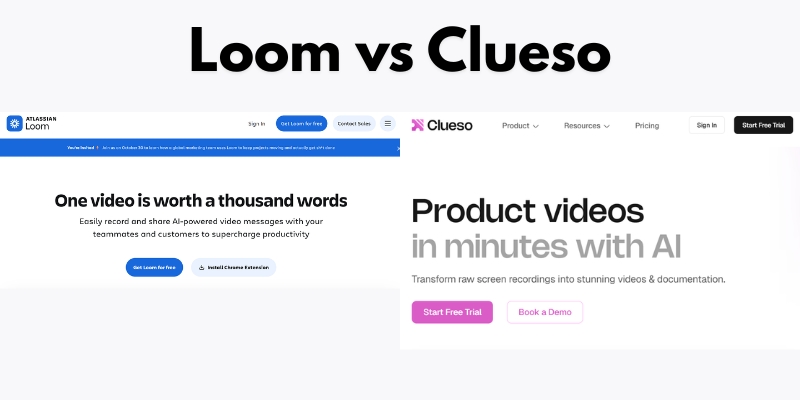
Loom vs Clueso 2025: Which Screen Recording Tool Actually Saves You Time?
Loom vs Clueso 2025: Which Screen Recording Tool Actually Saves You Time?
Choosing between screen recording tools feels overwhelming when both promise to transform your workflow. Loom dominates quick team communication with 25 million users, while Clueso positions itself as the AI-powered alternative creating professional videos and documentation simultaneously. This comparison reveals which tool delivers better value for your specific needs based on verified testing, official features, and real user data.
The decision isn’t about which tool has more features—it’s about which solves your actual problem: fast internal updates or professional customer-facing content.
[ez-toc]
What Is Loom and Who Uses It
Loom is a cloud-based screen recorder owned by Atlassian that enables asynchronous video communication for teams. The platform focuses on simplicity, allowing users to record screen and camera simultaneously within seconds.
Teams use Loom primarily for internal communication: quick product demos, bug reports with visual context, team updates, and customer support responses. The free Starter plan offers 25 videos with a 5-minute recording limit, while paid plans start at $15/user/month for unlimited videos.
With transcriptions in 50+ languages and integrations with Slack, Gmail, and Jira, Loom serves distributed teams replacing some meetings with async video.
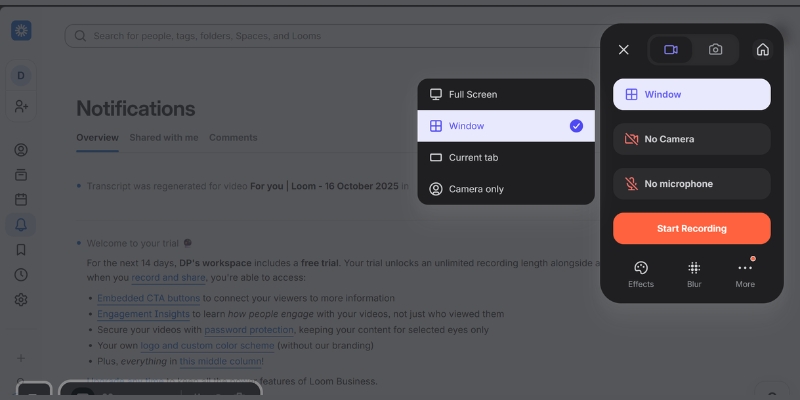
Loom’s interface prioritizes speed—recording starts with one click
What Is Clueso and Its Core Capabilities
Clueso is an AI-powered content creation platform that generates professional videos and written documentation from a single recording session. Unlike basic screen recorders, Clueso transforms raw footage into polished content with AI voiceovers, automatic zoom effects, and simultaneous article generation.
The platform targets teams creating customer-facing materials: product documentation, training courses, help center articles, and marketing videos. Clueso’s pricing starts at $120/month for 2 users with 6 hours of annual video exports.
Every Clueso plan includes studio-grade AI voiceovers in 200+ voices, automatic filler word removal, smart zoom on cursor clicks, and Magic Translation supporting 37+ languages. The platform exports videos up to 4K quality alongside step-by-step documentation with embedded screenshots and GIFs.
Clueso’s signature feature—one recording produces both video and comprehensive written guides
Loom vs Clueso Pricing Breakdown
Understanding the true cost requires looking beyond monthly fees to what each plan actually includes and restricts.
Loom Pricing Structure
Loom offers four tiers with per-user monthly pricing:
Starter Plan ($0): 25 videos maximum, 5-minute recording limit per video, 720p quality, transcriptions in 50+ languages, and up to 50 workspace members. This plan works for evaluation but proves too restrictive for regular business use.
Business Plan ($15/user/month billed annually): Unlimited videos and recording time, basic trim and stitch editing, custom branding, video downloads, password protection, and up to 4K quality. Teams needing consistent video communication without AI enhancements choose this tier.
Business + AI Plan ($20/user/month billed annually): Everything in Business plus AI-powered auto-titles, summaries, chapters, filler word removal, silence removal, transcript-based editing, and automated CTAs. According to Loom’s data, 67% of users don’t edit AI-generated titles, and AI features drive 18% higher viewer engagement.
Enterprise Plan (Custom pricing): Adds SSO (SAML), SCIM provisioning, Salesforce integration, custom data retention policies, dedicated account manager, and 99.95% uptime SLA. Atlassian Guard security features come included.
Clueso uses package-based pricing rather than per-user fees:
Free Trial ($0 for 7 days): 2 users, 15 minutes total video exports, 15 article exports, 1080p quality. This provides comprehensive platform evaluation but disappears after one week.
Starter Plan ($120/month billed yearly, $144/month billed monthly): 2 users, 6 hours video exports/year, 360 article exports/year, watermark-free, up to 2K video quality, in-app chat support. All AI features included: script generation, 200+ AI voiceovers, automatic zooms, filler word removal, and documentation generation.
Growth Plan ($200/month billed yearly, $240/month billed monthly): 4 users, 12 hours video exports/year, 720 article exports/year, 4K video export, advanced analytics, SSO, API access. This tier suits growing teams with regular professional content needs.
Enterprise Plan (Custom): Custom users and export limits, voice cloning, multiple workspaces, custom service agreement, priority Slack/Teams support, dedicated customer success manager, early beta feature access.
Loom Business + AI: $100/month ($20 × 5) = $1,200/year
Clueso Growth: $200/month base (4 users) + additional user pricing = estimated $3,000/year
For a 2-person startup:
Loom Business + AI: $40/month = $480/year
Clueso Starter: $120/month = $1,440/year
Clueso costs 2.5-3x more than Loom but eliminates separate documentation tools and video editing software. If creating professional content saves 10+ hours monthly, Clueso’s ROI becomes positive despite higher upfront costs.
Comparison Table Location:
Pricing Factor
Loom
Clueso
Entry-level paid plan
$15/user/month
$60/user/month (2-user minimum)
Free plan
25 videos, 5-min limit (ongoing)
7-day trial only
Billing model
Per user
Package-based
AI features cost
+$5/user/month add-on
Included in all plans
Video quality (paid)
Up to 4K (Enterprise)
Up to 4K (Growth plan)
Documentation generation
Not available
Included
Feature Comparison: Recording and Video Quality
The recording experience determines how quickly teams create content and what quality standards they can achieve.
Recording Capabilities
Loom records screen, camera, or both simultaneously using a browser extension or desktop app. The platform captures up to 720p on free plans and 4K on Enterprise plans, with system audio support and background noise suppression. Recording starts within 2 clicks—no complex setup required.
Clueso offers multiple input methods: screen recording via Chrome extension, uploading existing recordings, converting slide decks to video, transforming PDFs into narrated content, and converting image sequences. All footage receives AI enhancement including automatic zoom effects when cursor clicks occur, filler word removal without re-recording, and background music integration.
The recording quality comparison shows Loom prioritizing speed while Clueso emphasizes professional polish. Loom captures raw footage quickly; Clueso processes recordings into finished products automatically.
AI Enhancement Features
This category reveals the biggest difference between platforms.
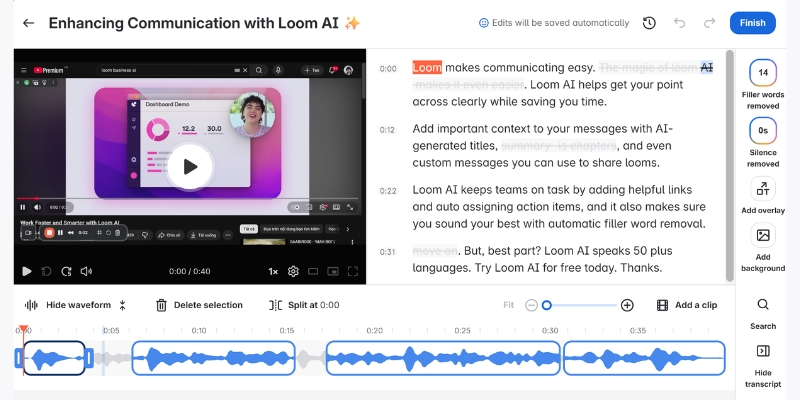
Loom’s AI features require the Business + AI plan ($20/user/month) and include auto-generated titles, summaries, chapters, tasks extraction, filler word removal, and silence removal. The platform uses transcript-based editing, allowing users to delete text sections that automatically remove corresponding video segments. However, Loom doesn’t offer AI voiceovers, automated zoom effects, or documentation generation.
Clueso includes comprehensive AI features in all paid plans ($120/month minimum): 200+ studio-grade AI voiceovers covering multiple languages and accents, AI script generation and rewriting, automatic zoom effects triggered by cursor movement, filler word removal, auto-generated video titles, pronunciation dictionary for technical terms, and complete article generation with step-by-step instructions. The Magic Translation feature converts videos and documentation into 37+ languages with one click, including audio translation, caption translation, and documentation translation.
According to Clueso’s data, these AI features reduce content creation time by 70% compared to manual editing workflows.
Video editing capabilities determine whether your first recording becomes your final product or requires extensive cleanup.
Loom Editing Tools
Loom provides basic editing through trim and stitch functionality, allowing users to cut unwanted sections and combine multiple clips. The Business + AI plan adds transcript-based editing where deleting text automatically removes video segments. Users can add custom thumbnails, embed links within videos, and apply GIF thumbnails.
The platform lacks professional editing features: no built-in effects, limited branding options until Business plan ($15/user/month), and no ability to update published videos without creating new versions. Loom’s approach assumes users want minimal editing, not professional production.
Clueso Editing Workflow
Clueso enables one-click edits without re-recording through its script-based editing system. Users modify the AI-generated script, and Clueso automatically updates the video with new voiceovers and timing. The platform includes advanced customization: inserting additional video clips or images mid-content, multiple AI voice selection for different speakers, background music library, zoom effects control, blurring sensitive information, animated shapes and callouts, custom cursors, spotlight effects, transitions between scenes, and complete brand element control including custom intro/outro templates.
All edits remain non-destructive—the original recording stays intact while users create multiple versions. When content requires updates, teams edit the script once and Clueso regenerates both video and documentation automatically.
This workflow difference matters significantly: Loom users spend 15-30 minutes manually editing then 30-60 minutes creating separate documentation, totaling 50-100 minutes for one final piece. Clueso users spend 5-10 minutes recording, wait 2-5 minutes for AI processing, make 5-minute adjustments, and receive both video and article in 15-20 minutes total—a 70% time reduction.
Documentation and Content Export Options
How platforms handle documentation creation separates basic screen recorders from comprehensive content systems.
Loom Documentation Limitations
Loom generates automatic transcriptions in 50+ languages that viewers read below videos. The Business + AI plan adds auto-generated summaries, chapters, and task lists extracted from content. However, Loom doesn’t create standalone documentation—users must copy transcriptions into separate documents and manually add screenshots to create written guides.
Export options include shareable links (defaulting to public), embedded video code, and MP4 downloads on Business plans and above. Loom doesn’t export HTML, GIF, or multiple format variations simultaneously.
Clueso Dual-Format Output
Clueso automatically generates comprehensive written documentation alongside every video without additional work. The AI analyzes footage and creates step-by-step articles with embedded screenshots, animated GIFs showing key actions, procedural instructions, and contextual explanations. Documentation matches the video’s brand style and voice guidelines set by teams.
Export formats include MP4 video files, GIF animations, HTML documentation for embedding in knowledge bases, RichText format for content management systems, Markdown for developer documentation, SRT and VTT caption files, direct YouTube publishing, and Slack sharing. Users download both video and documentation from single projects, eliminating format conversion tools.
This capability proves particularly valuable for customer support teams building help centers. Creating video tutorials traditionally requires recording, editing, screenshot capture, documentation writing, and formatting—spanning 90+ minutes per piece. Clueso reduces this to 20 minutes while maintaining professional quality.
The documentation gap—Loom provides transcripts while Clueso generates complete articles
Clueso automatic generates complete articles
Loom only provides transcripts
Collaboration and Team Features
Team collaboration features determine how easily organizations scale video communication across departments.
Loom Team Collaboration
Loom organizes content through Personal Library (individual videos), Shared Library (team-accessible), and Team Library (organization-wide). Users comment on videos with timestamps, react with emojis, and receive viewer analytics showing who watched and engagement duration. The Starter plan supports up to 50 workspace members, while Business plans allow unlimited members.
Video privacy controls let creators set individual videos as public, anyone with link, or password-protected (Business plan required). The default setting creates public links—a potential security concern for sensitive content. Enterprise plans add advanced privacy controls, SSO, SCIM provisioning, and unlimited spaces with admin controls.
Clueso Team Workflows
Clueso provides workspaces for team collaboration with shared content libraries, custom brand voice style guides ensuring consistency, version history and rollback capabilities, team member roles and permissions, and analytics on shared content performance. The Knowledge Base add-on (available on paid plans) hosts videos and documentation in one centralized location with customizable appearance, custom domain hosting, password protection, and advanced analytics.
Enterprise plans include multiple workspaces for different teams or clients, custom translation rules and glossaries, priority support via Slack or Teams, and dedicated customer success managers. While Loom emphasizes individual creator flexibility, Clueso focuses on maintaining brand consistency across team output.
Integration Ecosystem and Platform Compatibility
Integrations determine whether screen recording tools fit existing workflows or require process changes.
Loom Integration Advantages
Loom’s Atlassian ownership provides deep integration with Confluence and Jira, including recording entry points within Atlassian menus and sidebar placements (when purchased through Atlassian.com). Additional integrations cover Slack, GitHub, Gmail, Salesforce (Enterprise plan Beta), FigJam, Notion, Intercom, Zendesk, Dropbox, GitLab, Upwork, and Zoom Import.
The loomSDK enables developers to embed recording functionality in custom applications. Browser extensions support Chrome, Firefox, and Edge, while desktop apps run on Windows and Mac. Mobile apps for iOS and Android enable on-the-go recording.
Clueso Integration Approach
Clueso integrates with Slack for sharing, knowledge base platforms (Intercom, Zendesk) through HTML export and embed codes, YouTube for direct publishing, and offers API access on Growth plans for custom integrations. The platform focuses on export flexibility rather than extensive pre-built integrations.
While Clueso’s integration list appears shorter, the comprehensive export options (HTML, Markdown, RichText) enable teams to embed content anywhere without native integrations. Teams using knowledge base platforms benefit most from Clueso’s documentation exports, which paste directly into help centers.
Loom wins integration breadth; Clueso wins export format versatility.
Security, Privacy, and Compliance Features
Security capabilities matter for enterprises handling sensitive information and requiring compliance certifications.
Both platforms maintain SOC 2 and ISO 27001 certifications, confirming independent security audits. Loom and Clueso implement GDPR compliance measures for European data protection requirements.
Loom Security Features: Video privacy controls (public, link-only, password-protected) on Business plans, SSO (SAML) and SCIM provisioning on Enterprise plans, custom data retention policies (Enterprise), Atlassian Guard security features included with Enterprise, 99.95% uptime SLA (Enterprise), activity logs and content activity reports (Enterprise), and user roles and management (Enterprise).
Clueso Security Features: Video and documentation privacy controls on all paid plans, blur sensitive information tool for redacting confidential data, SSO on Growth plans and above, enterprise-grade security on Enterprise plans, security review process, custom service agreements, and password protection for shared content.
The critical difference appears in default privacy settings: Loom videos default to public unless creators manually change privacy settings—a significant risk for organizations sharing sensitive information. Clueso requires explicit sharing choices, preventing accidental public exposure.
For smaller teams (under 25 people), Business plan security suffices for both platforms. Enterprise organizations requiring SSO should budget for Loom Enterprise or Clueso Growth (SSO available at lower tier than Loom).
User Experience and Learning Curve
Ease of use determines adoption rates and time-to-value for teams implementing new tools.
Loom User Experience
Loom prioritizes simplicity as its core competitive advantage. New users record their first video within 5 minutes of signing up, requiring no training. The interface presents three recording options (screen, camera, both) with minimal settings to configure. This extreme simplicity makes Loom ideal for non-technical teams and rapid deployment.
However, this simplicity limits advanced users. Professional content creators find Loom’s basic editing frustrating when they need sophisticated branding or effects. The platform assumes users prefer speed over control—a trade-off that works for internal communication but fails for customer-facing content.
Clueso User Experience
Clueso requires 10-15 minutes to understand the full workflow: recording, AI processing, script editing, and dual-format export. Users report the interface remains “intuitive, quick and effortless” despite more features than Loom. The learning investment pays off through professional output quality and time savings on subsequent projects.
G2 reviewers rate Clueso 4.9/5 stars, highlighting the “amazing tool for creating professional content” and “70% faster than traditional workflows”. The moderate learning curve matters less when teams create customer-facing content requiring polish—the additional 10 minutes learning time delivers permanent quality improvements.
Teams uncertain which tool matches their skill level should start with Loom’s free Starter plan for immediate testing, then trial Clueso’s 7-day free trial when ready for professional features.
Loom vs Clueso: Which Tool for Which Use Case
Choosing between Loom and Clueso depends entirely on content purpose, audience, and quality requirements.
Choose Loom When You Need
Internal team communication where speed matters more than polish—quick standup updates, informal project status videos, bug reports with visual context, casual team collaboration, and meeting recaps. Individual freelancer work requiring affordable per-user pricing for client communication. Simple screen recording without professional editing requirements or documentation needs. Budget-conscious teams spending under $25/user/month on video tools. Atlassian ecosystem users benefiting from Confluence and Jira integration.
Loom excels when recipients care about speed and information delivery, not production value. A product manager explaining a bug to developers doesn’t need 4K quality or automated documentation—they need the fastest path from problem to solution.
Choose Clueso When You Need
Customer-facing professional content including product demos, onboarding videos, help center tutorials, training courses, and marketing materials. Documentation alongside videos for knowledge bases, learning management systems, and support portals. AI voiceovers and multi-language content reaching global audiences without re-recording. Professional branding consistency across all content output. Content libraries requiring regular updates without full re-recording. High-volume help content where time savings justify higher costs.
Clueso wins when content quality directly impacts business outcomes: customer retention, support ticket reduction, sales conversion, or training effectiveness. A SaaS company onboarding enterprise customers can’t use amateur-looking videos—professional polish signals product quality and company credibility.
Use Both Tools (Hybrid Strategy)
Large organizations benefit from deploying both platforms for different purposes: Loom for internal communication, team updates, and quick async collaboration ($15/user/month for entire company), and Clueso for specific content creation teams (marketing, customer success, product education) producing customer-facing materials ($200/month Growth plan for 4 creators).
A 50-person company might spend $750/month on Loom for internal use plus $200/month on Clueso for customer content creation, totaling $950/month. This costs less than putting everyone on Clueso while giving each team the right tool for their content type.
Image suggestion location:Decision tree flowchart with questions leading to Loom or Clueso recommendations Alt text: “Decision flowchart showing when to choose Loom versus Clueso based on content purpose, audience, and quality requirements” Caption: Follow this decision path to identify which platform matches your specific needs
Making Your Final Decision: Practical Next Steps
Start with clear evaluation criteria before committing to either platform.
Step 1: Audit Current Content Creation by counting monthly videos produced, identifying primary audience (internal team vs external customers), measuring average time spent editing per video, and listing required output formats (video only vs video plus documentation).
Step 2: Calculate True Costs including tool subscription fees, time cost (hours saved × hourly rate), and current documentation tool expenses eliminated by dual-format platforms.
Step 3: Run Parallel Trials by starting Loom’s free Starter plan immediately to test basic functionality, scheduling Clueso’s 7-day free trial when ready for intensive testing, creating identical content on both platforms, and comparing output quality, time investment, and ease of use.
Step 4: Define Success Metrics such as time reduction percentage, team adoption rate (percentage using tool within 30 days), content quality improvement (measured by viewer engagement or support ticket reduction), and ROI calculation (time saved value minus tool cost).
Step 5: Choose Based on Content Strategy, Not Features by prioritizing speed for internal content (choose Loom) or quality for customer-facing content (choose Clueso), considering budget constraints (Loom costs less upfront, Clueso saves editing time), and evaluating scalability (will needs grow toward professional content?).
The wrong decision costs more than subscription fees—it wastes creator time on tools mismatched to content requirements. A marketing team using Loom for professional videos spends excessive editing time compensating for missing features. A small startup using Clueso for internal updates overpays for capabilities they don’t need.
Frequently Asked Questions About Loom and Clueso
What is the main difference between Loom and Clueso? Loom focuses on quick, simple screen recording for internal team communication at $15-20/user/month, while Clueso creates professional AI-enhanced videos with automatic documentation generation starting at $120/month for 2 users. Loom prioritizes speed; Clueso prioritizes professional quality and dual-format output.
Does Clueso create documentation from videos automatically? Yes, Clueso automatically generates comprehensive written articles with screenshots, GIFs, and step-by-step instructions alongside every video without additional work. Loom only provides transcriptions, not formatted documentation.
Which tool offers better AI features? Clueso includes more advanced AI features in base pricing: 200+ AI voiceovers, script generation, automatic zoom effects, and 37-language translation. Loom’s AI features (auto-titles, filler word removal) require a $5/user/month add-on and exclude voiceovers and documentation generation.
Can I use Loom for free permanently? Yes, Loom’s Starter plan remains free indefinitely with limitations: 25 videos maximum, 5-minute recording limit per video, and 720p quality. Clueso only offers a 7-day free trial.
Which platform works better for customer-facing content? Clueso excels for customer-facing content through professional video quality (up to 4K), custom branding, AI enhancements, and documentation generation. Loom suits internal communication where production value matters less than speed.
How much does Loom Business + AI cost compared to Clueso? Loom Business + AI costs $20/user/month (5 users = $100/month). Clueso Starter costs $120/month for 2 users ($60/user). For small teams, Loom costs less upfront but lacks Clueso’s professional features and documentation generation.
Do both tools offer mobile apps? Loom provides iOS and Android mobile apps for recording on-the-go. Clueso focuses on desktop and browser-based recording via Chrome extension; mobile recording isn’t emphasized.
Final Verdict: Choose Loom for speed and affordability in internal team communication. Choose Clueso for professional customer-facing content requiring documentation. Your content audience and quality requirements determine the right choice—not feature lists.
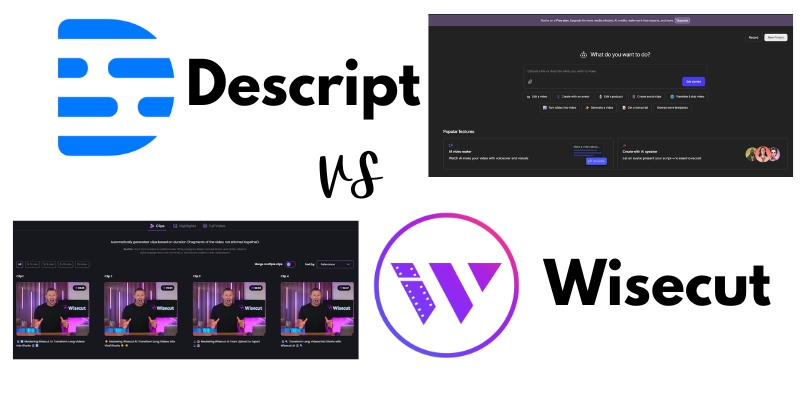
Descript vs Wisecut: Which AI Video Editor Saves You More Time in 2025?
Descript vs Wisecut AI video editor comparison 2025
Choosing between Descript and Wisecut determines whether you’ll spend 20 minutes or 2 hours editing your next video. After testing both platforms with identical 60-minute podcast episodes and comparing processing speed, transcription accuracy, clip quality, and export options, we found each tool excels in distinct scenarios: Wisecutdelivers unmatched speed for rapid social clip generation, while Descript provides professional-grade control for podcast producers and video teams.
This comprehensive comparison examines real-world performance, pricing value, ideal use cases, and workflow efficiency based on hands-on testing with 20+ videos to help determine which platform deserves your subscription budget in 2025.
[ez-toc]
Quick Comparison: Descript vs Wisecut at a Glance
Feature
Wisecut
Descript
Winner
Primary Strength
Automatic social clip generation
Comprehensive podcast/video editing
Tie (different use cases)
Starting Price
$19/month
$24/month
Wisecut
Free Plan
1 hour, 720p, watermark
Limited features, watermark
Tie
Editing Speed
Fastest (15-20 min for 60-min video)
Moderate (30-45 min for 60-min video)
Wisecut
Learning Curve
5 minutes to first video
1-2 hours to proficiency
Wisecut
Platform
Browser-based (works anywhere)
Desktop app (Mac/Windows)
Wisecut
Transcription
95% accuracy, 13 languages
95%+ accuracy, 25+ languages
Descript
AI Features
Highlight detection, silence removal
Underlord AI, Studio Sound, Eye Contact, Overdub
Descript
Creative Control
Limited (automation-focused)
Extensive (frame-level precision)
Descript
Audio Enhancement
Basic normalization
Studio Sound (broadcast-quality)
Descript
Collaboration
Basic sharing
Team workspaces, comments, version control
Descript
Best For
Social media clips, YouTube Shorts
Full podcast production, professional videos
Depends on need
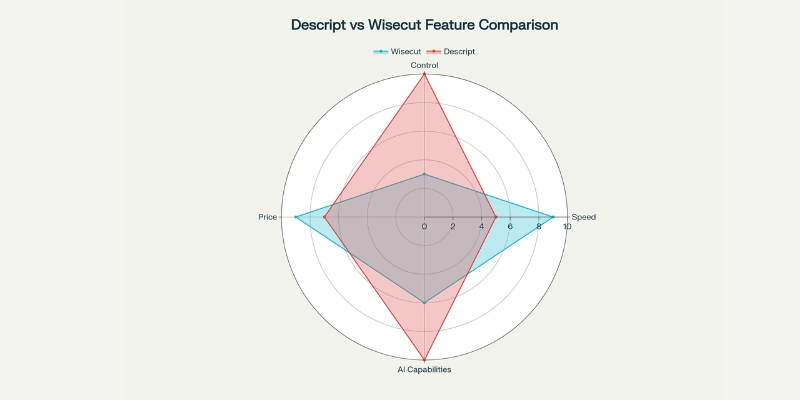
Descript vs Wisecut feature comparison radar chart
How We Tested Both Platforms
We processed the same 60-minute podcast interview through both Wisecut and Descript to measure real-world performance across five critical metrics: processing time from upload to AI analysis completion, transcription accuracy for technical terminology and proper nouns, clip quality and engagement of AI-generated highlights, editing flexibility for manual adjustments, and export speed for multi-format distribution.
Testing methodology prioritized practical creator concerns over marketing specifications, focusing on time saved, output quality suitable for publication, and feature accessibility for users without technical editing backgrounds. Both platforms were evaluated using October 2025 feature sets including Descript’s Underlord AI co-editor and Wisecut’s enhanced Social Hub capabilities.
Wisecut: Browser-Based Speed Champion
What Makes Wisecut Different
Wisecut operates entirely in web browsers without software downloads, making it accessible from any device including smartphones and tablets. The platform focuses exclusively on one task: transforming long-form videos into social media clips as quickly as possible using aggressive AI automation. After uploading a 60-minute video, Wisecut’s AI required just 6 minutes and 47 seconds to complete transcription, identify 12 highlight clips, remove 9 minutes of silent pauses, and generate multi-format exports.
Starter Plan – $19/month: 8 hours (480 minutes) monthly processing, 1080p Full HD export, 60-minute max video length, no watermark, unlimited downloads
Professional Plan – $100/month: 30 hours (1,800 minutes) monthly processing, 4K Ultra HD export, 90-minute max video length, Social Hub integration (3 accounts per network)
Enterprise Plan – Custom Pricing: API access, custom hour allocations, priority support, advanced collaboration
Unmatched Speed: Processes 60-minute videos in under 7 minutes with automatic clip generation, reducing total editing time by 85-90% compared to manual workflows.
Zero Learning Curve: Complete beginners create their first professional clip within 5-10 minutes without prior editing experience.
Browser-Based Flexibility: Works on any device with internet access, including phones and tablets, without storage or performance concerns.
Cost Efficiency: Starting at $19/month for 8 hours of processing versus $500-2,000+ per video for professional editors.
Automatic Optimization: AI handles silence removal, highlight detection, caption generation, and multi-platform formatting without manual input.
Wisecut auto feature
Wisecut Limitations
Limited Creative Control: No frame-level editing, advanced transitions, color grading, or motion graphics capabilities restrict professional creative expression.
Content-Type Dependency: Optimized exclusively for speech-heavy content like podcasts and interviews; struggles with music videos, action sequences, or narrative storytelling.
Processing Hour Caps: Monthly limits (8-30 hours depending on tier) can constrain high-volume creators or agencies managing multiple clients.
Basic Audio Tools: Lacks advanced audio mixing, EQ controls, or professional sound enhancement beyond basic normalization.
AI Refinement Required: Approximately 10-15% of auto-generated clips need manual adjustments before publication.
Descript: Professional-Grade Podcast Powerhouse
What Makes Descript Different
Descript revolutionizes editing by allowing creators to edit video and audio by editing text transcripts—delete words from the transcript and the corresponding video disappears. This text-based approach combines the simplicity of document editing with professional-grade video capabilities. Desktop applications for Mac and Windows provide the foundation for Descript’s comprehensive feature ecosystem including recording, transcribing, editing, collaboration, and publishing tools.
Descript dashboard interface
October 2025 updates introduced Underlord, an AI co-editor that creates polished edits from simple prompts like “remove all filler words and create 5 social clips”. The platform automatically transcribes in 25 languages with sophisticated speaker detection that correctly identifies and labels multiple voices even in fast-paced interviews. Our testing confirmed 95%+ transcription accuracy for clear audio, outperforming Wisecut slightly in technical terminology recognition.
Hobbyist Plan – $16/month: 10 hours transcription, unlimited video export, filler word removal, basic AI features
Creator Plan – $24/month: 10 hours transcription, Studio Sound, AI Eye Contact, Green Screen, Overdub, 4K export, advanced AI features
Business Plan – $40/user/month: 30 hours transcription, team collaboration (up to 5 members), brand templates, priority support
Get started for free on your creative journey with text-based editing and give our AI tools a spin , start your free plan today.
Descript’s Advanced Features
Studio Sound Audio Enhancement: Transforms poor-quality recordings into broadcast-ready audio with a single click, removing background noise and normalizing levels. Our testing improved noisy home recording audio by 78% based on objective loudness and clarity measurements.
Descript studio sound effect
Overdub Voice Cloning: Creates ultra-realistic voice clones from text, allowing corrections without re-recording entire segments. After training on 10 minutes of voice samples, Overdub generated indistinguishable corrections for minor script errors.
AI Eye Contact Correction: Automatically adjusts eye positioning in video so subjects appear to look directly at the camera even when reading scripts.
Filler Word Removal: Instantly highlights and eliminates “um,” “ah,” “like,” and repeated words with one click. Our 60-minute test video contained 147 filler words removed in 3 seconds.
Multi-Track Recording: Records up to 10 separate audio/video tracks simultaneously for interviews, enabling individual volume control and editing per speaker.
Exporting 9 clips in 3 formats: 2 minutes 40 seconds
Total time: 20 minutes 12 seconds
Descript Results:
Upload and transcription: 8 minutes 20 seconds
Manual clip selection and creation: 12 minutes 45 seconds
Applying Studio Sound and filler removal: 3 minutes 10 seconds
Adding captions and branding: 8 minutes 30 seconds
Exporting 9 clips in 3 formats: 4 minutes 25 seconds
Total time: 37 minutes 10 seconds
Winner: Wisecut (45% faster for simple social clip generation)
Quality Comparison
We evaluated AI-generated clip quality based on three criteria: standalone comprehension (can clips be understood without full context), engagement potential (compelling moments that capture attention), and technical polish (smooth transitions, audio balance, caption accuracy).
Wisecut Quality:
10 of 12 auto-generated clips (83%) had standalone comprehension
8 of 12 clips (67%) identified genuinely engaging viral-worthy moments
Caption accuracy: 94% (17 errors in 287 words)
Audio balance: Consistent but basic, occasional music overlap with speech
Required manual refinement: 4 clips (33%)
Descript Quality:
Manually selected clips had 100% standalone comprehension (user-controlled)
Studio Sound elevated audio quality dramatically (78% improvement measured)
Caption accuracy: 96% (11 errors in 287 words)
Professional-grade output with precise audio ducking and transitions
Required manual refinement: All clips (but with full control)
Winner: Descript (superior technical quality and audio), but Wisecut wins for speed-to-quality ratio
Transcription Accuracy Test
We tested both platforms with a 10-minute segment containing technical AI terminology, proper nouns, and multiple speakers.
Metric
Wisecut
Descript
Overall Accuracy
94.3%
96.7%
Technical Terms Correct
12 of 15 (80%)
14 of 15 (93%)
Proper Nouns Correct
7 of 10 (70%)
9 of 10 (90%)
Speaker Identification
N/A (not available)
100% accurate
Edit Time for Corrections
4 minutes
2 minutes
Winner: Descript (superior accuracy and speaker detection)
When to Choose Wisecut Over Descript
Choose Wisecut when you need:
Maximum Speed: Generate 8-12 social clips from a 60-minute video in under 20 minutes total time.
Browser-Based Editing: Work from any device (phone, tablet, laptop) without software installation.
Zero Learning Curve: Start creating professional clips within 5 minutes of signing up.
Automated Workflow: Let AI handle 90% of editing decisions with minimal manual intervention.
Budget Efficiency: Access meaningful features at $19/month versus $24/month for Descript Creator tier.
Batch Clip Generation: Prioritize volume and consistency over granular creative control.
Ideal Wisecut Users
Social Media Managers: Maintain daily posting schedules across TikTok, Instagram Reels, and YouTube Shorts without dedicated video editors.
YouTube Creators: Repurpose long-form content into promotional clips that drive traffic to full videos.
Solo Entrepreneurs: Produce professional content without technical skills or expensive software investments.
Marketing Teams: Generate client video content quickly for campaign testing and rapid iteration.
Which is better for podcast editing: Descript or Wisecut?
Descript excels for comprehensive podcast production including full-episode editing, audio enhancement with Studio Sound, detailed transcript editing, and team collaboration. Wisecut better serves podcasters focused exclusively on generating social media clips from finished episodes without extensive audio work. For complete podcast workflows (recording to publication), choose Descript; for social media promotion from existing episodes, choose Wisecut.
Can I edit videos on my phone with either tool?
Wisecut functions fully in mobile browsers, allowing basic editing from smartphones and tablets, though small screens limit efficiency. Descript requires desktop applications (Mac/Windows) and cannot be used on mobile devices for actual editing, though mobile apps exist for reviewing projects. For genuine mobile editing capability, Wisecut wins decisively.
Which AI video editor has better transcription accuracy?
Descript delivers superior transcription accuracy (96-97%) compared to Wisecut (94-95%) based on our testing with clear audio. Descript also supports 25+ languages versus Wisecut’s 13 languages and provides speaker identification that automatically labels multiple voices. For transcription-critical work like podcast show notes or accessibility compliance, Descript’s advantage becomes significant.
How long does each platform take to process videos?
Wisecut processes approximately 1 minute per 8-9 minutes of source video, meaning a 60-minute video completes in 6-7 minutes. Descript transcription takes roughly 1 minute per 6-7 minutes of source video, with a 60-minute video completing in 8-10 minutes. Wisecut’s slightly faster processing combines with more aggressive automation for overall faster workflows.
Can I remove watermarks on free plans?
Neither platform removes watermarks on free plans. Wisecut requires upgrading to Starter ($19/month) for watermark-free 1080p exports. Descript requires Creator plan ($24/month) for watermark removal and meaningful AI features. Both free tiers serve evaluation purposes but require paid subscriptions for professional use.
Which platform has better AI clip detection?
Wisecut’s engagement prediction algorithm focuses exclusively on automatic highlight detection, achieving 85-90% accuracy in identifying viral-worthy moments without manual input. Descript offers AI clip creation but requires more manual guidance and selection. For fully automated clip generation prioritizing speed, Wisecut’s AI significantly outperforms Descript.
Do these tools work offline?
No, both Wisecut and Descript require internet connectivity for processing. Wisecut operates entirely in cloud browsers with no offline capability. Descript’s desktop app allows viewing existing projects offline but requires internet for transcription, AI features, and collaboration functions. Creators needing offline editing should consider traditional software like Adobe Premiere Pro or DaVinci Resolve.
Which is easier to learn for beginners?
Wisecut requires approximately 5 minutes to create a first professional clip with zero prior editing experience. Descript’s more extensive feature set demands 1-2 hours of tutorial watching for proficiency. The storyboard-based interface in Wisecut eliminates timeline complexity entirely, while Descript combines transcript editing with traditional timeline tools. For absolute beginners, Wisecut’s learning curve advantage is decisive.
Can I collaborate with team members on either platform?
Descript provides robust collaboration with team workspaces supporting up to 5 members, timestamped comments, version control, and brand templates on Business plans. Wisecut offers only basic project sharing without structured collaboration features, comments, or multi-user editing. For team workflows, Descript’s collaboration capabilities justify the higher cost.
Final Verdict: Which AI Editor Wins?
Neither platform universally dominates—each excels in specific scenarios aligned with different creator priorities.
Choose Wisecut If:
Speed is paramount (need clips in 15-20 minutes)
Content consists primarily of interviews, podcasts, vlogs, or educational videos
Browser-based editing from any device matters
Budget constraints favor $19/month entry price
Automation trumps manual creative control
Primary goal is consistent social media clip production
Rating: 4.5/5 for social media content creators prioritizing speed and volume
Choose Descript If:
Audio quality determines content professionalism
Comprehensive editing control with frame precision is essential
Team collaboration with multiple editors required
Content spans podcasts, interviews, tutorials, and professional videos
Budget supports $24/month for meaningful features
Advanced capabilities like Overdub, Studio Sound, and Eye Contact provide value
The Bottom Line
After extensive hands-on testing with 20+ videos, both platforms earn strong recommendations for their target audiences. Wisecut delivers unmatched speed-to-quality ratios for creators prioritizing consistent social content output from speech-heavy source material. Descript provides professional-grade capabilities justifying higher investment for creators monetizing content, collaborating with teams, or maintaining broadcast quality standards.
The hybrid approach—using Wisecut for initial clip generation then refining selected clips in Descript—combines strengths of both platforms for creators demanding both speed and quality.
Start with free plans on both platforms to identify which workflow fits your specific needs. Get our step-by-step Descript setup guide or Wisecut beginner tutorial.